Home › Productivity

 US
US
 CNzh-Hans-CN
 HKzh-Hant-HKUSen-US
 JPja
JPja ILen-GB
 MYen-GB
 AEen-GB
 AFen-GB
 AGen-GB
 AIen-GB
 ALen-GB
 AOen-GB
 ARes-MX
 ATde-DE
 BAen-GB
 BBen-GB
 BEen-GB
 BFen-GB
 BGen-GB
 BHen-GB
 BJen-GB
 BMen-GB
 BNen-GB
 BOes-MX
 BRpt-BR
 BSen-GB
 BTen-GB
 BWen-GB
 BYen-GB
 BZen-GB
 CHde-CH
 CIfr-FR
 CLes-MX
 CMfr-FR
 COes-MX
 CRes-MX
 CVen-GB
 CYen-GB
 CZen-GB
 DEde-DE
 DKen-GB
 DMen-GB
 DOes-MX
 DZen-GB
 ECes-MX
 EEen-GB
 EGen-GB
 ESes-ES
 FIen-GB
 FJen-GB
 FMen-GB
 FRfr-FR
 GDen-GB
 GHen-GB
 GMen-GB
 GRen-GB
 GWen-GB
 GYen-GB
 HRen-GB
 HUen-GB
 IDen-GB
 IEen-GB
 INen-GB
 ISen-GB
 ITit
ITit JMen-GB
 JOen-GB
 KEen-GB
 KHen-GB
 KNen-GB
 KRko
KRko KWen-GB
 KYen-GB
 LAen-GB
 LBen-GB
 LCen-GB
 LKen-GB
 LRen-GB
 LTen-GB
 LUen-GB
 LVen-GB
 LYen-GB
 MAen-GB
 MDen-GB
 MEen-GB
 MGen-GB
 MKen-GB
 MLen-GB
 MOzh-Hant-HK
 MRen-GB
 MSen-GB
 MTen-GB
 MUen-GB
 MVen-GB
 MWen-GB
 MXes-MX
 MZen-GB
 NAen-GB
 NEen-GB
 NGen-GB
 NIes-MX
 NLnl
NLnl NOen-GB
 NPen-GB
 NRen-GB
 NZen-AU
 OMen-GB
 PAes-MX
 PEes-MX
 PGen-GB
 PHen-GB
 PKen-GB
 PLen-GB
 PTpt-PT
 PWen-GB
 PYes-MX
 QAen-GB
 ROen-GB
 RSen-GB
 RUru
RUru RWen-GB
 SAen-GB
 SBen-GB
 SCen-GB
 SEsv
SEsv SGen-GB
 SIen-GB
 SKen-GB
 SLen-GB
 SNen-GB
 SRen-GB
 STen-GB
 SZen-GB
 TCen-GB
 THen-GB
 TNen-GB
 TOen-GB
 TRen-GB
 TTen-GB
 TWzh-Hant-TW
 TZen-GB
 UAen-GB
 UGen-GB
 UYen-GB
 VCen-GB
 VEes-MX
 VGen-GB
 VNen-GB
 VUen-GB
 XKen-GB
 ZAen-GB
 ZMen-GB
 ZWen-GB
153 of 153 storefronts
Content in en-US
Content in en-US
Information
Preview 2 platforms
iPhone 5 images


iPad 5 images

What’s New Version 1.2.13
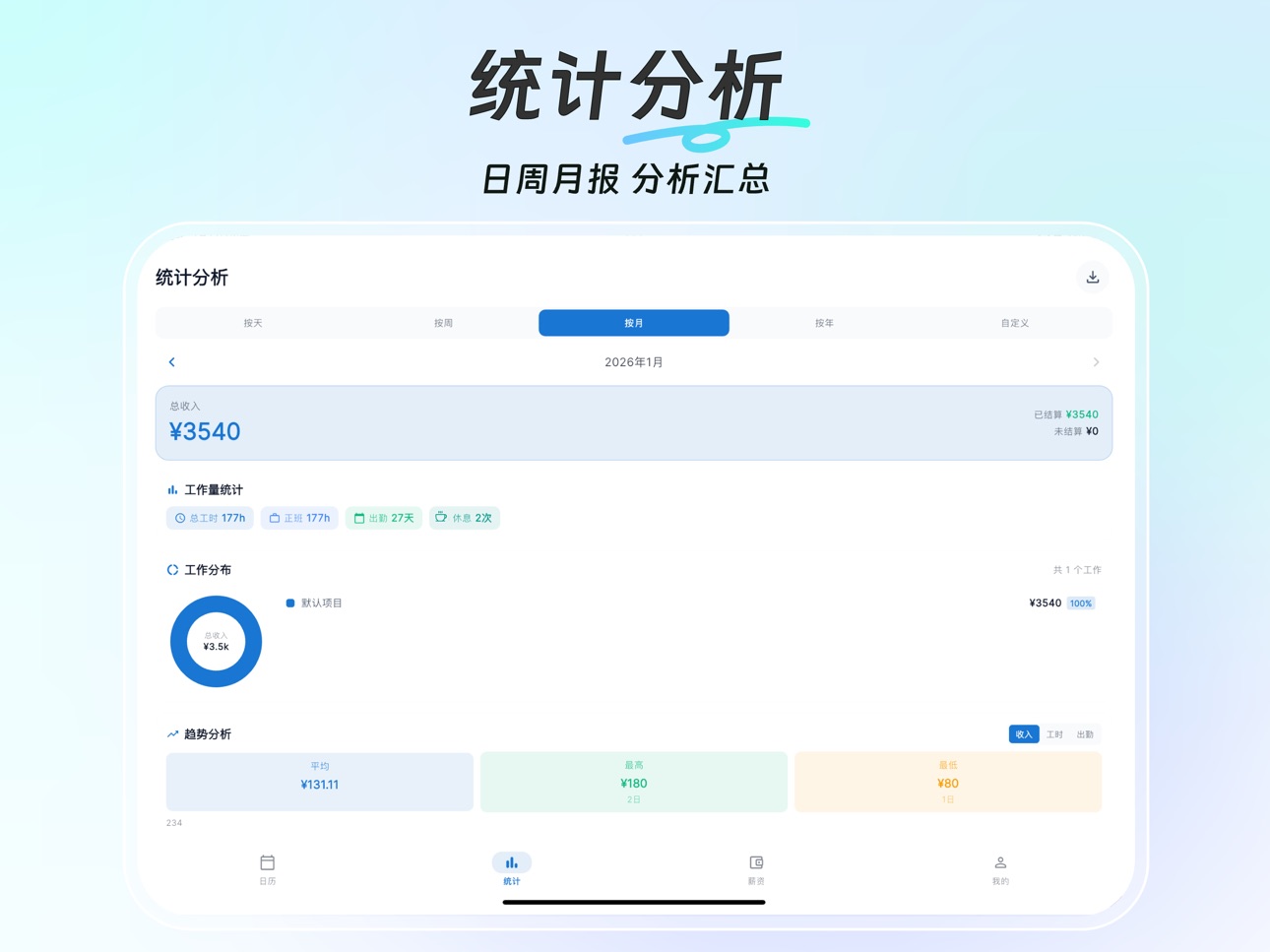
1. Improved Income Overview with project income, income distribution, and settled/unsettled details.
2. Improved monthly salary statistics. Current-month income now follows recorded attendance progress and uses recorded actual pay first.
3. Added weekday and weekend overtime hours and pay to monthly salary statistics.
4. After clearing local data, Income Overview now correctly shows zero data instead of a loading failure.
5. Safety restore points in local backup and restore now scroll inside the dialog, keeping the dialog shorter.
6. Improved calendar cell layout so work hours and shift labels are easier to read.
7. Fixed a crash that could happen when toggling the Clock tab.
Description
Timer Tracker is a professional work-hour tracking app for hourly workers.
Quickly record your work in just 5 seconds and calculate your pay automatically!
Track overtime, hourly work, and daily-paid jobs — your wages are calculated clearly and accurately.
You can use it to:
Record overtime pay, hourly wages, and daily wages
Track livestream durations and tutoring hours
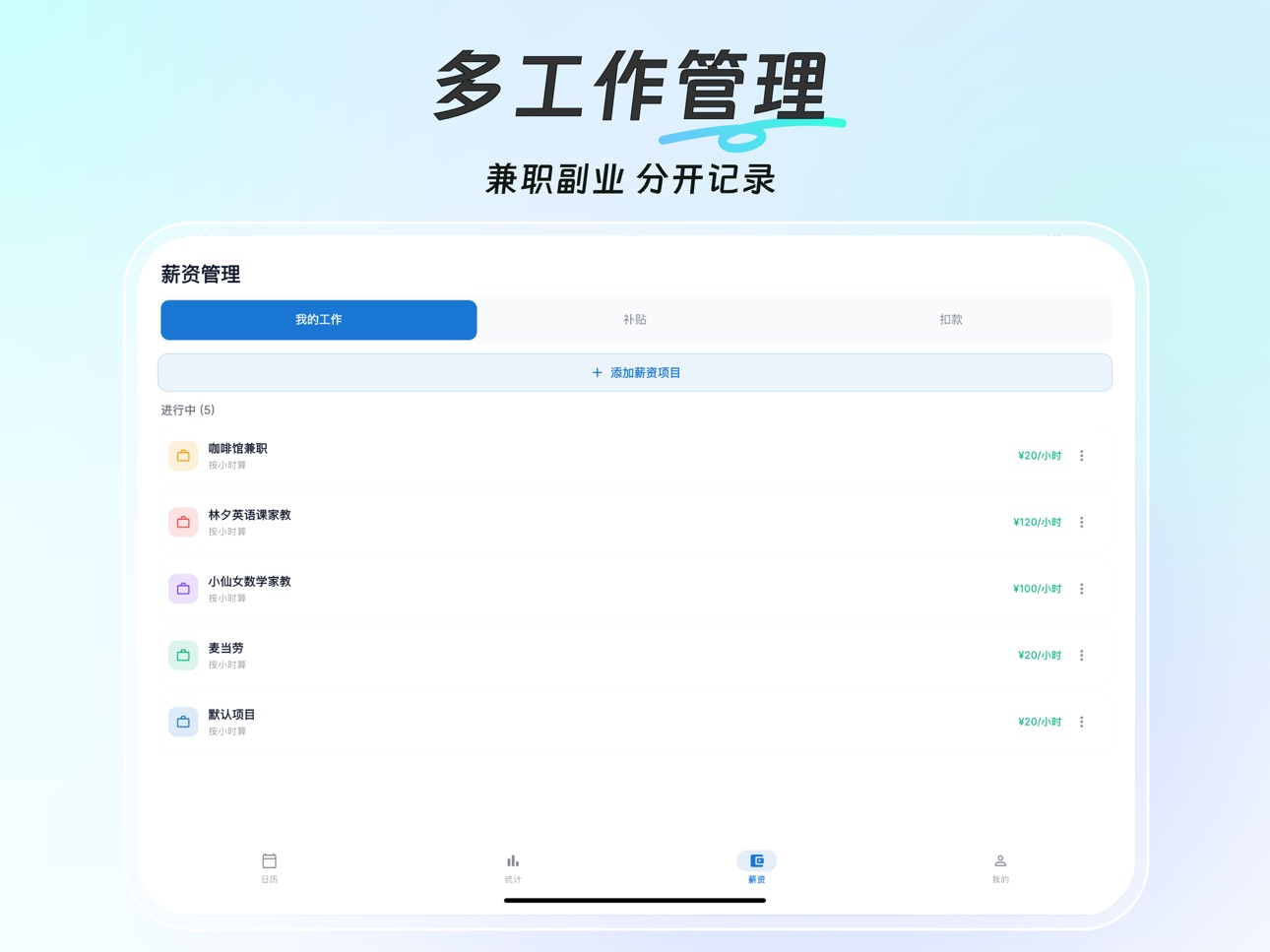
Manage multiple jobs and calculate income separately
Record wage settlement status and export work-hour details
Core Features
Multiple Pay Types: Hourly pay, daily pay, daily settlement, piece-rate pay, overtime pay, allowances, and deductions
Allowance & Deduction Management: Meal allowance, transportation allowance, night-shift allowance, lateness, early leave, absences, etc.
Flexible Time Clock: Clock in and out, automatic work-hour calculation, supports overnight shifts, cross-day work, and manual corrections
Multiple Job Management: Record multiple jobs at the same time with independent salary settings
Statistics & Analysis: Daily, weekly, monthly, and yearly statistics, with customizable time ranges
Data Export: One-click export of work-hour details to Excel
Settlement Marking: Mark wages as settled or unsettled, pending amounts are clear at a glance
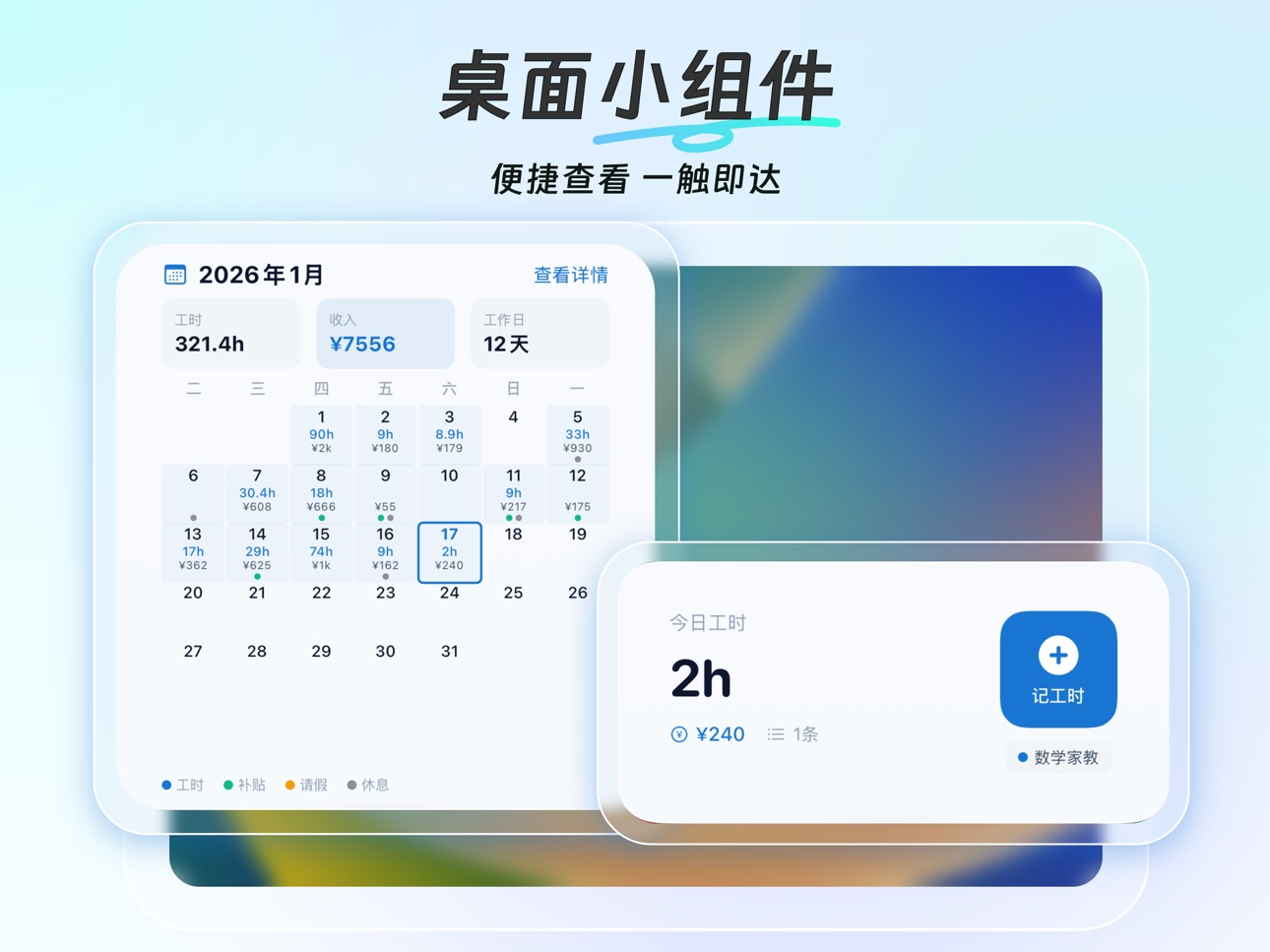
Home Screen Widgets: Quick clock-in and view today’s work hours and income
Dark Mode: More comfortable for night use
Data Backup: Supports data backup and data recovery for greater peace of mind
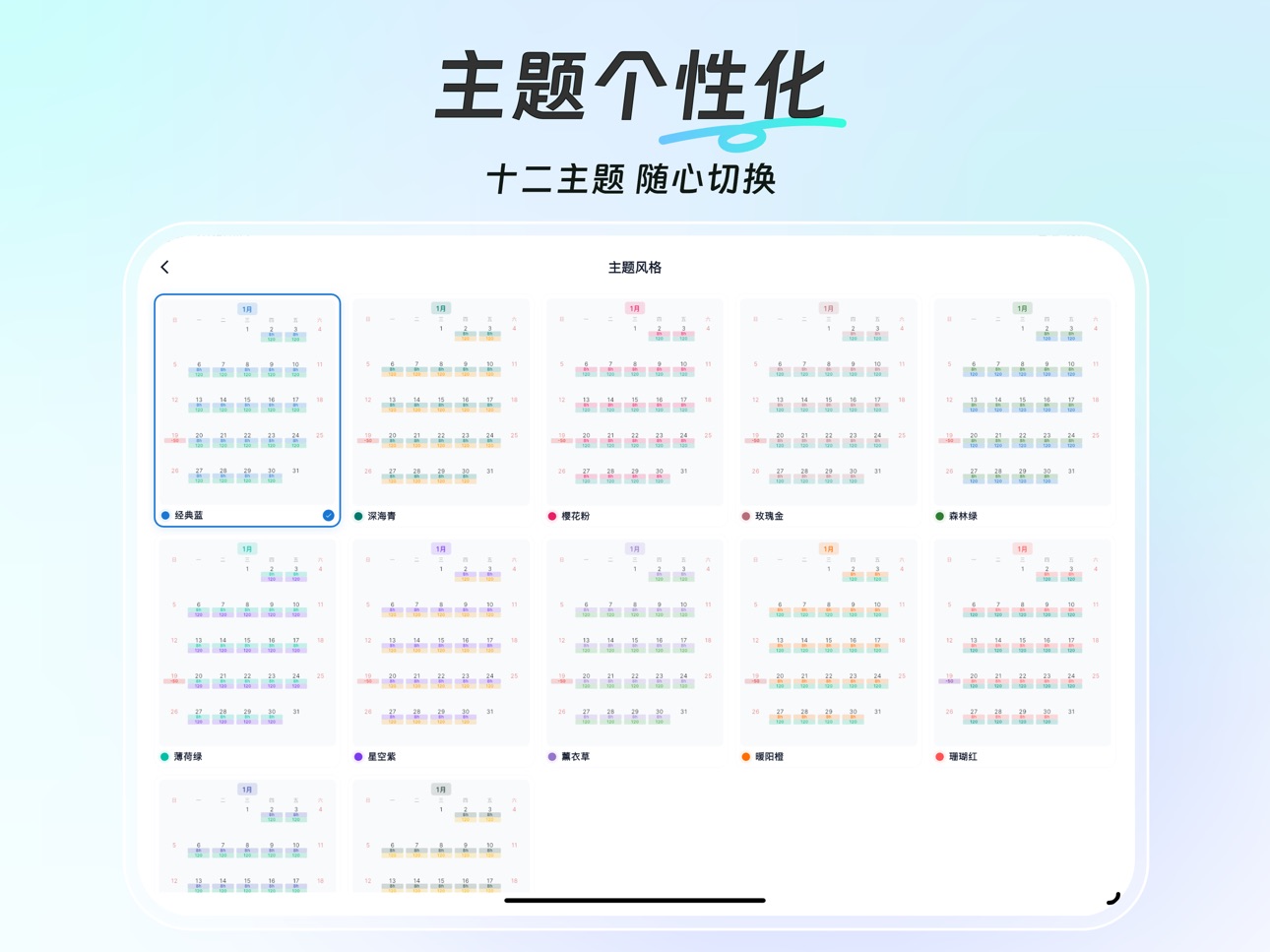
Theme Styles: Supports 12 theme styles, choose your favorite
Privacy Protection: All data is stored locally on your device for better privacy protection
Suitable For:
Hourly workers, part-time workers, temporary workers, livestreamers, tutors, freelancers, factory workers, supermarket promoters, hourly cleaners, etc.
Contact Us
If you have any questions or suggestions, feel free to contact us:
meishi007@foxmail.com
Download Timer Tracker and start efficient work-hour management today!
Terms of Use:
https://www.apple.com/legal/internet-services/itunes/dev/stdeula/
In-App Purchases US pricing
TimeTracker Subscription
Pro Monthly · Monthly$1.49
Pro Yearly · Yearly$4.29
Pro Quarterly · 3 months$3.00
One-Time Purchases
Pro Lifetime$6.99
Capabilities
In-App Purchases
Accessibility
ipadiphonemacrealityDevicetvoswatch
Version history 18 versions
Build 888015402v1.2.132026-07-09 04:54:13
1. Improved Income Overview with project income, income distribution, and settled/unsettled details.
2. Improved monthly salary statistics. Current-month income now follows recorded attendance progress and uses recorded actual pay first.
3. Added weekday and weekend overtime hours and pay to monthly salary statistics.
4. After clearing local data, Income Overview now correctly shows zero data instead of a loading failure.
5. Safety restore points in local backup and restore now scroll inside the dialog, keeping the dialog shorter.
6. Improved calendar cell layout so work hours and shift labels are easier to read.
7. Fixed a crash that could happen when toggling the Clock tab.
Build 887540699v1.2.122026-07-05 19:02:51
1. Cloud/auto backup for work hours, salary, projects, and student lessons.
2. Privacy PIN Lock plus restore points before restore, sync, or clear.
3. Stats: project income, yearly trends, unsettled pay, PDF/Excel reports.
4. Payroll: alternating weekends, fixed deductions, shifts, clock times, late/early leave.
5. Better clocking, piecework, and tutoring: widgets, decimals, per-student lesson deductions.
6. UI/performance fixes for themes, VIP, calendar, reports, backup restore, payroll.
Build 886559231v1.1.122026-06-05 16:57:49
1. Monthly salary jobs can now record dates outside the job validity period. You will see a confirmation before saving, with a quick shortcut to adjust the validity period.
2. The default start date for monthly salary jobs is now the first day of the current month, making it easier to add earlier records for the same month.
3. Monthly salary calculations are more accurate when a job only covers part of the selected period. Pay is now prorated based on the actual valid days.
4. Fixed the income distribution chart in Statistics. Percentages and ring segments now use income amount instead of work hours.
5. Added a calendar cell option to show regular hours and overtime hours together, with matching widget support.
6. Improved the validity-period reminder in the monthly salary calendar so it is clearer and easier to open settings.
7. Fixed saving and displaying optional work time ranges for daily wage records.
8. Fixed several wording, translation, and display details for a smoother experience.
Build 885972589v1.1.112026-05-26 15:03:35
1. Added Monthly Salary Mode with a monthly salary calendar, attendance records, salary estimates, and payroll statistics for users with fixed monthly pay.
2. Expanded monthly salary settings, including payroll cycles, workday rules, base salary, allowances, deductions, insurance, housing fund, income tax, probation salary, and salary revision history.
3. Improved monthly attendance tracking with normal attendance, leave, absence, overtime, compensatory time off, late arrival, early leave, and batch attendance actions.
4. Improved time tracking: regular work and overtime can now be recorded together, and zero-hour records are supported for shift or status marking.
5. Added Business Trip records and customizable record type tabs, so Hourly, Daily, Piecework, Rest, Leave, Allowance, Deduction, and Business Trip entries can be shown and reordered as needed.
6. Enhanced quick-add templates with homepage quick template tags, monthly attendance templates, and more preserved settings such as break time, participant count, and combined regular/overtime records.
7. Improved calendar and statistics: monthly overview can show total days, workday hours, weekend hours, holiday hours, and more; statistics now include settled record details and richer workload information.
8. Improved home screen widgets, including better salary calendar layouts, a recent two-week calendar widget, theme syncing, localization, and display adjustments.
9. Improved backup, restore, and export: monthly salary data is now included, and exports support payslips, project details, and more flexible date ranges.
10. Fixed multiple issues, including incomplete income statistics, missing template settings, batch settlement errors, calendar display issues, clipped widget content, amount input precision, and backup/restore experience problems.
Build 885390180v1.1.82026-05-07 21:20:37
1. New quick-select duration grid for faster hour logging
2. Pin favorite templates to home screen for one-tap recording
3. Clock-out now supports backdating with date & time picker
4. Real-time today's earnings and hours on the clock screen
5. Auto reminder for missed clock-outs from previous days
6. Support 0-hour entries for marking shift types
7. Paid leave and rest income now included in statistics
8. Customizable pay period display mode
9. New "Project Details" sheet in Excel export
10. Added haptic feedback settings
11. 3-decimal unit price support for precise calculations
12. Fixed stability issues and minor bugs
Build 884687793v1.1.72026-04-20 02:04:17
New Features
• Tax Calculator: Supports both progressive and flat tax rate modes,
with built-in default templates for 20 currencies (CNY, USD, EUR,
JPY, KRW, HKD, and more). Save customized rules per currency.
• Combined hourly segments: Split the same day into multiple regular
/ overtime segments, each with its own time range, earnings, and
multiplier.
• New iOS home-screen widgets: "Recent Two Weeks" (medium) and
"Home-Style Calendar" (large) that mirror the in-app calendar look.
Improvements
• iOS widgets: smaller date / lunar fonts, larger horizontally-
centered hours and amounts, empty days no longer show blank
placeholder blocks, cleaner overall layout.
• Android widgets: Home-style salary calendar now follows app theme,
custom colors, lunar toggle, and settlement markers.
• Monthly overview adds configurable weekday / weekend / holiday
hour breakdowns.
• Statistics page adds per-project hour details and smoother
settlement interactions.
• Export supports custom date ranges.
Bug Fixes
• Home project list and time record list now refresh correctly
after restoring a backup.
• Fixed an issue where .timetracker backup files could not be
selected on Android.
• Aligned the 00:00 slot display with the remaining lessons in the
course-package ledger.
• Restored missing type name after quick-adding a subsidy or
deduction record.
• Rest records no longer inherit a manual earnings override from
hourly records by mistake.
• Fixed a crash where the batch-settlement sheet exceeded screen
height on some devices.
• Corrected date offsets in the calendar across time zones.
• Unified the flag icon for the Traditional Chinese language entry.
• Fixed shift badges and hour labels being clipped inside calendar
cells.
Build 884106552v1.1.62026-04-03 20:51:30
Added Project Hours Details: view per-project records in calendar/list mode, with quick settle/unsettle actions.
Monthly Summary now supports extra metrics: Weekday Hours, Weekend Hours, and Holiday Hours.
Export improved: you can now export data for a custom date range.
Android widgets upgraded: added a new “Home-style Salary Calendar” widget and improved the “Simple” widget style and stability; more settings now sync with the app.
Shift improvements: better shift tagging/management and clearer shift display in records.
Fixed multiple time-entry issues, including template quick add, duration/time-range switching, and batch-add break configuration.
Fixed timezone/DST-related date and statistics inconsistencies for more accurate calendar and reports.
Holiday display refined: improved holiday accuracy and more detailed Spring Festival labels.
General stability and UX improvements: fixes for allowance/deduction display, project icon rendering, and abnormal data compatibility.
Build 883627775v1.1.42026-03-22 23:27:36
Added iOS Shortcuts-based auto clock-in/out, compatible with location automation (arrive/leave).
Improved iOS stability by fixing localization null issues, share sheet anchor errors, and widget interactivity fallback on older iOS versions.
Added a calendar option to show/hide adjacent month cells, with improved cross-month data rendering.
Refined monthly overview and statistics consistency.
Added 6 calendar cell display styles with preview support.
Added shift tags (Day / Night / Day|Night) with theme-aware and custom color support.
Improved shift tag alignment/readability in calendar cells and made the time-entry dialog more compact.
Fixed persistence issue where “Calendar Settings -> Cell Content” could reset after app restart.
Improved the Font Size dialog layout to prevent bottom content clipping.
Updated default Monthly Overview items to “Total Work Hours + Monthly Income” for a cleaner default experience.
Build 883327972v1.1.32026-03-13 17:07:00
1.Added flexible overnight wage attribution: assign to previous day, split across two days, or assign to next day.
2.Enhanced piecework analytics with piecework distribution statistics.
3.Fixed template notes not being retained.
4.Improved calendar interaction: switch between collapse-by-gesture and full-page scrolling mode.
5.Fixed archived jobs being incorrectly shown as deleted.
6.Tutoring mode upgrade: student class history list is now viewable and exportable.
7.Added student lesson package ledger in tutoring mode: supports top-up, deduction, bonus lessons, and refund records.
8.Added a work-log rating prompt.
9.Fixed missing “next day” reminder that could block saving certain time records.
10.Improved localization and currency-region display consistency.
11.Stability improvements: fixed multiple high-frequency issues for a more reliable experience.
Build 883120648v1.1.22026-03-11 14:16:45
Fixed major time-tracking and clock-in/out UX issues for more reliable records.
Added editable total amount in batch settlement; differences are now converted into one allowance/deduction entry on the last day.
Improved earning editor: extra bonus/commission is visible immediately when opening a record.
Improved tap accuracy for the earnings edit icon.
Enhanced preset and quick-add consistency across hourly, daily, piecework, rest, leave, allowance, and deduction types.
Added a calendar swipe-collapse toggle to reduce accidental gesture conflicts.
Strengthened migration and rollback safety to better protect existing user data.
Build 883037842v1.0.92026-03-05 17:46:31
1.Major reliability improvements for Clock + Calendar sync, including
fixes for stale clock state and no-response clock-in cases after
record deletion.
2.Better record consistency: changes to selected job/students on the
Clock tab now sync to the target record when clocking out or
updating clock-out.
3.Tutoring mode enhancement: student selection is now available
directly in the Clock flow and persisted to records.
4.Calendar interaction improvements: expanded calendar can collapse
via upward gestures even with short/empty lists; slow drags are
supported.
5.Work-time dialog UX improved: “Next Day” is now selectable directly
in the end-time picker and stays synced back to the dialog.
6.Salary tab UX upgrades: active jobs are reorderable via long-press
drag on the whole row; archived jobs moved to a dedicated top-right
entry.
7.More precise amount formatting: 1580 can now show as 1.58K, with a
settings toggle to display full values.
8.Piece-rate unit fixes: corrected mixed-unit display/aggregation in
statistics and add-record flows.
9.Safer DB migration: fixed duplicate pieceUnit column migration risk.
10. Widget and analytics improvements: restored/improved quick clock
widget path and integrated unified analytics tracking.
Build 882792223v1.0.72026-02-26 01:39:05
Smart reminders: customizable clock-in/out reminders with repeat modes
Tutoring mode: student management and participant tracking
Overnight shifts: support for cross-day work hour recording
Improved multi-currency: fixed amount display for various currencies
Better onboarding: more work types with auto-configured settings
Smarter daily records: auto-detect per-day vs per-shift billing
Enhanced privacy mode: shows work hours/shifts instead of hidden amounts
Visual refinements for a softer, more comfortable interface
Build 882596335v1.0.52026-02-21 01:18:48
1. Added international currency support for work hours recording.
2. Optimized currency selection on the initial onboarding page.
3. Fixed the issue where commas as decimal separators (e.g., 17,83) were not recognized; multiple number formats are now supported.
4. The iOS home screen widget now supports dark mode and automatically switches to match the system appearance.
5. Optimized the visual style of the income distribution module on the statistics page.
6. Fixed the issue of incorrect amount format display in PDF export reports.
7. Updated and improved multilingual translation content.
Build 882496634v1.0.42026-02-16 17:30:38
1. Statistics page supports custom module display and sorting
2. Added statistics on work quantity distribution and work hour distribution
3. Income distribution supports multi-selection summation
4. Optimized the display of income and settlement status
5. Overtime records support more flexible multiplier settings
6. Added font size adjustment
7. Optimized calendar display effect
8. Fixed some display issues in dark mode
Build 882321929v1.0.32026-02-10 18:54:45
fix bugs
Build 882080407v1.0.22026-02-02 19:56:30
Fix bugs
Build 881218644v1.02026-01-20 02:05:44
Build 881676436v1.0.12026-01-20 19:17:11
修复用户反馈的Bug
Price history by region
Currency
Show
Columns
Search
Availability 153 of 153 storefronts
| Region | Language | Price | Ratings | Avg | Version |
|---|---|---|---|---|---|
| CN | zh-Hans-CN | Free | 390 | 4.7 | 1.2.13 |
| HK | zh-Hant-HK | Free | 3 | 5.0 | 1.2.13 |
| US | en-US | Free | 3 | 4.3 | 1.2.13 |
| JP | ja | Free | 2 | 5.0 | 1.2.13 |
| IL | en-GB | Free | 1 | 2.0 | 1.2.13 |
| MY | en-GB | Free | 1 | 5.0 | 1.2.13 |
| AE | en-GB | Free | 0 | — | 1.2.13 |
| AF | en-GB | Free | 0 | — | 1.2.13 |
| AG | en-GB | Free | 0 | — | 1.2.13 |
| AI | en-GB | Free | 0 | — | 1.2.13 |
| AL | en-GB | Free | 0 | — | 1.2.13 |
| AO | en-GB | Free | 0 | — | 1.2.13 |
| AR | es-MX | Free | 0 | — | 1.2.13 |
| AT | de-DE | Free | 0 | — | 1.2.13 |
| BA | en-GB | Free | 0 | — | 1.2.13 |
| BB | en-GB | Free | 0 | — | 1.2.13 |
| BE | en-GB | Free | 0 | — | 1.2.13 |
| BF | en-GB | Free | 0 | — | 1.2.13 |
| BG | en-GB | Free | 0 | — | 1.2.13 |
| BH | en-GB | Free | 0 | — | 1.2.13 |
| BJ | en-GB | Free | 0 | — | 1.2.13 |
| BM | en-GB | Free | 0 | — | 1.2.13 |
| BN | en-GB | Free | 0 | — | 1.2.13 |
| BO | es-MX | Free | 0 | — | 1.2.13 |
| BR | pt-BR | Free | 0 | — | 1.2.13 |
| BS | en-GB | Free | 0 | — | 1.2.13 |
| BT | en-GB | Free | 0 | — | 1.2.13 |
| BW | en-GB | Free | 0 | — | 1.2.13 |
| BY | en-GB | Free | 0 | — | 1.2.13 |
| BZ | en-GB | Free | 0 | — | 1.2.13 |
| CH | de-CH | Free | 0 | — | 1.2.13 |
| CI | fr-FR | Free | 0 | — | 1.2.13 |
| CL | es-MX | Free | 0 | — | 1.2.13 |
| CM | fr-FR | Free | 0 | — | 1.2.13 |
| CO | es-MX | Free | 0 | — | 1.2.13 |
| CR | es-MX | Free | 0 | — | 1.2.13 |
| CV | en-GB | Free | 0 | — | 1.2.13 |
| CY | en-GB | Free | 0 | — | 1.2.13 |
| CZ | en-GB | Free | 0 | — | 1.2.13 |
| DE | de-DE | Free | 0 | — | 1.2.13 |
| DK | en-GB | Free | 0 | — | 1.2.13 |
| DM | en-GB | Free | 0 | — | 1.2.13 |
| DO | es-MX | Free | 0 | — | 1.2.13 |
| DZ | en-GB | Free | 0 | — | 1.2.13 |
| EC | es-MX | Free | 0 | — | 1.2.13 |
| EE | en-GB | Free | 0 | — | 1.2.13 |
| EG | en-GB | Free | 0 | — | 1.2.13 |
| ES | es-ES | Free | 0 | — | 1.2.13 |
| FI | en-GB | Free | 0 | — | 1.2.13 |
| FJ | en-GB | Free | 0 | — | 1.2.13 |
| FM | en-GB | Free | 0 | — | 1.2.13 |
| FR | fr-FR | Free | 0 | — | 1.2.13 |
| GD | en-GB | Free | 0 | — | 1.2.13 |
| GH | en-GB | Free | 0 | — | 1.2.13 |
| GM | en-GB | Free | 0 | — | 1.2.13 |
| GR | en-GB | Free | 0 | — | 1.2.13 |
| GW | en-GB | Free | 0 | — | 1.2.13 |
| GY | en-GB | Free | 0 | — | 1.2.13 |
| HR | en-GB | Free | 0 | — | 1.2.13 |
| HU | en-GB | Free | 0 | — | 1.2.13 |
| ID | en-GB | Free | 0 | — | 1.2.13 |
| IE | en-GB | Free | 0 | — | 1.2.13 |
| IN | en-GB | Free | 0 | — | 1.2.13 |
| IS | en-GB | Free | 0 | — | 1.2.13 |
| IT | it | Free | 0 | — | 1.2.13 |
| JM | en-GB | Free | 0 | — | 1.2.13 |
| JO | en-GB | Free | 0 | — | 1.2.13 |
| KE | en-GB | Free | 0 | — | 1.2.13 |
| KH | en-GB | Free | 0 | — | 1.2.13 |
| KN | en-GB | Free | 0 | — | 1.2.13 |
| KR | ko | Free | 0 | — | 1.2.13 |
| KW | en-GB | Free | 0 | — | 1.2.13 |
| KY | en-GB | Free | 0 | — | 1.2.13 |
| LA | en-GB | Free | 0 | — | 1.2.13 |
| LB | en-GB | Free | 0 | — | 1.2.13 |
| LC | en-GB | Free | 0 | — | 1.2.13 |
| LK | en-GB | Free | 0 | — | 1.2.13 |
| LR | en-GB | Free | 0 | — | 1.2.13 |
| LT | en-GB | Free | 0 | — | 1.2.13 |
| LU | en-GB | Free | 0 | — | 1.2.13 |
| LV | en-GB | Free | 0 | — | 1.2.13 |
| LY | en-GB | Free | 0 | — | 1.2.13 |
| MA | en-GB | Free | 0 | — | 1.2.13 |
| MD | en-GB | Free | 0 | — | 1.2.13 |
| ME | en-GB | Free | 0 | — | 1.2.13 |
| MG | en-GB | Free | 0 | — | 1.2.13 |
| MK | en-GB | Free | 0 | — | 1.2.13 |
| ML | en-GB | Free | 0 | — | 1.2.13 |
| MO | zh-Hant-HK | Free | 0 | — | 1.2.13 |
| MR | en-GB | Free | 0 | — | 1.2.13 |
| MS | en-GB | Free | 0 | — | 1.2.13 |
| MT | en-GB | Free | 0 | — | 1.2.13 |
| MU | en-GB | Free | 0 | — | 1.2.13 |
| MV | en-GB | Free | 0 | — | 1.2.13 |
| MW | en-GB | Free | 0 | — | 1.2.13 |
| MX | es-MX | Free | 0 | — | 1.2.13 |
| MZ | en-GB | Free | 0 | — | 1.2.13 |
| NA | en-GB | Free | 0 | — | 1.2.13 |
| NE | en-GB | Free | 0 | — | 1.2.13 |
| NG | en-GB | Free | 0 | — | 1.2.13 |
| NI | es-MX | Free | 0 | — | 1.2.13 |
| NL | nl | Free | 0 | — | 1.2.13 |
| NO | en-GB | Free | 0 | — | 1.2.13 |
| NP | en-GB | Free | 0 | — | 1.2.13 |
| NR | en-GB | Free | 0 | — | 1.2.13 |
| NZ | en-AU | Free | 0 | — | 1.2.13 |
| OM | en-GB | Free | 0 | — | 1.2.13 |
| PA | es-MX | Free | 0 | — | 1.2.13 |
| PE | es-MX | Free | 0 | — | 1.2.13 |
| PG | en-GB | Free | 0 | — | 1.2.13 |
| PH | en-GB | Free | 0 | — | 1.2.13 |
| PK | en-GB | Free | 0 | — | 1.2.13 |
| PL | en-GB | Free | 0 | — | 1.2.13 |
| PT | pt-PT | Free | 0 | — | 1.2.13 |
| PW | en-GB | Free | 0 | — | 1.2.13 |
| PY | es-MX | Free | 0 | — | 1.2.13 |
| QA | en-GB | Free | 0 | — | 1.2.13 |
| RO | en-GB | Free | 0 | — | 1.2.13 |
| RS | en-GB | Free | 0 | — | 1.2.13 |
| RU | ru | Free | 0 | — | 1.2.13 |
| RW | en-GB | Free | 0 | — | 1.2.13 |
| SA | en-GB | Free | 0 | — | 1.2.13 |
| SB | en-GB | Free | 0 | — | 1.2.13 |
| SC | en-GB | Free | 0 | — | 1.2.13 |
| SE | sv | Free | 0 | — | 1.2.13 |
| SG | en-GB | Free | 0 | — | 1.2.13 |
| SI | en-GB | Free | 0 | — | 1.2.13 |
| SK | en-GB | Free | 0 | — | 1.2.13 |
| SL | en-GB | Free | 0 | — | 1.2.13 |
| SN | en-GB | Free | 0 | — | 1.2.13 |
| SR | en-GB | Free | 0 | — | 1.2.13 |
| ST | en-GB | Free | 0 | — | 1.2.13 |
| SZ | en-GB | Free | 0 | — | 1.2.13 |
| TC | en-GB | Free | 0 | — | 1.2.13 |
| TH | en-GB | Free | 0 | — | 1.2.13 |
| TN | en-GB | Free | 0 | — | 1.2.13 |
| TO | en-GB | Free | 0 | — | 1.2.13 |
| TR | en-GB | Free | 0 | — | 1.2.13 |
| TT | en-GB | Free | 0 | — | 1.2.13 |
| TW | zh-Hant-TW | Free | 0 | — | 1.2.13 |
| TZ | en-GB | Free | 0 | — | 1.2.13 |
| UA | en-GB | Free | 0 | — | 1.2.13 |
| UG | en-GB | Free | 0 | — | 1.2.13 |
| UY | en-GB | Free | 0 | — | 1.2.13 |
| VC | en-GB | Free | 0 | — | 1.2.13 |
| VE | es-MX | Free | 0 | — | 1.2.13 |
| VG | en-GB | Free | 0 | — | 1.2.13 |
| VN | en-GB | Free | 0 | — | 1.2.13 |
| VU | en-GB | Free | 0 | — | 1.2.13 |
| XK | en-GB | Free | 0 | — | 1.2.13 |
| ZA | en-GB | Free | 0 | — | 1.2.13 |
| ZM | en-GB | Free | 0 | — | 1.2.13 |
| ZW | en-GB | Free | 0 | — | 1.2.13 |
Change log 22 changes · US
✎
releaseNotes updated
1. Improved Income Overview with project income, income distribution, and settled/unsettled details.
2. Improved monthly salary statistics. Current-month incom
✎
description updated
Timer Tracker is a professional work-hour tracking app for hourly workers.
Quickly record your work in just 5 seconds and calculate your pay automatically!
Trac
✎
subtitle updated
记工时记加班记兼职记考勤随手记
✎
name updated
简单记工时-小时工记加班考勤计时工资
◆
Version 1.2.13 released
1. Improved Income Overview with project income, income distribution, and settled/unsettled details.
2. Improved monthly salary statistics. Current-month income now follows recorded attendance progress and uses recorded actual pay first.
◆
Version 1.2.12 released
1. Cloud/auto backup for work hours, salary, projects, and student lessons.
2. Privacy PIN Lock plus restore points before restore, sync, or clear.
3. Stats: project income, yearly trends, unsettled pay, PDF/Excel reports.
4. Payroll: alter
◆
Version 1.1.12 released
1. Monthly salary jobs can now record dates outside the job validity period. You will see a confirmation before saving, with a quick shortcut to adjust the validity period.
2. The default start date for monthly salary jobs is now the first
◆
Version 1.1.11 released
1. Added Monthly Salary Mode with a monthly salary calendar, attendance records, salary estimates, and payroll statistics for users with fixed monthly pay.
2. Expanded monthly salary settings, including payroll cycles, workday rules, base
◆
Version 1.1.8 released
1. New quick-select duration grid for faster hour logging
2. Pin favorite templates to home screen for one-tap recording
3. Clock-out now supports backdating with date & time picker
4. Real-time today's earnings and hours on the clock sc
◆
Version 1.1.7 released
New Features
• Tax Calculator: Supports both progressive and flat tax rate modes,
with built-in default templates for 20 currencies (CNY, USD, EUR,
JPY, KRW, HKD, and more). Save customized rules per currency.
• Combined hourly segments
◆
Version 1.1.6 released
Added Project Hours Details: view per-project records in calendar/list mode, with quick settle/unsettle actions.
Monthly Summary now supports extra metrics: Weekday Hours, Weekend Hours, and Holiday Hours.
Export improved: you can now expor
◆
Version 1.1.4 released
Added iOS Shortcuts-based auto clock-in/out, compatible with location automation (arrive/leave).
Improved iOS stability by fixing localization null issues, share sheet anchor errors, and widget interactivity fallback on older iOS versions.
◆
Version 1.1.3 released
1.Added flexible overnight wage attribution: assign to previous day, split across two days, or assign to next day.
2.Enhanced piecework analytics with piecework distribution statistics.
3.Fixed template notes not being retained.
4.Improved
◆
Version 1.1.2 released
Fixed major time-tracking and clock-in/out UX issues for more reliable records.
Added editable total amount in batch settlement; differences are now converted into one allowance/deduction entry on the last day.
Improved earning editor: extr
◆
Version 1.0.9 released
1.Major reliability improvements for Clock + Calendar sync, including
fixes for stale clock state and no-response clock-in cases after
record deletion.
2.Better record consistency: changes to selected job/students on the
Clock tab now sync
◆
Version 1.0.7 released
Smart reminders: customizable clock-in/out reminders with repeat modes
Tutoring mode: student management and participant tracking
Overnight shifts: support for cross-day work hour recording
Improved multi-currency: fixed amount display for
◆
Version 1.0.5 released
1. Added international currency support for work hours recording.
2. Optimized currency selection on the initial onboarding page.
3. Fixed the issue where commas as decimal separators (e.g., 17,83) were not recognized; multiple number for
◆
Version 1.0.4 released
1. Statistics page supports custom module display and sorting
2. Added statistics on work quantity distribution and work hour distribution
3. Income distribution supports multi-selection summation
4. Optimized the display of income and s
◆
Version 1.0.3 released
fix bugs
◆
Version 1.0.2 released
Fix bugs
◆
Version 1.0.1 released
修复用户反馈的Bug
◆
Version 1.0 released