Home › Photo & Video

 US
US
1 of 1 storefronts
Content in en-US
Content in en-US
Information
Preview 2 platforms
iPhone 6 images


iPad 2 images


What’s New Version 1.6
- Added Green screen mode for front camera
- Added Picture capture mode
Description
Unlock the full potential of your iPhone with MixLens.
Why tell only half the story? MixLens turns your iPhone into a professional multi-camera production studio. Powered by native iOS MultiCam technology, MixLens allows you to record from the front and back cameras simultaneously, capturing your reaction and the action in real-time.
Whether you are a YouTuber, a fitness instructor, a journalist, or just capturing family memories, MixLens provides the professional tools you need to create engaging, dual-perspective content instantly.
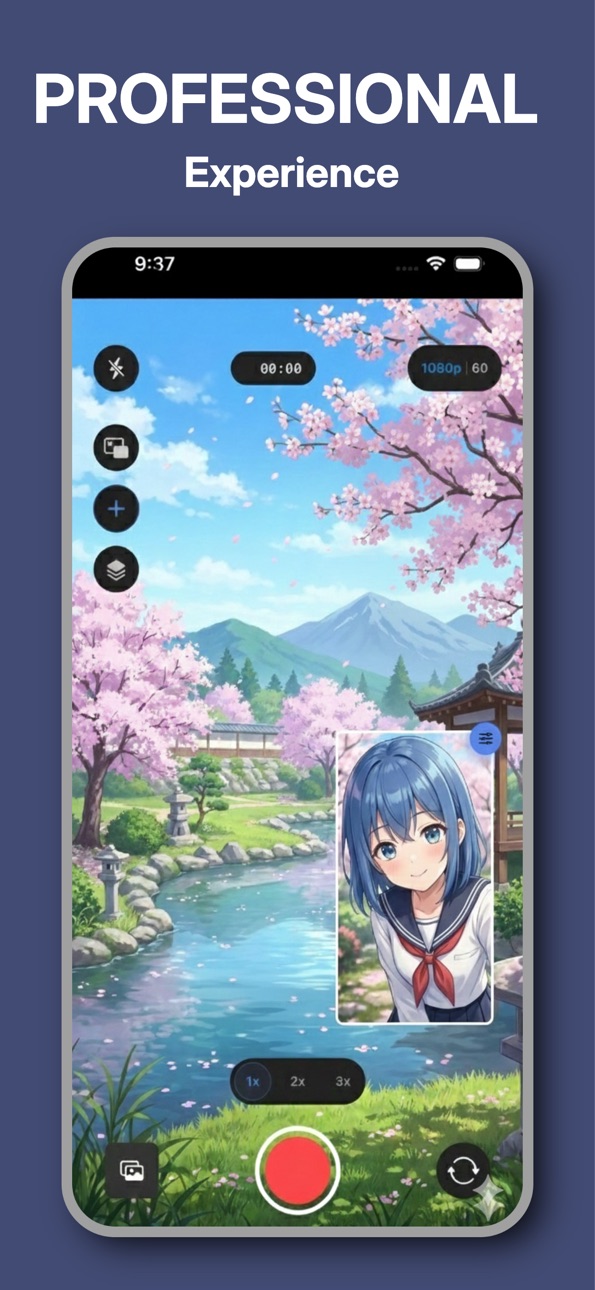
MixLens has Picture-in-Picture (PiP) mode perfect for reaction videos and gaming. Move the PiP window anywhere, resize it, and add drop shadows or borders.
STUDIO-QUALITY CUSTOMIZATION
Total Control: Adjust the corner radius, border width, and shadow intensity of your frames.
Preset Management: Save your favorite layouts (e.g., "Reaction Mode" vs. "Interview Mode") and switch between them instantly.
Professional Quality: Record in crisp 1080p HD at up to 60fps for buttery smooth motion.
ADVANCED WORKFLOW FOR CREATORS
Dual Stream Recording: Choose your workflow. Record a single combined video file (WYSIWYG) for instant sharing, or save two separate video files to edit them individually later.
Smart Gallery: Manage, preview, and share your multi-cam creations directly from the app.
Pro Assets: Access a library of overlays and templates to make your videos stand out.
IDEAL FOR:
Reaction Videos: Capture your genuine facial expressions while watching content.
Vlogging: Show the scenery and your narration simultaneously.
Interviews: Film the interviewer and the interviewee in a single take.
Tutorials & Demos: Show a product in your hand while maintaining eye contact with the audience.
Musicians: Capture your hands on the instrument and your face while singing.
DEVICE COMPATIBILITY MixLens requires the A12 Bionic chip or newer to handle simultaneous video streams.
Supported Devices: iPhone XS, XR, 11, 12, 13, 14, 15, 16, and SE (2nd Gen) or newer.
Requirement: iOS 15.0 or later.
Don't just record the moment—capture the experience. Download MixLens today and start creating content that sees everything.
END USER LICENSE AGREEMENT: https://www.apple.com/legal/internet-services/itunes/dev/stdeula/
Capabilities
In-App Purchases
Accessibility
ipadiphonemacrealityDevicetvoswatch
Version history 7 versions
Build 881806571v1.62026-01-26 06:28:29
- Added Green screen mode for front camera
- Added Picture capture mode
Build 881688757v1.052026-01-21 06:52:23
- Added split screen mode
- Fixed issue with video player
Build 881656415v1.042026-01-20 21:15:34
- Added new split screen modes
- Added location tagging capability
Build 881602244v1.032026-01-19 06:08:28
- UI Fixes
- Performance improvements
Build 881499909v1.022026-01-15 00:27:15
Mirror Front Camera: Moved the setting to the PiP menu for easier access and ensured it works perfectly for both previews and recordings.
No Interruptions: The screen now stays awake automatically while you are using the camera.
Smoother Performance: Added smart asset compression to prevent the app from stuttering when adding large images.
Improved Gallery: Videos opened from the gallery now play in a dedicated full-screen player.
Better Visibility: Increased the size of PiP and Asset settings icons for easier tapping.
Less Intrusive: Replaced blocking dialog popups (like "Recording Saved") with smooth, non-intrusive toast notifications.
Fixes under the hood
- Fixed Z-Index errors affecting overlay recording.
- General stability improvements and analytics updates for better app health.
Build 881371335v1.012026-01-14 00:41:24
Performance Improvements
Build 881209709v1.02026-01-09 23:36:45
No pricing data captured yet — comparisons appear once the app has paid storefronts or in-app purchases.
Availability 1 of 1 storefronts
| Region | Language | Price | Ratings | Avg | Version |
|---|---|---|---|---|---|
| US | en-US | Free | 0 | — | 1.6 |
Change log 11 changes · US
✎
releaseNotes updated
- Added Green screen mode for front camera
- Added Picture capture mode
✎
description updated
Unlock the full potential of your iPhone with MixLens.
Why tell only half the story? MixLens turns your iPhone into a professional multi-camera production stud
✎
subtitle updated
Record Front & Back at Once
✎
name updated
MixLens: Dual Camera Recorder
◆
Version 1.6 released
- Added Green screen mode for front camera
- Added Picture capture mode
◆
Version 1.05 released
- Added split screen mode
- Fixed issue with video player
◆
Version 1.04 released
- Added new split screen modes
- Added location tagging capability
◆
Version 1.03 released
- UI Fixes
- Performance improvements
◆
Version 1.02 released
Mirror Front Camera: Moved the setting to the PiP menu for easier access and ensured it works perfectly for both previews and recordings.
No Interruptions: The screen now stays awake automatically while you are using the camera.
Smoother Pe
◆
Version 1.01 released
Performance Improvements
◆
Version 1.0 released