Home › Lifestyle

 US
US
1 of 1 storefronts
Content in en-US
Content in en-US
Information
Preview 2 platforms
iPhone 5 images



iPad 3 images


What’s New Version 1.11
Improved some UI behaviors to make them feel smoother and better.
Description
Full iCloud Sync Support
"When was the last time I made curry? Maybe it's time to make it again."
"How many days has it been since we went to the amusement park?"
"Cutting back on drinking... ugh..."
"When did I last clean the ventilation fan?!?!"
"When was the last time I went to a bookstore?"
An app has arrived to solve all those everyday "wait, when was that?" moments with a single tap.
Last Time Log is a simple, easy-to-use logging app that lets you intuitively track and manage the time elapsed since you last did something.
With full iCloud sync support, your data stays safe even when you switch phones!
Use notifications to remind yourself about chores or build better habits!
Key Features
◆ Easy Logging & Elapsed Time at a Glance
Just tap a tile on the home screen! Instantly record "just did it."
Elapsed time is automatically calculated and displayed clearly, such as "3 days and 4 hours since last ○○."
◆ Fully Customizable
Create any activity you want to track — drinking nights, cleaning, haircuts, and more.
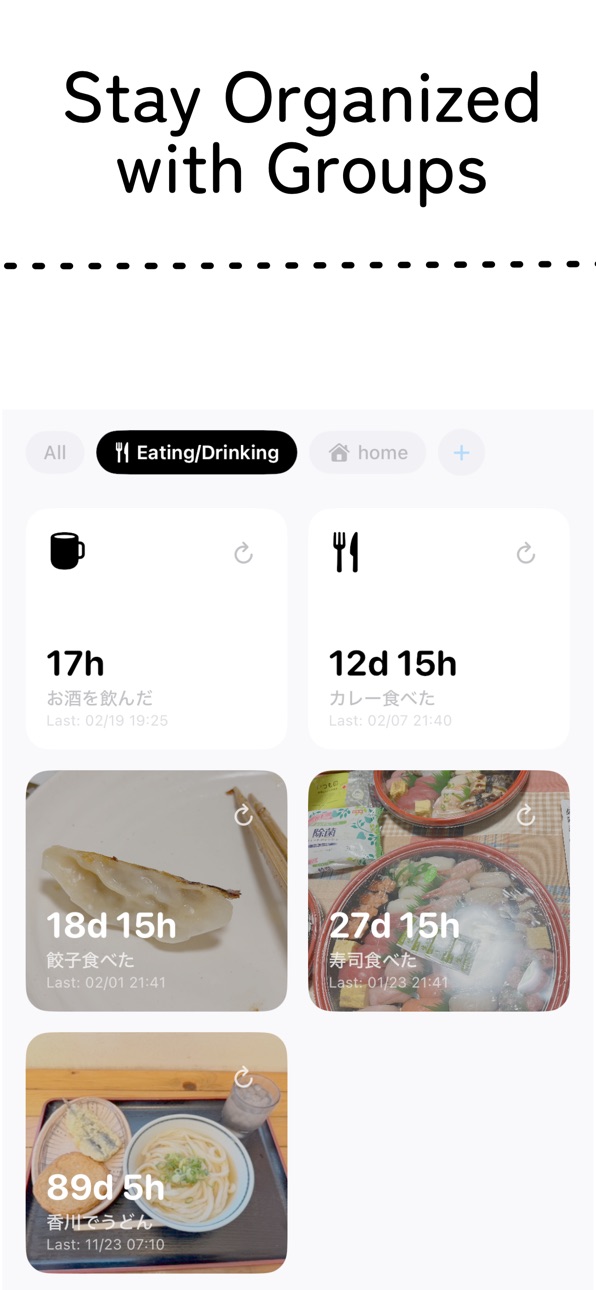
Choose your favorite icon or pick a photo from your phone to build a home screen that's uniquely yours.
With the grouping feature, you can organize by family member or separate work from personal life. The possibilities are endless.
You can now set your favorite color for each unit. Make your days even more colorful!
◆ Calendar & History for Looking Back
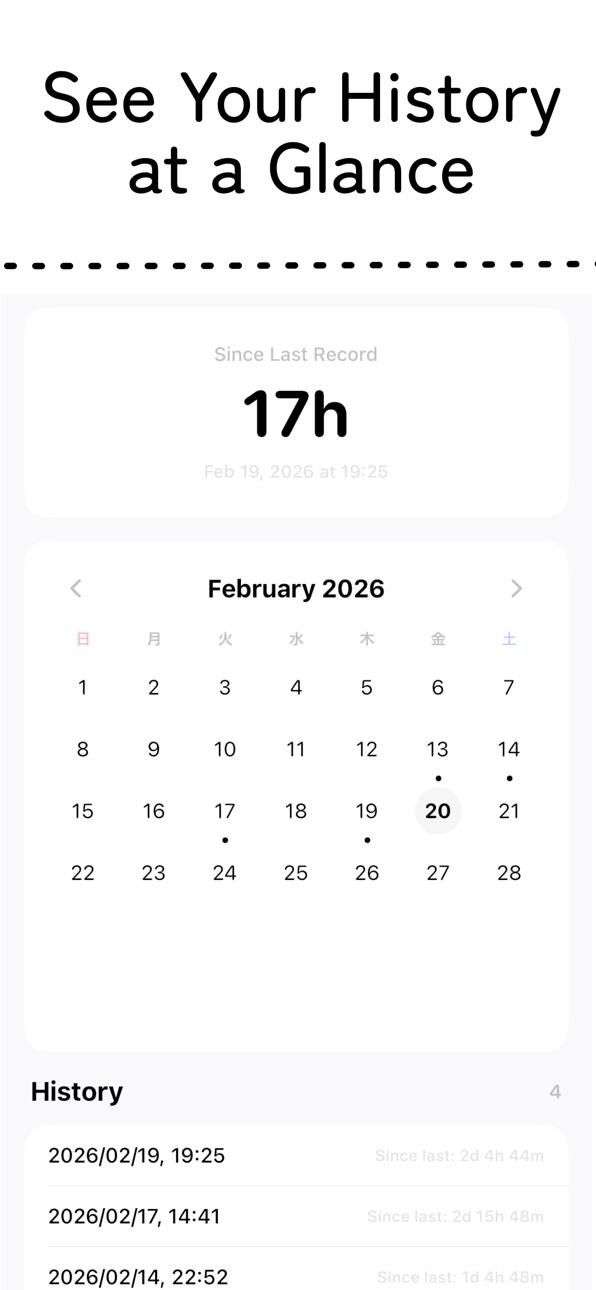
See what you did and when at a glance with dots on the calendar.
Browse past entries in a list view, and add notes to each log.
The time between entries is automatically displayed, helping you understand your own pace.
Recommended For
Anyone who wants to track and build habits
Anyone who wants to manage workout intervals for weight training, running, and more
Anyone who wants to log drinking days (and rest days for your liver)
Anyone who wants to keep track of recurring events like salon visits or oil changes
Anyone who wants an easy way to log daily meals
With Last Time Log, make your daily tracking more fun and more simple.
You'll never forget "the last time you did it" again.
Accessibility
ipadiphonemacrealityDevicetvoswatch
Version history 12 versions
Build 886459750v1.112026-06-03 16:38:46
Improved some UI behaviors to make them feel smoother and better.
Build 884610102v1.102026-04-17 20:19:48
Fix some UI design
Build 884567866v1.92026-04-16 09:22:27
You can now check notification settings at a shallower level. It used to be a hassle to check them before…
Build 884084753v1.82026-04-03 16:11:48
Improved UI behavior. Instances where you want to press a button but can’t have been significantly reduced.
Date formatting can now be customized or automatically changed. You can display it as “45 days 6 hours” or “1 month 15 days.” By default, it changes automatically, but you can also specify units individually.
The log addition hierarchy has been brought forward. It’s now easier to casually add logs later on.
Build 883453035v1.72026-03-17 17:19:34
You can now register directly from notifications. This makes keeping records much easier.
Build 882654130v1.62026-02-23 18:50:32
Fixed an issue where the screen would get cut off when rotating back to portrait after switching to landscape. Didn't catch that one — sorry about that!
Also, you can now assign colors to individual units. Time to add some color to your daily life!
Build 882602269v1.52026-02-20 20:28:53
We've added a grouping feature. Now you can separate personal tasks from household tasks — because having "range hood cleaning" and "dental checkup" side by side isn't exactly easy to follow.
Also, on mobile only, you can now drag and drop to reorder items. It's a bit annoying when something jumps to the top just because you made a small edit, right? You should be able to arrange things the way you want.
On top of that, we've tucked a feedback form deep in the settings. If you have any requests, feel free to reach out! We'll do our best to accommodate what we can.
Build 882358306v1.42026-02-13 22:13:49
I implemented a notification feature. Now, I’ll get a daily reminder for the monthly exhaust fan cleaning.
There’s no escaping it anymore.
Build 881874172v1.32026-01-27 06:27:05
Renew some icons!
Build 881011336v1.22025-12-31 15:30:13
Add ui localization
Build 880969122v1.12025-12-25 00:10:57
iCloud同期がもっと良い感じになりました
Build 880900636v1.02025-12-23 12:56:04
No pricing data captured yet — comparisons appear once the app has paid storefronts or in-app purchases.
Availability 1 of 1 storefronts
| Region | Language | Price | Ratings | Avg | Version |
|---|---|---|---|---|---|
| US | en-US | Free | 0 | — | 1.11 |
Change log 16 changes · US
✎
releaseNotes updated
Improved some UI behaviors to make them feel smoother and better.
✎
description updated
Full iCloud Sync Support
"When was the last time I made curry? Maybe it's time to make it again."
"How many days has it been since we went to the amusement park
✎
subtitle updated
How many days has it been?
✎
name updated
LastTime Logger
◆
Version 1.11 released
Improved some UI behaviors to make them feel smoother and better.
◆
Version 1.10 released
Fix some UI design
◆
Version 1.9 released
You can now check notification settings at a shallower level. It used to be a hassle to check them before…
◆
Version 1.8 released
Improved UI behavior. Instances where you want to press a button but can’t have been significantly reduced.
Date formatting can now be customized or automatically changed. You can display it as “45 days 6 hours” or “1 month 15 days.” By def
◆
Version 1.7 released
You can now register directly from notifications. This makes keeping records much easier.
◆
Version 1.6 released
Fixed an issue where the screen would get cut off when rotating back to portrait after switching to landscape. Didn't catch that one — sorry about that!
Also, you can now assign colors to individual units. Time to add some color to your dai
◆
Version 1.5 released
We've added a grouping feature. Now you can separate personal tasks from household tasks — because having "range hood cleaning" and "dental checkup" side by side isn't exactly easy to follow.
Also, on mobile only, you can now drag and drop
◆
Version 1.4 released
I implemented a notification feature. Now, I’ll get a daily reminder for the monthly exhaust fan cleaning.
There’s no escaping it anymore.
◆
Version 1.3 released
Renew some icons!
◆
Version 1.2 released
Add ui localization
◆
Version 1.1 released
iCloud同期がもっと良い感じになりました
◆
Version 1.0 released