Home › Food & Drink

3 of 3 storefronts
Content in en-US
Content in en-US
Information
Preview 2 platforms
iPhone 10 images




iPad 9 images




What’s New Version 2.15.0
Pre-dose NFC tags now support grind size, so you can pregrind your beans for those extra-early mornings or to speed up bean resting. This version also adds Espresso Portafilter Baskets as an equipment type.
Description
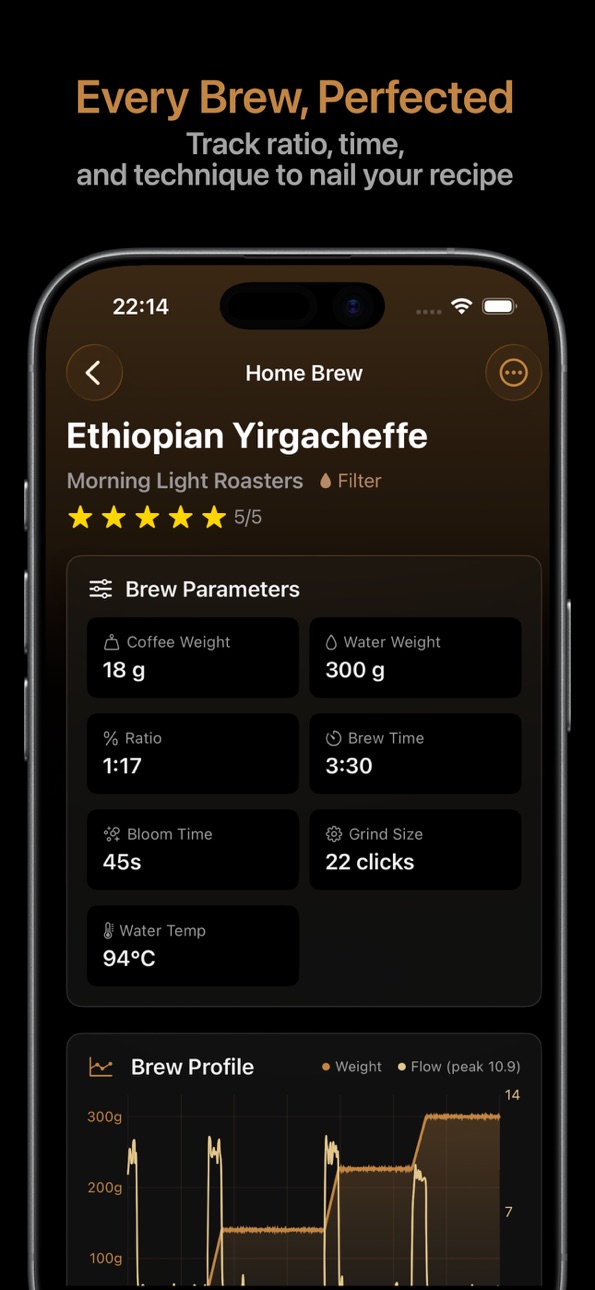
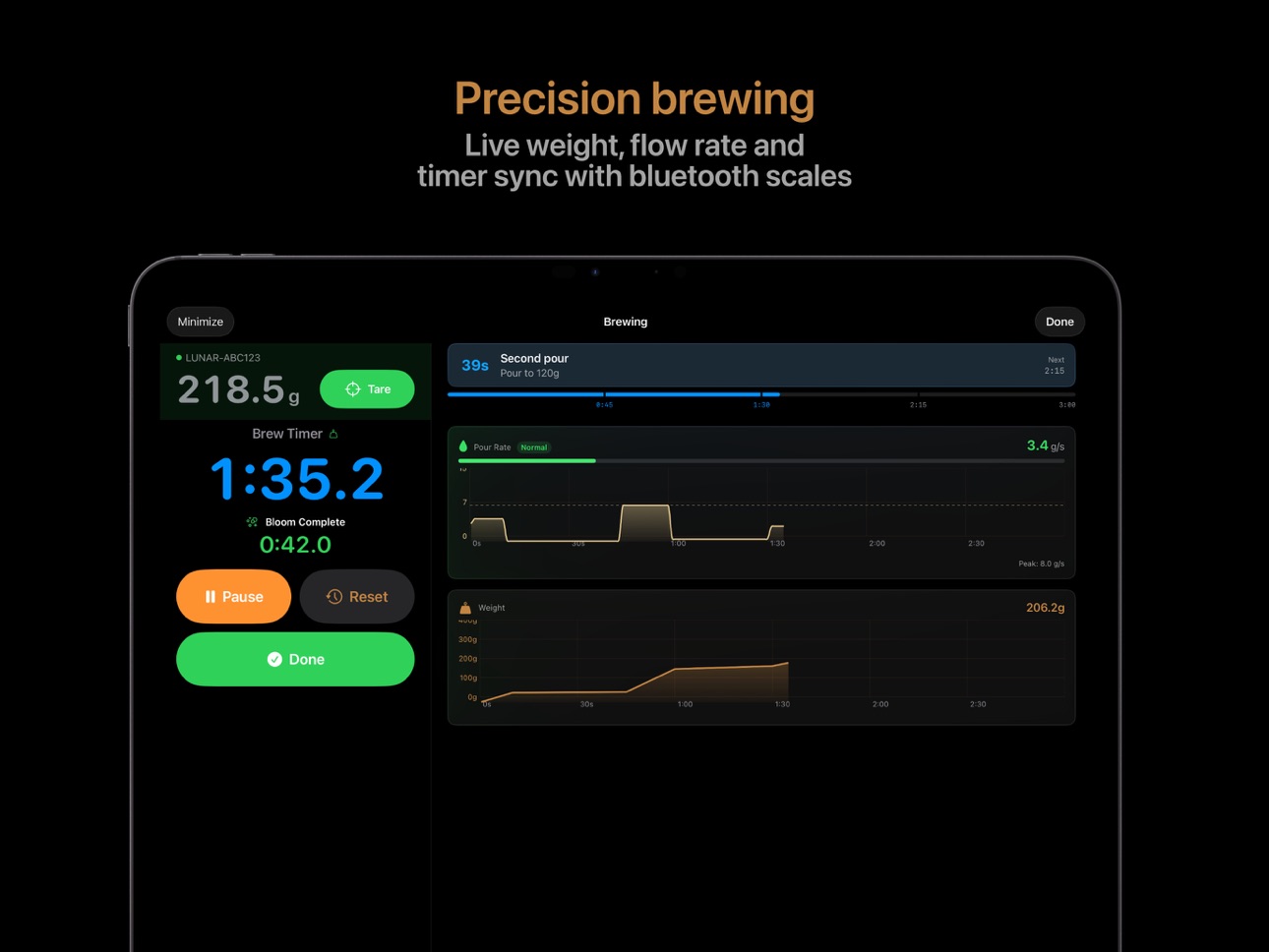
Connect your Bluetooth scale, capture real-time flow data, and track every detail of your coffee
journey, from bean to cup.
Beanstats is the all-in-one brew companion for home baristas who care about consistency and
improvement. Whether you're dialing in espresso or perfecting your pour-over technique, Beanstats
helps you understand what works.
BLUETOOTH SCALE INTEGRATION
• Connect Acaia, Bookoo, and compatible scales
• Real-time weight and live flow rate analysis
• Auto-start timer on first pour
• Auto-capture yield when flow stops (espresso)
• Reference curve overlay when repeating brews
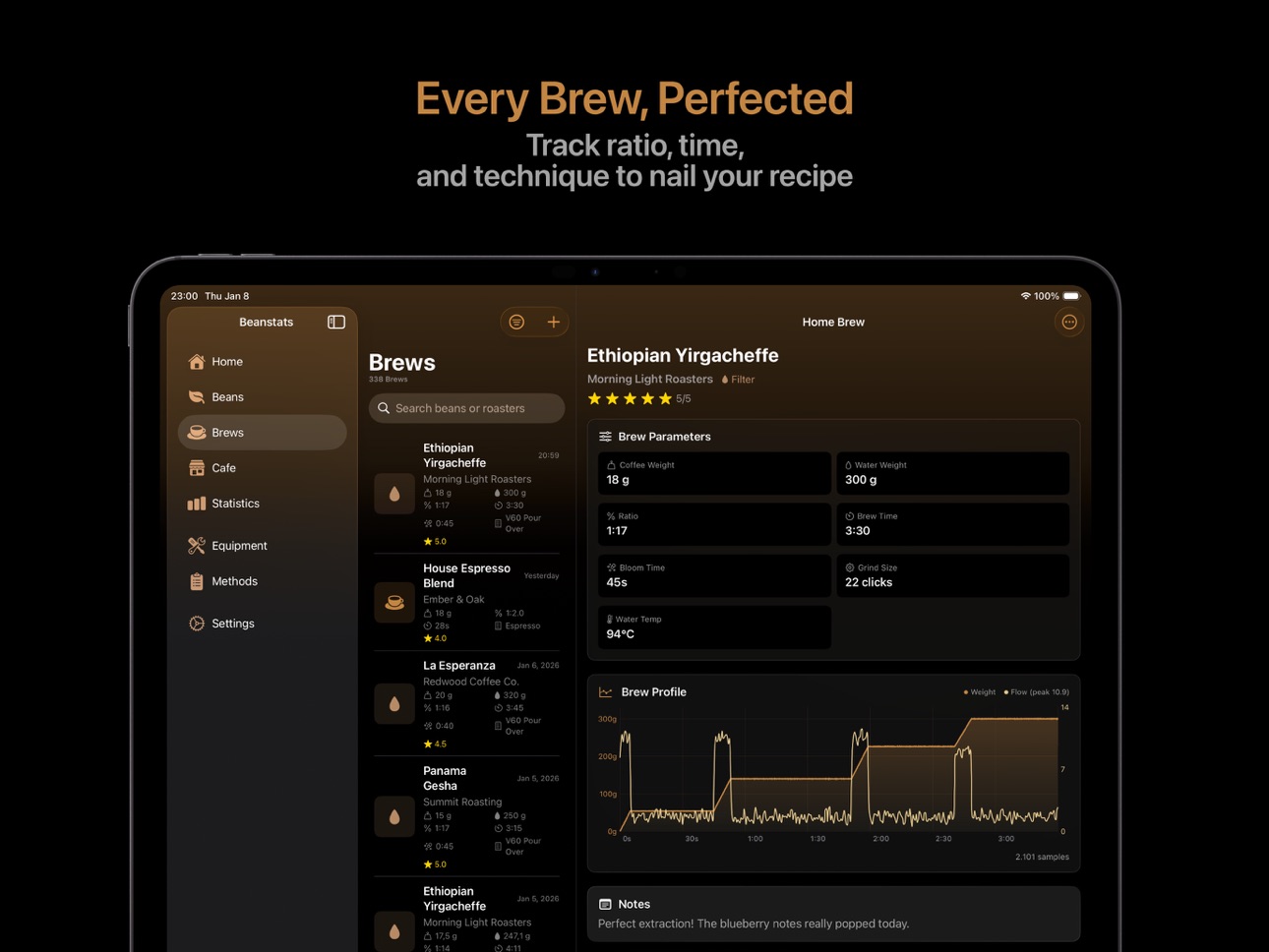
• Weight data stored with each brew for detailed charts
BREW LOGGING
• Dose, water, grind, temperature, and time
• Espresso mode with yield, pressure, and pre-infusion
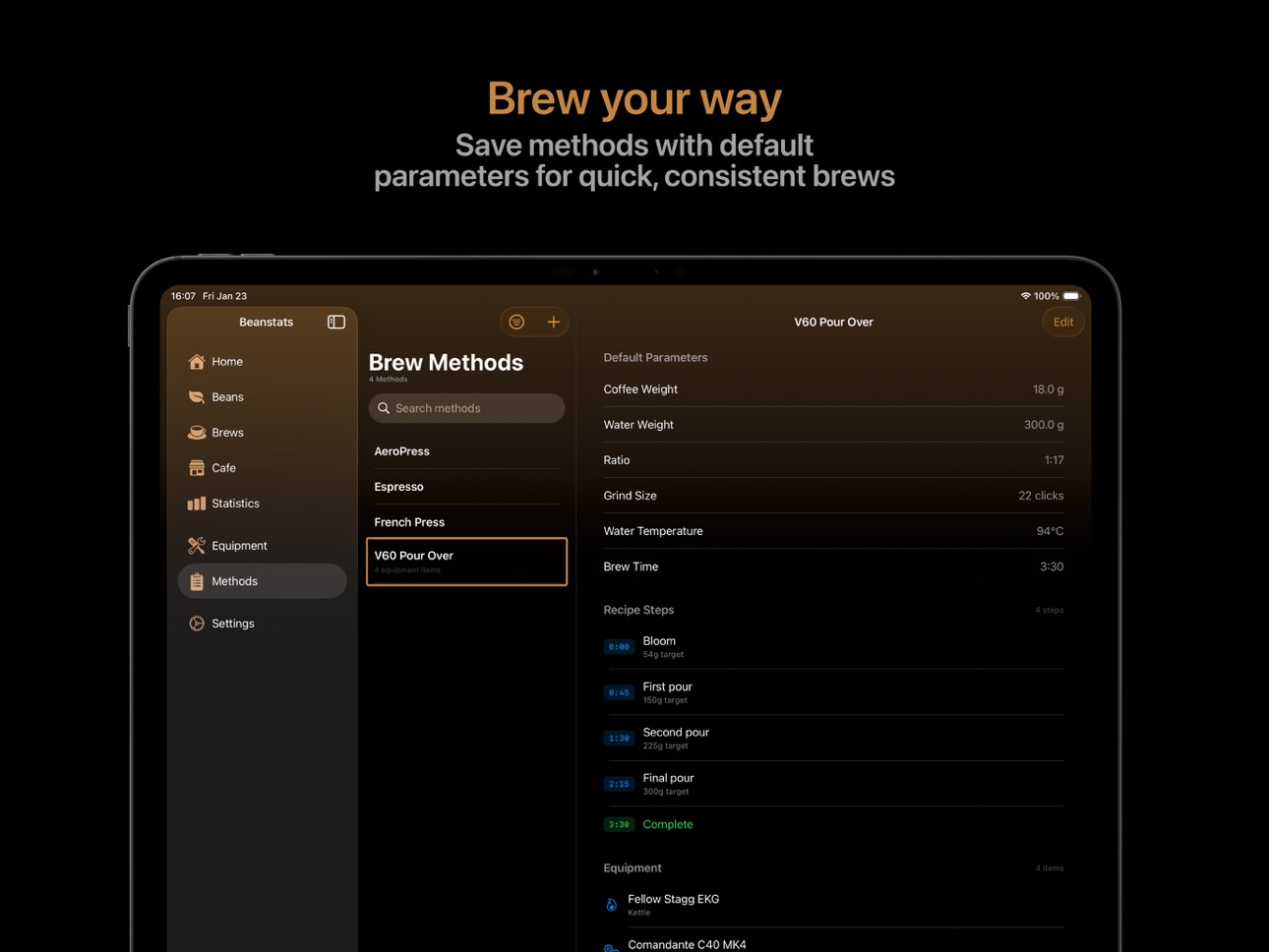
• Brew method templates with default parameters
• Repeat previous brews and compare against reference curves
• Track cafe visits with location and ratings
BEAN INVENTORY
• Roaster, origin, roast date, varieties, and tasting notes
• Remaining weight calculated automatically as you brew
• Single-origin and blend support with components
• Rate with stars and add SCA cupping scores
• Freeze tracking with NFC tags for container labeling
EQUIPMENT TRACKING
• Catalog grinders, brewers, kettles, scales, and more
• Associate equipment with brews and methods
• Track grinder retention and equipment usage patterns
STATISTICS & INSIGHTS
• Brewing frequency, consumption, and favorite origins
• Rating trends, freshness windows, and cost analysis
• Equipment usage and grinder retention stats
• Interactive charts filtered by date range
SIRI, SHORTCUTS & AUTOMATION
• "Log an espresso in Beanstats"
• Webhooks to n8n, Home Assistant, IFTTT, and Zapier
• JSON export for backup and analysis
iCloud sync across all devices. Metric and imperial units. Light, dark, and auto themes.
Link to the Apple Licensed Application End User License Agreement: https://www.apple.com/legal/internet-services/itunes/dev/stdeula/
Capabilities
In-App Purchases
Accessibility
ipadiphonemacrealityDevicetvoswatch
Version history 22 versions
Build 887408244v2.15.02026-06-25 18:01:56
Pre-dose NFC tags now support grind size, so you can pregrind your beans for those extra-early mornings or to speed up bean resting. This version also adds Espresso Portafilter Baskets as an equipment type.
Build 885908945v2.14.02026-05-24 18:44:28
This version adds support for the new Timemore Black Mirror Dot scale
Build 884934412v2.13.02026-05-11 21:37:34
This version improves the detection of pre-infusion and steady flow of espresso shots when using a smart scale.
- Brew detail view now also shows the ground weight as brew parameter card.
Build 884395236v2.12.02026-04-25 19:36:41
Bean Freshness Tracker
Know exactly when your coffee is at its best. Freshness timeline bars show where each bean is in its lifecycle, with separate windows for espresso and filter. Six roast tiers from ultra-light to dark, each with their own peak windows. Freshness badges appear on bean cards and list rows so you can spot what's ready to brew at a glance.
Set a roaster recommendation if your roaster suggests specific rest days, and the entire timeline shifts to match. Sort your beans by freshness to find what's at peak right now.
Personal Sweet Spot (Premium)
The app analyzes your rated brews to find the days post-roast where you rate highest. It weights matches by roaster, variety, origin, and roast level so the recommendation is specific to each bean. Shown per method in the Brew Readiness section.
Freshness Stats
New stats in the Beans tab: percentage of brews made during peak, brew count by freshness phase, beans currently past peak, and rating by freshness phase.
LSI Water Calculator
See whether your water will form limescale or corrode your machine. The Langelier Saturation Index gauge shows corrosive, balanced, or scale-forming status with an interactive boiler temperature slider. Tap the info button for a full explanation.
Decent Scale Support (Beta)
Decent Scale and Half Decent Scale are now supported for weight, timer, tare, and battery. Look for them in the scale pairing view.
Similar Beans
Variety matching added. Two Gesha beans from different origins now score higher as similar. "Same variety" appears as a match reason.
Interactive Quick Log Widget
The Quick Log widget now shows two buttons (Espresso and Filter) instead of a single link.
More Improvements
- Default brewing style setting in Settings (controls freshness badges and new brew default)
- Peak freshness notification at 9 AM when a bean enters peak (Settings > Notifications)
- Freshness info sheet explaining the science behind the recommendations
- Redesigned freezer section on bean detail
- Rate Beanstats link in Settings
- Reduced badge size on similar beans for better layout
Build 884162618v2.11.02026-04-10 23:03:30
This version adds the optional feature to keep track of your caffeine intake throughout the day. Enable and configure it in the settings and have a look at the new Caffeine dashboard.
Build 884098496v2.10.12026-04-05 02:49:22
This versions changes the location of the brew recommendation to the 'Brew parameters' section. It now only shows the recommendation if both the coffee bean and brew method match.
Build 883888700v2.10.02026-04-01 04:19:42
Sharing is caring! This version adds the ability to share Beans and Brew Methods. From either the Brew Method detail view or the Bean detail view, click the ... menu and easily share with other coffee enthusiasts.
New features
- Share brew methods (with recipe steps) via share.beanstats.com. Create a share link through the app, copy the link or QR code and share with other coffee enthusiasts
- Share beans via share.beanstats.com. Create a share link through the app, copy the link or QR code and share with other coffee enthusiasts
Improvements
- Widgets have updated coffee inventory widget which now shows your top-rated active beans
Build 883856098v2.9.22026-03-28 16:24:51
This update improves readability of text in the new Bean Grid view when in light mode.
Build 883809948v2.9.12026-03-27 18:56:25
This version fixes images overlapping in bean grid view on wide images.
Build 883699939v2.9.02026-03-25 20:14:01
Beanstats 2.9.0
New Features
- Bean grid view: browse your beans in a visual grid layout with thumbnail images
- Scale integration in freeze & NFC forms: see live weight readings and tare your scale directly from the freeze and predose tag screens
- iCloud sync monitoring: detect sync stalls with a retry button and improved diagnostics in Settings
Improvements
- iCloud sync is now more reactive — detail views update immediately when data syncs from other devices
- Brew timer reset now properly clears flow and pressure analyzer data
- Brew rating "pre-fill from extraction grid" button stays visible until you interact with flavor sliders
- WebP images are now recognized when pasting from the clipboard
- Sharper bean thumbnails on high-resolution displays
Bug Fixes
- Fixed a layout loop that could cause the brew list to freeze
- Fixed a crash when interacting with the taste profile chart on the rating sheet
- Fixed gesture conflicts on the interactive taste profile chart
- Fixed iCloud background sync reliability
- Fixed settings and preferences not carrying through to sheets opened from various screens
Build 882912220v2.8.02026-03-19 00:38:04
This version brings a lot of new features to get more insight into what you like.
Taste Profile & Rating
- Flavor profile radar chart - Rate brews across 5 dimensions: acidity, sweetness, bitterness, body, and aftertaste using an interactive drag-handle radar chart
- Extraction grid - Quick-tap 3x3 grid (strong/medium/weak x sour/balanced/bitter) with brewing adjustment suggestions based on Coffee Compass and Espresso Compass frameworks
- Pre-fill taste profile from extraction grid - One tap to populate the radar chart from your extraction grid selection
- Taste profiles on detail views - See taste radar charts on both brew and bean detail pages
- Mini taste radar on brew rows - Small radar icon in the brew list for brews with taste data
Insights & Recommendations
- Coffee insights - Personalized insights accessible from the Statistics page, showing your origin sweet spot, process preference, roast preference, and top roaster based on your ratings
- What to Buy Next - Purchase guidance showing your highest-rated origins, processes, and roast levels as separate dimensions with star ratings
- Best recipe per bean - Computed optimal dose, ratio, temperature, and time from your highest-rated brews, with fallback to similar beans
- Similar beans - Find purchased beans similar to any bean based on taste profile, origin, process, and roast similarity
- Method comparison - See which brew methods score highest in your ratings
- Extraction pattern analysis - Identifies dominant extraction grid patterns and surfaces dialing advice, enriched with TDS data when available
- Extraction sweet spot - Highlights your optimal TDS/extraction yield range with SCA reference comparison
- Taste preference profile - Adaptive preference model using recency decay and rating weighting
Sorting & Filtering
- Sort beans by roaster - New sort option for the bean list
- Sort beans by freshness - Sorts by proximity to peak freshness based on roast date and roast level (accounts for different peak windows per roast level)
- Sort beans by best match - Sorts by how well each bean matches your taste and attribute preferences
- Sort brews by roaster, rating, or bean name - New sort menu in the brew list toolbar with ascending/descending options
Statistics
- Top rated origins, roasters, varieties, and processing - New "by rating" sections alongside the existing "by quantity" favourites
- Extraction heatmap - Visual 3x3 heatmap showing brew count and average rating per extraction grid position
- Taste profile analytics - Your preference profile breakdown in the brew stats section
- Brewing Control Chart - SCA-style TDS vs extraction yield scatter plot
Quality of Life
- Paste from clipboard - Photo picker now offers "Paste from Clipboard" when an image is available
- Interactive keyboard dismiss - Drag the brew form to dismiss the keyboard
- Improved top-rated beans sorting - Beans with the same displayed rating now rank by brew count
Bug Fixes
- Fixed BC importer storing garbage ratings (0.1-0.4) from misconfigured rating scales, now snaps to half-star increments
- Fixed recommendation engine including invalid imported ratings in calculations
- Fixed extraction sweet spot using wrong extraction yield range for filter brews
- Fixed photo picker scrolling to text field when choosing or pasting photos
- Fixed redundant median computation in brew parameter insights
- Fixed inconsistent cafe brew weighting between insight generators
Build 882760553v2.7.02026-02-28 22:11:24
Did you know that 98% of your coffee is water? This updates helps you use the best water for your daily cups!
You can now add water profiles and assign them to brew methods and brews, and use the calculator to quickly calculate which concentrates you need to mix your own water recipes. Don't want to mix your own water? Choose from one of the common presets when creating a new water profile.
We've also added the option to track your TDS. When enabled, an extra field in the brew form appears where you can enter the TDS value. Extraction yield is automatically calculated. It also adds brew control charts to the brew detail view, the bean detail view and the brew statistics.
This update also includes some UI improvements
- The bean and brew lists now show images
- While brewing with a connected bluetooth scale the 'tare button' is now replaced by the ratio when the timer is running.
- In the brew form, if there is a scale paired and turned off, the UI will no longer 'jump' when the scale connection preview is removed.
- The statistics view now loads faster, this is especially noticeable for the users who already logged more than 5000 brews.
Build 882482690v2.6.12026-02-22 22:17:56
This version adds the option to add up to 5 photos to a coffee bean, home brew or cafe brew.
It also addresses some minor UI improvements such as default ordering of equipment in the brew detail view.
It fixes a bug where the in-app timer would sometimes not start when triggering the brew with auto-start enabled (this happened with some bluetooth scales)
Build 882269791v2.6.02026-02-12 21:22:35
Features:
- Initial support for the BooKoo espresso monitor
- Brew by weight webhook event added
Improvements:
- Auto starting espresso and filter brews with connected scales is improved
- Coffee bean detail pages now show up to 5 recent brews
Build 882214826v2.5.02026-02-06 21:49:55
Features
NFC Pre-dosing - now it's also possible to use NFC to 'pre-dose' a bean instead of only freeze entries
Ignore swirls - when brewing with a bluetooth scale, hold the weight to ignore rapid weight changes when swirling the brewer
Live ratio - when brewing with a bluetooth scale the ratio is now displayed
Image repositioning - you can now reposition the hero images for your beans and equipment
Fixes
- Improved auto-stop sensitivity for espresso brewing
- Scale timers no longer reset when selecting a bean
Build 881916497v2.4.22026-02-03 11:14:45
This version addresses several bugs:
- Freeze entries imported from third party apps are now handled correctly
- UI fixes in brew form when the user has many active beans
Build 881832440v2.4.12026-01-27 20:17:10
This version addresses several bugs:
- Water temperature not automatically applied when selecting brew method
- Water temperature was always in celsius, regardless of user locale
- Various third party import improvements
- Adds a loading state for statistics, typically only needed when users have thousands of brews
- Minor UI fixes, e.g. alignment issues and showing metric instead of imperial for some labels
Build 881775322v2.4.02026-01-25 18:03:19
New Features
- Improved Cost Analytics: track spending over time, cost per cup and best value beans
- Cafe stats: see your favorite cafes, drinks and visit patterns
- Average grinder retention stats are now in equipment analysis
- Recipe steps are now scale and time aware, and change appearance during the brew
Improvements
- Charts show all time periods
- Charts now have better groups when applying date filters in Statistics
- Heatmap cells now support VoiceOver
- Very recent brews on the home view now show 'Just now' instead of 2 seconds ago
Bug fixes
- Fixed crash when viewing deleted beans or brews
- Fixed brew date defaulting to wrong value
- Fixed chart data persistence when switching date filters
- Fixed chart values going out of visible bounds
- Fixed various iCloud and navigation issues
Build 881658731v2.3.02026-01-23 08:34:53
What's New in 2.3.0
Guided Brewing with Recipe Steps
Create step-by-step pour-over recipes with timed stages and weight targets.
A visual timeline shows your progress, and haptic feedback tells you when
it's time for your next pour. No need to watch the screen.
Fresh Onboarding Experience
New to Beanstats? We've redesigned the welcome flow to get you brewing faster. Set your goals,
connect your Bluetooth scale, and add your first beans, all in one smooth setup. Already have
data? We'll skip what you don't need.
Better Cafe Maps
Markers now cluster when zoomed out for a cleaner view, and you can see more cafe details with a
single tap.
Bug fixes
Several iCloud sync bugs were fixed
Build 881554610v2.2.02026-01-20 02:04:13
Rating Reminders
- Get gentle reminders to rate your brews after you've had time to enjoy them
- Configurable delay (15 min, 30 min, 1 hour, 2 hours, or next day)
- Rating sheet now shows bean name and brew details for context
- Find it in Settings → Notifications
Full Backup & Restore
- Export all your Beanstats data to a single JSON file
- Includes beans, brews, methods, equipment, and freeze entries
- Restore your data on any device
- Find it in Settings → Data
Improved Filters
- Added variety and processing method filters to brew list
- Better date filter UX - no more confusing default dates
- Fixed crash when using filters on Mac
Better International Support
- Price and decimal fields now work correctly with European number formats (e.g., "14,00" instead of "14.00")
- Prices display using your locale's formatting
Share Card Improvements
- Flow rate chart now shows more detail
Webhooks
- Now works with local network addresses (HTTP)
- Clearer "Accept Self-Signed Certificates" option
- Moved to Settings → Connected Devices
Data Import
- Beanconqueror import moved out of beta - now in Settings → Data → Import
- Fixed sync failures caused by invalid imported data
- Fixed roast level mapping issues
Bug Fixes
- Fixed roast level not updating in bean details after editing
- Updated supported Bluetooth scales list
- Various macOS compatibility improvements
Build 881460736v2.1.02026-01-15 18:54:46
New features:
- Share Cards - Share beautiful image cards of your brews with brew profile charts
- OCR Bean Import - Scan coffee bags with your camera to automatically import bean details
- Add Bean Button - Quick access on home view with long press menu for URL extraction and OCR
- Bean Rating on Archive - Rate beans when archiving after a brew
- Product Page Links - View and open product URLs from bean details
- Bookoo Scale Flow Rate - Hardware flow rate support for Bookoo scales
- Acaia Scale Compatibility - Improved authentication for Acaia scales
- iPhone Landscape Mode - Fullscreen graphs with orientation control
Improvements:
- Quick navigation to bean from brew detail view
- Improved brew ratings chart layout
- Added dark mode icon
- Analytics with privacy-friendly TelemetryDeck
Build 880889824v2.0.02026-01-12 23:22:08
No pricing data captured yet — comparisons appear once the app has paid storefronts or in-app purchases.
Availability 3 of 3 storefronts
| Region | Language | Price | Ratings | Avg | Version |
|---|---|---|---|---|---|
 US US | en-US | Free | 1 | 4.0 | 2.15.0 |
 GB GB | en-GB | Free | 0 | — | 2.15.0 |
 NG NG | en-GB | Free | 0 | — | 2.15.0 |
Change log 26 changes · US
✎
releaseNotes updated
Pre-dose NFC tags now support grind size, so you can pregrind your beans for those extra-early mornings or to speed up bean resting. This version also adds Espr
✎
description updated
Connect your Bluetooth scale, capture real-time flow data, and track every detail of your coffee
journey, from bean to cup.
Beanstats is the all-in-one brew co
✎
subtitle updated
Track your coffee journey
✎
name updated
Beanstats - Coffee Tracker
◆
Version 2.15.0 released
Pre-dose NFC tags now support grind size, so you can pregrind your beans for those extra-early mornings or to speed up bean resting. This version also adds Espresso Portafilter Baskets as an equipment type.
◆
Version 2.14.0 released
This version adds support for the new Timemore Black Mirror Dot scale
◆
Version 2.13.0 released
This version improves the detection of pre-infusion and steady flow of espresso shots when using a smart scale.
- Brew detail view now also shows the ground weight as brew parameter card.
◆
Version 2.12.0 released
Bean Freshness Tracker
Know exactly when your coffee is at its best. Freshness timeline bars show where each bean is in its lifecycle, with separate windows for espresso and filter. Six roast tiers from ultra-light to dark, each with their
◆
Version 2.11.0 released
This version adds the optional feature to keep track of your caffeine intake throughout the day. Enable and configure it in the settings and have a look at the new Caffeine dashboard.
◆
Version 2.10.1 released
This versions changes the location of the brew recommendation to the 'Brew parameters' section. It now only shows the recommendation if both the coffee bean and brew method match.
◆
Version 2.10.0 released
Sharing is caring! This version adds the ability to share Beans and Brew Methods. From either the Brew Method detail view or the Bean detail view, click the ... menu and easily share with other coffee enthusiasts.
New features
- Share brew
◆
Version 2.9.2 released
This update improves readability of text in the new Bean Grid view when in light mode.
◆
Version 2.9.1 released
This version fixes images overlapping in bean grid view on wide images.
◆
Version 2.9.0 released
Beanstats 2.9.0
New Features
- Bean grid view: browse your beans in a visual grid layout with thumbnail images
- Scale integration in freeze & NFC forms: see live weight readings and tare your scale directly from the freeze and predose tag
◆
Version 2.8.0 released
This version brings a lot of new features to get more insight into what you like.
Taste Profile & Rating
- Flavor profile radar chart - Rate brews across 5 dimensions: acidity, sweetness, bitterness, body, and aftertaste using an interact
◆
Version 2.7.0 released
Did you know that 98% of your coffee is water? This updates helps you use the best water for your daily cups!
You can now add water profiles and assign them to brew methods and brews, and use the calculator to quickly calculate which conce
◆
Version 2.6.1 released
This version adds the option to add up to 5 photos to a coffee bean, home brew or cafe brew.
It also addresses some minor UI improvements such as default ordering of equipment in the brew detail view.
It fixes a bug where the in-app timer
◆
Version 2.6.0 released
Features:
- Initial support for the BooKoo espresso monitor
- Brew by weight webhook event added
Improvements:
- Auto starting espresso and filter brews with connected scales is improved
- Coffee bean detail pages now show up to 5 recent b
◆
Version 2.5.0 released
Features
NFC Pre-dosing - now it's also possible to use NFC to 'pre-dose' a bean instead of only freeze entries
Ignore swirls - when brewing with a bluetooth scale, hold the weight to ignore rapid weight changes when swirling the brewer
Liv
◆
Version 2.4.2 released
This version addresses several bugs:
- Freeze entries imported from third party apps are now handled correctly
- UI fixes in brew form when the user has many active beans
◆
Version 2.4.1 released
This version addresses several bugs:
- Water temperature not automatically applied when selecting brew method
- Water temperature was always in celsius, regardless of user locale
- Various third party import improvements
- Adds a loading st
◆
Version 2.4.0 released
New Features
- Improved Cost Analytics: track spending over time, cost per cup and best value beans
- Cafe stats: see your favorite cafes, drinks and visit patterns
- Average grinder retention stats are now in equipment analysis
- Recipe s
◆
Version 2.3.0 released
What's New in 2.3.0
Guided Brewing with Recipe Steps
Create step-by-step pour-over recipes with timed stages and weight targets.
A visual timeline shows your progress, and haptic feedback tells you when
it's time for your next pour. No
◆
Version 2.2.0 released
Rating Reminders
- Get gentle reminders to rate your brews after you've had time to enjoy them
- Configurable delay (15 min, 30 min, 1 hour, 2 hours, or next day)
- Rating sheet now shows bean name and brew details for context
- Fin
◆
Version 2.1.0 released
New features:
- Share Cards - Share beautiful image cards of your brews with brew profile charts
- OCR Bean Import - Scan coffee bags with your camera to automatically import bean details
- Add Bean Button - Quick access on home view
◆
Version 2.0.0 released