Home › Utilities

 US
US
 NLnl
NLnl AEen-GB
 AGen-GB
 AIen-GB
 ALen-GB
 AMen-GB
 AOen-GB
 ARes-MX
 ATde-DE
 AUen-AU
 AZen-GB
 BAen-GB
 BBen-GB
 BEen-GB
 BFen-GB
 BGen-GB
 BHen-GB
 BJen-GB
 BOes-MX
 BRpt-BR
 BSen-GB
 BWen-GB
 BYen-GB
 BZen-GB
 CAen-CA
 CDen-GB
 CGen-GB
 CHde-CH
 CIfr-FR
 CLes-MX
 CMfr-FR
 CNzh-Hans-CN
 COes-MX
 CRes-MX
 CVen-GB
 CYen-GB
 CZen-GB
 DEde-DE
 DKen-GB
 DMen-GB
 DOes-MX
 DZen-GB
 ECes-MX
 EEen-GB
 EGen-GB
 ESes-ES
 FIen-GB
 FRfr-FR
 GAfr-FR
 GBen-GB
 GDen-GB
 GEen-GB
 GHen-GB
 GMen-GB
 GRen-GB
 GTes-MX
 GWen-GB
 GYen-GB
 HKzh-Hant-HK
 HNes-MX
 HRen-GB
 HUen-GB
 IEen-GB
 ILen-GB
 IQen-GB
 ISen-GB
 ITit
ITit JMen-GB
 JOen-GB
 JPja
JPja KEen-GB
 KNen-GB
 KRko
KRko KWen-GB
 KYen-GB
 LBen-GB
 LCen-GB
 LRen-GB
 LTen-GB
 LUen-GB
 LVen-GB
 LYen-GB
 MAen-GB
 MDen-GB
 MEen-GB
 MGen-GB
 MKen-GB
 MLen-GB
 MOzh-Hant-HK
 MSen-GB
 MTen-GB
 MUen-GB
 MWen-GB
 MXes-MX
 MZen-GB
 NAen-GB
 NEen-GB
 NGen-GB
 NIes-MX
 NOen-GB
 NZen-AU
 OMen-GB
 PAes-MX
 PEes-MX
 PLen-GB
 PTpt-PT
 PYes-MX
 QAen-GB
 ROen-GB
 RSen-GB
 RUru
RUru RWen-GB
 SAen-GB
 SCen-GB
 SEsv
SEsv SIen-GB
 SKen-GB
 SLen-GB
 SNen-GB
 SRen-GB
 STen-GB
 SVes-MX
 SZen-GB
 TCen-GB
 TDen-GB
 TNen-GB
 TRen-GB
 TTen-GB
 TWzh-Hant-TW
 TZen-GB
 UAen-GB
 UGen-GBUSen-US
 UYen-GB
 VCen-GB
 VEes-MX
 VGen-GB
 XKen-GB
 YEen-GB
 ZMen-GB
 ZWen-GB
141 of 141 storefronts
Content in en-US
Content in en-US
Information
Preview 2 platforms
iPhone 4 images


iPad 3 images


What’s New Version 1.2
New: Move measured areas anywhere
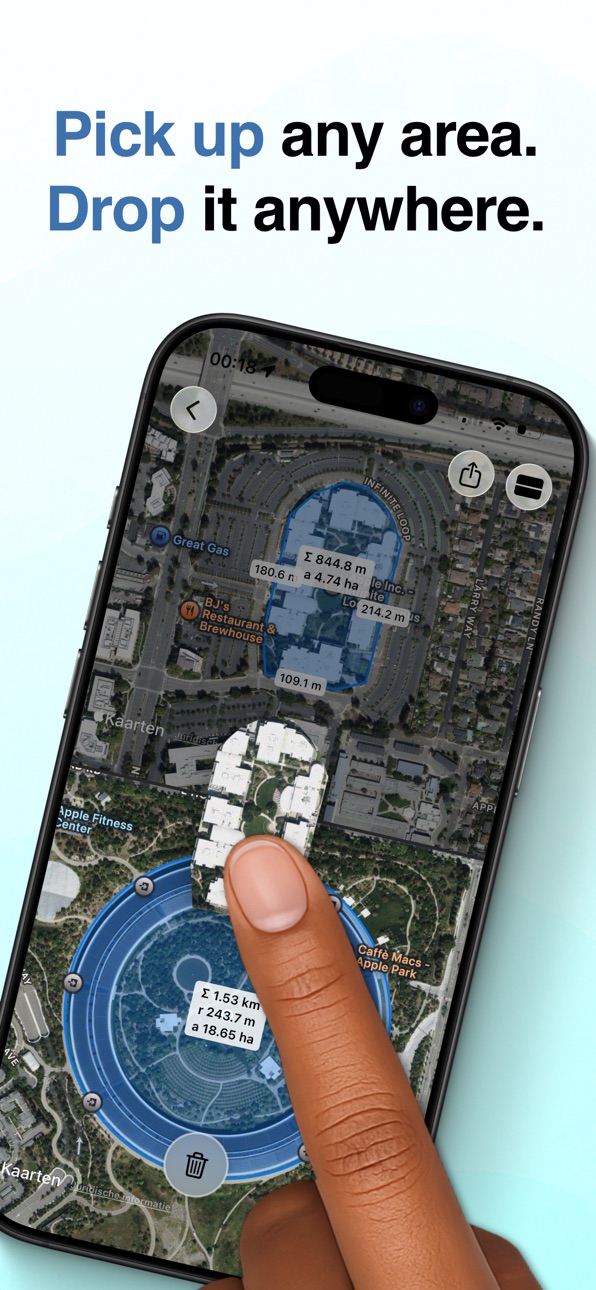
You can now press and hold any drawn area to pick it up and drag a copy to another location — even to a second map showing a different place in the world.
Instantly compare sizes across cities, countries, or continents. Test if something fits somewhere else without redrawing it.
This is a unique SplitMap feature, and a powerful new way to compare spaces visually.
Description
Measure and compare anything on a map with precision tools designed for speed and accuracy.
MEASURE WITH CONFIDENCE
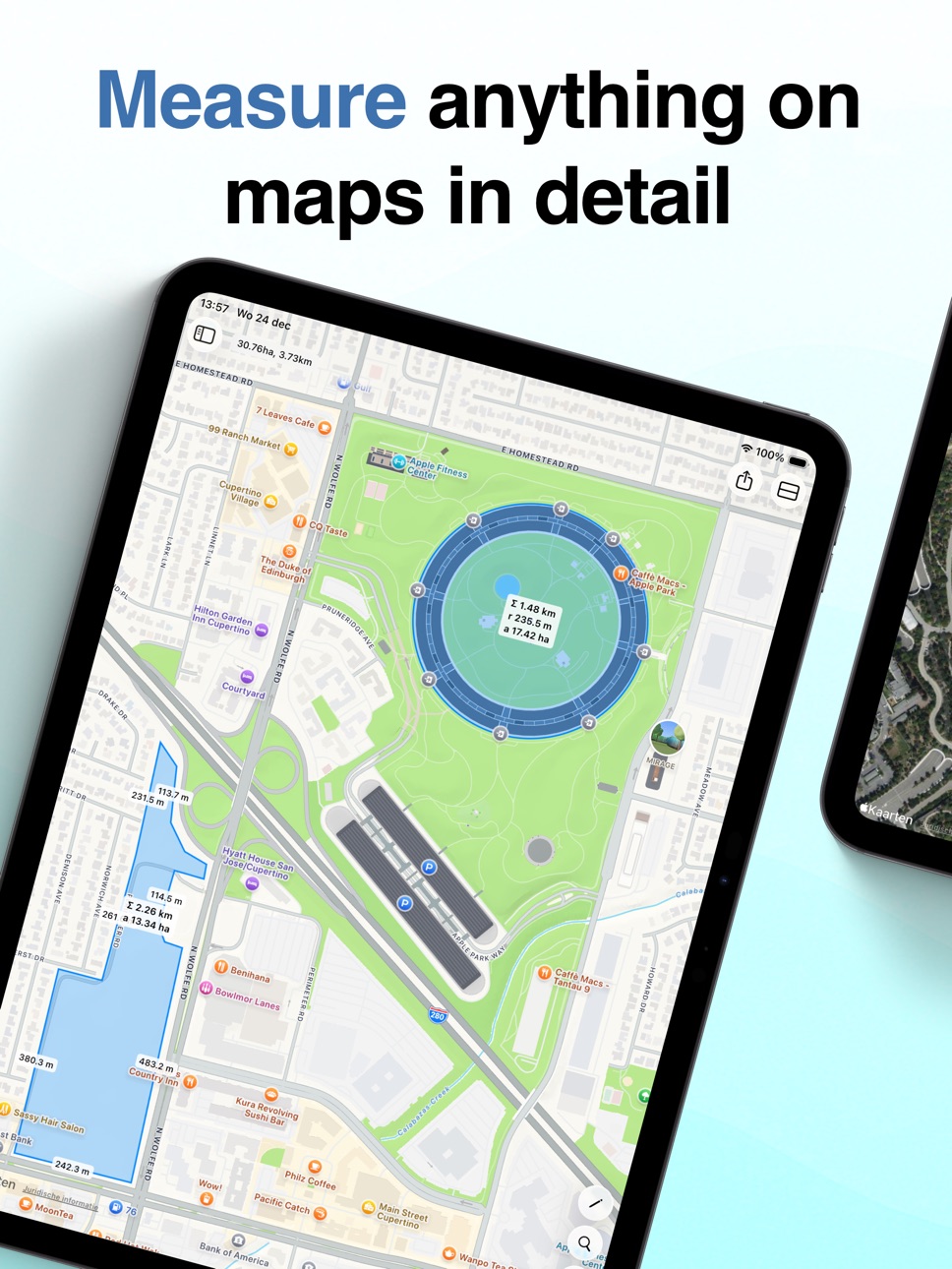
Place points exactly where they belong using the precision crosshair. Draw lines to measure distances, circles for radius calculations, and custom polygons to calculate surface areas. Every measurement is accurate down to the details.
PICK UP AND PLACE AREAS — ANYWHERE
Turn measurements into movable objects. Press and hold any drawn area to lift it, then drag a copy to a new location. Drop it elsewhere on the same map — or onto a second map showing a completely different place in the world.
Instantly see if a park fits inside a city block, compare property sizes across continents, or test how a landmark would scale somewhere else. No other map app lets you move measured areas this freely.
SIDE-BY-SIDE COMPARISON
Open two maps simultaneously and compare locations directly. Move shapes between maps, test ideas visually, and evaluate alternatives — all without switching views.
SEAMLESS WORKFLOW
Export your measurements as images or GeoJSON files to continue working in other apps and professional tools. Your data goes where you need it.
SYNC ACROSS DEVICES
Use SplitMap on iPhone and iPad with a single purchase. Your locations and measurements sync automatically, so you can start on one device and pick up on another.
BUILT FOR EVERYONE
• Supports metric and imperial units
• Available in 11 languages
• Adapts naturally to any screen size
Whether you’re planning a project, researching property boundaries, comparing hiking trails, or simply exploring the world, SplitMap gives you the tools to measure — and reposition — what matters.
In-App Purchases US pricing
One-Time Purchases
Unlock limits$3.99
Capabilities
In-App Purchases
Accessibility
ipadiphonemacrealityDevicetvoswatch
Version history 3 versions
Build 883115608v1.22026-03-09 06:43:33
New: Move measured areas anywhere
You can now press and hold any drawn area to pick it up and drag a copy to another location — even to a second map showing a different place in the world.
Instantly compare sizes across cities, countries, or continents. Test if something fits somewhere else without redrawing it.
This is a unique SplitMap feature, and a powerful new way to compare spaces visually.
Build 881200016v1.12026-01-14 16:12:38
• You can now try SplitMap for free. The free version includes limits, which can be removed with an in-app purchase.
• You can now assign a color to each area you draw.
• Removed the animation when opening the second map to prevent unintended zooming.
Build 880813561v1.02025-12-29 14:24:51
Price history by region
Currency
Show
Columns
Search
Availability 141 of 141 storefronts
| Region | Language | Price | Ratings | Avg | Version |
|---|---|---|---|---|---|
| NL | nl | Free | 5 | 5.0 | 1.2 |
| AE | en-GB | Free | 0 | — | 1.2 |
| AG | en-GB | Free | 0 | — | 1.2 |
| AI | en-GB | Free | 0 | — | 1.2 |
| AL | en-GB | Free | 0 | — | 1.2 |
| AM | en-GB | Free | 0 | — | 1.2 |
| AO | en-GB | Free | 0 | — | 1.2 |
| AR | es-MX | Free | 0 | — | 1.2 |
| AT | de-DE | Free | 0 | — | 1.2 |
| AU | en-AU | Free | 0 | — | 1.2 |
| AZ | en-GB | Free | 0 | — | 1.2 |
| BA | en-GB | Free | 0 | — | 1.2 |
| BB | en-GB | Free | 0 | — | 1.2 |
| BE | en-GB | Free | 0 | — | 1.2 |
| BF | en-GB | Free | 0 | — | 1.2 |
| BG | en-GB | Free | 0 | — | 1.2 |
| BH | en-GB | Free | 0 | — | 1.2 |
| BJ | en-GB | Free | 0 | — | 1.2 |
| BO | es-MX | Free | 0 | — | 1.2 |
| BR | pt-BR | Free | 0 | — | 1.2 |
| BS | en-GB | Free | 0 | — | 1.2 |
| BW | en-GB | Free | 0 | — | 1.2 |
| BY | en-GB | Free | 0 | — | 1.2 |
| BZ | en-GB | Free | 0 | — | 1.2 |
| CA | en-CA | Free | 0 | — | 1.2 |
| CD | en-GB | Free | 0 | — | 1.2 |
| CG | en-GB | Free | 0 | — | 1.2 |
| CH | de-CH | Free | 0 | — | 1.2 |
| CI | fr-FR | Free | 0 | — | 1.2 |
| CL | es-MX | Free | 0 | — | 1.2 |
| CM | fr-FR | Free | 0 | — | 1.2 |
| CN | zh-Hans-CN | Free | 0 | — | 1.2 |
| CO | es-MX | Free | 0 | — | 1.2 |
| CR | es-MX | Free | 0 | — | 1.2 |
| CV | en-GB | Free | 0 | — | 1.2 |
| CY | en-GB | Free | 0 | — | 1.2 |
| CZ | en-GB | Free | 0 | — | 1.2 |
| DE | de-DE | Free | 0 | — | 1.2 |
| DK | en-GB | Free | 0 | — | 1.2 |
| DM | en-GB | Free | 0 | — | 1.2 |
| DO | es-MX | Free | 0 | — | 1.2 |
| DZ | en-GB | Free | 0 | — | 1.2 |
| EC | es-MX | Free | 0 | — | 1.2 |
| EE | en-GB | Free | 0 | — | 1.2 |
| EG | en-GB | Free | 0 | — | 1.2 |
| ES | es-ES | Free | 0 | — | 1.2 |
| FI | en-GB | Free | 0 | — | 1.2 |
| FR | fr-FR | Free | 0 | — | 1.2 |
| GA | fr-FR | Free | 0 | — | 1.2 |
| GB | en-GB | Free | 0 | — | 1.2 |
| GD | en-GB | Free | 0 | — | 1.2 |
| GE | en-GB | Free | 0 | — | 1.2 |
| GH | en-GB | Free | 0 | — | 1.2 |
| GM | en-GB | Free | 0 | — | 1.2 |
| GR | en-GB | Free | 0 | — | 1.2 |
| GT | es-MX | Free | 0 | — | 1.2 |
| GW | en-GB | Free | 0 | — | 1.2 |
| GY | en-GB | Free | 0 | — | 1.2 |
| HK | zh-Hant-HK | Free | 0 | — | 1.2 |
| HN | es-MX | Free | 0 | — | 1.2 |
| HR | en-GB | Free | 0 | — | 1.2 |
| HU | en-GB | Free | 0 | — | 1.2 |
| IE | en-GB | Free | 0 | — | 1.2 |
| IL | en-GB | Free | 0 | — | 1.2 |
| IQ | en-GB | Free | 0 | — | 1.2 |
| IS | en-GB | Free | 0 | — | 1.2 |
| IT | it | Free | 0 | — | 1.2 |
| JM | en-GB | Free | 0 | — | 1.2 |
| JO | en-GB | Free | 0 | — | 1.2 |
| JP | ja | Free | 0 | — | 1.2 |
| KE | en-GB | Free | 0 | — | 1.2 |
| KN | en-GB | Free | 0 | — | 1.2 |
| KR | ko | Free | 0 | — | 1.2 |
| KW | en-GB | Free | 0 | — | 1.2 |
| KY | en-GB | Free | 0 | — | 1.2 |
| LB | en-GB | Free | 0 | — | 1.2 |
| LC | en-GB | Free | 0 | — | 1.2 |
| LR | en-GB | Free | 0 | — | 1.2 |
| LT | en-GB | Free | 0 | — | 1.2 |
| LU | en-GB | Free | 0 | — | 1.2 |
| LV | en-GB | Free | 0 | — | 1.2 |
| LY | en-GB | Free | 0 | — | 1.2 |
| MA | en-GB | Free | 0 | — | 1.2 |
| MD | en-GB | Free | 0 | — | 1.2 |
| ME | en-GB | Free | 0 | — | 1.2 |
| MG | en-GB | Free | 0 | — | 1.2 |
| MK | en-GB | Free | 0 | — | 1.2 |
| ML | en-GB | Free | 0 | — | 1.2 |
| MO | zh-Hant-HK | Free | 0 | — | 1.2 |
| MS | en-GB | Free | 0 | — | 1.2 |
| MT | en-GB | Free | 0 | — | 1.2 |
| MU | en-GB | Free | 0 | — | 1.2 |
| MW | en-GB | Free | 0 | — | 1.2 |
| MX | es-MX | Free | 0 | — | 1.2 |
| MZ | en-GB | Free | 0 | — | 1.2 |
| NA | en-GB | Free | 0 | — | 1.2 |
| NE | en-GB | Free | 0 | — | 1.2 |
| NG | en-GB | Free | 0 | — | 1.2 |
| NI | es-MX | Free | 0 | — | 1.2 |
| NO | en-GB | Free | 0 | — | 1.2 |
| NZ | en-AU | Free | 0 | — | 1.2 |
| OM | en-GB | Free | 0 | — | 1.2 |
| PA | es-MX | Free | 0 | — | 1.2 |
| PE | es-MX | Free | 0 | — | 1.2 |
| PL | en-GB | Free | 0 | — | 1.2 |
| PT | pt-PT | Free | 0 | — | 1.2 |
| PY | es-MX | Free | 0 | — | 1.2 |
| QA | en-GB | Free | 0 | — | 1.2 |
| RO | en-GB | Free | 0 | — | 1.2 |
| RS | en-GB | Free | 0 | — | 1.2 |
| RU | ru | Free | 0 | — | 1.2 |
| RW | en-GB | Free | 0 | — | 1.2 |
| SA | en-GB | Free | 0 | — | 1.2 |
| SC | en-GB | Free | 0 | — | 1.2 |
| SE | sv | Free | 0 | — | 1.2 |
| SI | en-GB | Free | 0 | — | 1.2 |
| SK | en-GB | Free | 0 | — | 1.2 |
| SL | en-GB | Free | 0 | — | 1.2 |
| SN | en-GB | Free | 0 | — | 1.2 |
| SR | en-GB | Free | 0 | — | 1.2 |
| ST | en-GB | Free | 0 | — | 1.2 |
| SV | es-MX | Free | 0 | — | 1.2 |
| SZ | en-GB | Free | 0 | — | 1.2 |
| TC | en-GB | Free | 0 | — | 1.2 |
| TD | en-GB | Free | 0 | — | 1.2 |
| TN | en-GB | Free | 0 | — | 1.2 |
| TR | en-GB | Free | 0 | — | 1.2 |
| TT | en-GB | Free | 0 | — | 1.2 |
| TW | zh-Hant-TW | Free | 0 | — | 1.2 |
| TZ | en-GB | Free | 0 | — | 1.2 |
| UA | en-GB | Free | 0 | — | 1.2 |
| UG | en-GB | Free | 0 | — | 1.2 |
| US | en-US | Free | 0 | — | 1.2 |
| UY | en-GB | Free | 0 | — | 1.2 |
| VC | en-GB | Free | 0 | — | 1.2 |
| VE | es-MX | Free | 0 | — | 1.2 |
| VG | en-GB | Free | 0 | — | 1.2 |
| XK | en-GB | Free | 0 | — | 1.2 |
| YE | en-GB | Free | 0 | — | 1.2 |
| ZM | en-GB | Free | 0 | — | 1.2 |
| ZW | en-GB | Free | 0 | — | 1.2 |
Change log 7 changes · US
✎
releaseNotes updated
New: Move measured areas anywhere
You can now press and hold any drawn area to pick it up and drag a copy to another location — even to a second map showing a
✎
description updated
Measure and compare anything on a map with precision tools designed for speed and accuracy.
MEASURE WITH CONFIDENCE
Place points exactly where they belong usi
✎
subtitle updated
Turn maps into insight
✎
name updated
SplitMap - Compare and Measure
◆
Version 1.2 released
New: Move measured areas anywhere
You can now press and hold any drawn area to pick it up and drag a copy to another location — even to a second map showing a different place in the world.
Instantly compare sizes across cities, countries,
◆
Version 1.1 released
• You can now try SplitMap for free. The free version includes limits, which can be removed with an in-app purchase.
• You can now assign a color to each area you draw.
• Removed the animation when opening the second map to prevent unintend
◆
Version 1.0 released