Home › Productivity

 US
US
1 of 1 storefronts
Content in en-US
Content in en-US
Information
Apple ID6756597761
Bundle IDio.jindongjun.duomiPrice
SellerSeller
Min iOS17.5
Device familiesmac, iphone, ipad
Released2026-01-08
Copyright© 2026 jindongjun
Privacy policyLink ↗
Preview 3 platforms
iPhone 5 images


iPad 5 images


Mac 5 images


What’s New Version 2.7.5
NEW
Sort by Record Count
The item list sort menu now includes a 'Record Count' option. Sort items ascending or descending by the number of price records to quickly find the most or least documented items.
Trend Chart Navigation Buttons
The 'Trend', 'Distribution', and 'Comparison' tabs above the trend chart are now capsule-shaped buttons with a more visible selected state for easier navigation.
Star Rating Filter
The record list filter menu now supports filtering by 1–5 star ratings, quickly view records with a specific rating. Available on both iOS and Mac.
Multi-Keyword Fuzzy Search
When searching items and price records, you can now separate multiple keywords with spaces. All keywords must match, helping you locate target data quickly and precisely.
Description
DuomiFlow – Offline Price & Data Logger
Stop guessing. Start tracking.
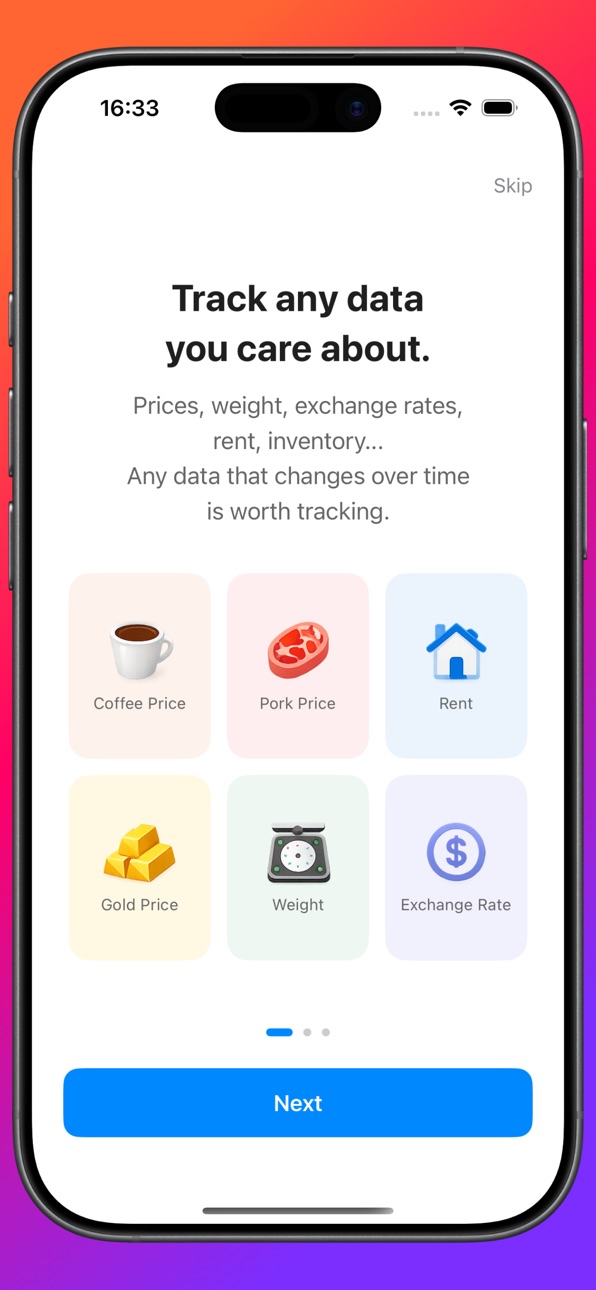
DuomiFlow is a lightweight, privacy-first tool for manually recording prices, monitoring trends, and making data-driven decisions. No cloud. No ads. Just your data, safely on your device.
Why DuomiFlow?
We interact with prices daily—groceries, subscriptions, procurement, or assets. But without historical records, we rely on memory. DuomiFlow turns isolated numbers into long-term insights.
Key Features:
• Manual Price Tracking: Log product prices, recurring expenses, and procurement costs with ease.
• Visual Trend Analysis: Instantly see historical highs/lows, trend directions (up/down/sideways), and abnormal movements.
• Beyond Prices: Record market indicators, behavioral metrics, or any custom data points.
• 100% Offline & Private: No mandatory registration. No ads. No personal data collection. Your records stay strictly on your device.
Set Realistic Expectations:
DuomiFlow is NOT an automated market data platform or a trading system. It is a dedicated, manual recording engine designed to help you build personal trend awareness and make rational decisions based on real, historical data.
Track prices. Understand change. Decide with clarity.
Terms of Service: https://www.duomi.vip/duomi-price-terms-of-service/
Privacy Policy: https://www.duomi.vip/duomi-price-privacy-policy/
In-App Purchases US pricing
DuomiFlow Pro Services Subscription
Annual Subscription · Yearly 3-day free trial$4.99
Quarterly Membership · 3 months$2.99
One-Time Purchases
Lifetime Pro$14.99
Capabilities
In-App Purchases
Accessibility
ipadiphonemacrealityDevicetvoswatch
Version history 25 versions
Build 887995868v2.7.52026-07-08 21:14:58
NEW
Sort by Record Count
The item list sort menu now includes a 'Record Count' option. Sort items ascending or descending by the number of price records to quickly find the most or least documented items.
Trend Chart Navigation Buttons
The 'Trend', 'Distribution', and 'Comparison' tabs above the trend chart are now capsule-shaped buttons with a more visible selected state for easier navigation.
Star Rating Filter
The record list filter menu now supports filtering by 1–5 star ratings, quickly view records with a specific rating. Available on both iOS and Mac.
Multi-Keyword Fuzzy Search
When searching items and price records, you can now separate multiple keywords with spaces. All keywords must match, helping you locate target data quickly and precisely.
Build 887518916v2.7.42026-06-30 22:49:43
NEW
Copy to PriceBook
In batch edit mode, selected price items can now be copied to a target PriceBook in one tap, preserving all item details and related records for fast cross-book data sync.
Move to PriceBook
In batch edit mode, selected price items can now be moved to a target PriceBook. The app first copies complete data, then removes originals, making it easier to organize price data across books.
Build 887329094v2.7.22026-06-25 03:04:15
New
Section Show/Hide Control
In User Center → Basic Settings → Section Display Order, freely show or hide each section to build a cleaner recording interface.
Trend Chart Tap Annotation
Tap or drag on the price trend chart to reveal a bubble annotation with date and price, making it easy to inspect each recorded value at a glance.
Build 887174432v2.7.12026-06-19 18:28:36
Fix known errors, make the system more stable
Build 886919742v2.7.02026-06-18 23:14:28
Spec Conversion
Added spec conversion for price items. When enabled, unit prices are automatically converted by spec, e.g. 1 box = 12 packs, 250ml per pack, auto-calculate price per ml. Enter the spec quantity when recording and the app will convert and display the base unit price.
Comparison Filter
Added filter buttons to the price comparison page. Quickly switch between All, Brand, Platform, Channel, and Region to compare prices from different sources.
Build 886730234v2.6.12026-06-09 19:59:16
Fix known errors, make the system more stable
Build 886317792v2.6.02026-05-30 20:55:32
NEW
Home Screen Widget
Added DuomiFlow Home Screen widgets. You can quickly view the latest price of a selected item and tap the widget to jump into the app for quick recording.
Widget Guide
Added a Widget Guide page in User Center with step-by-step instructions for adding widgets and changing the displayed item.
Build 886227920v2.5.02026-05-28 18:50:10
NEW
My Interventions Panel
A new "My Interventions" section is added to the item detail page, between Range Statistics and Calendar. It shows holding quantity, average cost, current price, and floating P&L on the left; buy/sell count and total amounts on the right. Tap "View Trade Records" to jump directly to the record list filtered to trade records.
Build 886084769v2.4.22026-05-25 18:05:34
NEW
Default List Price Display
Added a default price display type for item list rows. In User Center → Basic Settings → List Price Display, you can choose Compare to Previous, All-time High, All-time Low, All-time Avg, or All-time Median.
Build 885961149v2.4.12026-05-21 22:36:56
NEW
Customizable Section Order
Drag to reorder sections in the price record editor. Go to User Center → Basic Settings → Section Order to customize.
Range Statistics Baseline
Quickly switch the baseline in Range Statistics — choose from Latest, Max, Min, Average, or Median directly in the section header. Set a global default in User Center → Basic Settings → Default Range Baseline.
Build 885846269v2.4.02026-05-19 19:43:55
Record Location
Automatically captures your current location when adding a record. View the location in the record detail page.
Record Rating
Rate each record (1–5 stars) when adding. Ratings can be viewed and edited in the detail page.
Build 885752105v2.3.62026-05-17 17:58:54
Added `ValueStepperField` component for total price and quantity input: left/right ± buttons and tappable value; unit shown in the title. Step size is automatically inferred from the current value's decimal places. Integrated into the Record Entry page.
Build 885647328v2.3.52026-05-14 18:15:47
Fix known errors, make the system more stable
Build 885202563v2.3.42026-05-03 19:11:57
Fix known errors, make the system more stable
Build 885028539v2.3.32026-04-29 14:44:11
PriceList now includes an 'Export All' action to export all items and records from the current price book as a CSV file that can be imported into a newly created price book.
The items list now supports sorting, with the sort button placed next to the More button for quicker access.
Build 884741709v2.3.22026-04-21 18:22:18
Barcode Support
Items now include a barcode field. Add or edit barcodes when creating or updating items; barcodes display automatically in detail and list views. CSV import also supports barcode column parsing with multi-format line ending compatibility.
Build 884588342v2.3.12026-04-16 20:42:26
Time Precision for Price Records
A new 'Enable Time Selection' toggle on price items lets you record the exact hour and minute instead of just the date. All date displays update accordingly. Defaults to off, fully compatible with existing records.
Build 884135200v2.3.02026-04-04 19:05:33
Image upload now supports camera and photo library, take a photo and upload instantly.
Fix known errors and make the system more stable.
Build 883777850v2.2.22026-03-26 16:47:49
Fix known errors, make the system more stable
Build 883542557v2.2.12026-03-19 18:53:39
CSV Import Improved
Supports UTF-8, GBK and other encodings, shows clear error message on failure
Build 883136812v2.2.02026-03-13 12:44:44
V2.2.0 Update: Batch Import Is Here—Say Goodbye to Manual Entry!
In this update, we’ve completely reimagined the data entry process. Our goal is to free you from tedious typing so you can focus on what really matters—visualizing price trends.
【Key Features】
Batch Import (Excel/CSV): Simply prepare a basic spreadsheet and import years of price history in seconds. What used to take days now takes moments.
Auto-Structure Creation: No need to pre-set categories or platforms. The system automatically creates and links products, categories, brands, and channels directly from your spreadsheet.
Multi-Tag Support: Use the # symbol to assign multiple categories (e.g., Fruit#Imported#Organic). The system will automatically split and link them for smarter organization.
Versatile Use Cases: Perfect for importing purchase history, tracking price fluctuations, or building your own personal product database.
【Privacy First】
DuoMi Price Tracker adheres to a "Local Only" policy. All your data stays on your device—no cloud uploads, no tracking, and no data collection. Your records belong to you alone.
Update now and turn your spreadsheets into insights!
Build 882934470v2.1.22026-03-04 14:06:16
Increase the setting of decimal places for recording objects;
Fix known errors and make the system more stable.
Build 882493928v2.1.02026-02-22 19:00:07
Display Mapping (Multi-Series Comparison Enhancement)
When multiple datasets exist at different scales, direct comparison in a single chart becomes ineffective.
For example:
Limit-up count: 0–100
Limit-down count: 0–100
Index level: 4000+
Large value gaps can obscure meaningful trend relationships.
Duomi introduces:
Display Mapping
You can apply a transformation formula to any dataset:
Add (+)
Subtract (−)
Multiply (×)
Divide (÷)
The chart will visualize the transformed values while preserving all original data.
Use Cases
• Large-value offset (e.g., index minus baseline)
• Unit conversion
• Same-scale comparison
• Structural trend analysis
Important
Affects chart visualization only
Does not modify original records
Raw values remain fully accessible
With Display Mapping, you gain clearer structural insight
without compromising data integrity.
Build 881921948v2.0.02026-02-06 11:05:46
What’s New in Version 2.0
This update is not about adding more features.
It’s a shift in how recording is understood.
What’s changed?
1. From recording prices to recording states
Prices are outcomes.
What truly matters is the movement and condition behind them.
You can now record not only prices, but also data that reflects market state.
2. Enhanced trend and range analysis
Trends are clearer, and changes are easier to observe over time.
Not for prediction — but for understanding.
3. Unified system for price objects and data objects
Prices and statistics now follow the same recording and comparison logic.
More consistency. Less cognitive friction.
4. Stronger privacy and data ownership
All data is stored locally by default.
No cloud dependency. Your data belongs to you.
5. Rebuilt onboarding and product narrative
We restructured how the app introduces itself —
so from the start, it’s clear this is not a market-quoting app.
This is not a more complex app.
It’s a clearer one.
Duomi 2.0 — helping you stay calm and conscious when facing prices and data.
Build 881875243v1.1.22026-01-27 06:30:10
Fixed: Resolved an issue where price reminders would trigger in an infinite loop.
Improved: Enhanced overall system stability for a smoother experience.
Price history by region
Currency
Show
Columns
Search
Availability 1 of 1 storefronts
| Region | Language | Price | Ratings | Avg | Version |
|---|---|---|---|---|---|
| US | en-US | Free | 2 | 4.5 | 2.7.5 |
Change log 29 changes · US
✎
releaseNotes updated
NEW
Sort by Record Count
The item list sort menu now includes a 'Record Count' option. Sort items ascending or descending by the number of price records to qui
✎
description updated
DuomiFlow – Offline Price & Data Logger
Stop guessing. Start tracking.
DuomiFlow is a lightweight, privacy-first tool for manually recording prices, monitoring
✎
subtitle updated
Offline Price & Data Logger
✎
name updated
DuomiFlow – Price Tracker
◆
Version 2.7.5 released
NEW
Sort by Record Count
The item list sort menu now includes a 'Record Count' option. Sort items ascending or descending by the number of price records to quickly find the most or least documented items.
Trend Chart Navigation Buttons
Th
◆
Version 2.7.4 released
NEW
Copy to PriceBook
In batch edit mode, selected price items can now be copied to a target PriceBook in one tap, preserving all item details and related records for fast cross-book data sync.
Move to PriceBook
In batch edit mode, selected
◆
Version 2.7.2 released
New
Section Show/Hide Control
In User Center → Basic Settings → Section Display Order, freely show or hide each section to build a cleaner recording interface.
Trend Chart Tap Annotation
Tap or drag on the price trend chart to reveal a bubb
◆
Version 2.7.1 released
Fix known errors, make the system more stable
◆
Version 2.7.0 released
Spec Conversion
Added spec conversion for price items. When enabled, unit prices are automatically converted by spec, e.g. 1 box = 12 packs, 250ml per pack, auto-calculate price per ml. Enter the spec quantity when recording and the app wil
◆
Version 2.6.1 released
Fix known errors, make the system more stable
◆
Version 2.6.0 released
NEW
Home Screen Widget
Added DuomiFlow Home Screen widgets. You can quickly view the latest price of a selected item and tap the widget to jump into the app for quick recording.
Widget Guide
Added a Widget Guide page in User Center with ste
◆
Version 2.5.0 released
NEW
My Interventions Panel
A new "My Interventions" section is added to the item detail page, between Range Statistics and Calendar. It shows holding quantity, average cost, current price, and floating P&L on the left; buy/sell count and to
◆
Version 2.4.2 released
NEW
Default List Price Display
Added a default price display type for item list rows. In User Center → Basic Settings → List Price Display, you can choose Compare to Previous, All-time High, All-time Low, All-time Avg, or All-time Median.
◆
Version 2.4.1 released
NEW
Customizable Section Order
Drag to reorder sections in the price record editor. Go to User Center → Basic Settings → Section Order to customize.
Range Statistics Baseline
Quickly switch the baseline in Range Statistics — choose from Lat
◆
Version 2.4.0 released
Record Location
Automatically captures your current location when adding a record. View the location in the record detail page.
Record Rating
Rate each record (1–5 stars) when adding. Ratings can be viewed and edited in the detail page.
◆
Version 2.3.6 released
Added `ValueStepperField` component for total price and quantity input: left/right ± buttons and tappable value; unit shown in the title. Step size is automatically inferred from the current value's decimal places. Integrated into the Recor
◆
Version 2.3.5 released
Fix known errors, make the system more stable
◆
Version 2.3.4 released
Fix known errors, make the system more stable
◆
Version 2.3.3 released
PriceList now includes an 'Export All' action to export all items and records from the current price book as a CSV file that can be imported into a newly created price book.
The items list now supports sorting, with the sort button placed n
◆
Version 2.3.2 released
Barcode Support
Items now include a barcode field. Add or edit barcodes when creating or updating items; barcodes display automatically in detail and list views. CSV import also supports barcode column parsing with multi-format line ending
◆
Version 2.3.1 released
Time Precision for Price Records
A new 'Enable Time Selection' toggle on price items lets you record the exact hour and minute instead of just the date. All date displays update accordingly. Defaults to off, fully compatible with existing r
◆
Version 2.3.0 released
Image upload now supports camera and photo library, take a photo and upload instantly.
Fix known errors and make the system more stable.
◆
Version 2.2.2 released
Fix known errors, make the system more stable
◆
Version 2.2.1 released
CSV Import Improved
Supports UTF-8, GBK and other encodings, shows clear error message on failure
◆
Version 2.2.0 released
V2.2.0 Update: Batch Import Is Here—Say Goodbye to Manual Entry!
In this update, we’ve completely reimagined the data entry process. Our goal is to free you from tedious typing so you can focus on what really matters—visualizing price trend
◆
Version 2.1.2 released
Increase the setting of decimal places for recording objects;
Fix known errors and make the system more stable.
◆
Version 2.1.0 released
Display Mapping (Multi-Series Comparison Enhancement)
When multiple datasets exist at different scales, direct comparison in a single chart becomes ineffective.
For example:
Limit-up count: 0–100
Limit-down count: 0–100
Index level: 40
◆
Version 2.0.0 released
What’s New in Version 2.0
This update is not about adding more features.
It’s a shift in how recording is understood.
What’s changed?
1. From recording prices to recording states
Prices are outcomes.
What truly matters is the movement an
◆
Version 1.1.2 released
Fixed: Resolved an issue where price reminders would trigger in an infinite loop.
Improved: Enhanced overall system stability for a smoother experience.