Home › Utilities

 US
US
 JPjaUSen-US
 AEen-GB
 AFen-GB
 AGen-GB
 AIen-GB
 ALen-GB
 AMen-GB
 AOen-GB
 ARes-MX
 ATde-DE
 AUen-AU
 AZen-GB
 BAen-GB
 BBen-GB
 BEen-GB
 BFen-GB
 BGen-GB
 BHen-GB
 BJen-GB
 BMen-GB
 BNen-GB
 BOes-MX
 BRpt-BR
 BSen-GB
 BTen-GB
 BWen-GB
 BYen-GB
 BZen-GB
 CAen-CA
 CDen-GB
 CGen-GB
 CHde-CH
 CIfr-FR
 CLes-MX
 CMfr-FR
 CNzh-Hans-CN
 COes-MX
 CRes-MX
 CVen-GB
 CYen-GB
 CZen-GB
 DEde-DE
 DKen-GB
 DMen-GB
 DOes-MX
 DZen-GB
 ECes-MX
 EEen-GB
 EGen-GB
 ESes-ES
 FIen-GB
 FJen-GB
 FMen-GB
 FRfr-FR
 GAfr-FR
 GBen-GB
 GDen-GB
 GEen-GB
 GHen-GB
 GMen-GB
 GRen-GB
 GTes-MX
 GWen-GB
 GYen-GB
 HKzh-Hant-HK
 HNes-MX
 HRen-GB
 HUen-GB
 IDen-GB
 IEen-GB
 ILen-GB
 INen-GB
 IQen-GB
 ISen-GB
 ITit
ITit JMen-GB
 JOen-GB
 KEen-GB
 KGen-GB
 KHen-GB
 KNen-GB
 KRko
KRko KWen-GB
 KYen-GB
 KZen-GB
 LAen-GB
 LBen-GB
 LCen-GB
 LKen-GB
 LRen-GB
 LTen-GB
 LUen-GB
 LVen-GB
 LYen-GB
 MAen-GB
 MDen-GB
 MEen-GB
 MGen-GB
 MKen-GB
 MLen-GB
 MMen-GB
 MNen-GB
 MOzh-Hant-HK
 MRen-GB
 MSen-GB
 MTen-GB
 MUen-GB
 MVen-GB
 MWen-GB
 MXes-MX
 MYen-GB
 MZen-GB
 NAen-GB
 NEen-GB
 NGen-GB
 NIes-MX
 NLnl
NLnl NOen-GB
 NPen-GB
 NRen-GB
 NZen-AU
 OMen-GB
 PAes-MX
 PEes-MX
 PGen-GB
 PHen-GB
 PKen-GB
 PLen-GB
 PTpt-PT
 PWen-GB
 PYes-MX
 QAen-GB
 ROen-GB
 RSen-GB
 RUru
RUru RWen-GB
 SAen-GB
 SBen-GB
 SCen-GB
 SEsv
SEsv SGen-GB
 SIen-GB
 SKen-GB
 SLen-GB
 SNen-GB
 SRen-GB
 STen-GB
 SVes-MX
 SZen-GB
 TCen-GB
 TDen-GB
 THen-GB
 TJen-GB
 TMen-GB
 TNen-GB
 TOen-GB
 TRen-GB
 TTen-GB
 TWzh-Hant-TW
 TZen-GB
 UAen-GB
 UGen-GB
 UYen-GB
 UZen-GB
 VCen-GB
 VEes-MX
 VGen-GB
 VNen-GB
 VUen-GB
 XKen-GB
 YEen-GB
 ZAen-GB
 ZMen-GB
 ZWen-GB
175 of 175 storefronts
Content in en-US
Content in en-US
Information
Preview 2 platforms
iPhone 7 images




iPad 7 images




What’s New Version 1.3.7
- Redesigned the Home screen so you can reach your favorite sites faster.
- Unified the search field: just type a site name or URL to search or open it.
- Favorite folders now show how many items they contain.
- Cleaned up extra buttons and clutter for a simpler, clearer look.
Description
Too many tabs? Bookmarks you can never find again? Pages buried in ads?
Side Browser keeps the sites you visit every day in one clean place — videos, articles, news, comics, web novels, forums, tools, and research pages, all a tap away. Open them faster, with fewer distracting ads and a cleaner layout.
■ Browse your daily content in one place
Keep your favorite videos, articles, news, comics, novels, forums, work tools, and research pages in one simple browser.
■ Browse with less clutter
Side Browser helps reduce ads and distracting elements on web pages so you can focus on the content you want to view.
Effectiveness may vary depending on the website.
■ Visual bookmarks with screenshots
Save links with screenshots so you can find the right page more easily than with text-only bookmarks.
■ Collections for every use case
Create folders for videos, articles, comics, novels, work, research, travel, shopping, and more.
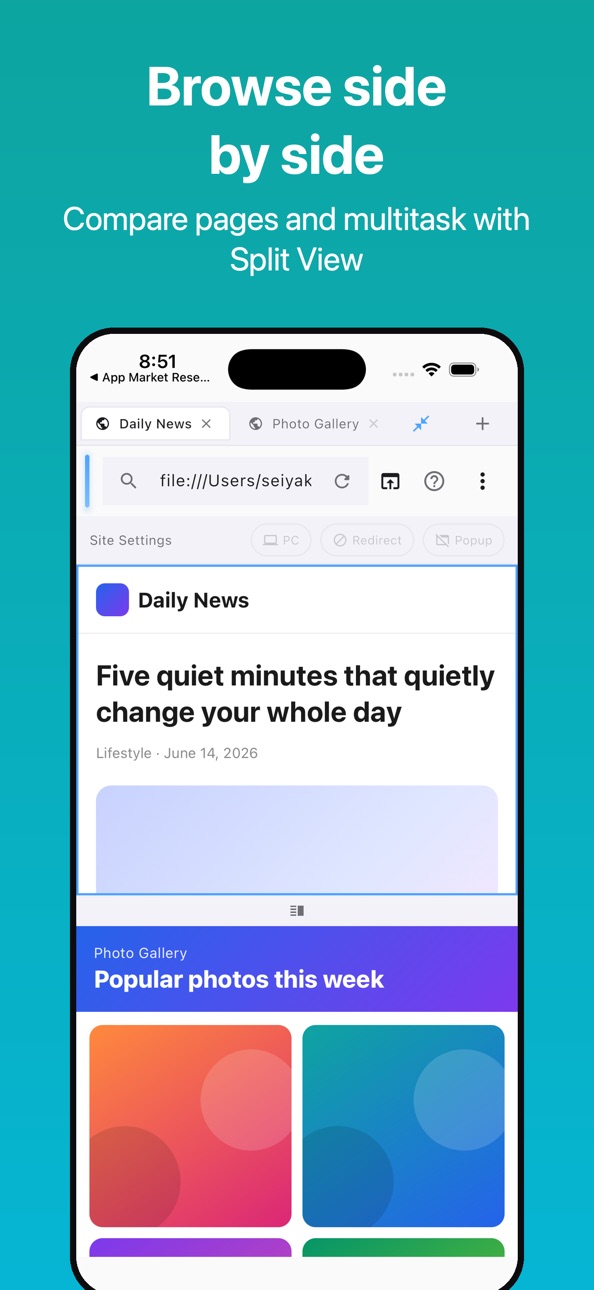
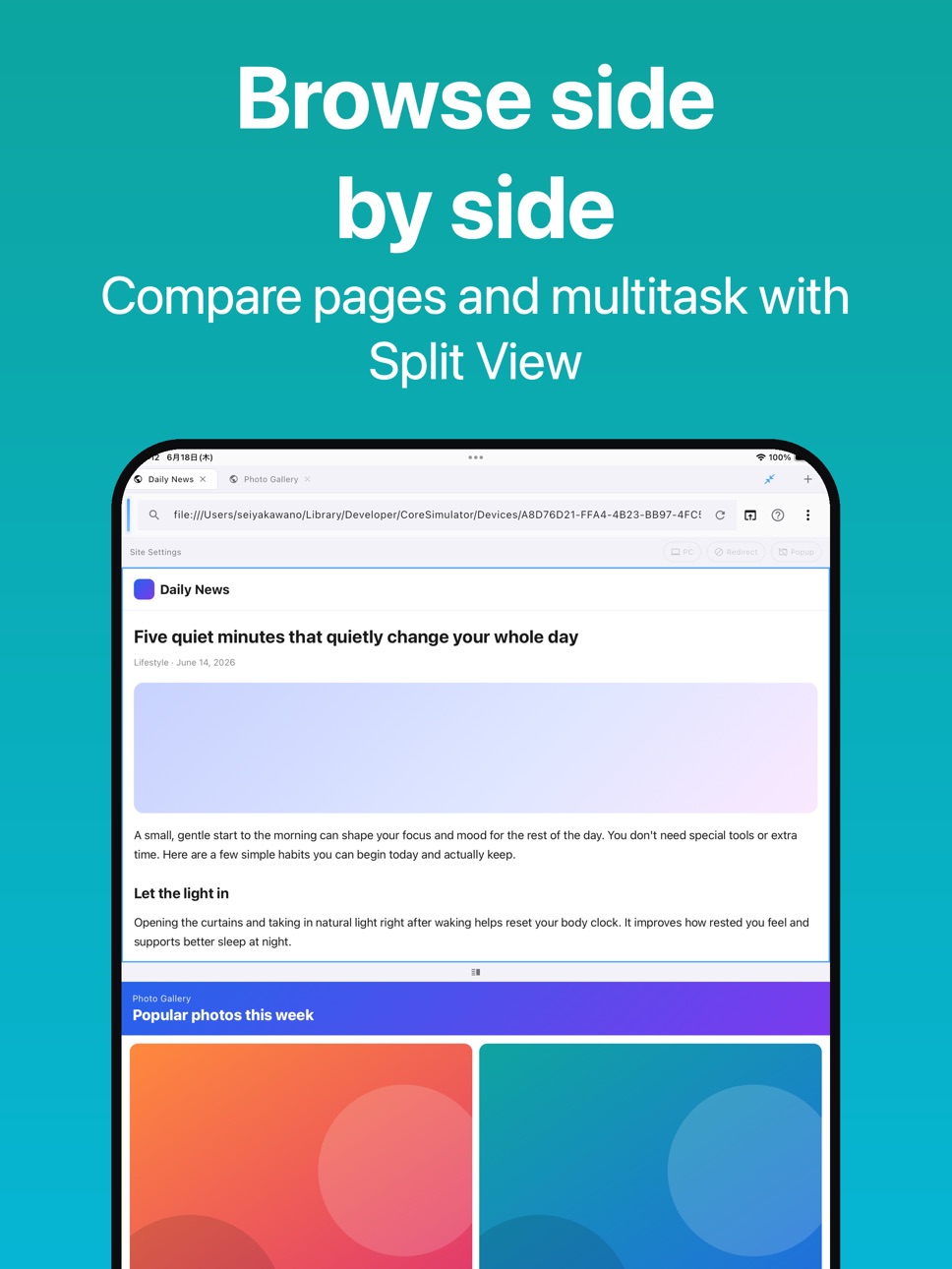
■ Split View browsing
Open two pages side by side for comparison, research, reference, or multitasking.
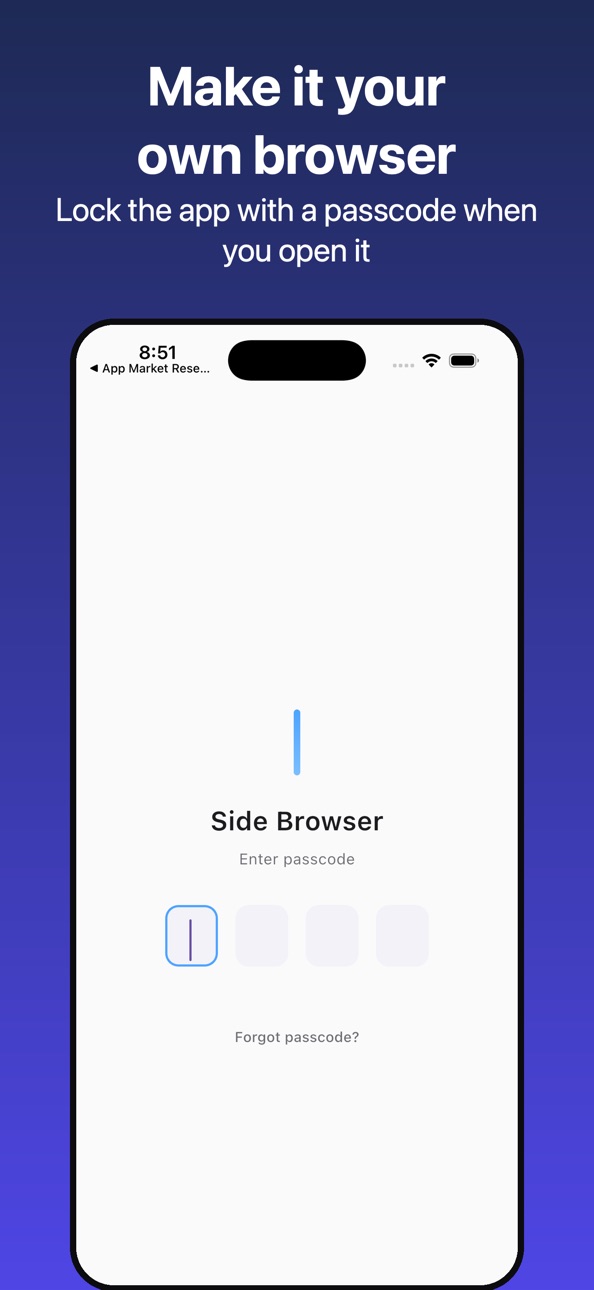
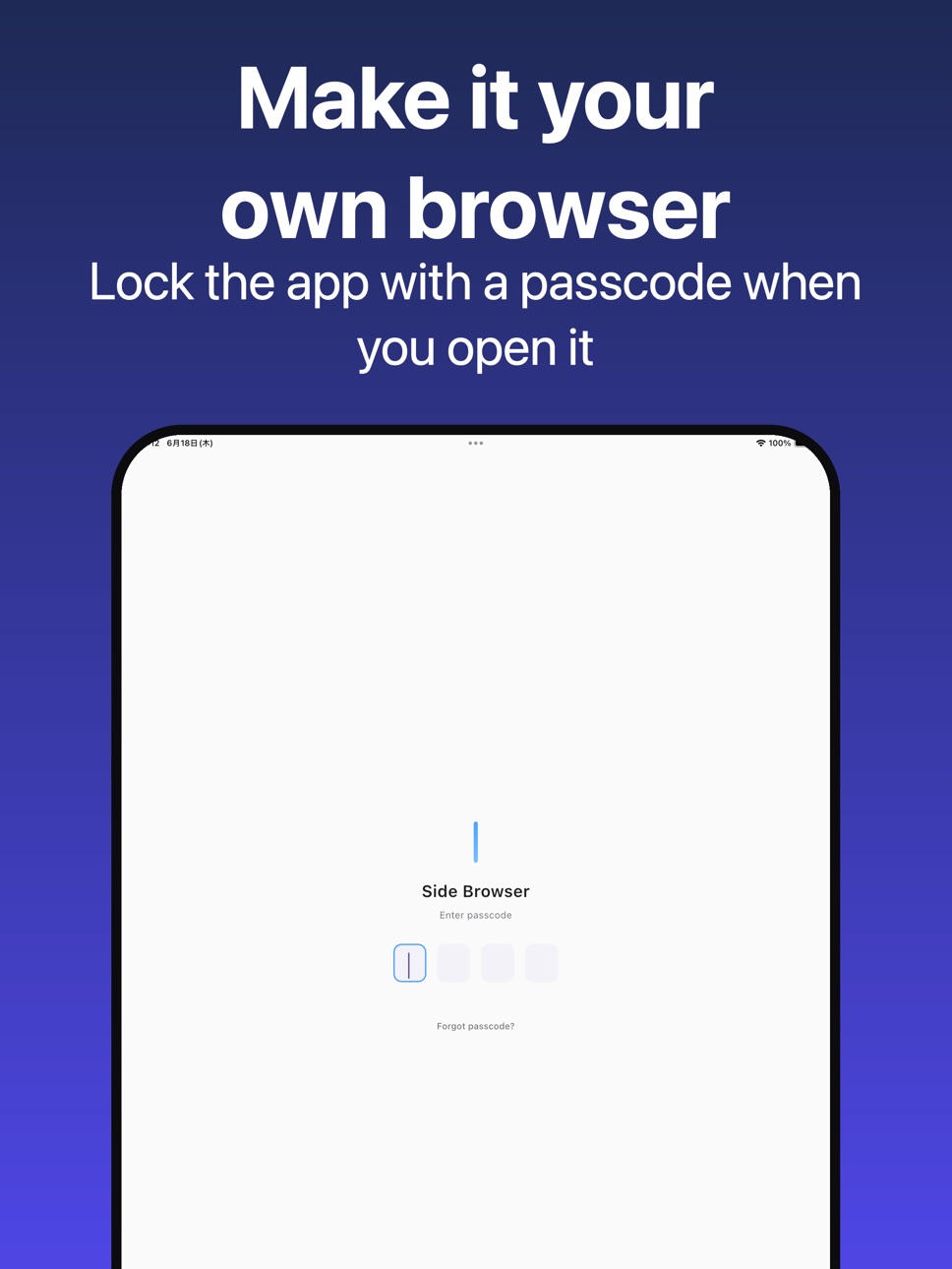
■ App Lock support
Protect your personal browser with passcode lock when opening or returning to the app.
■ Upgrade to Pro
Go Pro to remove in-app ads and enjoy a cleaner, more comfortable browsing experience.
Side Browser is a web browser and content link organizer. It does not provide comics, novels, videos, articles, or other third-party content inside the app. Users can save and browse their own URLs.
Ad and clutter reduction may vary depending on the website.
―――――――――――
About the subscription
- Side Browser Pro (monthly / yearly)
- Payment is charged to your Apple ID at confirmation of purchase.
- The subscription renews automatically unless canceled at least 24 hours before the end of the current period.
- Your account is charged for renewal within 24 hours prior to the end of the current period.
- Manage or cancel anytime in Settings > Apple ID > Subscriptions.
- Terms of Use: https://www.apple.com/legal/internet-services/itunes/dev/stdeula/
- Privacy Policy: https://fillapps.com/privacy/
In-App Purchases US pricing
Side Browser Pro Subscription
(月額) · Monthly$0.99
(yearly) · Yearly$9.99
Capabilities
In-App Purchases
Accessibility
ipadiphonemacrealityDevicetvoswatch
Version history 25 versions
Build 887310307v1.3.72026-06-23 16:19:54
- Redesigned the Home screen so you can reach your favorite sites faster.
- Unified the search field: just type a site name or URL to search or open it.
- Favorite folders now show how many items they contain.
- Cleaned up extra buttons and clutter for a simpler, clearer look.
Build 887289999v1.3.62026-06-22 21:22:58
- Logins for sites like YouTube and Amazon now stay signed in like Safari, even after you close the app.
- Added a setting to automatically clear data when you quit, for extra privacy.
- "Clear session" now also removes cookies, so you're fully signed out.
Build 887235556v1.3.52026-06-21 17:12:17
- YouTube and other video sites now play reliably.
- Smoother browsing with fewer glitches on ad-heavy pages.
- Favorites: search and sort by name, date added, or most opened.
- New start page with handy default sites and a simpler first-run guide.
- Show or hide the "Frequently used" and "Recently added" sections.
Build 887115360v1.3.42026-06-20 15:41:18
- Improved performance and stability.
- Fixed minor bugs.
Build 886939752v1.3.32026-06-16 08:36:44
- Improved performance and stability.
- Fixed minor bugs.
Build 886858252v1.3.22026-06-12 17:59:16
- Improved performance and stability.
- Fixed minor bugs.
Build 886825318v1.3.12026-06-11 17:19:42
- Improved performance and stability.
- Fixed minor bugs.
Build 886640040v1.3.02026-06-07 17:49:51
- Improved performance and stability.
- Fixed minor bugs.
Build 886390317v1.2.92026-06-05 15:04:56
- Improved performance and stability.
- Fixed minor bugs.
Build 883788030v1.2.82026-03-26 22:47:55
New: Split Screen View
- View two websites side by side with vertical or horizontal split
- Drag the divider to freely adjust the size of each pane
- Double-tap to reset to 50:50
Feature Tour
- A guided tour now appears on first launch to help you learn the controls
- Tap the "?" button in the address bar to replay it anytime
Other
- Improved localization support
Build 883647864v1.2.72026-03-23 17:54:58
• Added image download
• Improved sharing stability
Build 883376004v1.2.62026-03-14 21:44:31
Enhanced bookmark icon features
• Bookmark icons can now display page screenshots
• Switch between screenshot and favicon modes in settings
• Choose from 4 icon sizes (Small/Medium/Large/Extra Large)
• Grid layout automatically adjusts based on icon size
Build 883250798v1.2.52026-03-11 23:40:34
・Fixed: Back button now returns to the original favorites folder after navigating from a link within that folder
Build 883134012v1.2.42026-03-08 17:18:08
スクリーンショットの更新
Build 882675589v1.2.32026-02-22 21:27:55
Added long-press menu for links.
- Normal tap: Navigate to the link as usual
- Long press: Shows a menu with the following options
- Open in New Tab
- Open in Safari
- Share
- Copy URL
Build 882515405v1.2.22026-02-16 21:32:39
[Bug Fixes]
- Fixed an issue where tapping links on certain sites caused the screen to
go blank
- Fixed an issue where main content wouldn't play after ads on video sites
- Fixed a rare crash issue
[Improvements]
- Improved stability of ad blocking feature
- Enhanced page loading performance
Build 882473445v1.2.12026-02-14 22:45:12
【Free Version Improvements】
・Increased favorites limit from 20 to 100 items
・Save more sites with the Free version
【Browsing Improvements】
・Fixed an issue where links weren't working properly on some sites
・Improved ad blocking functionality
【Other】
・Minor bug fixes and performance improvements
Build 882198857v1.1.92026-02-06 14:14:20
New Feature: Multiple Subscription Plans
Added 3 plans for Side Browser Pro:
- Monthly Plan ($1.99/month) - Cancel anytime
- Yearly Plan ($17.99/year) - Save 3 months! [Recommended]
- Lifetime ($29.99) - One-time purchase, yours forever
Choose your preferred plan from "Upgrade" in Settings.
Build 882237634v1.2.02026-02-06 23:44:28
Performance Improvements
- Optimized memory usage during page browsing
- Reduced unnecessary background timer processes
- Improved memory cleanup when closing the app
Build 882055534v1.1.82026-02-02 16:58:52
- Security: Improved passcode storage with encryption
Build 881907631v1.1.72026-01-28 03:21:14
- Tapping the domain name now navigates to the site's homepage
Build 881788476v1.1.62026-01-25 22:16:43
・Improved SPA site support
Fixed an issue where URLs were not updated correctly when navigating on
Single Page Applications such as Next.js. The app now detects URL changes
via History API (pushState/replaceState) and properly updates the address
bar and tab information.
Build 881618007v1.1.52026-01-19 06:15:13
Added button to open current page in Safari
Build 881535245v1.1.42026-01-15 19:25:32
・Improved behavior when returning from background
- When passcode is enabled, app now returns to home screen with option
to go back to previous page
・Added forward button
Build 881409045v1.1.32026-01-12 18:17:23
New Feature
- Added screen orientation lock. Choose from "Auto / Portrait / Landscape"
in Settings > Display.
Price history by region
Currency
Show
Columns
Search
Availability 175 of 175 storefronts
| Region | Language | Price | Ratings | Avg | Version |
|---|---|---|---|---|---|
| JP | ja | Free | 1 | 5.0 | 1.3.7 |
| US | en-US | Free | 1 | 5.0 | 1.3.7 |
| AE | en-GB | Free | 0 | — | 1.3.7 |
| AF | en-GB | Free | 0 | — | 1.3.7 |
| AG | en-GB | Free | 0 | — | 1.3.7 |
| AI | en-GB | Free | 0 | — | 1.3.7 |
| AL | en-GB | Free | 0 | — | 1.3.7 |
| AM | en-GB | Free | 0 | — | 1.3.7 |
| AO | en-GB | Free | 0 | — | 1.3.7 |
| AR | es-MX | Free | 0 | — | 1.3.7 |
| AT | de-DE | Free | 0 | — | 1.3.7 |
| AU | en-AU | Free | 0 | — | 1.3.7 |
| AZ | en-GB | Free | 0 | — | 1.3.7 |
| BA | en-GB | Free | 0 | — | 1.3.7 |
| BB | en-GB | Free | 0 | — | 1.3.7 |
| BE | en-GB | Free | 0 | — | 1.3.7 |
| BF | en-GB | Free | 0 | — | 1.3.7 |
| BG | en-GB | Free | 0 | — | 1.3.7 |
| BH | en-GB | Free | 0 | — | 1.3.7 |
| BJ | en-GB | Free | 0 | — | 1.3.7 |
| BM | en-GB | Free | 0 | — | 1.3.7 |
| BN | en-GB | Free | 0 | — | 1.3.7 |
| BO | es-MX | Free | 0 | — | 1.3.7 |
| BR | pt-BR | Free | 0 | — | 1.3.7 |
| BS | en-GB | Free | 0 | — | 1.3.7 |
| BT | en-GB | Free | 0 | — | 1.3.7 |
| BW | en-GB | Free | 0 | — | 1.3.7 |
| BY | en-GB | Free | 0 | — | 1.3.7 |
| BZ | en-GB | Free | 0 | — | 1.3.7 |
| CA | en-CA | Free | 0 | — | 1.3.7 |
| CD | en-GB | Free | 0 | — | 1.3.7 |
| CG | en-GB | Free | 0 | — | 1.3.7 |
| CH | de-CH | Free | 0 | — | 1.3.7 |
| CI | fr-FR | Free | 0 | — | 1.3.7 |
| CL | es-MX | Free | 0 | — | 1.3.7 |
| CM | fr-FR | Free | 0 | — | 1.3.7 |
| CN | zh-Hans-CN | Free | 0 | — | 1.3.7 |
| CO | es-MX | Free | 0 | — | 1.3.7 |
| CR | es-MX | Free | 0 | — | 1.3.7 |
| CV | en-GB | Free | 0 | — | 1.3.7 |
| CY | en-GB | Free | 0 | — | 1.3.7 |
| CZ | en-GB | Free | 0 | — | 1.3.7 |
| DE | de-DE | Free | 0 | — | 1.3.7 |
| DK | en-GB | Free | 0 | — | 1.3.7 |
| DM | en-GB | Free | 0 | — | 1.3.7 |
| DO | es-MX | Free | 0 | — | 1.3.7 |
| DZ | en-GB | Free | 0 | — | 1.3.7 |
| EC | es-MX | Free | 0 | — | 1.3.7 |
| EE | en-GB | Free | 0 | — | 1.3.7 |
| EG | en-GB | Free | 0 | — | 1.3.7 |
| ES | es-ES | Free | 0 | — | 1.3.7 |
| FI | en-GB | Free | 0 | — | 1.3.7 |
| FJ | en-GB | Free | 0 | — | 1.3.7 |
| FM | en-GB | Free | 0 | — | 1.3.7 |
| FR | fr-FR | Free | 0 | — | 1.3.7 |
| GA | fr-FR | Free | 0 | — | 1.3.7 |
| GB | en-GB | Free | 0 | — | 1.3.7 |
| GD | en-GB | Free | 0 | — | 1.3.7 |
| GE | en-GB | Free | 0 | — | 1.3.7 |
| GH | en-GB | Free | 0 | — | 1.3.7 |
| GM | en-GB | Free | 0 | — | 1.3.7 |
| GR | en-GB | Free | 0 | — | 1.3.7 |
| GT | es-MX | Free | 0 | — | 1.3.7 |
| GW | en-GB | Free | 0 | — | 1.3.7 |
| GY | en-GB | Free | 0 | — | 1.3.7 |
| HK | zh-Hant-HK | Free | 0 | — | 1.3.7 |
| HN | es-MX | Free | 0 | — | 1.3.7 |
| HR | en-GB | Free | 0 | — | 1.3.7 |
| HU | en-GB | Free | 0 | — | 1.3.7 |
| ID | en-GB | Free | 0 | — | 1.3.7 |
| IE | en-GB | Free | 0 | — | 1.3.7 |
| IL | en-GB | Free | 0 | — | 1.3.7 |
| IN | en-GB | Free | 0 | — | 1.3.7 |
| IQ | en-GB | Free | 0 | — | 1.3.7 |
| IS | en-GB | Free | 0 | — | 1.3.7 |
| IT | it | Free | 0 | — | 1.3.7 |
| JM | en-GB | Free | 0 | — | 1.3.7 |
| JO | en-GB | Free | 0 | — | 1.3.7 |
| KE | en-GB | Free | 0 | — | 1.3.7 |
| KG | en-GB | Free | 0 | — | 1.3.7 |
| KH | en-GB | Free | 0 | — | 1.3.7 |
| KN | en-GB | Free | 0 | — | 1.3.7 |
| KR | ko | Free | 0 | — | 1.3.7 |
| KW | en-GB | Free | 0 | — | 1.3.7 |
| KY | en-GB | Free | 0 | — | 1.3.7 |
| KZ | en-GB | Free | 0 | — | 1.3.7 |
| LA | en-GB | Free | 0 | — | 1.3.7 |
| LB | en-GB | Free | 0 | — | 1.3.7 |
| LC | en-GB | Free | 0 | — | 1.3.7 |
| LK | en-GB | Free | 0 | — | 1.3.7 |
| LR | en-GB | Free | 0 | — | 1.3.7 |
| LT | en-GB | Free | 0 | — | 1.3.7 |
| LU | en-GB | Free | 0 | — | 1.3.7 |
| LV | en-GB | Free | 0 | — | 1.3.7 |
| LY | en-GB | Free | 0 | — | 1.3.7 |
| MA | en-GB | Free | 0 | — | 1.3.7 |
| MD | en-GB | Free | 0 | — | 1.3.7 |
| ME | en-GB | Free | 0 | — | 1.3.7 |
| MG | en-GB | Free | 0 | — | 1.3.7 |
| MK | en-GB | Free | 0 | — | 1.3.7 |
| ML | en-GB | Free | 0 | — | 1.3.7 |
| MM | en-GB | Free | 0 | — | 1.3.7 |
| MN | en-GB | Free | 0 | — | 1.3.7 |
| MO | zh-Hant-HK | Free | 0 | — | 1.3.7 |
| MR | en-GB | Free | 0 | — | 1.3.7 |
| MS | en-GB | Free | 0 | — | 1.3.7 |
| MT | en-GB | Free | 0 | — | 1.3.7 |
| MU | en-GB | Free | 0 | — | 1.3.7 |
| MV | en-GB | Free | 0 | — | 1.3.7 |
| MW | en-GB | Free | 0 | — | 1.3.7 |
| MX | es-MX | Free | 0 | — | 1.3.7 |
| MY | en-GB | Free | 0 | — | 1.3.7 |
| MZ | en-GB | Free | 0 | — | 1.3.7 |
| NA | en-GB | Free | 0 | — | 1.3.7 |
| NE | en-GB | Free | 0 | — | 1.3.7 |
| NG | en-GB | Free | 0 | — | 1.3.7 |
| NI | es-MX | Free | 0 | — | 1.3.7 |
| NL | nl | Free | 0 | — | 1.3.7 |
| NO | en-GB | Free | 0 | — | 1.3.7 |
| NP | en-GB | Free | 0 | — | 1.3.7 |
| NR | en-GB | Free | 0 | — | 1.3.7 |
| NZ | en-AU | Free | 0 | — | 1.3.7 |
| OM | en-GB | Free | 0 | — | 1.3.7 |
| PA | es-MX | Free | 0 | — | 1.3.7 |
| PE | es-MX | Free | 0 | — | 1.3.7 |
| PG | en-GB | Free | 0 | — | 1.3.7 |
| PH | en-GB | Free | 0 | — | 1.3.7 |
| PK | en-GB | Free | 0 | — | 1.3.7 |
| PL | en-GB | Free | 0 | — | 1.3.7 |
| PT | pt-PT | Free | 0 | — | 1.3.7 |
| PW | en-GB | Free | 0 | — | 1.3.7 |
| PY | es-MX | Free | 0 | — | 1.3.7 |
| QA | en-GB | Free | 0 | — | 1.3.7 |
| RO | en-GB | Free | 0 | — | 1.3.7 |
| RS | en-GB | Free | 0 | — | 1.3.7 |
| RU | ru | Free | 0 | — | 1.3.7 |
| RW | en-GB | Free | 0 | — | 1.3.7 |
| SA | en-GB | Free | 0 | — | 1.3.7 |
| SB | en-GB | Free | 0 | — | 1.3.7 |
| SC | en-GB | Free | 0 | — | 1.3.7 |
| SE | sv | Free | 0 | — | 1.3.7 |
| SG | en-GB | Free | 0 | — | 1.3.7 |
| SI | en-GB | Free | 0 | — | 1.3.7 |
| SK | en-GB | Free | 0 | — | 1.3.7 |
| SL | en-GB | Free | 0 | — | 1.3.7 |
| SN | en-GB | Free | 0 | — | 1.3.7 |
| SR | en-GB | Free | 0 | — | 1.3.7 |
| ST | en-GB | Free | 0 | — | 1.3.7 |
| SV | es-MX | Free | 0 | — | 1.3.7 |
| SZ | en-GB | Free | 0 | — | 1.3.7 |
| TC | en-GB | Free | 0 | — | 1.3.7 |
| TD | en-GB | Free | 0 | — | 1.3.7 |
| TH | en-GB | Free | 0 | — | 1.3.7 |
| TJ | en-GB | Free | 0 | — | 1.3.7 |
| TM | en-GB | Free | 0 | — | 1.3.7 |
| TN | en-GB | Free | 0 | — | 1.3.7 |
| TO | en-GB | Free | 0 | — | 1.3.7 |
| TR | en-GB | Free | 0 | — | 1.3.7 |
| TT | en-GB | Free | 0 | — | 1.3.7 |
| TW | zh-Hant-TW | Free | 0 | — | 1.3.7 |
| TZ | en-GB | Free | 0 | — | 1.3.7 |
| UA | en-GB | Free | 0 | — | 1.3.7 |
| UG | en-GB | Free | 0 | — | 1.3.7 |
| UY | en-GB | Free | 0 | — | 1.3.7 |
| UZ | en-GB | Free | 0 | — | 1.3.7 |
| VC | en-GB | Free | 0 | — | 1.3.7 |
| VE | es-MX | Free | 0 | — | 1.3.7 |
| VG | en-GB | Free | 0 | — | 1.3.7 |
| VN | en-GB | Free | 0 | — | 1.3.7 |
| VU | en-GB | Free | 0 | — | 1.3.7 |
| XK | en-GB | Free | 0 | — | 1.3.7 |
| YE | en-GB | Free | 0 | — | 1.3.7 |
| ZA | en-GB | Free | 0 | — | 1.3.7 |
| ZM | en-GB | Free | 0 | — | 1.3.7 |
| ZW | en-GB | Free | 0 | — | 1.3.7 |
Change log 29 changes · US
✎
releaseNotes updated
- Redesigned the Home screen so you can reach your favorite sites faster.
- Unified the search field: just type a site name or URL to search or open it.
- Favor
✎
description updated
Too many tabs? Bookmarks you can never find again? Pages buried in ads?
Side Browser keeps the sites you visit every day in one clean place — videos, articles,
✎
subtitle updated
Ad blocker for clean reading
✎
name updated
Side Browser: Content Hub
◆
Version 1.3.7 released
- Redesigned the Home screen so you can reach your favorite sites faster.
- Unified the search field: just type a site name or URL to search or open it.
- Favorite folders now show how many items they contain.
- Cleaned up extra buttons and
◆
Version 1.3.6 released
- Logins for sites like YouTube and Amazon now stay signed in like Safari, even after you close the app.
- Added a setting to automatically clear data when you quit, for extra privacy.
- "Clear session" now also removes cookies, so you're f
◆
Version 1.3.5 released
- YouTube and other video sites now play reliably.
- Smoother browsing with fewer glitches on ad-heavy pages.
- Favorites: search and sort by name, date added, or most opened.
- New start page with handy default sites and a simpler first-ru
◆
Version 1.3.4 released
- Improved performance and stability.
- Fixed minor bugs.
◆
Version 1.3.3 released
- Improved performance and stability.
- Fixed minor bugs.
◆
Version 1.3.2 released
- Improved performance and stability.
- Fixed minor bugs.
◆
Version 1.3.1 released
- Improved performance and stability.
- Fixed minor bugs.
◆
Version 1.3.0 released
- Improved performance and stability.
- Fixed minor bugs.
◆
Version 1.2.9 released
- Improved performance and stability.
- Fixed minor bugs.
◆
Version 1.2.8 released
New: Split Screen View
- View two websites side by side with vertical or horizontal split
- Dr
◆
Version 1.2.7 released
• Added image download
• Improved sharing stability
◆
Version 1.2.6 released
Enhanced bookmark icon features
• Bookmark icons can now display page screenshots
• Switch between screenshot and favicon modes in settings
• Choose from 4 icon sizes (Small/Medium/Large/Extra Large)
• Grid layout automatically a
◆
Version 1.2.5 released
・Fixed: Back button now returns to the original favorites folder after navigating from a link within that folder
◆
Version 1.2.4 released
スクリーンショットの更新
◆
Version 1.2.3 released
Added long-press menu for links.
- Normal tap: Navigate to the link as usual
- Long press: Shows a menu with the following options
- Open in New Tab
- Open in Safari
- Share
- Copy URL
◆
Version 1.2.2 released
[Bug Fixes]
- Fixed an issue where tapping links on certain sites caused the screen to
go blank
- Fixed an issue where main content wouldn't play after ads on video sites
- Fixed a rare crash issue
[Improvements]
- Improved
◆
Version 1.2.1 released
【Free Version Improvements】
・Increased favorites limit from 20 to 100 items
・Save more sites with the Free version
【Browsing Improvements】
・Fixed an issue where links weren't working properly on some sites
・Improved ad blocking
◆
Version 1.2.0 released
Performance Improvements
- Optimized memory usage during page browsing
- Reduced unnecessary background timer processes
- Improved memory cleanup when closing the app
◆
Version 1.1.9 released
New Feature: Multiple Subscription Plans
Added 3 plans for Side Browser Pro:
- Monthly Plan ($1.99/month) - Cancel anytime
- Yearly Plan ($17.99/year) - Save 3 months! [Recommended]
- Lifetime ($29.99) - One-time purchase, yours
◆
Version 1.1.8 released
- Security: Improved passcode storage with encryption
◆
Version 1.1.7 released
- Tapping the domain name now navigates to the site's homepage
◆
Version 1.1.6 released
・Improved SPA site support
Fixed an issue where URLs were not updated correctly when navigating on
Single Page Applications such as Next.js. The app now detects URL changes
via History API (pushState/replaceState) and properly updat
◆
Version 1.1.5 released
Added button to open current page in Safari
◆
Version 1.1.4 released
・Improved behavior when returning from background
- When passcode is enabled, app now returns to home screen with option
to go back to previous page
・Added forward button
◆
Version 1.1.3 released
New Feature
- Added screen orientation lock. Choose from "Auto / Portrait / Landscape"
in Settings > Display.