Home › Productivity

 US
US
1 of 1 storefronts
Content in en-US
Content in en-US
Information
Apple ID6756518673
Bundle IDcom.heimdl.Heimdl
SellerSeller
Min iOS17.6
Min macOS14.6
Device familiesiphone, ipad
Released2026-01-28
Copyright© PodQ Limited
Privacy policyLink ↗
Preview 2 platforms
iPhone 6 images



iPad 4 images


What’s New Version 4.4
- Care entries now show their attached photos right in the detail view.
- Open a care entry straight from the care log card on your home screen.
- Stronger privacy protection: your sensitive information is now encrypted, with tighter safeguards across the app.
Description
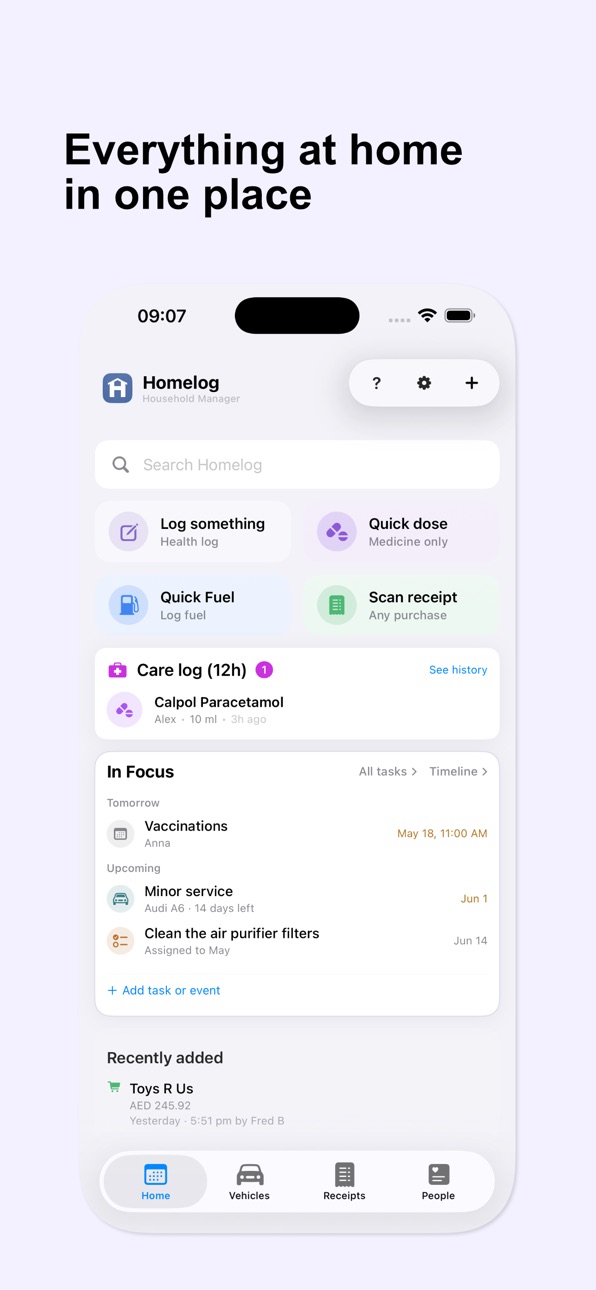
Homelog gives your household one shared place to keep track of everyday life.
Designed for busy families and households with staff, Homelog helps you log important information, organise responsibilities, and make sure the right
people have access to the right records.
Track what matters
• Care logs: medicines, incidents, symptoms, and notes
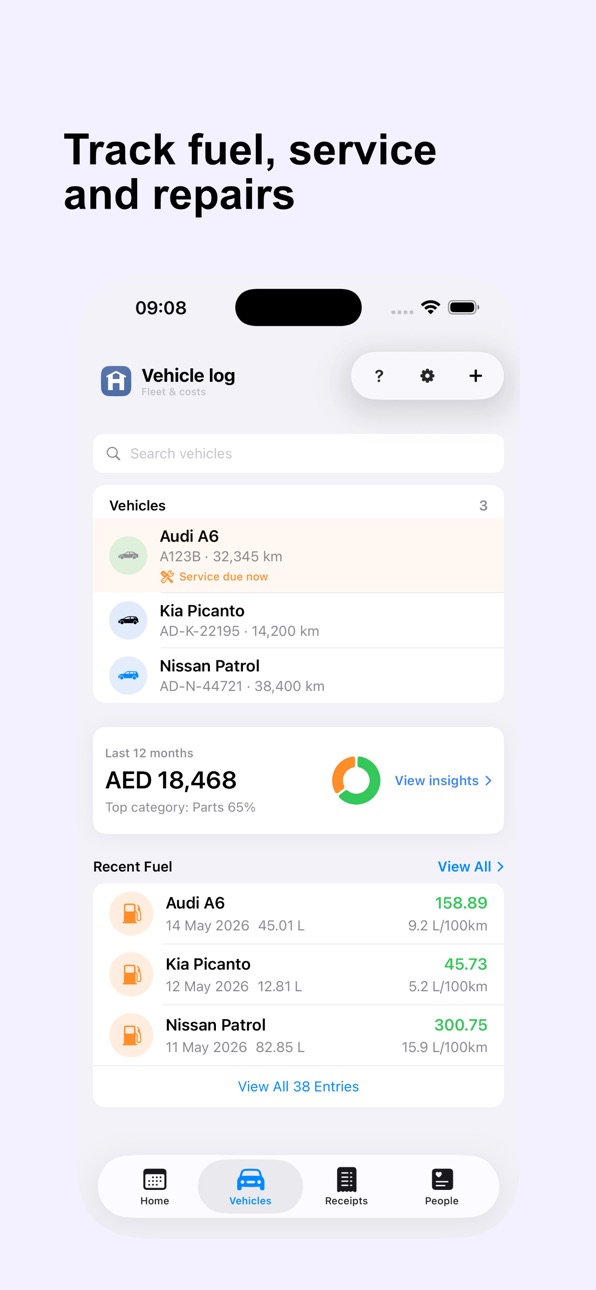
• Vehicles: fuel, maintenance, insurance, and reminders
• Staff: roles, access, and shared records
• Receipts & scans: stored, searchable, and traceable
Built for shared responsibility
Invite family members and household staff with controlled access. Everyone works from the same record, so important details do not get lost in chats,
paper notes, or memory.
Private by design
Your data is tied to your account and used only to run and improve the app. No advertising. No third-party tracking. Your data is never sold or shared.
Plans
Homelog offers optional auto-renewing subscription plans (Household, Family, and Estate) with monthly or annual billing. Subscriptions can be managed or
cancelled anytime in your App Store account settings.
Terms of Use: https://www.homelog.ai/terms
Privacy Policy: https://www.homelog.ai/privacy
In-App Purchases US pricing
Homelog Membership Subscription
Estate · Yearly 14-day free trial$399.99
Estate · Monthly 14-day free trial$39.99
Household · Yearly 14-day free trial$99.99
Household · Monthly 14-day free trial$9.99
Family · Yearly 14-day free trial$49.99
Family · Monthly 14-day free trial$4.99
Premium · Monthly 2-month free trial$14.99
Household · Monthly 2-month free trial$7.99
Personal · Monthly 2-month free trial$3.99
Capabilities
In-App Purchases
Accessibility
ipadiphonemacrealityDevicetvoswatch
Version history 25 versions
Build 888094634v4.42026-07-10 19:58:54
- Care entries now show their attached photos right in the detail view.
- Open a care entry straight from the care log card on your home screen.
- Stronger privacy protection: your sensitive information is now encrypted, with tighter safeguards across the app.
Build 887895948v4.32026-07-08 00:24:37
A fresh look and simpler plans.
• New app icon and updated in-app logo
• Annual billing: every plan is now available monthly or yearly — switch anytime in Settings
• Simpler receipt scanning: visible scan quotas are gone; scan freely under fair use
• A clearer, friendlier welcome when setting up your household
• Improvements to purchase reliability and overall stability
Build 886789846v4.22026-06-10 21:06:54
- Redesigned household activity feed with readable event descriptions, per-item history, and filters for member, date, and category
- Medicine schedules can now be edited without creating false missed doses, and past care log entries can be corrected on both platforms
- New iOS home screen widget shows today's and upcoming items, and document previews now load faster with server-generated thumbnails
- Fixes for all-day calendar events showing on the wrong day, dose reminder cards, and smoother loading across people and dashboard screens
Build 886534815v4.12026-06-08 19:09:59
- Repeating calendar events — set events to recur, edit or delete one or all, now in your local time.
- Doses at a glance — a new card shows what's due across everyone you care for; tap to jump straight in.
- Add medicines faster — straight from a person's card, plus a tidier Quick Dose.
- In Focus widget — see what's due today and soon right on your Home Screen.
- Activity log — a new Settings screen shows who did what in your household, with filters and per-item history on detail screens.
- Care made easier — edit past care log entries and dose schedules, a "Review" badge on new medicines, and smoother dose marking.
- Faster vehicle documents — quicker, lighter document previews.
- Smoother & steadier — quicker start-up and lots of small polish.
Build 886297267v4.02026-05-29 18:43:54
• Medicine context on Person Detail — each medicine now shows its schedule, next dose, and refill status, so upcoming doses are visible at a glance.
• Refill alerts on Home — the In Focus card surfaces refill warnings; tap to log a refill or snooze without leaving Home.
• Live Doses-due card — refreshes on a 60-second timer so the times stay accurate.
• Backdate Update Pay — apply a pay change effective the day after the most recent payslip, not just today.
• Faster tab opens on Android — People and Vehicles render from cached data first, then refresh in the background.
• Payroll polish — temporary-contract chip now honours end dates; payslip details include period dates; misc small fixes.
Build 886223104v3.92026-05-28 17:25:06
- New medicine library with age and dose guidance built in.
- Scheduled doses and refill reminders, with phone notifications.
- "Doses due" card on Home, plus a review for yesterday's missed doses.
- Staff can log their own days or hours; clearer contracts and pay changes.
- Attach photos and PDFs to vehicle service records.
- Redesigned task Repeats editor with presets and a "next due" preview.
Build 885877643v3.82026-05-21 00:09:23
Receipts Fuel filter now includes vehicle fuel entries, and Insights filters by the selected range.
Smoother Care flow when adding medicines, plus delete unverified ones from the review sheet.
Edit Task matches Add Task and accepts group-only assignments.
Parts scan shows line items before Continue.
Stuck screens auto-retry after your session restores.
Build 885740999v3.72026-05-18 14:37:35
- Tasks: group assignments work end-to-end in Add/Edit Task (validation, save, home label).
- Care: medicine add flow no longer drops the confirm tap; chains into Verify Dosage; unverified medicines can be deleted from the review sheet.
- Parts: scan shows line items before Continue; zero/negative odometer cases handled.
- Receipts: Insights period picker filters correctly; Fuel filter includes vehicle fuel entries.
- Team: clear last name, edit name without a location row.
- Reliability: views auto-recover after auth session restore.
Build 885474024v3.52026-05-11 02:58:16
Reworked Pay & Records functionality to make payroll better.
Build 885534850v3.62026-05-11 23:19:21
Improvements in the adding new users flow.
Build 885251517v3.32026-05-04 21:37:16
Fix to quick fuel of unclear receipts.
Build 885213913v3.22026-05-03 21:58:59
Improved permission system for the care logging.
Build 885165054v3.12026-05-01 19:25:34
Improved permission management
Build 885128644v3.02026-04-30 21:14:29
Bug fixes and performance improvements
Build 885066047v2.92026-04-29 14:48:41
Improved receipt scanning process, is now done in three stages.
Build 884724287v2.82026-04-21 03:20:06
Improvements to the care logging. A new Log Something button that helps make this easy.
Build 884469243v2.72026-04-13 23:01:48
Bug fix for adding fuel receipts with unclear date.
Build 883969066v2.62026-04-01 21:44:47
Fixed an issue with the care log entry flow.
Build 883748233v2.52026-03-26 22:54:09
This update improves Home and In Focus reliability, with better visibility for upcoming events and more consistent refresh behavior.
We’ve also refined onboarding and setup flows across Home, Care, and Vehicles, and made general UI and dark mode improvements throughout the app.
Build 883671695v2.42026-03-23 21:59:06
Bug fixes for the new onboarding and help system.
Build 883592761v2.32026-03-22 18:02:39
Improved user onboarding and help system.
Build 883429492v2.22026-03-17 01:27:40
Bug fixes in adding staff and the widget.
Build 883394096v2.12026-03-16 01:59:54
- Added configurable Homelog Home widgets with activity, fuel, groceries, and care modes.
- Home widgets now load faster and stay in sync with the app using shared Home snapshot data.
- Improved widget content ranking so important items appear before passive recent activity.
- Fixed widget issue labeling so normal fuel and grocery entries no longer appear as needing attention.
- Refined widget layouts across sizes with denser rows, better care details, and improved medium-widget spacing.
- Improved Home startup so the app can render from cached shared snapshot data before refresh completes.
Build 882731821v1.92026-03-03 16:54:38
We’ve improved how the app handles your information behind the scenes, so screens load faster and the app feels quicker and smoother overall.
Build 882639994v1.82026-02-23 18:42:16
### New
- Added Calendar Sync settings in iOS so you can manage calendar feed access directly in-app.
- Introduced ICS calendar feed support with token-based access for external calendar subscriptions.
### Improvements
- Improved calendar sync reliability by polishing ICS link handling and caching.
- Reduced calendar noise by filtering feed events using a lookback window.
### Fixes
- Fixed an issue where selected people could be lost after saving a calendar event.
- Included general stability and maintenance updates.
Price history by region
Currency
Show
Columns
Search
Availability 1 of 1 storefronts
| Region | Language | Price | Ratings | Avg | Version |
|---|---|---|---|---|---|
| US | en-US | Free | 0 | — | 4.4 |
Change log 29 changes · US
✎
releaseNotes updated
- Care entries now show their attached photos right in the detail view.
- Open a care entry straight from the care log card on your home screen.
- Stronger pri
✎
description updated
Homelog gives your household one shared place to keep track of everyday life.
Designed for busy families and households with staff, Homelog helps you log impor
✎
subtitle updated
One log for your household
✎
name updated
Homelog: Household Manager
◆
Version 4.4 released
- Care entries now show their attached photos right in the detail view.
- Open a care entry straight from the care log card on your home screen.
- Stronger privacy protection: your sensitive information is now encrypted, with tighter safeg
◆
Version 4.3 released
A fresh look and simpler plans.
• New app icon and updated in-app logo
• Annual billing: every plan is now available monthly or yearly — switch anytime in Settings
• Simpler receipt scanning: visible scan quotas are gone; scan freely under
◆
Version 4.2 released
- Redesigned household activity feed with readable event descriptions, per-item history, and filters for member, date, and category
- Medicine schedules can now be edited without creating false missed doses, and past care log entries can be
◆
Version 4.1 released
- Repeating calendar events — set events to recur, edit or delete one or all, now in your local time.
- Doses at a glance — a new card shows what's due across everyone you care for; tap to jump straight in.
- Add medicines faster — straight
◆
Version 4.0 released
• Medicine context on Person Detail — each medicine now shows its schedule, next dose, and refill status, so upcoming doses are visible at a glance.
• Refill alerts on Home — the In Focus card surfaces refill warnings; tap to log a refill o
◆
Version 3.9 released
- New medicine library with age and dose guidance built in.
- Scheduled doses and refill reminders, with phone notifications.
- "Doses due" card on Home, plus a review for yesterday's missed doses.
- Staff can log their own days or hours
◆
Version 3.8 released
Receipts Fuel filter now includes vehicle fuel entries, and Insights filters by the selected range.
Smoother Care flow when adding medicines, plus delete unverified ones from the review sheet.
Edit Task matches Add Task and accepts group-on
◆
Version 3.7 released
- Tasks: group assignments work end-to-end in Add/Edit Task (validation, save, home label).
- Care: medicine add flow no longer drops the confirm tap; chains into Verify Dosage; unverified medicines can be deleted from the review sheet.
- P
◆
Version 3.6 released
Improvements in the adding new users flow.
◆
Version 3.5 released
Reworked Pay & Records functionality to make payroll better.
◆
Version 3.3 released
Fix to quick fuel of unclear receipts.
◆
Version 3.2 released
Improved permission system for the care logging.
◆
Version 3.1 released
Improved permission management
◆
Version 3.0 released
Bug fixes and performance improvements
◆
Version 2.9 released
Improved receipt scanning process, is now done in three stages.
◆
Version 2.8 released
Improvements to the care logging. A new Log Something button that helps make this easy.
◆
Version 2.7 released
Bug fix for adding fuel receipts with unclear date.
◆
Version 2.6 released
Fixed an issue with the care log entry flow.
◆
Version 2.5 released
This update improves Home and In Focus reliability, with better visibility for upcoming events and more consistent refresh behavior.
We’ve also refined onboarding and setup flows across Home, Care, and Vehicles, and made general UI and dar
◆
Version 2.4 released
Bug fixes for the new onboarding and help system.
◆
Version 2.3 released
Improved user onboarding and help system.
◆
Version 2.2 released
Bug fixes in adding staff and the widget.
◆
Version 2.1 released
- Added configurable Homelog Home widgets with activity, fuel, groceries, and care modes.
- Home widgets now load faster and stay in sync with the app using shared Home snapshot data.
- Improved widget content ranking so important items app
◆
Version 1.9 released
We’ve improved how the app handles your information behind the scenes, so screens load faster and the app feels quicker and smoother overall.
◆
Version 1.8 released
### New
- Added Calendar Sync settings in iOS so you can manage calendar feed access directly in-app.
- Introduced ICS calendar feed support with token-based access for external calendar subscriptions.
### Improvements
- Improved calendar