Home › Utilities

 US
US
1 of 1 storefronts
Content in en-US
Content in en-US
Information
Apple ID6756453626
Bundle IDdnzmaral.MarAI
SellerSeller
Min iOS18.6
Min macOS15.6
Device familiesiphone
Released2026-01-28
Copyright© 2026 Deniz Maral
Privacy policyLink ↗
Preview 1 platform
iPhone 10 images




What’s New Version 2.41
- Smarter language detection: the keyboard follows your language switches more reliably — names, fast typing, and mixed German/English/Turkish messages
- Much faster keyboard startup: language models load up to 40× faster when iOS re-launches the keyboard
- Pro now works fully offline — no more losing your theme in airplane mode
- Deleting a learned word from Statistics now removes it everywhere, permanently
- Better corrections for hyphenated words, names with internal capitals, and Turkish apostrophe suffixes
- New setting: choose whether backspace undoes an autocorrection or keeps it
Description
Your keyboard. Your data. On your device.
This keyboard is built with one clear principle: your typing stays on your device — always.
No internet connection. No servers. No analytics. No tracking. Everything the keyboard does happens locally, using on-device processing only.
PRIVACY BY DESIGN
• No data collection or telemetry
• No network access — fully offline
• No cloud sync of typing data
• No third-party services or SDKs
• No tracking, fingerprinting, or identifiers
Text input is processed only to provide keyboard functionality such as suggestions and corrections. Nothing is ever transmitted off your device. Learned words and preferences are stored locally and can be deleted at any time.
INTELLIGENT TYPING
• Smart autocorrect — Powered by a custom spell-check engine with fuzzy matching. Catches typos, restores missing diacritics, and keeps the accents you intentionally type — all without relying on the cloud.
• Multi-language support — Over 30 languages with automatic language detection. Switch seamlessly between languages mid-sentence — the keyboard follows along, and even weighs the words you've taught it when deciding the language.
• Context-aware suggestions — Word predictions that adapt to what you're typing, including next-word suggestions based on word pairs.
• Personal dictionary — The keyboard learns your words and names over time. Your vocabulary, stored only on your device.
DESIGNED FOR SPEED
• Swipe gestures — Swipe left to delete characters or whole words. Swipe right for accent characters.
• Fast period shortcut — Double-tap space to insert a period.
• Clipboard history — Access your recent copies with one tap. Stored locally, encrypted at rest, auto-expires after 24 hours. Sensitive content like passwords and OTPs is filtered automatically.
• Number row — Optional dedicated number row above the keyboard.
• Math expressions — Type simple calculations and see results inline.
MAKE IT YOURS
• 26 built-in themes — From minimalist Mono to vibrant Neon, with special effects like rainbow borders and gold gradients.
• Custom theme creator — Design your own keyboard theme with full color control and live preview. Pick colors for every element — keys, text, borders, accents — and see changes instantly.
• Adjustable layout — Fine-tune key spacing, padding, and sizing to match your typing style.
• Configurable gestures — Assign swipe actions to keys for shortcuts that fit your workflow.
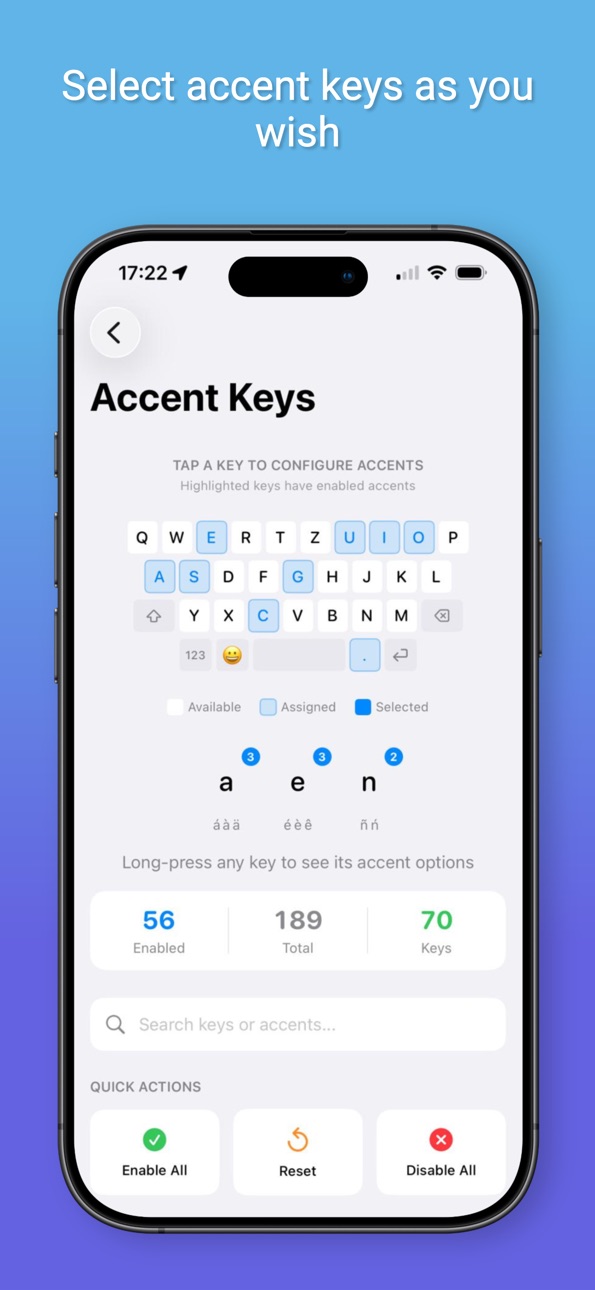
• Custom accent keys — Choose which accents appear on long-press for each key.
YOU STAY IN CONTROL
• All data stored only on your device
• Never shared, never uploaded
• Private mode disables clipboard history and word learning
• Clear learned words and history at any time
If you value privacy, transparency, and performance — this keyboard was made for you.
In-App Purchases US pricing
MarAI Pro Subscription
Monthly · Monthly 7-day free trial$3.99
Annual · Yearly$24.99
One-Time Purchases
MarAI Pro Lifetime$69.99
Capabilities
In-App Purchases
Accessibility
ipadiphonemacrealityDevicetvoswatch
Version history 25 versions
Build 887989991v2.412026-07-08 20:14:28
- Smarter language detection: the keyboard follows your language switches more reliably — names, fast typing, and mixed German/English/Turkish messages
- Much faster keyboard startup: language models load up to 40× faster when iOS re-launches the keyboard
- Pro now works fully offline — no more losing your theme in airplane mode
- Deleting a learned word from Statistics now removes it everywhere, permanently
- Better corrections for hyphenated words, names with internal capitals, and Turkish apostrophe suffixes
- New setting: choose whether backspace undoes an autocorrection or keeps it
Build 887647964v2.402026-07-01 04:52:48
• Your personal dictionary stays cleaner — common words are no longer added to it, and words you delete now stay deleted and sync reliably across your devices.
• Smarter corrections — improved fixes for short words and for words typed without their accents, plus fewer wrong autocorrects when you switch between languages.
• Better multilingual typing — refreshed German, English, and Turkish language models for cleaner, less noisy suggestions.
• More reliable — fixed several crashes and reduced memory use for smoother, more responsive typing.
• Polished handling of personal words, including accented and non-Latin words you've taught the keyboard.
Build 887231262v2.392026-06-21 22:43:34
Fixed the bug with small words (ds ->da)
Build 886952281v2.382026-06-14 23:24:06
• AI Writing gets a roomier, expandable panel and now reads your entire text — not just what's on screen — so rewrites, replies, and translations have the full picture.
• New one-tap option to hide the keyboard while you review an AI suggestion, giving you more room to read.
• Smarter Turkish corrections: the right accented word is now kept even in the middle of a sentence, instead of being swapped for a rarer look-alike.
• Sharper multi-language detection, so the correct language activates faster as you move between them.
Build 886902406v2.372026-06-13 04:26:38
A sharper look on the latest iOS, and a keyboard that knows your words better than ever.
• Polished for iOS 26 and iOS 27 — the keyboard and clipboard now render clean and solid, with no more see-through glass or stray frames showing the page behind them.
• Your personal words come first — names, nicknames, and the slang you've taught MarAI are now recognized across every language you type in, and the words you use most rise
to the top.
• Forget a word in one move — long-press a suggestion to instantly remove something you didn't mean to save. No menus, no digging through settings.
• Cleaner autocorrect — fixed a highlight that could linger after you undo a correction.
Build 886778626v2.362026-06-11 22:20:41
Typing has never felt this smooth.
• Buttery-smooth suggestions — the suggestion bar no longer flickers while you type. Words and corrections
update in place, calm and steady, just like you'd expect.
SMARTER AUTOCORRECT
• Accent-safe corrections — when you type a word with accents, autocorrect now keeps them instead of replacing it with a more common unaccented word.
• Better diacritic restoration — missing accents are now restored even when the same word also has a typo.
• Improved typo handling — a retuned correction model lands on the word you meant more often, especially when a single key is mistyped.
SMARTER LANGUAGE DETECTION
• A new on-device language model switches languages mid-sentence more reliably and gives real weight to the words you've taught your keyboard.
• It's faster and lighter, with no loss in accuracy.
SMOOTHER SUGGESTIONS
• The suggestion bar no longer flickers and refreshes with lower latency as you type.
As always, everything runs on your device. No internet, no tracking.
Build 886544052v2.342026-06-04 23:02:06
• Latest emoji — Updated to the Emoji 17.0 set, including the newest characters and improved support for multi-person skin tone combinations.
• Clearer skin tone picker — The skin tone preview in Settings now shows the selected tone on a face, so it's easy to see exactly which shade you're
choosing.
Build 886449511v2.332026-06-03 16:38:56
Smarter, more accurate typing across languages.
• Accent-safe autocorrect - When you type a word with accents or special characters, the keyboard now keeps them instead of stripping them back to the
plain version.
• Language detection that respects your words - The keyboard considers the words you've taught it when deciding which language you're typing, so your own
vocabulary stays in the right language even when a similar word exists in another.
• Sharper next-word predictions - Fixed a case where suggestions after certain words used the wrong letterforms.
• AI Writing panel - Fixed the number row overflowing the panel.
• Stability and accuracy refinements throughout.
Build 886346856v2.322026-06-01 14:43:58
Performance improvements
Improved language accuracy
Build 886211060v2.312026-05-27 23:21:10
We rebuilt the brains of the keyboard. This release makes suggestions more accurate, autocorrect less pushy, and language switching seamless.
• Rebuilt suggestion engine — Our English, German, and Turkish language models were retrained on dramatically larger datasets, so word suggestions and next-word predictions are noticeably more relevant. As-you-type completion is now context-aware, too.
• Better accents & diacritics — Missing marks get restored more reliably in German (hätte, schön, über) and Turkish (işte, üzerinde, çabuk).
• Autocorrect that stays out of your way — Fewer wrong "corrections," smarter handling of tricky typos, and your word is no longer changed when you swipe to add punctuation.
• Abbreviations are respected — Type acronyms like USA, EU, or ABD mid-sentence and the keyboard leaves them alone — while German nouns still get capitalized correctly.
• Cleaner word learning — Your personal dictionary now only remembers words you actually keep. Stray single letters and quickly-deleted words no longer sneak in.
• Sharper language detection — Faster, more reliable switching between your languages, with no cross-language mix-ups.
Plus dozens of accuracy refinements and bug fixes under the hood.
Build 885747184v2.302026-05-20 10:27:52
- AI Writing powered by Apple Intelligence — rewrite and polish text right from the keyboard.
- Live Translation — translate as you type, in a row above the suggestion bar.
- Customizable Quick Action Row — drag, reorder, and choose your own shortcuts.
- Bottom Row customization (Pro) — pick the keys around your spacebar.
- Smarter corrections for inflected words and Swiss German ß↔ss variants.
- New pricing: Monthly with free trial, Annual, or Lifetime.
- Plus a sleeker number row, a faithful keyboard preview, and many polish fixes.
Build 885668077v2.272026-05-14 20:46:00
This update sharpens predictions, expands the German dictionary, and
gives you control over the paste banner. We also fine-tuned typing
performance for a snappier feel.
Build 885686993v2.282026-05-14 22:44:20
• Block bad suggestions: long-press any suggestion to dismiss it for good.
It won't come back. (Pro)
• Pinned clipboard items: keep your most-used snippets at the top of the
clipboard list — they never roll off.
• Faster, smoother typing: dictionary lookups now run off the main thread
and start instantly on first tap. Noticeably crisper feel.
• Cleaner predictions: mid-sentence German now suggests "ich" / "es" in
the right case, and your personal stats no longer show common dictionary
words.
• Safer language switching: typing a word in one language before the
keyboard auto-detects another no longer pollutes your personal
dictionary — words you didn't mean to learn stay out.
Build 885592093v2.262026-05-13 17:33:18
• Smarter German autocorrect: typos at the start of a sentence now keep your capitalization (e.g. "Nocj" → "Noch" instead of
"noch").
• Improved delete gestures: swipe left on a key to delete a character, flick faster to delete a whole word. Hold the delete key for
continuous deletion.
• Quicker period-swipe gesture.
• Small performance polish.
Build 885319210v2.252026-05-12 20:23:13
• Swiss German: greetings, Helvetisms, and verb forms (Grüezi, Velo, Schoggi, mer luege …) are now recognized — with correct
capitalization at sentence start.
• Text Snippets v2: new {word}, {sentence}, {content}, {cursor} tokens, a :capitalize transform, and a guided editor that catches
duplicate triggers.
• Clipboard privacy: credit cards, phone numbers, emails, and access tokens are masked in your clipboard history.
• Smarter typing: better next-word predictions, faster language switching, and more accurate German noun capitalization.
• Smoother gestures: axis-aware swipe-to-delete with undo when you swipe back, plus refined edge-key behavior.
Build 884865720v2.242026-05-05 00:49:02
• Text Snippets just got a lot more useful: a built-in Unicode symbol picker (arrows, math, currency, punctuation, and macOS
keyboard glyphs like ⌘ ⌥ ⇧), plus tap-to-add example shortcuts so you can get started in seconds.
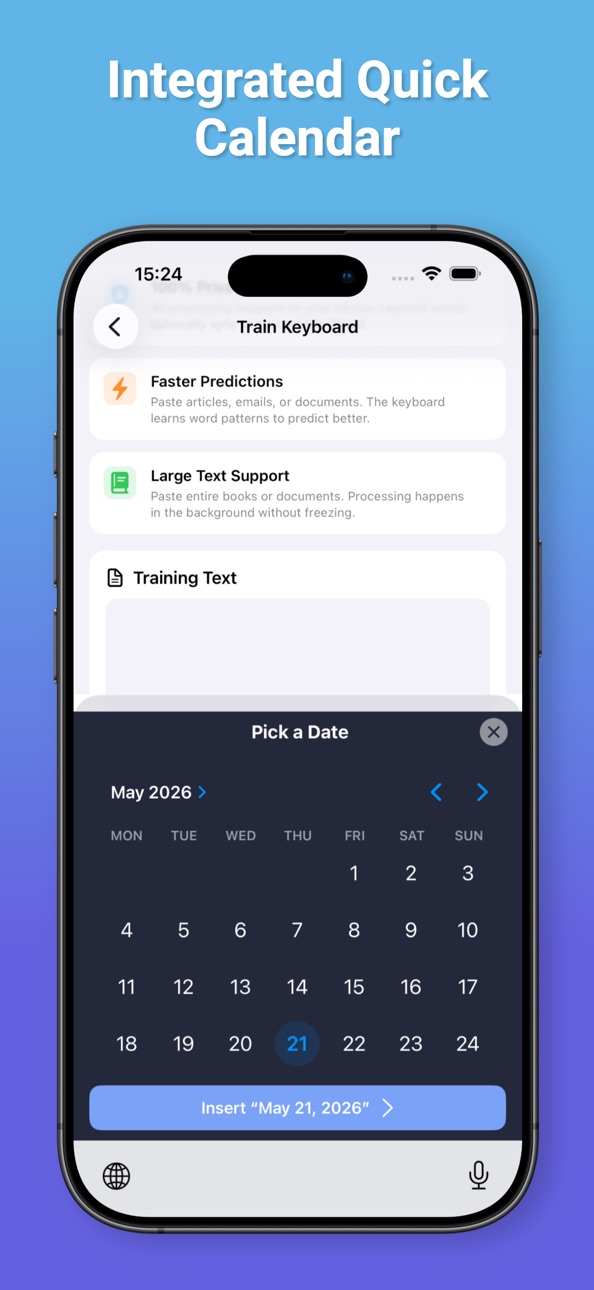
• New Date/Time quick action with a built-in calendar picker — drop today's date or any custom date into the field in one tap.
• Clipboard history now stores images alongside text.
• The quick-action row sits right above the number row, putting your most-used actions one tap away.
• Smarter German noun capitalization, powered by an updated on-device dictionary format.
• Refined keyboard sizing on iPad and iPhone Pro Max, tighter horizontal spacing, and more breathing room between rows.
• Refreshed Clipboard view, polished quick-action icons, and more reliable iCloud sync for learned words.
Thanks for using MarAI Keyboard!
Build 884648622v2.22.32026-04-18 07:34:00
• Redesigned clipboard: modern themed cards that match your
keyboard theme, tap-to-insert, one-tap copy button, and
a clear "Current" indicator for your latest copied item.
• New optional Quick Action row: a slim icon strip above
the suggestion bar for instant access to Settings,
Private mode, Clipboard, and Hide Keyboard. Enable it
in Layout settings (on by default).
• Clipboard paste is now verbatim — no autocorrect or
suggestions run on pasted text.
• Polish: cleaner icon spacing in the Quick Action row
and favorites button, fixed a visual overlap between
the row and the suggestion bar on first launch,
corrected stacking order when the number row is placed
above the suggestions.
Build 884605551v2.22.22026-04-16 22:10:33
• Faster keyboard cold start — folded vocab index cached to disk
(Turkish loads in 5ms instead of 6 seconds, saves ~2.6 MB RAM)
• Smoother first appearance — emoji index now builds in background
• Fixed: German auto-capitalized adjectives (e.g. "Schönes" at sentence
start) no longer get learned as nouns and re-suggested mid-sentence
Build 884475476v2.222026-04-14 16:15:35
• Long-press emoji suggestion to see all matching emojis in a popup
• Works across all enabled languages (English, German, Turkish, French, etc.)
• Bigram emoji matching: "thumbs up"
• Respects your skin tone preference
• Repetition learning: type an unknown word twice and it's automatically learned
• Rejection learning: undo an autocorrect and that word won't be autocorrected again
• Smarter context-aware suggestions with stronger bigram ranking
• Fixed: "Sehr viele" now correctly detects German instead of staying in English
• Fixed: "buluyor ki" no longer falsely autocorrects "ki" to "mu"
Build 884518591v2.22.12026-04-14 22:44:02
• Emoji suggestions now replace both words for phrases ("thumbs down" → emoji)
• Long-press emoji suggestion to see all matching emojis in a popup
• Refactored secondary symbols layout: removed duplicates, added # ! " — –
• Fixed: selecting emoji from popup now properly replaces the typed word
Build 884249059v2.212026-04-07 21:41:38
• Emoji suggestions — type "fire" or "Feuer" to see its emoji in the suggestion bar
• Works across languages (German, English, Turkish, and more)
• Bigram matching: "thumbs up"
• Respects your global skin tone preference
• Unit converter: type "5km" → "3.11 mi", works for distance, weight,
temperature, volume, and speed
Build 884172544v2.20.12026-04-06 15:23:34
• New dictionary support for Arabic, Hebrew, Ukrainian, and Greek
• Words containing numbers (1400km, iPhone12) are no longer autocorrected
• Long press 2 and 3 for superscript ² and ³
Build 884079351v2.192026-04-03 15:56:45
• Smarter apostrophe key — applies accent corrections without unwanted autocorrects
• Suggestions you tap frequently now rank higher over time
Build 884111519v2.202026-04-03 22:12:38
• Layout settings preview now updates live when you change toggles
• Removed Japanese and Chinese keyboard layouts (CJK input requires a dedicated IME)
• New dictionary support for Arabic, Hebrew, and Ukrainian
Build 884030661v2.182026-04-01 21:44:09
- Math expressions now work for all users
- Faster keyboard startup — languages load up to 2x quicker
Price history by region
Currency
Show
Columns
Search
Availability 1 of 1 storefronts
| Region | Language | Price | Ratings | Avg | Version |
|---|---|---|---|---|---|
| US | en-US | Free | 0 | — | 2.41 |
Change log 29 changes · US
✎
releaseNotes updated
- Smarter language detection: the keyboard follows your language switches more reliably — names, fast typing, and mixed German/English/Turkish messages
- Much
✎
description updated
Your keyboard. Your data. On your device.
This keyboard is built with one clear principle: your typing stays on your device — always.
No internet connection.
✎
subtitle updated
Smart keyboard for Polyglots
✎
name updated
MarAI Keyboard
◆
Version 2.41 released
- Smarter language detection: the keyboard follows your language switches more reliably — names, fast typing, and mixed German/English/Turkish messages
- Much faster keyboard startup: language models load up to 40× faster when iOS re-laun
◆
Version 2.40 released
• Your personal dictionary stays cleaner — common words are no longer added to it, and words you delete now stay deleted and sync reliably across your devices.
• Smarter corrections — improved fixes for short words and for words typed witho
◆
Version 2.39 released
Fixed the bug with small words (ds ->da)
◆
Version 2.38 released
• AI Writing gets a roomier, expandable panel and now reads your entire text — not just what's on screen — so rewrites, replies, and translations have the full picture.
• New one-tap option to hide the keyboard while you review an AI su
◆
Version 2.37 released
A sharper look on the latest iOS, and a keyboard that knows your words better than ever.
• Polished for iOS 26 and iOS 27 — the keyboard and clipboard now render clean and solid, with no more see-through glass or stray frames showing t
◆
Version 2.36 released
Typing has never felt this smooth.
• Buttery-smooth suggestions — the suggestion bar no longer flickers while you type. Words and corrections
update in place, calm and steady, just like you'd expect.
SMARTER AUTOCORR
◆
Version 2.34 released
• Latest emoji — Updated to the Emoji 17.0 set, including the newest characters and improved support for multi-person skin tone combinations.
• Clearer skin tone picker — The skin tone preview in Settings now shows the selected tone on a fa
◆
Version 2.33 released
Smarter, more accurate typing across languages.
• Accent-safe autocorrect - When you type a word with accents or special characters, the keyboard now keeps them instead of stripping them back to the
plain version.
• Language detect
◆
Version 2.32 released
Performance improvements
Improved language accuracy
◆
Version 2.31 released
We rebuilt the brains of the keyboard. This release makes suggestions more accurate, autocorrect less pushy, and language switching seamless.
• Rebuilt suggestion engine — Our English, German, and Turkish language models were retrained
◆
Version 2.30 released
- AI Writing powered by Apple Intelligence — rewrite and polish text right from the keyboard.
- Live Translation — translate as you type, in a row above the suggestion bar.
- Customizable Quick Action Row — drag, reorder, and choose y
◆
Version 2.28 released
• Block bad suggestions: long-press any suggestion to dismiss it for good.
It won't come back. (Pro)
• Pinned clipboard items: keep your most-used snippets at the top of the
clipboard list — they never roll off.
• Faster, smoo
◆
Version 2.27 released
This update sharpens predictions, expands the German dictionary, and
gives you control over the paste banner. We also fine-tuned typing
performance for a snappier feel.
◆
Version 2.26 released
• Smarter German autocorrect: typos at the start of a sentence now keep your capitalization (e.g. "Nocj" → "Noch" instead of
"noch").
• Improved delete gestures: swipe left on a key to delete a character, flick faster to delete a w
◆
Version 2.25 released
• Swiss German: greetings, Helvetisms, and verb forms (Grüezi, Velo, Schoggi, mer luege …) are now recognized — with correct
capitalization at sentence start.
• Text Snippets v2: new {word}, {sentence}, {content}, {cursor} tokens, a
◆
Version 2.24 released
• Text Snippets just got a lot more useful: a built-in Unicode symbol picker (arrows, math, currency, punctuation, and macOS
keyboard glyphs like ⌘ ⌥ ⇧), plus tap-to-add example shortcuts so you can get started in seconds.
◆
Version 2.22.3 released
• Redesigned clipboard: modern themed cards that match your
keyboard theme, tap-to-insert, one-tap copy button, and
◆
Version 2.22.2 released
• Faster keyboard cold start — folded vocab index cached to disk
(Turkish loads in 5ms instead of 6 seconds, saves ~
◆
Version 2.22.1 released
• Emoji suggestions now replace both words for phrases ("thumbs down" → emoji)
• Long-press emoji suggestion to see all matching emojis in a popup
◆
Version 2.22 released
• Long-press emoji suggestion to see all matching emojis in a popup
• Works across all enabled languages (English, German, Turkish, French, etc.)
• Bigram emoji matching: "thumbs up"
• Respects your skin tone preference
• Repetit
◆
Version 2.21 released
• Emoji suggestions — type "fire" or "Feuer" to see its emoji in the suggestion bar
• Works across languages (German, English, Turkish, and more)
◆
Version 2.20.1 released
• New dictionary support for Arabic, Hebrew, Ukrainian, and Greek
• Words containing numbers (1400km, iPhone12) are no longer autocorrected
• Long press 2 and 3 for superscript ² and ³
◆
Version 2.20 released
• Layout settings preview now updates live when you change toggles
• Removed Japanese and Chinese keyboard layouts (CJK input requires a dedicated IME)
• New dictionary support for Arabic, Hebrew, and Ukrainian
◆
Version 2.19 released
• Smarter apostrophe key — applies accent corrections without unwanted autocorrects
• Suggestions you tap frequently now rank higher over time
◆
Version 2.18 released
- Math expressions now work for all users
- Faster keyboard startup — languages load up to 2x quicker