Home › Social Networking

 US
US
USen-US AENot Available
 AFNot Available
 ALNot Available
 AMNot Available
 ATNot Available
 AUNot Available
 AZNot Available
 BANot Available
 BENot Available
 BGNot Available
 BHNot Available
 BMNot Available
 BNNot Available
 BTNot Available
 BYNot Available
 CANot Available
 CHNot Available
 CNNot Available
 CYNot Available
 CZNot Available
 DENot Available
 DKNot Available
 EENot Available
 EGNot Available
 ESNot Available
 FINot Available
 FJNot Available
 FMNot Available
 FRNot Available
 GBNot Available
 GENot Available
 GRNot Available
 HKNot Available
 HRNot Available
 HUNot Available
 IDNot Available
 IENot Available
 ILNot Available
 INNot Available
 IQNot Available
 ISNot Available
 ITNot Available
 JONot Available
 JPNot Available
 KHNot Available
 KRNot Available
 KWNot Available
 LANot Available
 LBNot Available
 LKNot Available
 LTNot Available
 LUNot Available
 LVNot Available
 MDNot Available
 MENot Available
 MKNot Available
 MMNot Available
 MNNot Available
 MONot Available
 MRNot Available
 MTNot Available
 MVNot Available
 MYNot Available
 NLNot Available
 NONot Available
 NPNot Available
 NRNot Available
 NZNot Available
 OMNot Available
 PGNot Available
 PHNot Available
 PKNot Available
 PLNot Available
 PTNot Available
 PWNot Available
 QANot Available
 RONot Available
 RSNot Available
 RUNot Available
 SANot Available
 SBNot Available
 SENot Available
 SGNot Available
 SINot Available
 SKNot Available
 THNot Available
 TJNot Available
 TMNot Available
 TONot Available
 TRNot Available
 TWNot Available
 UANot Available
 UZNot Available
 VNNot Available
 VUNot Available
 XKNot Available
 YENot Available
 ZANot Available
1 of 99 storefronts
Content in en-US
Content in en-US
Information
Apple ID6756277127
Bundle IDcom.seeke.app
SellerSeller
Min iOS15.1
Min macOS12.0
Device familiesiphone, ipod
Released2026-01-15
Copyright© Seeke Technologies, LLC 2025
Privacy policyLink ↗
Preview 1 platform
iPhone 5 images


What’s New Version 2.9.6
What's New in 2.9.6
Tagging that just works — @mentions in posts and comments are now reliable. Tag anyone (including businesses with multi-word names) and tapping a tag takes you straight to the right profile.
Fixed the mention picker — the suggestion list no longer gets squished when tagging someone in a comment; you'll see full names, photos, and roles.
New post options menu — tap the ••• on anyone's post to share it or report it.
"Job" is now "Hiring" — clearer labels when creating a post, browsing the feed, and searching.
Bug fixes and polish throughout.
Description
You're in the Right Place
Seeke is the professional social network built exclusively for the service industry. Whether you're a bartender, server, chef, barista, or hospitality professional, Seeke connects you with your community, opportunities, and the events that matter.
DISCOVER YOUR COMMUNITY
Join a vibrant network of service industry professionals who understand your world. Share experiences, celebrate wins, and build meaningful connections with people who get it.
FIND YOUR NEXT OPPORTUNITY
Browse job postings from top venues, restaurants, and hospitality businesses. From part-time gigs to career moves, find opportunities tailored to the service industry.
NEVER MISS AN EVENT
Stay in the loop on industry events, pop-ups, staff parties, and networking opportunities. Know what's happening and where your community is gathering.
STAY INFORMED
Get the latest industry news, trends, and insights. From new openings to industry updates, Seeke keeps you connected to what matters.
KEY FEATURES
Create and share posts, events, jobs, and news
Comment and engage with your community
Build your professional profile
Discover opportunities in your area
Seeke is more than an app - it's your professional home in the service industry.
Capabilities
Wallet
Accessibility
ipadiphonemacrealityDevicetvoswatch
Version history 15 versions
Build 887927603v2.9.62026-07-07 17:17:24
What's New in 2.9.6
Tagging that just works — @mentions in posts and comments are now reliable. Tag anyone (including businesses with multi-word names) and tapping a tag takes you straight to the right profile.
Fixed the mention picker — the suggestion list no longer gets squished when tagging someone in a comment; you'll see full names, photos, and roles.
New post options menu — tap the ••• on anyone's post to share it or report it.
"Job" is now "Hiring" — clearer labels when creating a post, browsing the feed, and searching.
Bug fixes and polish throughout.
Build 887755542v2.9.52026-07-02 23:54:31
This update makes tagging better:
• Tapping a tag (like @username) now takes you straight to that person or business's profile.
• You can now find and tag businesses by their business name when writing a post.
• Fixed an issue where some tags didn't open the right profile.
Thanks for using Seeke!
Build 886692179v2.9.42026-06-09 07:48:45
Bug and UI/UX issues fixed.
Build 886030428v2.9.22026-06-02 07:54:17
What's new in Seeke:
• Paid ticketed events: real QR code tickets, organizer check-in scanner, and a cleaner purchase flow
• Stripe payments are now retry-safe — if the app closes mid-payment, reopening takes you right to your ticket instead of charging you twice
• If an event sells out or is canceled between payment and confirmation, you're refunded automatically
• Atomic seat counting means no more overbooking on popular events
• Check-in now blocks canceled or refunded tickets at the door
• Various bug fixes and polish
Build 885501117v2.9.12026-05-12 03:17:48
What's New in This Version
We've added a brand-new Service Booking Marketplace — the easiest way for vendors and service pros to get booked through Seeke.
For service providers (business accounts):
Set up secure payouts in minutes with Stripe Connect
Create unlimited service listings with your own pricing, duration, and service area
Get booked and paid up front — funds land in your bank account automatically
Manage incoming bookings, mark jobs complete, or cancel right from the app
For everyone:
Browse services from real vendors across 10+ categories — Bartenders, DJs, Photographers, Caterers, and more
Filter by category to find exactly what you need
See transparent pricing up front, including the small Seeke service fee
Book and pay securely in one tap, then track everything in My Bookings
Build 883642573v2.7.12026-03-23 18:08:52
Create Ticketed Event fix — Fixed an issue where the state selector could freeze or become unresponsive when selecting a location
Improved picker interactions — Date, time, and state pickers no longer conflict with each other, preventing the app from locking up
Smoother scrolling — State selection list now scrolls reliably on iOS
Build 883564817v2.62026-03-20 15:25:42
Paid Ticketed Events (New)
Organizers can create paid events with details like name, description, date/time, location, ticket price, and capacity
Users can browse upcoming ticketed events from a new dedicated events list screen
Ticket purchasing powered by Stripe — secure payment flow with confirmation
QR code tickets generated automatically after purchase
"My Tickets" section on your profile to view all purchased tickets
Deep linking support — share event links (seeke://event/:eventId) that open directly to the event
Home Feed
New horizontal banner at the top of the feed showcasing upcoming ticketed events with cover images, dates, prices, and remaining spots
"See All" button to browse the full events list
Event Management (Organizer Tools)
New "Event Management" section in Settings
"Create Ticketed Event" form for organizers
"Check-In Scanner" using your phone's camera to scan QR codes at the door
Attendee list view showing who's registered and checked in
Reviews System
Leave 1-5 star reviews with optional text on other users' profiles
Profile pages show average rating, review count, and individual reviews
Pricing Visibility
Set your services, hourly rate, event rate, and pricing notes on your profile
Visible to others on your public profile
Browse by Service
Grid of 18 service categories to discover professionals by trade
Event Request Posts
"Event Help" post type for requesting service providers
Includes event type, date, location, guest count, budget, and services needed
Build 882498297v2.5.5 2026-02-16 17:31:33
Private Profile Follow Requests — You can now visit private profiles and send a follow request for approval. Private profiles display the user's name, photo, and basic info, with a "Request to Follow" button. Once approved, their full profile details become visible.
Messaging Improvements — Fixed an issue where chat messages weren't displaying properly. Message history now loads reliably, sent messages appear instantly, and re-entering a conversation preserves your full chat history. Added an error state with a retry option if messages fail to load.
Calendar View — Added a personal calendar accessible from the Home screen. See all your upcoming events at a glance — color-coded dots show events you're Going to (green), Interested in (amber), and Saved (purple). Tap any event to view full details.
Event Engagement — RSVP to events with Going, Interested, or Not Going status. Save and bookmark events for later. Event posts in the feed include quick RSVP and save buttons.
Bug Fixes & Stability — Resolved issues with message rendering, scroll behavior, and data refresh across the app.
Build 882347151v2.5.1 (12)2026-02-11 03:05:07
Dark mode UI / UX issues fixed.
Build 882239652viOS App Version 2.05 Build 102026-02-06 23:44:30
Bug fixes, search option, people you may know, push notifications;.
Build 882168288viOS App Version 2.0 Build 82026-02-05 01:38:08
Posts are now clickable in Profile - Tapping a post in your profile now opens it in a detail view with comments
Search keyboard dismisses on tap outside - The search text box now closes when you tap anywhere outside of it or scroll
Profile highlights display properly - Two-word items like "Find Professionals" now show with spaces instead of underscores
Previously Added (v2.7.0):
4. Follow Requests for Private Profiles - Private profiles now require approval before someone can follow
"Request to Follow" button - Shows on private profiles instead of direct follow
"Requested" status - Displays when a follow request is pending
Follow Requests screen - Manage incoming requests from the Notifications section
Pending request badge - Shows count of pending follow requests in Notifications
"People You May Know" discovery - Suggested users grid on the Search screen when not searching
Quick follow buttons - Follow suggested users directly from the discovery section
Build 881945851viOS App Version 2.0 Build 42026-01-29 05:49:10
1. Continue Button Fix - The button text is now white (#FFFFFF) on the dark background, making "Continue" clearly visible during profile setup
2. Comment Section Improvements
* Input field has proper minimum height so typed text is visible
* Send button no longer gets cut off on the right side
* Adjusted padding for better spacing
3. Dark Mode Button Fix - Updated the button background color in dark mode for consistent appearance across themes
Notifications:
* Go to Settings → Notification Preferences
* Toggle notifications for Comments, Likes, and Mentions on/off
* Settings are saved per user and persist across sessions
Profile Privacy:
* During profile setup (Step 6), you can choose Public or Private
* To change later, go to Profile → Edit Profile and scroll to "Profile Visibility"
* Public profiles can be viewed when someone taps your name in the feed
* Private profiles show a "profile is private" message when tapped
Build 881872262viOS App Version 2.0 (1.2)2026-01-27 06:29:26
What's New in Seeke 2.1.0
Email Sign Up & Sign In - Create an account with your email and password, or sign in to your existing account
Comprehensive Profile Creation - New 7-step profile setup for General Public users:
Basic info (name, email, phone, city, age range)
How you'll use Seeke (discovering events, networking, etc.)
Your interests (food & beverage, nightlife, networking, etc.)
Event preferences and preferred days
Hosting frequency and help needed
Profile photo, Instagram, and LinkedIn
Personality traits and communication preferences
Profile Photos in Feed - Profile photos now display properly throughout the community feed and posts
Bug Fixes & Performance Improvements
Build 881760822viOS App Version 2.02026-01-23 22:05:09
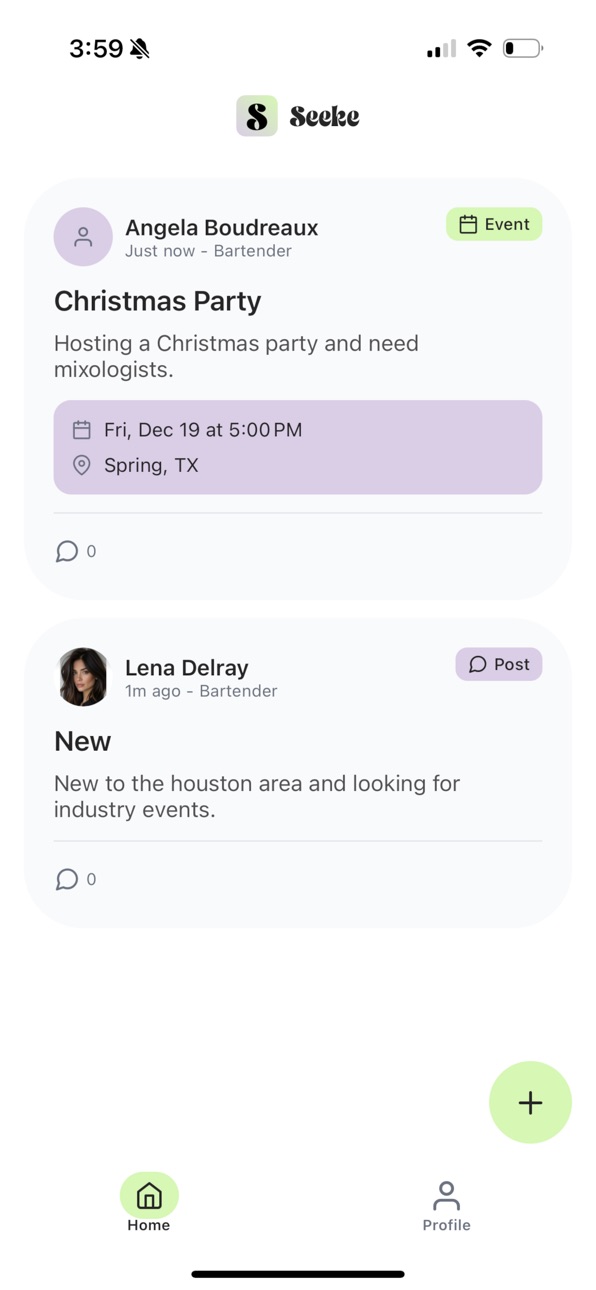
Community feed with multiple post types (events, jobs, news, general)
Like/unlike for posts and comments
@mention tagging with autocomplete
Edit/delete posts
Apple Sign-In authentication
Keyboard-friendly forms
Improved text display
Build 880457318v1.02026-01-14 20:39:21
No pricing data captured yet — comparisons appear once the app has paid storefronts or in-app purchases.
Availability 1 of 99 storefronts
| Region | Language | Price | Ratings | Avg | Version |
|---|---|---|---|---|---|
| US | en-US | Free | 1 | 5.0 | 2.9.6 |
Not available in: AE, AF, AL, AM, AT, AU, AZ, BA, BE, BG, BH, BM, BN, BT, BY, CA, CH, CN, CY, CZ, DE, DK, EE, EG, ES, FI, FJ, FM, FR, GB, GE, GR, HK, HR, HU, ID, IE, IL, IN, IQ, IS, IT, JO, JP, KH, KR, KW, LA, LB, LK, LT, LU, LV, MD, ME, MK, MM, MN, MO, MR, MT, MV, MY, NL, NO, NP, NR, NZ, OM, PG, PH, PK, PL, PT, PW, QA, RO, RS, RU, SA, SB, SE, SG, SI, SK, TH, TJ, TM, TO, TR, TW, UA, UZ, VN, VU, XK, YE, ZA
Change log 19 changes · US
✎
releaseNotes updated
What's New in 2.9.6
Tagging that just works — @mentions in posts and comments are now reliable. Tag anyone (including businesses with multi-word names) and tap
✎
description updated
You're in the Right Place
Seeke is the professional social network built exclusively for the service industry. Whether you're a bartender, server, chef, baris
✎
subtitle updated
Connect.Network.Thrive
✎
name updated
Seeke.Us
◆
Version 2.9.6 released
What's New in 2.9.6
Tagging that just works — @mentions in posts and comments are now reliable. Tag anyone (including businesses with multi-word names) and tapping a tag takes you straight to the right profile.
Fixed the mention picker — t
◆
Version 2.9.5 released
This update makes tagging better:
• Tapping a tag (like @username) now takes you straight to that person or business's profile.
• You can now find and tag businesses by their business name when writing a post.
• Fixed an issue where some t
◆
Version 2.9.4 released
Bug and UI/UX issues fixed.
◆
Version 2.9.2 released
What's new in Seeke:
• Paid ticketed events: real QR code tickets, organizer check-in scanner, and a cleaner purchase flow
• Stripe payments are now retry-safe — if the app closes mid-payment, reopening takes you right to your ticket inste
◆
Version 2.9.1 released
What's New in This Version
We've added a brand-new Service Booking Marketplace — the easiest way for vendors and service pros to get booked through Seeke.
For service providers (business accounts):
Set up secure payouts in minutes with S
◆
Version 2.7.1 released
Create Ticketed Event fix — Fixed an issue where the state selector could freeze or become unresponsive when selecting a location
Improved picker interactions — Date, time, and state pickers no longer conflict with each other, preventing th
◆
Version 2.6 released
Paid Ticketed Events (New)
Organizers can create paid events with details like name, description, date/time, location, ticket price, and capacity
Users can browse upcoming ticketed events from a new dedicated events list screen
Ticket purc
◆
Version 2.5.5 released
Private Profile Follow Requests — You can now visit private profiles and send a follow request for approval. Private profiles display the user's name, photo, and basic info, with a "Request to Follow" button. Once approved, their full profi
◆
Version 2.5.1 (12) released
Dark mode UI / UX issues fixed.
◆
Version iOS App Version 2.05 Build 10 released
Bug fixes, search option, people you may know, push notifications;.
◆
Version iOS App Version 2.0 Build 8 released
Posts are now clickable in Profile - Tapping a post in your profile now opens it in a detail view with comments
Search keyboard dismisses on tap outside - The search text box now closes when you tap anywhere outside of it or scroll
Profile
◆
Version iOS App Version 2.0 Build 4 released
1. Continue Button Fix - The button text is now white (#FFFFFF) on the dark background, making "Continue" clearly visible during profile setup
2. Comment Section Improvements
* Input field has proper minimum height so typed text is visi
◆
Version iOS App Version 2.0 (1.2) released
What's New in Seeke 2.1.0
Email Sign Up & Sign In - Create an account with your email and password, or sign in to your existing account
Comprehensive Profile Creation - New 7-step profile setup for General Public users:
Basic info (name, e
◆
Version iOS App Version 2.0 released
Community feed with multiple post types (events, jobs, news, general)
Like/unlike for posts and comments
@mention tagging with autocomplete
Edit/delete posts
Apple Sign-In authentication
Keyboard-friendly forms
Improved text display
◆
Version 1.0 released