Home › Education

 US
US
 ESes-ES
 AEen-GB
 AFen-GB
 ALen-GB
 AMen-GB
 ATde-DE
 AUen-AU
 AZen-GB
 BAen-GB
 BEen-GB
 BGen-GB
 BHen-GB
 BMen-GB
 BNen-GB
 BTen-GB
 BYen-GB
 CAen-CA
 CHde-CH
 CNzh-Hans-CN
 CYen-GB
 CZen-GB
 DEde-DE
 DKen-GB
 EEen-GB
 EGen-GB
 FIen-GB
 FJen-GB
 FRfr-FR
 GBen-GB
 GEen-GB
 GRen-GB
 HKzh-Hant-HK
 HRen-GB
 HUen-GB
 IDen-GB
 IEen-GB
 ILen-GB
 INen-GB
 IQen-GB
 ISen-GB
 ITit
ITit JOen-GB
 JPja
JPja KGen-GB
 KHen-GB
 KRko
KRko KWen-GB
 KZen-GB
 LAen-GB
 LBen-GB
 LKen-GB
 LTen-GB
 LUen-GB
 LVen-GB
 MDen-GB
 MEen-GB
 MKen-GB
 MMen-GB
 MNen-GB
 MOzh-Hant-HK
 MRen-GB
 MTen-GB
 MVen-GB
 MYen-GB
 NLnl
NLnl NOen-GB
 NPen-GB
 NZen-AU
 OMen-GB
 PHen-GB
 PKen-GB
 PLen-GB
 PTpt-PT
 QAen-GB
 ROen-GB
 RSen-GB
 RUru
RUru SAen-GB
 SEsv
SEsv SGen-GB
 SIen-GB
 SKen-GB
 THen-GB
 TJen-GB
 TMen-GB
 TRen-GB
 TWzh-Hant-TW
 UAen-GBUSen-US
 UZen-GB
 VNen-GB
 XKen-GB
 YEen-GB
93 of 93 storefronts
Content in en-US
Content in en-US
Information
Preview 2 platforms
iPhone 9 images


iPad 10 images



What’s New Version 1.1.2
What's New — Version 1.1.2
Bug fixes and stability improvements:
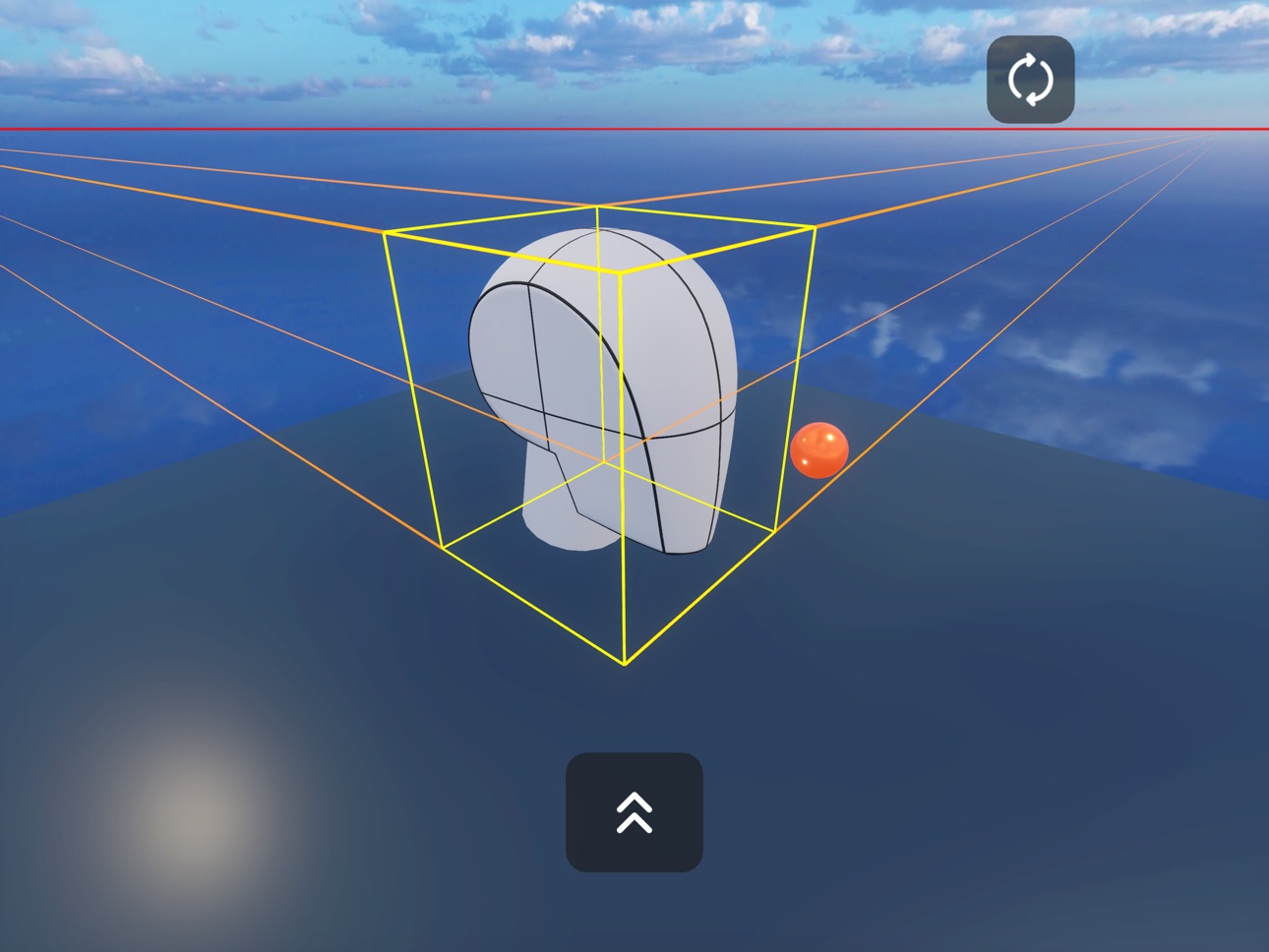
• Fixed vanishing point lines appearing on screen by default when they shouldn't be active
• Improved bounding box calculations for accurate vanishing point placement on all meshes
Description
Master Form. Draw with Confidence.
RefCreate is the 3D reference tool designed for artists serious about learning constructional drawing. Stop relying
on flat photos that only show one angle. Start understanding how forms actually work in 3D space.
THE PROBLEM WITH FLAT REFERENCES
You can't master drawing by copying 2D images. Real skill comes from understanding form in three dimensions - how
volumes turn in space, how planes catch light, how forms intersect and penetrate each other.
RefCreate gives you instant access to the exact teaching models used by the best art schools and instructors - all
perfectly lit, endlessly rotatable, always in your hands.
WHAT'S INSIDE
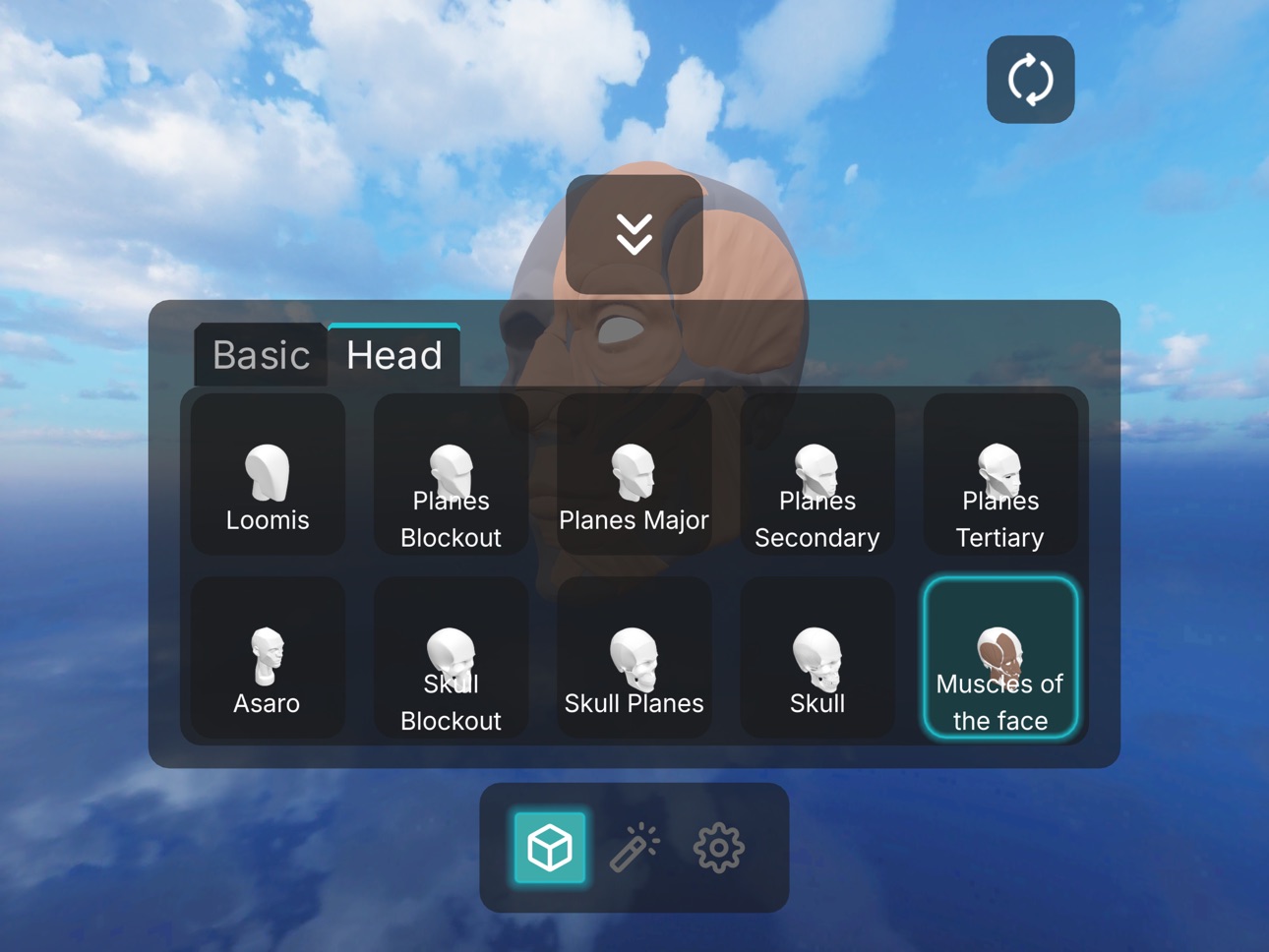
• ASARO HEAD (Planes of the Head) - The classic faceted head showing how facial planes turn in space. Includes major,
secondary, and tertiary plane breakdowns.
• LOOMIS HEAD - Study Andrew Loomis's legendary head construction method from every angle.
• SKULL ANATOMY - Full skull with normal, planes, and blockout versions. Understand the foundation before drawing
portraits.
• FACIAL MUSCLES - Split view showing muscle anatomy on one side, bone structure on the other.
• FORM INTERSECTIONS - The exercises that separate hobbyists from serious students. Box intersections, cylinder
penetrations, complex combinations. Essential for Draw A Box students.
• GEOMETRIC PRIMITIVES - Sphere, cylinder, box, cone, pyramid, torus. The building blocks of everything you draw,
with perfect proportions and clean geometry.
STUDY WORKSHEETS
The Canvas is your digital sketchboard - a Procreate-style infinite workspace where 3D reference and curated 2D study
material live side by side.
Comes loaded with hand-picked worksheet packs:
• BARGUE PLATES - Classical drawing exercises from the Charles Bargue Drawing Course. Used in ateliers worldwide to
train observation and line quality.
• PERSPECTIVE WORKSHEETS - Structured exercises for 1-point, 2-point, and 3-point perspective. Follow along or use as
a guide while you work.
• ANATOMY PLATES - Écorché and muscle diagrams drawn for artists, not medical students.
Pin a 3D model next to your reference. Work through exercises with the exact form in front of you. Everything stays
exactly where you put it.
STUDY TOOLS THAT ACTUALLY HELP
Perspective grids (2D and 3D), vanishing points, horizon lines, rotation markers, bounding boxes - all the guides you
need for serious practice.
Multiple display modes: solid shading, edge wireframes, sectional views (halfs, thirds, cross-sections). Toggle any
guide on or off instantly.
BUILT FOR HOW YOU WORK
Snap to cardinal views with a swipe - instant front, side, top, bottom views for orthographic practice.
Works completely offline - your reference library is always available.
Optimized for iPad - use it alongside Procreate for digital studies or keep it next to your sketchbook for
Everything in RefCreate is designed to leave with you.
EXPORT ANYWHERE
• Export your 3D model at any angle as a PNG - drop it straight into Procreate, reference it in Clip Studio, or print
it
• Export individual canvas images for use in other apps
• Export the entire canvas as a single composite image - your full study layout, ready to share or archive
Set up your reference in RefCreate. Export exactly what you need. Work anywhere. traditional work.
WHO IS REFCREATE FOR?
→ Portrait artists studying the Asaro head and Loomis method
→ Atelier students working through the Bargue course
→ Dynamic Sketching practitioners who need to understand form
→ Any artist serious about fundamentals over shortcuts
No subscriptions. No ads. No clutter. Just the essential tools for understanding form.
Stop studying in 2D. Start understanding in 3D.
In-App Purchases US pricing
One-Time Purchases
Head Construction Pack$5.99
Capabilities
In-App Purchases
Accessibility
ipadiphonemacrealityDevicetvoswatch
Version history 4 versions
Build 883611899v1.1.22026-03-21 20:41:47
What's New — Version 1.1.2
Bug fixes and stability improvements:
• Fixed vanishing point lines appearing on screen by default when they shouldn't be active
• Improved bounding box calculations for accurate vanishing point placement on all meshes
Build 883556212v1.1.12026-03-20 00:11:54
• Fixed vanishing point guides not appearing when toggled on
• Improved app stability
Build 882685681v1.12026-02-23 15:41:13
Canvas - Your Digital Study Desk
This update adds the Canvas: an infinite workspace designed around how artists actually study.
Pull up a 3D model on one side. Open your reference on the other. Annotate, arrange, zoom in on the details that
matter. Everything stays exactly where you put it between sessions.
Worksheet Packs
The Canvas ships with curated study packs used in serious drawing programs:
• Bargue Plates - The classical drawing exercises from the Charles Bargue Drawing Course, used in ateliers worldwide
• Perspective Worksheets - Structured 1-point, 2-point, and 3-point perspective exercises
• Anatomy Plates - Écorché and muscle diagrams made for artists
Import your own images from your photo library and build your own custom study boards alongside them.
Designed for focused practice - not a mood board tool, not a general-purpose canvas. A structured place to do the
work.
Build 880444870v1.02026-01-12 11:04:00
Price history by region
Currency
Show
Columns
Search
Availability 93 of 93 storefronts
| Region | Language | Price | Ratings | Avg | Version |
|---|---|---|---|---|---|
| ES | es-ES | Free | 1 | 5.0 | 1.1.2 |
| AE | en-GB | Free | 0 | — | 1.1.2 |
| AF | en-GB | Free | 0 | — | 1.1.2 |
| AL | en-GB | Free | 0 | — | 1.1.2 |
| AM | en-GB | Free | 0 | — | 1.1.2 |
| AT | de-DE | Free | 0 | — | 1.1.2 |
| AU | en-AU | Free | 0 | — | 1.1.2 |
| AZ | en-GB | Free | 0 | — | 1.1.2 |
| BA | en-GB | Free | 0 | — | 1.1.2 |
| BE | en-GB | Free | 0 | — | 1.1.2 |
| BG | en-GB | Free | 0 | — | 1.1.2 |
| BH | en-GB | Free | 0 | — | 1.1.2 |
| BM | en-GB | Free | 0 | — | 1.1.2 |
| BN | en-GB | Free | 0 | — | 1.1.2 |
| BT | en-GB | Free | 0 | — | 1.1.2 |
| BY | en-GB | Free | 0 | — | 1.1.2 |
| CA | en-CA | Free | 0 | — | 1.1.2 |
| CH | de-CH | Free | 0 | — | 1.1.2 |
| CN | zh-Hans-CN | Free | 0 | — | 1.1.2 |
| CY | en-GB | Free | 0 | — | 1.1.2 |
| CZ | en-GB | Free | 0 | — | 1.1.2 |
| DE | de-DE | Free | 0 | — | 1.1.2 |
| DK | en-GB | Free | 0 | — | 1.1.2 |
| EE | en-GB | Free | 0 | — | 1.1.2 |
| EG | en-GB | Free | 0 | — | 1.1.2 |
| FI | en-GB | Free | 0 | — | 1.1.2 |
| FJ | en-GB | Free | 0 | — | 1.1.2 |
| FR | fr-FR | Free | 0 | — | 1.1.2 |
| GB | en-GB | Free | 0 | — | 1.1.2 |
| GE | en-GB | Free | 0 | — | 1.1.2 |
| GR | en-GB | Free | 0 | — | 1.1.2 |
| HK | zh-Hant-HK | Free | 0 | — | 1.1.2 |
| HR | en-GB | Free | 0 | — | 1.1.2 |
| HU | en-GB | Free | 0 | — | 1.1.2 |
| ID | en-GB | Free | 0 | — | 1.1.2 |
| IE | en-GB | Free | 0 | — | 1.1.2 |
| IL | en-GB | Free | 0 | — | 1.1.2 |
| IN | en-GB | Free | 0 | — | 1.1.2 |
| IQ | en-GB | Free | 0 | — | 1.1.2 |
| IS | en-GB | Free | 0 | — | 1.1.2 |
| IT | it | Free | 0 | — | 1.1.2 |
| JO | en-GB | Free | 0 | — | 1.1.2 |
| JP | ja | Free | 0 | — | 1.1.2 |
| KG | en-GB | Free | 0 | — | 1.1.2 |
| KH | en-GB | Free | 0 | — | 1.1.2 |
| KR | ko | Free | 0 | — | 1.1.2 |
| KW | en-GB | Free | 0 | — | 1.1.2 |
| KZ | en-GB | Free | 0 | — | 1.1.2 |
| LA | en-GB | Free | 0 | — | 1.1.2 |
| LB | en-GB | Free | 0 | — | 1.1.2 |
| LK | en-GB | Free | 0 | — | 1.1.2 |
| LT | en-GB | Free | 0 | — | 1.1.2 |
| LU | en-GB | Free | 0 | — | 1.1.2 |
| LV | en-GB | Free | 0 | — | 1.1.2 |
| MD | en-GB | Free | 0 | — | 1.1.2 |
| ME | en-GB | Free | 0 | — | 1.1.2 |
| MK | en-GB | Free | 0 | — | 1.1.2 |
| MM | en-GB | Free | 0 | — | 1.1.2 |
| MN | en-GB | Free | 0 | — | 1.1.2 |
| MO | zh-Hant-HK | Free | 0 | — | 1.1.2 |
| MR | en-GB | Free | 0 | — | 1.1.2 |
| MT | en-GB | Free | 0 | — | 1.1.2 |
| MV | en-GB | Free | 0 | — | 1.1.2 |
| MY | en-GB | Free | 0 | — | 1.1.2 |
| NL | nl | Free | 0 | — | 1.1.2 |
| NO | en-GB | Free | 0 | — | 1.1.2 |
| NP | en-GB | Free | 0 | — | 1.1.2 |
| NZ | en-AU | Free | 0 | — | 1.1.2 |
| OM | en-GB | Free | 0 | — | 1.1.2 |
| PH | en-GB | Free | 0 | — | 1.1.2 |
| PK | en-GB | Free | 0 | — | 1.1.2 |
| PL | en-GB | Free | 0 | — | 1.1.2 |
| PT | pt-PT | Free | 0 | — | 1.1.2 |
| QA | en-GB | Free | 0 | — | 1.1.2 |
| RO | en-GB | Free | 0 | — | 1.1.2 |
| RS | en-GB | Free | 0 | — | 1.1.2 |
| RU | ru | Free | 0 | — | 1.1.2 |
| SA | en-GB | Free | 0 | — | 1.1.2 |
| SE | sv | Free | 0 | — | 1.1.2 |
| SG | en-GB | Free | 0 | — | 1.1.2 |
| SI | en-GB | Free | 0 | — | 1.1.2 |
| SK | en-GB | Free | 0 | — | 1.1.2 |
| TH | en-GB | Free | 0 | — | 1.1.2 |
| TJ | en-GB | Free | 0 | — | 1.1.2 |
| TM | en-GB | Free | 0 | — | 1.1.2 |
| TR | en-GB | Free | 0 | — | 1.1.2 |
| TW | zh-Hant-TW | Free | 0 | — | 1.1.2 |
| UA | en-GB | Free | 0 | — | 1.1.2 |
| US | en-US | Free | 0 | — | 1.1.2 |
| UZ | en-GB | Free | 0 | — | 1.1.2 |
| VN | en-GB | Free | 0 | — | 1.1.2 |
| XK | en-GB | Free | 0 | — | 1.1.2 |
| YE | en-GB | Free | 0 | — | 1.1.2 |
Change log 8 changes · US
✎
releaseNotes updated
What's New — Version 1.1.2
Bug fixes and stability improvements:
• Fixed vanishing point lines appearing on screen by default when they shouldn't be act
✎
description updated
Master Form. Draw with Confidence.
RefCreate is the 3D reference tool designed for artists serious about learning constructional drawing. Stop relying
on
✎
subtitle updated
Draw smarter, not harder
✎
name updated
RefCreate
◆
Version 1.1.2 released
What's New — Version 1.1.2
Bug fixes and stability improvements:
• Fixed vanishing point lines appearing on screen by default when they shouldn't be active
• Improved bounding box calculations for accurate vanishing point placemen
◆
Version 1.1.1 released
• Fixed vanishing point guides not appearing when toggled on
• Improved app stability
◆
Version 1.1 released
Canvas - Your Digital Study Desk
This update adds the Canvas: an infinite workspace designed around how artists actually study.
Pull up a 3D model on one side. Open your reference on the other. Annotate, arrange, zoom in on the detail
◆
Version 1.0 released