Home › Navigation

 US
US
 AEen-GB
 ALen-GB
 AMen-GB
 ATde-DE
 AZen-GB
 BAen-GB
 BGen-GB
 BHen-GB
 BYen-GB
 CNzh-Hans-CN
 CYen-GB
 CZen-GB
 DKen-GB
 EEen-GB
 EGen-GB
 ESes-ES
 FIen-GB
 FRfr-FR
 GEen-GB
 HKzh-Hant-HK
 HRen-GB
 HUen-GB
 IEen-GB
 ILen-GB
 IQen-GB
 ISen-GB
 JOen-GB
 JPja
JPja KWen-GB
 LBen-GB
 LTen-GB
 LVen-GB
 MDen-GB
 MEen-GB
 MKen-GB
 MOzh-Hant-HK
 MTen-GB
 NOen-GB
 OMen-GB
 PLen-GB
 PTpt-PT
 QAen-GB
 ROen-GB
 RSen-GB
 RUru
RUru SAen-GB
 SEsv
SEsv SIen-GB
 SKen-GB
 TRen-GB
 TWzh-Hant-TW
 UAen-GBUSen-US
 XKen-GB
 YEen-GB
55 of 55 storefronts
Content in en-US
Content in en-US
Information
Preview 1 platform
iPhone 7 images
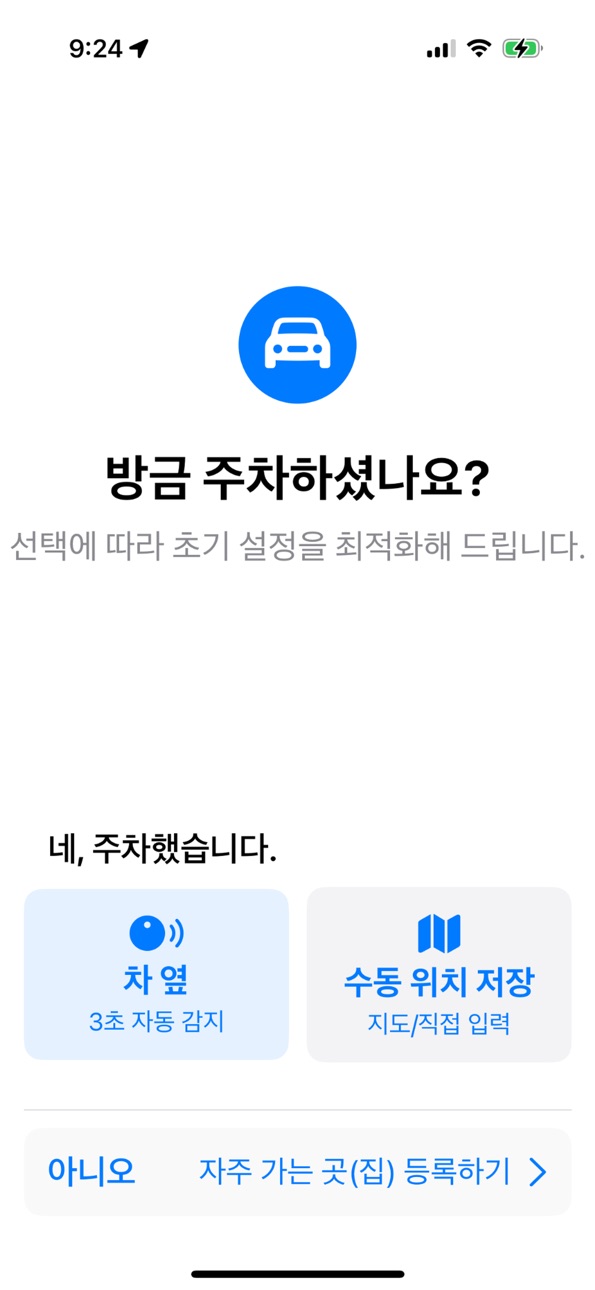
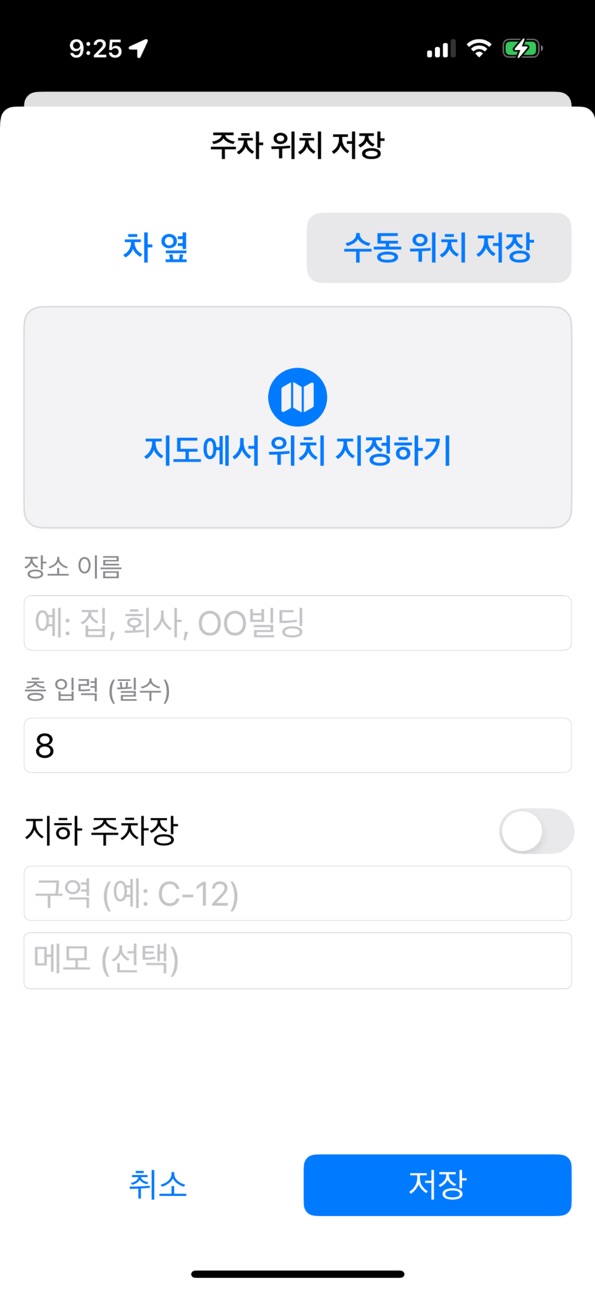
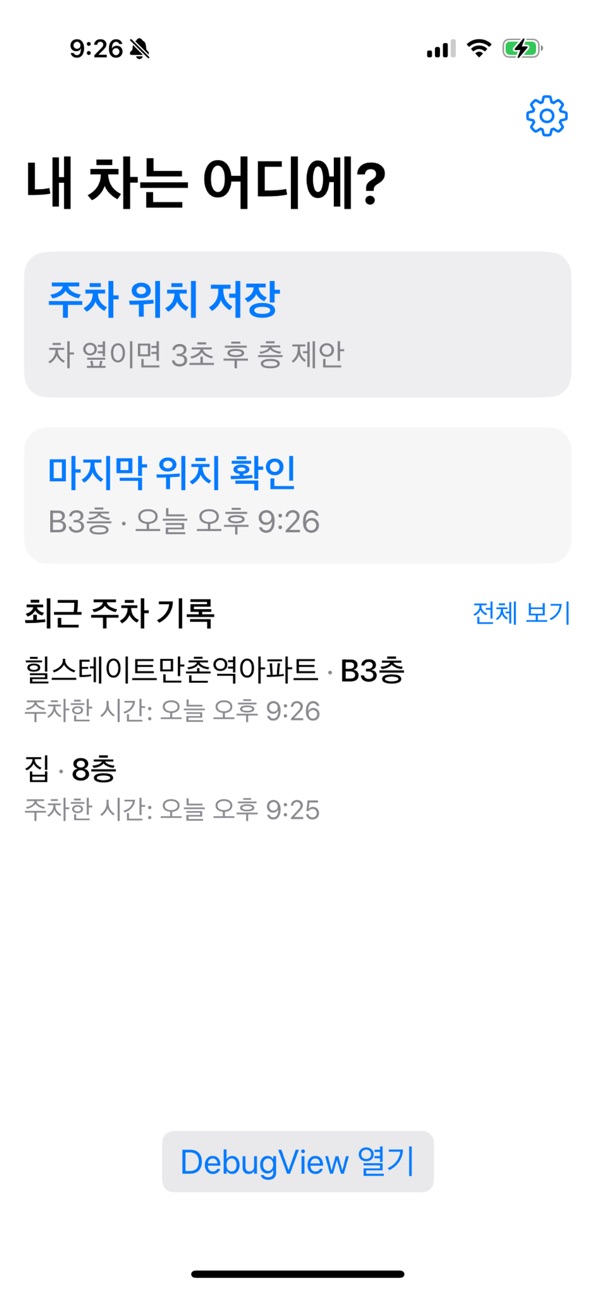


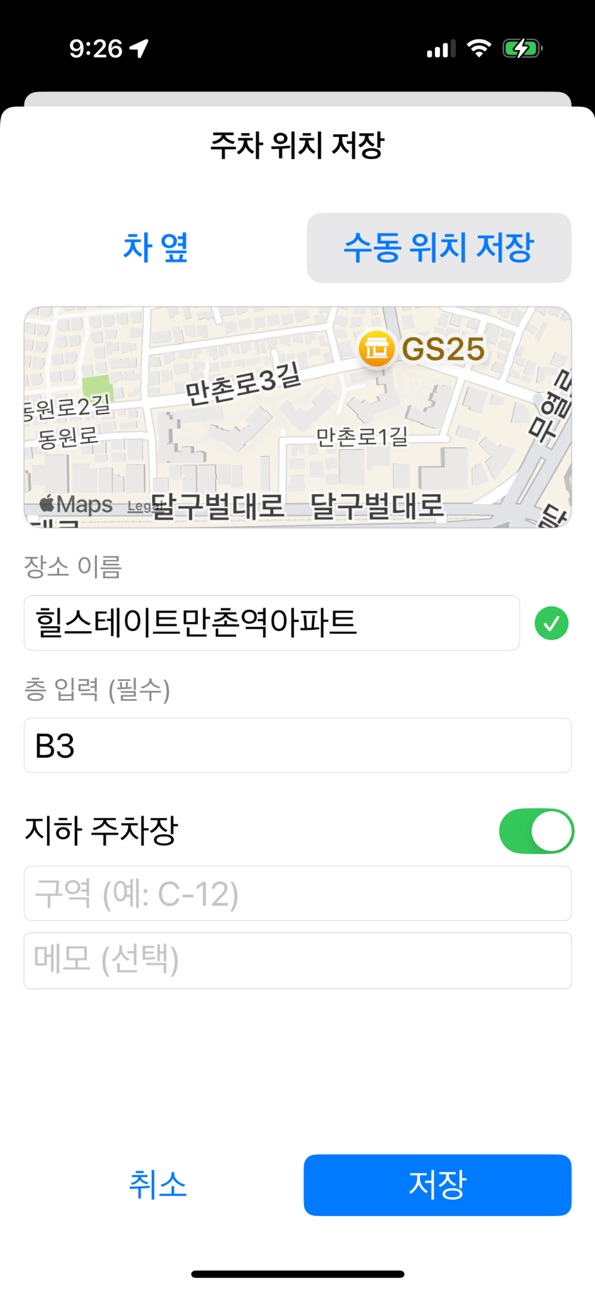

What’s New Version 1.1.0
• Cleaner home screen with a map preview card and a quick-save + button.
• Home Screen widget: see your last parking spot and tap to start saving.
• Full English and Spanish UI localization.
• Optional auto-save when your registered car Bluetooth disconnects (enable in Settings).
• Better parking location when GPS is weak underground (uses last accurate fix).
• New floor picker wheel and on-device suggestions from past visits at the same place.
• Dark Mode support and haptic feedback when saving.
• Streamlined 3-step onboarding: permissions → try saving → get started.
Description
Where's My Car? helps you remember where you parked in busy garages and lots—without juggling notes or photos.
When you leave your car, the app can detect that you may have just parked and ask with a single tap to save your spot. It uses your location, barometric pressure (for floor level), and map data. Everything stays on your device—no account required.
KEY FEATURES
1. Automatic parking detection
When your vehicle stops and the app detects that you've left on foot, you'll get a "Did you just park?" notification. One tap saves your parking location.
2. Floor detection (barometer)
Struggling to remember which level you parked on? The app estimates the floor using your device's barometer and learns from your corrections over time.
3. Save in about 3 seconds
Park → confirm suggested floor → save. Fast, simple flow. All data is stored only on this device.
4. Places you visit often
Register home, work, or favorite garages. Smart detection runs when you enter those areas.
5. See your last spot at a glance
Open the app for your latest parking address, floor, and zone. Compare your current location with the saved spot on the map.
6. Timely reminders
Optional reminder about 24 hours after you save, so you don't forget a long-term park. Turn on or off in Settings.
NEW IN VERSION 1.1
• Cleaner home with a map preview card and a quick-save + button
• Home Screen widget: last parking spot at a glance; tap to start saving
• Full English and Spanish app interface
• Optional auto-save when your registered car's Bluetooth disconnects (Settings)
• Better saves when GPS is weak underground (uses last accurate fix)
• Floor scroll wheel and on-device suggestions from past visits at the same place
• Dark Mode and haptic feedback when saving
• Streamlined 3-step onboarding: permissions → try saving → get started
PRO UPGRADE (ONE-TIME PURCHASE)
Remove ads, unlock full home and history lists, and see floor & zone in notifications. Restore purchases anytime from the upgrade screen.
Privacy: parking data is stored on your device only. See our privacy policy for details.
In-App Purchases US pricing
One-Time Purchases
PRO Unlock – Remove Ads$1.99
Capabilities
In-App Purchases
Accessibility
ipadiphonemacrealityDevicetvoswatch
Version history 7 versions
Build 885717857v1.1.02026-05-16 22:38:00
• Cleaner home screen with a map preview card and a quick-save + button.
• Home Screen widget: see your last parking spot and tap to start saving.
• Full English and Spanish UI localization.
• Optional auto-save when your registered car Bluetooth disconnects (enable in Settings).
• Better parking location when GPS is weak underground (uses last accurate fix).
• New floor picker wheel and on-device suggestions from past visits at the same place.
• Dark Mode support and haptic feedback when saving.
• Streamlined 3-step onboarding: permissions → try saving → get started.
Build 881048621v1.0.52026-03-04 06:11:28
버그 수정 및 앱 최적화
Build 880862147v1.0.42025-12-20 16:32:01
버그 수정 및 앱 최적화
Build 880765865v1.0.32025-12-17 20:37:12
버그 수정 및 앱 최적화.
Build 880560602v1.0.22025-12-12 01:49:24
버그 수정 및 앱 최적화
Build 880486274v1.0.12025-12-10 05:06:25
버그 수정 및 최적화 작업 수행
Build 880197477v1.0.02025-12-09 03:06:37
Price history by region
Currency
Show
Columns
Search
Availability 55 of 55 storefronts
| Region | Language | Price | Ratings | Avg | Version |
|---|---|---|---|---|---|
| AE | en-GB | Free | 0 | — | 1.1.0 |
| AL | en-GB | Free | 0 | — | 1.1.0 |
| AM | en-GB | Free | 0 | — | 1.1.0 |
| AT | de-DE | Free | 0 | — | 1.1.0 |
| AZ | en-GB | Free | 0 | — | 1.1.0 |
| BA | en-GB | Free | 0 | — | 1.1.0 |
| BG | en-GB | Free | 0 | — | 1.1.0 |
| BH | en-GB | Free | 0 | — | 1.1.0 |
| BY | en-GB | Free | 0 | — | 1.1.0 |
| CN | zh-Hans-CN | Free | 0 | — | 1.1.0 |
| CY | en-GB | Free | 0 | — | 1.1.0 |
| CZ | en-GB | Free | 0 | — | 1.1.0 |
| DK | en-GB | Free | 0 | — | 1.1.0 |
| EE | en-GB | Free | 0 | — | 1.1.0 |
| EG | en-GB | Free | 0 | — | 1.1.0 |
| ES | es-ES | Free | 0 | — | 1.1.0 |
| FI | en-GB | Free | 0 | — | 1.1.0 |
| FR | fr-FR | Free | 0 | — | 1.1.0 |
| GE | en-GB | Free | 0 | — | 1.1.0 |
| HK | zh-Hant-HK | Free | 0 | — | 1.1.0 |
| HR | en-GB | Free | 0 | — | 1.1.0 |
| HU | en-GB | Free | 0 | — | 1.1.0 |
| IE | en-GB | Free | 0 | — | 1.1.0 |
| IL | en-GB | Free | 0 | — | 1.1.0 |
| IQ | en-GB | Free | 0 | — | 1.1.0 |
| IS | en-GB | Free | 0 | — | 1.1.0 |
| JO | en-GB | Free | 0 | — | 1.1.0 |
| JP | ja | Free | 0 | — | 1.1.0 |
| KW | en-GB | Free | 0 | — | 1.1.0 |
| LB | en-GB | Free | 0 | — | 1.1.0 |
| LT | en-GB | Free | 0 | — | 1.1.0 |
| LV | en-GB | Free | 0 | — | 1.1.0 |
| MD | en-GB | Free | 0 | — | 1.1.0 |
| ME | en-GB | Free | 0 | — | 1.1.0 |
| MK | en-GB | Free | 0 | — | 1.1.0 |
| MO | zh-Hant-HK | Free | 0 | — | 1.1.0 |
| MT | en-GB | Free | 0 | — | 1.1.0 |
| NO | en-GB | Free | 0 | — | 1.1.0 |
| OM | en-GB | Free | 0 | — | 1.1.0 |
| PL | en-GB | Free | 0 | — | 1.1.0 |
| PT | pt-PT | Free | 0 | — | 1.1.0 |
| QA | en-GB | Free | 0 | — | 1.1.0 |
| RO | en-GB | Free | 0 | — | 1.1.0 |
| RS | en-GB | Free | 0 | — | 1.1.0 |
| RU | ru | Free | 0 | — | 1.1.0 |
| SA | en-GB | Free | 0 | — | 1.1.0 |
| SE | sv | Free | 0 | — | 1.1.0 |
| SI | en-GB | Free | 0 | — | 1.1.0 |
| SK | en-GB | Free | 0 | — | 1.1.0 |
| TR | en-GB | Free | 0 | — | 1.1.0 |
| TW | zh-Hant-TW | Free | 0 | — | 1.1.0 |
| UA | en-GB | Free | 0 | — | 1.1.0 |
| US | en-US | Free | 0 | — | 1.1.0 |
| XK | en-GB | Free | 0 | — | 1.1.0 |
| YE | en-GB | Free | 0 | — | 1.1.0 |
Change log 11 changes · US
✎
releaseNotes updated
• Cleaner home screen with a map preview card and a quick-save + button.
• Home Screen widget: see your last parking spot and tap to start saving.
• Full Englis
✎
description updated
Where's My Car? helps you remember where you parked in busy garages and lots—without juggling notes or photos.
When you leave your car, the app can detect that
✎
subtitle updated
Never lose your parking spot
✎
name updated
Where's My Car??
◆
Version 1.1.0 released
• Cleaner home screen with a map preview card and a quick-save + button.
• Home Screen widget: see your last parking spot and tap to start saving.
• Full English and Spanish UI localization.
• Optional auto-save when your registered car Blu
◆
Version 1.0.5 released
버그 수정 및 앱 최적화
◆
Version 1.0.4 released
버그 수정 및 앱 최적화
◆
Version 1.0.3 released
버그 수정 및 앱 최적화.
◆
Version 1.0.2 released
버그 수정 및 앱 최적화
◆
Version 1.0.1 released
버그 수정 및 최적화 작업 수행
◆
Version 1.0.0 released