Home › Utilities

 US
US
1 of 1 storefronts
Content in en-US
Content in en-US
Information
Apple ID6755636605
Bundle IDcom.Cephalopod.CannotIgnore
SellerSeller
Min iOS26.0
Min macOS26.0
Device familiesiphone, ipad
Released2025-12-01
Copyright© Cephalopod Studio LLC, 2025
Privacy policyLink ↗
Preview 2 platforms
iPhone 7 images



iPad 7 images


What’s New Version 2.1.0
Now you can add sub alarms automatically to your reminder or calendar events. So you can set multiple alarms before an event, at an event, or even after an event! And you can adjust alarms so that you can keep them after they fire, for easy reuse later.
Description
Never miss another important moment. Cannot Ignore is a powerful alarm app designed specifically for those critical, one-time events that demand your full attention.
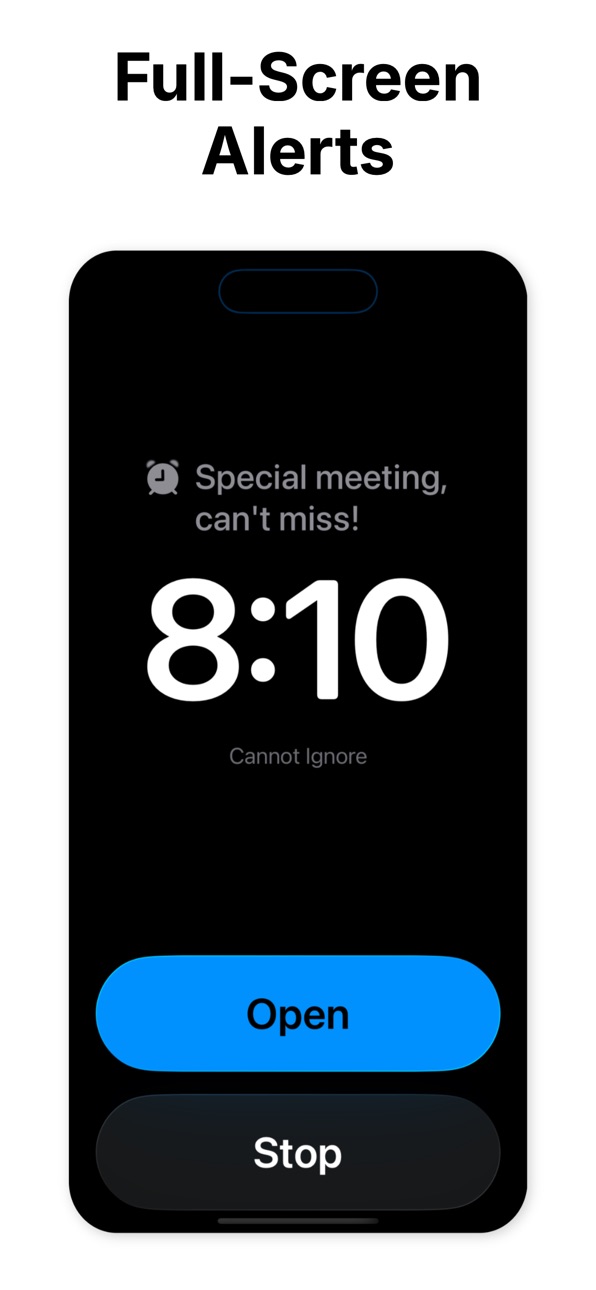
FULL-SCREEN ALARMS THAT DEMAND ATTENTION
When your alarm fires, Cannot Ignore takes over your entire screen - whether you're on the lock screen, home screen, or in another app. There's no ignoring it, no accidentally dismissing it. You'll see a full-screen alert with your alarm details and action buttons front and center.
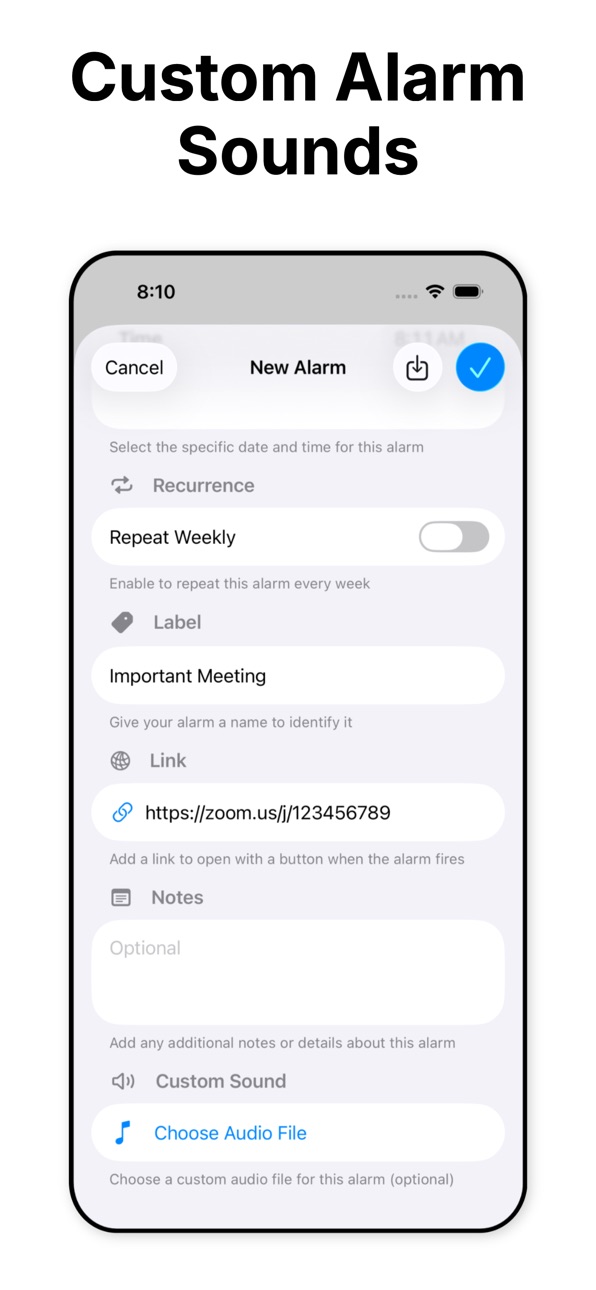
CUSTOM SOUNDS FOR MAXIMUM IMPACT
Make your alarms unmissable with custom audio files. Upload any sound that will get your attention - whether it's a special ringtone, voice recording, or audio file. Your important alarms deserve more than generic system sounds.
SMART CALENDAR & REMINDER INTEGRATION
Import upcoming events directly from your Calendar or Reminders with one tap. Cannot Ignore automatically detects and includes:
- Video conference links (Zoom, Google Meet, Teams, etc.)
- Location URLs
- Event notes and URLs
- Reminder links
No more manually copying details between apps. Set an alarm for your meeting, and access the join link instantly when it fires.
INSTANT LINK ACCESS
Add any link to your alarm. When it fires, tap "Open" to launch the link immediately - perfect for:
- Video conference meetings
- Important documents
- Location directions
- Online forms or registrations
- Flight check-ins
- Time-sensitive web pages
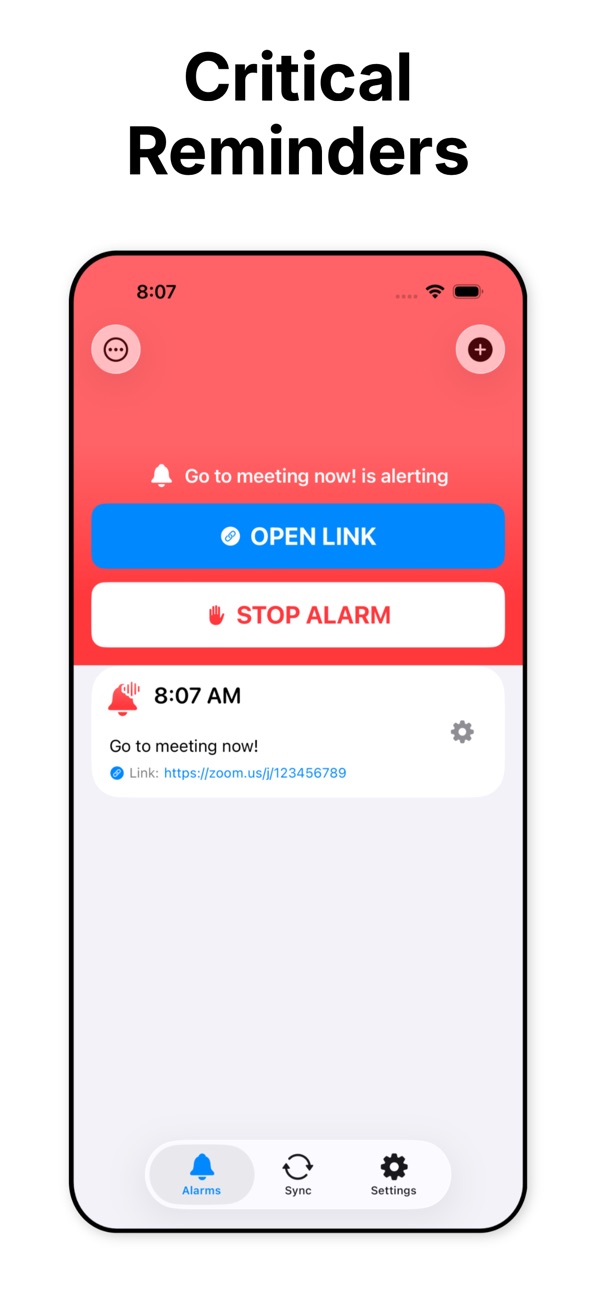
IN-APP ALARM MANAGEMENT
Even if you dismiss the full-screen alert, Cannot Ignore keeps you in control:
- See which alarms are currently alerting
- Stop alarms with one tap from within the app
- Open links directly from the alarm list
- Edit existing alarms anytime
DESIGNED FOR CRITICAL MOMENTS
Cannot Ignore is purpose-built for important, out-of-the-ordinary events:
- Job interviews and important meetings
- Medical appointments
- Flight departures
- Deadline submissions
- Time-sensitive phone calls
- Special occasions you can't afford to miss
SIMPLE, FOCUSED DESIGN
No complicated settings or features you'll never use. Cannot Ignore does one thing exceptionally well: ensures you never miss what matters most. Clean interface with intuitive controls gets you from "create alarm" to "done" in seconds.
KEY FEATURES
• Full-screen alarms that take over your device
• Custom audio file support for unique alarm sounds
• Import from Calendar events with automatic link detection
• Import from Reminders with automatic link detection
• Add links that open with one tap when alarms fire
• In-app alarm control and monitoring
• Edit existing alarms
• Real-time alarm state tracking
• Clean, intuitive interface
• Requires iOS 26 or later
PERFECT FOR
• Business professionals with critical meetings
• Students with exam schedules
• Travelers with flight departures
• Healthcare appointments
• Remote workers with video conferences
• Anyone with important deadlines
• Time-sensitive commitments that cannot be missed
Stop relying on easy-to-dismiss notifications. For the moments that truly matter, use Cannot Ignore.
In-App Purchases US pricing
One-Time Purchases
Pro$14.99
Capabilities
In-App Purchases
Accessibility
ipadiphonemacrealityDevicetvoswatch
Version history 17 versions
Build 887466152v2.1.02026-06-27 17:36:33
Now you can add sub alarms automatically to your reminder or calendar events. So you can set multiple alarms before an event, at an event, or even after an event! And you can adjust alarms so that you can keep them after they fire, for easy reuse later.
Build 885049396v2.02026-05-10 11:41:37
Free access to try out the app before you buy!
Build 885000221v1.6.52026-04-28 19:24:18
Now customize the alarm information you see at a glance. You can see what alarms have snooze activated, vs opening links. And you can choose whether to see notes about your alarm on the homepage.
Build 884931544v1.6.42026-04-25 22:00:00
Bug fix with snooze states vs default states.
Build 884327207v1.6.22026-04-09 17:34:44
Now with vacation mode! Go into settings and disable all of your alarms without deleting anything.
Build 883431855v1.6.12026-03-16 23:26:59
Bug fix where the refresh shortcut was adding duplicate alarms.
Build 882577000v1.6.02026-02-23 18:45:34
Now with multi alarms per event! An alarm can have sub alarms, as many as you want, before and after an event.
Build 882412775v1.5.02026-02-18 15:28:18
New shortcuts! Delete alarms and add alarms.
Build 882118577v1.4.12026-02-11 12:27:46
Added improvements to snoozing:
* All synced events and manually added events default to snooze if there is no link.
* Now in settings you can choose to always add the snooze option, even if your event has a link associated with it.
* There is a button in settings to switch all of your alarms to use snooze in bulk.
Build 881640624v1.42026-01-26 12:06:10
Now you can have an alarm be disabled, if you just want to know what's coming up via the app. And when you delete a synced alarm, you have the option to keep it deleted after re-syncing. And there is a way to manually purge all of the alarms.
Build 881107629v1.3.12025-12-31 13:46:30
Bug fixes in the Shortcut.
Build 881076287v1.3.02025-12-30 00:15:18
* Now with seven new app-provide sounds (in addition to being able to upload your own). And ...
* There is a silent sound for those who wish for their Cannot Ignore alarms to be quiet.
* The app now remembers all of the custom sounds you've uploaded so that you only need to upload once.
* The app also has a toggle to filter out all-day events when syncing.
Build 881053911v1.2.02025-12-29 01:01:21
Now with snoozing! If no link is set, automatically has a snooze button. Customizable snooze time. And the link opening setting can be overridden to use snoozing instead as well.
Build 880953113v1.1.02025-12-24 00:04:00
Now with tags! Tags also get imported from your reminders and your calendar events. And you can customize their color. And you can filter by tags. Also, your events now incorporate time-to-leave so that you get to where you need to go on time by getting an alarm at your time-to-leave.
Build 880395279v1.0.22025-12-06 18:44:25
Bug fix on alarm order.
Build 880002440v1.02025-12-01 14:40:24
Build 880247853v1.0.12025-12-01 21:40:29
Bug fixes, refinements.
Price history by region
Currency
Show
Columns
Search
Availability 1 of 1 storefronts
| Region | Language | Price | Ratings | Avg | Version |
|---|---|---|---|---|---|
| US | en-US | Free | 22 | 4.4 | 2.1.0 |
Change log 21 changes · US
✎
releaseNotes updated
Now you can add sub alarms automatically to your reminder or calendar events. So you can set multiple alarms before an event, at an event, or even after an even
✎
description updated
Never miss another important moment. Cannot Ignore is a powerful alarm app designed specifically for those critical, one-time events that demand your full atten
✎
subtitle updated
Critical alarms you can't miss
✎
name updated
Cannot Ignore - Super Alarms
◆
Version 2.1.0 released
Now you can add sub alarms automatically to your reminder or calendar events. So you can set multiple alarms before an event, at an event, or even after an event! And you can adjust alarms so that you can keep them after they fire, for easy
◆
Version 2.0 released
Free access to try out the app before you buy!
◆
Version 1.6.5 released
Now customize the alarm information you see at a glance. You can see what alarms have snooze activated, vs opening links. And you can choose whether to see notes about your alarm on the homepage.
◆
Version 1.6.4 released
Bug fix with snooze states vs default states.
◆
Version 1.6.2 released
Now with vacation mode! Go into settings and disable all of your alarms without deleting anything.
◆
Version 1.6.1 released
Bug fix where the refresh shortcut was adding duplicate alarms.
◆
Version 1.6.0 released
Now with multi alarms per event! An alarm can have sub alarms, as many as you want, before and after an event.
◆
Version 1.5.0 released
New shortcuts! Delete alarms and add alarms.
◆
Version 1.4.1 released
Added improvements to snoozing:
* All synced events and manually added events default to snooze if there is no link.
* Now in settings you can choose to always add the snooze option, even if your event has a link associated with it.
* Ther
◆
Version 1.4 released
Now you can have an alarm be disabled, if you just want to know what's coming up via the app. And when you delete a synced alarm, you have the option to keep it deleted after re-syncing. And there is a way to manually purge all of the alarm
◆
Version 1.3.1 released
Bug fixes in the Shortcut.
◆
Version 1.3.0 released
* Now with seven new app-provide sounds (in addition to being able to upload your own). And ...
* There is a silent sound for those who wish for their Cannot Ignore alarms to be quiet.
* The app now remembers all of the custom sounds you'v
◆
Version 1.2.0 released
Now with snoozing! If no link is set, automatically has a snooze button. Customizable snooze time. And the link opening setting can be overridden to use snoozing instead as well.
◆
Version 1.1.0 released
Now with tags! Tags also get imported from your reminders and your calendar events. And you can customize their color. And you can filter by tags. Also, your events now incorporate time-to-leave so that you get to where you need to go on ti
◆
Version 1.0.2 released
Bug fix on alarm order.
◆
Version 1.0.1 released
Bug fixes, refinements.
◆
Version 1.0 released