Home › Utilities

 US
US
USen-US AGen-GB
 AIen-GB
 AOen-GB
 ARes-MX
 BBen-GB
 BFen-GB
 BJen-GB
 BOes-MX
 BRpt-BR
 BSen-GB
 BWen-GB
 BZen-GB
 CDen-GB
 CGen-GB
 CIfr-FR
 CLes-MX
 CMfr-FR
 COes-MX
 CRes-MX
 CVen-GB
 DMen-GB
 DOes-MX
 DZen-GB
 ECes-MX
 GAfr-FR
 GDen-GB
 GHen-GB
 GMen-GB
 GTes-MX
 GWen-GB
 GYen-GB
 HNes-MX
 JMen-GB
 KEen-GB
 KNen-GB
 KYen-GB
 LCen-GB
 LRen-GB
 LYen-GB
 MAen-GB
 MGen-GB
 MLen-GB
 MSen-GB
 MUen-GB
 MWen-GB
 MXes-MX
 MZen-GB
 NAen-GB
 NEen-GB
 NGen-GB
 NIes-MX
 PAes-MX
 PEes-MX
 PYes-MX
 RWen-GB
 SCen-GB
 SLen-GB
 SNen-GB
 SRen-GB
 STen-GB
 SVes-MX
 SZen-GB
 TCen-GB
 TDen-GB
 TNen-GB
 TTen-GB
 TZen-GB
 UGen-GB
 UYen-GB
 VCen-GB
 VEes-MX
 VGen-GB
 ZMen-GB
 ZWen-GB
75 of 75 storefronts
Content in en-US
Content in en-US
Information
Preview 2 platforms
iPhone 3 images


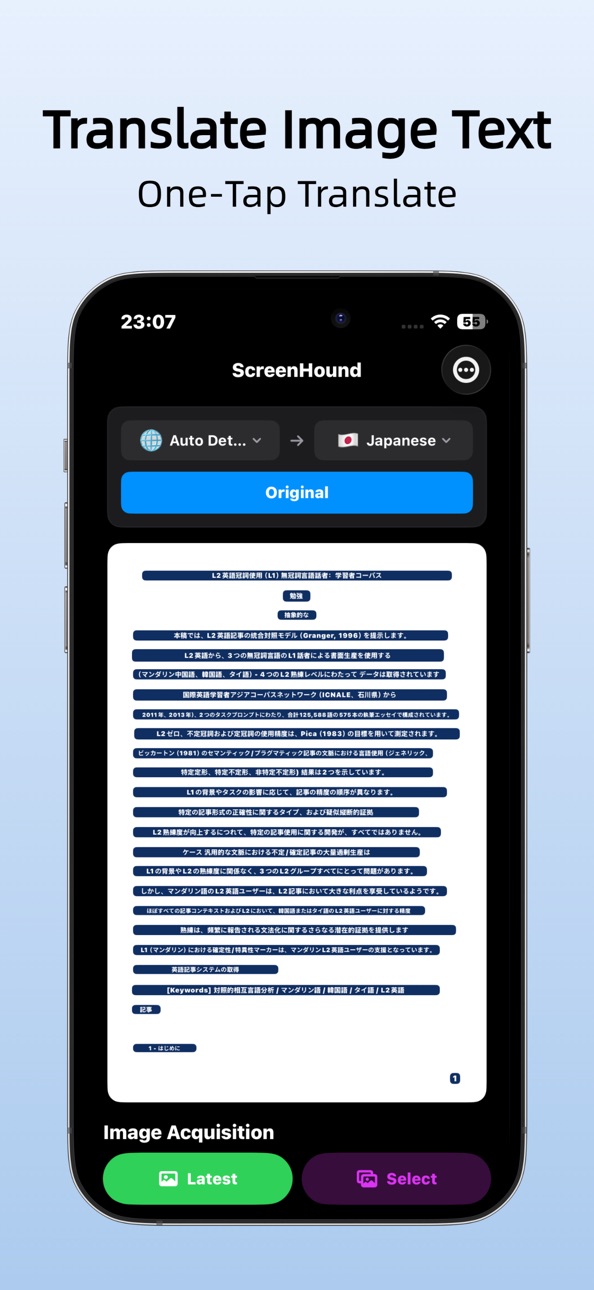
iPad 1 image

What’s New Version 1.0.5
Supports one-tap copying of all text
Description
ScreenHound turns screenshots or camera photos into selectable text and instant translation. Powered by on‑device OCR and offline translation, it’s fast, private, and ready when you are.
Core features
* Screenshot to text (OCR) — copy and share in one tap
* Camera capture to translate — point, shoot, and understand
* Inline highlight for easy verification
* Translate all recognized text with one tap (offline supported)
* Auto‑load the latest screenshot or pick from Photos
* Works with Shortcuts (Back Tap/Control Center)
Fast and private
On‑device processing with optional offline translation keeps your content private and responsive, even without a network.
Great for
Study notes, documents, posters, slides, app screens, web pages, and multilingual reading or research.
Get started
1.Open the app to auto‑load your latest screenshot.
2.Or select a photo from your library.
3.Or use the camera to capture text.
4.Tap highlighted text to copy, then translate all with one tap.
Supported languages for translation:
1.English
2.Chinese (Simplified)
3.Chinese (Traditional)
4.Japanese
5.Korean
6.Spanish
7.French
8.German
9.Italian
10.Portuguese
11.Russian
12.Arabic
13.Indonesian
14.Turkish
15.Vietnamese
16.Thai
17.Hindi
Accessibility
ipadiphonemacrealityDevicetvoswatch
Version history 3 versions
Build 886438869v1.0.52026-06-02 19:57:57
Supports one-tap copying of all text
Build 881159656v1.0.42026-01-03 02:43:52
Metadata optimization
Build 879872054v1.0.32025-11-24 16:46:39
No pricing data captured yet — comparisons appear once the app has paid storefronts or in-app purchases.
Availability 75 of 75 storefronts
| Region | Language | Price | Ratings | Avg | Version |
|---|---|---|---|---|---|
| US | en-US | Free | 1 | 1.0 | 1.0.5 |
| AG | en-GB | Free | 0 | — | 1.0.5 |
| AI | en-GB | Free | 0 | — | 1.0.5 |
| AO | en-GB | Free | 0 | — | 1.0.5 |
| AR | es-MX | Free | 0 | — | 1.0.5 |
| BB | en-GB | Free | 0 | — | 1.0.5 |
| BF | en-GB | Free | 0 | — | 1.0.5 |
| BJ | en-GB | Free | 0 | — | 1.0.5 |
| BO | es-MX | Free | 0 | — | 1.0.5 |
| BR | pt-BR | Free | 0 | — | 1.0.5 |
| BS | en-GB | Free | 0 | — | 1.0.5 |
| BW | en-GB | Free | 0 | — | 1.0.5 |
| BZ | en-GB | Free | 0 | — | 1.0.5 |
| CD | en-GB | Free | 0 | — | 1.0.5 |
| CG | en-GB | Free | 0 | — | 1.0.5 |
| CI | fr-FR | Free | 0 | — | 1.0.5 |
| CL | es-MX | Free | 0 | — | 1.0.5 |
| CM | fr-FR | Free | 0 | — | 1.0.5 |
| CO | es-MX | Free | 0 | — | 1.0.5 |
| CR | es-MX | Free | 0 | — | 1.0.5 |
| CV | en-GB | Free | 0 | — | 1.0.5 |
| DM | en-GB | Free | 0 | — | 1.0.5 |
| DO | es-MX | Free | 0 | — | 1.0.5 |
| DZ | en-GB | Free | 0 | — | 1.0.5 |
| EC | es-MX | Free | 0 | — | 1.0.5 |
| GA | fr-FR | Free | 0 | — | 1.0.5 |
| GD | en-GB | Free | 0 | — | 1.0.5 |
| GH | en-GB | Free | 0 | — | 1.0.5 |
| GM | en-GB | Free | 0 | — | 1.0.5 |
| GT | es-MX | Free | 0 | — | 1.0.5 |
| GW | en-GB | Free | 0 | — | 1.0.5 |
| GY | en-GB | Free | 0 | — | 1.0.5 |
| HN | es-MX | Free | 0 | — | 1.0.5 |
| JM | en-GB | Free | 0 | — | 1.0.5 |
| KE | en-GB | Free | 0 | — | 1.0.5 |
| KN | en-GB | Free | 0 | — | 1.0.5 |
| KY | en-GB | Free | 0 | — | 1.0.5 |
| LC | en-GB | Free | 0 | — | 1.0.5 |
| LR | en-GB | Free | 0 | — | 1.0.5 |
| LY | en-GB | Free | 0 | — | 1.0.5 |
| MA | en-GB | Free | 0 | — | 1.0.5 |
| MG | en-GB | Free | 0 | — | 1.0.5 |
| ML | en-GB | Free | 0 | — | 1.0.5 |
| MS | en-GB | Free | 0 | — | 1.0.5 |
| MU | en-GB | Free | 0 | — | 1.0.5 |
| MW | en-GB | Free | 0 | — | 1.0.5 |
| MX | es-MX | Free | 0 | — | 1.0.5 |
| MZ | en-GB | Free | 0 | — | 1.0.5 |
| NA | en-GB | Free | 0 | — | 1.0.5 |
| NE | en-GB | Free | 0 | — | 1.0.5 |
| NG | en-GB | Free | 0 | — | 1.0.5 |
| NI | es-MX | Free | 0 | — | 1.0.5 |
| PA | es-MX | Free | 0 | — | 1.0.5 |
| PE | es-MX | Free | 0 | — | 1.0.5 |
| PY | es-MX | Free | 0 | — | 1.0.5 |
| RW | en-GB | Free | 0 | — | 1.0.5 |
| SC | en-GB | Free | 0 | — | 1.0.5 |
| SL | en-GB | Free | 0 | — | 1.0.5 |
| SN | en-GB | Free | 0 | — | 1.0.5 |
| SR | en-GB | Free | 0 | — | 1.0.5 |
| ST | en-GB | Free | 0 | — | 1.0.5 |
| SV | es-MX | Free | 0 | — | 1.0.5 |
| SZ | en-GB | Free | 0 | — | 1.0.5 |
| TC | en-GB | Free | 0 | — | 1.0.5 |
| TD | en-GB | Free | 0 | — | 1.0.5 |
| TN | en-GB | Free | 0 | — | 1.0.5 |
| TT | en-GB | Free | 0 | — | 1.0.5 |
| TZ | en-GB | Free | 0 | — | 1.0.5 |
| UG | en-GB | Free | 0 | — | 1.0.5 |
| UY | en-GB | Free | 0 | — | 1.0.5 |
| VC | en-GB | Free | 0 | — | 1.0.5 |
| VE | es-MX | Free | 0 | — | 1.0.5 |
| VG | en-GB | Free | 0 | — | 1.0.5 |
| ZM | en-GB | Free | 0 | — | 1.0.5 |
| ZW | en-GB | Free | 0 | — | 1.0.5 |
Change log 7 changes · US
✎
releaseNotes updated
Supports one-tap copying of all text
✎
description updated
ScreenHound turns screenshots or camera photos into selectable text and instant translation. Powered by on‑device OCR and offline translation, it’s fast, privat
✎
subtitle updated
Extract Text, Scan Documents
✎
name updated
ScreenHound: OCR & Translation
◆
Version 1.0.5 released
Supports one-tap copying of all text
◆
Version 1.0.4 released
Metadata optimization
◆
Version 1.0.3 released