Home › Business

 US
US
1 of 1 storefronts
Content in en-US
Content in en-US
Information
Apple ID6755148447
Bundle IDai.wakata.wakata
SellerSeller
Min iOS14.0
Min macOS11.0
Device familieswatch, iphone, ipad, ipod
Released2026-01-12
Copyright© Wakata.ai
Privacy policyLink ↗
Preview 3 platforms
iPhone 7 images




iPad 3 images


Apple Watch 1 image

What’s New Version 26.7.2
Supervisors get a new Field Reports section with a daily overview and graduated overdue-task buckets, so nothing falls through the cracks at end of shift.
Incidents can now be suspended and resumed, matching the same flow you already use for asset and user inspections.
Group access is now enforced throughout the app - tasks, issues, assets, inspections, and dashboard counts all reflect only the items your access group has permission to see, so your screen stays relevant to your work.
Voice recordings now display the server-generated transcript right inside the media review screen - no more guessing what was said.
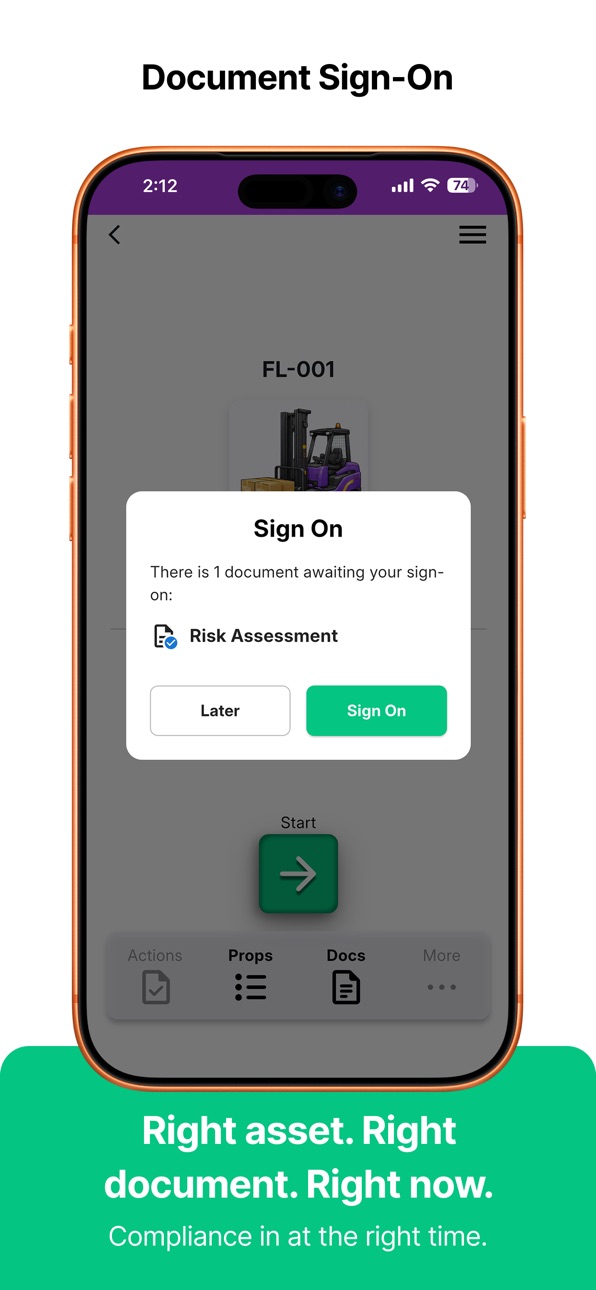
Signing on to a document is cleaner: the redesigned Sign On dialog has a confirmation tick so you always know the sign-on was recorded.
PPE cards now show the compliance standard and serial number at a glance.
Bug fixes:
• Photos - Done button stays active while images compress; app no longer locks you out after resubmitting an inspection with missing data
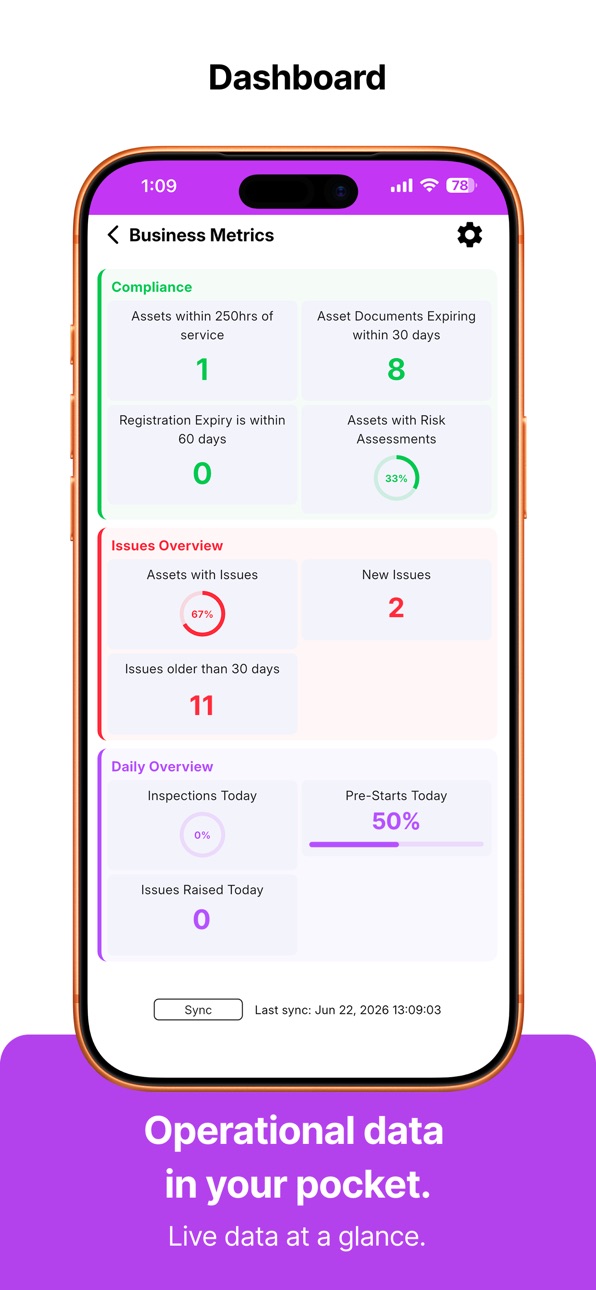
• Dashboard tiles update correctly after every sync, and the Timesheets tile only appears if you have an approval scheme
• Keypad rows and the Next button no longer overlap on small or landscape screens
• Quiz answer pop-ups stay fully on-screen on smaller phones
• Date picker no longer resets to today's day when you change the month; date fields now cover the full year range needed for birthdates
• Time-format setting is respected in extra-info time pickers
• Issue history sheet opens fully expanded and no longer fires duplicate updates
• Checklist names display correctly even when the original checklist has been archived
• App permissions can be checked at a glance in Settings, with a direct link to your device's OS Settings to make changes
• Dark mode blur is more visible; toolbar icons align cleanly when labels wrap to two lines
• App loads faster when branding assets are unavailable
Description
Wakata is a mobile data capture app for heavy industry. Built for operations, not the office.
Your team records what they see, right there at the source. Quick, simple, doesn't slow them down. You get data you can actually trust.
Accessibility
ipadiphonemacrealityDevicetvoswatch
Version history 19 versions
Build 887277722v26.7.22026-07-02 22:14:06
Supervisors get a new Field Reports section with a daily overview and graduated overdue-task buckets, so nothing falls through the cracks at end of shift.
Incidents can now be suspended and resumed, matching the same flow you already use for asset and user inspections.
Group access is now enforced throughout the app - tasks, issues, assets, inspections, and dashboard counts all reflect only the items your access group has permission to see, so your screen stays relevant to your work.
Voice recordings now display the server-generated transcript right inside the media review screen - no more guessing what was said.
Signing on to a document is cleaner: the redesigned Sign On dialog has a confirmation tick so you always know the sign-on was recorded.
PPE cards now show the compliance standard and serial number at a glance.
Bug fixes:
• Photos - Done button stays active while images compress; app no longer locks you out after resubmitting an inspection with missing data
• Dashboard tiles update correctly after every sync, and the Timesheets tile only appears if you have an approval scheme
• Keypad rows and the Next button no longer overlap on small or landscape screens
• Quiz answer pop-ups stay fully on-screen on smaller phones
• Date picker no longer resets to today's day when you change the month; date fields now cover the full year range needed for birthdates
• Time-format setting is respected in extra-info time pickers
• Issue history sheet opens fully expanded and no longer fires duplicate updates
• Checklist names display correctly even when the original checklist has been archived
• App permissions can be checked at a glance in Settings, with a direct link to your device's OS Settings to make changes
• Dark mode blur is more visible; toolbar icons align cleanly when labels wrap to two lines
• App loads faster when branding assets are unavailable
Build 887187620v26.6.192026-06-19 21:59:31
Triage New Issues Faster
Supervisors can now swipe through new site issues to immediately Close, Follow Up, or mark as Info Required - with full photo carousels and pinch-to-zoom.
Support Diagnostics
Fixes an issue where Send Logs wasn't capturing all unsynced photos, helping our support team recover data in rare scenarios.
Build 886676549v26.6.182026-06-18 18:00:39
Your submissions are now protected by a write-ahead outbox - inspections, dockets, timesheets, and signed documents queue locally and upload automatically on the next sync, even if the app is closed or the connection drops mid-submit.
- Offline protection: inspections, dockets, and timesheets are saved to a local outbox before uploading, so no work is lost if you go offline or the app is interrupted
- Unsynced media safeguard: photos and attachments are now bundled and protected if a data reset is needed, so nothing captured in the field can be wiped before it uploads
- Auto-logout: the app now logs out after 5 minutes of inactivity to protect your account when you set your device down on-site
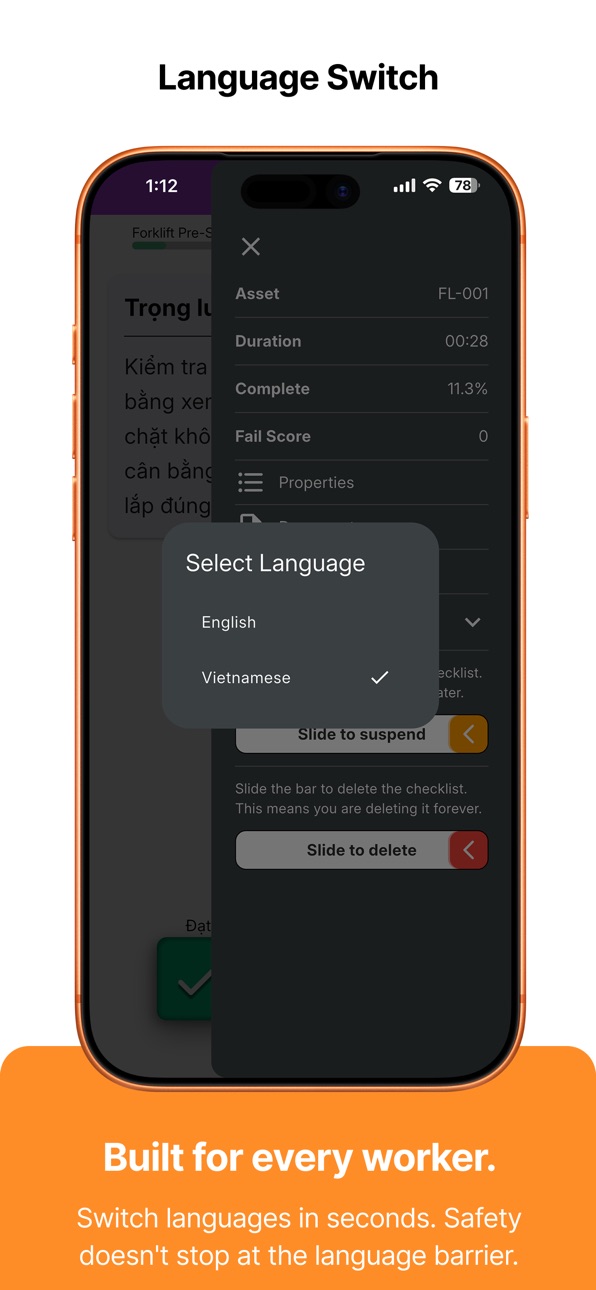
- Language fixes: changing your content language during an inspection now takes effect immediately, and gauge labels, issue history, and the suspended screen all appear in the correct language
- Dashboard metrics now update automatically after every sync, and the dashboard view picker correctly applies the view you choose
- Fail score now shows live in the inspection drawer as you work through a checklist
- Photo improvements: landscape photos are captured at full frame, markup is only available once compression finishes, and photo thumbnails in inspection details display correctly
- Tablet and layout fixes: keypads, duration pickers, list padding, and the pairing screen all display correctly on iPad
- Timesheet and issue fixes: several timeline, issue-detail, and activity-logging bugs resolved
Build 886019761v26.5.222026-05-22 21:55:10
This release brings smarter checklists, faster photos, and a more reliable sync experience for field workers.
• Conditional checklists now adapt as you go - follow-up questions appear only when they're relevant, including questions triggered by scored sections, so you're never shown steps that don't apply.
• Stuck syncs self-heal automatically, so your device always ends up with the latest checklist version and data - no more getting stranded on an outdated version.
• If two workers open the same suspended inspection at the same time, ownership is handled correctly so responses aren't lost.
• Dashboard metrics now show the freshest figures available.
• Photos appear faster - thumbnails generate immediately and compression runs in the background so the camera stays snappy.
• Timesheets now use the in-app number keypad instead of the system keyboard.
• Your company's sign-in screen now shows a branded image with a subtle motion effect as you scroll.
• Text on Properties and Documents screens is larger and clearer, and the checklist progress bar accurately shows how far you've gone.
• Asset property values display in your preferred language, and date-based calculated properties give the correct result.
Build 885670712v26.5.142026-05-14 20:43:42
- Inspections that use conditional questions based on asset properties (such as Destination or asset class) now branch correctly. Previously, selecting an asset from a dynamic list could cause conditions to stop evaluating, sending you down the wrong question path.
- Language switching now translates the full inspection - button labels, gauge band descriptions, question options, and data-entry field hints all update correctly alongside question titles.
- A discarded inspection no longer reappears as suspended after the next sync.
- Resuming an inspection while offline - or when a token refresh fails due to no signal - now works reliably. The app stays in offline mode throughout the session rather than stalling.
- Editing a phone number, currency, or numeric field now respects where your cursor is. Changes insert at the cursor position instead of always appending to the end.
- Photo markup: fixed a black screen that appeared after deleting a photo, and fixed annotations shifting position when re-opening a marked photo.
- The dashboard background now uses the site logo where one is set, falling back to the company logo.
- Inspection step buttons now render consistently without stray outlines.
- Apple Watch dashboard: all display types (gauge, trend, count) are now fully rendered. Pairing button on round watch faces no longer clips at the edge.
Build 885383763v26.5.72026-05-07 20:38:47
What's New in 26.5.7
- Update notifications - When a new version is available, a full-screen prompt shows the release notes with an Update Now button (takes you straight to the App Store) and a Remind Me Later option that snoozes for 24 hours.
- Redesigned Review Responses - Cleaner layout with a centred asset/user header, bottom tab bar, and larger text throughout for easier reading in the field. Photos now show the originating question and capture time when you view them full screen.
- Extra-info fields pre-fill from asset properties - When you tap Fix on a confirmed property value, the input field now opens with the existing value ready to edit instead of blank.
- The Next button stays greyed out until you select an option on mandatory questions, so there is no more confusing error toast after you tap.
- Timesheet entry improvements - Scrollbars on all list steps, an Adjusted Total Time label under the duration picker, and cleaner audio-step button layout.
- A delete button now appears in the sidebar while annotating a photo so you can remove it without leaving the screen.
- Barcode scanner works on all iPads - Fixed a crash on Wi-Fi-only iPad models whose cameras have no flash hardware.
- Signatures updated on one device now appear correctly on all others after the next sync.
- Suspended tab renamed to Resume - The label now matches what the button actually does across all languages.
- Hour meter values visible in Review Responses - Property-type readings (hour meters, etc.) now display their numeric value instead of just a status tick.
- Keyboard and bottom sheet fixes - Input sheets no longer hide behind the keyboard, and tapping outside correctly dismisses them.
- Data syncs on every launch - The app now syncs fresh data each time you open it, so update prompts and other server-pushed changes appear immediately.
Build 884916230v26.4.292026-05-01 14:52:35
What's New:
- Timesheet entries now show larger cards with a description and icons indicating what each entry requires (photo, audio, number, etc.)
- The Next and Confirm buttons now appear in the same spot at the bottom of every step, no matter what type of content is on screen
Bug Fixes:
- Fixed a potential data loss issue where submitting an inspection against a checklist that had been updated by your admin could silently delete all your photos and answers instead of submitting them.
- Fixed a race condition where a completed inspection could show as failed on your device even though it had been received successfully by the server
- Fixed double-stamping of photo annotations: resuming and resubmitting an inspection could apply annotation strokes twice, producing smeared markups on the final image
- Fixed an issue where tapping Discard still briefly showed the inspection in your Suspended list before it disappeared
- Fixed a "Continue inspection?" prompt appearing immediately after suspending - the app no longer asks you to continue something you just put on hold
- Submitting and suspending inspections now returns you to the dashboard immediately rather than showing a progress spinner while waiting for the server
Build 884765030v0.9.62026-04-22 01:56:55
Signature pad - completely overhauled
- Swiping from the left edge of the screen no longer hijacks the first stroke and navigates back.
- Navigating back and then forward no longer loses your work. Signatures are automatically saved the moment you leave the page, no matter how you exit.
Camera viewfinder now matches the saved photo
- On iPhone, the viewfinder now shows the correct landscape frame when you're holding the phone upright.
Keypads and Next button always visible
- Numeric keypads inside input sheets are now sized so the Next button is always on screen, including on smaller phones and compact landscape layouts.
Sync no longer fails on re-registered devices
- Fixed an error that blocked sync on devices that had been registered more than once.
Suspended inspections load correctly
- Inspections with an unrecognised or missing subject no longer disappear from your Suspended list.
Suspend and Delete show a progress indicator
- Sliding to suspend or delete an inspection now immediately shows a progress screen, so it's clear the action registered.
Quiz panel styled correctly on phones
- The answer options panel on phone-sized screens now has a clear bordered boundary, matching the tablet layout.
Build 884687751v0.9.52026-04-21 13:32:09
Inspections
- Resuming an inspection now takes you straight to the first question you haven't answered yet, instead of starting over from the beginning.
- Date fields no longer auto-fill today's date when you haven't touched the picker. Optional date fields can also be cleared with a new Clear button if you scroll the wheel by accident.
- Optional photo fields can now be skipped without capturing a photo.
- Photo markup is available again when working on a resumed inspection.
- The Properties and Documents panel now opens correctly for person-based inspections.
- Additional info answers now display cleanly in review: whole numbers no longer show a trailing decimal, and date-only fields no longer show a redundant midnight time.
- Additional info fields appear in the same order everywhere, matching what you see on the portal.
Photos
- Photos taken on iPad no longer appear rotated or distorted in markup and review.
- The photo strip at the bottom of the capture screen no longer causes the preview to jump in size when the first photo is taken.
- The camera preview maintains the correct aspect ratio when you rotate the device mid-session.
- On iPad, capture notes are shown above the preview in landscape so they stay visible.
Phone number fields
- The phone number country code now defaults to your company's country instead of always starting on Australia.
- Phone number fields now use the same circular on-screen keypad as other number inputs, so you never see the system keyboard pop up unexpectedly.
- Skipping an optional phone field no longer keeps the Next button disabled.
Tablet improvements
- iPads now stay in landscape orientation as intended across all screens.
- Pass and Fail buttons on tablet are more widely spaced so they're harder to mis-tap.
- Answer options on question screens sit near the bottom of the panel, closer to where your thumb naturally rests.
GPS tagging
- Inspection submissions, individual answers, and additional info responses are now tagged with your device's GPS coordinates, making site records more accurate.
Reliability improvements
- Faster People and Assets screens from smarter image caching.
- Various sync and connectivity fixes.
Build 884544721v0.9.42026-04-16 16:27:39
Bug Fixes:
- Camera fix: the camera preview no longer goes black when taking photos across multiple steps in the same inspection. iOS users will no longer need to back out and re-enter to get a working camera feed.
- Inspections with conditional questions can now be submitted. Previously, inspections where some questions were skipped based on earlier answers could not reach the Submit screen.
- Barcode scanner accuracy improved: barcodes are now only detected when held inside the orange targeting box, matching what you see on screen.
- Tablet login security: users required to change their PIN are now correctly prompted to do so on tablets, consistent with the existing behaviour on phones.
Build 884499858v0.9.32026-04-14 18:13:54
Bug Fixes and Reliability Improvements
- Fixed an issue where changing the app language during an inspection had no effect — the language now updates immediately throughout the app.
- Fixed inspections ending too early when navigating through conditional sections. The app now correctly continues to the next available section instead of stopping unexpectedly.
- Fixed asset property conditions not evaluating correctly during in-progress inspections that had not yet synced to the server. Conditions depending on answers given earlier in the same inspection now work as expected.
Build 883524153v0.92026-04-12 20:21:42
iPad support across the entire app
Every screen now has a purpose-built iPad layout. Side-by-side navigation, split-screen detail views, and two-column lists make working on iPad faster and more comfortable throughout inspections, timesheets, assets, people, issues, tasks, SWMS, dockets, and more.
Timesheets
- Tap any entry to view full details, photos, and audio notes in a quick-view panel
- Audio notes are now transcribed on your device - no internet required
- Swipe left on a draft timesheet to delete it
- "Pending approval" and "more info required" statuses now shown correctly
- Fixed an issue where timesheet durations occasionally showed incorrect totals
Inspections
- Meter readings now warn you when a value looks unusually high or low
- Gauge fail conditions now correctly show a cross icon on related answer options
- Fixed an issue where questions could loop when conditions skipped whole sections
Safety (SWMS)
- Much larger text, stronger colour contrast, and clearer headers throughout
- All SWMS screens are now fully translated into all supported languages
- Dark mode text and sign-on dates now display correctly
Dashboard
- Business metrics now available on a swipeable dashboard card (phone and iPad)
Sync and data
- Faster, more reliable syncing with the new sync protocol
- Photos and signatures now sync correctly across multiple devices
- Inspection data is compressed before upload for faster submission
Assets and properties
- Property values with large numbers now show thousands separators
- Asset properties are now listed in alphabetical order
- New "validation list" and "calculation" property types supported
People
- Customer and customer contact fields now available in timesheet timeline entries
Build 882364843v0.82026-03-18 20:30:15
Work Instructions
You can now capture, store, and execute work instructions directly in the app. Step-by-step instructions display with a markup overlay, full-screen photo viewing, and text-to-speech playback so your team can follow along hands-free on the job.
Apple Watch Companion App
A new Apple Watch app lets you monitor your key site metrics from your wrist. Pair your Watch from the app settings and get live dashboard data at a glance, without reaching for your phone.
Language Settings
The app now separates your interface language from your content language, so you can work in your preferred language while viewing inspection content in a different one. First-time users are guided through language selection on setup. All supported languages have been fully translated.
Safety: SWMS Improvements
Safe Work Method Statements now load faster in review mode, no longer requiring you to scroll to the bottom before signing. Contrast and readability have been improved, and the signee list is now visible directly in review mode.
Timesheets
You can now assign a customer when entering timesheet hours, making it easier to track billable time against the right account.
PIN Management
You can now change your PIN directly from your profile, without contacting an administrator.
Dashboard
The dashboard has a refreshed layout and colour scheme. Suspended inspections now appear on a dedicated tab so active and paused work are easier to manage separately.
Site Directory
The site directory people list now correctly includes all team members, including those without active roles currently assigned.
Pairing and Setup
- You can now tap and hold the pairing code field to paste a code directly from your clipboard.
- Magic link deep linking is supported, so pairing links sent by email or SMS open the app and pre-fill your pairing code automatically.
- A 5-minute cooldown now applies after sending a login reminder to prevent duplicate messages.
Bug Fixes and Improvements
- Inspection photos can now be marked up correctly during review.
- Biometric login (fingerprint and Face ID) now works reliably on Android devices.
- Gauge fail status now correctly flows through to dependent sub-options in checklists.
- Media files now upload correctly to cloud storage after inspection submission.
- Asset properties are updated locally as soon as an inspection is submitted, without waiting for the next sync.
- Inspection submission no longer shows a jarring animation transition.
- Decimal values in property fields no longer display unnecessary trailing zeros.
- Inspection and question translations now display correctly throughout the app.
Build 882317914v0.72026-02-10 22:34:40
We're excited to bring you Wakata 0.7.0 with global language support and improved reliability!
What's New:
• Multi-language support - Use the app in your preferred language! Now available in English, Spanish, French, Japanese, Swahili, Tok Pisin, Ukrainian, and Chinese. Switch languages anytime from the settings menu.
• Your language preference stays consistent across the entire app and persists even after logging out or restarting.
Improvements:
• Fixed device pairing issue that prevented new users from connecting to their company environment in some configurations.
• Enhanced app stability and performance with updated build system.
We're committed to making Wakata accessible to teams worldwide.
Build 882287463v0.62026-02-09 18:14:41
Major New Features
• Voice-to-Docket: Record voice notes that are automatically transcribed into docket entries, making it faster than ever to capture information in the field
• Tasks Module: Access and complete task-based inspections directly from your dashboard
• Customer Directory: Quickly find and contact customer information when you need it
• Dockets: Full docket management now available - create, edit, and sync work orders on the go
Performance & Speed
• Data sync is now 9.5x faster with our new optimised sync engine
• Per-site sync allows you to update just the sites you need, saving time and data
Camera & Photos
• Automatic document downloads when viewing files
• Improved camera preview on all devices
• Better landscape photo capture for inspections
• Photo markup now works smoothly even when files are offline
Enhanced Usability
• Easier-to-read text with increased font sizes on timesheets, properties, and documents
• Contact validation ensures email and phone numbers are entered correctly
• Cleaner inspection pages with better organisation
• Profile pictures now show initials when photos aren't available
• Dashboard shows only the modules your company uses
Plus dozens of refinements to make your daily workflow smoother and more reliable.
Build 881926185v0.52026-01-28 17:32:41
Inspections
- Resume and repeat inspection now shows a progress indicator
- Repeat inspection correctly populates extra info values and photos from previous inspections
- Fixed site category level assignments to properly match checklists
Photo Annotations
- Callout labels now scale text to fit without wrapping
- Photos display thumbnail previews with annotations
- Fixed layout overflow in view mode during orientation changes
Timesheets
- Slide-to-submit gesture for submitting timesheets
- Submitted timesheets display in read-only view
Property Scanning
- Detected meter values now display above the scan frame
Documents
- Fixed crash when sharing documents on iPad
General
- Dashboard inspection buttons refresh after sync
- Navigation drawer reopens after returning from Properties or Documents
Build 881800894v0.42026-01-27 07:46:06
New Features:
- Incident Reporting - Report workplace incidents directly from the dashboard with checklist-based workflow, optional asset/user linking
- Biometric Authentication - Touch ID / Face ID login support
- SWMS Sign-off - Safe Work Method Statement feature with complete 7-screen sign-off flow
- Issue Photo Markup - Full markup mode for annotating issue photos with drawing tools
- Native Maps - Upgraded to Apple Maps on iOS (previously OpenStreetMap) for sharper, faster map rendering
Improvements:
- Enhanced issue details with date picker and status colours
- View mode for issue photos
- Standardised confirmation dialogs across the app
- macOS window resizing support for markup mode
Bug Fixes:
- Fixed timesheet duplicate creation bug caused by date format handling
Build 881691299v0.22026-01-24 00:11:14
Improved Camera & Scanning
- Replaced the camera scanning system with a more stable and reliable library for better barcode and text recognition
- Meter reading scanner now shows detected values for confirmation before accepting, with an option to re-scan if incorrect
- Improved asset identification scanning accuracy
Timesheets
- New Timesheets feature on the dashboard for recording work hours
- Multi-step entry flow for easy time logging
- Background sync keeps timesheets up to date
Site Directory
- New Site Directory feature to view and contact colleagues at your site
- Search by name, employee ID, email, or phone
- Quick actions to call, text, or email contacts
Document Improvements
- Document Sign-On feature with just-in-time compliance prompts
- Share documents directly from the preview screen
- Better error messages when attachments are unavailable
- Landscape mode support for easier document reading
Asset QuickView
- Scan QR codes to quickly view asset details from the Wakata Portal
- Validates company access before displaying information
Issues & Inspections
- Redesigned Issues page with improved navigation
- Issue details now show response history with rich formatting
- Improved inspection progress tracking with per-question indicators
- Fixed inspection resume for sessions that were interrupted
- Read-only photo viewer for completed inspections
User Interface
- Redesigned Asset and Person details pages with bottom navigation
- Improved keyboard button sizes for easier input
- Last used Employee ID is now pre-filled on login
- Better typography and layout across the app
Stability & Performance
- Fixed PDF viewer rotation issues
- Improved sync reliability
- Better handling of encrypted PDFs
Build 879674236v0.12026-01-12 18:16:40
No pricing data captured yet — comparisons appear once the app has paid storefronts or in-app purchases.
Availability 1 of 1 storefronts
| Region | Language | Price | Ratings | Avg | Version |
|---|---|---|---|---|---|
| US | en-US | Free | 0 | — | 26.7.2 |
Change log 23 changes · US
✎
releaseNotes updated
Supervisors get a new Field Reports section with a daily overview and graduated overdue-task buckets, so nothing falls through the cracks at end of shift.
Inci
✎
description updated
Wakata is a mobile data capture app for heavy industry. Built for operations, not the office.
Your team records what they see, right there at the source. Quick
✎
subtitle updated
Data by Wakata
✎
name updated
Wakata
◆
Version 26.7.2 released
Supervisors get a new Field Reports section with a daily overview and graduated overdue-task buckets, so nothing falls through the cracks at end of shift.
Incidents can now be suspended and resumed, matching the same flow you already use f
◆
Version 26.6.19 released
Triage New Issues Faster
Supervisors can now swipe through new site issues to immediately Close, Follow Up, or mark as Info Required - with full photo carousels and pinch-to-zoom.
Support Diagnostics
Fixes an issue where Send Logs wasn't c
◆
Version 26.6.18 released
Your submissions are now protected by a write-ahead outbox - inspections, dockets, timesheets, and signed documents queue locally and upload automatically on the next sync, even if the app is closed or the connection drops mid-submit.
- Of
◆
Version 26.5.22 released
This release brings smarter checklists, faster photos, and a more reliable sync experience for field workers.
• Conditional checklists now adapt as you go - follow-up questions appear only when they're relevant, including questions trigger
◆
Version 26.5.14 released
- Inspections that use conditional questions based on asset properties (such as Destination or asset class) now branch correctly. Previously, selecting an asset from a dynamic list could cause conditions to stop evaluating, sending you down
◆
Version 26.5.7 released
What's New in 26.5.7
- Update notifications - When a new version is available, a full-screen prompt shows the release notes with an Update Now button (takes you straight to the App Store) and a Remind Me Later option that snoozes for 24 ho
◆
Version 26.4.29 released
What's New:
- Timesheet entries now show larger cards with a description and icons indicating what each entry requires (photo, audio, number, etc.)
- The Next and Confirm buttons now appear in the same spot at the bottom of every step, no m
◆
Version 0.9.6 released
Signature pad - completely overhauled
- Swiping from the left edge of the screen no longer hijacks the first stroke and navigates back.
- Navigating back and then forward no longer loses your work. Signatures are automatically saved the mom
◆
Version 0.9.5 released
Inspections
- Resuming an inspection now takes you straight to the first question you haven't answered yet, instead of starting over from the beginning.
- Date fields no longer auto-fill today's date when you haven't touched the picker. Opt
◆
Version 0.9.4 released
Bug Fixes:
- Camera fix: the camera preview no longer goes black when taking photos across multiple steps in the same inspection. iOS users will no longer need to back out and re-enter to get a working camera feed.
- Inspections with condit
◆
Version 0.9.3 released
Bug Fixes and Reliability Improvements
- Fixed an issue where changing the app language during an inspection had no effect — the language now updates immediately throughout the app.
- Fixed inspections ending too early when navigating throu
◆
Version 0.9 released
iPad support across the entire app
Every screen now has a purpose-built iPad layout. Side-by-side navigation, split-screen detail views, and two-column lists make working on iPad faster and more comfortable throughout inspections, timesheet
◆
Version 0.8 released
Work Instructions
You can now capture, store, and execute work instructions directly in the app. Step-by-step instructions display with a markup overlay, full-screen photo viewing, and text-to-speech playback so your team can follow along h
◆
Version 0.7 released
We're excited to bring you Wakata 0.7.0 with global language support and improved reliability!
What's New:
• Multi-language support - Use the app in your preferred language! Now available in English, Spanish, French, Japanese, Swahili, Tok
◆
Version 0.6 released
Major New Features
• Voice-to-Docket: Record voice notes that are automatically transcribed into docket entries, making it faster than ever to capture information in the field
• Tasks Module: Access and complete task-based inspections direc
◆
Version 0.5 released
Inspections
- Resume and repeat inspection now shows a progress indicator
- Repeat inspection correctly populates extra info values and photos from previous inspections
- Fixed site category level assignments to properly match checklists
P
◆
Version 0.4 released
New Features:
- Incident Reporting - Report workplace incidents directly from the dashboard with checklist-based workflow, optional asset/user linking
- Biometric Authentication - Touch ID / Face ID login support
- SWMS Sign-off - Safe Work
◆
Version 0.2 released
Improved Camera & Scanning
- Replaced the camera scanning system with a more stable and reliable library for better barcode and text recognition
- Meter reading scanner now shows detected values for confirmation before accepting, with an op
◆
Version 0.1 released