Home › Productivity

 US
US
 SAen-GB
 AEen-GB
 AGen-GB
 AIen-GB
 ALen-GB
 AMen-GB
 AOen-GB
 ARes-MX
 ATde-DE
 AUen-AU
 AZen-GB
 BAen-GB
 BBen-GB
 BEen-GB
 BFen-GB
 BGen-GB
 BHen-GB
 BJen-GB
 BOes-MX
 BRpt-BR
 BSen-GB
 BWen-GB
 BYen-GB
 BZen-GB
 CAen-CA
 CDen-GB
 CGen-GB
 CHde-CH
 CIfr-FR
 CLes-MX
 CMfr-FR
 CNzh-Hans-CN
 COes-MX
 CRes-MX
 CVen-GB
 CYen-GB
 CZen-GB
 DEde-DE
 DKen-GB
 DMen-GB
 DOes-MX
 DZen-GB
 ECes-MX
 EGen-GB
 ESes-ES
 FIen-GB
 FRfr-FR
 GAfr-FR
 GBen-GB
 GDen-GB
 GEen-GB
 GHen-GB
 GTes-MX
 GWen-GB
 GYen-GB
 HKzh-Hant-HK
 HNes-MX
 HUen-GB
 IDen-GB
 IEen-GB
 ILen-GB
 IQen-GB
 ISen-GB
 ITit
ITit JMen-GB
 JOen-GB
 JPja
JPja KEen-GB
 KNen-GB
 KRko
KRko KWen-GB
 KYen-GB
 LBen-GB
 LCen-GB
 LRen-GB
 LTen-GB
 LUen-GB
 LYen-GB
 MAen-GB
 MDen-GB
 MEen-GB
 MGen-GB
 MKen-GB
 MLen-GB
 MOzh-Hant-HK
 MSen-GB
 MTen-GB
 MUen-GB
 MWen-GB
 MXes-MX
 MYen-GB
 MZen-GB
 NAen-GB
 NEen-GB
 NGen-GB
 NIes-MX
 NLnl
NLnl NOen-GB
 NZen-AU
 OMen-GB
 PAes-MX
 PEes-MX
 PLen-GB
 PTpt-PT
 PYes-MX
 QAen-GB
 ROen-GB
 RSen-GB
 RUru
RUru SCen-GB
 SEsv
SEsv SGen-GB
 SKen-GB
 SLen-GB
 SNen-GB
 SRen-GB
 STen-GB
 SVes-MX
 TCen-GB
 TDen-GB
 THen-GB
 TNen-GB
 TRen-GB
 TTen-GB
 TWzh-Hant-TW
 TZen-GB
 UAen-GB
 UGen-GBUSen-US
 UYen-GB
 VCen-GB
 VEes-MX
 VGen-GB
 XKen-GB
 YEen-GB
 ZMen-GB
 ZWen-GB
137 of 137 storefronts
Content in en-US
Content in en-US
Information
Preview 2 platforms
iPhone 10 images




iPad 10 images



What’s New Version 2.0.10
Quick Actions: Open Tasbih, add a task, or browse your task list instantly with a long press on the app icon.
Comprehensive Tasbih Improvements: Redesigned page and buttons, smoother goal-setting sheet, haptic feedback on reaching your goal, screen stays on during Tasbih, and your count is saved automatically even after closing the app.
Bug Fixes & Improvements: Fixed free-scroll drag on the home screen, fixed tap and long-press on calendar days for some users, plus general improvements to app fluidity and stability.
Description
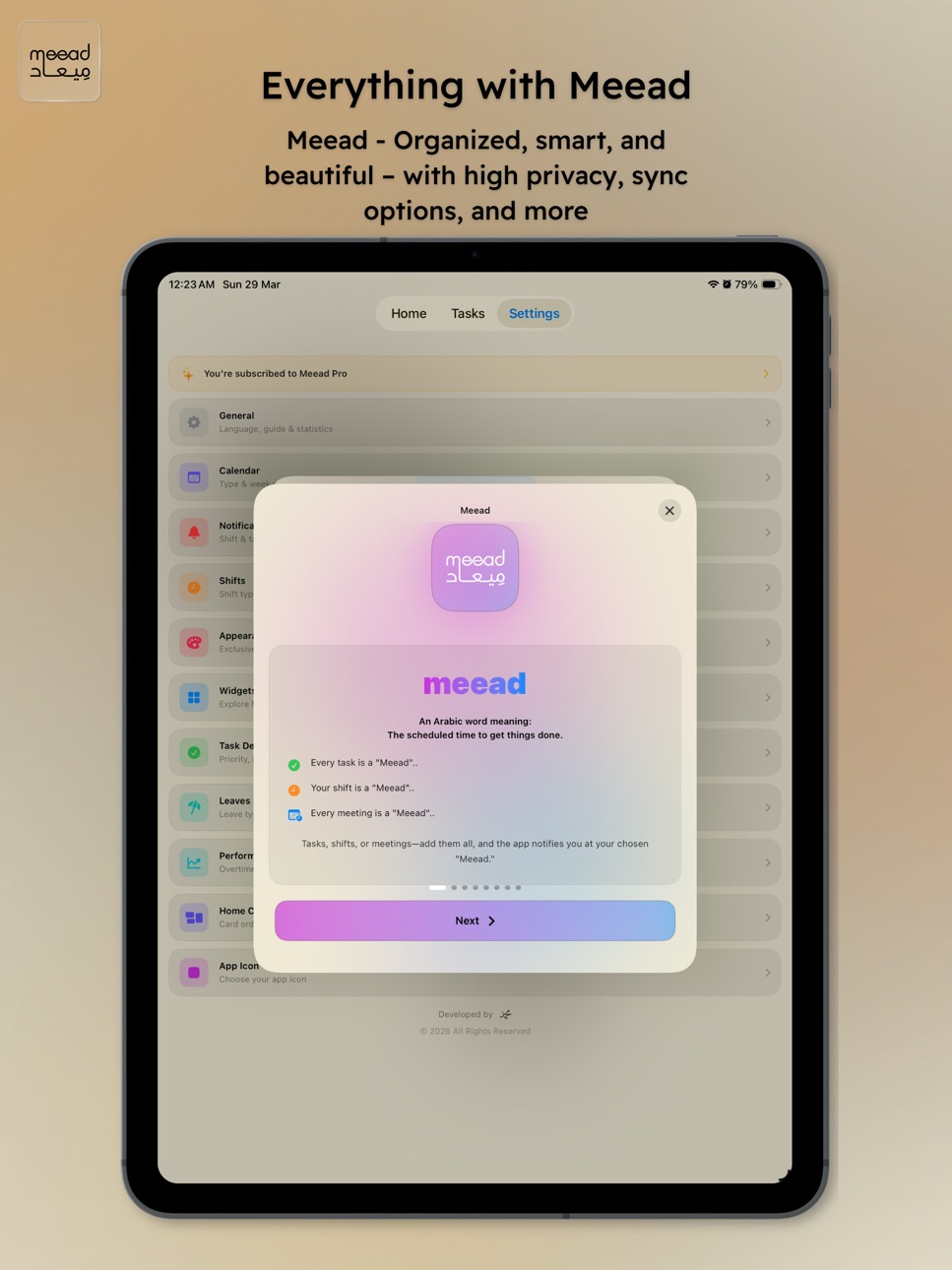
Meead is your daily companion for organizing your work shifts, tasks, and entire work life — with a beautiful design that fully supports Arabic with both Hijri and Gregorian calendars.
Whether you work a regular daily schedule or rotating shifts, Meead keeps everything in order — from shift scheduling and smart reminders to performance tracking and staying hydrated.
◆ Shift Scheduling
• Regular daily schedule or manual shift entries
• Create unlimited custom shift types with colors and times
• Color-coded shifts displayed on calendar
• Share your monthly schedule as an image
◆ Dual Calendar
• Hijri and Gregorian calendars side by side
• Choose your primary calendar preference
• Configurable week start day
• Beautiful circle calendar visualization
◆ Task Management
• Tasks with priorities, colors, and custom icons
• Repeat daily, weekly, monthly, or yearly
• Two notifications per task
• Morning overdue task alerts
• Complete tasks directly from widgets
◆ Smart Notifications
• Shift start and end reminders (two each)
• Fingerprint/attendance clock-in & clock-out reminders
• Fixed-time or shift-linked mode
• 7 custom notification sounds
• Per-day control for each reminder
◆ Performance Tracking
• Log overtime, late arrivals, permissions, and absences
• Statistics by period (day / week / month / year)
◆ Leave Management
• Pre-loaded and custom leave types
• Calendar integration
• Automatic impact on shift notifications
◆ Tools
• Pomodoro Timer — Focus + break with automatic cycling
• Stopwatch — High precision with centiseconds
• Countdown Timer — Pick your time and go
• Tally / Tasbih Counter — Simple tap counter with goal
• Water Reminder — Daily cup tracker with periodic reminders
◆ Live Activity
• Timers appear on Lock Screen and Dynamic Island
• Auto-updating countdown without opening the app
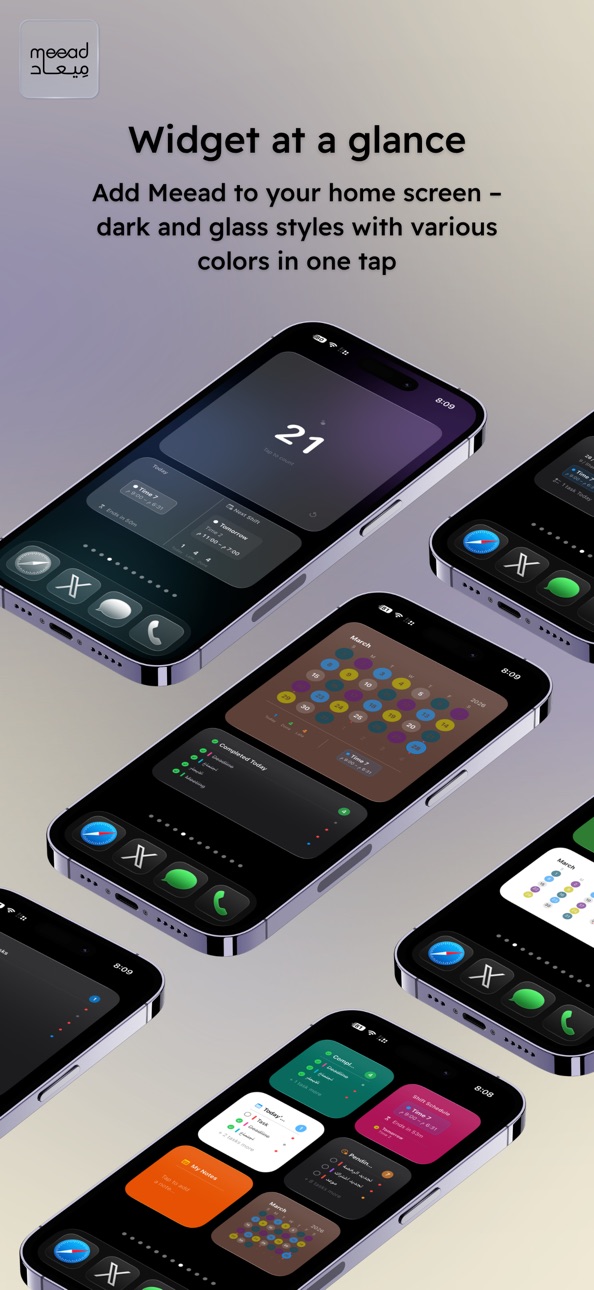
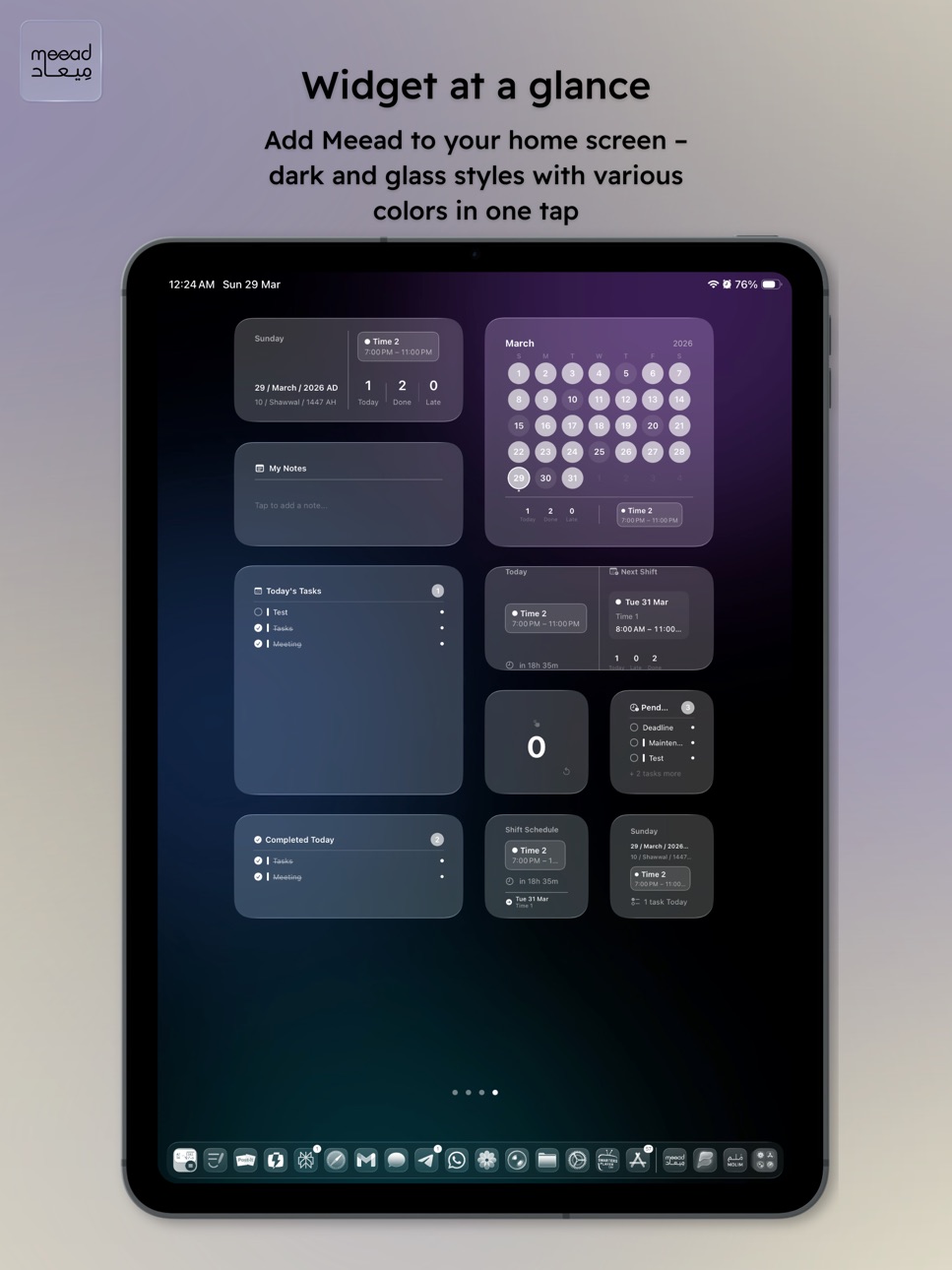
◆ 14+ Widgets
• Day Summary · Notes · Circle Calendar · Today's Tasks
• Pending Tasks · Shift Schedule · Interactive Tasbih
• Shift Countdown · Water Tracker
• Lock Screen: Shift Status · Date · Tasks · New Task · Shift
◆ Quick Notes
• Jot down notes from the home screen
• Visible on widgets and synced via iCloud
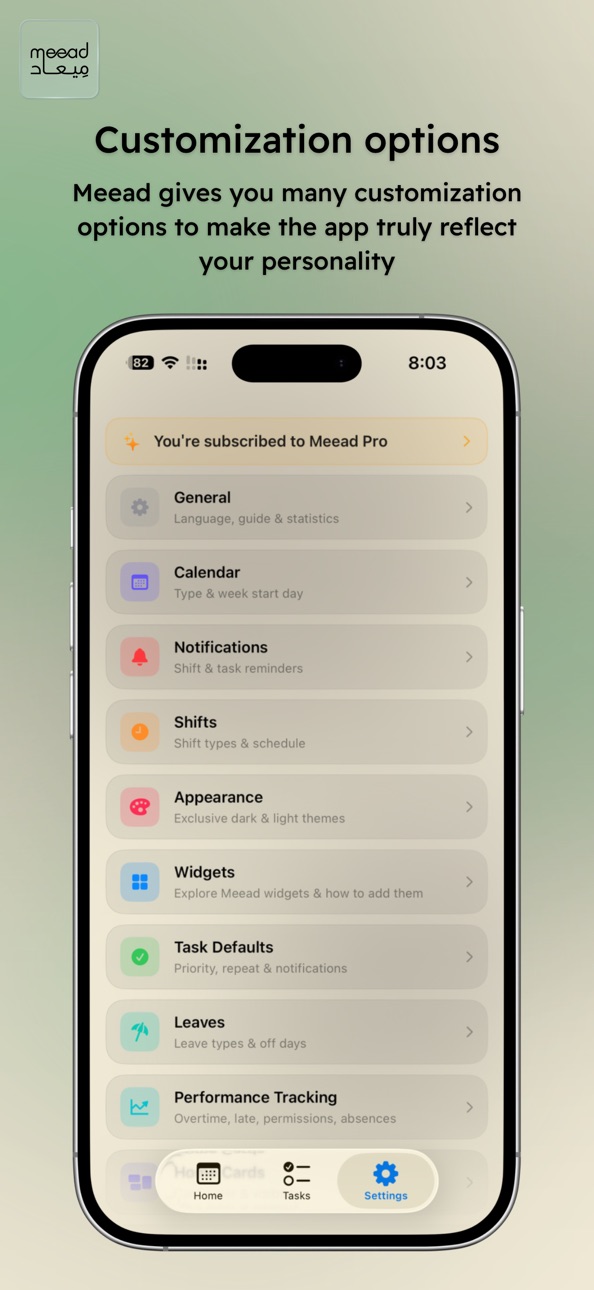
◆ 20 Themes & Icons
• 10 dark + 10 light themes with animated gradients
• 20 alternate app icons
◆ 6 Languages
Arabic · English · German · Spanish · French · Turkish
◆ iCloud Sync
• Automatic cross-device synchronization
Meead Pro unlocks everything:
2nd Reminders · Fingerprint Alerts · Notification Sounds · Overdue Alerts · All Widgets · Card Reordering · Performance Tracking · Default Task Settings · App Icons · Themes · iCloud Sync
Try free for 7 days — no commitment.
Your data stays on your device. We don't collect or share any data with anyone.
Terms of Use: https://meead-terms.q4qw5nxdbn.workers.dev?lang=en
In-App Purchases US pricing
Meead Pro Subscription
— Monthly · Monthly 7-day free trial$2.99
— Yearly · Yearly 7-day free trial$14.99
One-Time Purchases
Meead Pro — Lifetime$49.99
Capabilities
In-App Purchases
Accessibility
ipadiphonemacrealityDevicetvoswatch
Version history 17 versions
Build 886212161v2.0.102026-05-27 23:39:52
Quick Actions: Open Tasbih, add a task, or browse your task list instantly with a long press on the app icon.
Comprehensive Tasbih Improvements: Redesigned page and buttons, smoother goal-setting sheet, haptic feedback on reaching your goal, screen stays on during Tasbih, and your count is saved automatically even after closing the app.
Bug Fixes & Improvements: Fixed free-scroll drag on the home screen, fixed tap and long-press on calendar days for some users, plus general improvements to app fluidity and stability.
Build 886131881v2.0.92026-05-27 16:56:40
Quick Actions: Open Tasbih, add a task, or browse your task list instantly with a long press on the app icon.
Comprehensive Tasbih Improvements: Redesigned page and buttons, smoother goal-setting sheet, haptic celebration on reaching your goal, screen stays on during Tasbih, and your count is saved automatically even after closing the app.
Bug Fixes & Improvements: Fixed free-scroll drag on the home screen in English, plus general improvements to app fluidity and stability.
Build 885169118v2.0.82026-05-01 22:19:20
Bug Fix: App Freeze When Adding a Task from Day Detail
Some users experienced the app freezing when tapping the + button on the Day Detail screen (accessed by tapping any day in the calendar), forcing them to close and reopen the app. This issue has been fully resolved in this update.
Build 884901238v2.0.72026-04-24 23:50:38
What's new:
• The shift counter in the widget now moves from one shift to the next on its own — no more getting stuck after a shift ends.
• Tasbih counter, water cups, and quick notes now sync between your devices automatically.
• Widgets reflect your changes faster and more accurately — without opening the app.
• General stability and performance improvements.
Thanks to everyone who shared feedback
Build 884561007v2.0.62026-04-17 22:06:48
• The Shift Countdown widget was always showing the next shift date in the Hijri calendar regardless of your preference, and now it respects your choice.
• Hijri and Gregorian suffixes on the task and tracking pages are now fully translated in all six languages instead of Latin abbreviations.
• The Shift Countdown widget now shows the name and date of the next shift after today's shift ends, on both the home screen and the lock screen.
• All widget names and descriptions in the iOS widget gallery are now localized for every supported language, after previously appearing in Arabic for non-Arabic users.
• Clearer distinction between the "Shift Status" and "Shift Countdown" widgets that look similar on the lock screen.
• If you denied notifications at first launch, a clear banner now appears in notification settings with a one-tap button that takes you directly to the Meaad notification page in iOS Settings.
• The main notification toggles now verify system permission before being enabled.
• Removed card wobble while scrolling on the theme picker page.
• Fixed a strange behavior that appeared when selecting a new theme.
• Fixed the direction arrow on the "Welcome to Premium" screen in Arabic, which was pointing right instead of left.
• Task color and icon selection indicators are now visible across all themes, after previously disappearing on light backgrounds.
• Fixed the collapse of the "Due Date" row when selecting Hijri in Spanish and European languages, where the label was shown character by character in a narrow column.
• Full translation of Quick Setup card names in French, Spanish, German, and Turkish.
• Translated hours and minutes formatting across all tracking cards: Overtime, Late, Permissions, Absence, and Leaves.
• Translated task repeat units (day/week/month/year) with singular and plural forms for each language.
• Translated the "Overdue Tasks" badge for all languages.
• Statistics sharing now respects the selected sharing language, after previously ignoring it.
Build 884536107v2.0.52026-04-15 19:17:56
Fixes & improvements:
• Fixed card wobble and unintended drift while scrolling in the Settings, Shifts, and Calendar pages.
• Removed the extra gap at the top of sub-pages and refined their layout.
• Moved the scroll indicator to the screen edge on every page.
• Optimized the animated background to run independently, so it no longer affects cards or scrolling.
Shift Scheduler & Pattern Repeat improvements:
• Noticeably faster performance in the Shift Scheduler when saving and closing, especially for users with many shifts.
• Important fix for Hijri calendar users: the "Clear Month Shifts" button now correctly operates on the Hijri month.
• All shift, shift-end, and fingerprint notifications are now fully synced when you tap "Apply" in the Shift Scheduler.
• Fixed the day count display in "Repeat Shift Pattern" when the end date is before the start date.
• Optimized the "Repeat Shift Pattern" preview to prevent freezes on very long date ranges, while still applying the pattern to the full period.
• Changes made via "Repeat Pattern" are now preserved when returning to the Shift Scheduler page.
Build 884311779v2.0.42026-04-09 17:38:42
• Cleaner time display in widgets
• Fixed shift time order in the Arabic interface
• Keyboard now opens automatically when creating a new task
Build 884241033v2.0.12026-04-08 00:52:43
• Improved shift countdown widget: faster and more accurate transitions at shift start and end
• Next shift details now shown in widget: shift name, day, and start/end time
• Fixed water widget sync with the app in both directions
• Water tracking data now syncs across devices via iCloud
• Improved reliability of interactive widget data updates
• Renamed the notes widget to "My Memo"
• Improved memo widget design: more space for text
• Improved memo widget sync between devices via iCloud
Build 884260471v2.0.22026-04-08 18:13:16
Bug fixes.
Learn more about version 2.0.0 features: completely redesigned UI with 20 themes and icons, iPad support, 14+ interactive widgets, Pomodoro timer and daily tools, smart notifications, Gregorian and Hijri calendar, performance and leave tracking, iCloud sync, and 6 language support.
Build 884294973v2.0.32026-04-08 21:30:14
• New countdown widget design showing remaining and elapsed time with a full progress bar
• Improved Notes widget with better use of space to display more text
• Bug fixes and performance improvements
Build 883860667v2.0.02026-04-07 12:55:07
A comprehensive update with a brand-new design and advanced features:
◆ Brand New Design
• Redesigned interface with new themes and animated gradients
• 20 themes and 20 alternate app icons
• iPad support
◆ Home Screen & Lock Screen Widgets
• 14+ widgets in multiple sizes
• Interactive widgets: Tasbih, Water Tracker, Task Completion
• Lock Screen widgets: Shift Status, Date, Tasks, Countdown
◆ New Daily Tools
• Pomodoro timer with automatic focus/break cycling
• Stopwatch · Countdown Timer · Tally / Tasbih Counter
• Water reminder with daily cup tracker and interactive widget
• Live Activity on Lock Screen and Dynamic Island
◆ Advanced Smart Notifications
• Two reminders for shift start and two for shift end
• Fingerprint clock-in/out reminders
• Morning overdue task alerts
• 7 custom notification sounds
◆ Flexible Calendar
• Gregorian only, Hijri only, or both with primary selection
• Configurable week start day
◆ More Customization for Shifts & Tasks
• Unlimited shift types with custom colors and times
• Tasks with priorities, colors, icons, and flexible repeat
• New sorting and filtering options for tasks
• Share monthly schedule and statistics as an image
◆ Performance & Leave Tracking
• Track leaves, absences, late arrivals, permissions, and overtime
• Detailed statistics by period
◆ New Languages & Sync
• Added Spanish, French, Turkish, and German
• Automatic iCloud sync across your devices
Build 880487083v1.72025-12-10 15:25:38
New in this Version :
• General improvements to notifications
• Tasks marked as completed in the app will no longer send notifications
• General bug fixes and improvements to performance and stability
Reminder of the features from the previous version 1.4
• Easily repeat shift patterns
You can now select a date range (from–to), define a shift pattern (work days / off days), and apply it automatically to the entire period with a single tap
• Two clear buttons at the bottom of the shift screen
A button to repeat the shift pattern + a button to open shift time settings or go back, depending on how you entered the screen, to improve navigation and avoid annoying back-and-forth between screens
• Improved “today’s shift” selection screen
A clearer, cleaner design when choosing today’s shift, with well-organized, eye-friendly cards
• Improved translations across multiple parts of the app
• Fixed some minor bugs
• New app icon
Build 880456753v1.42025-12-09 12:22:13
What’s new in this version:
• Easily repeat shift patterns
You can now select a date range (from–to), define a shift pattern (work days / off days), and apply it automatically to the entire period with a single tap
• Two clear buttons at the bottom of the shift screen
A button to repeat the shift pattern + a button to open shift time settings or go back, depending on how you entered the screen, to improve navigation and avoid annoying back-and-forth between screens
• Improved “today’s shift” selection screen
A clearer, cleaner design when choosing today’s shift, with well-organized, eye-friendly cards
• Improved translations across multiple parts of the app
• Fixed some minor bugs
• New app icon
Build 880419045v1.32025-12-07 22:20:16
Improved notifications and ensured they work correctly,
in addition to all the features from version 1.2.
Major update: Meead instead of Shifty!
- The app name has changed from Shifty to Meead because it is no longer limited to shifts only; it now brings together your calendar, tasks, appointments, and shifts in one place, with more features coming soon.
- Full English language support.
- A new onboarding screen at first launch that explains Meead’s features from the start.
- Improved display of shifts, days off, and task status in the monthly calendar.
- Improved number formatting across all screens.
- Improved date formatting across all screens.
- Improved notifications and fixes for previous issues to increase stability and speed.
- Other minor enhancements that improve the experience and make the app smoother.
And this is just the beginning — bigger updates are coming.
Build 880333189v1.22025-12-04 19:58:45
Major update: Meead instead of Shifty!
- The app name has changed from Shifty to Meead because it is no longer limited to shifts only; it now brings together your calendar, tasks, appointments, and shifts in one place, with more features coming soon.
- Full English language support.
- A new onboarding screen at first launch that explains Meead’s features from the start.
- Improved display of shifts, days off, and task status in the monthly calendar.
- Improved number formatting across all screens.
- Improved date formatting across all screens.
- Improved notifications and fixes for previous issues to increase stability and speed.
- Other minor enhancements that improve the experience and make the app smoother.
And this is just the beginning — bigger updates are coming.
Build 880315649v1.1.12025-12-03 23:08:03
Big update: Meead instead of Shifty!
- The app has been renamed from Shifty to Meead, because it’s no longer just about shifts — it now brings together your calendar, tasks, appointments, and shifts in one place, with more features on the way.
- Full English language support across the app.
- A new onboarding screen that introduces Meead’s features from the very first launch.
- Improved monthly calendar view for clearer display of shifts, off days, and task status.
- Better number formatting across all screens.
- Improved date formatting across the entire app.
- Enhanced notifications and multiple fixes for better stability and faster performance.
And this is just the beginning — bigger updates are coming.
Build 879655845v1.02025-11-19 16:36:22
Price history by region
Currency
Show
Columns
Search
Availability 137 of 137 storefronts
| Region | Language | Price | Ratings | Avg | Version |
|---|---|---|---|---|---|
| SA | en-GB | Free | 5 | 5.0 | 2.0.10 |
| AE | en-GB | Free | 0 | — | 2.0.10 |
| AG | en-GB | Free | 0 | — | 2.0.10 |
| AI | en-GB | Free | 0 | — | 2.0.10 |
| AL | en-GB | Free | 0 | — | 2.0.10 |
| AM | en-GB | Free | 0 | — | 2.0.10 |
| AO | en-GB | Free | 0 | — | 2.0.10 |
| AR | es-MX | Free | 0 | — | 2.0.10 |
| AT | de-DE | Free | 0 | — | 2.0.10 |
| AU | en-AU | Free | 0 | — | 2.0.10 |
| AZ | en-GB | Free | 0 | — | 2.0.10 |
| BA | en-GB | Free | 0 | — | 2.0.10 |
| BB | en-GB | Free | 0 | — | 2.0.10 |
| BE | en-GB | Free | 0 | — | 2.0.10 |
| BF | en-GB | Free | 0 | — | 2.0.10 |
| BG | en-GB | Free | 0 | — | 2.0.10 |
| BH | en-GB | Free | 0 | — | 2.0.10 |
| BJ | en-GB | Free | 0 | — | 2.0.10 |
| BO | es-MX | Free | 0 | — | 2.0.10 |
| BR | pt-BR | Free | 0 | — | 2.0.10 |
| BS | en-GB | Free | 0 | — | 2.0.10 |
| BW | en-GB | Free | 0 | — | 2.0.10 |
| BY | en-GB | Free | 0 | — | 2.0.10 |
| BZ | en-GB | Free | 0 | — | 2.0.10 |
| CA | en-CA | Free | 0 | — | 2.0.10 |
| CD | en-GB | Free | 0 | — | 2.0.10 |
| CG | en-GB | Free | 0 | — | 2.0.10 |
| CH | de-CH | Free | 0 | — | 2.0.10 |
| CI | fr-FR | Free | 0 | — | 2.0.10 |
| CL | es-MX | Free | 0 | — | 2.0.10 |
| CM | fr-FR | Free | 0 | — | 2.0.10 |
| CN | zh-Hans-CN | Free | 0 | — | 2.0.10 |
| CO | es-MX | Free | 0 | — | 2.0.10 |
| CR | es-MX | Free | 0 | — | 2.0.10 |
| CV | en-GB | Free | 0 | — | 2.0.10 |
| CY | en-GB | Free | 0 | — | 2.0.10 |
| CZ | en-GB | Free | 0 | — | 2.0.10 |
| DE | de-DE | Free | 0 | — | 2.0.10 |
| DK | en-GB | Free | 0 | — | 2.0.10 |
| DM | en-GB | Free | 0 | — | 2.0.10 |
| DO | es-MX | Free | 0 | — | 2.0.10 |
| DZ | en-GB | Free | 0 | — | 2.0.10 |
| EC | es-MX | Free | 0 | — | 2.0.10 |
| EG | en-GB | Free | 0 | — | 2.0.10 |
| ES | es-ES | Free | 0 | — | 2.0.10 |
| FI | en-GB | Free | 0 | — | 2.0.10 |
| FR | fr-FR | Free | 0 | — | 2.0.10 |
| GA | fr-FR | Free | 0 | — | 2.0.10 |
| GB | en-GB | Free | 0 | — | 2.0.10 |
| GD | en-GB | Free | 0 | — | 2.0.10 |
| GE | en-GB | Free | 0 | — | 2.0.10 |
| GH | en-GB | Free | 0 | — | 2.0.10 |
| GT | es-MX | Free | 0 | — | 2.0.10 |
| GW | en-GB | Free | 0 | — | 2.0.10 |
| GY | en-GB | Free | 0 | — | 2.0.10 |
| HK | zh-Hant-HK | Free | 0 | — | 2.0.10 |
| HN | es-MX | Free | 0 | — | 2.0.10 |
| HU | en-GB | Free | 0 | — | 2.0.10 |
| ID | en-GB | Free | 0 | — | 2.0.10 |
| IE | en-GB | Free | 0 | — | 2.0.10 |
| IL | en-GB | Free | 0 | — | 2.0.10 |
| IQ | en-GB | Free | 0 | — | 2.0.10 |
| IS | en-GB | Free | 0 | — | 2.0.10 |
| IT | it | Free | 0 | — | 2.0.10 |
| JM | en-GB | Free | 0 | — | 2.0.10 |
| JO | en-GB | Free | 0 | — | 2.0.10 |
| JP | ja | Free | 0 | — | 2.0.10 |
| KE | en-GB | Free | 0 | — | 2.0.10 |
| KN | en-GB | Free | 0 | — | 2.0.10 |
| KR | ko | Free | 0 | — | 2.0.10 |
| KW | en-GB | Free | 0 | — | 2.0.10 |
| KY | en-GB | Free | 0 | — | 2.0.10 |
| LB | en-GB | Free | 0 | — | 2.0.10 |
| LC | en-GB | Free | 0 | — | 2.0.10 |
| LR | en-GB | Free | 0 | — | 2.0.10 |
| LT | en-GB | Free | 0 | — | 2.0.10 |
| LU | en-GB | Free | 0 | — | 2.0.10 |
| LY | en-GB | Free | 0 | — | 2.0.10 |
| MA | en-GB | Free | 0 | — | 2.0.10 |
| MD | en-GB | Free | 0 | — | 2.0.10 |
| ME | en-GB | Free | 0 | — | 2.0.10 |
| MG | en-GB | Free | 0 | — | 2.0.10 |
| MK | en-GB | Free | 0 | — | 2.0.10 |
| ML | en-GB | Free | 0 | — | 2.0.10 |
| MO | zh-Hant-HK | Free | 0 | — | 2.0.10 |
| MS | en-GB | Free | 0 | — | 2.0.10 |
| MT | en-GB | Free | 0 | — | 2.0.10 |
| MU | en-GB | Free | 0 | — | 2.0.10 |
| MW | en-GB | Free | 0 | — | 2.0.10 |
| MX | es-MX | Free | 0 | — | 2.0.10 |
| MY | en-GB | Free | 0 | — | 2.0.10 |
| MZ | en-GB | Free | 0 | — | 2.0.10 |
| NA | en-GB | Free | 0 | — | 2.0.10 |
| NE | en-GB | Free | 0 | — | 2.0.10 |
| NG | en-GB | Free | 0 | — | 2.0.10 |
| NI | es-MX | Free | 0 | — | 2.0.10 |
| NL | nl | Free | 0 | — | 2.0.10 |
| NO | en-GB | Free | 0 | — | 2.0.10 |
| NZ | en-AU | Free | 0 | — | 2.0.10 |
| OM | en-GB | Free | 0 | — | 2.0.10 |
| PA | es-MX | Free | 0 | — | 2.0.10 |
| PE | es-MX | Free | 0 | — | 2.0.10 |
| PL | en-GB | Free | 0 | — | 2.0.10 |
| PT | pt-PT | Free | 0 | — | 2.0.10 |
| PY | es-MX | Free | 0 | — | 2.0.10 |
| QA | en-GB | Free | 0 | — | 2.0.10 |
| RO | en-GB | Free | 0 | — | 2.0.10 |
| RS | en-GB | Free | 0 | — | 2.0.10 |
| RU | ru | Free | 0 | — | 2.0.10 |
| SC | en-GB | Free | 0 | — | 2.0.10 |
| SE | sv | Free | 0 | — | 2.0.10 |
| SG | en-GB | Free | 0 | — | 2.0.10 |
| SK | en-GB | Free | 0 | — | 2.0.10 |
| SL | en-GB | Free | 0 | — | 2.0.10 |
| SN | en-GB | Free | 0 | — | 2.0.10 |
| SR | en-GB | Free | 0 | — | 2.0.10 |
| ST | en-GB | Free | 0 | — | 2.0.10 |
| SV | es-MX | Free | 0 | — | 2.0.10 |
| TC | en-GB | Free | 0 | — | 2.0.10 |
| TD | en-GB | Free | 0 | — | 2.0.10 |
| TH | en-GB | Free | 0 | — | 2.0.10 |
| TN | en-GB | Free | 0 | — | 2.0.10 |
| TR | en-GB | Free | 0 | — | 2.0.10 |
| TT | en-GB | Free | 0 | — | 2.0.10 |
| TW | zh-Hant-TW | Free | 0 | — | 2.0.10 |
| TZ | en-GB | Free | 0 | — | 2.0.10 |
| UA | en-GB | Free | 0 | — | 2.0.10 |
| UG | en-GB | Free | 0 | — | 2.0.10 |
| US | en-US | Free | 0 | — | 2.0.10 |
| UY | en-GB | Free | 0 | — | 2.0.10 |
| VC | en-GB | Free | 0 | — | 2.0.10 |
| VE | es-MX | Free | 0 | — | 2.0.10 |
| VG | en-GB | Free | 0 | — | 2.0.10 |
| XK | en-GB | Free | 0 | — | 2.0.10 |
| YE | en-GB | Free | 0 | — | 2.0.10 |
| ZM | en-GB | Free | 0 | — | 2.0.10 |
| ZW | en-GB | Free | 0 | — | 2.0.10 |
Change log 21 changes · US
✎
releaseNotes updated
Quick Actions: Open Tasbih, add a task, or browse your task list instantly with a long press on the app icon.
Comprehensive Tasbih Improvements: Redesigned pag
✎
description updated
Meead is your daily companion for organizing your work shifts, tasks, and entire work life — with a beautiful design that fully supports Arabic with both Hijri
✎
subtitle updated
Scheduling · Tasks · Widgets
✎
name updated
Meead — Shifts, Tasks & Tools
◆
Version 2.0.10 released
Quick Actions: Open Tasbih, add a task, or browse your task list instantly with a long press on the app icon.
Comprehensive Tasbih Improvements: Redesigned page and buttons, smoother goal-setting sheet, haptic feedback on reaching your goa
◆
Version 2.0.9 released
Quick Actions: Open Tasbih, add a task, or browse your task list instantly with a long press on the app icon.
Comprehensive Tasbih Improvements: Redesigned page and buttons, smoother goal-setting sheet, haptic celebration on reaching your
◆
Version 2.0.8 released
Bug Fix: App Freeze When Adding a Task from Day Detail
Some users experienced the app freezing when tapping the + button on the Day Detail screen (accessed by tapping any day in the calendar), forcing them to close and reopen the app. This
◆
Version 2.0.7 released
What's new:
• The shift counter in the widget now moves from one shift to the next on its own — no more getting stuck after a shift ends.
• Tasbih counter, water cups, and quick notes now sync between your devices automatically.
• Widgets
◆
Version 2.0.6 released
• The Shift Countdown widget was always showing the next shift date in the Hijri calendar regardless of your preference, and now it respects your choice.
• Hijri and Gregorian suffixes on the task and tracking pages are now fully translated
◆
Version 2.0.5 released
Fixes & improvements:
• Fixed card wobble and unintended drift while scrolling in the Settings, Shifts, and Calendar pages.
• Removed the extra gap at the top of sub-pages and refined their layout.
• Moved the scroll indicator to the screen
◆
Version 2.0.4 released
• Cleaner time display in widgets
• Fixed shift time order in the Arabic interface
• Keyboard now opens automatically when creating a new task
◆
Version 2.0.3 released
• New countdown widget design showing remaining and elapsed time with a full progress bar
• Improved Notes widget with better use of space to display more text
• Bug fixes and performance improvements
◆
Version 2.0.2 released
Bug fixes.
Learn more about version 2.0.0 features: completely redesigned UI with 20 themes and icons, iPad support, 14+ interactive widgets, Pomodoro timer and daily tools, smart notifications, Gregorian and Hijri calendar, performance an
◆
Version 2.0.1 released
• Improved shift countdown widget: faster and more accurate transitions at shift start and end
• Next shift details now shown in widget: shift name, day, and start/end time
• Fixed water widget sync with the app in both directions
• Water t
◆
Version 2.0.0 released
A comprehensive update with a brand-new design and advanced features:
◆ Brand New Design
• Redesigned interface with new themes and animated gradients
• 20 themes and 20 alternate app icons
• iPad support
◆ Home Screen & Lock Screen Widge
◆
Version 1.7 released
New in this Version :
• General improvements to notifications
• Tasks marked as completed in the app will no longer send notifications
• General bug fixes and improvements to performance and stability
Reminder of the features from the pre
◆
Version 1.4 released
What’s new in this version:
• Easily repeat shift patterns
You can now select a date range (from–to), define a shift pattern (work days / off days), and apply it automatically to the entire period with a single tap
• Two clear buttons at
◆
Version 1.3 released
Improved notifications and ensured they work correctly,
in addition to all the features from version 1.2.
Major update: Meead instead of Shifty!
- The app name has changed from Shifty to Meead because it is no longer limited to shifts onl
◆
Version 1.2 released
Major update: Meead instead of Shifty!
- The app name has changed from Shifty to Meead because it is no longer limited to shifts only; it now brings together your calendar, tasks, appointments, and shifts in one place, with more features c
◆
Version 1.1.1 released
Big update: Meead instead of Shifty!
- The app has been renamed from Shifty to Meead, because it’s no longer just about shifts — it now brings together your calendar, tasks, appointments, and shifts in one place, with more features on the
◆
Version 1.0 released