Home › Games

 US
US
USen-US TWzh-Hant-TW
 DEde-DE
 AUen-AU
 CAen-CA
 GBen-GB
 RUru
RUru JPja
JPja BRpt-BR
 FRfr-FR
 NLnl
NLnl ESes-ES
 TRen-GB
 HKzh-Hant-HK
 INen-GB
 ITit
ITit LKen-GB
 MYen-GB
 PLen-GB
 SEsv
SEsv SGen-GB
 THen-GB
 GRen-GB
 NZen-AU
 SAen-GB
 TTen-GB
 AEen-GB
 AFen-GB
 AGen-GB
 ALen-GB
 AMen-GB
 AOen-GB
 ATde-DE
 AZen-GB
 BAen-GB
 BBen-GB
 BEen-GB
 BGen-GB
 BHen-GB
 BMen-GB
 BNen-GB
 BTen-GB
 BWen-GB
 BYen-GB
 CDen-GB
 CHde-CH
 CIfr-FR
 CLes-MX
 CMfr-FR
 CRes-MX
 CYen-GB
 CZen-GB
 DKen-GB
 DMen-GB
 EEen-GB
 EGen-GB
 FIen-GB
 FJen-GB
 FMen-GB
 GAfr-FR
 GDen-GB
 GEen-GB
 GHen-GB
 GMen-GB
 HNes-MX
 HRen-GB
 HUen-GB
 IDen-GB
 IEen-GB
 ILen-GB
 IQen-GB
 ISen-GB
 JMen-GB
 JOen-GB
 KGen-GB
 KHen-GB
 KWen-GB
 KZen-GB
 LAen-GB
 LBen-GB
 LTen-GB
 LUen-GB
 LVen-GB
 MDen-GB
 MEen-GB
 MGen-GB
 MKen-GB
 MLen-GB
 MMen-GB
 MNen-GB
 MOzh-Hant-HK
 MRen-GB
 MSen-GB
 MTen-GB
 MUen-GB
 MZen-GB
 NAen-GB
 NEen-GB
 NGen-GB
 NOen-GB
 NRen-GB
 OMen-GB
 PAes-MX
 PHen-GB
 PKen-GB
 PTpt-PT
 PWen-GB
 PYes-MX
 QAen-GB
 ROen-GB
 RSen-GB
 SBen-GB
 SCen-GB
 SIen-GB
 SKen-GB
 SNen-GB
 STen-GB
 SZen-GB
 TCen-GB
 TDen-GB
 TJen-GB
 TMen-GB
 TNen-GB
 TOen-GB
 TZen-GB
 UAen-GB
 UGen-GB
 UZen-GB
 VGen-GB
 VUen-GB
 XKen-GB
 YEen-GB
 ZAen-GB
 ZMen-GB
 CNNot Available
 KRNot Available
 VNNot Available
134 of 137 storefronts
Content in en-US
Content in en-US
Information
Apple ID6755103808
Bundle IDcom.voidlinkextreme.iOS
SellerSeller
Min iOS12.0
Min macOS11.0
Device familiesiphone, ipad, ipod
Released2025-11-20
CopyrightCopyright © 2025 TrueZhuanjia(True砖家) @ Bilibili
Privacy policyLink ↗
Preview 2 platforms
iPhone 5 images


iPad 5 images



What’s New Version 3.4.4
Fixed: sub-widget does not bounce back to original position when getting collected by folder button.
Description
VoidLink is a project developed & maintained by Sunshine - Moonlight game streaming community players. After long term development and iterations, it has been refined into a powerful and feature rich game streaming tool.
More details about VoidLink including our community support is available on the app support web page.
Key Features of VoidLink
1. Better performance
- Fine tuned video rendering enables enhanced streaming performance for most iOS devices. Check our app support web page for details.
- Supports HDR and YUV 4:4:4 streaming (requires device hardware decoding).
- Picture‑in‑picture mode supported (iOS15+) —stream in the background without interruption.
2. Drawing Toolkit:
Toolkit built for drawing: better stroke transmission, pro-level pressure curve mapping, double-tap and squeeze shortcuts, exclusive on-screen buttons.
(Basic stylus support remains available without purchasing the Drawing Toolkit)
3. External controller support
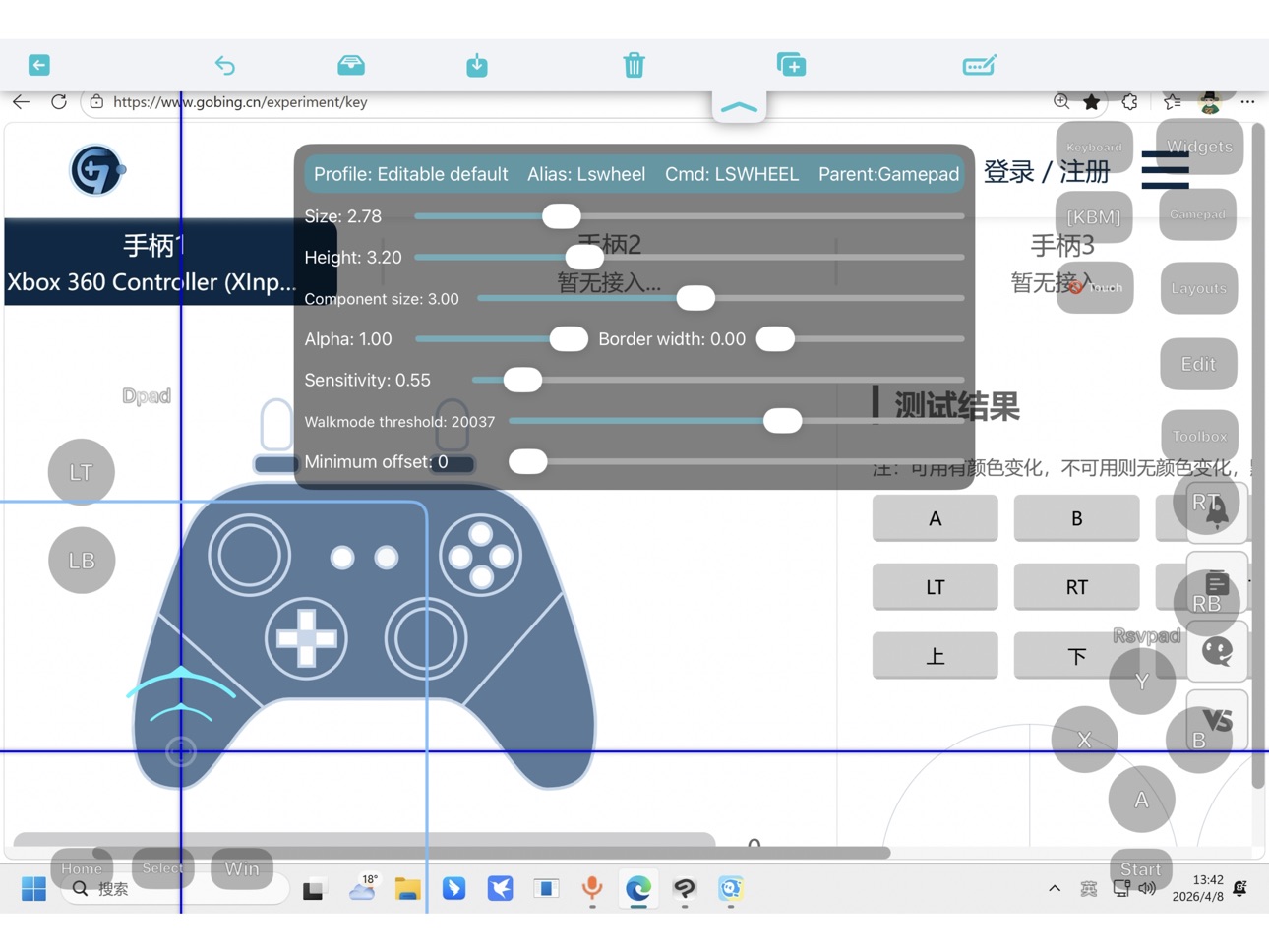
- Super fun! VoidLink brings the first-ever virtual gamepad overlay with real-time input feedback to the game streaming community.
- Specify controller mapping as Xbox360 or DualShock 4.
- User-defined controller mouse mode.
- User-defined gyro toggle & hold button.
- Controllers can be connected anytime during streaming.
- DS4 Gyroscope mapping.
4. Advanced touch support
- Smooth, reliable multi‑touch passthrough.
- The app introduces a multi‑Touch game fine‑tuning feature for games with native mobile UI on PC.
- Simulated mouse click, double click, right‑click, drag, etc., with adjustable pointer sensitivity.
5. Powerful on-screen widgets
- Button widget includes: controller, keyboard, mouse, gyro control, functional (settings menu, soft keyboard, etc.)
- Supports grouping, layering, collapsing, and expanding on-screen widgets.
- Widget group is able to import complete layouts for quick reuse.
- Supports combo buttons, button macros, button+touchpad hybrid widgets
- Touchpad widget that enables mobile style gaming.
- Auto tap timer for each button widgets
- Visual and haptic feedback supported (requires device with vibration motor).
- Customize on-screen widget & layout—adjust size, shape, border, transparency, sensitivity, labels, and more.
- Import/export on-screen widget layouts for sharing configurations across devices.
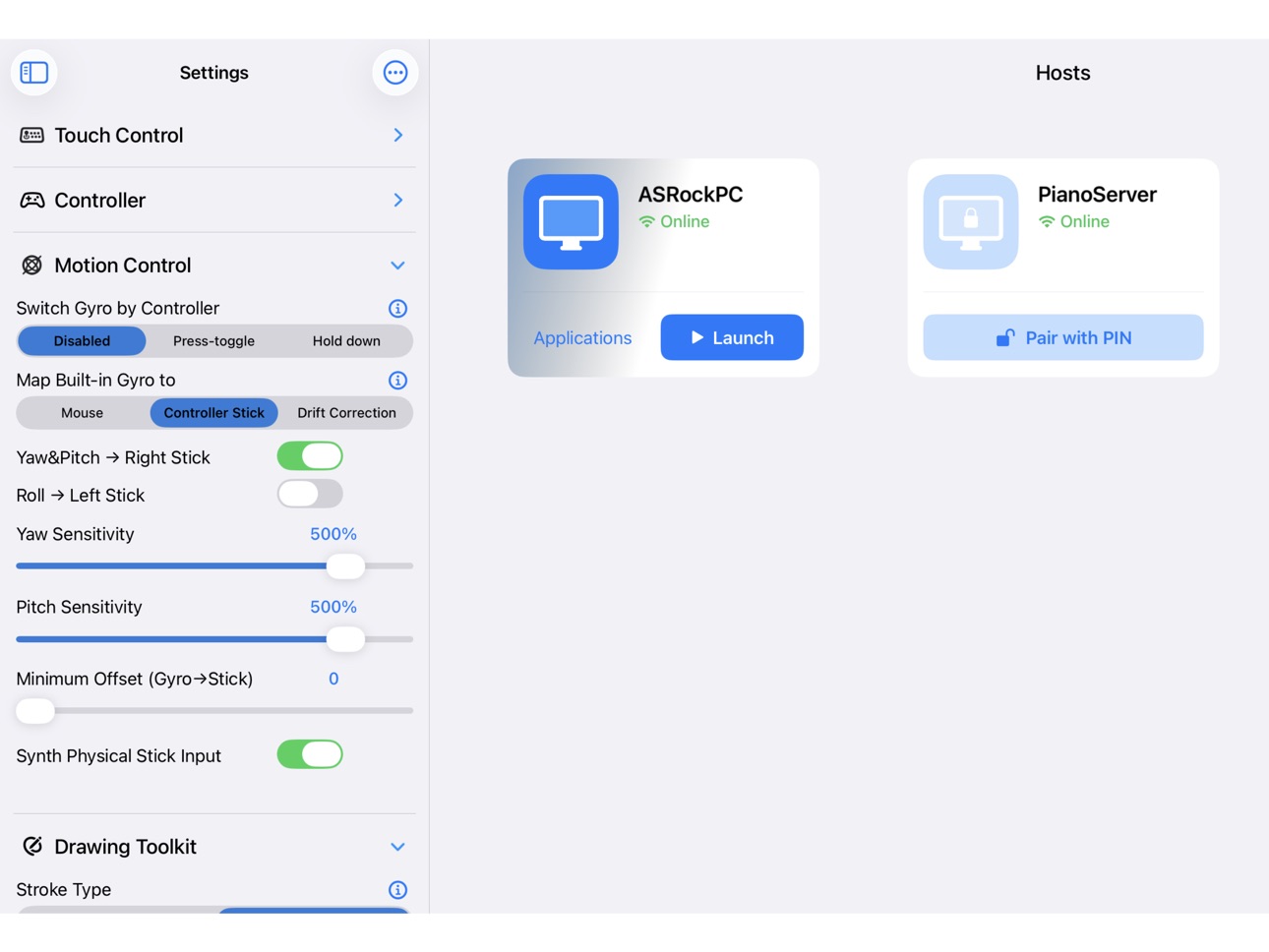
6. Powerful motion control
- Directly maps built-in gyro or external gamepad gyro to mouse or controller stick, no need for third party PC software for motion control mapping
- Works with on-screen gyro control button “GYRO” & “GYROPAUSE” or user-defined physical controller buttons.
7. Haptic engine selection (iOS 13+)
- Auto: rumbles iPhone when controller does not support rumbling. Able to rumble iPhone when using on-screen widget control while no physical controller is connected.
- swap rumbling left & right handle motor on controller
Note: external controller rumbling supported on iOS 14+.
8. Microphone redirection
- Support for microphone redirection with Sunshine-Foundation.
9. Changing bitrate upper limit without disconnecting
- Bitrate upper limit can be adjusted without disconnecting when working with Sunshine-Foundation.
Note: check out our technical support page for more details about Sunshine-Foundation
10. Full portrait‑mode support
- Streaming content and on‑screen widgets adapt to portrait orientation: automatic resolution and widget layout adjustment.
11. External display support: duplicate or external display only
In-App Purchases US pricing
One-Time Purchases
Drawing Toolkit$5.99
Capabilities
In-App PurchasesGame controller
Accessibility
ipadiphonemacrealityDevicetvoswatch
Version history 25 versions
Build 886940060v3.4.42026-06-14 22:06:29
Fixed: sub-widget does not bounce back to original position when getting collected by folder button.
Build 886616960v3.4.32026-06-07 23:01:46
• Updated the built-in on-screen widget layouts created by the VoidLink community:
◦ Components can be quickly expanded and collapsed for flexible access
◦ Includes 20+ commonly used keyboard shortcuts
◦ PC navigation components now integrate all keys from a full 104-key keyboard
◦ One-tap switching between game and PC navigation layouts
◦ One-tap access to the touch mouse
• Added a keyboard shortcut library to the on-screen widget picker, featuring commonly used PC shortcuts.
• Fixed known issues and improved the overall experience.
Build 886140109v3.4.22026-05-28 14:23:31
- Bug fixes
Build 885889536v3.4.12026-05-21 23:38:20
- Microphone audio encryption for Sunshine-Foundation.
- On-screen widget update:
- Button skill-combo now enhanced to powerful button macro
- Able to set repeat count for button auto tap
- Allow reversed input for gyro control
- Scrollable widget pool with larger capacity
- Bug fixes and improvements
Build 885755257v3.4.02026-05-17 18:55:58
Fixed home indicator interaction issue.
Build 885629147v3.3.92026-05-14 07:55:52
• Fixed: Single point touch mode zooming issue
• On-screen widget update:
◦ Improved displacement based stick touchpads (LsPad, RsPad)
◦ Button widget batch resize
◦ Shortcut button triggering improvement
◦ Layout tool improvements
• Globe key as Escape switch
Build 885124343v3.3.82026-05-01 00:03:58
• Game profile system
• Motion control for external gamepad — controller gyroscope can be directly mapped to mouse and joystick input
• Rebuilt the soft keyboard toolbar
• On-screen widget updates:
◦ Magnifier touchpad for real-time panning and zooming of the streaming view
◦ Absolute mousepad for RTS games (just put it into a folder button)
• Fixed known compatibility issues on older iOS versions
• Fixed known issues affecting keyboard & mouse desktop streaming experience
Build 884584022v3.3.72026-04-19 19:53:17
• User interaction fixes and improvements
• Widget layout tool UI improvements
• GUI shortcut picker for toolbox menu
Build 884431566v3.3.62026-04-15 05:51:24
• Recover toolbox menu, and user interaction fixes and improvements
• On-screen widget fixes and improvements
• App crash fix for iOS12
• Bug fixes
Build 884249213v3.3.52026-04-10 03:31:01
• Virtual gamepad overlay with live input feedback for external gamepad
• GUI on-screen widget picker
• On-screen widget batch edit
• Auto docking for on-screen folder button
Build 883648132v3.3.42026-03-23 18:14:35
Fixed: soft keyboard brought up by controller button caused by iOS26 system-level action.
Build 883628385v3.3.32026-03-22 23:42:04
• Enable Liquid Glass for iOS 26.
• Refine UI for iOS 13~18.
• Drawing Toolkit update:
◦ Filtering applied to eliminate bubble/burst/hook at the start of pencil stroke. (in-app-purchase feature based)
◦ Improved auto-hover mechanism resolves compatibility issues with certain drawing software(e.g. SAI2) caused by lack of hovering support by some iPad. (in-app-purchase feature based).
• On screen widget update:
◦ Feat: able to move sub widgets in batch by on-screen folder button.
◦ Feat: new on-screen button "disableTouch", available in default profile.
◦ Layout tool improvements.
• Designating soft keyboard height as a workaround of unreliable height value read from third party input method, making sure streaming view properly lifted. Available in "Others" section of settings menu.
Build 883042665v3.3.22026-03-07 11:04:12
- Fixed: on-screen widget layout with folder buttons broken by resizing window, entering background/PiP & orientation change.
- Fixed: unexpected triggering of on-screen buttons collected by folder
- Remove "Auto" from codec option.
Build 882713612v3.3.12026-03-03 18:45:23
- Restore “view all apps" function for host card.
- Adjust setting option section & order.
- Fixed: flickering cursor on host while the stylus is hovering.
- Feat: stylus hover mode selector.
- Fixed: unable to setup updated pressure curve mapping during streaming (after pressure modification or on-screen widget profile change).
- Other drawing related settings now able to update after being changed during streaming.
- Flexible stylus pressure curve start point.
- Larger pressure curve view.
Build 882464267v3.3.02026-02-22 08:52:49
• iPadOS 15 and later now support Pencil Pro Pack, featuring 240Hz high-frequency stylus passthrough, pro-level pencil pressure curve adjustment, double-tap and squeeze shortcuts, as well as several exclusive on-screen buttons.
Note: Basic pencil support remains available without purchasing the Pencil Pro Pack.
• Breakthrough improvements in streaming performance, delivering smoother visuals. Visit the our technical support webpage to learn more about performance comparison tests.
• Introducing the powerful new on-screen button “Folder” (widget folder), which can contain on-screen buttons, on-screen touchpads, and sub-folders. It enables quick expand/collapse actions, multi-layer layout switching within the same configuration, and even a slidable custom button menu. After updating, simply load the preset “Default” on-screen control profile to experience it.
• Touch point tracking.
• Completed recovery handling when returning to streaming after the screen has been turned off.
• Fixed known memory management issues.
Build 882069326v3.2.92026-02-05 04:25:04
- Fixed performance degradation in some cases.
- On screen widget profile quick loading & switching.
Build 881389939v3.2.82026-01-12 20:05:54
• Fixed: unable to display IPv6 address correctly by long pressing host card view.
• Fixed: app crash caused by detecting hosts with alternative IPs.
• Fixed: app crash caused by controller button string utility.
Build 881150027v3.2.72026-01-06 07:28:58
- Allow on-screen touchPad widget border width to be zero.
Build 881065926v3.2.62026-01-02 01:11:31
• Fixed: in stereo mode, audio playback can't be resumed after a phone call is ended
• Feat: ability to resume mic redirection after a phone call
• Add stereo(SDL) audio option
• Feat: restore content offset after settings menu being loaded for the first time after app launch
• Feat: multi-IP storage for host (tested with zeroTier & tail scale), now you just need to manually add host for only once.
• Soft keyboard prewarming & fast loading
On-screen widget major update:
• Fixed: touch pad widgets sent to bottom to make sure buttons on the top
• Fixed: tap to toggle button not released after being cleared
• Reload on-screen widgets only when necessary
• Feat: powerful on-screen widget LsWheel/RsWheel. Left stick direction wheel (LsWheel) recommended for RPG games!
• New default on-screen widget template based on LsWheel control
• Feat: synthesize rsvPad inertia + motion handler gyro input convergently
• Vertical decelerationRate for inertial touchPads (trackball/LsvPad/RsvPad), by tapping the decelerationRate label
• Feat: direct minimum offset test for all on-screen widgets, gyro->stick mapping & physical controller.
• Improved on-screen widget label text: rounded font & stroke
• Feat: able to change base color widget background, border & label, between black & white by tuning alpha.
• Feat: able to change widget highlight alpha by tapping alpha label on widget panel
• Feat: direction pad (WasdPad, DPad, ArrowPad) improvement: geometry centered when sensitivities set to 0, button triggered without finger moved.
• Feat: highlight widget border when being moved in layout tool
Build 880502722v3.2.52025-12-10 16:44:22
• Fixed: memory leaks caused by on-screen button auto-tap timer
• Fixed: microphone redirection switch enabled by default on first installation of the app
• Feat: inertial scroll for touchpad mode
• Feat: implements inertia for on-screen controller stick touchpads" RsvPad" & "Lsvpad"
Build 880364093v3.2.42025-12-05 14:09:36
- Fixed: AV1 color range issue
- Feat: on-screen widget "OSCHOME" for controller home button
Build 880235588v3.2.32025-12-02 08:51:26
Fixed: unable to move mouse cursor under touch pad mode or on mousePad widget when moving the finger very slowly on screen.
Build 880150412v3.2.22025-11-28 18:03:50
• Prevent controller home button within app from activating iOS Game Center
• Feat: round shape stick boost zone for anti-deadzone compensation. Minimum stick offset saved along with on-screen widget profile for different games.
• Feat: controller mouse mode with self defined buttons & sticks, pointer velocity, and curve exponent.
• DS4 gyro mapping adapted with 4 UI interface orientations.
• Feat: controller gyro button: gyro-toggle button, gyro-hold button, or both. Controls built-in gyro direct mapping to mouse/stick, or DS4 gyro mapping.
• Feat: reversed controller gyro-hold button (gyro-pause button)
• Feat: gyro->stick mapping synthesizes physical controller stick input.
• Disables on-screen widget cross-widgetType (touchpad & button) editing.
Build 879961867v3.2.12025-11-21 22:05:47
- Fixed: gyro minimum stick offset slider doesn't work on iPad
- Fixed: some app theme related issues
Build 879635280v3.2.02025-11-20 21:03:52
Price history by region
Currency
Show
Columns
Search
Availability 134 of 137 storefronts
| Region | Language | Price | Ratings | Avg | Version |
|---|---|---|---|---|---|
| US | en-US | USD 1.49 | 63 | 4.7 | 3.4.4 |
| TW | zh-Hant-TW | TWD 45 | 11 | 4.6 | 3.4.4 |
| DE | de-DE | EUR 1.49 | 9 | 4.6 | 3.4.4 |
| AU | en-AU | AUD 2.49 | 8 | 4.5 | 3.4.4 |
| CA | en-CA | CAD 2.09 | 8 | 4.5 | 3.4.4 |
| GB | en-GB | GBP 1.49 | 7 | 4.4 | 3.4.4 |
| RU | ru | RUB 149 | 7 | 5.0 | 3.4.4 |
| JP | ja | JPY 260 | 5 | 5.0 | 3.4.4 |
| BR | pt-BR | BRL 9.9 | 4 | 5.0 | 3.4.4 |
| FR | fr-FR | EUR 1.49 | 4 | 5.0 | 3.4.4 |
| NL | nl | EUR 1.49 | 4 | 4.0 | 3.4.4 |
| ES | es-ES | EUR 1.49 | 3 | 5.0 | 3.4.4 |
| TR | en-GB | TRY 79.99 | 3 | 5.0 | 3.4.4 |
| HK | zh-Hant-HK | HKD 12 | 2 | 5.0 | 3.4.4 |
| IN | en-GB | INR 149 | 2 | 5.0 | 3.4.4 |
| IT | it | EUR 1.49 | 2 | 5.0 | 3.4.4 |
| LK | en-GB | USD 1.49 | 2 | 5.0 | 3.4.4 |
| MY | en-GB | MYR 7 | 2 | 4.5 | 3.4.4 |
| PL | en-GB | PLN 6.49 | 2 | 5.0 | 3.4.4 |
| SE | sv | SEK 19 | 2 | 4.5 | 3.4.4 |
| SG | en-GB | SGD 2.08 | 2 | 5.0 | 3.4.4 |
| TH | en-GB | THB 45 | 2 | 4.0 | 3.4.4 |
| GR | en-GB | EUR 1.49 | 1 | 5.0 | 3.4.4 |
| NZ | en-AU | NZD 2.99 | 1 | 5.0 | 3.4.4 |
| SA | en-GB | SAR 7.49 | 1 | 5.0 | 3.4.4 |
| TT | en-GB | USD 1.49 | 1 | 5.0 | 3.4.4 |
| AE | en-GB | AED 5.99 | 0 | — | 3.4.4 |
| AF | en-GB | USD 1.49 | 0 | — | 3.4.4 |
| AG | en-GB | USD 1.49 | 0 | — | 3.4.4 |
| AL | en-GB | USD 1.99 | 0 | — | 3.4.4 |
| AM | en-GB | USD 1.79 | 0 | — | 3.4.4 |
| AO | en-GB | USD 1.49 | 0 | — | 3.4.4 |
| AT | de-DE | EUR 1.49 | 0 | — | 3.4.4 |
| AZ | en-GB | USD 1.99 | 0 | — | 3.4.4 |
| BA | en-GB | EUR 1.49 | 0 | — | 3.4.4 |
| BB | en-GB | USD 1.99 | 0 | — | 3.4.4 |
| BE | en-GB | EUR 1.49 | 0 | — | 3.4.4 |
| BG | en-GB | EUR 1.99 | 0 | — | 3.4.4 |
| BH | en-GB | USD 1.99 | 0 | — | 3.4.4 |
| BM | en-GB | USD 1.49 | 0 | — | 3.4.4 |
| BN | en-GB | USD 1.49 | 0 | — | 3.4.4 |
| BT | en-GB | USD 1.49 | 0 | — | 3.4.4 |
| BW | en-GB | USD 1.49 | 0 | — | 3.4.4 |
| BY | en-GB | USD 1.79 | 0 | — | 3.4.4 |
| CD | en-GB | USD 1.49 | 0 | — | 3.4.4 |
| CH | de-CH | CHF 1.5 | 0 | — | 3.4.4 |
| CI | fr-FR | USD 1.99 | 0 | — | 3.4.4 |
| CL | es-MX | CLP 1500 | 0 | — | 3.4.4 |
| CM | fr-FR | USD 1.99 | 0 | — | 3.4.4 |
| CR | es-MX | USD 1.49 | 0 | — | 3.4.4 |
| CY | en-GB | EUR 1.49 | 0 | — | 3.4.4 |
| CZ | en-GB | CZK 43 | 0 | — | 3.4.4 |
| DK | en-GB | DKK 13 | 0 | — | 3.4.4 |
| DM | en-GB | USD 1.49 | 0 | — | 3.4.4 |
| EE | en-GB | EUR 1.49 | 0 | — | 3.4.4 |
| EG | en-GB | EGP 79.99 | 0 | — | 3.4.4 |
| FI | en-GB | EUR 1.69 | 0 | — | 3.4.4 |
| FJ | en-GB | USD 1.49 | 0 | — | 3.4.4 |
| FM | en-GB | USD 1.49 | 0 | — | 3.4.4 |
| GA | fr-FR | USD 1.49 | 0 | — | 3.4.4 |
| GD | en-GB | USD 1.49 | 0 | — | 3.4.4 |
| GE | en-GB | USD 1.99 | 0 | — | 3.4.4 |
| GH | en-GB | USD 1.99 | 0 | — | 3.4.4 |
| GM | en-GB | USD 1.49 | 0 | — | 3.4.4 |
| HN | es-MX | USD 1.49 | 0 | — | 3.4.4 |
| HR | en-GB | EUR 1.69 | 0 | — | 3.4.4 |
| HU | en-GB | HUF 699 | 0 | — | 3.4.4 |
| ID | en-GB | IDR 29000 | 0 | — | 3.4.4 |
| IE | en-GB | EUR 1.49 | 0 | — | 3.4.4 |
| IL | en-GB | ILS 5.5 | 0 | — | 3.4.4 |
| IQ | en-GB | USD 1.49 | 0 | — | 3.4.4 |
| IS | en-GB | USD 1.99 | 0 | — | 3.4.4 |
| JM | en-GB | USD 1.49 | 0 | — | 3.4.4 |
| JO | en-GB | USD 1.49 | 0 | — | 3.4.4 |
| KG | en-GB | USD 1.99 | 0 | — | 3.4.4 |
| KH | en-GB | USD 1.99 | 0 | — | 3.4.4 |
| KW | en-GB | USD 1.49 | 0 | — | 3.4.4 |
| KZ | en-GB | KZT 899 | 0 | — | 3.4.4 |
| LA | en-GB | USD 1.99 | 0 | — | 3.4.4 |
| LB | en-GB | USD 1.49 | 0 | — | 3.4.4 |
| LT | en-GB | EUR 1.49 | 0 | — | 3.4.4 |
| LU | en-GB | EUR 1.49 | 0 | — | 3.4.4 |
| LV | en-GB | EUR 1.49 | 0 | — | 3.4.4 |
| MD | en-GB | USD 1.99 | 0 | — | 3.4.4 |
| ME | en-GB | EUR 1.49 | 0 | — | 3.4.4 |
| MG | en-GB | USD 1.49 | 0 | — | 3.4.4 |
| MK | en-GB | USD 1.49 | 0 | — | 3.4.4 |
| ML | en-GB | USD 1.49 | 0 | — | 3.4.4 |
| MM | en-GB | USD 1.49 | 0 | — | 3.4.4 |
| MN | en-GB | USD 1.49 | 0 | — | 3.4.4 |
| MO | zh-Hant-HK | USD 1.49 | 0 | — | 3.4.4 |
| MR | en-GB | USD 1.49 | 0 | — | 3.4.4 |
| MS | en-GB | USD 1.49 | 0 | — | 3.4.4 |
| MT | en-GB | EUR 1.49 | 0 | — | 3.4.4 |
| MU | en-GB | USD 1.99 | 0 | — | 3.4.4 |
| MZ | en-GB | USD 1.49 | 0 | — | 3.4.4 |
| NA | en-GB | USD 1.49 | 0 | — | 3.4.4 |
| NE | en-GB | USD 1.49 | 0 | — | 3.4.4 |
| NG | en-GB | NGN 2300 | 0 | — | 3.4.4 |
| NO | en-GB | NOK 19 | 0 | — | 3.4.4 |
| NR | en-GB | USD 1.49 | 0 | — | 3.4.4 |
| OM | en-GB | USD 1.69 | 0 | — | 3.4.4 |
| PA | es-MX | USD 1.49 | 0 | — | 3.4.4 |
| PH | en-GB | PHP 99 | 0 | — | 3.4.4 |
| PK | en-GB | PKR 450 | 0 | — | 3.4.4 |
| PT | pt-PT | EUR 1.49 | 0 | — | 3.4.4 |
| PW | en-GB | USD 1.49 | 0 | — | 3.4.4 |
| PY | es-MX | USD 1.49 | 0 | — | 3.4.4 |
| QA | en-GB | QAR 5.99 | 0 | — | 3.4.4 |
| RO | en-GB | RON 7.49 | 0 | — | 3.4.4 |
| RS | en-GB | EUR 1.49 | 0 | — | 3.4.4 |
| SB | en-GB | USD 1.49 | 0 | — | 3.4.4 |
| SC | en-GB | USD 1.49 | 0 | — | 3.4.4 |
| SI | en-GB | EUR 1.49 | 0 | — | 3.4.4 |
| SK | en-GB | EUR 1.49 | 0 | — | 3.4.4 |
| SN | en-GB | USD 1.99 | 0 | — | 3.4.4 |
| ST | en-GB | USD 1.49 | 0 | — | 3.4.4 |
| SZ | en-GB | USD 1.49 | 0 | — | 3.4.4 |
| TC | en-GB | USD 1.49 | 0 | — | 3.4.4 |
| TD | en-GB | USD 1.49 | 0 | — | 3.4.4 |
| TJ | en-GB | USD 1.99 | 0 | — | 3.4.4 |
| TM | en-GB | USD 1.49 | 0 | — | 3.4.4 |
| TN | en-GB | USD 1.49 | 0 | — | 3.4.4 |
| TO | en-GB | USD 1.49 | 0 | — | 3.4.4 |
| TZ | en-GB | TZS 4500 | 0 | — | 3.4.4 |
| UA | en-GB | USD 1.79 | 0 | — | 3.4.4 |
| UG | en-GB | USD 1.99 | 0 | — | 3.4.4 |
| UZ | en-GB | USD 1.99 | 0 | — | 3.4.4 |
| VG | en-GB | USD 1.49 | 0 | — | 3.4.4 |
| VU | en-GB | USD 1.49 | 0 | — | 3.4.4 |
| XK | en-GB | EUR 1.49 | 0 | — | 3.4.4 |
| YE | en-GB | USD 1.49 | 0 | — | 3.4.4 |
| ZA | en-GB | ZAR 29.99 | 0 | — | 3.4.4 |
| ZM | en-GB | USD 1.99 | 0 | — | 3.4.4 |
Not available in: CN, KR, VN
Change log 29 changes · US
✎
releaseNotes updated
Fixed: sub-widget does not bounce back to original position when getting collected by folder button.
✎
description updated
VoidLink is a project developed & maintained by Sunshine - Moonlight game streaming community players. After long term development and iterations, it has been r
✎
subtitle updated
A Creative Fork of Moonlight
✎
name updated
VoidLink - Extreme
◆
Version 3.4.4 released
Fixed: sub-widget does not bounce back to original position when getting collected by folder button.
◆
Version 3.4.3 released
• Updated the built-in on-screen widget layouts created by the VoidLink community:
◦ Components can be quickly expanded and collapsed for flexible access
◦ Includes 20+ commonly used keyboard shortcuts
◦ PC navigation components now i
◆
Version 3.4.2 released
- Bug fixes
◆
Version 3.4.1 released
- Microphone audio encryption for Sunshine-Foundation.
- On-screen widget update:
- Button skill-combo now enhanced to powerful button macro
- Able to set repeat count for button auto tap
- Allow reversed input for gyro control
◆
Version 3.4.0 released
Fixed home indicator interaction issue.
◆
Version 3.3.9 released
• Fixed: Single point touch mode zooming issue
• On-screen widget update:
◦ Improved displacement based stick touchpads (LsPad, RsPad)
◦ Button widget batch resize
◦ Shortcut button triggering improvement
◦ Layout tool improveme
◆
Version 3.3.8 released
• Game profile system
• Motion control for external gamepad — controller gyroscope can be directly mapped to mouse and joystick input
• Rebuilt the soft keyboard toolbar
• On-screen widget updates:
◦ Magnifier touchpad for real-time panni
◆
Version 3.3.7 released
• User interaction fixes and improvements
• Widget layout tool UI improvements
• GUI shortcut picker for toolbox menu
◆
Version 3.3.6 released
• Recover toolbox menu, and user interaction fixes and improvements
• On-screen widget fixes and improvements
• App crash fix for iOS12
• Bug fixes
◆
Version 3.3.5 released
• Virtual gamepad overlay with live input feedback for external gamepad
• GUI on-screen widget picker
• On-screen widget batch edit
• Auto docking for on-screen folder button
◆
Version 3.3.4 released
Fixed: soft keyboard brought up by controller button caused by iOS26 system-level action.
◆
Version 3.3.3 released
• Enable Liquid Glass for iOS 26.
• Refine UI for iOS 13~18.
• Drawing Toolkit update:
◦ Filtering applied to eliminate bubble/burst/hook at the start of pencil stroke. (in-app-purchase feature based)
◦ Improved auto-hover mechanism res
◆
Version 3.3.2 released
- Fixed: on-screen widget layout with folder buttons broken by resizing window, entering background/PiP & orientation change.
- Fixed: unexpected triggering of on-screen buttons collected by folder
- Remove "Auto" from codec option.
◆
Version 3.3.1 released
- Restore “view all apps" function for host card.
- Adjust setting option section & order.
- Fixed: flickering cursor on host while the stylus is hovering.
- Feat: stylus hover mode selector.
- Fixed: unable to setup updated pressure curve
◆
Version 3.3.0 released
• iPadOS 15 and later now support Pencil Pro Pack, featuring 240Hz high-frequency stylus passthrough, pro-level pencil pressure curve adjustment, double-tap and squeeze shortcuts, as well as several exclusive on-screen buttons.
Note: Basic
◆
Version 3.2.9 released
- Fixed performance degradation in some cases.
- On screen widget profile quick loading & switching.
◆
Version 3.2.8 released
• Fixed: unable to display IPv6 address correctly by long pressing host card view.
• Fixed: app crash caused by detecting hosts with alternative IPs.
• Fixed: app crash caused by controller button string utility.
◆
Version 3.2.7 released
- Allow on-screen touchPad widget border width to be zero.
◆
Version 3.2.6 released
• Fixed: in stereo mode, audio playback can't be resumed after a phone call is ended
• Feat: ability to resume mic redirection after a phone call
• Add stereo(SDL) audio option
• Feat: restore content offset after settings menu being loaded
◆
Version 3.2.5 released
• Fixed: memory leaks caused by on-screen button auto-tap timer
• Fixed: microphone redirection switch enabled by default on first installation of the app
• Feat: inertial scroll for touchpad mode
• Feat: implements inertia for on-scree
◆
Version 3.2.4 released
- Fixed: AV1 color range issue
- Feat: on-screen widget "OSCHOME" for controller home button
◆
Version 3.2.3 released
Fixed: unable to move mouse cursor under touch pad mode or on mousePad widget when moving the finger very slowly on screen.
◆
Version 3.2.2 released
• Prevent controller home button within app from activating iOS Game Center
• Feat: round shape stick boost zone for anti-deadzone compensation. Minimum stick offset saved along with on-screen widget profile for different games.
• Feat:
◆
Version 3.2.1 released
- Fixed: gyro minimum stick offset slider doesn't work on iPad
- Fixed: some app theme related issues
◆
Version 3.2.0 released