Home › Music

 US
US
1 of 1 storefronts
Content in en-US
Content in en-US
Information
Preview 2 platforms
iPhone 7 images


iPad 3 images

What’s New Version 3.5.0
The Create screen is all new — a lead-sheet style grid that lets you see your whole song and build it section by section.
Sections are now color-coded by role, so you can spot the chorus at a glance.
■ Redesigned Create screen
- A vertical, lead-sheet style grid shows your song structure while you edit
- Input is organized into 4 tabs (Chord / Preset / Ideas / Diatonic); Instrument, AI and Analysis moved to the top
■ Section colors (Create & Play)
- Auto color-coding by section role (Chorus = vermillion, Verse = blue, and more)
- Pick your own color from the rename dialog
■ More improvements
- No more blank pages in PDF export, a loading indicator when opening songs, an iCloud sync button on Home, and small bug fixes
Description
OtoTheory is a chord progression builder. Create theory-correct progressions intuitively — no theory knowledge required.
Now with AI import: ask AI for any song's chords, copy & paste. Degree analysis, backing playback, and MIDI export — instantly.
Who Is This For?
Guitarists who want to write songs without theory
Players seeking scale guides for solos
DTM users needing pre-production tools
Acoustic players needing capo suggestions
Songwriters wanting chord substitution ideas
Bassists and keyboardists exploring chord tones
Free — All Creative Tools
▸ AI Chord Import
Ask AI for any song's chords, copy & paste. Instant analysis and playback.
▸ Chord Progression Builder
12-slot grid. Pick a key and scale — only correct chords appear. Tensions and slash chords included. Auto-loop, BPM 60-180.
▸ 15 Groove Patterns
All 15 grooves free. Edit chords in real-time while playing.
▸ 50 Presets
Pop, Jazz, Blues, Rock, Ballad — all 50 presets free.
▸ OtoTheory AI
Bridge, Substitute, Advanced modes. AI-powered suggestions to expand your ideas.
▸ Section Management
Verse, Chorus, Bridge. Set repeat counts per section.
▸ Scale Analysis
Auto-detect key and scale. Fit %, degree notation (I, IV, V).
▸ Fretboard & Keyboard
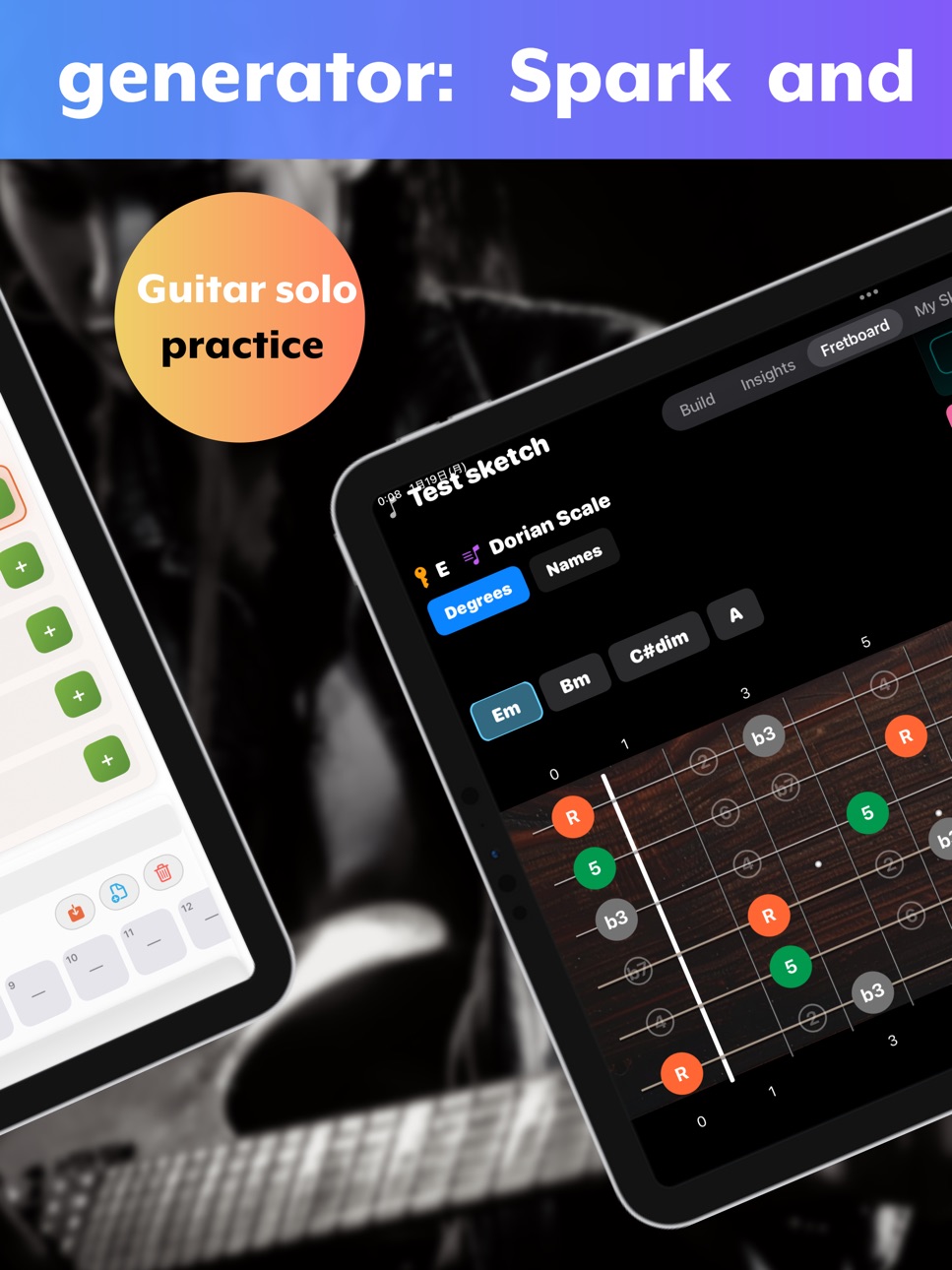
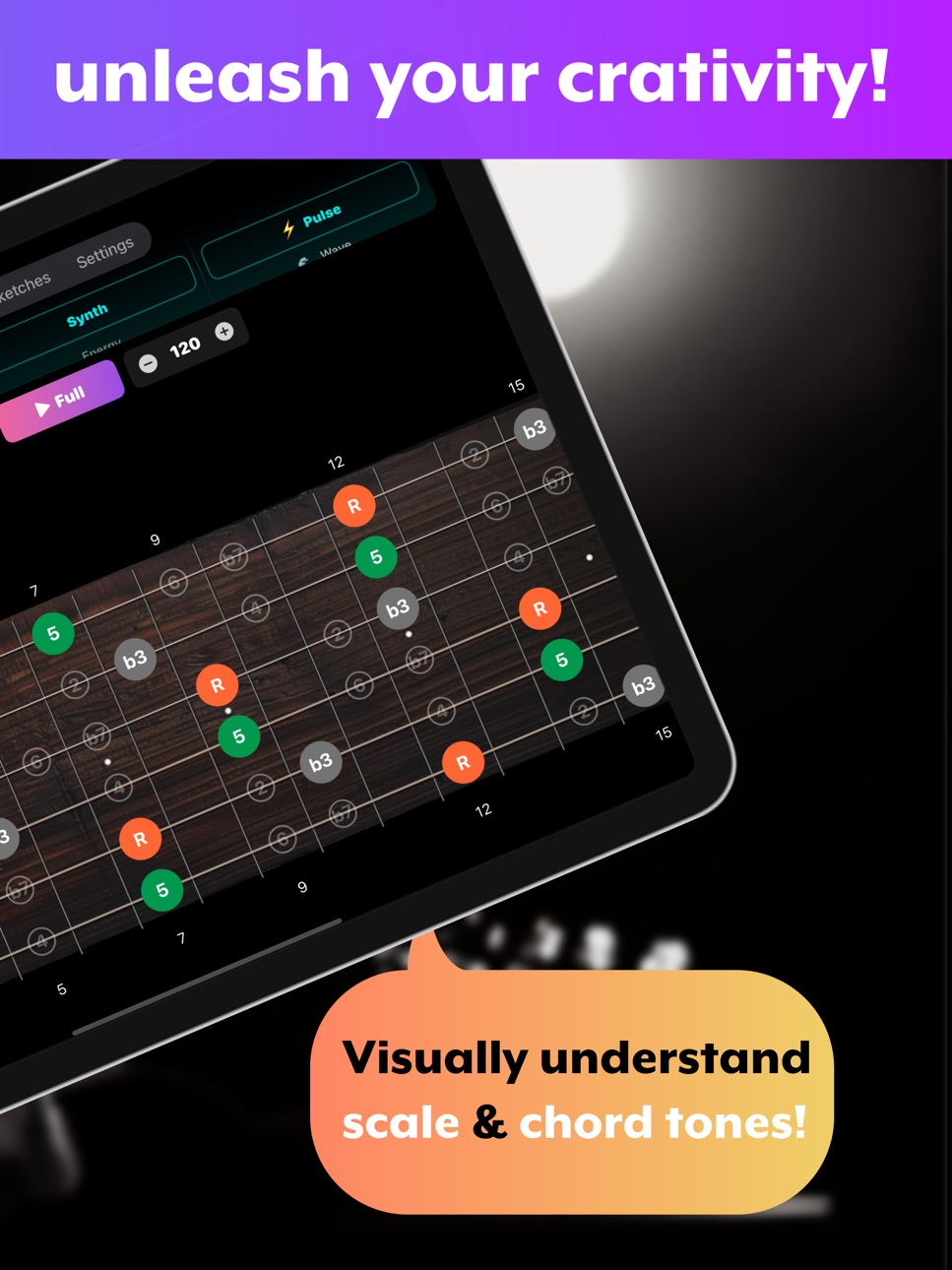
Guitar, bass, piano views. Chord tones highlight in real-time during playback. Tap to play.
▸ Capo Suggestions & 3 Local Saves
Pro — Unlimited Workflow ($2.99/mo)
▸ MIDI Export
Groove arrangement → MIDI. Chord Track, Guide Tones, Bass Track, section markers. Logic Pro, Cubase, Ableton ready.
▸ Audio Export
Groove-backed AAC files for videos and social media.
▸ Unlimited Export
No limits. *Free: 1/day via ad.
▸ Unlimited Saves + iCloud Sync
Sync iPhone & iPad. Transfers to new devices.
▸ Ad-Free
Why OtoTheory?
No Theory Required: Pick a key, select chords. Done.
Game-Like Editing: Swap chords in real-time while grooves play.
3 Visual Views: Guitar, bass, keyboard — chord tones highlighted during playback.
DAW Ready: MIDI export with groove arrangement. Phone to DAW seamlessly.
Acoustic Friendly: Capo suggestions for comfortable positions.
FAQ
Q: Need music theory?
A: No. Pick a key and scale — correct chords appear automatically.
Q: Free vs Pro?
A: All creative features free (15 grooves, 50 presets, all chords, AI, sections). Pro: unlimited export, unlimited saves + iCloud, ad-free.
Q: MIDI export?
A: Pro exports groove arrangement as MIDI with chord track, guide tones, bass, markers.
hello@ototheory.com
Privacy: https://ototheory.com/privacy
Terms: https://ototheory.com/terms
Build progressions and enjoy songwriting with OtoTheory.
In-App Purchases US pricing
Pro Subscription
OtoTheory · Monthly 7-day free trial$4.99
OtoTheory Pro (Annual) · Yearly 7-day free trial$49.99
Capabilities
In-App Purchases
Accessibility
ipadiphonemacrealityDevicetvoswatch
Version history 25 versions
Build 887836599v3.5.02026-07-07 23:13:45
The Create screen is all new — a lead-sheet style grid that lets you see your whole song and build it section by section.
Sections are now color-coded by role, so you can spot the chorus at a glance.
■ Redesigned Create screen
- A vertical, lead-sheet style grid shows your song structure while you edit
- Input is organized into 4 tabs (Chord / Preset / Ideas / Diatonic); Instrument, AI and Analysis moved to the top
■ Section colors (Create & Play)
- Auto color-coding by section role (Chorus = vermillion, Verse = blue, and more)
- Pick your own color from the rename dialog
■ More improvements
- No more blank pages in PDF export, a loading indicator when opening songs, an iCloud sync button on Home, and small bug fixes
Build 887684568v3.4.02026-07-01 20:14:29
Build chord progressions, play them with pro-quality grooves, and turn ideas into songs.
Import a track and OtoTheory analyzes its key and chords for you.
It's your playful pre-production studio.
■ Improved Pro trial experience
We refined the guidance so you can get the most out of Pro features during your free trial.
Plus small improvements.
Feedback: support@ototheory.com
Build 887587305v3.3.02026-06-29 21:07:57
You can now preview Pro grooves before you subscribe.
If you like them, choose the new yearly plan and save two months.
The basic grooves stay free, just as before.
■ Try grooves before you choose
Tap a Pro groove and hear it play along with your current progression—decide with your ears first.
■ New yearly plan
In addition to monthly, you can now pick a yearly plan that saves you two months.
■ Improved library
Saved sketches and imported songs now show groove name, tempo, and time signature at a glance.
Plus small improvements.
Feedback: support@ototheory.com
Build 887527623v3.2.02026-06-27 23:37:58
Added a guide for first-time users.
Just follow the on-screen prompts to add a classic chord progression and play it back.
Plus small improvements.
Feedback: support@ototheory.com
Build 887328293v3.1.02026-06-26 21:14:25
Import any song and OtoTheory detects its chords, key, and sections automatically. No ear-training needed—start playing the songs you love right away.
■ More time signatures
Ballads in 6/8 or 12/8 and other non-4/4 songs now display and play back in the right meter—just one tap.
■ Analyze songs into chords
Load an audio file to get a chord-progression draft, synced to playback on the fretboard.
■ Now even smoother
Highlights keep up clearly while you adjust tempo or meter during playback. Sending an analyzed song to Create mode is clearer too, plus minor bug fixes.
We also added an annual plan—two months free versus paying monthly.
Feedback: support@ototheory.com
Build 887265342v3.0.12026-06-22 15:48:54
Import any song and OtoTheory detects its chords, key, and sections automatically. No ear-training needed—start playing the songs you love right away.
■ Analyze songs into chords
Load an audio file to get a chord-progression draft, synced to playback on the fretboard.
■ See chord shapes
View how to play each chord along your progression, with a look-ahead to what comes next.
■ Now even smoother
We fixed minor bugs and polished the overall experience.
Feedback: support@ototheory.com
Build 887155035v3.0.02026-06-21 23:54:56
What's new:
- Import your own audio and get an automatic chord draft
- Edit the detected chords right away and finish them your own way
- Change key, transpose, edit sections, and practice along with the original
- See how to play each chord on guitar (fretboard) and keyboard — with now/next as you play along
- Manage your sketches and imported songs together in one Library
Build 886936580v2.21.02026-06-17 21:15:28
Seeing how to play a chord is now even clearer.
For guitar, chord shapes are shown right on the fretboard. Following the CAGED system, you can flip through multiple positions for the same chord.
For keyboard, the chord-tone view has been refined. It shows the bass note for your left hand and the chord tones for your right hand directly on the keys, so you can tell which keys to press at a glance — no sheet music required.
Switching between guitar, bass, and keyboard is clearer too, and chord tones are instantly available on every instrument.
Plus various minor improvements and bug fixes.
Feedback: support@ototheory.com
Build 886591478v2.20.22026-06-06 03:24:05
This update includes bug fixes and improvements to enhance your experience.
Build 886438067v2.20.12026-06-04 18:07:22
■ New Foundations category
Clean, single-instrument backings (piano, guitar, bass and more) in whole-note, quarter, eighth, and sixteenth rhythms. With no extra ornamentation, they're perfect for checking how chords and scales sound, practicing or ear-training, and laying a foundation before you arrange.
■ New Neo-Soul groove
A Wurlitzer electric piano plays rich extended-chord voicings (9ths, 11ths, 13ths) for a smooth, feel-good funk-soul sound. Just lining up chords already sets the mood.
Some of the new grooves are Pro, but you can preview them by watching an ad. For full production in a DAW, Audio / MIDI export is available with Pro. Plus various minor improvements.
Feedback: support@ototheory.com
Build 886389940v2.18.02026-06-01 23:51:35
A new piano-driven, high-speed rock groove, "Piano Rock," is now available.
It blends a piano playing shimmering tension chords, a rich choir, and power-chord guitars into an uplifting, anime-opening / emo-style sound. The piano arrangement is built so the harmony stays clear even at fast tempos: the right hand brings out the tensions while the left hand holds down a low foundation.
Piano Rock is a Pro groove, but you can also preview it by watching an ad. If you want to take it further in a DAW, Audio / MIDI export is available with Pro.
Plus various minor improvements and bug fixes.
Feedback: support@ototheory.com
Build 886348893v2.17.02026-05-31 21:42:32
A new groove "Afrobeats" is now available — the 4th entry in the Loops category.
Afrobeats: a mellow West African Afropop groove featuring muted-guitar 16th-note cutting, a syncopated 3-3-2 kick, call-and-response congas, and a soft electric piano. Recommended BPM 95-110 — a relaxed, danceable groove that's ready to build in seconds.
Afrobeats is a Pro groove, but you can also preview it by watching an ad. If you want to take it further in a DAW, Audio / MIDI export is available with Pro.
Plus various minor improvements and bug fixes.
Feedback: support@ototheory.com
Build 886323204v2.16.02026-05-30 21:00:39
A new groove "Trap" is now available — the 3rd entry in the Loops category.
Trap: an Atlanta Trap groove featuring a deep 808 sub-bass, dark Kalimba stabs with tense voicings, half-time hand-claps, and shimmering hi-hat rolls. Recommended BPM 130-150 — a heavy, sunken half-time beat that's ready to build in seconds.
Trap is a Pro groove, but you can also preview it by watching an ad. If you want to take it further in a DAW, Audio / MIDI export is available with Pro.
Plus various minor improvements and bug fixes.
Feedback: support@ototheory.com
Build 886250172v2.15.02026-05-28 20:47:45
A new "Loops" category for loop-based beatmaking is now available — added to both chord progression presets and grooves.
[Presets] 7 loop-oriented presets for hip-hop, Lo-Fi, trap, Drill, Latin House, Phonk, and EDM: Lo-Fi Chill / Neo-Soul Loop / Trap Drop / Drill Dark / Latin House / Phonk Vamp / Trap Melodic. With 4-bar and 2-bar cyclic patterns, you have a quick foundation for track-making.
[Grooves] Two new grooves:
- Amapiano: a South African house style featuring a melodic "Log Drum" bassline, laid-back Rhodes chords, and fast 16th-note shakers. Its 4-bar loop is a perfect foundation for your tracks.
- Lo-Fi: a relaxed Lo-Fi hip-hop groove with warm sub bass and a dusty swing. Start a chill beat right away.
We've also consolidated some existing categories: "Blues" and "R&B / Soul" are now combined as "Blues & R&B", and "Acoustic" and "Ballad" are now combined as "Acoustic". All preset content remains fully available.
We've also improved how presets are inserted into split bars. When you add a preset to a bar split into beats (4 or 2), the chords are now distributed to match that bar's split count.
The 7 presets and the Lo-Fi groove are free. Amapiano is a Pro groove, but you can also preview it by watching an ad. If you want to take it further in a DAW, Audio / MIDI export is available with Pro.
Plus various minor improvements and bug fixes, including display stability.
Feedback: support@ototheory.com
Build 886199105v2.14.02026-05-27 17:17:34
Two new Pro grooves "Nu-Disco" and "Indie Rock" are now available.
"Nu-Disco" delivers modern 2020s disco-pop. With funky 16th-note guitar comping, syncopated synth bass, four-on-the-floor kick, and open hi-hats on the off-beats, you can instantly try trendy dance-pop progressions. Recommended BPM 110-125.
"Indie Rock" delivers 2000s post-punk revival sound. Twin clean guitars with bell-like sparkles create chamber-style indie rock, while driving 16th-note hi-hat ghosts and octave-jumping bass anticipation push forward momentum. Recommended BPM 130-150.
Perfect for producers who want to take it into a DAW. Export to Audio / MIDI ready.
Try any Pro groove for 10 minutes free. Tap a Pro groove and watch a single ad to unlock 10 minutes of full playback. Love it? Subscribe to Pro to keep it unlocked permanently.
Get notified when new grooves are added. We'll send a brief notification whenever a new groove joins OtoTheory. Opt in from the dialog after your first try — turn it off anytime in Settings.
[7-day free trial] Cancel anytime with one tap.
Feedback: support@ototheory.com
Build 886025700v2.12.02026-05-24 18:43:48
Two new Pro grooves are now available.
"Bossa Nova" delivers authentic Brazilian jazz with six instruments: Nylon Guitar, Acoustic Bass, Drop 2 voicing Piano, Vibraphone, Tenor Sax, and Brazilian Clave Drums.
"Lounge Jazz" recreates modern piano trio jazz with sustained Piano comping, ECM-style Ride cymbal, walking Acoustic Bass, sub-tone Tenor Sax, and feathered Drums.
Both shine as Lo-Fi / Chillhop / Jazz Hop sampling sources. Export to Audio / MIDI and drop them into your DAW. Recommended BPM: Bossa Nova 100-130 / Lounge Jazz 70-115.
[7-day free trial] Cancel anytime with one tap.
Feedback: support@ototheory.com
Build 885975726v2.11.02026-05-21 22:42:13
[New Pro-only groove: Drop]
Future Bass with deep sub bass + Spread Voicing pad stabs + Saw lead + EP warm layer for bold modern EDM.
[New Pro-only groove: City Pop]
70s-80s urban funk-pop-jazz fusion (Tatsuro Yamashita / Mariya Takeuchi style). DX7 FM E.Piano + Slap Bass + 16-beat funky cutting + Jupiter-6 Pad.
[New Pro-only groove: Arena Rock]
Anthemic stadium rock (Queen / Bon Jovi / U2 / Foo Fighters). Big Stadium Backbeat + ringing Power Chords + Rock Organ wash + Lead Gtr melodic fills.
[Modern Producer Pack — complete]
Three contrasting Pro grooves (EDM Drop + funky City Pop + anthemic Arena Rock) dramatically expand Pro's musical range. 7-day free trial available.
Feedback: support@ototheory.com
Build 885890608v2.10.02026-05-20 23:18:12
v2.10.0 — Per-Beat Chord Placement + Export & UX Upgrades
[Split bars into up to 4 segments]
Place chords per beat, not just per bar. Long-press, split, then assign a different chord to each beat.
[Grooves sound musical at 4-split]
Bass octave-leap avoidance and leading-tone diatonic constraint. All 22 grooves verified for natural playback.
[PDF Export major upgrade]
Choose 2 to 8 bars per row. Toggle Roman numeral degrees on or off, chord names auto-center, and 4-split overlap is resolved.
[No data loss on time signature change]
4-split chords compressed when switching to 6/8 are fully restored when switching back.
[Pro screen + UX polish]
Pro upgrade screen logo redesigned for Light and Dark modes. Save-confirmation timing improved.
Feedback: support@ototheory.com
Build 885727654v2.9.42026-05-17 20:59:31
- New "Piano 2" groove (piano + bass + drums) — great for ballad/pop demos.
- "Piano" renamed to "Piano 1" (no drums). Pick the feel that suits your song.
- "Acoustic Guitar" added to Preview Instrument.
Build 885577865v2.9.32026-05-15 06:44:04
v2.9.3 — Usability & Stability Improvements
- You can now choose your chord preview instrument (Guitar or Piano) in Settings > Preview Instrument.
- Redesigned Pro upgrade screen
The 7-day free trial flow and cancellation steps are now clear at a glance.
- Improved new sketch behavior
When you create a new sketch, the key now properly resets to C Major.
- Better display stability
Fixed a layout issue when returning from the fullscreen fretboard view.
- UI refinements
Cleaned up the Lens view and other tabs.
- Coming next in v2.10: per-beat chord placement.
Build 885428600v2.9.22026-05-09 18:07:01
v2.9.2 — Minor Refinements
【Improvements】
• Clearer wording for the export confirmation toast
• Improved tap responsiveness of certain menu buttons
Other internal improvements for a smoother experience.
Feedback welcome at support@ototheory.com
Build 885292879v2.9.12026-05-07 19:10:24
v2.9.1 — Trial & Peace of Mind
【See Your Trial Status at a Glance】
• Trial days-remaining now always shown in Settings
• Friendly reminder when only 1-2 days are left — never miss the deadline
• 24-hour offline grace period keeps Pro features working
even in airplane mode
• Family Sharing entitlements correctly reflected as Pro
Build 885097584v2.9.02026-05-02 17:13:06
v2.9.0 — Major Build Screen Redesign
■ New & Improved
- Redesigned Build screen built around the editor as the home view
- Color-coded, bold tabs (Suggest / Pick / Instrument / Analyze / AI) for at-a-glance navigation
- Tap any chord in Overview to jump straight to that bar in Build
- Unified capo shape notation across all views (e.g., Key of G with Capo 2 displays F-shape chords)
- Wider chord slots so long names like Cmaj7 and Am7(b5) are no longer truncated
- Save and all exports (Audio, MIDI, PDF, Share) are now accessible from the Mixer
- Audio export progress indicator with phase display and cancel
- Overview auto-scroll pauses for 10 seconds after manual scroll, then resumes
- Redesigned section editing makes it easier to reorder, rename, and manage sections
- Larger modals on iPad (Overview, PDF Preview) with cells, fonts, and legends scaled up
- Simplified splash screen
Build 885042553v2.8.42026-04-29 19:56:18
This update fixes several issues in our internal analytics tracking. These improvements help us continue refining the user experience. Thank you for your continued support!
Build 884987877v2.8.32026-04-27 21:15:59
【What's New in v2.8.3】
• Save MIDI / PDF directly to the Files app
• New confirmation toast shows where your file was saved
• Audio export still supports AirDrop and share sheet
• Fixed iPad share sheet display issue
• Protects your daily reward when export fails on Free
Price history by region
Currency
Show
Columns
Search
Availability 1 of 1 storefronts
| Region | Language | Price | Ratings | Avg | Version |
|---|---|---|---|---|---|
| US | en-US | Free | 0 | — | 3.5.0 |
Change log 29 changes · US
✎
releaseNotes updated
The Create screen is all new — a lead-sheet style grid that lets you see your whole song and build it section by section.
Sections are now color-coded by role,
✎
description updated
OtoTheory is a chord progression builder. Create theory-correct progressions intuitively — no theory knowledge required.
Now with AI import: ask AI for any song
✎
subtitle updated
Songwriting & Scale Practice
✎
name updated
OtoTheory - Chord Progression
◆
Version 3.5.0 released
The Create screen is all new — a lead-sheet style grid that lets you see your whole song and build it section by section.
Sections are now color-coded by role, so you can spot the chorus at a glance.
■ Redesigned Create screen
- A vertical
◆
Version 3.4.0 released
Build chord progressions, play them with pro-quality grooves, and turn ideas into songs.
Import a track and OtoTheory analyzes its key and chords for you.
It's your playful pre-production studio.
■ Improved Pro trial experience
We refined
◆
Version 3.3.0 released
You can now preview Pro grooves before you subscribe.
If you like them, choose the new yearly plan and save two months.
The basic grooves stay free, just as before.
■ Try grooves before you choose
Tap a Pro groove and hear it play along wi
◆
Version 3.2.0 released
Added a guide for first-time users.
Just follow the on-screen prompts to add a classic chord progression and play it back.
Plus small improvements.
Feedback: support@ototheory.com
◆
Version 3.1.0 released
Import any song and OtoTheory detects its chords, key, and sections automatically. No ear-training needed—start playing the songs you love right away.
■ More time signatures
Ballads in 6/8 or 12/8 and other non-4/4 songs now display and pl
◆
Version 3.0.1 released
Import any song and OtoTheory detects its chords, key, and sections automatically. No ear-training needed—start playing the songs you love right away.
■ Analyze songs into chords
Load an audio file to get a chord-progression draft, synced
◆
Version 3.0.0 released
What's new:
- Import your own audio and get an automatic chord draft
- Edit the detected chords right away and finish them your own way
- Change key, transpose, edit sections, and practice along with the original
- See how to play each chor
◆
Version 2.21.0 released
Seeing how to play a chord is now even clearer.
For guitar, chord shapes are shown right on the fretboard. Following the CAGED system, you can flip through multiple positions for the same chord.
For keyboard, the chord-tone view has been
◆
Version 2.20.2 released
This update includes bug fixes and improvements to enhance your experience.
◆
Version 2.20.1 released
■ New Foundations category
Clean, single-instrument backings (piano, guitar, bass and more) in whole-note, quarter, eighth, and sixteenth rhythms. With no extra ornamentation, they're perfect for checking how chords and scales sound, practi
◆
Version 2.18.0 released
A new piano-driven, high-speed rock groove, "Piano Rock," is now available.
It blends a piano playing shimmering tension chords, a rich choir, and power-chord guitars into an uplifting, anime-opening / emo-style sound. The piano arrangemen
◆
Version 2.17.0 released
A new groove "Afrobeats" is now available — the 4th entry in the Loops category.
Afrobeats: a mellow West African Afropop groove featuring muted-guitar 16th-note cutting, a syncopated 3-3-2 kick, call-and-response congas, and a soft electr
◆
Version 2.16.0 released
A new groove "Trap" is now available — the 3rd entry in the Loops category.
Trap: an Atlanta Trap groove featuring a deep 808 sub-bass, dark Kalimba stabs with tense voicings, half-time hand-claps, and shimmering hi-hat rolls. Recommended
◆
Version 2.15.0 released
A new "Loops" category for loop-based beatmaking is now available — added to both chord progression presets and grooves.
[Presets] 7 loop-oriented presets for hip-hop, Lo-Fi, trap, Drill, Latin House, Phonk, and EDM: Lo-Fi Chill / Neo-Soul
◆
Version 2.14.0 released
Two new Pro grooves "Nu-Disco" and "Indie Rock" are now available.
"Nu-Disco" delivers modern 2020s disco-pop. With funky 16th-note guitar comping, syncopated synth bass, four-on-the-floor kick, and open hi-hats on the off-beats, you can i
◆
Version 2.12.0 released
Two new Pro grooves are now available.
"Bossa Nova" delivers authentic Brazilian jazz with six instruments: Nylon Guitar, Acoustic Bass, Drop 2 voicing Piano, Vibraphone, Tenor Sax, and Brazilian Clave Drums.
"Lounge Jazz" recreates moder
◆
Version 2.11.0 released
[New Pro-only groove: Drop]
Future Bass with deep sub bass + Spread Voicing pad stabs + Saw lead + EP warm layer for bold modern EDM.
[New Pro-only groove: City Pop]
70s-80s urban funk-pop-jazz fusion (Tatsuro Yamashita / Mariya Takeuchi s
◆
Version 2.10.0 released
v2.10.0 — Per-Beat Chord Placement + Export & UX Upgrades
[Split bars into up to 4 segments]
Place chords per beat, not just per bar. Long-press, split, then assign a different chord to each beat.
[Grooves sound musical at 4-split]
Bass o
◆
Version 2.9.4 released
- New "Piano 2" groove (piano + bass + drums) — great for ballad/pop demos.
- "Piano" renamed to "Piano 1" (no drums). Pick the feel that suits your song.
- "Acoustic Guitar" added to Preview Instrument.
◆
Version 2.9.3 released
v2.9.3 — Usability & Stability Improvements
- You can now choose your chord preview instrument (Guitar or Piano) in Settings > Preview Instrument.
- Redesigned Pro upgrade screen
The 7-day free trial flow and cancellation steps are now cle
◆
Version 2.9.2 released
v2.9.2 — Minor Refinements
【Improvements】
• Clearer wording for the export confirmation toast
• Improved tap responsiveness of certain menu buttons
Other internal improvements for a smoother experience.
Feedback welcome at support@otothe
◆
Version 2.9.1 released
v2.9.1 — Trial & Peace of Mind
【See Your Trial Status at a Glance】
• Trial days-remaining now always shown in Settings
• Friendly reminder when only 1-2 days are left — never miss the deadline
• 24-hour offline grace period keeps Pro featu
◆
Version 2.9.0 released
v2.9.0 — Major Build Screen Redesign
■ New & Improved
- Redesigned Build screen built around the editor as the home view
- Color-coded, bold tabs (Suggest / Pick / Instrument / Analyze / AI) for at-a-glance navigation
- Tap any chord in Ove
◆
Version 2.8.4 released
This update fixes several issues in our internal analytics tracking. These improvements help us continue refining the user experience. Thank you for your continued support!
◆
Version 2.8.3 released
【What's New in v2.8.3】
• Save MIDI / PDF directly to the Files app
• New confirmation toast shows where your file was saved
• Audio export still supports AirDrop and share sheet
• Fixed iPad share sheet display issue
• Protects your daily r