Home › Productivity

 US
US
1 of 1 storefronts
Content in en-US
Content in en-US
Information
Preview 2 platforms
iPhone 7 images


iPad 5 images


What’s New Version 3.2.0
Optimized template functionality
Improved stability
Description
MindNote – A Powerful Knowledge Management Tool for Mind Maps and Outline Notes
MindNote is a thoughtfully designed mind mapping and outline note-taking app built for deep thinkers. With an intuitive tree structure and flexible outlining mode, it helps students, professionals, and creators clarify their ideas, organize knowledge efficiently, and build structured knowledge systems with ease.
Why Choose MindNote?
True Mind Mapping Experience
Freely build your thinking network around nodes. Supports unlimited hierarchy levels, quick addition of child/sibling nodes, and one-tap expand/collapse—making complex information instantly clear.
Powerful Outline Note Mode
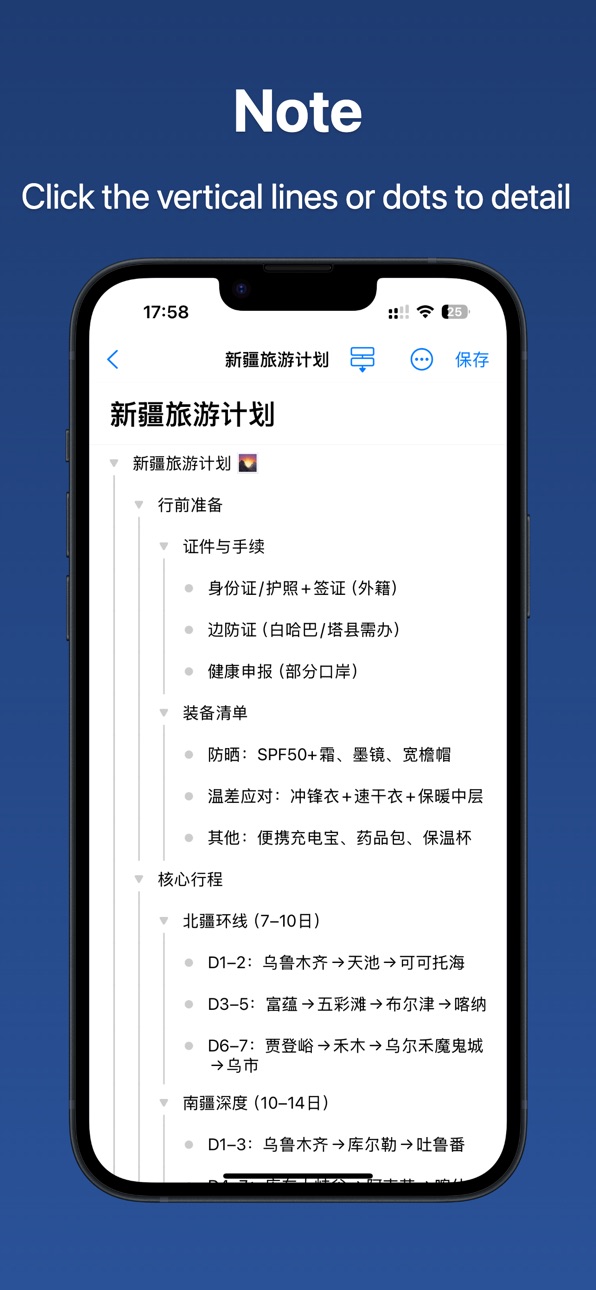
Uses an indented outline structure that supports multi-level headings, nested content, and fast navigation—balancing logical organization with writing efficiency.
Seamless Switch Between Mind Map and Outline
Switch any note between outline view and mind map view at will, adapting to different needs for planning, reviewing, or presenting.
Optimized for iPad and iPhone
Takes full advantage of large screens with split-view support, drag-and-drop editing, and gesture-based shortcuts for a smooth creative workflow.
Key Features
Multi-level tree structure for building complex knowledge frameworks
Real-time indentation and visual hierarchy for clear, clutter-free logic
Fast creation, editing, and reordering of nodes—simple and intuitive
Light and dark themes to suit any environment
Fully offline with local storage—your data stays private and secure
Export notes as plain text or images, or share directly to other apps
Multi-language interface: Chinese, English, Japanese, Korean, and more
Who It’s For & Use Cases
Students: Organize lecture notes, build subject knowledge maps, create study outlines
Professionals: Plan project structures, summarize meeting notes, draft work plans
Researchers: Manage literature, structure research frameworks
Creators: Outline articles or scripts, capture and organize creative ideas, draft novels
Minimal. Efficient. Focused.
MindNote strips away distractions and returns to the essence of note-taking—capturing thoughts in a structured way. No ads. No internet required. All your data stays securely on your device.
Download MindNote now—clarify your thinking with mind maps, and deepen your understanding with outline notes.
In-App Purchases US pricing
One-Time Purchases
VIP member for 1 year$3.99
Lifetime VIP Member$8.99
Capabilities
In-App Purchases
Accessibility
ipadiphonemacrealityDevicetvoswatch
Version history 13 versions
Build 887713933v3.2.02026-07-07 17:16:59
Optimized template functionality
Improved stability
Build 887489319v3.1.02026-06-26 21:28:27
Recycle Bin support
Build 885211067v3.0.02026-05-04 14:43:37
Fix bugs and improve stability.
Build 884785065v2.9.02026-04-24 16:15:12
Performance optimization for a smoother user interface
Build 884503401v2.8.02026-04-14 17:12:34
Fixed the issue where the bottom content is easily obscured by the keyboard when editing notes in outline mode.
Added support for auto-save functionality.
Build 884310699v2.7.02026-04-10 16:12:23
Added more mind map styles.
Supported AI node rewriting.
Enabled expand/collapse for All, Level 1, Level 2, and Level 3 nodes.
Double-click on the blank area to reset the view zoom.
Added a "Restore View" option to the menu for quickly resetting the view after panning or zooming.
Build 882212943v2.6.02026-03-14 03:11:34
Local caching improves note opening speed.
Changed link keyboard to URL keyboard.
Clicking link nodes supports opening links and editing links.
Fixed the bug where tables were missing in exports.
Fixed the bug where table data was lost when saving.
Fixed the lag issue when entering content in tables.
Mind map mode supports free dragging and zooming.
Build 881953861v2.5.02026-02-04 13:50:19
Improved Mind Map mode performance with 120% smoother operation
Added a "Close Keyboard" button on the AI-generated note creation page
Extended timeout duration for AI note creation to prevent premature termination of unfinished requests
Added support for configuring the maximum number of tokens returned by the AI model
Added keyboard shortcut support on iPad and macOS:
Tab: Create child node
Enter: Create sibling node
Spacebar: Start editing
Command +: Zoom in
Command -: Zoom out
Added a "Daily Poem" feature
Build 881885607v2.4.02026-01-28 21:25:04
Optimize the experience of deleting nodes.
Fix the folder location when creating notes by clicking the plus icon at the bottom.
The keyboard no longer triggers actions when pressing Enter to create a node.
Add scrolling support to the settings page on iPad.
Fix the issue of overly long connection lines for child nodes of text blocks in mind map view mode.
Build 881555517v2.3.02026-01-26 20:19:06
Fixed iCloud sync functionality
Added more templates
Optimized performance for smoother experience
Build 881323046v2.2.02026-01-15 00:32:55
Fix iCloud sync bug
Optimize the performance of the notes page
Prompt to export and then re-import when unable to open notes
Optimize the export and import functions of notes
Notes support generating shareable images
In outline mode, support selecting nodes and copying node content
Fix the issue in mind map mode where entering text does not automatically adjust the size
Build 880862128v2.1.02026-01-05 05:14:12
Support long-pressing the triangle or dot to drag and reposition nodes. During dragging, the view can be scrolled by moving your finger.
Support iCloud sync.
Support inputting emoji.
Support copying notes.
Support renaming notes and folders.
Support importing notes from JSON files.
Support exporting notes as JPEG, PNG, Markdown, HTML, and PDF.
Support voice input.
Support AI-powered summarization of input content to automatically generate notes.
Add a prompt feature to generate notes using an online large language model and import them directly.
Build 879600068v2.0.02025-12-18 04:48:25
Price history by region
Currency
Show
Columns
Search
Availability 1 of 1 storefronts
| Region | Language | Price | Ratings | Avg | Version |
|---|---|---|---|---|---|
| US | en-US | Free | 4 | 5.0 | 3.2.0 |
Change log 17 changes · US
✎
releaseNotes updated
Optimized template functionality
Improved stability
✎
description updated
MindNote – A Powerful Knowledge Management Tool for Mind Maps and Outline Notes
MindNote is a thoughtfully designed mind mapping and outline note-taking app bui
✎
subtitle updated
Mind Map Notes
✎
name updated
MindNote - Mind Map&Notes
◆
Version 3.2.0 released
Optimized template functionality
Improved stability
◆
Version 3.1.0 released
Recycle Bin support
◆
Version 3.0.0 released
Fix bugs and improve stability.
◆
Version 2.9.0 released
Performance optimization for a smoother user interface
◆
Version 2.8.0 released
Fixed the issue where the bottom content is easily obscured by the keyboard when editing notes in outline mode.
Added support for auto-save functionality.
◆
Version 2.7.0 released
Added more mind map styles.
Supported AI node rewriting.
Enabled expand/collapse for All, Level 1, Level 2, and Level 3 nodes.
Double-click on the blank area to reset the view zoom.
Added a "Restore View" option to the menu for quickly rese
◆
Version 2.6.0 released
Local caching improves note opening speed.
Changed link keyboard to URL keyboard.
Clicking link nodes supports opening links and editing links.
Fixed the bug where tables were missing in exports.
Fixed the bug where table data was lost when
◆
Version 2.5.0 released
Improved Mind Map mode performance with 120% smoother operation
Added a "Close Keyboard" button on the AI-generated note creation page
Extended timeout duration for AI note creation to prevent premature termination of unfinished requests
Ad
◆
Version 2.4.0 released
Optimize the experience of deleting nodes.
Fix the folder location when creating notes by clicking the plus icon at the bottom.
The keyboard no longer triggers actions when pressing Enter to create a node.
Add scrolling support to the setti
◆
Version 2.3.0 released
Fixed iCloud sync functionality
Added more templates
Optimized performance for smoother experience
◆
Version 2.2.0 released
Fix iCloud sync bug
Optimize the performance of the notes page
Prompt to export and then re-import when unable to open notes
Optimize the export and import functions of notes
Notes support generating shareable images
In outline mode, suppor
◆
Version 2.1.0 released
Support long-pressing the triangle or dot to drag and reposition nodes. During dragging, the view can be scrolled by moving your finger.
Support iCloud sync.
Support inputting emoji.
Support copying notes.
Support renaming notes and folders
◆
Version 2.0.0 released