Home › Utilities

 US
US
 DEde-DEUSen-US
 FIen-GB
 BEen-GB
 CHde-CH
 BYen-GB
 KWen-GB
 AEen-GB
 AFen-GB
 ALen-GB
 AMen-GB
 ATde-DE
 AUen-AU
 AZen-GB
 BAen-GB
 BGen-GB
 BHen-GB
 BMen-GB
 BNen-GB
 BTen-GB
 CAen-CA
 CNzh-Hans-CN
 CYen-GB
 CZen-GB
 DKen-GB
 EEen-GB
 EGen-GB
 ESes-ES
 FJen-GB
 FMen-GB
 FRfr-FR
 GBen-GB
 GEen-GB
 GRen-GB
 HKzh-Hant-HK
 HRen-GB
 HUen-GB
 IDen-GB
 IEen-GB
 ILen-GB
 INen-GB
 IQen-GB
 ISen-GB
 ITit
ITit JOen-GB
 JPja
JPja KGen-GB
 KHen-GB
 KRko
KRko KZen-GB
 LAen-GB
 LBen-GB
 LKen-GB
 LTen-GB
 LUen-GB
 LVen-GB
 MDen-GB
 MEen-GB
 MKen-GB
 MMen-GB
 MNen-GB
 MOzh-Hant-HK
 MRen-GB
 MTen-GB
 MVen-GB
 MYen-GB
 NLnl
NLnl NOen-GB
 NPen-GB
 NRen-GB
 NZen-AU
 OMen-GB
 PGen-GB
 PHen-GB
 PKen-GB
 PLen-GB
 PTpt-PT
 PWen-GB
 QAen-GB
 ROen-GB
 RSen-GB
 RUru
RUru SAen-GB
 SBen-GB
 SEsv
SEsv SGen-GB
 SIen-GB
 SKen-GB
 THen-GB
 TJen-GB
 TMen-GB
 TOen-GB
 TRen-GB
 TWzh-Hant-TW
 UAen-GB
 UZen-GB
 VNen-GB
 VUen-GB
 XKen-GB
 YEen-GB
 ZAen-GB
101 of 101 storefronts
Content in en-US
Content in en-US
Information
Apple ID6754844184
Bundle IDde.akator.wurstfinger
SellerSeller
Min iOS17.0
Min macOS14.0
Device familiesiphone
Released2025-12-09
Copyright© 2026 Akator GmbH
Privacy policyLink ↗
Preview 1 platform
iPhone 8 images



What’s New Version 1.3.1
Version 1.3.1
New:
• Reworked haptics — exactly one pulse per keystroke and a much wider intensity range
• Toggle label visibility directly with a gesture on the space bar
• Compose hints (small accent labels) can now be hidden
• Hebrew: final letters via return swipes
Reliability:
• Fixed double vibration per key press
• Fixed cursor movement across emoji
• Fast swipe gestures are recognized more reliably
• Auto-capitalization now engages at the right moments
• Disabled languages stay disabled
• Vietnamese tone rules no longer leak into other languages
Description
Wurstfinger - The Keyboard for Fat Fingers
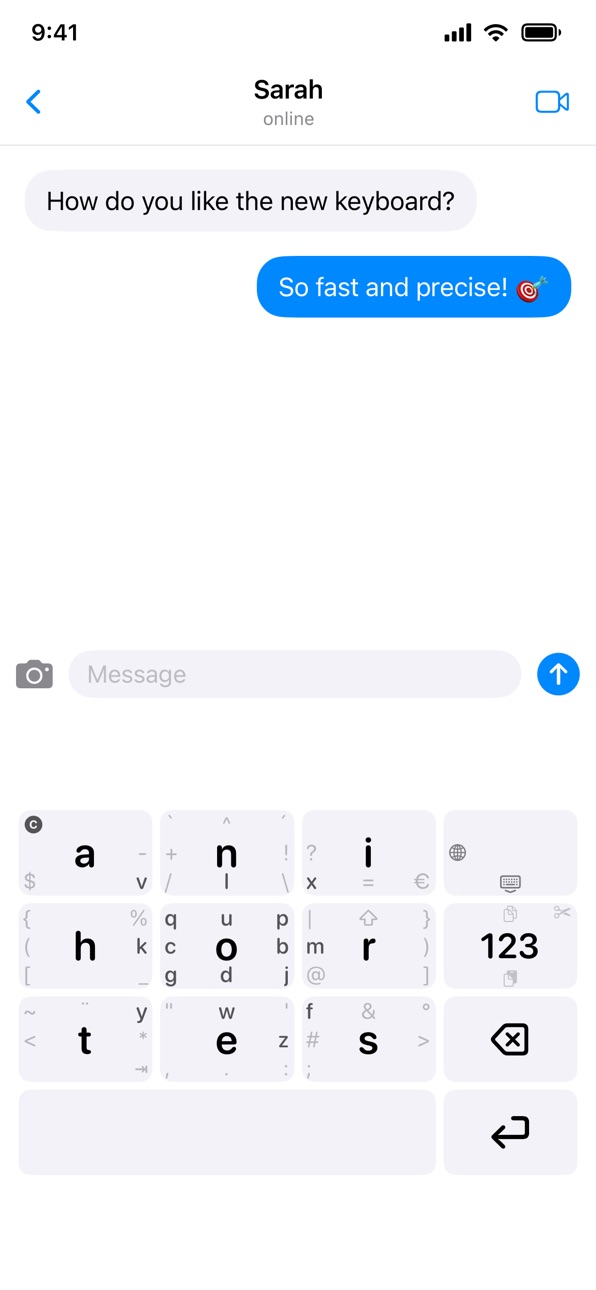
Tired of typos? Wurstfinger is a privacy-conscious keyboard with large keys and swipe gestures. Based on the proven MessagEase layout, it replaces the cramped QWERTY grid with a 3x3 layout optimized for thumb typing.
Unlike mainstream keyboards, Wurstfinger doesn't rely on invasive word prediction - instead, it achieves accuracy through ergonomic design. Large, well-spaced keys mean fewer missed taps, and the gesture system lets you access all characters without hunting for tiny buttons.
FEATURES:
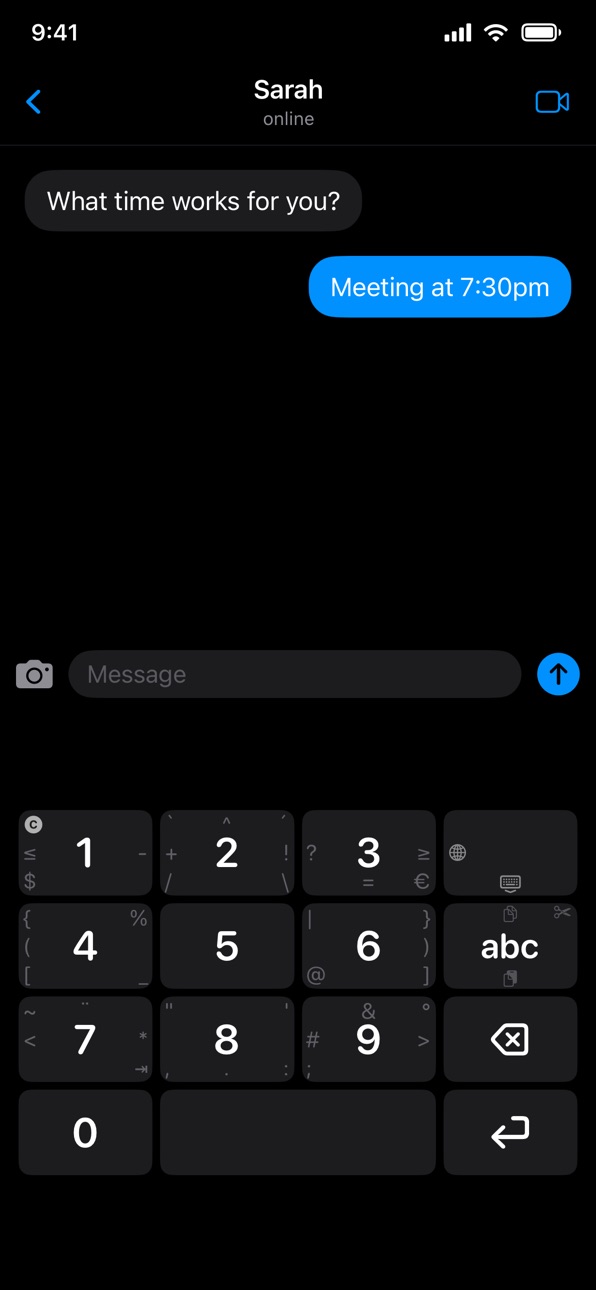
• Large 3x3 Key Grid - Optimized for thumbs, not precision pointers
• Swipe Gestures - Access 8 additional characters per key by swiping
• 15 Languages - Catalan, Croatian, English, Estonian-Finnish, Finnish, French, German, Hebrew, Italian, Polish, Russian, Spanish, Swedish, Tagalog, and Vietnamese (with Telex input)
• Compose Rules - Create accents through combinations (e.g. ' + a = á)
• Circular Gestures - Draw a circle for uppercase letters
• Cursor Control - Drag on space bar to move cursor, long-press for text selection
• Haptic Feedback - Customizable vibration intensity
• Fully Adjustable - Scale keyboard size to your preference
PRIVACY FIRST:
• No data collection
• No network access
• No word prediction tracking
• All processing happens locally on your device
Wurstfinger requires training - expect a few days to build muscle memory. But once you've crossed that threshold, you'll never want to go back to a standard keyboard. The gestures become second nature, and you'll type faster and with fewer errors than ever before.
Your fingers will thank you!
Accessibility
ipadiphonemacrealityDevicetvoswatch
Version history 6 versions
Build 887840281v1.3.12026-07-05 17:44:50
Version 1.3.1
New:
• Reworked haptics — exactly one pulse per keystroke and a much wider intensity range
• Toggle label visibility directly with a gesture on the space bar
• Compose hints (small accent labels) can now be hidden
• Hebrew: final letters via return swipes
Reliability:
• Fixed double vibration per key press
• Fixed cursor movement across emoji
• Fast swipe gestures are recognized more reliably
• Auto-capitalization now engages at the right moments
• Disabled languages stay disabled
• Vietnamese tone rules no longer leak into other languages
Build 887675026v1.3.02026-07-01 19:24:07
Version 1.3.0
New:
• Switch languages right from the keyboard — cycle through your enabled languages with a swipe on the globe key
• Cursor control — choose how the space-bar cursor moves: continuous drag or step-by-step, including word-by-word
• Label visibility — hide letters, standard symbols, or extra symbols independently
• The app is now available in 12 languages
• New Vietnamese Telex input
Reliability:
• The keyboard now opens more reliably
• Fixed dead zones between keys in the Liquid Glass style
Build 884139507v1.2.02026-04-05 19:09:00
Version 1.2.0
Highlights:
• No more dead zones — every pixel on the keyboard now responds to touch
• Snappier haptic feedback — vibration fires on touch-down instead of after the action
• Keyboard stays correctly aligned after rotating while backgrounded
Bug fixes:
• French layout: fixed return swipe on center key
• Auto-capitalization after delete works correctly again
• Apostrophe no longer triggers accent/compose mode
• iOS now reports the correct keyboard language
• Various other fixes for gestures and settings
Build 881054641v1.1.12025-12-29 01:41:36
Version 1.1.1
Bug Fix:
• Restored missing apostrophe (') on the e-key
Build 881041334v1.12025-12-28 03:06:31
Version 1.1
New Features:
• Clipboard actions: Copy, Cut & Paste via swipe gestures
• Bidirectional delete (swipe left/right on Delete)
• Auto-capitalization after sentence punctuation
• Globe key: Dismiss keyboard via swipe
• iOS 18+ Dark Mode & Tinted App Icons
• Liquid Glass style for iOS 26+
• Extended touch areas between keys
• Expert Settings for gesture tuning
• Gesture Playground for testing
Language Support:
• Swedish: Added missing å character
Improvements:
• Better circular gesture detection
• Optimized landscape support
• Performance optimizations
Bug Fixes:
• Swipe direction on non-square buttons
• Keyboard background fills entire area
• Haptic feedback settings persistence
Build 879457187v1.02025-12-08 17:31:39
No pricing data captured yet — comparisons appear once the app has paid storefronts or in-app purchases.
Availability 101 of 101 storefronts
| Region | Language | Price | Ratings | Avg | Version |
|---|---|---|---|---|---|
| DE | de-DE | Free | 5 | 5.0 | 1.3.1 |
| US | en-US | Free | 5 | 4.8 | 1.3.1 |
| FI | en-GB | Free | 3 | 5.0 | 1.3.1 |
| BE | en-GB | Free | 2 | 4.5 | 1.3.1 |
| CH | de-CH | Free | 2 | 5.0 | 1.3.1 |
| BY | en-GB | Free | 1 | 4.0 | 1.3.1 |
| KW | en-GB | Free | 1 | 5.0 | 1.3.1 |
| AE | en-GB | Free | 0 | — | 1.3.1 |
| AF | en-GB | Free | 0 | — | 1.3.1 |
| AL | en-GB | Free | 0 | — | 1.3.1 |
| AM | en-GB | Free | 0 | — | 1.3.1 |
| AT | de-DE | Free | 0 | — | 1.3.1 |
| AU | en-AU | Free | 0 | — | 1.3.1 |
| AZ | en-GB | Free | 0 | — | 1.3.1 |
| BA | en-GB | Free | 0 | — | 1.3.1 |
| BG | en-GB | Free | 0 | — | 1.3.1 |
| BH | en-GB | Free | 0 | — | 1.3.1 |
| BM | en-GB | Free | 0 | — | 1.3.1 |
| BN | en-GB | Free | 0 | — | 1.3.1 |
| BT | en-GB | Free | 0 | — | 1.3.1 |
| CA | en-CA | Free | 0 | — | 1.3.1 |
| CN | zh-Hans-CN | Free | 0 | — | 1.3.1 |
| CY | en-GB | Free | 0 | — | 1.3.1 |
| CZ | en-GB | Free | 0 | — | 1.3.1 |
| DK | en-GB | Free | 0 | — | 1.3.1 |
| EE | en-GB | Free | 0 | — | 1.3.1 |
| EG | en-GB | Free | 0 | — | 1.3.1 |
| ES | es-ES | Free | 0 | — | 1.3.1 |
| FJ | en-GB | Free | 0 | — | 1.3.1 |
| FM | en-GB | Free | 0 | — | 1.3.1 |
| FR | fr-FR | Free | 0 | — | 1.3.1 |
| GB | en-GB | Free | 0 | — | 1.3.1 |
| GE | en-GB | Free | 0 | — | 1.3.1 |
| GR | en-GB | Free | 0 | — | 1.3.1 |
| HK | zh-Hant-HK | Free | 0 | — | 1.3.1 |
| HR | en-GB | Free | 0 | — | 1.3.1 |
| HU | en-GB | Free | 0 | — | 1.3.1 |
| ID | en-GB | Free | 0 | — | 1.3.1 |
| IE | en-GB | Free | 0 | — | 1.3.1 |
| IL | en-GB | Free | 0 | — | 1.3.1 |
| IN | en-GB | Free | 0 | — | 1.3.1 |
| IQ | en-GB | Free | 0 | — | 1.3.1 |
| IS | en-GB | Free | 0 | — | 1.3.1 |
| IT | it | Free | 0 | — | 1.3.1 |
| JO | en-GB | Free | 0 | — | 1.3.1 |
| JP | ja | Free | 0 | — | 1.3.1 |
| KG | en-GB | Free | 0 | — | 1.3.1 |
| KH | en-GB | Free | 0 | — | 1.3.1 |
| KR | ko | Free | 0 | — | 1.3.1 |
| KZ | en-GB | Free | 0 | — | 1.3.1 |
| LA | en-GB | Free | 0 | — | 1.3.1 |
| LB | en-GB | Free | 0 | — | 1.3.1 |
| LK | en-GB | Free | 0 | — | 1.3.1 |
| LT | en-GB | Free | 0 | — | 1.3.1 |
| LU | en-GB | Free | 0 | — | 1.3.1 |
| LV | en-GB | Free | 0 | — | 1.3.1 |
| MD | en-GB | Free | 0 | — | 1.3.1 |
| ME | en-GB | Free | 0 | — | 1.3.1 |
| MK | en-GB | Free | 0 | — | 1.3.1 |
| MM | en-GB | Free | 0 | — | 1.3.1 |
| MN | en-GB | Free | 0 | — | 1.3.1 |
| MO | zh-Hant-HK | Free | 0 | — | 1.3.1 |
| MR | en-GB | Free | 0 | — | 1.3.1 |
| MT | en-GB | Free | 0 | — | 1.3.1 |
| MV | en-GB | Free | 0 | — | 1.3.1 |
| MY | en-GB | Free | 0 | — | 1.3.1 |
| NL | nl | Free | 0 | — | 1.3.1 |
| NO | en-GB | Free | 0 | — | 1.3.1 |
| NP | en-GB | Free | 0 | — | 1.3.1 |
| NR | en-GB | Free | 0 | — | 1.3.1 |
| NZ | en-AU | Free | 0 | — | 1.3.1 |
| OM | en-GB | Free | 0 | — | 1.3.1 |
| PG | en-GB | Free | 0 | — | 1.3.1 |
| PH | en-GB | Free | 0 | — | 1.3.1 |
| PK | en-GB | Free | 0 | — | 1.3.1 |
| PL | en-GB | Free | 0 | — | 1.3.1 |
| PT | pt-PT | Free | 0 | — | 1.3.1 |
| PW | en-GB | Free | 0 | — | 1.3.1 |
| QA | en-GB | Free | 0 | — | 1.3.1 |
| RO | en-GB | Free | 0 | — | 1.3.1 |
| RS | en-GB | Free | 0 | — | 1.3.1 |
| RU | ru | Free | 0 | — | 1.3.1 |
| SA | en-GB | Free | 0 | — | 1.3.1 |
| SB | en-GB | Free | 0 | — | 1.3.1 |
| SE | sv | Free | 0 | — | 1.3.1 |
| SG | en-GB | Free | 0 | — | 1.3.1 |
| SI | en-GB | Free | 0 | — | 1.3.1 |
| SK | en-GB | Free | 0 | — | 1.3.1 |
| TH | en-GB | Free | 0 | — | 1.3.1 |
| TJ | en-GB | Free | 0 | — | 1.3.1 |
| TM | en-GB | Free | 0 | — | 1.3.1 |
| TO | en-GB | Free | 0 | — | 1.3.1 |
| TR | en-GB | Free | 0 | — | 1.3.1 |
| TW | zh-Hant-TW | Free | 0 | — | 1.3.1 |
| UA | en-GB | Free | 0 | — | 1.3.1 |
| UZ | en-GB | Free | 0 | — | 1.3.1 |
| VN | en-GB | Free | 0 | — | 1.3.1 |
| VU | en-GB | Free | 0 | — | 1.3.1 |
| XK | en-GB | Free | 0 | — | 1.3.1 |
| YE | en-GB | Free | 0 | — | 1.3.1 |
| ZA | en-GB | Free | 0 | — | 1.3.1 |
Change log 10 changes · US
✎
releaseNotes updated
Version 1.3.1
New:
• Reworked haptics — exactly one pulse per keystroke and a much wider intensity range
• Toggle label visibility directly with a gesture on t
✎
description updated
Wurstfinger - The Keyboard for Fat Fingers
Tired of typos? Wurstfinger is a privacy-conscious keyboard with large keys and swipe gestures. Based on the proven
✎
subtitle updated
The Keyboard for Fat Fingers
✎
name updated
Wurstfinger
◆
Version 1.3.1 released
Version 1.3.1
New:
• Reworked haptics — exactly one pulse per keystroke and a much wider intensity range
• Toggle label visibility directly with a gesture on the space bar
• Compose hints (small accent labels) can now be hidden
• Hebrew: f
◆
Version 1.3.0 released
Version 1.3.0
New:
• Switch languages right from the keyboard — cycle through your enabled languages with a swipe on the globe key
• Cursor control — choose how the space-bar cursor moves: continuous drag or step-by-step, including word-by
◆
Version 1.2.0 released
Version 1.2.0
Highlights:
• No more dead zones — every pixel on the keyboard now responds to touch
• Snappier haptic feedback — vibration fires on touch-down instead of after the action
• Keyboard stays correctly aligned after rotating whi
◆
Version 1.1.1 released
Version 1.1.1
Bug Fix:
• Restored missing apostrophe (') on the e-key
◆
Version 1.1 released
Version 1.1
New Features:
• Clipboard actions: Copy, Cut & Paste via swipe gestures
• Bidirectional delete (swipe left/right on Delete)
• Auto-capitalization after sentence punctuation
• Globe key: Dismiss keyboard via swipe
• iOS 18+ Dark
◆
Version 1.0 released