Home › Business

 US
US
1 of 1 storefronts
Content in en-US
Content in en-US
Information
Preview 2 platforms
iPhone 8 images



iPad 6 images


What’s New Version 1.2.8
- Now you can activate and deactivate spin.
Description
Spin 360 — Your inventory, showroom-ready.
AD Spin Studio is the companion mobile app for Spin 360, the 360° vehicle spin service built into the Auto Dealers Digital platform. Capture exterior 360° spins and interior photos for any vehicle on your lot — cars, trucks, RVs, motorcycles, powersports, boats — directly from your phone or tablet. Photos auto-process with clean studio backgrounds and publish to your dealership website.
Free to start. Unlimited spins. No credit card.
Core Features
• Built into ADD: Log in with your Auto Dealers Digital credentials — your inventory syncs automatically.
• Guided 360° Capture: Walk around the vehicle and capture a series of photos. The app guides framing and pace for consistent results. Capture standalone interior images alongside the exterior spin.
• Clean studio backgrounds: Backgrounds are removed and replaced for a showroom-ready finish.
• Seamless Integration: Spins sync to your ADD website and attach to the right listing. Using your own website? Copy the embed code from the ADD UI.
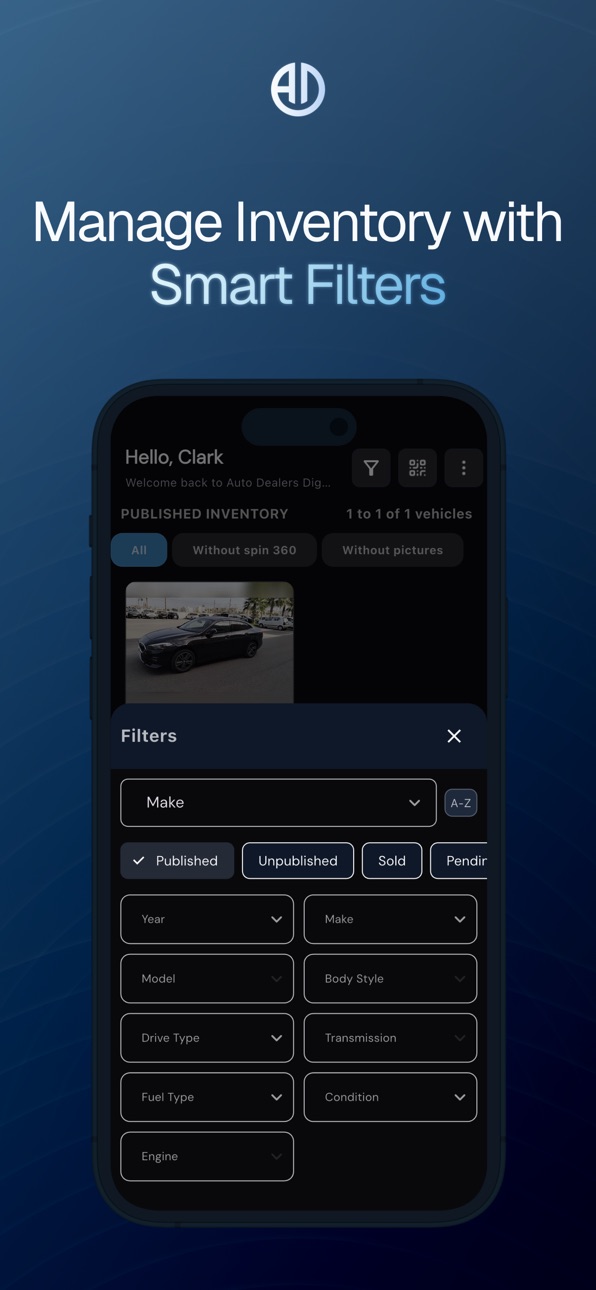
• Smart Inventory Management: Filter by spin status, track which vehicles still need a spin, and see which spins are Free vs Premium.
• Real-time Updates: Photos process and publish automatically while you continue working — no waiting or manual uploads required.
Why Dealers Choose Spin 360
• Already inside ADD: No extra subscription, no separate tool — Spin 360 lives where your listings already live.
• Built for visual shoppers: Buyers compare vehicles visually before they ever pick up the phone. Spin 360 is designed to support engagement on your listings.
• No photographer, no studio: Your phone becomes a professional 360° vehicle studio.
• Free to start: Unlimited spins with standard background removal. No credit card.
• Consistent results: Guided capture and automatic background processing help every listing meet a uniform standard.
• Faster Time-to-Market: From lot to live listing enhancement in minutes, not hours.
Requirements
• Active Auto Dealers Digital account
• Spin 360 activated inside the ADD platform (one-time activation from the left-side menu)
• Apple device with a working rear camera (iPhone or iPad)
Exclusively for Licensed Automotive Dealers
Activate Spin 360 inside your Auto Dealers Digital dashboard, then download AD Spin Studio to start creating showroom-ready listings — free, unlimited, no commitment.
Accessibility
ipadiphonemacrealityDevicetvoswatch
Version history 12 versions
Build 887055172v1.2.82026-06-16 23:43:35
- Now you can activate and deactivate spin.
Build 886687411v1.2.62026-06-09 01:42:11
-UI refresh — cleaner screens and clearer tier identity
-Bug fixes — better uploads, stability improvements
Build 886535234v1.2.52026-06-04 23:00:44
-Wallet — view balance, top up, and track transactions in-app
-One-tap activation — enable Spin 360 without leaving the app
-Smarter capture — framing assistant + review step before processing
-UI refresh — cleaner screens and clearer tier identity
-Bug fixes — better uploads, stability improvements
Build 886026314v1.2.42026-05-23 02:19:06
-Wallet — view balance, top up, and track transactions in-app
-One-tap activation — enable Spin 360 without leaving the app
-Smarter capture — framing assistant + review step before processing
-UI refresh — cleaner screens and clearer tier identity
-Bug fixes — better uploads, stability improvements
Build 885386431v1.2.02026-05-09 19:00:07
• Capture button now shows progress as "12 / 32" so you always know how close you are to finishing.
• Fixed photo saving on newer Android tablets.
• Faster, more consistent default background-removal service.
• Filter chips are now mutually exclusive — no more conflicting filters.
• Pull-to-refresh works correctly on empty inventory lists.
• Reset Filters button only appears when filters are actually active.
• Multiple crash fixes: vehicle details, processing feed, 360 capture screen on slow-starting cameras, and navigating away mid-action.
• Photo review now shows a clear error if a delete fails.
• Missing translations on the tablet vehicle details screen are now present in English, Spanish, and French.
Build 882192771v1.1.62026-02-05 19:15:49
• Fixed various UX/UI issues for a smoother user experience
• Improved and stabilized camera functionality
• Added French and Spanish translations
• Enhanced search functionality and accuracy
Build 882165676v1.1.52026-02-04 21:51:14
- Updated UI/UX
- Added filtering for processing vehicles
- Fixed camera issues
Build 882112959v1.1.42026-02-03 20:51:54
- Improved overall UX for smoother navigation and a more intuitive experience
- Updated UI design for a cleaner and more modern look
- Added local storage to prevent losing captured images (even if the app is closed, the device runs out of battery, or the internet connection is lost)
- Images can now be reprocessed and uploaded at any time
- Added a Profile screen to clearly show which account is currently logged in
Build 881879647v1.1.22026-01-27 10:19:36
- Fixed UI/UX issues
- Fixed missing translations
Build 881534520v1.1.12026-01-15 22:22:12
- Improved UI/UX for a smoother and more intuitive experience
- Fixed issues with Dark Mode and Light Mode
- Users can now choose from a wide range of turntables and backgrounds
- Users can reprocess failed processes
- Performance improvements and minor bug fixes
Build 880510885v1.0.32025-12-10 17:24:26
• Improved image upload reliability
• Added background processing for faster and smoother uploads
• reprocesses failed tasks to ensure successful completion
• Performance enhancements and minor bug fixes
Build 879447069v1.0.22025-11-21 03:18:37
No pricing data captured yet — comparisons appear once the app has paid storefronts or in-app purchases.
Availability 1 of 1 storefronts
| Region | Language | Price | Ratings | Avg | Version |
|---|---|---|---|---|---|
| US | en-US | Free | 1 | 5.0 | 1.2.8 |
Change log 16 changes · US
✎
releaseNotes updated
- Now you can activate and deactivate spin.
✎
description updated
Spin 360 — Your inventory, showroom-ready.
AD Spin Studio is the companion mobile app for Spin 360, the 360° vehicle spin service built into the Auto Dealers Di
✎
subtitle updated
Your inventory, showroom-ready
✎
name updated
AD Spin Studio
◆
Version 1.2.8 released
- Now you can activate and deactivate spin.
◆
Version 1.2.6 released
-UI refresh — cleaner screens and clearer tier identity
-Bug fixes — better uploads, stability improvements
◆
Version 1.2.5 released
-Wallet — view balance, top up, and track transactions in-app
-One-tap activation — enable Spin 360 without leaving the app
-Smarter capture — framing assistant + review step before processing
-UI refresh — cleaner screens and clearer tier
◆
Version 1.2.4 released
-Wallet — view balance, top up, and track transactions in-app
-One-tap activation — enable Spin 360 without leaving the app
-Smarter capture — framing assistant + review step before processing
-UI refresh — cleaner screens and clearer tier
◆
Version 1.2.0 released
• Capture button now shows progress as "12 / 32" so you always know how close you are to finishing.
• Fixed photo saving on newer Android tablets.
• Faster, more consistent default background-removal service.
• Filter chips are now mu
◆
Version 1.1.6 released
• Fixed various UX/UI issues for a smoother user experience
• Improved and stabilized camera functionality
• Added French and Spanish translations
• Enhanced search functionality and accuracy
◆
Version 1.1.5 released
- Updated UI/UX
- Added filtering for processing vehicles
- Fixed camera issues
◆
Version 1.1.4 released
- Improved overall UX for smoother navigation and a more intuitive experience
- Updated UI design for a cleaner and more modern look
- Added local storage to prevent losing captured images (even if the app is closed, the device runs out o
◆
Version 1.1.2 released
- Fixed UI/UX issues
- Fixed missing translations
◆
Version 1.1.1 released
- Improved UI/UX for a smoother and more intuitive experience
- Fixed issues with Dark Mode and Light Mode
- Users can now choose from a wide range of turntables and backgrounds
- Users can reprocess failed processes
- Performance improveme
◆
Version 1.0.3 released
• Improved image upload reliability
• Added background processing for faster and smoother uploads
• reprocesses failed tasks to ensure successful completion
• Performance enhancements and minor bug fixes
◆
Version 1.0.2 released