Home › Utilities

PixelSieve: Sift & Save Space
Sift Your Media, Keep the Gold
 US
US
1 of 1 storefronts
Content in en-US
Content in en-US
Information
Preview 2 platforms
iPhone 10 images
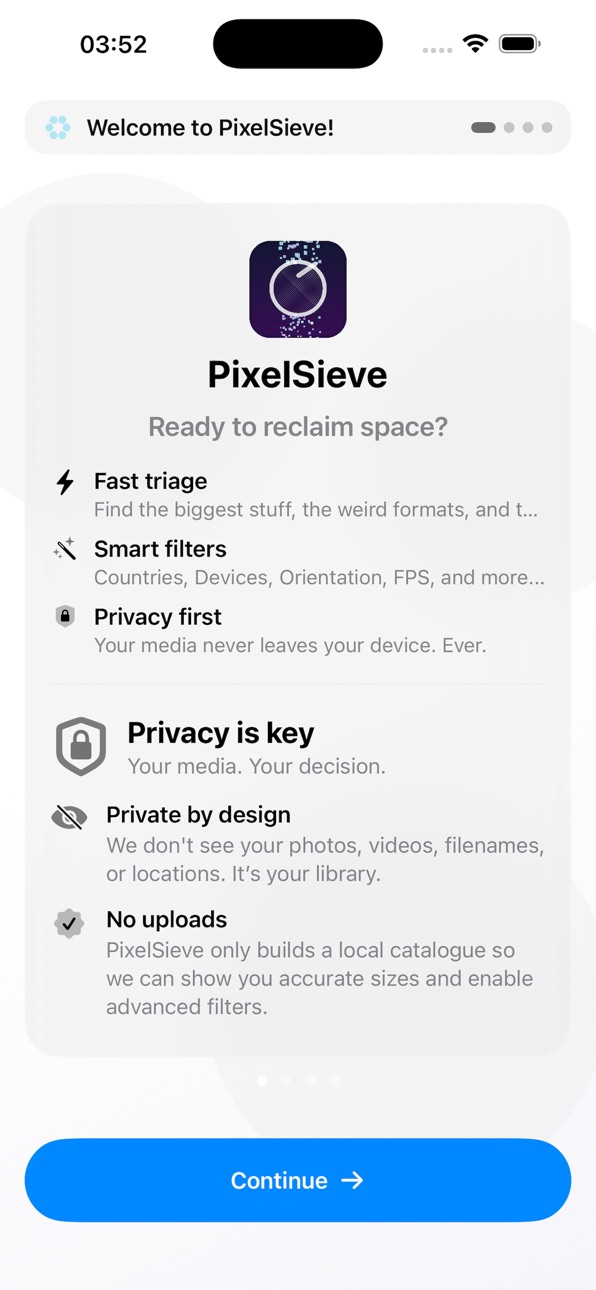




iPad 2 images


What’s New Version 1.5.5
Updated Search, custom radius for city search
Added maps to Photo information
Updated Splash Texts
Fixed "vlog" filter bug
Description
Meet PixelSieve - the fastest way to sift your camera roll and find your best shots.
It’s built for people with large or small libraries: filter by real technical metadata (2K/4K, HDR, Dolby Vision, RAW/ProRAW, Live, Portrait, Cinematic, Slow-Mo, Time-lapse, Screen Recordings, DJI, Country and more).
Sort by date or file size, preview instantly, share, add to albums, compress, delete safely (moves to Recently Deleted).
Your entire library - neatly sieved.
Why you’ll love it:
- SmartSievePro (Advanced Filters): optional “second-pass” scans that unlock deeper metadata (and keeps expanding over time).
- Task Centre scans (with progress + resume): run heavy analysis in the background with clear progress, cancellation, and resume support.
- Compression tools + reports: shrink photos & videos with minimal visible quality loss — and get a clean report showing original size, new size, and space saved.
- Power search: search by date, location, filename, and size — including friendly dates like “16th December 2025”.
- Device filtering: automatically groups media by capture device (e.g. iPhone models, DJI, etc.) so you can filter your library by what shot it.
- Built for speed: on-device analysis + caching. Use Reload Recent (Today / Last 7 / Last 30 / Last 90 / custom ranges) to avoid full rescans.
- Confident cleanup: select with a tap, multi-select actions, and safe deletion to Recently Deleted.
Video features:
- Resolution filters: 2K+ / 4K+
- HDR + Dolby Vision* flags
- FPS filtering (24 / 30 / 60 / 120 and more)
- Sort by Date or Size (asc/desc in Pro)
- Mode detection: Cinematic, Slow-Mo, Time-lapse, Dual Capture, Screen Recordings
- DJI detector (filename heuristics)
- Inline playback + size/duration display
- SmartSievePro advanced metadata (codec/transfer/audio channels, etc.)
Photo features:
- Flags: RAW / ProRAW, Live, Portrait/Depth, HDR Photo, Panorama, Screenshot
- Megapixels + resolution display, quick preview
- Sort by Date or Size (asc/desc in Pro)
- Multi-select actions: Add to Album, Share/Export, Compress, Delete
- Persistent cache + Reload Recent + Full library reload (with warning)
- SmartSievePro advanced signals (lens type, Night Mode heuristics, capture device, and more where available)
Free vs Pro
Free:
- View full library
- Sort by Size (ascending)
- Delete (up to 10 at once)
- Cache + Reload Recent + Full Reload
- Settings Tab
- 2k+ Video Filtering
- 24MP+ Photo Filtering
- Limited Photo / Video Toggle Flags
Pro unlocks:
- All filters (2K+/4K+, HDR, Dolby Vision*, DJI, RAW/Live/Portrait/HDR/Pano/Screenshot + video modes)
- Country Filters
- Device Filters
- Sort by Date or Size (asc/desc) + live item count
- Add to Album
- Share/Export
- Select All (no selection cap)
- No deletion cap
- No ads
- SmartSievePro scans + advanced metadata tools
..and so much more constntly in development - once pro unlocked, all new PixelSieve Pro features are *FREE!
Privacy & permissions
PixelSieve requires Photo Library access (read/write for album & deletion features).
Your media stays in your library — analysis happens on-device, and deletions go to Recently Deleted.
* Dolby Vision detection relies on available file metadata and may vary by source.
Dolby and Dolby Vision are trademarks of Dolby Laboratories.
DJI is a trademark of SZ DJI Technology Co., Ltd.
*FREE! - Indicates features are part of PixelSieve Pro and not another branded add on. (For example, SmartSievePro)
Terms of Use (EULA): https://www.apple.com/legal/internet-services/itunes/dev/stdeula/
Capabilities
In-App Purchases
Accessibility
ipadiphonemacrealityDevicetvoswatch
Version history 15 versions
Build 883030042v1.5.42026-03-10 07:50:49
- BRAND NEW Bottom Bar - no more sliding.
- Action & Helper Panel
- Bug fixes with a few filters
- Bump Database for Countries & Cities
- Retry country&city button if unknown
- Removed unnecessary opacity for free users
Build 883216272v1.5.52026-03-10 20:34:32
Updated Search, custom radius for city search
Added maps to Photo information
Updated Splash Texts
Fixed "vlog" filter bug
Build 881829944v1.5.32026-01-26 07:47:49
- Top Bar redesign
- City Filter (Please re-index)
- New Country logic (offline)
Build 881368961v1.5.22026-01-10 23:13:25
Minor Bug Fixes & Performance Improvements
Design changes
Build 881339148v1.5.12026-01-09 19:17:21
- Cleanup to FREE Mode: Settings, Upgrade Hub, SieveCredits and Pro button
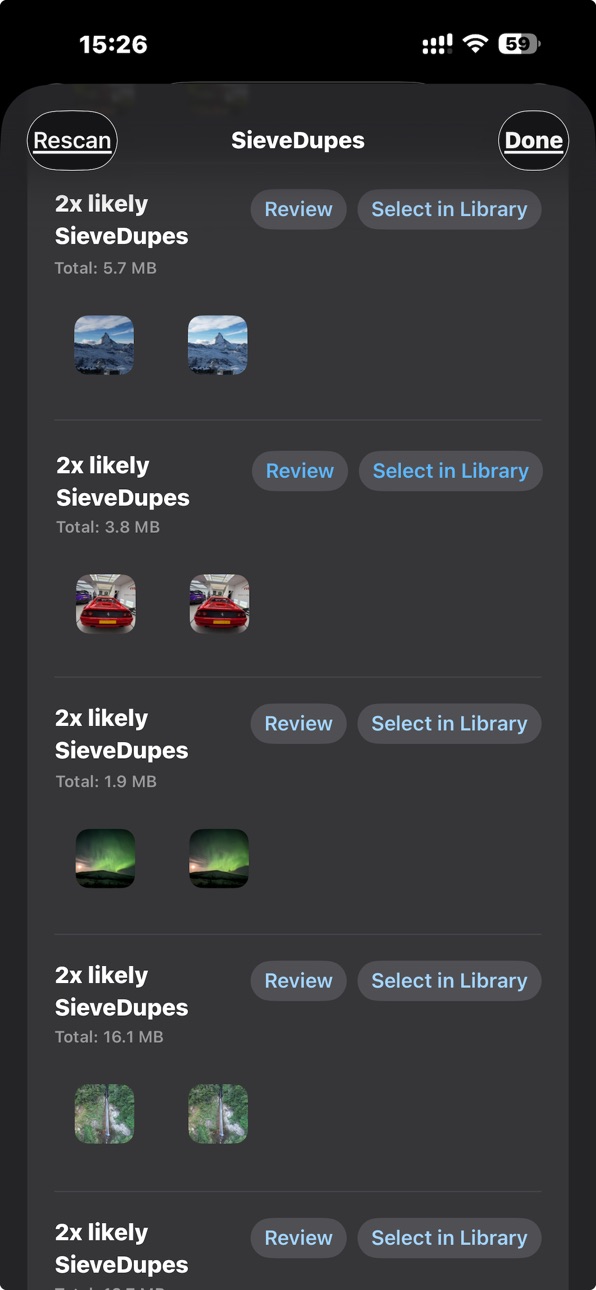
- SieveDupe clarity, location/date per asset
- Thumbnails on trip mode
- Search improvements. Show in Library as a filter & speed fixes
- Dismiss scans that cannot be cancelled
- Onboarding cleanups
- Album only indexing
- Other small bug fixes
Build 881233943v1.4.52026-01-07 18:11:09
- Onboarding process for new users
- cleanup to reloading settings
- cleaner top menu
- added orientation filter to photos
Build 881293411v1.52026-01-07 23:03:46
- Brand new top bar no more toggles
- Fix device label missing on videos
- Set location in bulk feature
- Option to save dismissed SieveDupes
- Fixed resume & interrupted indexing bug
- Version info in settings
- New basic filtering logic
- Added hide filtering for all basic filters
- Cleanup to settings, upgrade hub and SieveCredits
Build 881191506v1.4.42026-01-04 21:14:35
- Caching improvements
- Much faster App feeling
- Added more "approximate" size labels
- Size disclaimer
- added fps in video row and megapixels in photo row
- other small bug fixes
Build 880863243v1.4.22026-01-02 05:50:32
One word? Everything.
Please see https://pixelsieve.app for more info and FAQs!
Complete new redo for Free and Pro users.
Free version has much more included and access to (almost) all pro features.
Main new features.
- SmartSievePro
- SieveScope
- Compression
- Improvements to SmartSievePro. Global filter remove, MATCH to correct place, show select count for all
- SieveDupe improvements, hashing is customisable
- Pro tips
- Sieve Credits
- Added delete / Info button to media viewer
- Privacy policy addition in disclaimer
- Burst viewer
- Live Photo Replacer
- Optional scans from first launch
- No more advanced scans, all in one and fast.
- No more empty display rows
- Added extra filter toggles.
Build 881152707v1.4.32026-01-02 22:47:42
- Introducing v1 Trip Mode: See your photos / videos from around the globe
- bottom bar cleanup
- multiple bug fixes on swipe back, on photo viewing and inturpt bug where it is a false scan
- performance improvements
- quick reload for each tab
- date range filter selector
Build 880669653v1.2.22025-12-17 00:56:19
- Video Compression: Choose between High, Medium and Low video compression to save space on your device by reducing the size of videos with minimal difference
- Photo Compression: Compress photos to lower resolution if, for example, you accidentally took some in RAW and didn't mean to. Or if you just want to reduce the size!
- Delete or keep originals for Video/Photo Compression: Choose whether you want to keep or delete them, good to keep for comparing!
- "Add to Album" now can select albums as well as create one
- Bug fixes and Performance Improvements
Build 880745929v1.32025-12-17 22:34:19
- Introducing SmartSievePro - An Advanced filter skeleton. Always expanding to more.
- Compression now shows a small report at the end
- Search features include date, location, file sizes, and file names. Works with friendly dates such as 16th December 2025
- User controlled range for scanning Advanced Filtration in task centre
- improved UX for the advanced filters, and/or. For example, "Night Mode AND Horizontal" / "120 FPS AND Vertical"
- Fixed compression to show device, lens, etc (No metadata lost!)
- Other general bug fixes and performance improvements so it stays as efficient as possible!
Build 879727106v1.2.12025-11-14 01:14:04
- Introducing "Short-Heavy": Set a variable size & duration for videos to find those gremlins that are short and take high amount of space
- Privacy Information
- Album Choosing
- Pause started tasks (For large libraries)
- Other bug fixes and performance improvements
Build 879568333v1.22025-11-11 14:00:21
Many new features added:
Export to ZIP
More Features for the Free version
Settings Page
More Pro Upgrades
Task Center
More Filters for Photos and Videos
Better Cache clearing
Custom Albums
Build 879430610v1.02025-11-06 17:29:34
No pricing data captured yet — comparisons appear once the app has paid storefronts or in-app purchases.
Availability 1 of 1 storefronts
| Region | Language | Price | Ratings | Avg | Version |
|---|---|---|---|---|---|
| US | en-US | Free | 0 | — | 1.5.5 |
Change log 19 changes · US
✎
releaseNotes updated
Updated Search, custom radius for city search
Added maps to Photo information
Updated Splash Texts
Fixed "vlog" filter bug
✎
description updated
Meet PixelSieve - the fastest way to sift your camera roll and find your best shots.
It’s built for people with large or small libraries: filter by real techn
✎
subtitle updated
Sift Your Media, Keep the Gold
✎
name updated
PixelSieve: Sift & Save Space
◆
Version 1.5.5 released
Updated Search, custom radius for city search
Added maps to Photo information
Updated Splash Texts
Fixed "vlog" filter bug
◆
Version 1.5.4 released
- BRAND NEW Bottom Bar - no more sliding.
- Action & Helper Panel
- Bug fixes with a few filters
- Bump Database for Countries & Cities
- Retry country&city button if unknown
- Removed unnecessary opacity for free users
◆
Version 1.5.3 released
- Top Bar redesign
- City Filter (Please re-index)
- New Country logic (offline)
◆
Version 1.5.2 released
Minor Bug Fixes & Performance Improvements
Design changes
◆
Version 1.5.1 released
- Cleanup to FREE Mode: Settings, Upgrade Hub, SieveCredits and Pro button
- SieveDupe clarity, location/date per asset
- Thumbnails on trip mode
- Search improvements. Show in Library as a filter & speed fixes
- Dismiss scans that cannot b
◆
Version 1.5 released
- Brand new top bar no more toggles
- Fix device label missing on videos
- Set location in bulk feature
- Option to save dismissed SieveDupes
- Fixed resume & interrupted indexing bug
- Version info in settings
- New basic filtering logic
-
◆
Version 1.4.5 released
- Onboarding process for new users
- cleanup to reloading settings
- cleaner top menu
- added orientation filter to photos
◆
Version 1.4.4 released
- Caching improvements
- Much faster App feeling
- Added more "approximate" size labels
- Size disclaimer
- added fps in video row and megapixels in photo row
- other small bug fixes
◆
Version 1.4.3 released
- Introducing v1 Trip Mode: See your photos / videos from around the globe
- bottom bar cleanup
- multiple bug fixes on swipe back, on photo viewing and inturpt bug where it is a false scan
- performance improvements
- quick reload for each
◆
Version 1.4.2 released
One word? Everything.
Please see https://pixelsieve.app for more info and FAQs!
Complete new redo for Free and Pro users.
Free version has much more included and access to (almost) all pro features.
Main new features.
- SmartSievePro
-
◆
Version 1.3 released
- Introducing SmartSievePro - An Advanced filter skeleton. Always expanding to more.
- Compression now shows a small report at the end
- Search features include date, location, file sizes, and file names. Works with friendly dates such as 1
◆
Version 1.2.2 released
- Video Compression: Choose between High, Medium and Low video compression to save space on your device by reducing the size of videos with minimal difference
- Photo Compression: Compress photos to lower resolution if, for example, you acc
◆
Version 1.2.1 released
- Introducing "Short-Heavy": Set a variable size & duration for videos to find those gremlins that are short and take high amount of space
- Privacy Information
- Album Choosing
- Pause started tasks (For large libraries)
- Other bug fixes
◆
Version 1.2 released
Many new features added:
Export to ZIP
More Features for the Free version
Settings Page
More Pro Upgrades
Task Center
More Filters for Photos and Videos
Better Cache clearing
Custom Albums
◆
Version 1.0 released