Home › Finance

 US
US
1 of 1 storefronts
Content in en-US
Content in en-US
Information
Apple ID6754511468
Bundle IDcom.ikotti.paymenttrackerapp
SellerSeller
Min iOS15.1
Min macOS12.0
Device familiesiphone, ipad, ipod
Released2025-10-30
Copyright© PieCheck
Privacy policyLink ↗
Preview 2 platforms
iPhone 9 images



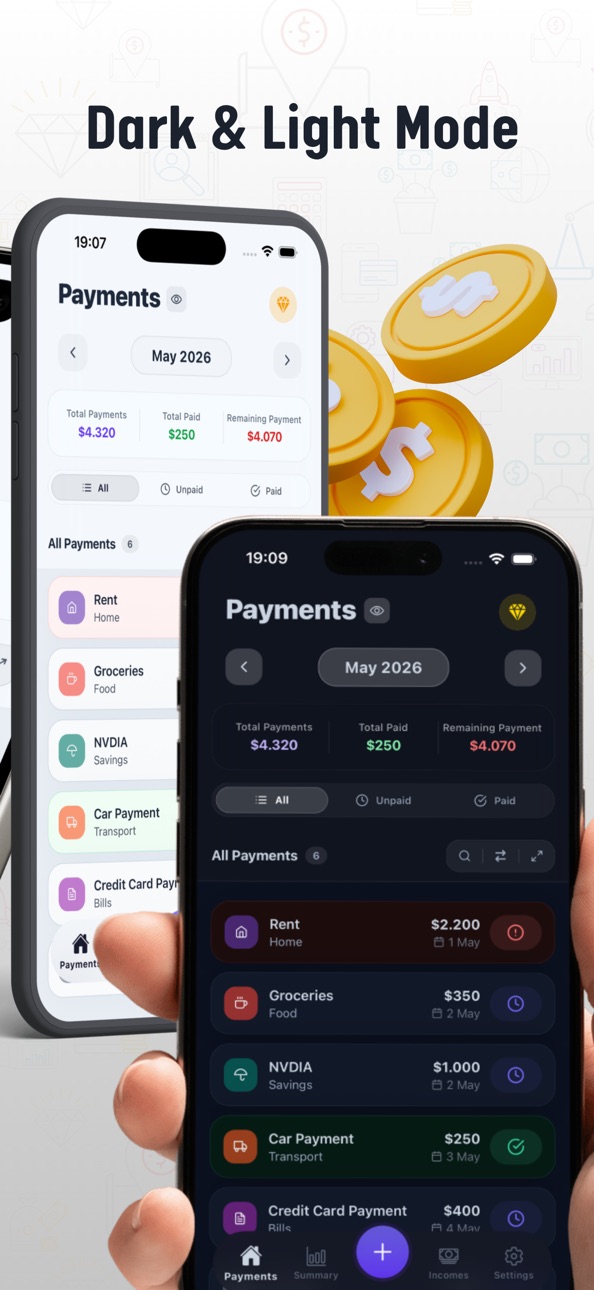
iPad 8 images


What’s New Version 1.1.0
PieCheck has become even more powerful thanks to your support and feedback! With this update:
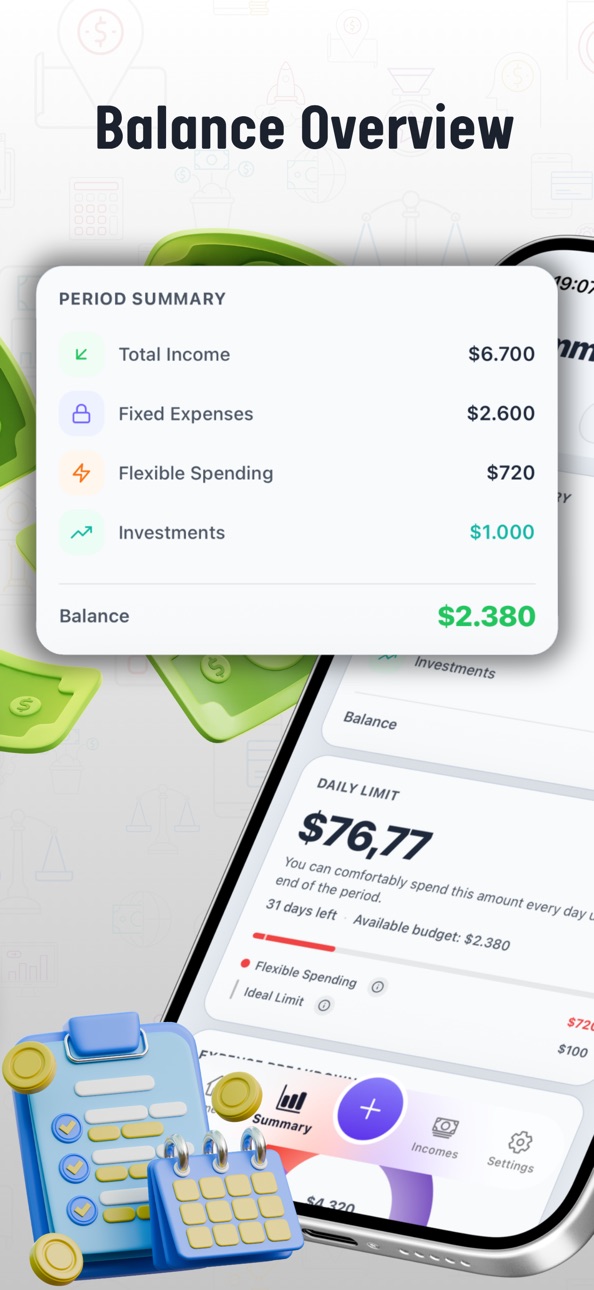
1. EXPENSES ARE NOW DIVIDED INTO THREE DIFFERENT TYPES
1.a) Fixed
Fixed expenses are mandatory payments you have to make. (Rent, bills, loans, etc.)
1.b) Flexible
Flexible expenses are non-essential expenses that you can control. (Coffee, cinema, etc.)
1.c) Investment
Investment expenses cover payments made for savings and investments. (Precious metals, stocks, etc.)
2. THE SUMMARY SCREEN IS NOW MUCH MORE DETAILED
Thanks to the new expense types, you can analyze your spending in greater detail and manage your budget more effectively. You can now easily see how much of your spending is mandatory and how much is flexible.
New cards added to the summary screen:
2.a) Daily Limit
This section shows how much you can spend daily within the current period. It updates automatically every day and provides information about your ideal spending limit and current budget status. The daily limit is calculated based on the remaining balance after all expenses are paid.
2.b) Spending Distribution
The improved chart now provides detailed analysis by both category and expense type. You can also view spending changes compared to the previous month.
2.c) 6-Month Trend
View your income and expense chart for the last 6 months. Tap on any month to see detailed information for that period.
2.d) Smart Summary
Analyze increases and decreases in your flexible expenses compared to previous months and identify the expenses that need your attention.
2.e) Investment Vault
Displays the total amount of expenses added as investments over the last 12 months.
2.f) Highest Payments
Lists the highest payments for the selected period by payment type.
3. THE USER INTERFACE HAS BEEN REFRESHED
Various interface improvements have been made for a more modern and user-friendly experience.
4. AMOUNT HIDING FEATURE ADDED
You can now hide amounts anytime using the eye icon added next to section titles.
5. BIOMETRIC AUTHENTICATION SUPPORT ADDED
Biometric authentication support has been added for accessing Settings. You can also choose to protect the app using your phone’s security method when opening it. (Face ID, fingerprint, etc.)
6. PERFORMANCE IMPROVEMENTS
General performance and stability improvements have been made throughout the app.
Description
Your Powerful Assistant for Financial Organization: PieCheck
PieCheck makes personal finance tracking simple, organized, and understandable for everyone.
It helps you control your expenses, manage your budget, and progress toward your financial goals with more confidence.
By gathering all your expenses on a single screen, it gives you real visibility into your finances.
- Put an End to End-of-Month Calculation Chaos
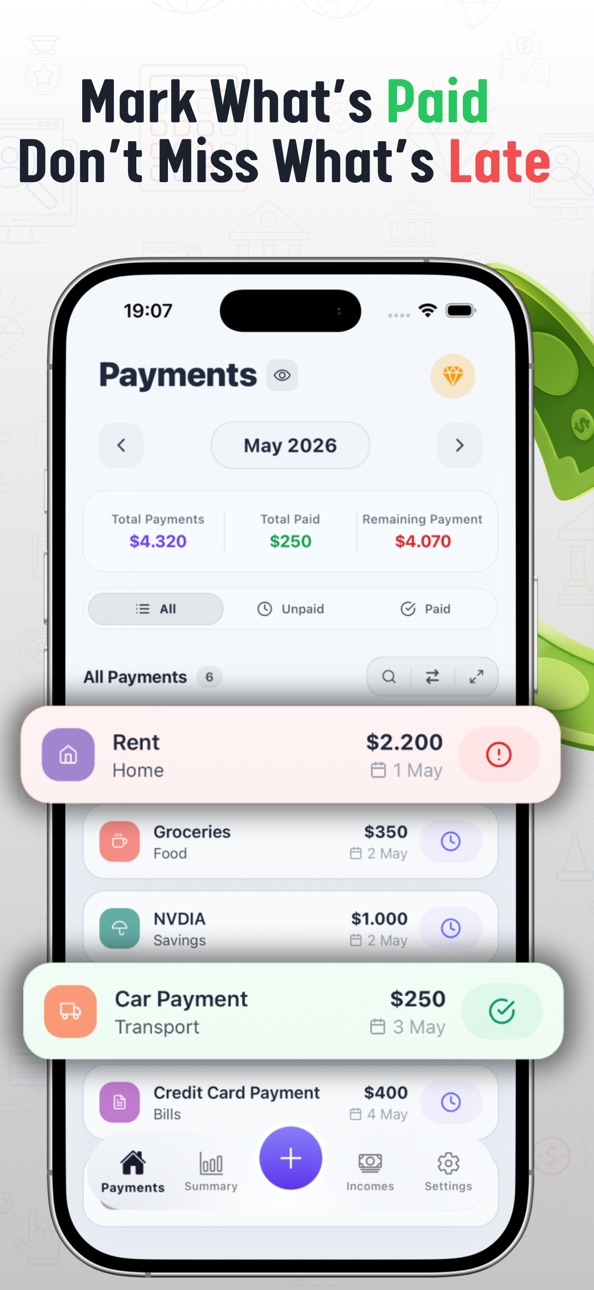
Add your monthly payments once; PieCheck tracks the rest for you.
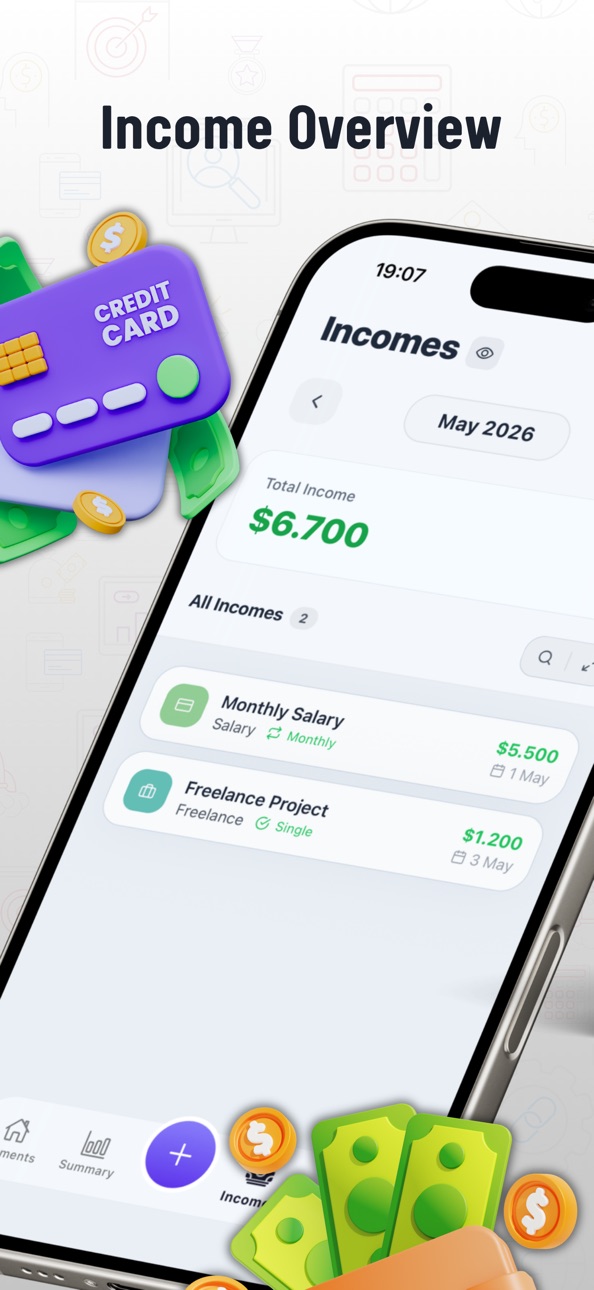
Manage your income and expenses quickly and easily, without manual calculations.
- Make Finance Tracking Smarter
PieCheck is a smart assistant designed to help you keep your daily spending and monthly budget organized.
It simplifies money management, helps you analyze your financial habits, and allows you to make more informed decisions.
You can quickly add expenses, create your monthly financial plan, and view your money flow with detailed charts.
Collecting all your financial activity in one app makes budget control easier than ever.
- Stop Wasting Time with Calculators Every Month
No more calculators, pens, or paper for tracking income and expenses.
Enter your recurring monthly payments once and let PieCheck handle the rest.
Organize all your spending on a single screen and take real control of your finances.
- Simplify Personal Finance Management
Create your budget, manage your expenses, and see your money flow clearly.
With modern design and powerful features, finance tracking becomes much more practical.
- Receive Payment Reminder Notifications
Get personalized notifications so you don’t forget your payments.
Never miss a due date.
- Gain Financial Awareness
Track your spending regularly to increase your financial awareness.
PieCheck makes your money flow visible and helps you identify unnecessary expenses.
This gives you complete control over your budget.
- Categorize Your Income and Expenses
Create your own categories and record all transactions in an organized way.
Analyze spending trends with detailed charts.
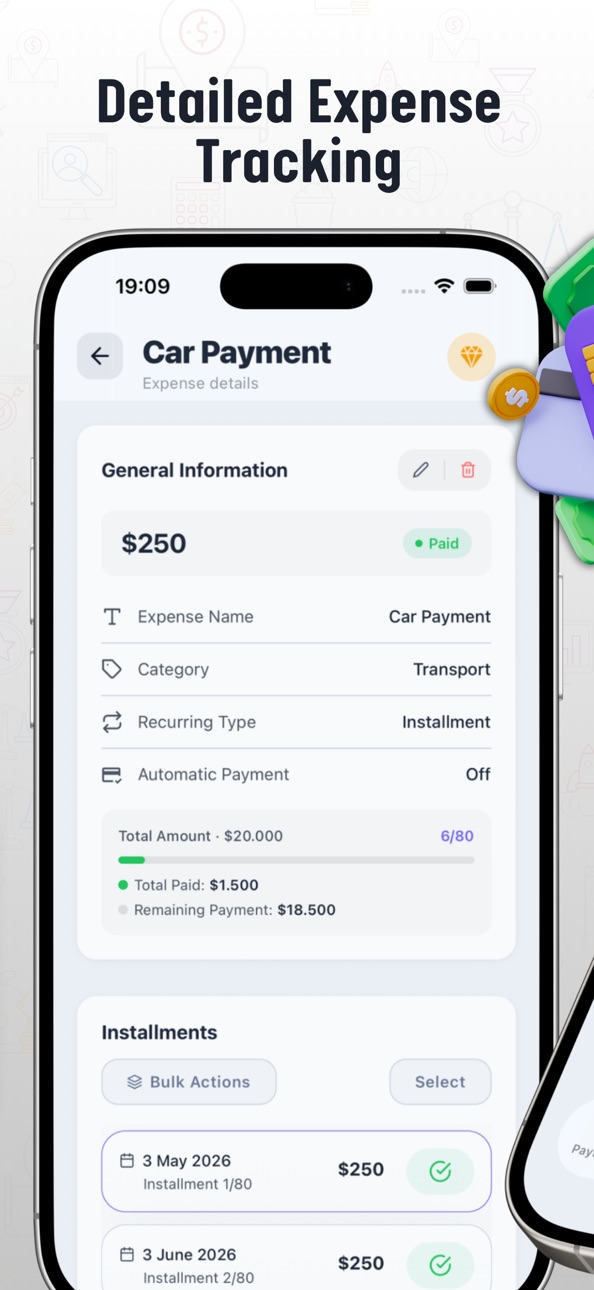
- Add Installment, Recurring, or One-Time Expenses
Choose the expense type when adding payments and set any frequency you want.
Track all kinds of expenses with daily, weekly, monthly, and many other options.
- Multi-Currency Support
Add transactions in many currencies. Easily manage expenses in different currencies.
- A Clearer, More Organized Financial Life
Manage your monthly expenses more accurately.
See exactly where your money goes.
Your spending habits become clearer over time.
Creating and sticking to your budget becomes much easier.
With PieCheck, you can strengthen your personal finance tracking and build a more controlled financial life.
-------
Access Even More with PieCheck Premium
- Unlimited Income & Expense Entries
Create as many records as you want each month.
- Ad-Free Experience
Enjoy a cleaner, uninterrupted interface.
- Export in Excel Format
Save your income and expenses as Excel files and create monthly reports.
- Easy Data Transfer When Changing Devices
When switching devices, you can transfer your data from the old device to the new one.
Continue right where you left off without re-entering your expenses.
- Custom Themes and Color Options
Personalize the look of the app to your preference.
You can start now and track all your financial data in an organized way.
-------
Terms of Use:
https://www.apple.com/legal/internet-services/itunes/dev/stdeula/
In-App Purchases US pricing
Unlock all features, ad-free experience, and exclusive content. Subscription
Monthly Plan · Monthly$2.99
6 Month Plan · 6 months$14.99
Annual Plan · Yearly$29.99
Capabilities
In-App Purchases
Accessibility
ipadiphonemacrealityDevicetvoswatch
Version history 6 versions
Build 885285687v1.1.02026-05-05 19:01:49
PieCheck has become even more powerful thanks to your support and feedback! With this update:
1. EXPENSES ARE NOW DIVIDED INTO THREE DIFFERENT TYPES
1.a) Fixed
Fixed expenses are mandatory payments you have to make. (Rent, bills, loans, etc.)
1.b) Flexible
Flexible expenses are non-essential expenses that you can control. (Coffee, cinema, etc.)
1.c) Investment
Investment expenses cover payments made for savings and investments. (Precious metals, stocks, etc.)
2. THE SUMMARY SCREEN IS NOW MUCH MORE DETAILED
Thanks to the new expense types, you can analyze your spending in greater detail and manage your budget more effectively. You can now easily see how much of your spending is mandatory and how much is flexible.
New cards added to the summary screen:
2.a) Daily Limit
This section shows how much you can spend daily within the current period. It updates automatically every day and provides information about your ideal spending limit and current budget status. The daily limit is calculated based on the remaining balance after all expenses are paid.
2.b) Spending Distribution
The improved chart now provides detailed analysis by both category and expense type. You can also view spending changes compared to the previous month.
2.c) 6-Month Trend
View your income and expense chart for the last 6 months. Tap on any month to see detailed information for that period.
2.d) Smart Summary
Analyze increases and decreases in your flexible expenses compared to previous months and identify the expenses that need your attention.
2.e) Investment Vault
Displays the total amount of expenses added as investments over the last 12 months.
2.f) Highest Payments
Lists the highest payments for the selected period by payment type.
3. THE USER INTERFACE HAS BEEN REFRESHED
Various interface improvements have been made for a more modern and user-friendly experience.
4. AMOUNT HIDING FEATURE ADDED
You can now hide amounts anytime using the eye icon added next to section titles.
5. BIOMETRIC AUTHENTICATION SUPPORT ADDED
Biometric authentication support has been added for accessing Settings. You can also choose to protect the app using your phone’s security method when opening it. (Face ID, fingerprint, etc.)
6. PERFORMANCE IMPROVEMENTS
General performance and stability improvements have been made throughout the app.
Build 880518671v1.0.92025-12-12 21:34:17
- App name and logo updated.
- Payment reminder notifications added. You can now receive personalized alerts for your expenses.
- “Notification Preferences” and “Data Synchronization” added to the Settings screen.
- Dynamic formatting added for currency inputs.
- Onboarding screen updated.
- Income & Expense Detail UI refreshed.
- Various bug fixes and performance improvements.
You can share your thoughts and feedback about the app from Settings → Feedback.
Build 879788956v1.0.82025-11-19 01:41:03
- Added Splash Screen.
- Added review pop-up.
- General bug fixes.
Build 879467150v1.0.72025-11-04 23:00:48
- Income and expense types can now be edited during updates.
- Fixed issues related to the delayed payment notification icon.
- General performance and stability improvements.
Build 879376706v1.0.62025-11-01 21:27:16
- New theme colors have been added to the app.
Build 879232117v1.0.52025-10-30 15:13:41
Price history by region
Currency
Show
Columns
Search
Availability 1 of 1 storefronts
| Region | Language | Price | Ratings | Avg | Version |
|---|---|---|---|---|---|
| US | en-US | Free | 0 | — | 1.1.0 |
Change log 10 changes · US
✎
releaseNotes updated
PieCheck has become even more powerful thanks to your support and feedback! With this update:
1. EXPENSES ARE NOW DIVIDED INTO THREE DIFFERENT TYPES
1.a) Fixe
✎
description updated
Your Powerful Assistant for Financial Organization: PieCheck
PieCheck makes personal finance tracking simple, organized, and understandable for everyone.
It h
✎
subtitle updated
Track Spending and Save Money
✎
name updated
PieCheck: Budget & Expense
◆
Version 1.1.0 released
PieCheck has become even more powerful thanks to your support and feedback! With this update:
1. EXPENSES ARE NOW DIVIDED INTO THREE DIFFERENT TYPES
1.a) Fixed
Fixed expenses are mandatory payments you have to make. (Rent, bills, loans, e
◆
Version 1.0.9 released
- App name and logo updated.
- Payment reminder notifications added. You can now receive personalized alerts for your expenses.
- “Notification Preferences” and “Data Synchronization” added to the Settings screen.
- Dynamic formatting added
◆
Version 1.0.8 released
- Added Splash Screen.
- Added review pop-up.
- General bug fixes.
◆
Version 1.0.7 released
- Income and expense types can now be edited during updates.
- Fixed issues related to the delayed payment notification icon.
- General performance and stability improvements.
◆
Version 1.0.6 released
- New theme colors have been added to the app.
◆
Version 1.0.5 released