Home › Productivity

 US
US
1 of 1 storefronts
Content in en-US
Content in en-US
Information
Preview 1 platform
iPhone 5 images


What’s New Version 3.2.0
This update improves Auto Log, income statistics, and project management. Auto Log is now easier to use day to day, with Live Activities, notifications, and “Skip this visit”. Income statistics now support compensation changes and extra income such as bonuses and allowances, making historical and current estimates more accurate.
「New Features」
- Added Live Activities for Auto Log, so you can see an active session on the Lock Screen and Dynamic Island.
- Added compensation changes, allowing different pay rules for the same project from different effective dates.
- Added extra income records for bonuses, allowances, and incentives.
- Added “Skip this visit” for Auto Log.
- Added new Help Center content.
「Bug Fixes」
- Fixed Auto Log status issues after location permission changes.
- Fixed handling for interrupted sessions, short visits, and location switching.
- Fixed some settings warning states not being saved or restored correctly.
- Fixed issues around archiving, deleting, and moving project records.
- Fixed several income calculation edge cases.
「Experience Improvements」
- New records from the Home screen now prefer the selected calendar date.
- Improved the active Auto Log entry point, details screen, stop actions, and notification copy.
- Improved statistics cards, income breakdowns, heatmaps, and value formatting.
- Improved project management structure and localized text.
Description
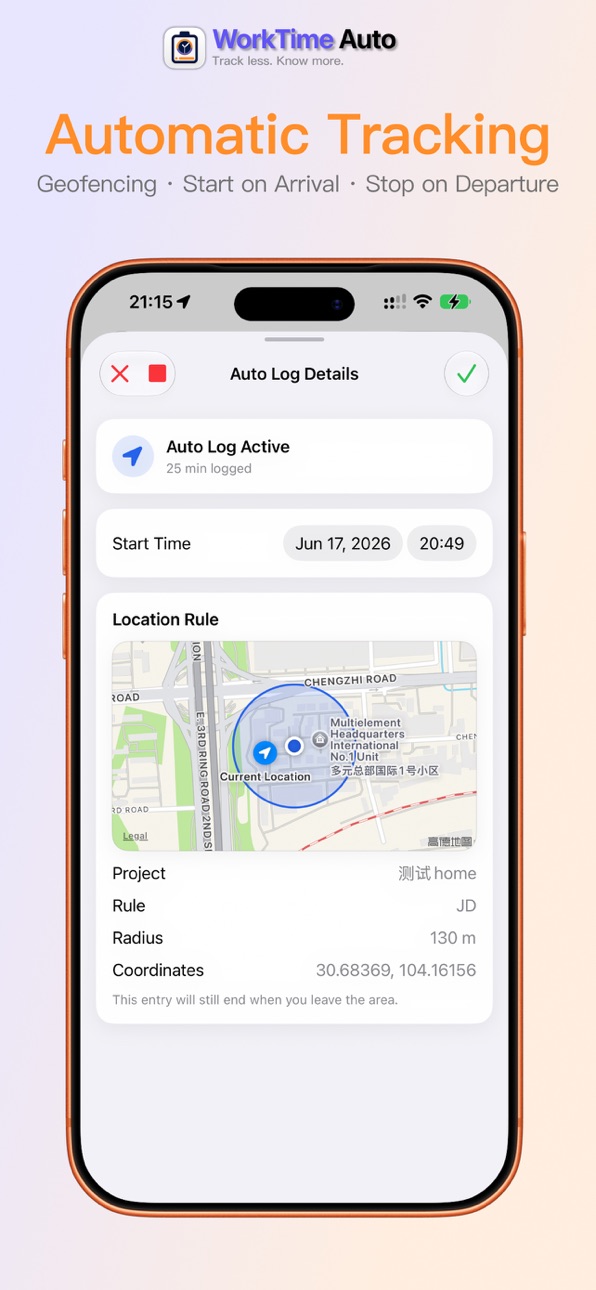
WorkTime Auto is built around location-based auto logging for work hours, overtime, and income estimates. Set up a workplace or project location, and the app can start logging when you arrive and stop when you leave, reducing missed entries and end-of-day cleanup.
You can still add or edit records manually at any time. Auto logs stay editable too, including start time, project, and notes, making the app useful for fixed workplaces, long-term projects, shifts, night work, and overtime-heavy schedules.
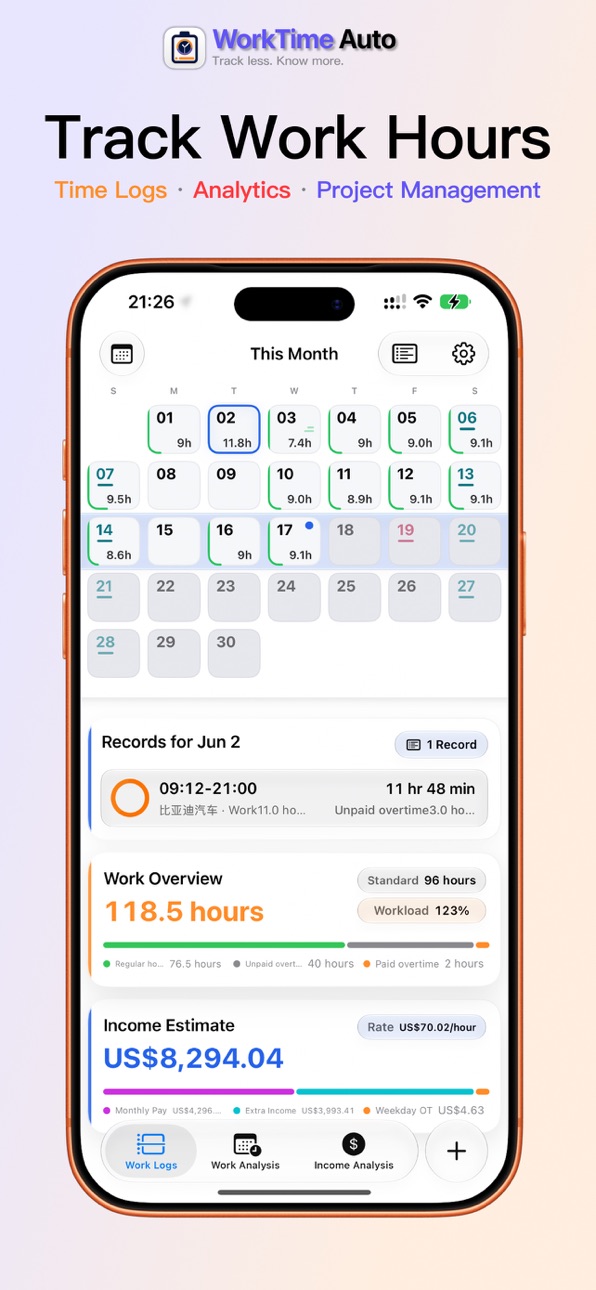
Your records are organized into a calendar, heatmaps, daily work hours, work ranges, workload, project breakdowns, and income estimates. View them by calendar month or by your own payroll cycle, with a custom monthly start day when needed.
[Key Features]
- Auto Log: starts on arrival and stops when you leave.
- Work Calendar: view, add, and edit records by date.
- Project Payroll: set standard hours, comprehensive hours, salary, hourly rates, and overtime multipliers per project.
- Workday Rules: supports regional holidays, adjusted workdays, and manual date overrides.
- Stats: track hours, workload, income, heatmaps, daily hours, and work ranges.
- Home Screen Widgets: check recent heatmaps, today’s status, and work summaries at a glance.
- iCloud and Backup: sync across your devices, export backups, and merge imported data.
[Pro]
Work Hours Log Pro unlocks location-based Auto Log and live widget data.
Without Pro, you can still use manual logging, projects, stats, work calendar, export, and import.
Work Hours Log has no ads, does not sell your data, and does not use your data for ad tracking. Auto Log stores only the location rules you create, not your location history.
Terms of Use (EULA): https://www.apple.com/legal/internet-services/itunes/dev/stdeula/
Privacy Policy: http://workhourlog.cn/privacy/
Capabilities
In-App Purchases
Accessibility
ipadiphonemacrealityDevicetvoswatch
Version history 7 versions
Build 886810145v3.2.02026-06-25 17:45:49
This update improves Auto Log, income statistics, and project management. Auto Log is now easier to use day to day, with Live Activities, notifications, and “Skip this visit”. Income statistics now support compensation changes and extra income such as bonuses and allowances, making historical and current estimates more accurate.
「New Features」
- Added Live Activities for Auto Log, so you can see an active session on the Lock Screen and Dynamic Island.
- Added compensation changes, allowing different pay rules for the same project from different effective dates.
- Added extra income records for bonuses, allowances, and incentives.
- Added “Skip this visit” for Auto Log.
- Added new Help Center content.
「Bug Fixes」
- Fixed Auto Log status issues after location permission changes.
- Fixed handling for interrupted sessions, short visits, and location switching.
- Fixed some settings warning states not being saved or restored correctly.
- Fixed issues around archiving, deleting, and moving project records.
- Fixed several income calculation edge cases.
「Experience Improvements」
- New records from the Home screen now prefer the selected calendar date.
- Improved the active Auto Log entry point, details screen, stop actions, and notification copy.
- Improved statistics cards, income breakdowns, heatmaps, and value formatting.
- Improved project management structure and localized text.
Build 885311979v3.1.12026-06-10 17:20:40
This update focuses on Auto Log: start when you arrive, stop when you leave, and spend less time managing entries by hand. It also adds widgets, work calendar improvements, localization settings, payroll cycles, and richer work stats.
[New Features]
- Added Auto Log for location-based start and stop.
- Added an active Auto Log status view with rule details and map range.
- Added Home Screen Widgets for recent heatmaps, work hours, work ranges, and today’s status.
- Added Work Calendar presets, manual date overrides, and an override list.
- Added localization settings for currency, regional holidays, week start day, and languages.
- Added monthly payroll start day from day 1 to 31.
- Added work stats charts for daily work hours, average line, and work ranges.
- Added data export and import for backup and merge restore.
- Added Pro subscription for Auto Log and live widget data.
[Bug Fixes]
- Fixed income summaries not using the current work calendar and paid overtime hours.
- Improved legacy data migration, duplicate detection, and work calendar override stability.
- Fixed same-day calendar taps opening only one record when multiple records existed.
[Improvements]
- Improved the home calendar, workload, income card, and day record list.
- Improved stats chart interactions with tap and horizontal scrubbing.
- Reduced heavy card materials to improve scrolling smoothness and lower heat.
Build 885188524v2.2.02026-05-03 01:56:19
Build 880868665v2.1.02025-12-20 21:35:41
Build 879459349v2.0.52025-11-04 02:01:14
Build 879144432v2.0.32025-10-28 01:42:50
Build 879066391v1.0.22025-10-22 09:29:32
No pricing data captured yet — comparisons appear once the app has paid storefronts or in-app purchases.
Availability 1 of 1 storefronts
| Region | Language | Price | Ratings | Avg | Version |
|---|---|---|---|---|---|
| US | en-US | Free | 0 | — | 3.2.0 |
Change log 11 changes · US
✎
releaseNotes updated
This update improves Auto Log, income statistics, and project management. Auto Log is now easier to use day to day, with Live Activities, notifications, and “Sk
✎
description updated
WorkTime Auto is built around location-based auto logging for work hours, overtime, and income estimates. Set up a workplace or project location, and the app ca
✎
subtitle updated
Auto work time tracking
✎
name updated
WorkTime Auto
◆
Version 3.2.0 released
This update improves Auto Log, income statistics, and project management. Auto Log is now easier to use day to day, with Live Activities, notifications, and “Skip this visit”. Income statistics now support compensation changes and extra inc
◆
Version 3.1.1 released
This update focuses on Auto Log: start when you arrive, stop when you leave, and spend less time managing entries by hand. It also adds widgets, work calendar improvements, localization settings, payroll cycles, and richer work stats.
[New
◆
Version 2.2.0 released
◆
Version 2.1.0 released
◆
Version 2.0.5 released
◆
Version 2.0.3 released
◆
Version 1.0.2 released