Home › Business

 US
US
1 of 1 storefronts
Content in en-US
Content in en-US
Information
Preview 2 platforms
iPhone 5 images
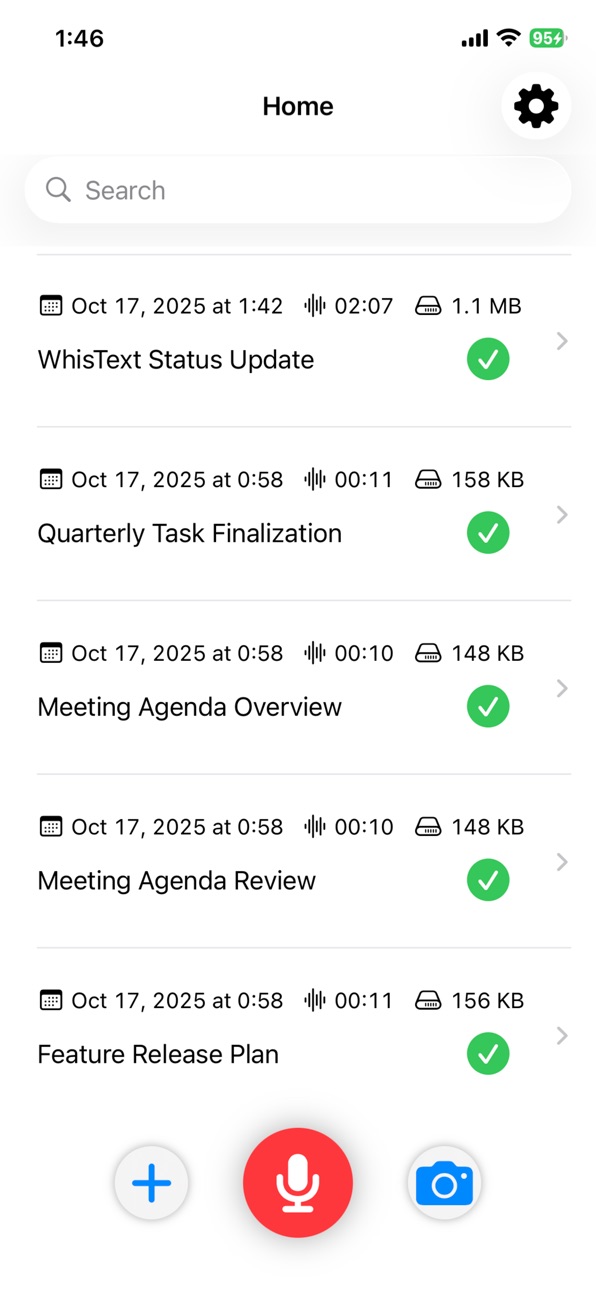
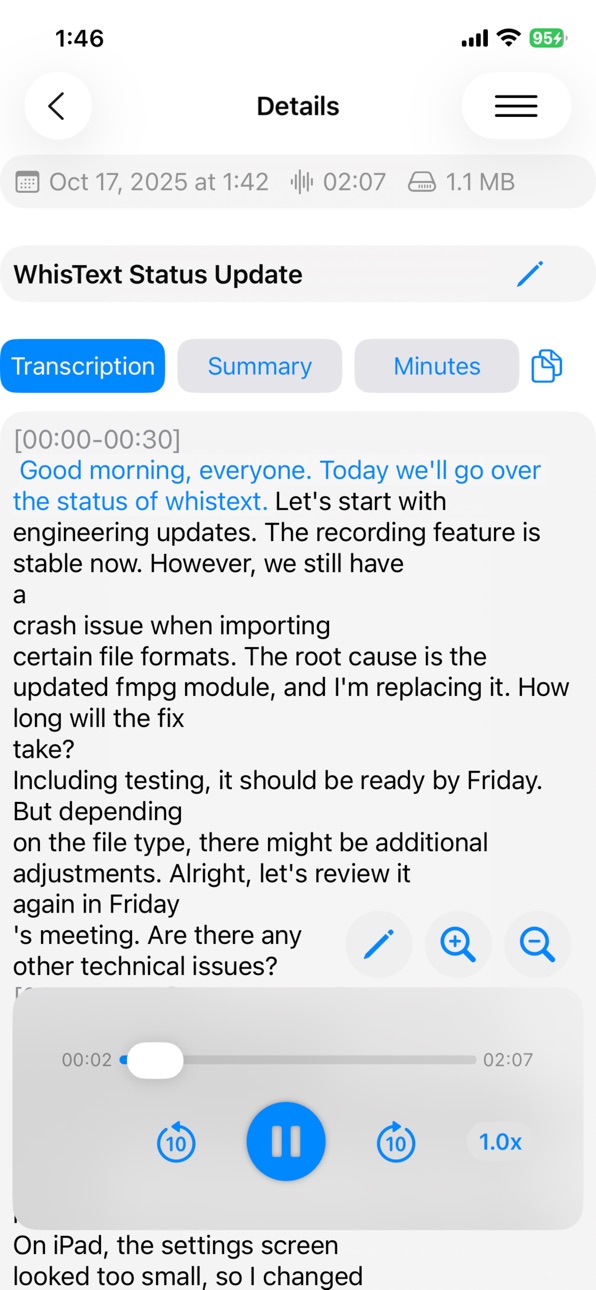


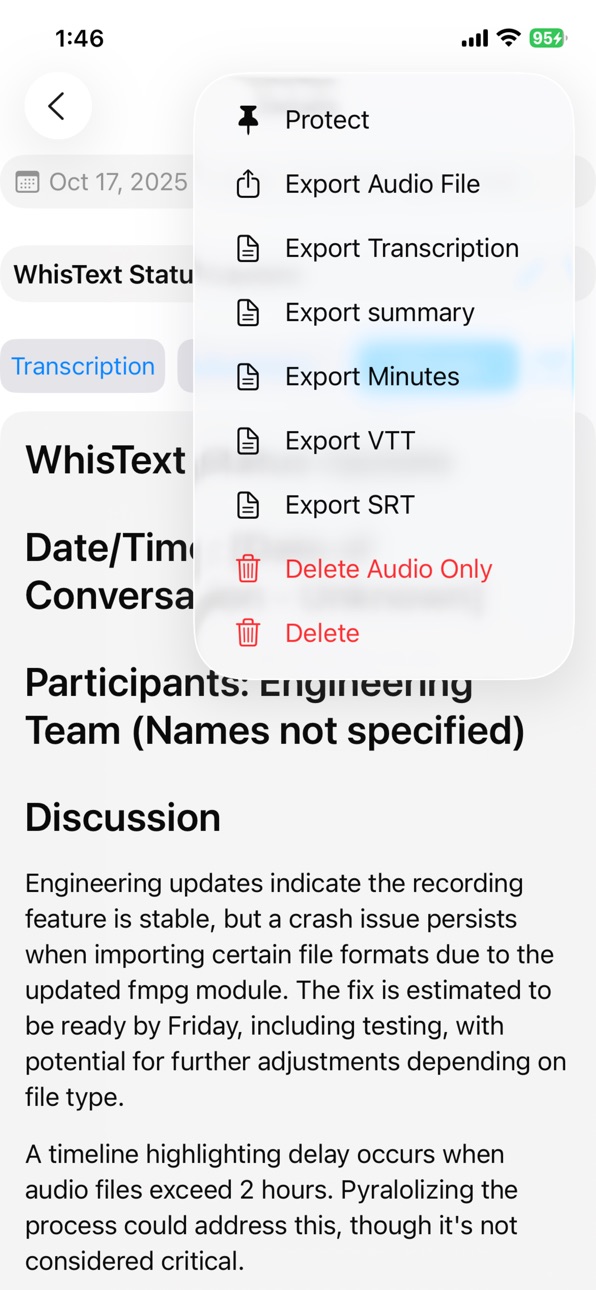
iPad 5 images


What’s New Version 1.2.7
- Added storage management feature (you can now check the total size of audio files and delete unnecessary audio data from the settings screen)
- Fixed an issue where the language selection screen would appear every time at launch for some language settings
- Improved stability
Description
Just tap record, and the app automatically generates a transcript, summary, and meeting minutes.
It also supports importing audio files and OCR transcription from camera/photos.
Generated content can be posted automatically to Slack.
Audio files and transcripts are deleted from the server immediately after processing.
Main Features
- Tap record for instant transcription
- Insert timeline markers to flag key moments on the spot (adjustable in 5-second increments)
- Transcript highlighting synced to playback position
- Automatic summary and meeting minutes generation via AI (custom prompts supported)
- Automatic posting to Slack
- OCR transcription from images (batch processing for multiple images)
Fast, Multilingual Processing
- NVIDIA Parakeet (25+ languages including English, German, French, Spanish, Italian, and Japanese) and Paraformer (Chinese) both process at 30x+ speed.
*Unsupported languages and mixed-language audio will process more slowly.
*Processing speed may vary depending on the server load.
- Other/mixed languages: multilingual models (e.g., Whisper)
- Server-side processing to minimize battery consumption
Recording & Import
- Tap to record → instant transcription
- Import audio files (Share Sheet supported)
- Automatically extract and compress audio from video files
- Import images for OCR (processed on-device)
Export & Integration
- Export as audio, text, summary, minutes, or subtitles (VTT, SRT)
- Automatic posting to Slack
Privacy & Security
- Audio files and transcripts are deleted from the server immediately after processing. No data is retained.
Supported Formats
- Audio: mp3, m4a, aac, wav, flac, ogg, opus, wma, amr, mpga, webm, aiff, caf
- Video: mp4, mov, m4v, webm, mkv, avi, mpeg, mpg
*Recognition accuracy may vary depending on audio quality and content.
Accessibility
ipadiphonemacrealityDevicetvoswatch
Version history 18 versions
Build 887471134v1.2.72026-06-26 14:29:44
- Added storage management feature (you can now check the total size of audio files and delete unnecessary audio data from the settings screen)
- Fixed an issue where the language selection screen would appear every time at launch for some language settings
- Improved stability
Build 887441757v1.2.52026-06-25 18:07:01
- Added “Auto-detect” for speaker language.
- Fixed an issue with incorrect language detection.
Build 887457166v1.2.62026-06-25 22:52:00
- Fixed an issue where the progress percentage was not displayed correctly.
Build 887387655v1.2.42026-06-24 15:16:10
- Made speaker language selection mandatory, and fixed a bug where the language setting alert was not displayed in some environments.
Build 887261490v1.2.22026-06-22 03:01:22
- Minor adjustments to the screen design
- Fixed minor bugs
Build 887274890v1.2.32026-06-22 13:35:43
- Removed LLM language selection from the settings.
Build 887202392v1.2.12026-06-19 23:40:07
- Added support for displaying processing progress (%)
Build 887074774v1.2.02026-06-17 14:18:30
- Added channel picker for Slack integration
- Added OAuth Scopes guidance inside the app for Slack token setup
- Screen turns black while recording
- Added a language selection prompt on first launch
- Updated speech recognition model description to reflect current setup
Build 886020354v1.1.02026-05-22 18:40:11
- Adjustments related to changes in the speech recognition model.
Build 882521737v1.0.72026-03-20 15:41:05
We have switched to a slower server to maintain free availability and reduce processing costs.
Build 883596757v1.0.82026-03-20 22:29:39
Fixed an issue that caused the app to crash in certain situations, improving stability.
Build 880433237v1.0.62025-12-08 21:54:34
・Improved timeline display and added VAD (silence removal) processing.
Build 879186511v1.0.52025-10-23 21:09:46
• Adjusted the community link behavior in the Settings screen — it now opens via an HTML redirect for improved compatibility.
Build 879154442v1.0.42025-10-22 21:51:21
• Added a link to the community thread on X in the Settings screen.
You can now join the official community directly from the app.
Build 879055850v1.0.32025-10-20 06:41:50
•Fixed an issue where push notifications were not received on Mac.
Build 879047415v1.0.12025-10-18 14:21:32
•Fixed an issue where push notifications were not delivered correctly.
Build 879052633v1.0.22025-10-18 21:15:39
•Add FFmpeg-driven audio conversion
Build 878996241v1.0.02025-10-17 22:03:12
No pricing data captured yet — comparisons appear once the app has paid storefronts or in-app purchases.
Availability 1 of 1 storefronts
| Region | Language | Price | Ratings | Avg | Version |
|---|---|---|---|---|---|
| US | en-US | Free | 0 | — | 1.2.7 |
Change log 22 changes · US
✎
releaseNotes updated
- Added storage management feature (you can now check the total size of audio files and delete unnecessary audio data from the settings screen)
- Fixed an issue
✎
description updated
Just tap record, and the app automatically generates a transcript, summary, and meeting minutes.
It also supports importing audio files and OCR transcription fr
✎
subtitle updated
Recording to summary & minutes
✎
name updated
WhisText
◆
Version 1.2.7 released
- Added storage management feature (you can now check the total size of audio files and delete unnecessary audio data from the settings screen)
- Fixed an issue where the language selection screen would appear every time at launch for some
◆
Version 1.2.6 released
- Fixed an issue where the progress percentage was not displayed correctly.
◆
Version 1.2.5 released
- Added “Auto-detect” for speaker language.
- Fixed an issue with incorrect language detection.
◆
Version 1.2.4 released
- Made speaker language selection mandatory, and fixed a bug where the language setting alert was not displayed in some environments.
◆
Version 1.2.3 released
- Removed LLM language selection from the settings.
◆
Version 1.2.2 released
- Minor adjustments to the screen design
- Fixed minor bugs
◆
Version 1.2.1 released
- Added support for displaying processing progress (%)
◆
Version 1.2.0 released
- Added channel picker for Slack integration
- Added OAuth Scopes guidance inside the app for Slack token setup
- Screen turns black while recording
- Added a language selection prompt on first launch
- Updated speech recognition model desc
◆
Version 1.1.0 released
- Adjustments related to changes in the speech recognition model.
◆
Version 1.0.8 released
Fixed an issue that caused the app to crash in certain situations, improving stability.
◆
Version 1.0.7 released
We have switched to a slower server to maintain free availability and reduce processing costs.
◆
Version 1.0.6 released
・Improved timeline display and added VAD (silence removal) processing.
◆
Version 1.0.5 released
• Adjusted the community link behavior in the Settings screen — it now opens via an HTML redirect for improved compatibility.
◆
Version 1.0.4 released
• Added a link to the community thread on X in the Settings screen.
You can now join the official community directly from the app.
◆
Version 1.0.3 released
•Fixed an issue where push notifications were not received on Mac.
◆
Version 1.0.2 released
•Add FFmpeg-driven audio conversion
◆
Version 1.0.1 released
•Fixed an issue where push notifications were not delivered correctly.
◆
Version 1.0.0 released