Home › Productivity

 US
US
1 of 1 storefronts
Content in en-US
Content in en-US
Information
Preview 2 platforms
iPhone 10 images



iPad 5 images


What’s New Version 1.10
• Focus Now for instant distraction-free sessions
• Simpler step-by-step setup for all block types
• Clearer editing, breaks, and active block controls
• More accurate Screen Time insights and daily progress
• More reliable blocking, resets, and overlapping rules
A big update that makes Hazel easier to use and more dependable every day.
Description
Stay focused without the guilt. Hazel is the cute, fun way to take control of your screen time.
◆ YOUR NEW FOCUS BESTIE
Meet Hazel. Not your typical productivity app. We're here to make staying focused actually enjoyable—not through punishing rules, but through streaks, rewards, and genuine support. Your hedgehog friend gets it. No judgment. Just vibes.
◆ WHAT MAKES HAZEL DIFFERENT
Unlike other screen time apps that feel like punishment, Hazel makes it fun to stay focused:
◆ DAILY STREAKS - Build momentum, not guilt
Watch your streak grow as you stick to your goals. Every day counts. See that number climb? That's the dopamine you actually want. Share your streaks with friends (or don't—zero pressure).
◆ EARN REWARDS - Get rewarded for staying focused
Because why not? Complete your focus goals and unlock rewards. Every streak matters. Every small win counts.
◆ FUN ANALYTICS - Actually understand your screen time
Boring graphs? Not here. Our insights are designed to be engaging and easy to understand. Cool colors, simple numbers, real insights. You'll actually *want* to check them.
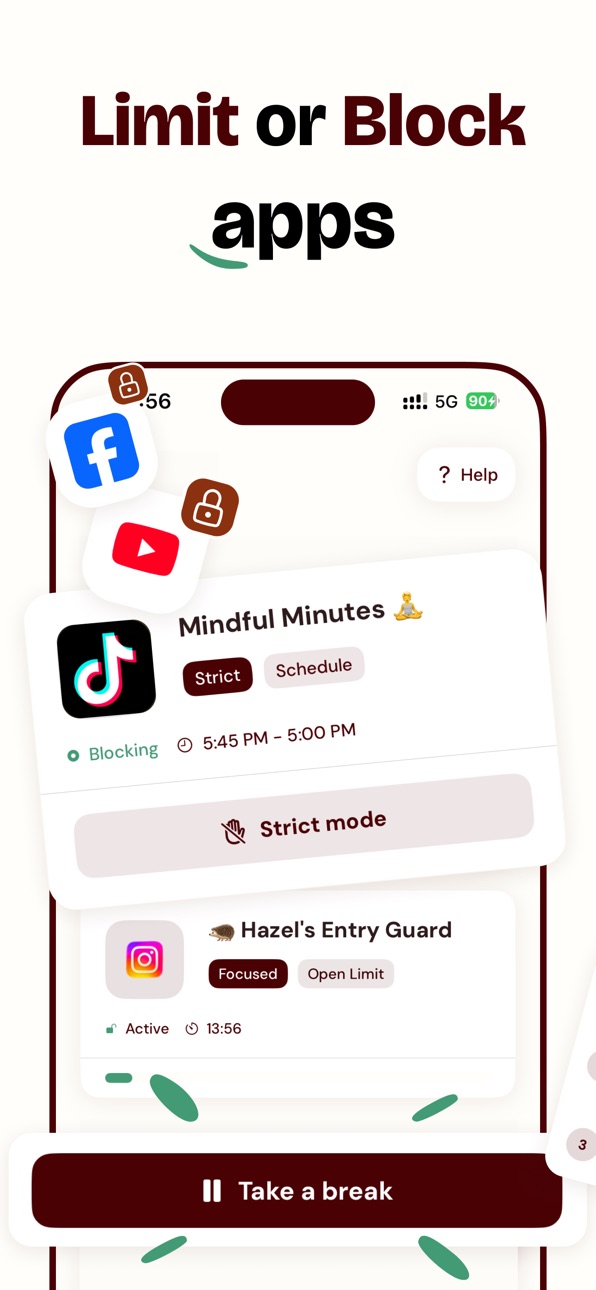
◆ THREE FLEXIBLE BLOCKS - Control your way
• Schedules - Block apps during specific times (class, work, sleep)
• Time Limits - Set daily caps on your worst apps
• App Locks - Limit how many times you can open an app per day
Pick what works for you. No judgement, no shame. You're in control.
◆ LIGHT, EASY UI - Built for your vibe
No scary screens, no corporate energy. Hazel is designed to feel friendly and approachable. Our warm colors and cute design make taking control of your screen time actually pleasant.
◆ NO GUILT, NO SHAME
We know you're not "addicted." You just want more focus. We know life happens—sometimes you break your goals. That's normal. That's okay. Hazel is here to support, not judge. Take a break? No problem. Get back on track? We're here for it.
◆ BUILT FOR PEOPLE LIKE YOU
Hazel is designed for:
- Students who want to focus without spiraling into guilt
- People who love their phone but want to use it less mindlessly
- Anyone who's tired of productivity apps that feel like punishment
- Younger people who want cool, relatable design (not corporate vibes)
- Anyone who wants to build actual habits, not just suppress bad ones
The typical "focus app" isn't made for your generation. Hazel is.
◆ MAKE IT FUN
With daily streaks and rewards, staying focused becomes a game you actually want to play. Compete with friends (or yourself). Celebrate wins. Treat your phone like something you control, not something that controls you.
◆ YOUR DATA, YOUR CONTROL
Your data stays on your phone. Always. We use Apple's own Screen Time technology—the same thing that powers Apple's built-in controls. You're in good hands. Your privacy? Sacred.
◆ DESIGNED WITH CARE
Hazel is built with a warm, earthy color palette and a cute hedgehog mascot because staying focused should feel good, not scary. Every animation is smooth. Every button is thoughtful. This isn't corporate—this is made with love.
◆ START YOUR STREAK TODAY
Download Hazel and join thousands of people who are taking control of their screen time—guilt-free. Your first streak starts now.
Questions? Say hi at admin@gethazel.app. We're here for you.
---
Privacy Policy: https://gethazel.app/privacy-policy
Terms of Service: https://gethazel.app/terms-of-service
In-App Purchases US pricing
Hazel Plus Subscription
Yearly · Yearly$79.99
Monthly · Monthly$12.99
Weekly · 7 days$4.99
Capabilities
In-App Purchases
Accessibility
ipadiphonemacrealityDevicetvoswatch
Version history 9 versions
Build 887404989v1.102026-06-28 09:13:42
• Focus Now for instant distraction-free sessions
• Simpler step-by-step setup for all block types
• Clearer editing, breaks, and active block controls
• More accurate Screen Time insights and daily progress
• More reliable blocking, resets, and overlapping rules
A big update that makes Hazel easier to use and more dependable every day.
Build 882522627v1.072026-02-18 23:10:21
• Quicker start - Onboarding’s been trimmed so Hazel can get you into the app faster.
• iPad polish - The paywall and flow now look and feel better on the big screen.
Small tweaks so Hazel feels snappier and nicer to use, especially on iPad.
Build 882279034v1.062026-02-11 15:21:01
• Full iPad support: Hazel now looks great on bigger screens
• Smoother onboarding experience with improved layouts and flow
• Softer paywall so you have more time to explore before committing
• UI polish across analytics, settings, and configuration screens
Small updates that make Hazel easier to use on all your devices.
Build 881977930v1.052026-02-08 21:27:32
• Clearer onboarding so you understand how Hazel works from day one
• Improved free trial experience with better Premium messaging and reminders
• Valentine’s Day theme and special app icons (limited time)
• Cleaner Settings screen with easier access to social links
• Bug fixes and performance improvements
Small updates that make Hazel easier to use and more reliable.
Build 881598533v1.042026-01-19 14:20:14
• Smarter onboarding that better explains how Hazel works
• More reliable blocking schedules
• Redesigned Premium screen with clearer pricing
• Promocode support for special offers
• Smoother animations and cleaner visuals
• Better stability and performance overall
Small improvements that make Hazel feel more polished, trustworthy, and easy to use.
Build 881228684v1.032026-01-07 14:44:40
What’s new:
• Onboarding feels clearer and more helpful
• Screen Time data is more accurate for family setups
• Tracking works more reliably (only with your permission)
• Small visual tweaks for a cleaner experience
• Overall stability and performance improvements
Little improvements that make Hazel feel smoother and more reliable every day.
Build 881004168v1.022025-12-30 10:27:16
What’s new:
• Holiday look to get you into the Christmas mood
• Insights are clearer and easier to understand
• Onboarding is smoother when you first set things up
• Paywall and charts behave better - fewer visual issues
• Faster and more reliable experience overall
Little things you’ll feel every day, not just see.
Build 880556110v1.012025-12-12 15:11:35
This week’s upgrades:
• Bugs: gone.
• UI: smoother.
• Stability: sturdier than Hazel after her third cup of tea.
Plus, a big behind-the-scenes polish to analytics, blocks, and app logic.
Small update on the outside, big upgrade on the inside.
Build 878510556v1.02025-12-11 12:31:20
Price history by region
Currency
Show
Columns
Search
Availability 1 of 1 storefronts
| Region | Language | Price | Ratings | Avg | Version |
|---|---|---|---|---|---|
| US | en-US | Free | 75 | 4.8 | 1.10 |
Change log 13 changes · US
✎
releaseNotes updated
• Focus Now for instant distraction-free sessions
• Simpler step-by-step setup for all block types
• Clearer editing, breaks, and active block controls
• More a
✎
description updated
Stay focused without the guilt. Hazel is the cute, fun way to take control of your screen time.
◆ YOUR NEW FOCUS BESTIE
Meet Hazel. Not your typical productiv
✎
subtitle updated
App blocker, limits & focus
✎
name updated
Screen Time Control: Hazel
◆
Version 1.10 released
• Focus Now for instant distraction-free sessions
• Simpler step-by-step setup for all block types
• Clearer editing, breaks, and active block controls
• More accurate Screen Time insights and daily progress
• More reliable blocking, resets
◆
Version 1.07 released
• Quicker start - Onboarding’s been trimmed so Hazel can get you into the app faster.
• iPad polish - The paywall and flow now look and feel better on the big screen.
Small tweaks so Hazel feels snappier and nicer to use, especially on iPa
◆
Version 1.06 released
• Full iPad support: Hazel now looks great on bigger screens
• Smoother onboarding experience with improved layouts and flow
• Softer paywall so you have more time to explore before committing
• UI polish across analytics, settings, and con
◆
Version 1.05 released
• Clearer onboarding so you understand how Hazel works from day one
• Improved free trial experience with better Premium messaging and reminders
• Valentine’s Day theme and special app icons (limited time)
• Cleaner Settings screen with eas
◆
Version 1.04 released
• Smarter onboarding that better explains how Hazel works
• More reliable blocking schedules
• Redesigned Premium screen with clearer pricing
• Promocode support for special offers
• Smoother animations and cleaner visuals
• Better stabilit
◆
Version 1.03 released
What’s new:
• Onboarding feels clearer and more helpful
• Screen Time data is more accurate for family setups
• Tracking works more reliably (only with your permission)
• Small visual tweaks for a cleaner experience
• Overall stability and
◆
Version 1.02 released
What’s new:
• Holiday look to get you into the Christmas mood
• Insights are clearer and easier to understand
• Onboarding is smoother when you first set things up
• Paywall and charts behave better - fewer visual issues
• Faster and more
◆
Version 1.01 released
This week’s upgrades:
• Bugs: gone.
• UI: smoother.
• Stability: sturdier than Hazel after her third cup of tea.
Plus, a big behind-the-scenes polish to analytics, blocks, and app logic.
Small update on the outside, big upgrade on the insi
◆
Version 1.0 released