Home › Business

 US
US
1 of 1 storefronts
Content in en-US
Content in en-US
Information
Preview 2 platforms
iPhone 4 images

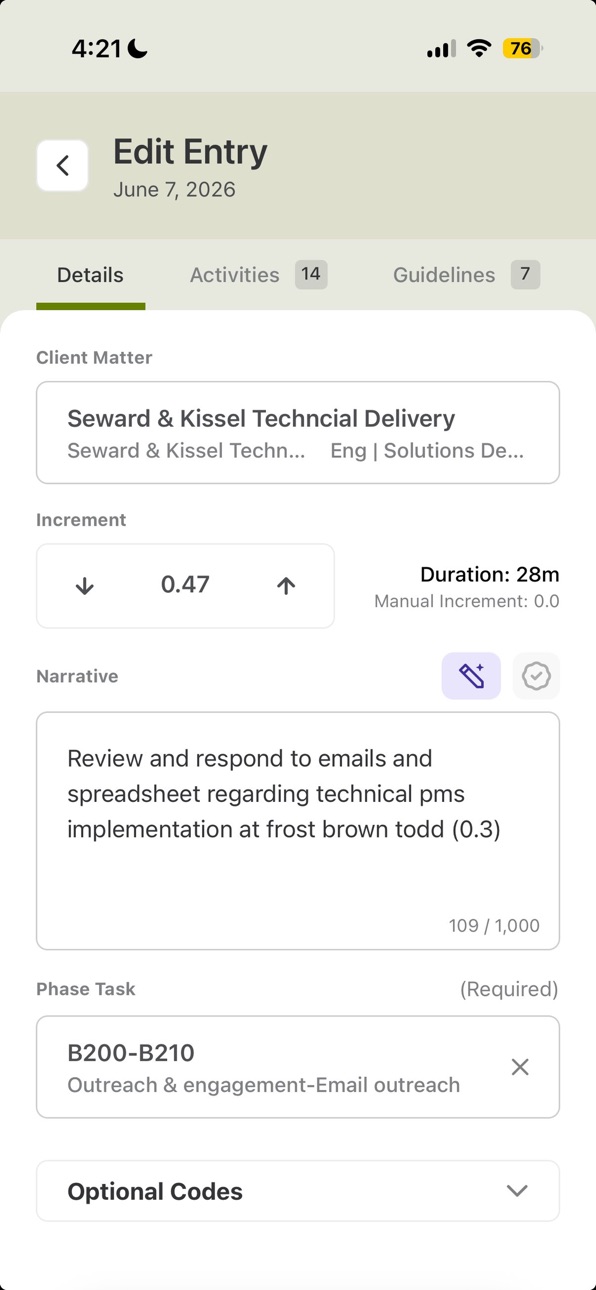


iPad 4 images


What’s New Version 1.11
This release makes it faster to capture and manage your time on the go:
- Add activities to an existing entry
- Create a temporary matter while building an entry
- Amend released entries to fix mistakes after the fact
- Search, filter, and sort entries directly on your timesheet
- Take bulk actions on entries — release, delete, duplicate, assign, and amend
Description
AI-Powered Time Management
Laurel Time is built for every moment of your day, not just end-of-day reconstruction. Capture, review, and release time from anywhere — even with no connection — with a mobile-first app designed for professional services.
Key Features:
- Start a timer in one tap, with or without a matter — pause, duplicate, and assign later
- Work fully offline: timers stay accurate and entries queue securely, then sync automatically when you reconnect
- Create complete entries on device, with task and activity codes auto-populated from matter configuration
- Review captured activity from your desktop and combine multiple activities into a single entry
- Edit narratives, hours, and billing codes with full detail access
- Release approved time directly from your phone
Accessibility
ipadiphonemacrealityDevicetvoswatch
Version history 12 versions
Build 886751028v1.112026-06-16 15:25:13
This release makes it faster to capture and manage your time on the go:
- Add activities to an existing entry
- Create a temporary matter while building an entry
- Amend released entries to fix mistakes after the fact
- Search, filter, and sort entries directly on your timesheet
- Take bulk actions on entries — release, delete, duplicate, assign, and amend
Build 885820507v1.0.102026-05-19 02:45:53
Enhanced reliability for date handling
Build 885637683v1.92026-05-14 18:34:15
- Disable Intune integration
- Release success UI
- Fix entry list in Release confirmation bottomsheet
Build 885542224v1.82026-05-12 18:08:32
- Hot-fix for iOS App crash on Intune managed devices
- Activity component design refresher
- Security patches
- Edit Entry screen now shows correct date
Build 885333154v1.72026-05-11 13:49:36
- Intune / MAM support: Enrollment and app-protection policies now work end-to-end.
- Improved sync stability: Reduced the likelihood of getting stuck mid-sync, so your time entries and changes flow through more reliably.
- New: Search activities directly from the activities header
- New: Duplicate a timer to quickly start a similar one
- New: Reassignment confirmation bottom sheet
- New: Refreshed timer widget nudge sheet
- Improved: New timers default to current time + 1 hour
- Improved: Activity unassign uses a clearer gray X icon
- Fixed: Entry form now respects your firm's summary-required configuration
- Fixed: Activity scrubber no longer clipped by the bottom fade
Build 885133994v1.62026-05-01 15:03:12
Hot fix for app crashing when OS dark mode enabled
Build 884901701v1.52026-04-27 15:59:49
Timer Improvements
- A new timer badge on the app tabs makes it easy to see your active timers at a glance
- Total duration is now displayed in headers for a clearer overview of your time
- Improved timer activity controls with consistent button styles throughout the app
- Running timers now display with a polished drop shadow for better visual clarity
- Fixed an issue where the play button would appear activated when tapping to select a timer row
Bug Fixes
- Fixed a bug where time entries couldn't be deleted in the iOS app
- Improved empty state messaging on past days in the Timers tab ("No timers on this day")
- Fixed the activity selection bar positioning so it properly aligns with the tab bar
- Fixed layout issues with modals on Android (Initiative and Code selectors no longer overlap the status bar)
- Removed a duplicate "Not yet assigned" label on unassigned timer cards
- Fixed an issue where deleting an entry would show a confirmation dialog before the action sheet fully closed
Performance & Reliability
- Added a 30-second request timeout to prevent the app from getting stuck on the sync screen due to stalled network connections
- Enhanced app security and stability
Build 884074406v1.42026-04-07 18:25:27
- Improved security
- Correct first day of week in the calendar based on user config
- Misc improvements to timers
- Better activity icon handling
Build 883060189v1.32026-03-25 17:46:29
• Timers — Start, manage, and adjust timers from your phone, with real-time sync and overnight support
• Activity Tab — A new view of your day's captured activity, right at your fingertips
• Polished experience — Swipeable tabs, redesigned lists, smarter navigation, and dozens of fixes under the hood
Build 882777602v1.22026-02-26 18:43:10
- Implemented swipeable calendar with render optimization to improve performance and responsiveness.
- Added character limit for summary fields with a live counter for better user feedback.
- Introduced smooth open/close animation for the calendar component.
- Applied drop shadow styling to entry cards to improve visual hierarchy.
- Prevented compliance footer from flashing during render.
- Adjusted opacity of entry header initiative color for better visual consistency.
Build 880951857v1.12026-02-17 18:00:37
Access daily and historical time entries, both online and offline
Create manual time entries on the go, with full offline support
Edit time entries before release while online
Release time entries securely when online
Automatically queue offline-created entries and release them once connectivity is restored
Offline-first architecture with reliable, secure synchronization
Enterprise-grade security with encrypted local data storage
Build 878440984v1.02025-10-08 10:06:34
No pricing data captured yet — comparisons appear once the app has paid storefronts or in-app purchases.
Availability 1 of 1 storefronts
| Region | Language | Price | Ratings | Avg | Version |
|---|---|---|---|---|---|
| US | en-US | Free | 4 | 5.0 | 1.11 |
Change log 16 changes · US
✎
releaseNotes updated
This release makes it faster to capture and manage your time on the go:
- Add activities to an existing entry
- Create a temporary matter while building an entr
✎
description updated
AI-Powered Time Management
Laurel Time is built for every moment of your day, not just end-of-day reconstruction. Capture, review, and release time from anywher
✎
subtitle updated
Automate timesheets. Save time
✎
name updated
Laurel Time
◆
Version 1.11 released
This release makes it faster to capture and manage your time on the go:
- Add activities to an existing entry
- Create a temporary matter while building an entry
- Amend released entries to fix mistakes after the fact
- Search, filter, and
◆
Version 1.0.10 released
Enhanced reliability for date handling
◆
Version 1.9 released
- Disable Intune integration
- Release success UI
- Fix entry list in Release confirmation bottomsheet
◆
Version 1.8 released
- Hot-fix for iOS App crash on Intune managed devices
- Activity component design refresher
- Security patches
- Edit Entry screen now shows correct date
◆
Version 1.7 released
- Intune / MAM support: Enrollment and app-protection policies now work end-to-end.
- Improved sync stability: Reduced the likelihood of getting stuck mid-sync, so your time entries and changes flow through more reliably.
◆
Version 1.6 released
Hot fix for app crashing when OS dark mode enabled
◆
Version 1.5 released
Timer Improvements
- A new timer badge on the app tabs makes it easy to see your active timers at a glance
- Total duration is now displayed in headers for a clearer overview of your time
- Improved timer activity controls with consistent b
◆
Version 1.4 released
- Improved security
- Correct first day of week in the calendar based on user config
- Misc improvements to timers
- Better activity icon handling
◆
Version 1.3 released
• Timers — Start, manage, and adjust timers from your phone, with real-time sync and overnight support
• Activity Tab — A new view of your day's captured activity, right at your fingertips
• Polished experience — Swipeable tabs, redesigned
◆
Version 1.2 released
- Implemented swipeable calendar with render optimization to improve performance and responsiveness.
- Added character limit for summary fields with a live counter for better user feedback.
- Introduced smooth open/close animation for the c
◆
Version 1.1 released
Access daily and historical time entries, both online and offline
Create manual time entries on the go, with full offline support
Edit time entries before release while online
Release time entries securely when online
Automatically queu
◆
Version 1.0 released