Home › Utilities

 US
US
1 of 1 storefronts
Content in en-US
Content in en-US
Information
Preview 2 platforms
iPhone 3 images


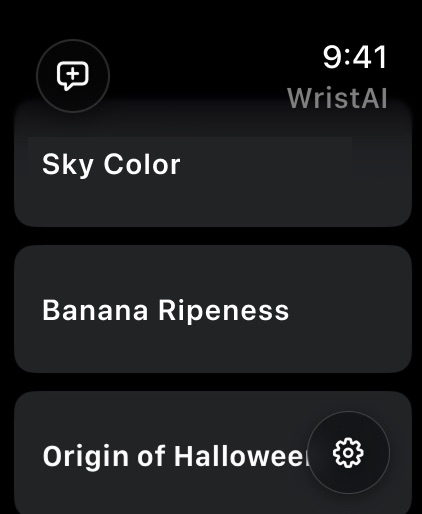
Apple Watch 4 images



What’s New Version 1.6.1
Wrist AI is now also available in English (UK), English (Australia), and English (Canada).
Description
Wrist AI lets you access ChatGPT or
Gemini with a single tap from your watch face,
for instant questions and conversations.
On Apple Watch Ultra, use the Action Button
to assign ChatGPT or Gemini and truly
bring AI to life right on your wrist.
Speak to your watch, and within a few seconds
the AI’s response appears in real time.
Quickly ask about small questions or ideas
whenever they come to mind.
■ Key Features
• Fast responses
Start voice input from a complication and get
an AI reply in just a few seconds.
• ChatGPT & Gemini integration
Ask questions, get summaries, or create
first drafts for your writing.
• One-tap launch & voice input
Launch from the watch face and immediately
ask your question by voice.
• Works over cellular
On Apple Watch cellular models, you can use
Wrist AI even when your iPhone isn’t nearby.
• Apple Watch Ultra support
Assign the Action button as a dedicated
“AI button” for instant access.
• Prompt management & personality customization
Organize frequently used prompts and save
custom AI personalities that match how you want it
to speak and behave.
With the free version, you can try AI chat
up to 6 times per day, for a total of up to 12 chats.
For continued use, there are three subscription plans:
Entry, Standard, and Premium.
An internet connection is required to use this app.
Wrist AI uses the OpenAI API & Gemini API to generate its responses.
Terms of Use:
https://246design.com/wristai/terms/index.html
Privacy Policy:
https://246design.com/wristai/privacy/index.html
In-App Purchases US pricing
WristAI プラン Subscription
プレミアムプラン (月額) · Monthly 7-day free trial$5.99
プレミアムプラン (年額) · Yearly 7-day free trial$59.99
スタンダードプラン (月額) · Monthly 7-day free trial$2.99
スタンダードプラン (年額) · Yearly 7-day free trial$29.99
エントリープラン (月額) · Monthly 7-day free trial$1.99
エントリープラン (年額) · Yearly 7-day free trial$19.99
Capabilities
In-App Purchases
Accessibility
ipadiphonemacrealityDevicetvoswatch
Version history 16 versions
Build 885208784v1.6.12026-05-03 21:15:38
Wrist AI is now also available in English (UK), English (Australia), and English (Canada).
Build 885177174v1.6.02026-05-02 20:44:41
Wrist AI is now available in German, French, Spanish, Portuguese, and Italian. Set your device to one of these languages to use the app in your preferred language.
Build 885051631v1.5.02026-04-30 18:35:32
New: Response Language Setting
You can now choose the language the AI responds in — independently of your device language. Select from 15 languages including Spanish, French, Portuguese, Russian, and more. Go to Settings to try it out.
Build 883758296v1.4.12026-03-25 19:11:14
Fixed an issue where the AI responded in Japanese when using a language not supported by the app (e.g., Italian, French). The AI now responds in English for unsupported languages.
Build 882907743v1.4.02026-03-10 14:13:34
We improved AI chat stability and made responses feel more natural across supported languages.
We also improved post-purchase plan syncing and plan-status display stability.
Build 881073474v1.3.02026-01-06 17:24:18
・Now supporting Gemini AI models! Experience lightning-fast responses in as little as 2 seconds with Gemini 2.5 Flash-Lite.
・Added "Preview Settings" to display conversation history in a list.
・AI personalities now sync across your devices via iCloud.
・Improved sync stability between iOS and Apple Watch.
Have a feature request? Contact us via the in-app "Contact Us" page!
Build 880852914v1.2.22025-12-22 02:06:53
Improved the stability of syncing between iOS and Apple Watch.
If there are any features you’d like to see, please contact us via the in-app support form!
Build 880811273v1.2.12025-12-19 14:03:04
Improved the stability of syncing between iOS and Apple Watch.
If there are any features you’d like to see, please contact us via the in-app support form!
Build 880736922v1.2.02025-12-17 16:03:27
・Added support for iOS 17 and 18.
・Added support for watchOS 10 and 11.
・A 7-day free trial is now available for subscription plans.
・Added a setting to show message previews in the conversation history list on Apple Watch.
If you have any feature requests, please contact us via the in-app inquiry form!
Build 880190978v1.1.52025-12-11 01:55:49
・Improved sync stability between iOS and Apple Watch.
・Added support for the German language.
Build 880182472v1.1.42025-11-29 01:35:58
• Improved the stability of sync between iOS and Apple Watch.
Build 880118758v1.1.32025-11-27 21:10:28
• Made minor fixes to the Traditional Chinese (Taiwan, Hong Kong, Macau) translations.
• Improved the stability of syncing between the iOS app and Apple Watch.
Build 880062432v1.1.22025-11-25 22:01:39
・ Added support for Traditional Chinese (Taiwan, Hong Kong, Macau).
・ Improved the stability of sync between iOS and Apple Watch.
Build 880025399v1.1.12025-11-24 19:15:41
• Added support for Korean.
• Fixed a bug where a sync confirmation prompt would appear when creating a new conversation on iOS.
Build 879989862v1.1.02025-11-23 22:08:26
What’s New in This Version
• Added a manual sync button that appears
when conversation history fails to sync correctly.
• Improved the stability of the connection between
the iPhone app and the Apple Watch app.
Build 878373280v1.0.02025-11-21 19:44:38
Price history by region
Currency
Show
Columns
Search
Availability 1 of 1 storefronts
| Region | Language | Price | Ratings | Avg | Version |
|---|---|---|---|---|---|
| US | en-US | Free | 4 | 4.3 | 1.6.1 |
Change log 20 changes · US
✎
releaseNotes updated
Wrist AI is now also available in English (UK), English (Australia), and English (Canada).
✎
description updated
Wrist AI lets you access ChatGPT or
Gemini with a single tap from your watch face,
for instant questions and conversations.
On Apple Watch Ultra, use the Actio
✎
subtitle updated
2-sec AI answers on your wrist
✎
name updated
Wrist AI : 1-Tap Watch GPT
◆
Version 1.6.1 released
Wrist AI is now also available in English (UK), English (Australia), and English (Canada).
◆
Version 1.6.0 released
Wrist AI is now available in German, French, Spanish, Portuguese, and Italian. Set your device to one of these languages to use the app in your preferred language.
◆
Version 1.5.0 released
New: Response Language Setting
You can now choose the language the AI responds in — independently of your device language. Select from 15 languages including Spanish, French, Portuguese, Russian, and more. Go to Settings to try it out.
◆
Version 1.4.1 released
Fixed an issue where the AI responded in Japanese when using a language not supported by the app (e.g., Italian, French). The AI now responds in English for unsupported languages.
◆
Version 1.4.0 released
We improved AI chat stability and made responses feel more natural across supported languages.
We also improved post-purchase plan syncing and plan-status display stability.
◆
Version 1.3.0 released
・Now supporting Gemini AI models! Experience lightning-fast responses in as little as 2 seconds with Gemini 2.5 Flash-Lite.
・Added "Preview Settings" to display conversation history in a list.
・AI personalities now sync across your devices
◆
Version 1.2.2 released
Improved the stability of syncing between iOS and Apple Watch.
If there are any features you’d like to see, please contact us via the in-app support form!
◆
Version 1.2.1 released
Improved the stability of syncing between iOS and Apple Watch.
If there are any features you’d like to see, please contact us via the in-app support form!
◆
Version 1.2.0 released
・Added support for iOS 17 and 18.
・Added support for watchOS 10 and 11.
・A 7-day free trial is now available for subscription plans.
・Added a setting to show message previews in the conversation history list on Apple Watch.
If you have any
◆
Version 1.1.5 released
・Improved sync stability between iOS and Apple Watch.
・Added support for the German language.
◆
Version 1.1.4 released
• Improved the stability of sync between iOS and Apple Watch.
◆
Version 1.1.3 released
• Made minor fixes to the Traditional Chinese (Taiwan, Hong Kong, Macau) translations.
• Improved the stability of syncing between the iOS app and Apple Watch.
◆
Version 1.1.2 released
・ Added support for Traditional Chinese (Taiwan, Hong Kong, Macau).
・ Improved the stability of sync between iOS and Apple Watch.
◆
Version 1.1.1 released
• Added support for Korean.
• Fixed a bug where a sync confirmation prompt would appear when creating a new conversation on iOS.
◆
Version 1.1.0 released
What’s New in This Version
• Added a manual sync button that appears
when conversation history fails to sync correctly.
• Improved the stability of the connection between
the iPhone app and the Apple Watch app.
◆
Version 1.0.0 released