Home › Productivity

 US
US
1 of 1 storefronts
Content in en-US
Content in en-US
Information
Preview 1 platform
iPhone 10 images




What’s New Version 26.7.0
• Added Graphite and Paper theme presets, with clearer button text on light themes.
• Added drag-based anniversary cover positioning, so photos crop better across list and detail views.
• Fixed duplicate Habit reminders, so the same alert no longer appears multiple times.
• Fixed Streak Trail highlights for Habits that require multiple check-ins in the same period, so progress appears only after the goal is met.
• Fixed monthly Habit streak and past-year completion stats for more accurate progress summaries.
• Improved new and edit Habit sheets by removing background bleed-through and extra tips.
• Improved tips for To-Dos, Habit lists, and Super Complete emojis to make key actions clearer.
• Fixed the Super Complete emoji picker and add button for smoother emoji selection.
• Polished toolbar menus, share buttons, and tab bar settings with clearer spacing, colors, and guidance.
Description
Avanti — Your long-term companion for steady growth
【What Makes Avanti Different】
【Privacy-First Design】
No account required. No tracking servers. Your data stays on your device and syncs through your own private iCloud. We can never see your data (not even the Avanti team).
【Native Experience, Simple & Efficient】
A carefully crafted interaction experience—simple and efficient—lets you focus on what matters most without being distracted by cluttered interfaces or unnecessary features.
【To-Dos】
1. Three Main Categories: Inbox, Today's Focus, and Scheduled—helping you focus on what matters most right now, plan for the future clearly, and keep a clean, achievable "today," while capturing ideas and thoughts anytime to avoid forgetting.
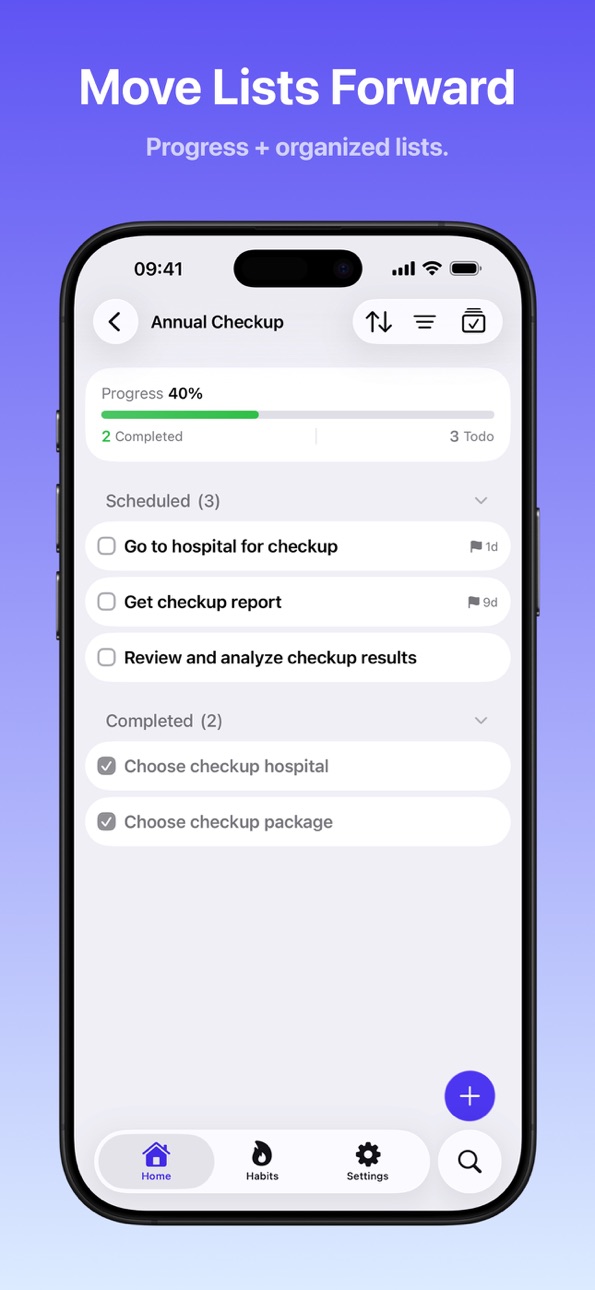
2. Custom Lists: Create a list for any goal that requires multiple steps, then tackle them one by one. Custom lists let you fully focus and commit to that goal without getting distracted by other things. Examples: planning a vacation, annual budgeting, etc.
3. Areas: Use Areas to manage different parts of your life, accumulate achievements within each area, see what you've accomplished, and make life more organized and fulfilling. Examples: Health, Family, Work, Life, Personal Growth, Entertainment, etc.
4. Tags: Tags help you cross list and area boundaries to group related To-Dos together. For example, use a "#Home" tag to track all To-Dos that need to be done at home, regardless of which list or area they belong to.
5. Auto-Recurring To-Dos: Set periodic To-Dos to repeat, and Avanti will automatically generate them according to your repeat rules—greatly reducing the burden of managing recurring To-Dos and preventing forgotten tasks. Supports hourly, daily, weekly, monthly, and yearly repeats. Examples: pay credit card on the 20th of each month, pay utilities on the 10th of each month, etc.
6. Multiple Reminders: Set multiple reminders for your To-Dos so you receive timely notifications and never forget.
7. More Features: To-Dos support adding priority, due date, notes, checklists, comments and logs, emoji reactions, custom completion sounds and more.
【Habit Building & Breaking】
1. To-Do-Driven Habits: Avanti generates To-Dos based on your habit repeat rules. Complete check-ins at "Home → Today's Habits." Let habits become part of your daily life through To-Dos.
2. Build Good Habits: Whether daily or weekly, you can set habit-building goals, and Avanti will generate To-Dos based on your repeat rules to help you build good habits.
3. Break Bad Habits: Tell Avanti the bad habits you want to break—whether reducing frequency or quitting completely, you can start here. Every time you take control and resist the urge, you can "log a win" in Avanti. It's okay if you slip occasionally—you can also "log a slip" in Avanti, and it will honestly record your feedback. What matters is reducing frequency, achieving victories, and making progress—not perfect elimination.
4. Habit Customization: Easily customize your habits—name, icon, color, and more—to make them more recognizable.
5. Habit Stats: Avanti generates habit statistics based on your check-in records. For building habits: "Current Streak," "Longest Streak," "Total Completions," and more. For breaking habits: "Current Resist Streak," "Longest Streak Without Slipping," "Total Resisted," and more.
6. Backfill Check-ins: We know sometimes you can't check in on time due to travel, business trips, illness, etc. Within 48 hours of missing a check-in, you can "Backfill" in Avanti to keep your streak unbroken, maintain your habit-building progress, and stay motivated to continue.
【Pricing】
Avanti offers a free tier for daily use. Avanti PRO unlocks all advanced To-Do features, advanced habit features, and deep customization—available as affordable monthly, yearly, or one-time lifetime purchase options to help you stay committed.
Less pressure, more progress. Download Avanti and keep going—one step at a time.
In-App Purchases US pricing
Avanti Pro Subscription
(Monthly) · Monthly 7-day free trial$3.99
Annual · Yearly 7-day free trial$39.99
Avanti Pro Special Offer Subscription
Avanti Pro Monthly · Monthly 7-day free trial$1.99
Avanti Pro Annual · Yearly 7-day free trial$19.99
One-Time Purchases
Lifetime Pro (Special Offer)$39.99
Lifetime$79.99
Capabilities
In-App Purchases
Accessibility
ipadiphonemacrealityDevicetvoswatch
Version history 25 versions
Build 887816152v26.7.02026-07-05 23:04:24
• Added Graphite and Paper theme presets, with clearer button text on light themes.
• Added drag-based anniversary cover positioning, so photos crop better across list and detail views.
• Fixed duplicate Habit reminders, so the same alert no longer appears multiple times.
• Fixed Streak Trail highlights for Habits that require multiple check-ins in the same period, so progress appears only after the goal is met.
• Fixed monthly Habit streak and past-year completion stats for more accurate progress summaries.
• Improved new and edit Habit sheets by removing background bleed-through and extra tips.
• Improved tips for To-Dos, Habit lists, and Super Complete emojis to make key actions clearer.
• Fixed the Super Complete emoji picker and add button for smoother emoji selection.
• Polished toolbar menus, share buttons, and tab bar settings with clearer spacing, colors, and guidance.
Build 887545487v26.6.42026-07-01 00:30:21
• Introduced the all-new Anniversary feature, combining countdown and count-up in one place for the moments that matter
• Add a cover, memories, and a life timeline to each anniversary to revisit every special journey
• Refined the tab bar layout; when space runs out, Settings now lives in the top-right of the Anniversary page
• Fixed weekly and monthly habits still showing a check-in reminder in the home screen widget after completion
• Polished empty-state screens across the app for a cleaner, more consistent look
Build 887412393v26.6.32026-06-25 23:00:15
• New "Streak Trail" view in the habit list — revisit your consistency across each cycle with an at-a-glance heatmap
• Improved habit check-in stats, with support for multiple check-ins per cycle and more accurate cycle progress
• Refined month filtering and record layout on the "All Records" screen for easier browsing
• Polished the empty state of the to-do list for a cleaner look
Build 887245569v26.6.22026-06-21 23:18:13
• New Home Screen widgets: complete to-dos and check in on habits right from your Home Screen, no need to open the app
• Habit details now feature a check-in contribution graph, so you can see your streaks and consistency at a glance
Build 886837421v26.6.12026-06-11 23:06:17
- Added status filters for Repeating To-Dos, making it easier to view repeating To-Dos by status.
- Improved Inbox display logic so completed Lists no longer appear in the Inbox list.
- Improved To-Do completion feedback settings: when “Super Complete” is turned off, related swipe actions are no longer shown.
- Renamed the To-Do swipe actions “Comment” to “Record”, and “Reaction” to “Celebrate”.
- Improved the feedback experience after completing a To-Do by separating “Celebrate” and “Record” into clearer actions.
- Improved Home tab switching performance and reduced stutters when switching tabs.
- Fixed an issue where streak days and status for Break Habits did not refresh promptly after recording or deleting history.
- Added support for multiple Habit reminders, allowing multiple reminder times for the same Habit.
- Improved the experience of creating Habit reminder times.
- Added reminders for Break Habits.
- Improved Habit repeat and goal settings, supporting completion by Habit Day or by a target number of times per week or month.
- Improved the configuration experience for weekly, weekday, weekend, and specific monthly date Habit schedules.
Build 885788517v26.5.12026-05-18 21:17:49
• Break-type habits now offer make-up check-ins right at the top — recover any missed day within 48 hours
• Tap a group header to jump straight to the matching list — Area, Project, or Tag
• Delete actions for Areas and Projects have moved into the list's More menu to prevent accidental taps
• Streamlined button labels and helper text for a lighter, calmer feel
Build 885123203v26.5.02026-05-08 23:02:58
• New bottom navigation: Inbox, Today, and Upcoming are now their own Tab pages for faster switching
• A more focused home: Completed has moved to Settings, and Search now lives in the top-right of Settings
• To-do rows show more context: tags use dedicated icon prefixes, with extras like start date displayed inline
• New Features page: manage all sub-features in one place — for example, turn off "Break bad habits" if you don't need it
• New Interaction Preferences page: customize the swipe direction for completing to-dos and checking in habits (left or right)
• Every to-do list now has a Display menu for custom sorting, grouping, and filtering
• Simpler habit creation: habits no longer link to areas or tags, keeping the focus on the habit itself
• Cleaner habit list: Build and Break habits are now organized as separate groups
• New version numbering: switched from v1.0.0 to a Year.Month.Patch format (e.g. v26.5.0) for clearer release cadence
Build 883778849v1.0.452026-03-26 22:53:34
New Features
1. Added a celebration popup when reaching a habit milestone, allowing you to share your achievements with friends
2. Added 25 new background styles for habit sharing cards, categorized for easy selection
3. Added a share button in the top right corner of the Habit Details page to easily select and share habit cards
4. Habit scheduling now automatically skips missed dates and fast-forwards to the latest
5. Tapping a habit row in the search results now jumps directly to the Habit Details page
6. Group names in the Today's Focus list have been moved to the bottom right area and are now tappable for quick navigation
7. Added support to cancel past missed habit check-ins with one click on the Habit list page
Improvements
1. Automatically hide the completed To-Dos group on all pages to reduce visual clutter and distractions
2. The completed group will automatically expand for easy review once all To-Dos are finished
3. Task completion sounds will no longer play when the device is muted
4. Changed the default icon for Lists
5. Streamlined content across multiple pages for a cleaner interface
Fixes
1. Fixed a date alignment error for weekly repeating habits
2. Fixed an issue where selecting "This Weekend" on a Sunday incorrectly jumped to the following Saturday
3. Fixed an issue where an opaque background appeared in the corner of the keyboard on the Habit page
4. Fixed an issue where the interface briefly flashed the default state when closing the creation page
Build 883465784v1.0.432026-03-17 20:19:16
New Features
1. The Inbox now supports free drag-and-drop sorting, allowing you to easily arrange To-Dos by priority
2. Added usage tips for the habit heatmap to help you better understand your check-in records
3. Added a completion checkmark icon to the Build habit grid, making check-in status clear at a glance
Improvements
1. Simplified habit creation: Removed monthly and yearly repeat rules to focus on high-frequency daily and weekly scenarios
2. Streamlined Break habit creation into two steps with smooth transition animations
3. Optimized habit repeat frequency configuration, switching to a more intuitive preset selection mode
4. Optimized the status text on habit list rows for clearer information presentation
5. Simplified the Settings page layout to reduce visual clutter for a cleaner experience
6. Optimized grouping and selection styles in the To-Do repeat rule picker for more intuitive operation
7. Removed the total task count from group headers in the To-Do list, and groups are no longer collapsible
8. Refined multiple UI pages for a simpler look, reducing distracting elements
Fixes
1. Fixed an issue where the habit list would jitter upon loading
2. Fixed an issue where drag-and-drop sorting in the habit list was not working
3. Fixed visual inconsistencies in the calendar grid for Break habits
Build 883328110v1.0.422026-03-14 03:15:23
1. Habit list now supports swipe left/right to quickly log a check-in — one swipe completes today's record
2. UI improvements and refinements across multiple screens
Build 883254676v1.0.412026-03-11 16:05:06
1. Added a Tag Details page: click any tag to view all To-Dos under it.
2. Added the ability to edit Lists and Areas directly by clicking the pencil icon in the top right corner of their task pages.
3. Renamed the "Inbox" group on List and Area task pages to "Unscheduled" for clearer meaning.
4. Changed the habit type filter to an inline picker, making it faster to switch between Build and Break habits.
5. The Break habit list now uses specific icons to display the past 7 days' records instead of the previous grid view, making recent status more intuitive.
6. Added dedicated empty state descriptions for Break habits to provide clear guidance when there is no data.
7. Added a delete button on the To-Do reminder configuration page to easily remove individual reminders.
8. The Habit Analysis page now uses the habit's own color as the background to avoid conflicts with the app theme color.
9. Optimized color schemes for multiple themes in Light and Dark modes, and made the "Avanti Blue" theme available to all free users.
10. Renamed "Display Settings" to "Themes & Colors" in Settings for a more intuitive entry.
11. Streamlined the interfaces for feature toggles, the Settings page, and the subscription area for a cleaner look.
12. Fixed content overlap issues on the Priority, Habit, and Super Done settings pages on iOS 17.
Build 883049973v1.0.402026-03-09 19:40:58
1. Added a quick-create shortcut for recurring To-Dos directly from the Repeating To-Dos list.
2. Unlocked feature toggles for all users — customize your experience without a subscription.
3. Improved Habit reminder preview text across all supported languages for clearer wording.
4. Fixed energy balance displaying incorrectly after iCloud data sync.
Build 882845360v1.0.392026-03-04 23:53:07
New
1. Added multiple new themes and optimized color schemes for both Light and Dark modes, making Light mode less glaring.
2. Quick priority change via long-press: Switch priority directly from the context menu without opening details.
3. Quick reminder setting via long-press: Added a "Remind" shortcut to the context menu.
4. Remove To-Do from List via long-press: Added a "Remove from List" option to the list management in the context menu.
5. Added toolbar usage tips when creating a new To-Do to help you discover property buttons quickly.
6. Personalization guide: Timely reminders to customize settings for your unique experience.
Improved
1. Improved To-Do reminder experience for smoother operation.
2. Renamed the "Multi-select" menu to the more intuitive "Select".
3. Adjusted the order of the completion sound list to make popular sounds easier to find.
4. Optimized the drag-and-drop reordering experience in the Habit list.
Fixed
1. Fixed an issue where the drag icon was not displayed when entering edit mode in the Habit list.
Build 882689749v1.0.382026-02-25 22:49:58
1. Added Weekly and Monthly calendar views to the Scheduled page, with Weekly view as the default. Creating a new To-Do from the Scheduled page will automatically use the currently selected date as its start time
2. Added a "Show Repeating To-Dos" option to the Scheduled page
3. Removed the logic that automatically sets the start time to tomorrow for To-Dos created after 9 PM
Build 882661634v1.0.372026-02-22 22:18:47
1. Added the "Oasis" preset theme for a fresh and natural visual experience
2. Optimized dark mode color schemes for multiple preset themes for more comfortable nighttime use
3. Added "This Weekend" and "Next Week" quick options to the start time menu for more efficient planning
4. The start time button now uses a dynamic calendar icon, making the date clear at a glance
5. Area list icons now adapt to the theme color for a more unified visual style
6. Multiple UI elements now adapt to the theme color
7. Moved the entry to view the recurring To-Do list on the Scheduled page into the ellipsis menu to avoid cluttering the top toolbar
Build 882511473v1.0.362026-02-17 00:06:22
Happy Chinese New Year! Wishing you a prosperous Year of the Horse and success in all your endeavors!
New Features
1. Added a quick edit menu to Inbox, Today, Upcoming, List, and Area pages for fast modification of Start Date, Due Date, Tags, Priority, and List
Improvements
1. Adjusted toolbar button positions in Today's Focus for consistency with other pages
2. Filter tags and "More" icons now use the theme color for a unified visual style
3. Refined UI styles for checklists and comments in To-Do Details
4. Checklists in list rows now support horizontal scrolling
5. Adjusted group order in Today's Habits; Break habits now appear before Overdue tasks
Fixes
1. Fixed issues with checklist sorting and incorrect insertion position when pressing Enter
2. Fixed a display issue with the corner radius of the comment input box
3. Fixed a background color display issue in the recurring To-Do list
Build 882098157v1.0.332026-02-14 23:41:04
New Features:
1. Brand New Theme System: Offers multiple professionally designed presets to switch up your app's style
2. New "Personalization" settings page to manage themes and appearance preferences
3. Support for automatic Light/Dark mode switching based on system settings
Improvements:
1. Optimized Subscription page layout with vertical plans for clearer information display
2. Global icon colors now adapt to the theme for better visual consistency
3. List separators and page backgrounds (e.g., List/Area pickers) now match the theme style
Fixes:
1. Fixed an issue in "Today's Habits" where Break habits would not show if there were no Build habits
Build 882024927v1.0.322026-02-02 20:09:40
1. Optimized the creation process for recurring To-Dos, using plain language to display repetition rules
2. Optimized the empty state text for the recurring To-Do list
3. Optimized the order of habit tasks in "Today's Habits" to keep them consistent with your habit list
4. Refined task completion sound names for a cleaner Settings interface
5. Tweaked the App Icon
6. Performance optimizations and improvements
Build 881963267v1.0.312026-01-29 22:39:47
1. Support creating recurring To-Dos and viewing your recurring To-Do list in the "Planned" category page
2. You can now disable and hide the "Habit" feature
3. Renamed categories on the Home page
4. Significantly improved scrolling and loading performance across multiple pages
Build 881735645v1.0.302026-01-23 23:57:11
1. Optimized the habit creation and editing process with more intuitive color and icon customization
2. Added filtering to the Habit list, allowing you to filter by habit type
3. Greatly improved the readability and layout of the Habit Details page
4. Fixed a search bar layout issue on Area, List, and Tag pages on iOS 17
Build 881665423v1.0.292026-01-21 04:02:55
New Features
1. Added swipe hints for the Habit Breaking list, shown on first view
Improvements
1. Added empty state hints to the Filter page when there are no Lists, Tags, or Areas
2. Optimized button order in the Habit list context menu, moving "View Habit" to the top
3. Adjusted positions of "Remind" and "Due" buttons in the To-Do edit screen
4. Updated list empty state text to improve user guidance
5. Improved multilingual localization support
Fixes
1. Fixed an issue where the toolbar tooltip was not aligned with the button when creating a new To-Do
2. Fixed an issue where Close/Done buttons in the top corners were occasionally unresponsive
Build 881546742v1.0.282026-01-19 23:24:45
This Update
1. New: Long-press a habit task to quickly view habit details
2. Fix: Redundant headers are no longer shown when the active section of a list is empty
3. Optimization: Improved data synchronization stability
4. Optimization: Terminology update, "List" is now used instead of "Project"
Build 881478704v1.0.262026-01-15 00:34:52
This update brings UI improvements and bug fixes to enhance your experience:
- Fixed the positioning issue of the usage tip alert when creating a new To-Do
- Simplified the empty state text in project task lists
- Optimized the search bar for smoother operation
- Unified the visual style of toggle switches in Area, Project, and Tag management pages
- Improved list display for better compatibility
Thank you for your support, we will continue to improve the product experience!
Build 881535809v1.0.272026-01-15 23:47:37
New Features & Improvements:
1. Added limited-time offer alerts so you never miss a deal
2. Added a Support & Feedback entry to easily get in touch
3. Optimized tutorial To-Do text for better clarity
4. Fixed several known issues to improve app stability
Build 881424891v1.0.252026-01-14 03:27:21
1. Unified Theme Colors: Optimized the overall color scheme for a more cohesive look.
2. Refined Icon Design: New rounded icon style in Settings and Home views for a modern look.
3. Optimized Buttons & Toolbars: Adjusted styles and spacing for better usability.
4. Optimized Project Picker: Now only displays active projects.
5. Various UI details optimized and known issues fixed to improve overall experience.
Price history by region
Currency
Show
Columns
Search
Availability 1 of 1 storefronts
| Region | Language | Price | Ratings | Avg | Version |
|---|---|---|---|---|---|
| US | en-US | Free | 2 | 5.0 | 26.7.0 |
Change log 29 changes · US
✎
releaseNotes updated
• Added Graphite and Paper theme presets, with clearer button text on light themes.
• Added drag-based anniversary cover positioning, so photos crop better acro
✎
description updated
Avanti — Your long-term companion for steady growth
【What Makes Avanti Different】
【Privacy-First Design】
No account required. No tracking servers. Your data s
✎
subtitle updated
Private, Offline, No Account
✎
name updated
Avanti: To-Dos,Habits&Memories
◆
Version 26.7.0 released
• Added Graphite and Paper theme presets, with clearer button text on light themes.
• Added drag-based anniversary cover positioning, so photos crop better across list and detail views.
• Fixed duplicate Habit reminders, so the same alert n
◆
Version 26.6.4 released
• Introduced the all-new Anniversary feature, combining countdown and count-up in one place for the moments that matter
• Add a cover, memories, and a life timeline to each anniversary to revisit every special journey
• Refined the tab bar
◆
Version 26.6.3 released
• New "Streak Trail" view in the habit list — revisit your consistency across each cycle with an at-a-glance heatmap
• Improved habit check-in stats, with support for multiple check-ins per cycle and more accurate cycle progress
• Refined m
◆
Version 26.6.2 released
• New Home Screen widgets: complete to-dos and check in on habits right from your Home Screen, no need to open the app
• Habit details now feature a check-in contribution graph, so you can see your streaks and consistency at a glance
◆
Version 26.6.1 released
- Added status filters for Repeating To-Dos, making it easier to view repeating To-Dos by status.
- Improved Inbox display logic so completed Lists no longer appear in the Inbox list.
- Improved To-Do completion feedback settings: when “Sup
◆
Version 26.5.1 released
• Break-type habits now offer make-up check-ins right at the top — recover any missed day within 48 hours
• Tap a group header to jump straight to the matching list — Area, Project, or Tag
• Delete actions for Areas and Projects have moved
◆
Version 26.5.0 released
• New bottom navigation: Inbox, Today, and Upcoming are now their own Tab pages for faster switching
• A more focused home: Completed has moved to Settings, and Search now lives in the top-right of Settings
• To-do rows show more context: t
◆
Version 1.0.45 released
New Features
1. Added a celebration popup when reaching a habit milestone, allowing you to share your achievements with friends
2. Added 25 new background styles for habit sharing cards, categorized for easy selection
3. Added a share butt
◆
Version 1.0.43 released
New Features
1. The Inbox now supports free drag-and-drop sorting, allowing you to easily arrange To-Dos by priority
2. Added usage tips for the habit heatmap to help you better understand your check-in records
3. Added a completion checkm
◆
Version 1.0.42 released
1. Habit list now supports swipe left/right to quickly log a check-in — one swipe completes today's record
2. UI improvements and refinements across multiple screens
◆
Version 1.0.41 released
1. Added a Tag Details page: click any tag to view all To-Dos under it.
2. Added the ability to edit Lists and Areas directly by clicking the pencil icon in the top right corner of their task pages.
3. Renamed the "Inbox" group on List and
◆
Version 1.0.40 released
1. Added a quick-create shortcut for recurring To-Dos directly from the Repeating To-Dos list.
2. Unlocked feature toggles for all users — customize your experience without a subscription.
3. Improved Habit reminder preview text across all
◆
Version 1.0.39 released
New
1. Added multiple new themes and optimized color schemes for both Light and Dark modes, making Light mode less glaring.
2. Quick priority change via long-press: Switch priority directly from the context menu without opening details.
3.
◆
Version 1.0.38 released
1. Added Weekly and Monthly calendar views to the Scheduled page, with Weekly view as the default. Creating a new To-Do from the Scheduled page will automatically use the currently selected date as its start time
2. Added a "Show Repeating
◆
Version 1.0.37 released
1. Added the "Oasis" preset theme for a fresh and natural visual experience
2. Optimized dark mode color schemes for multiple preset themes for more comfortable nighttime use
3. Added "This Weekend" and "Next Week" quick options to the star
◆
Version 1.0.36 released
Happy Chinese New Year! Wishing you a prosperous Year of the Horse and success in all your endeavors!
New Features
1. Added a quick edit menu to Inbox, Today, Upcoming, List, and Area pages for fast modification of Start Date, Due Date, T
◆
Version 1.0.33 released
New Features:
1. Brand New Theme System: Offers multiple professionally designed presets to switch up your app's style
2. New "Personalization" settings page to manage themes and appearance preferences
3. Support for automatic Light/Dark m
◆
Version 1.0.32 released
1. Optimized the creation process for recurring To-Dos, using plain language to display repetition rules
2. Optimized the empty state text for the recurring To-Do list
3. Optimized the order of habit tasks in "Today's Habits" to keep them c
◆
Version 1.0.31 released
1. Support creating recurring To-Dos and viewing your recurring To-Do list in the "Planned" category page
2. You can now disable and hide the "Habit" feature
3. Renamed categories on the Home page
4. Significantly improved scrolling and loa
◆
Version 1.0.30 released
1. Optimized the habit creation and editing process with more intuitive color and icon customization
2. Added filtering to the Habit list, allowing you to filter by habit type
3. Greatly improved the readability and layout of the Habit Deta
◆
Version 1.0.29 released
New Features
1. Added swipe hints for the Habit Breaking list, shown on first view
Improvements
1. Added empty state hints to the Filter page when there are no Lists, Tags, or Areas
2. Optimized button order in the Habit list context men
◆
Version 1.0.28 released
This Update
1. New: Long-press a habit task to quickly view habit details
2. Fix: Redundant headers are no longer shown when the active section of a list is empty
3. Optimization: Improved data synchronization stability
4. Optimization: Te
◆
Version 1.0.27 released
New Features & Improvements:
1. Added limited-time offer alerts so you never miss a deal
2. Added a Support & Feedback entry to easily get in touch
3. Optimized tutorial To-Do text for better clarity
4. Fixed several known issues to improv
◆
Version 1.0.26 released
This update brings UI improvements and bug fixes to enhance your experience:
- Fixed the positioning issue of the usage tip alert when creating a new To-Do
- Simplified the empty state text in project task lists
- Optimized the search bar
◆
Version 1.0.25 released
1. Unified Theme Colors: Optimized the overall color scheme for a more cohesive look.
2. Refined Icon Design: New rounded icon style in Settings and Home views for a modern look.
3. Optimized Buttons & Toolbars: Adjusted styles and spacing