Home › Productivity

ButtonShift
Feedback Tool with Workflows
 US
US
 AGen-GB
 AIen-GB
 AOen-GB
 ARes-MX
 BBen-GB
 BFen-GB
 BJen-GB
 BOes-MX
 BRpt-BR
 BSen-GB
 BWen-GB
 BZen-GB
 CDen-GB
 CGen-GB
 CIfr-FR
 CLes-MX
 CMfr-FR
 COes-MX
 CRes-MX
 CVen-GB
 DMen-GB
 DOes-MX
 DZen-GB
 ECes-MX
 GAfr-FR
 GDen-GB
 GHen-GB
 GMen-GB
 GTes-MX
 GWen-GB
 GYen-GB
 HNes-MX
 JMen-GB
 KEen-GB
 KNen-GB
 KYen-GB
 LCen-GB
 LRen-GB
 LYen-GB
 MAen-GB
 MGen-GB
 MLen-GB
 MSen-GB
 MUen-GB
 MWen-GB
 MXes-MX
 MZen-GB
 NAen-GB
 NEen-GB
 NGen-GB
 NIes-MX
 PAes-MX
 PEes-MX
 PYes-MX
 RWen-GB
 SCen-GB
 SLen-GB
 SNen-GB
 SRen-GB
 STen-GB
 SVes-MX
 SZen-GB
 TCen-GB
 TDen-GB
 TNen-GB
 TTen-GB
 TZen-GB
 UGen-GBUSen-US
 UYen-GB
 VCen-GB
 VEes-MX
 VGen-GB
 ZMen-GB
 ZWen-GB
75 of 75 storefronts
Content in en-US
Content in en-US
Information
Preview 1 platform
iPhone 7 images
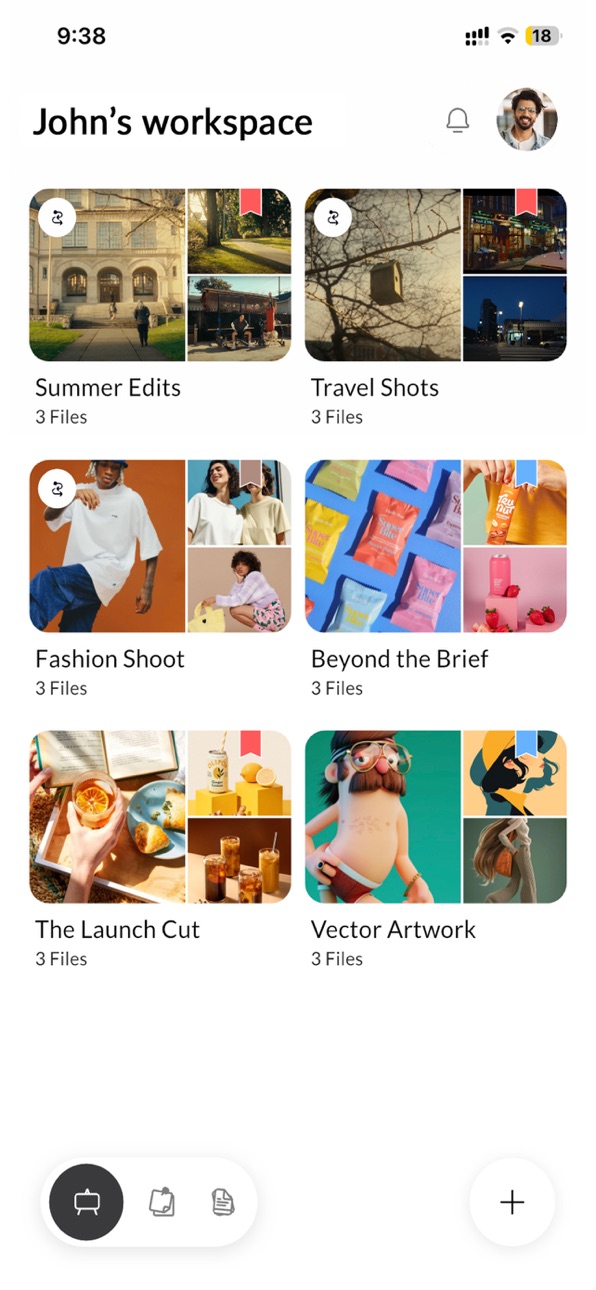
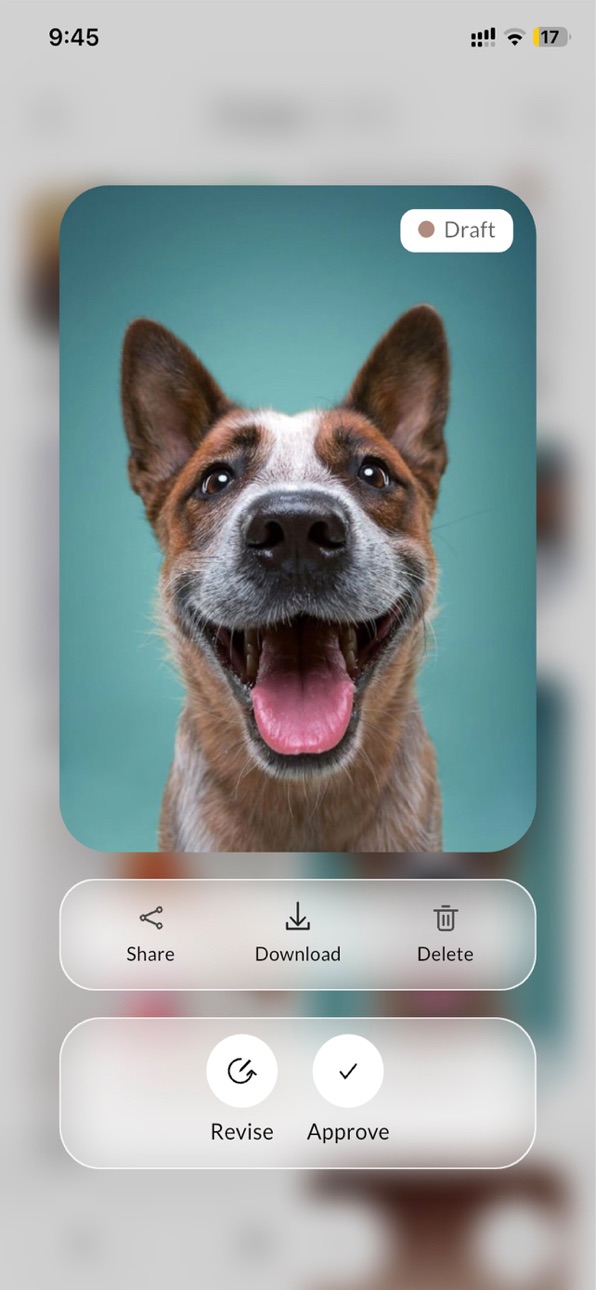


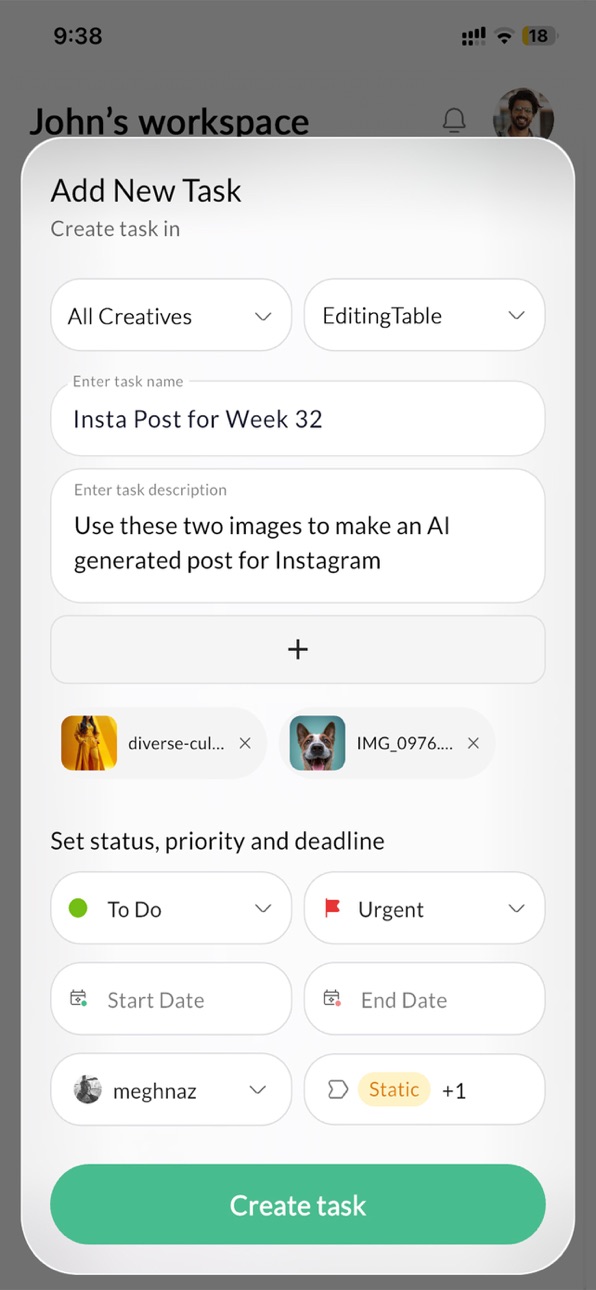

What’s New Version 2.1.0
We’ve polished the creative review experience!
● Video Feedback: Added precise Time Stamp and Time Range feedback.
● Seamless Links: Navigate between tasks, files, and boards effortlessly via in-app links.
● Annotation Upgrade: Enjoy a smoother experience with new pinch-to-zoom and intuitive navigation.
● Quick Actions: Added faster access to files inside Sub-Boards.
● Bug Fixes: Resolved audio/video playback issues, worklist navigation, and admin view errors.
Description
The ButtonShift app makes it easier than ever to manage reviews, share feedback, and keep projects moving, right from your phone. Whether you’re approving a design, leaving a quick feedback, or managing projects, ButtonShift keeps your creative flow intact, anytime and anywhere.
Built for creative teams - designers, video editors, marketing teams, agencies, and anyone who deals with visual content. It combines feedback, reviews, approvals, and project management into one simple, beautiful workspace made for the way creative work actually happens.
Here’s what you can do with ButtonShift:
Centralized Feedback
Make your feedback actionable, clear with annotations, voice notes, tagging, and precise timestamps directly on Videos, Images, PDFs, and Audio files, so your team can move projects forward faster.
Review and Approve on the go
Move your creative work through a simple workflow. Get client approvals with one click, track statuses like In Review, In Revision, or Approved, and get to conclusions faster.
Seamless Messaging
Chat, share feedback, and make decisions - all in the same workspace. No more jumping between apps.
Minimalist Project Management
A simple non-geeky project management tool designed for creative minds. Manage projects, deadlines, and deliverables visually, without the clutter of traditional project management tools.
All In One Creative Workspace
Bring your team, content, and projects together in one intuitive workspace. Manage tasks, approvals, and feedback effortlessly, and keep your creative work moving faster.
Why creative teams love it:
● Purpose-built for creative teams
● Clean, intuitive design that’s easy to use
● Combines feedback, reviews, and project management in one space
● Helps teams and clients stay perfectly aligned
With ButtonShift, your creative work feels effortless. No clutter, no chaos - just a simple, visual, and intuitive way to bring ideas to conclusions faster.
Download ButtonShift today and experience how creative teams stay in sync, from feedback to final approval.
Accessibility
ipadiphonemacrealityDevicetvoswatch
Version history 5 versions
Build 887828597v2.1.02026-07-05 03:34:27
We’ve polished the creative review experience!
● Video Feedback: Added precise Time Stamp and Time Range feedback.
● Seamless Links: Navigate between tasks, files, and boards effortlessly via in-app links.
● Annotation Upgrade: Enjoy a smoother experience with new pinch-to-zoom and intuitive navigation.
● Quick Actions: Added faster access to files inside Sub-Boards.
● Bug Fixes: Resolved audio/video playback issues, worklist navigation, and admin view errors.
Build 887523201v2.02026-06-29 15:17:38
ButtonShift is now more powerful than before! We’ve brought the full power of our web-based creative workflows to your pocket.
What’s New:
● Full Creative Workflows: Review, approve, and manage your Boards and files (Videos, Images, PDFs, and Audio) directly from your iPhone or iPad. Manage submissions, revision requests, and versioning on the go.
● Enhanced Feedback: Leave detailed feedback with annotations, voice notes, and attachments.
● Seamless Guest Access: Easily share files or Boards with clients via a secure link. Guests can now view and provide feedback without needing to create an account.
● Improved Navigation: Enjoy better stability with auto-saving of your last visited workspaces and improved deep-linking for all notifications.
Build 884844025v1.32026-04-23 20:34:44
In this update, we’ve improved session management to ensure you stay logged in across all your devices. We’ve also fixed a bug that caused unexpected sign-outs, providing a more seamless experience between our web and mobile platforms.
Build 884127285v1.22026-04-04 19:12:54
In this update:
● Push Notification Enhancements: Stay updated in real-time. We’ve improved notification reliability and added granular settings so you can control how you receive alerts.
● UI & UX Refinements: We’ve polished the interface for a smoother, more intuitive navigation experience.
● Performance Improvements: General bug fixes and stability enhancements for a faster, more reliable project review workflow.
Build 878152374v1.12026-03-12 04:10:08
No pricing data captured yet — comparisons appear once the app has paid storefronts or in-app purchases.
Availability 75 of 75 storefronts
| Region | Language | Price | Ratings | Avg | Version |
|---|---|---|---|---|---|
| AG | en-GB | Free | 0 | — | 2.1.0 |
| AI | en-GB | Free | 0 | — | 2.1.0 |
| AO | en-GB | Free | 0 | — | 2.1.0 |
| AR | es-MX | Free | 0 | — | 2.1.0 |
| BB | en-GB | Free | 0 | — | 2.1.0 |
| BF | en-GB | Free | 0 | — | 2.1.0 |
| BJ | en-GB | Free | 0 | — | 2.1.0 |
| BO | es-MX | Free | 0 | — | 2.1.0 |
| BR | pt-BR | Free | 0 | — | 2.1.0 |
| BS | en-GB | Free | 0 | — | 2.1.0 |
| BW | en-GB | Free | 0 | — | 2.1.0 |
| BZ | en-GB | Free | 0 | — | 2.1.0 |
| CD | en-GB | Free | 0 | — | 2.1.0 |
| CG | en-GB | Free | 0 | — | 2.1.0 |
| CI | fr-FR | Free | 0 | — | 2.1.0 |
| CL | es-MX | Free | 0 | — | 2.1.0 |
| CM | fr-FR | Free | 0 | — | 2.1.0 |
| CO | es-MX | Free | 0 | — | 2.1.0 |
| CR | es-MX | Free | 0 | — | 2.1.0 |
| CV | en-GB | Free | 0 | — | 2.1.0 |
| DM | en-GB | Free | 0 | — | 2.1.0 |
| DO | es-MX | Free | 0 | — | 2.1.0 |
| DZ | en-GB | Free | 0 | — | 2.1.0 |
| EC | es-MX | Free | 0 | — | 2.1.0 |
| GA | fr-FR | Free | 0 | — | 2.1.0 |
| GD | en-GB | Free | 0 | — | 2.1.0 |
| GH | en-GB | Free | 0 | — | 2.1.0 |
| GM | en-GB | Free | 0 | — | 2.1.0 |
| GT | es-MX | Free | 0 | — | 2.1.0 |
| GW | en-GB | Free | 0 | — | 2.1.0 |
| GY | en-GB | Free | 0 | — | 2.1.0 |
| HN | es-MX | Free | 0 | — | 2.1.0 |
| JM | en-GB | Free | 0 | — | 2.1.0 |
| KE | en-GB | Free | 0 | — | 2.1.0 |
| KN | en-GB | Free | 0 | — | 2.1.0 |
| KY | en-GB | Free | 0 | — | 2.1.0 |
| LC | en-GB | Free | 0 | — | 2.1.0 |
| LR | en-GB | Free | 0 | — | 2.1.0 |
| LY | en-GB | Free | 0 | — | 2.1.0 |
| MA | en-GB | Free | 0 | — | 2.1.0 |
| MG | en-GB | Free | 0 | — | 2.1.0 |
| ML | en-GB | Free | 0 | — | 2.1.0 |
| MS | en-GB | Free | 0 | — | 2.1.0 |
| MU | en-GB | Free | 0 | — | 2.1.0 |
| MW | en-GB | Free | 0 | — | 2.1.0 |
| MX | es-MX | Free | 0 | — | 2.1.0 |
| MZ | en-GB | Free | 0 | — | 2.1.0 |
| NA | en-GB | Free | 0 | — | 2.1.0 |
| NE | en-GB | Free | 0 | — | 2.1.0 |
| NG | en-GB | Free | 0 | — | 2.1.0 |
| NI | es-MX | Free | 0 | — | 2.1.0 |
| PA | es-MX | Free | 0 | — | 2.1.0 |
| PE | es-MX | Free | 0 | — | 2.1.0 |
| PY | es-MX | Free | 0 | — | 2.1.0 |
| RW | en-GB | Free | 0 | — | 2.1.0 |
| SC | en-GB | Free | 0 | — | 2.1.0 |
| SL | en-GB | Free | 0 | — | 2.1.0 |
| SN | en-GB | Free | 0 | — | 2.1.0 |
| SR | en-GB | Free | 0 | — | 2.1.0 |
| ST | en-GB | Free | 0 | — | 2.1.0 |
| SV | es-MX | Free | 0 | — | 2.1.0 |
| SZ | en-GB | Free | 0 | — | 2.1.0 |
| TC | en-GB | Free | 0 | — | 2.1.0 |
| TD | en-GB | Free | 0 | — | 2.1.0 |
| TN | en-GB | Free | 0 | — | 2.1.0 |
| TT | en-GB | Free | 0 | — | 2.1.0 |
| TZ | en-GB | Free | 0 | — | 2.1.0 |
| UG | en-GB | Free | 0 | — | 2.1.0 |
| US | en-US | Free | 0 | — | 2.1.0 |
| UY | en-GB | Free | 0 | — | 2.1.0 |
| VC | en-GB | Free | 0 | — | 2.1.0 |
| VE | es-MX | Free | 0 | — | 2.1.0 |
| VG | en-GB | Free | 0 | — | 2.1.0 |
| ZM | en-GB | Free | 0 | — | 2.1.0 |
| ZW | en-GB | Free | 0 | — | 2.1.0 |
Change log 9 changes · US
✎
releaseNotes updated
We’ve polished the creative review experience!
● Video Feedback: Added precise Time Stamp and Time Range feedback.
● Seamless Links: Navigate between tasks, fi
✎
description updated
The ButtonShift app makes it easier than ever to manage reviews, share feedback, and keep projects moving, right from your phone. Whether you’re approving a des
✎
subtitle updated
Feedback Tool with Workflows
✎
name updated
ButtonShift
◆
Version 2.1.0 released
We’ve polished the creative review experience!
● Video Feedback: Added precise Time Stamp and Time Range feedback.
● Seamless Links: Navigate between tasks, files, and boards effortlessly via in-app links.
● Annotation Upgrade: Enjoy a smo
◆
Version 2.0 released
ButtonShift is now more powerful than before! We’ve brought the full power of our web-based creative workflows to your pocket.
What’s New:
● Full Creative Workflows: Review, approve, and manage your Boards and files (Videos, Images, PDFs,
◆
Version 1.3 released
In this update, we’ve improved session management to ensure you stay logged in across all your devices. We’ve also fixed a bug that caused unexpected sign-outs, providing a more seamless experience between our web and mobile platforms.
◆
Version 1.2 released
In this update:
● Push Notification Enhancements: Stay updated in real-time. We’ve improved notification reliability and added granular settings so you can control how you receive alerts.
● UI & UX Refinements: We’ve polished the interface
◆
Version 1.1 released