Home › Productivity

 US
US
1 of 1 storefronts
Content in en-US
Content in en-US
Information
Preview 1 platform
iPhone 8 images


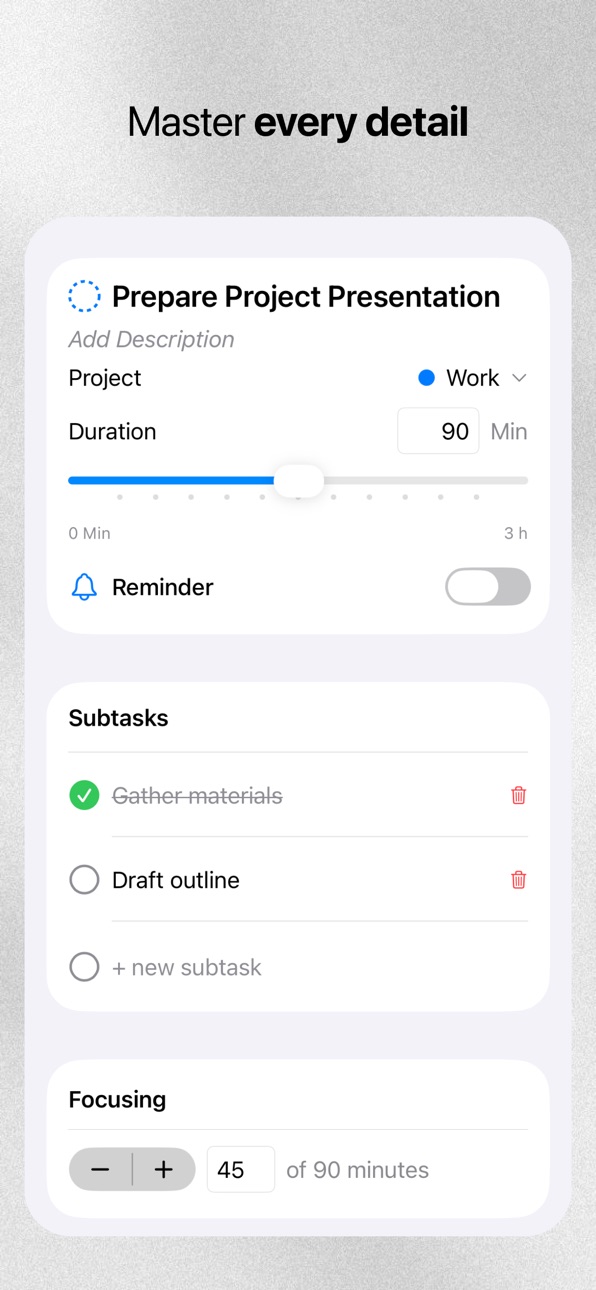


What’s New Version 1.7.0
- Compatibility Improvements: minor fixes for better performance and stability with the macOS version.
- Data Security: enhanced the reliability and security of user data storage.
- Icon Update: removed the holiday-themed icon and adapted the design to the Liquid Glass style.
Description
Dayline is designed for clarity. It’s a minimalist planner that guides you through your day without the noise. Plan in seconds, stay focused for hours.
Prioritize
- Key Tasks: Focus on your top 3 goals to avoid burnout.
- To-Dos: A simple list for everything else.
- Inbox: Quick capture for ideas and notes.
Smart Calendar
- Day Templates: Apply your "Work" or "Weekend" routine in one tap.
- Active Hours: See only your scheduled time, not empty space.
- Task Sync: Key tasks automatically appear in your calendar.
Dayline Assist Manage your schedule with simple text or voice commands:
- "Shift all events 2 hours forward."
- "Break this task into subtasks."
- "Move unfinished tasks to tomorrow."
Deep Focus
- Focus Tab: A unified timeline of your tasks and events.
- Timers: Built-in Pomodoro and focus tracking.
- Live Activities: Track progress via Dynamic Island and Lock Screen.
Essentials
- Google Calendar integration.
- Seamless Dark and Light modes.
- Interactive onboarding for quick setup.
Privacy Policy: https://dayline.pro/privacy
Terms of Use (EULA): https://dayline.pro/terms
In-App Purchases US pricing
Dayline Pro Subscription
(1 Year) · Yearly 7-day free trial$39.99
(1 Month) · Monthly$4.99
One-Time Purchases
Dayline Pro (Lifetime)$69.99
Capabilities
In-App Purchases
Accessibility
ipadiphonemacrealityDevicetvoswatch
Version history 13 versions
Build 881524750v1.7.02026-01-15 22:23:20
- Compatibility Improvements: minor fixes for better performance and stability with the macOS version.
- Data Security: enhanced the reliability and security of user data storage.
- Icon Update: removed the holiday-themed icon and adapted the design to the Liquid Glass style.
Build 881242249v1.6.12026-01-07 00:14:41
- Calendar: Fixed a bug where "Save Template" and "Open Calendar" buttons were unresponsive.
- Dynamic Island: Time values now update correctly when transitioning from minutes to hours (e.g., from 59m to 1h).
- Task Interface: Fixed the display of checkboxes for tasks with subtasks to ensure consistent sizing.
- Localization: General improvements and fixes to translations across several screens.
Build 881037875v1.6.02026-01-02 06:35:03
Dayline is now available on macOS! A fully optimized, native app is now live on the App Store.
- Instant Sync. Start on your iPhone and pick up right where you left off on your Mac.
- Weekly View. See your entire week of tasks at a single glance.
- Day Templates & Calendar. Effortlessly plan your schedule directly on macOS.
We’ve also rolled out several updates to the iOS version for a smoother experience.
Build 880917142v1.5.12025-12-23 03:14:57
- The subscription display issue is now officially fixed!
- We’ve fixed the bug that switched the New Year icon back to default. Remember, you can always pick your favorite icon in Settings — Profile — Change Icon.
- No more lost tasks: your progress is now saved even if you accidentally tap the space above the "Add Task" window.
Build 880849287v1.5.02025-12-20 01:01:40
We’ve released a major update to help you start your New Year planning even more effectively!
- Meet Dayline Assist. Now you can create tasks and events using simple commands. Want to move all incomplete tasks to another day in just a few seconds with a single phrase? Easy! Check out our blog to learn more about how this feature works.
- Global Redesign. The app is now cleaner and more minimalist. We’ve streamlined several features and refined the interface to make the user experience even smoother.
- Quick Task Creation. A new task entry panel allows you to instantly select a category and duration, or simply dictate the task name using your voice.
- Calendar Updates. The calendar logic is now more intuitive. All 24 hours are available, but unused hours can be hidden so they don’t distract you from your work.
- Timer Improvements. The timer is now more stable. We’ve also added a mini-timer on the task page, which stays visible even when you minimize the main timer screen.
- Bug Fixes. We’ve crushed many bugs and addressed various stability issues. Specifically, we fixed the issue where subscriptions would reset upon app launch. Everything is now running smoothly!
Build 879972611v1.4.02025-11-22 19:38:40
Dayline 1.4.0: Dynamic Island and Live Activity Support
The app now has 3 timer options:
1. Regular task timer. Tracks time and records focus progress in the task.
2. Pomodoro timer. Focus in 25-minute intervals, also records focus progress.
3. Event focus. You can start a timer to track the completion of a calendar event.
All timers support display in Dynamic Island and Live Activity.
When you reach progress milestones, stop the timer, or an event ends — notifications arrive so you won't miss the moment.
Other changes:
- Menu items in the day template now look better
- Calendar now supports displaying the day after 00:00. (For example, when your workday ends late — events will belong to the current day after 00:00, not the next one)
- Reworked the logic for showing progress thumbnails in tasks
- When adding a task, the AI button no longer interferes with text input.
And more than 10 other issues in the app have been fixed.
Build 879404262v1.3.02025-11-05 23:20:42
Task widgets are now available!
For now, there are two sizes: medium and large. The medium widget shows only your key tasks, while the large one displays both key and regular tasks.
The widgets are fully interactive — you can mark tasks as done directly from the widget by tapping the checkbox.
Also:
When creating a new account, there’s now a short practical onboarding to help you get started faster. It guides you through creating your first tasks and generating your personal daily template.
For existing users:
In Settings, you’ll find a new button — “Set up daily template”. You can use it anytime to generate or refresh your day template — it automatically adapts to your schedule.
Try generating your personal daily template.
Other improvements:
- Calendar events now look richer and more vibrant.
- The “Edit” button is gone — edit mode is always active. Just hold an event to move it, or long-press on an empty spot to create a new one.
- The profile section has been updated — your Google account avatar is now automatically displayed.
- Fixed around 5 minor bugs and UI issues.
Currently working on the macOS version — coming in November.
Build 879090958v1.2.12025-10-21 17:37:46
Fixed 3 bugs after the previous release:
- The AI input field now works correctly (previously, you could only send a request after closing the keyboard).
- Task and event titles can now be edited in two lines. It’s much more convenient than trying to tap on the exact word you mistyped.
- Improved AI behavior — all new tasks are now automatically created with a capital letter.
Build 879026972v1.2.02025-10-19 16:59:48
Dayline 1.2.0 Update: Google Calendar Sync & Calendar Redesign
- Create a day template right from the calendar (Edit → Save as Template).
- Added Google Calendar sync (to apply your template to a day, choose it from the top of the calendar).
- Completely redesigned the event creation and editing page. Added duration presets.
- Added calendar view options: standard scroll or time-split view.
- Tasks on the main screen are now created one after another when you press Enter on the keyboard (to exit, tap anywhere above the keyboard).
- Task progress and event duration timers now keep working even if you close the app or lock the screen. Task progress is saved after stopping the timer.
- Made the subscription page a bit prettier (check it out).
- Hid the AI input field so it doesn’t get in the way. To activate it — just tap the button.
Build 878553251v1.1.22025-10-01 01:32:18
Fixing minor bugs after a major update + usability improvements.
- When creating a new account, default templates were created incorrectly (there were 2 identical templates). If you had this problem, you can click on "Reset to default templates" in settings, and there will be two correct default templates: "Work" and "Day Off".
- Updated AI model in the app. Now it's more powerful and works 3 times faster.
- Subtasks had no ability to edit them. Now there is.
- Removed the button to the "Focus" page, which is not being used yet. Will bring it back in new updates when there's functionality there.
- Fixed compatibility of the new slider (which appeared in iOS 26) for iOS 18 and below.
- When moving a task to another day or to "Inbox", the task category wasn't saved. Fixed.
- Added the ability to save a task when adding it not only by pressing the Enter button on the keyboard, but also by tapping on any part of the screen at the top. The task closes and saves.
- Also fixed keyboard dismissal in all places so that it also closes when tapping on any empty space on the screen.
Build 878396250v1.1.12025-09-24 21:41:58
The biggest app update ever!
There are so many changes that there aren't enough characters to describe them all. So here are the main ones:
- New "Focus" page
The main place in the app. Here's how it works: you plan tasks, create events, and track completion on the "Focus" page. It's very convenient, give it a try.
- Fixed more than 40 bugs and issues
The app has become much more pleasant to use, many aspects now look more logical, and to complete most settings — you now need 2-3 times fewer clicks.
- New task editing screen
The place you'll visit daily is now new. Everything is made convenient and beautiful.
- The app is now adapted for iOS 26 and supports all new system features.
For example, iOS 26 introduced a segmented slider, which is now used to conveniently select the needed task duration in 15-minute increments. Full support for the new system's transparent elements.
Overall, from the update description, you can understand that the main focus of my work was the convenience of using the app. The user experience has significantly improved.
Build 877669438v1.0.12025-08-31 07:53:02
This is the first app update!
- Fixed text for reminders scheduled for another day
- Fixed display of purchased subscription
- Profile now shows which account you logged in from, which authorization system you used, and until what date your subscription is purchased
- Fixed bug where checkbox only worked on the second tap
- Added "Delete Task" button to the first screen. No need for an extra tap to delete tasks anymore.
Thanks to user @SerjOST for finding bugs
- Fixed bug when keyboard wouldn't disappear.
Thanks to user @ustiklena for discovering this bug
Improved logic:
When a task is marked as "Cancelled" — task progress resets to 0 minutes.
New feature:
AI can now create tasks for other days. For example: "Schedule task 'Create presentation' for tomorrow". The task will appear on the next day. You can also create tasks directly for a specific date.
Build 877358202v1.0.02025-08-28 09:45:31
Price history by region
Currency
Show
Columns
Search
Availability 1 of 1 storefronts
| Region | Language | Price | Ratings | Avg | Version |
|---|---|---|---|---|---|
| US | en-US | Free | 3 | 5.0 | 1.7.0 |
Change log 17 changes · US
✎
releaseNotes updated
- Compatibility Improvements: minor fixes for better performance and stability with the macOS version.
- Data Security: enhanced the reliability and security of
✎
description updated
Dayline is designed for clarity. It’s a minimalist planner that guides you through your day without the noise. Plan in seconds, stay focused for hours.
Priorit
✎
subtitle updated
To-do list, planner & timer
✎
name updated
Dayline: Tasks & Calendar
◆
Version 1.7.0 released
- Compatibility Improvements: minor fixes for better performance and stability with the macOS version.
- Data Security: enhanced the reliability and security of user data storage.
- Icon Update: removed the holiday-themed icon and adapted t
◆
Version 1.6.1 released
- Calendar: Fixed a bug where "Save Template" and "Open Calendar" buttons were unresponsive.
- Dynamic Island: Time values now update correctly when transitioning from minutes to hours (e.g., from 59m to 1h).
- Task Interface: Fixed the di
◆
Version 1.6.0 released
Dayline is now available on macOS! A fully optimized, native app is now live on the App Store.
- Instant Sync. Start on your iPhone and pick up right where you left off on your Mac.
- Weekly View. See your entire week of tasks at a single
◆
Version 1.5.1 released
- The subscription display issue is now officially fixed!
- We’ve fixed the bug that switched the New Year icon back to default. Remember, you can always pick your favorite icon in Settings — Profile — Change Icon.
- No more lost tasks: you
◆
Version 1.5.0 released
We’ve released a major update to help you start your New Year planning even more effectively!
- Meet Dayline Assist. Now you can create tasks and events using simple commands. Want to move all incomplete tasks to another day in just a few
◆
Version 1.4.0 released
Dayline 1.4.0: Dynamic Island and Live Activity Support
The app now has 3 timer options:
1. Regular task timer. Tracks time and records focus progress in the task.
2. Pomodoro timer. Focus in 25-minute intervals, also records focus progres
◆
Version 1.3.0 released
Task widgets are now available!
For now, there are two sizes: medium and large. The medium widget shows only your key tasks, while the large one displays both key and regular tasks.
The widgets are fully interactive — you can mark tasks a
◆
Version 1.2.1 released
Fixed 3 bugs after the previous release:
- The AI input field now works correctly (previously, you could only send a request after closing the keyboard).
- Task and event titles can now be edited in two lines. It’s much more convenient than
◆
Version 1.2.0 released
Dayline 1.2.0 Update: Google Calendar Sync & Calendar Redesign
- Create a day template right from the calendar (Edit → Save as Template).
- Added Google Calendar sync (to apply your template to a day, choose it from the top of the calendar
◆
Version 1.1.2 released
Fixing minor bugs after a major update + usability improvements.
- When creating a new account, default templates were created incorrectly (there were 2 identical templates). If you had this problem, you can click on "Reset to default temp
◆
Version 1.1.1 released
The biggest app update ever!
There are so many changes that there aren't enough characters to describe them all. So here are the main ones:
- New "Focus" page
The main place in the app. Here's how it works: you plan tasks, create events, a
◆
Version 1.0.1 released
This is the first app update!
- Fixed text for reminders scheduled for another day
- Fixed display of purchased subscription
- Profile now shows which account you logged in from, which authorization system you used, and until what date yo
◆
Version 1.0.0 released