Home › Productivity

 US
US
USen-US AGen-GB
 AIen-GB
 AOen-GB
 ARes-MX
 BBen-GB
 BFen-GB
 BJen-GB
 BOes-MX
 BRpt-BR
 BSen-GB
 BWen-GB
 BZen-GB
 CDen-GB
 CGen-GB
 CIfr-FR
 CLes-MX
 CMfr-FR
 COes-MX
 CRes-MX
 CVen-GB
 DMen-GB
 DOes-MX
 DZen-GB
 ECes-MX
 GAfr-FR
 GDen-GB
 GHen-GB
 GMen-GB
 GTes-MX
 GWen-GB
 GYen-GB
 HNes-MX
 JMen-GB
 KEen-GB
 KNen-GB
 KYen-GB
 LCen-GB
 LRen-GB
 LYen-GB
 MAen-GB
 MGen-GB
 MLen-GB
 MSen-GB
 MUen-GB
 MWen-GB
 MXes-MX
 MZen-GB
 NAen-GB
 NEen-GB
 NGen-GB
 NIes-MX
 PAes-MX
 PEes-MX
 PYes-MX
 RWen-GB
 SCen-GB
 SLen-GB
 SNen-GB
 SRen-GB
 STen-GB
 SVes-MX
 SZen-GB
 TCen-GB
 TDen-GB
 TNen-GB
 TTen-GB
 TZen-GB
 UGen-GB
 UYen-GB
 VCen-GB
 VEes-MX
 VGen-GB
 ZMen-GB
 ZWen-GB
75 of 75 storefronts
Content in en-US
Content in en-US
Information
Apple ID6751143483
Bundle IDcom.photoreportx.app
SellerSeller
Min iOS15.0
Min macOS12.0
Device familiesiphone, ipad, ipod
Released2025-09-05
Copyright© 2025 Adjuster X LLC
Privacy policyLink ↗
Preview 2 platforms
iPhone 8 images




iPad 8 images


What’s New Version 2.1.8
• Drag & drop to reorder photos in any folder — the order carries into your PDF report
• Vibration + screen blink confirm every shot
• No more GPS delay when saving photos
• One-tap Retry if a photo fails to save
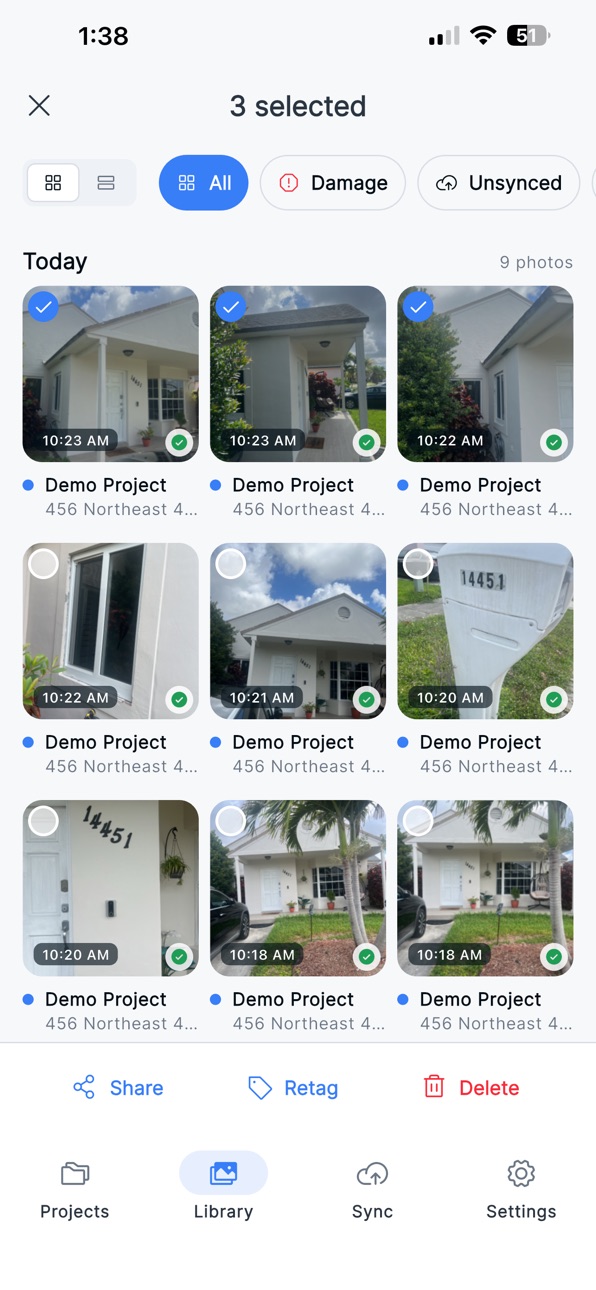
• Users can now delete photos in batch (multi-selection).
Description
Photo Report X is the field-first photo documentation app built for roofers, property inspectors, and independent insurance adjusters. Capture every photo a claim or inspection requires, organized by property section, then deliver a branded PDF report in seconds — even when there is no signal on the roof.
WHY ROOFERS AND ADJUSTERS USE PHOTO REPORT X
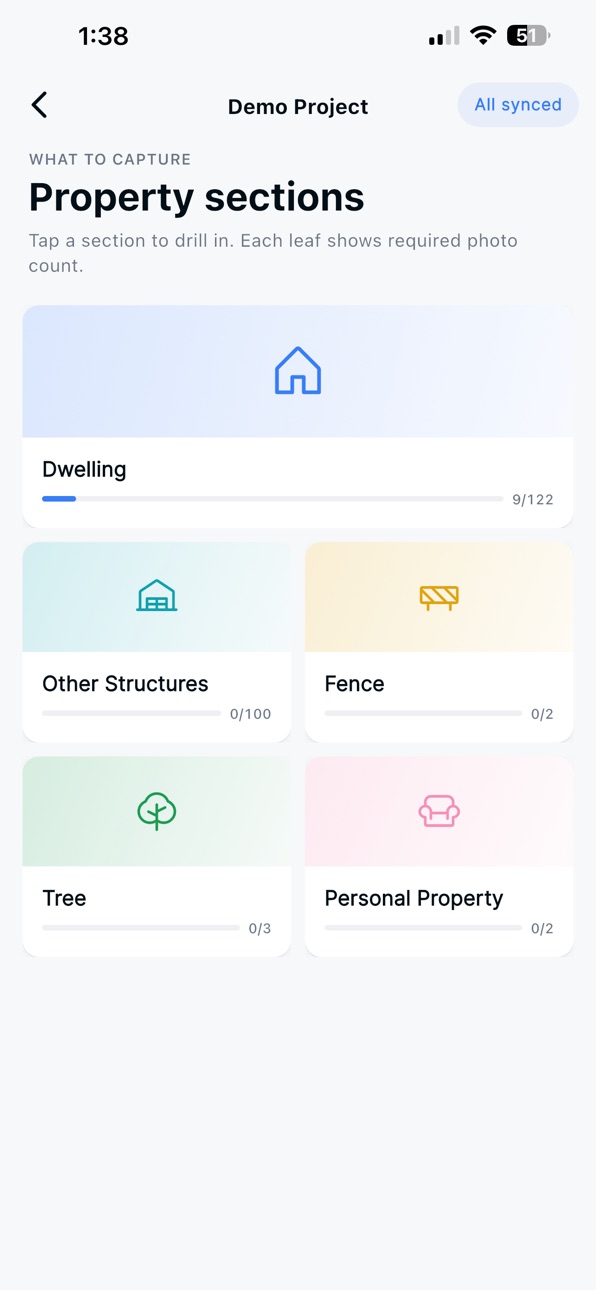
• Built-in inspection checklist — never miss a required shot. Dwelling, other structures, fence, tree, and personal property are pre-structured so every photo lands in the right section automatically.
• Offline-first. The whole app — capture, captions, projects, reports — works without a connection. Photos sync the moment you are back on Wi-Fi or cellular.
• PDF reports your clients trust. Generate a fully branded, paginated PDF report on-device with your company logo, slogan, address, and contact info on every page.
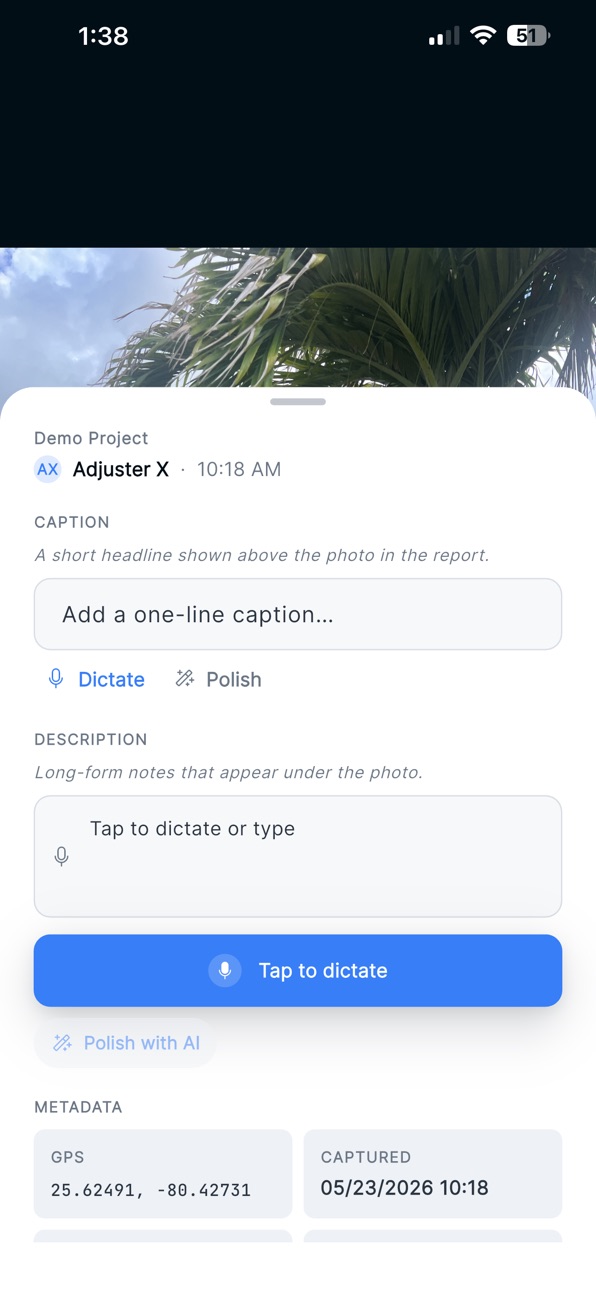
• Faster captions with AI. Dictate notes hands-free, then tap "Polish with AI" to clean up grammar and tone before they hit the report.
• Markup on the photo. Circle damage, point at a defect, highlight a serial number — annotations travel with the photo into the report.
• GPS and timestamps on every shot. Each photo records location and capture time, ready for claim audits.
• One-tap project creation. Tap "Use my location" — Photo Report X fills in the address from GPS so you can start documenting in under 10 seconds.
• Cross-project library. Browse, filter, and search every photo you have ever captured by project, section, damage status, or sync state.
• Brand your reports once. Set your company logo, slogan, address, phone, and website. Every PDF you generate carries them.
• Built for crews. Sign in once, stay signed in. Slow connections and dead zones do not boot you out of the app mid-inspection.
USE IT FOR
• Roof inspections (residential and commercial)
• Pre-storm and post-storm property documentation
• Hail, wind, and hurricane damage assessment
• Independent adjuster claim files
• Public adjuster photo evidence
• Contractor scope and warranty documentation
SUBSCRIPTION
Photo Report X is offered as a subscription — monthly or annual. Subscribe once and use it across all your iPhone and iPad devices. Subscriptions renew automatically through your Apple ID and can be managed or canceled at any time in App Store settings.
Terms of Use (EULA): https://www.apple.com/legal/internet-services/itunes/dev/stdeula/
Questions? info@adjusterx.com
In-App Purchases US pricing
Pro Plan Subscription
Monthly Pro Plan · Monthly$19.99
Yearly Pro Plan (20% off) · Yearly$199.99
Capabilities
In-App Purchases
Accessibility
ipadiphonemacrealityDevicetvoswatch
Version history 7 versions
Build 887792772v2.1.82026-07-04 05:13:42
• Drag & drop to reorder photos in any folder — the order carries into your PDF report
• Vibration + screen blink confirm every shot
• No more GPS delay when saving photos
• One-tap Retry if a photo fails to save
• Users can now delete photos in batch (multi-selection).
Build 887701433v2.1.62026-07-01 23:43:58
• Switching accounts on a shared device now clears the previous user's synced projects, while keeping any unsaved local work safe.
• The Sync screen now shows both upload and download progress, so you always know what's still syncing.
• Various performance and stability improvements.
Build 887117001v2.1.52026-06-18 16:43:04
We've reorganized the photo folder structure to make organizing your inspection photos faster and clearer.
Build 886590415v2.1.42026-06-06 01:47:29
* Improving the Roof Pitch measurement tool.
* Import photos from your device gallery, single or multiple at a time.
Build 886164868v2.1.32026-05-29 20:51:31
Enabled App Plans
Build 886053566v2.1.22026-05-26 17:59:27
Photo Report X 2.0 is a ground-up rewrite — designed with field crews, roofers, and IA adjusters who use it every day. Almost every screen, every workflow, and every photo path has been rebuilt.
Here is what is new since v1:
REDESIGNED FROM THE GROUND UP
• A brand-new field-first design system — bigger touch targets, cleaner type, and a sticky bottom nav (Projects, Library, Sync, Settings) so the tools you use most are always one tap away.
• Reworked project list with color-coded type pills, damage flags, sync status dots, and a debounced search across customer, address, and claim.
• A collapsing project hero with the property photo on top, sticky quick actions (Capture, Photos, Report, Share) underneath, and a single scrolling feed for project info, progress, and reports.
A REAL INSPECTION WORKFLOW
• A guided "Property sections" checklist — Dwelling, Other Structures, Fence, Tree, and Personal Property — so you always know what you still need to capture.
• "What to capture" sample visuals on every one of the 229 inspection leaves, so new crew members know exactly what a good photo looks like.
• Per-project photo gallery organized by section, taxonomy, and damage state — modeled after Apple Photos Collections.
PROFESSIONAL FIELD CAMERA
• Field-agent camera tools: zoom, grid, level, roof-pitch overlay, compass heading, and on-photo watermark.
• Pitch, tilt, and heading are stamped into the saved photo file — your reports now carry the data your claims team needs.
• Photo rotation, damage-marker annotation, and on-photo markup (circles, arrows, highlights) with a proper edit screen and sticky save bar.
CAPTIONS IN SECONDS
• Tap-to-dictate captions using on-device speech-to-text.
• One-tap "Polish with AI" cleans up grammar and tone before the caption hits the report.
• Long-form descriptions per photo, preserved across swipes and syncs.
BRANDED PDF REPORTS
• A brand-new PDF generator — paginated, organized by section, with your photos in context.
• Company branding settings: upload your logo, set your slogan, address, phone, and website. Every PDF carries them.
• Reports are auto-named after the customer and project type, so they file themselves.
TRUE OFFLINE-FIRST
• A brand-new sync engine with an outbox queue, exponential backoff, and connectivity-aware retry.
• A live sync status pill shows you exactly what is pending and what is synced.
• Auth survives bad signal — you no longer get signed out on slow first launches or in dead zones.
• Local database fully rebuilt to handle reports, photo descriptions, na-flags, and edited photos across devices.
LIBRARY AND BULK ACTIONS
• A cross-project Library with filter chips for Damage, Unsynced, and every property section.
• Selection mode with bulk share and bulk delete.
• Photo edits and annotations sync across all your devices.
ONE-TAP PROJECT CREATION
• Tap "Use my location" — Photo Report X auto-fills the address from GPS so you can start documenting in under 10 seconds.
• New project fields: customer, project type (Roof inspection, Damage assessment, Pre-storm, Post-storm, Other), date of loss, notes.
• Archive or delete projects without leaving the list.
SETTINGS THAT MATTER
• Production-ready Settings — Profile, Subscription, Company branding, Sync & storage, and About.
• Native iOS subscriptions (monthly and annual) with secure receipt verification.
UNDER THE HOOD
• Brand-new app icons, splash screen, and brand lockup.
• Sentry crash reporting so we catch issues before you have to report them.
• Hundreds of bug fixes and performance improvements over the v1 MVP.
Questions or feedback? info@adjusterx.com
Build 877309771v1.0.02025-09-05 20:33:03
Price history by region
Currency
Show
Columns
Search
Availability 75 of 75 storefronts
| Region | Language | Price | Ratings | Avg | Version |
|---|---|---|---|---|---|
| US | en-US | Free | 1 | 5.0 | 2.1.8 |
| AG | en-GB | Free | 0 | — | 2.1.8 |
| AI | en-GB | Free | 0 | — | 2.1.8 |
| AO | en-GB | Free | 0 | — | 2.1.8 |
| AR | es-MX | Free | 0 | — | 2.1.8 |
| BB | en-GB | Free | 0 | — | 2.1.8 |
| BF | en-GB | Free | 0 | — | 2.1.8 |
| BJ | en-GB | Free | 0 | — | 2.1.8 |
| BO | es-MX | Free | 0 | — | 2.1.8 |
| BR | pt-BR | Free | 0 | — | 2.1.8 |
| BS | en-GB | Free | 0 | — | 2.1.8 |
| BW | en-GB | Free | 0 | — | 2.1.8 |
| BZ | en-GB | Free | 0 | — | 2.1.8 |
| CD | en-GB | Free | 0 | — | 2.1.8 |
| CG | en-GB | Free | 0 | — | 2.1.8 |
| CI | fr-FR | Free | 0 | — | 2.1.8 |
| CL | es-MX | Free | 0 | — | 2.1.8 |
| CM | fr-FR | Free | 0 | — | 2.1.8 |
| CO | es-MX | Free | 0 | — | 2.1.8 |
| CR | es-MX | Free | 0 | — | 2.1.8 |
| CV | en-GB | Free | 0 | — | 2.1.8 |
| DM | en-GB | Free | 0 | — | 2.1.8 |
| DO | es-MX | Free | 0 | — | 2.1.8 |
| DZ | en-GB | Free | 0 | — | 2.1.8 |
| EC | es-MX | Free | 0 | — | 2.1.8 |
| GA | fr-FR | Free | 0 | — | 2.1.8 |
| GD | en-GB | Free | 0 | — | 2.1.8 |
| GH | en-GB | Free | 0 | — | 2.1.8 |
| GM | en-GB | Free | 0 | — | 2.1.8 |
| GT | es-MX | Free | 0 | — | 2.1.8 |
| GW | en-GB | Free | 0 | — | 2.1.8 |
| GY | en-GB | Free | 0 | — | 2.1.8 |
| HN | es-MX | Free | 0 | — | 2.1.8 |
| JM | en-GB | Free | 0 | — | 2.1.8 |
| KE | en-GB | Free | 0 | — | 2.1.8 |
| KN | en-GB | Free | 0 | — | 2.1.8 |
| KY | en-GB | Free | 0 | — | 2.1.8 |
| LC | en-GB | Free | 0 | — | 2.1.8 |
| LR | en-GB | Free | 0 | — | 2.1.8 |
| LY | en-GB | Free | 0 | — | 2.1.8 |
| MA | en-GB | Free | 0 | — | 2.1.8 |
| MG | en-GB | Free | 0 | — | 2.1.8 |
| ML | en-GB | Free | 0 | — | 2.1.8 |
| MS | en-GB | Free | 0 | — | 2.1.8 |
| MU | en-GB | Free | 0 | — | 2.1.8 |
| MW | en-GB | Free | 0 | — | 2.1.8 |
| MX | es-MX | Free | 0 | — | 2.1.8 |
| MZ | en-GB | Free | 0 | — | 2.1.8 |
| NA | en-GB | Free | 0 | — | 2.1.8 |
| NE | en-GB | Free | 0 | — | 2.1.8 |
| NG | en-GB | Free | 0 | — | 2.1.8 |
| NI | es-MX | Free | 0 | — | 2.1.8 |
| PA | es-MX | Free | 0 | — | 2.1.8 |
| PE | es-MX | Free | 0 | — | 2.1.8 |
| PY | es-MX | Free | 0 | — | 2.1.8 |
| RW | en-GB | Free | 0 | — | 2.1.8 |
| SC | en-GB | Free | 0 | — | 2.1.8 |
| SL | en-GB | Free | 0 | — | 2.1.8 |
| SN | en-GB | Free | 0 | — | 2.1.8 |
| SR | en-GB | Free | 0 | — | 2.1.8 |
| ST | en-GB | Free | 0 | — | 2.1.8 |
| SV | es-MX | Free | 0 | — | 2.1.8 |
| SZ | en-GB | Free | 0 | — | 2.1.8 |
| TC | en-GB | Free | 0 | — | 2.1.8 |
| TD | en-GB | Free | 0 | — | 2.1.8 |
| TN | en-GB | Free | 0 | — | 2.1.8 |
| TT | en-GB | Free | 0 | — | 2.1.8 |
| TZ | en-GB | Free | 0 | — | 2.1.8 |
| UG | en-GB | Free | 0 | — | 2.1.8 |
| UY | en-GB | Free | 0 | — | 2.1.8 |
| VC | en-GB | Free | 0 | — | 2.1.8 |
| VE | es-MX | Free | 0 | — | 2.1.8 |
| VG | en-GB | Free | 0 | — | 2.1.8 |
| ZM | en-GB | Free | 0 | — | 2.1.8 |
| ZW | en-GB | Free | 0 | — | 2.1.8 |
Change log 11 changes · US
✎
releaseNotes updated
• Drag & drop to reorder photos in any folder — the order carries into your PDF report
• Vibration + screen blink confirm every shot
• No more GPS delay when sa
✎
description updated
Photo Report X is the field-first photo documentation app built for roofers, property inspectors, and independent insurance adjusters. Capture every photo a cla
✎
subtitle updated
Property Photo Report Maker
✎
name updated
Photo Report X
◆
Version 2.1.8 released
• Drag & drop to reorder photos in any folder — the order carries into your PDF report
• Vibration + screen blink confirm every shot
• No more GPS delay when saving photos
• One-tap Retry if a photo fails to save
• Users can now delete phot
◆
Version 2.1.6 released
• Switching accounts on a shared device now clears the previous user's synced projects, while keeping any unsaved local work safe.
• The Sync screen now shows both upload and download progress, so you always know what's still syncing.
• Var
◆
Version 2.1.5 released
We've reorganized the photo folder structure to make organizing your inspection photos faster and clearer.
◆
Version 2.1.4 released
* Improving the Roof Pitch measurement tool.
* Import photos from your device gallery, single or multiple at a time.
◆
Version 2.1.3 released
Enabled App Plans
◆
Version 2.1.2 released
Photo Report X 2.0 is a ground-up rewrite — designed with field crews, roofers, and IA adjusters who use it every day. Almost every screen, every workflow, and every photo path has been rebuilt.
Here is what is new since v1:
REDESIGNED FR
◆
Version 1.0.0 released