Home › Photo & Video

 US
US
1 of 1 storefronts
Content in en-US
Content in en-US
Information
Preview 2 platforms
iPhone 6 images


iPad 5 images




What’s New Version 1.6.3
Fixed video translation issues
Description
TransVid is an AI-powered video translation app that can translate your entire video into multiple languages.
Both subtitles and voiceovers are automatically translated, making it easy for anyone to create multilingual videos.
◆ Key Features
- Automatic video translation (subtitles + voiceover)
- Supports 30+ languages including English, Chinese, Spanish, and more
- AI-generated narration with natural-sounding voices
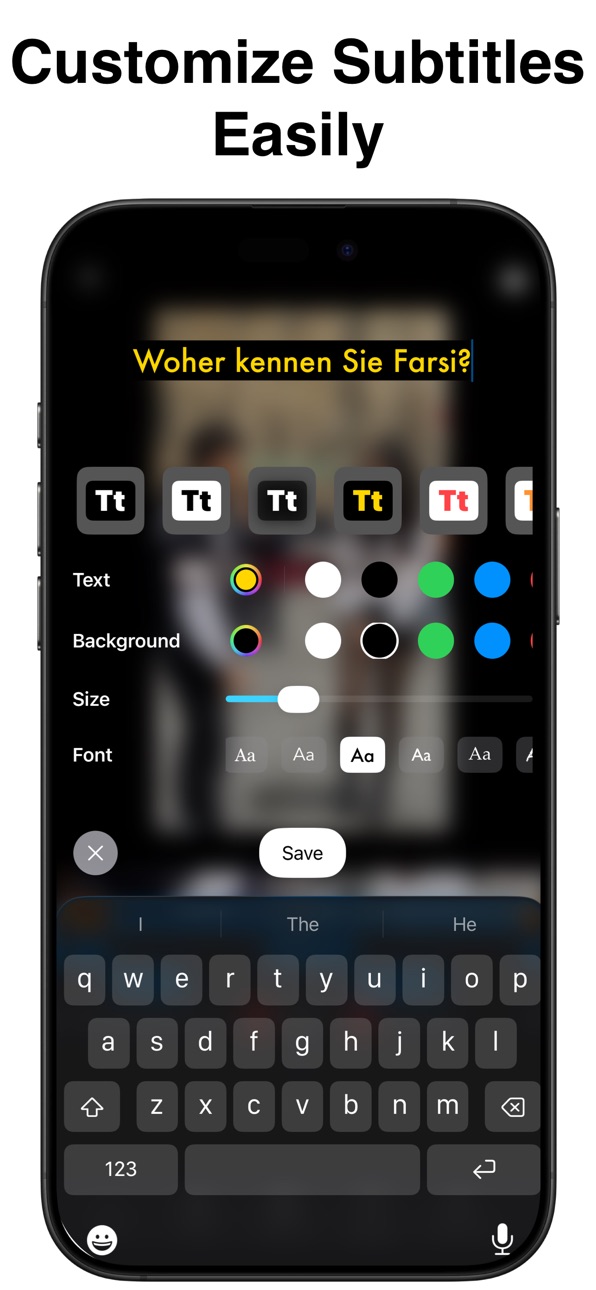
- Easy subtitle translation, editing, and style customization
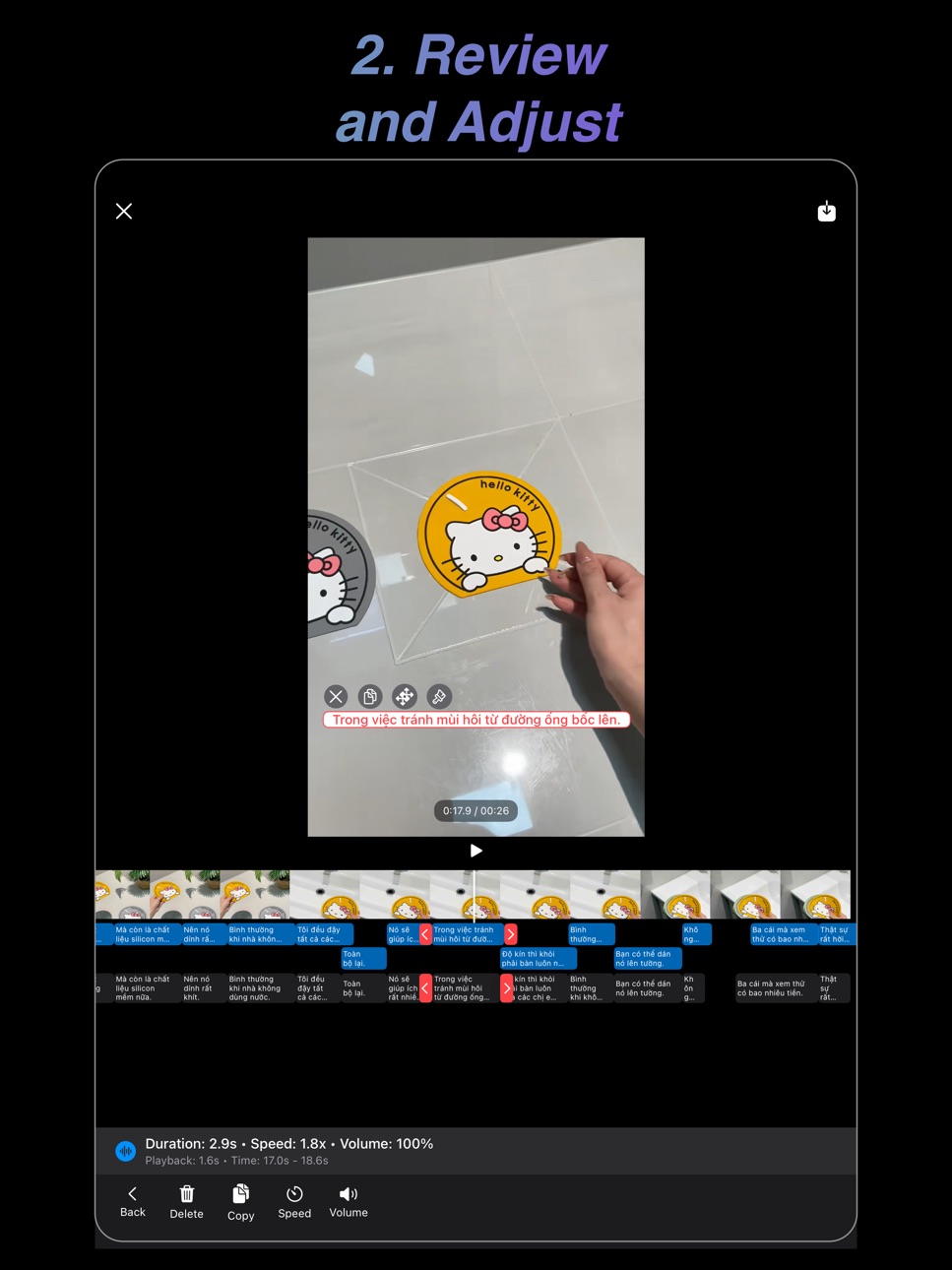
- Precise subtitle timing adjustment with timeline editing
- Video editing features such as BGM addition, speed control, and volume adjustment
- High-quality export with direct sharing to social media
- Automatically generate video scripts and subtitles using AI
- Add customizable AI voiceovers with various sound effects and styles, such as cute, robot, or old man
- Enhance the stability, performance, and reliability of the video editor
◆ Perfect For
- Creators who want to share “translated videos” with global audiences
- Influencers who want to support multiple languages on TikTok, Instagram, YouTube
- Businesses creating multilingual marketing videos
- Educators offering learning materials in multiple languages
◆ Why Choose TransVid
- Translate entire videos in just seconds
- Studio-quality subtitles and AI voiceovers
- Simple and intuitive UI for beginners
- Supports batch translation for multiple videos
Bring your videos to viewers around the world with TransVid.
Terms of Use: https://www.apple.com/legal/internet-services/itunes/dev/stdeula/
In-App Purchases US pricing
Video Translator Pro Subscription
Weekly · 7 days 3-day free trial$1.99
Monthly · Monthly 3-day free trial$3.99
Annual · Yearly 3-day free trial$24.99
Capabilities
In-App Purchases
Accessibility
ipadiphonemacrealityDevicetvoswatch
Version history 25 versions
Build 887244709v1.6.32026-06-21 22:45:24
Fixed video translation issues
Build 887174129v1.6.22026-06-19 23:10:49
Audio Sync: Volume now matches perfectly between your preview and export.
More Voices: Expanded our voice library with new options to bring your projects to life.
Build 886586749v1.6.02026-06-06 01:15:44
- Improve application performance
Build 886607573v1.6.12026-06-06 23:41:54
- Improve application performance
Build 886005937v1.5.92026-05-22 23:13:36
we update new features and improve performance to enhance the user experience.
Build 885439655v1.5.82026-05-09 23:10:19
we update new features and improve performance to enhance the user experience.
Build 885194269v1.5.72026-05-03 02:08:39
we update new features and improve performance to enhance the user experience.
Build 884310066v1.5.62026-04-10 02:19:40
we update new features and improve performance to enhance the user experience.
Build 883632349v1.5.52026-03-23 01:00:38
we update new features and improve performance to enhance the user experience.
Build 883607587v1.5.42026-03-21 22:57:02
we update new features and improve performance to enhance the user experience.
Build 882727418v1.5.32026-02-25 21:20:16
- Update the new AI model
- Bug fixes and performance improvements.
Build 882007553v1.5.22026-01-30 23:23:26
Fix bugs and Improve UI
Build 881688842v1.5.12026-01-21 12:14:05
After editing a subtitle, the user can regenerate the voiceover for that subtitle without recreating the entire voiceover
Build 881559906v1.52026-01-16 23:40:04
◆ Automatically generate video scripts and subtitles using AI
◆ Add customizable AI voiceovers with various sound effects and styles, such as cute, robot, or old man
◆ Enhance the stability, performance, and reliability of the video editor
Build 881441665v1.4.72026-01-14 10:02:10
Added support for more platforms and fixed some translation errors
Build 881374122v1.4.62026-01-10 23:37:30
- Added the ability to select subtitle areas for translation based on subtitles in the video.
- Fixed bugs and improved the interface on small screens
Build 881104626v1.4.52026-01-04 01:31:27
Added new functionalities:
- Insert watermark.
- Remove vocal from the original video.
Bug fixes and performance improvements.
Build 880214882v1.4.42025-11-30 23:00:45
bug fixes and performance improvements
Build 880001813v1.4.32025-11-22 23:41:29
bug fixes and improvements
Build 879957179v1.4.22025-11-21 23:20:57
_ Automatically analyze overlapping audio tracks and create speed segments to ensure smooth playback without audio conflicts.
_ Add more languages.
_ Improve sentence separation when translating.
_ Bug fixes.
Build 879929899v1.4.12025-11-20 22:54:43
_ Speech Speed Sync: Automatically analyzes overlapping audio tracks and creates speed segments to ensure smooth playback without audio conflicts.
_ Added more languages
_ Improve sentence splitting when translating.
_ Fixed bugs
Build 879660492v1.2.92025-11-11 23:16:23
Upgrades crafted to supercharge your video translation workflow:
- AI Auto-Caption 2.0 (iOS 26+): Sharper speaker detection with faster and more accurate bilingual translations.
- Lightning-fast export: Exports finish up to 30% quicker with our new background rendering engine.
- Display progress of subtitle generation: Track the progress of subtitle generation accurately.
Build 879152401v1.2.82025-10-23 15:53:49
Bug fixes and improvements
Build 878750643v1.2.72025-10-09 01:43:08
automatically find subtitle location
fixed bug
Build 878667368v1.2.62025-10-06 02:18:47
fixed bug
Price history by region
Currency
Show
Columns
Search
Availability 1 of 1 storefronts
| Region | Language | Price | Ratings | Avg | Version |
|---|---|---|---|---|---|
| US | en-US | Free | 0 | — | 1.6.3 |
Change log 29 changes · US
✎
releaseNotes updated
Fixed video translation issues
✎
description updated
TransVid is an AI-powered video translation app that can translate your entire video into multiple languages.
Both subtitles and voiceovers are automatically
✎
subtitle updated
Download and Translate Video
✎
name updated
TransVid Quick Video Translate
◆
Version 1.6.3 released
Fixed video translation issues
◆
Version 1.6.2 released
Audio Sync: Volume now matches perfectly between your preview and export.
More Voices: Expanded our voice library with new options to bring your projects to life.
◆
Version 1.6.1 released
- Improve application performance
◆
Version 1.6.0 released
- Improve application performance
◆
Version 1.5.9 released
we update new features and improve performance to enhance the user experience.
◆
Version 1.5.8 released
we update new features and improve performance to enhance the user experience.
◆
Version 1.5.7 released
we update new features and improve performance to enhance the user experience.
◆
Version 1.5.6 released
we update new features and improve performance to enhance the user experience.
◆
Version 1.5.5 released
we update new features and improve performance to enhance the user experience.
◆
Version 1.5.4 released
we update new features and improve performance to enhance the user experience.
◆
Version 1.5.3 released
- Update the new AI model
- Bug fixes and performance improvements.
◆
Version 1.5.2 released
Fix bugs and Improve UI
◆
Version 1.5.1 released
After editing a subtitle, the user can regenerate the voiceover for that subtitle without recreating the entire voiceover
◆
Version 1.5 released
◆ Automatically generate video scripts and subtitles using AI
◆ Add customizable AI voiceovers with various sound effects and styles, such as cute, robot, or old man
◆ Enhance the stability, performance, and reliability of the video editor
◆
Version 1.4.7 released
Added support for more platforms and fixed some translation errors
◆
Version 1.4.6 released
- Added the ability to select subtitle areas for translation based on subtitles in the video.
- Fixed bugs and improved the interface on small screens
◆
Version 1.4.5 released
Added new functionalities:
- Insert watermark.
- Remove vocal from the original video.
Bug fixes and performance improvements.
◆
Version 1.4.4 released
bug fixes and performance improvements
◆
Version 1.4.3 released
bug fixes and improvements
◆
Version 1.4.2 released
_ Automatically analyze overlapping audio tracks and create speed segments to ensure smooth playback without audio conflicts.
_ Add more languages.
_ Improve sentence separation when translating.
_ Bug fixes.
◆
Version 1.4.1 released
_ Speech Speed Sync: Automatically analyzes overlapping audio tracks and creates speed segments to ensure smooth playback without audio conflicts.
_ Added more languages
_ Improve sentence splitting when translating.
_ Fixed bugs
◆
Version 1.2.9 released
Upgrades crafted to supercharge your video translation workflow:
- AI Auto-Caption 2.0 (iOS 26+): Sharper speaker detection with faster and more accurate bilingual translations.
- Lightning-fast export: Exports finish up to 30% quicker with
◆
Version 1.2.8 released
Bug fixes and improvements
◆
Version 1.2.7 released
automatically find subtitle location
fixed bug
◆
Version 1.2.6 released
fixed bug