Home › Photo & Video

 US
US
1 of 1 storefronts
Content in en-US
Content in en-US
Information
Preview 1 platform
iPhone 3 images


What’s New Version 1.2.0
1. Added support for multiple languages (Korean, Chinese, Arabic, and more).
2. Added a language switch setting.
3. Improved performance.
Description
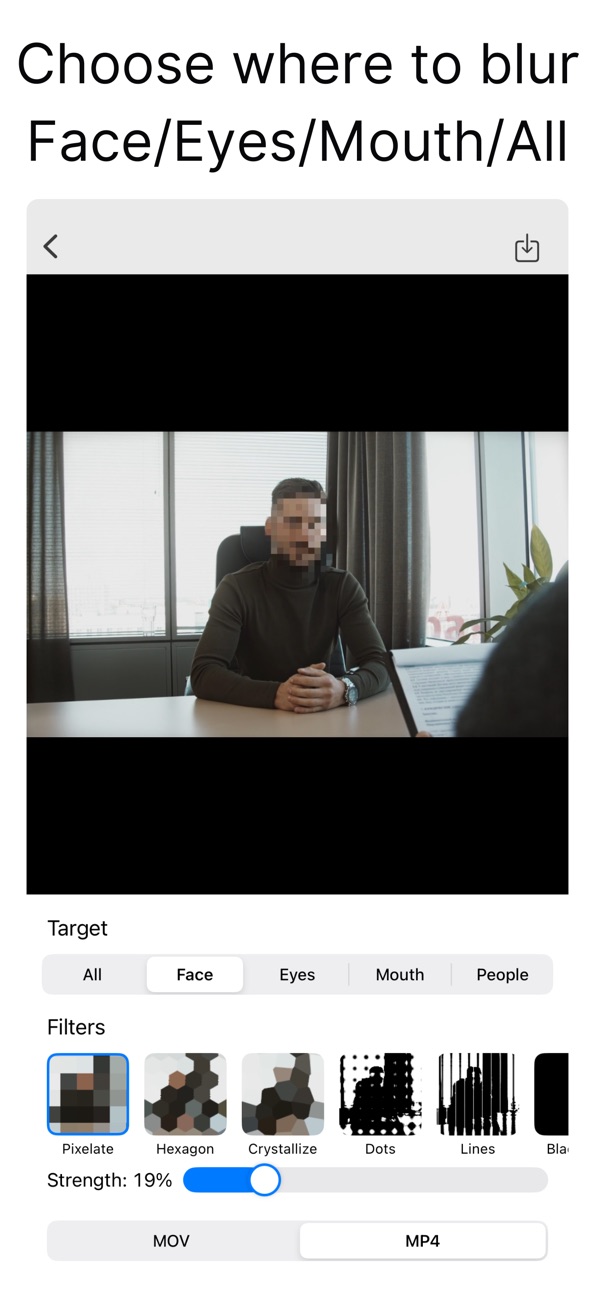
Automatically blur/pixelate people in your videos.
Just pick a video—the app detects people and applies blur/pixelation for you.
You can target People (full body) or specific parts like Face, Eyes, and Mouth.
●Features
【Simple workflow】
・Pick a video → choose target & filter → save/share in 3 steps
・Targets: Entire Frame / Face / Eyes / Mouth / People (Full Body)
【Auto detection & tracking】
・Detects face, eyes, mouth, and full body on each frame
・Stays on the subject even as they move
【Preview & edit】
・Effects update in real time in the preview
・Adjust effect strength with a slider
【Rich filters】
・Pixelate / Hexagon / Crystallize
・Dots / Lines / Blackout
・Monochrome / Pointillize / Blur / Zoom Blur
・Motion Blur (H / 45° / V) / Comic / Invert
【High-quality export】
・Save exactly what you preview as MOV/MP4
・Share directly to social apps and messages
【No sign-up required】
・No account needed—use it right after install
Accessibility
ipadiphonemacrealityDevicetvoswatch
Version history 3 versions
Build 881299712v1.2.02026-01-15 17:23:04
1. Added support for multiple languages (Korean, Chinese, Arabic, and more).
2. Added a language switch setting.
3. Improved performance.
Build 877365547v1.1.02025-08-19 17:45:35
Now you can open videos from the Files app.
Build 877240772v1.02025-08-18 08:40:55
No pricing data captured yet — comparisons appear once the app has paid storefronts or in-app purchases.
Availability 1 of 1 storefronts
| Region | Language | Price | Ratings | Avg | Version |
|---|---|---|---|---|---|
| US | en-US | Free | 0 | — | 1.2.0 |
Change log 7 changes · US
✎
releaseNotes updated
1. Added support for multiple languages (Korean, Chinese, Arabic, and more).
2. Added a language switch setting.
3. Improved performance.
✎
description updated
Automatically blur/pixelate people in your videos.
Just pick a video—the app detects people and applies blur/pixelation for you.
You can target People (full bo
✎
subtitle updated
Auto blur faces, eyes & people
✎
name updated
Video Auto Blur
◆
Version 1.2.0 released
1. Added support for multiple languages (Korean, Chinese, Arabic, and more).
2. Added a language switch setting.
3. Improved performance.
◆
Version 1.1.0 released
Now you can open videos from the Files app.
◆
Version 1.0 released