Home › Food & Drink

 US
US
1 of 1 storefronts
Content in en-US
Content in en-US
Information
Preview 2 platforms
iPhone 6 images



iPad 4 images


What’s New Version 2.0
Version 2.0
This update focuses on better usability and performance.
Improved
• Cleaner and clearer layout
• Faster interaction and editing
• Optimised user interface for iPhone
• Improved performance
• Increased stability
Description
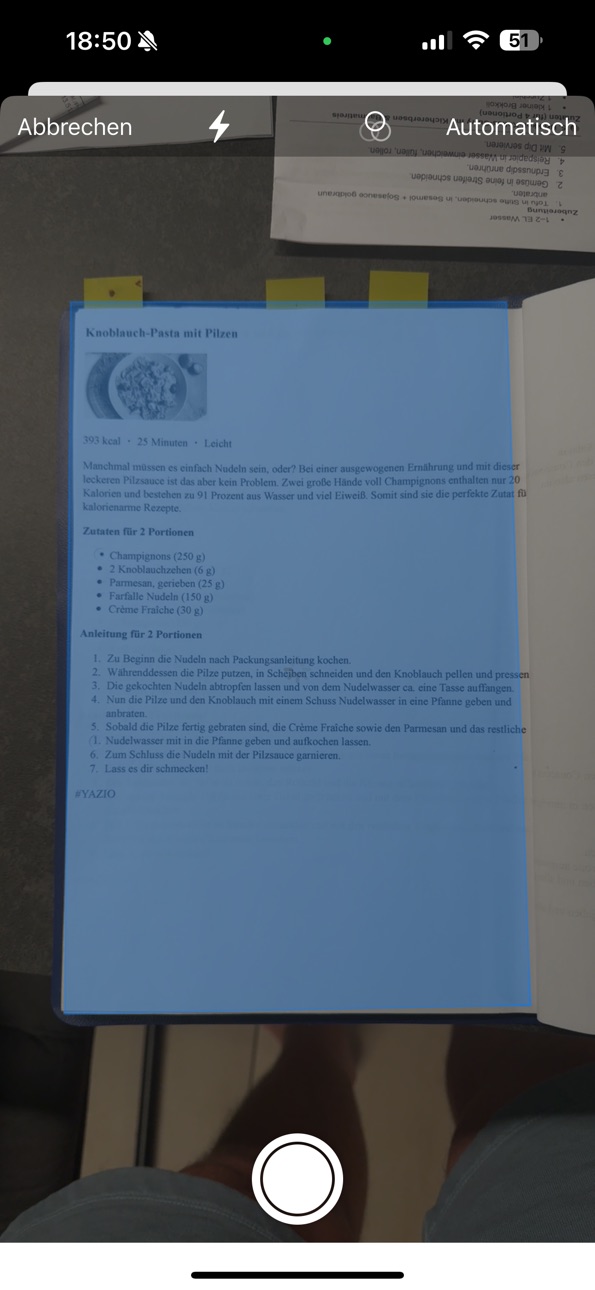
Zutato makes it easy to scan, save, and organize your recipes – completely free, with no sign-up and no ads.
Snap a photo, import a PDF, or type manually – quick, private, and simple.
The app automatically detects ingredients, instructions, and extra notes using smart OCR. Whether it’s a handwritten note, a magazine page, or a screenshot – Zutato keeps everything organized.
Features:
• Scan recipes using your camera (OCR)
• Import PDFs from Files app or iOS Share Sheet
• Rate recipes from 1 to 5 stars
• Create and assign custom categories
• Filter recipes by category or rating
• Add your own recipe photo
• Share recipes with friends
• Export recipes as PDF
• Fully localized in English and German
• iCloud sync – no login required
• No registration, no ads, completely free
Zutato works offline and online – privacy-friendly and delightfully simple.
Perfect for anyone who loves to cook and wants their favorite recipes always at hand – without the clutter.
Accessibility
ipadiphonemacrealityDevicetvoswatch
Version history 5 versions
Build 881575143v2.02026-01-19 06:10:43
Version 2.0
This update focuses on better usability and performance.
Improved
• Cleaner and clearer layout
• Faster interaction and editing
• Optimised user interface for iPhone
• Improved performance
• Increased stability
Build 878506526v1.32025-09-29 19:50:36
• Categories in the recipe list can now be expanded and collapsed
• Category & star rating when editing placed directly below the title
• Improved recipe recognition
• Optimized category management
• Recipe images can now be cropped
• Confirmation dialog before deleting recipes
• Translations available in all 5 languages
• General bug fixes & improvements
Build 877294589v1.22025-08-16 01:47:46
Version 1.2
- Improved layout in the recipe detail view
- Automatic image assignment for new recipes (no more recipes without a photo)
- Removed unnecessary image delete option
- Fixed duplicate category entries
- Onboarding now appears only as intended, with improved design
- Enhanced text recognition for imported recipes
Build 877228398v1.12025-08-15 12:11:08
Version 1.1: Dark Mode improvements, App Store link in recipe exports, iCloud sync across all your devices, and automatic main photo from ZUTATO PDFs
Build 877102647v1.02025-08-12 20:30:25
No pricing data captured yet — comparisons appear once the app has paid storefronts or in-app purchases.
Availability 1 of 1 storefronts
| Region | Language | Price | Ratings | Avg | Version |
|---|---|---|---|---|---|
| US | en-US | Free | 0 | — | 2.0 |
Change log 9 changes · US
✎
releaseNotes updated
Version 2.0
This update focuses on better usability and performance.
Improved
• Cleaner and clearer layout
• Faster interaction and editing
• Optimised use
✎
description updated
Zutato makes it easy to scan, save, and organize your recipes – completely free, with no sign-up and no ads.
Snap a photo, import a PDF, or type manually – quic
✎
subtitle updated
Scan & organize your recipes
✎
name updated
Zutato
◆
Version 2.0 released
Version 2.0
This update focuses on better usability and performance.
Improved
• Cleaner and clearer layout
• Faster interaction and editing
• Optimised user interface for iPhone
• Improved performance
• Increased stability
◆
Version 1.3 released
• Categories in the recipe list can now be expanded and collapsed
• Category & star rating when editing placed directly below the title
• Improved recipe recognition
• Optimized category management
• Recipe images can now be cropped
• Confi
◆
Version 1.2 released
Version 1.2
- Improved layout in the recipe detail view
- Automatic image assignment for new recipes (no more recipes without a photo)
- Removed unnecessary image delete option
- Fixed duplicate category entries
- Onboarding now appears onl
◆
Version 1.1 released
Version 1.1: Dark Mode improvements, App Store link in recipe exports, iCloud sync across all your devices, and automatic main photo from ZUTATO PDFs
◆
Version 1.0 released