Home › Productivity

 US
US
1 of 1 storefronts
Content in en-US
Content in en-US
Information
Apple ID6749399425
Bundle IDapp.finetime.FineTime
SellerSeller
Min iOS26.0
Min macOS26.0
Device familiesiphone
Released2025-09-25
Copyright© 2025 KILAM LLC
Privacy policyLink ↗
Preview 1 platform
iPhone 5 images



What’s New Version 1.6
- Redesigned health and sleep experience with richer charts, smoother animations, and cleaner detail sheets.
- Added a new traffic widget with route setup, commute details, and a more polished map-based UI.
- Rebuilt the weather widget experience with a more visual layout and better at-a-glance information.
- Improved home screen widget customization with a better add/edit flow and more flexible layouts.
- Polished the overall app feel with smoother transitions, updated UI across key screens, and stability improvements for existing users upgrading the app.
Description
FineTime is the first alarm clock that makes you prove you’re awake by completing challenges — or it charges you money, and it’s 100% cheat-proof.
→ How it works:
Set your alarm – Choose the time you want to wake up.
Add a challenge – Prove you’re up by doing push-ups, squats, walking outside, and more (20+ choices).
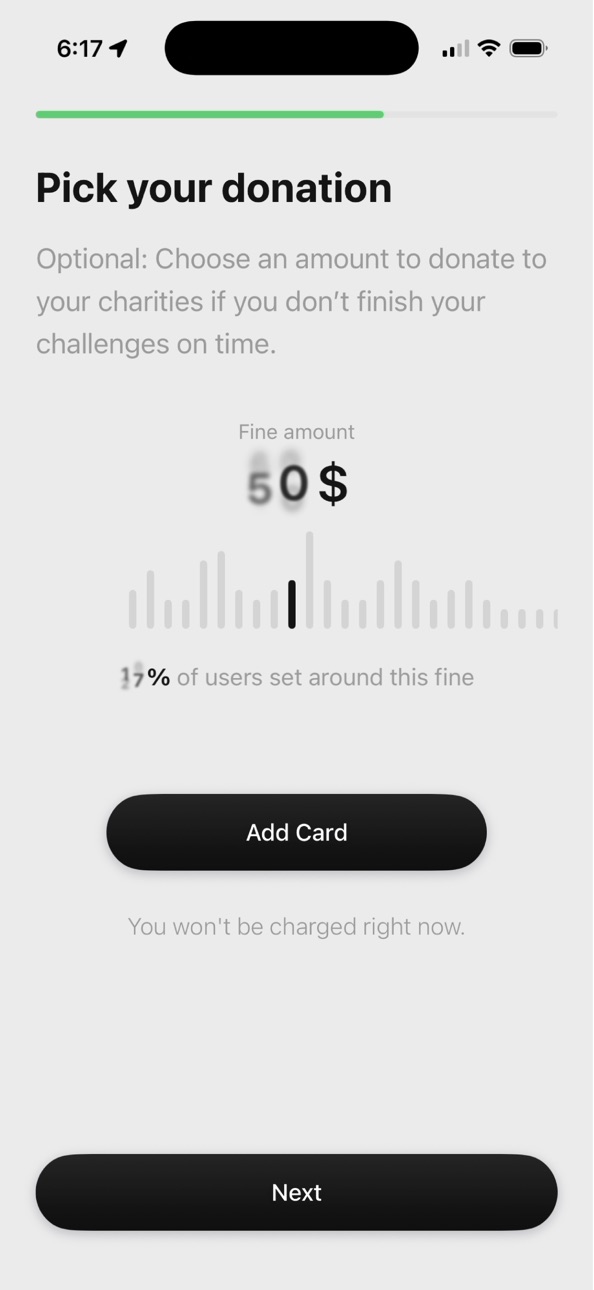
Set the money – Pick how much money you’ll lose if you fail, and which charities it goes to.
Wake up on time – If you don’t finish your challenge in time, you get charged.
No cheating – FineTime is 100% cheat-proof. Your alarms are saved online, and AI is watching you. Cheat and you’ll pay.
→ Bonus: Fail-Proof System
• Wake check: Pick a time (or random) after your alarm to prove you’re awake. Fail and you’ll pay.
• Ultra-loud: Set crazy-loud sounds and intense vibrations that cannot be turned off.
• Countdowns: Set Live Activities bedtime and alarm countdowns, even when the app isn’t running.
→ Bonus: Compete
• Live feed: Watch the globe light up in real time to see wins and fails around the world.
→ Bonus: Customization
• 100% configurable: Fine-tune alarms, sounds, challenges, etc. More options than any app.
→ Bonus: Offline Compatibility
• iOS clock integration: Alarms are saved in the Clock app; you don’t need to keep the app open.
• Offline access: Complete alarms fully offline; just reconnect every seven days to sync.
SUBSCRIPTION PRICING
FineTime is a premium-only app that offers two auto-renewing subscription options:
$14.99 / month
$164.99 / year
FineTime has a free trial, but does not offer a free subscription tier.
These prices are for US customers. Pricing in other countries may vary.
Your subscription to FineTime will automatically renew, unless you cancel at least 24 hours before the current period ends. You can cancel or manage your subscription from your Apple account settings.
DONATION PLEDGES AND DISTRIBUTIONS
Due to Apple’s guidelines, we can not charge you for missed alarms. However, you may optionally add a donation pledge to an alarm. This pledge is your choice and can be updated or removed at any time. If you miss a challenge for an alarm with an active pledge, the donation you selected may be processed securely through Stripe.
Users have 7 days from when an alarm is due to reconnect their device to Wi-Fi or cellular so our servers can receive the signal. If no connection is made within that time or we confirm the alarm was fail, the pledged donation will be processed automatically.
Whenever a pledged donation is processed, you will receive an official email from Stripe on FineTime’s behalf. This email includes the alarm time, the challenge details, the donation amount, and clear instructions on how to dispute a charge if necessary.
All pledged donations are pooled and distributed to the charities you selected, typically once per year at the beginning of the following calendar year. In rare cases (for example, a pending dispute or charity approval), a donation may be moved to the next year’s batch. Stripe deducts its standard 1–2% processing fee on each donation. FineTime does not take any of the donation amount. If you do not select a charity FineTime will donate to a random charity.
Users can view the full status of every alarm and donation under Settings → Alarm History. At year’s end, we also post receipts of all distributed donations (aggregate totals only, never tied to personal data) on our website.
To update your payment methods tied to the donation system, go to Settings → Manage Donation Info. This will take you to an external safari page where you can make the changes.
ACCOUNT DELETION
• Subscribed users: You can delete your FineTime account and all associated data at any time from the in-app settings.
• Non-subscribed users: If you complete onboarding but do not subscribe, your account and any associated data will be automatically deleted after 14 days.
TERMS
https://www.finetime.app/terms
PRIVACY POLICY
https://www.finetime.app/privacy
In-App Purchases US pricing
FineTime Subscriptions Subscription
FineTime Premium Monthly · Monthly 7-day free trial$19.99
FineTime Premium Yearly · Yearly 14-day free trial$239.99
Capabilities
In-App PurchasesWallet
Accessibility
ipadiphonemacrealityDevicetvoswatch
Version history 7 versions
Build 884300261v1.62026-04-09 16:07:11
- Redesigned health and sleep experience with richer charts, smoother animations, and cleaner detail sheets.
- Added a new traffic widget with route setup, commute details, and a more polished map-based UI.
- Rebuilt the weather widget experience with a more visual layout and better at-a-glance information.
- Improved home screen widget customization with a better add/edit flow and more flexible layouts.
- Polished the overall app feel with smoother transitions, updated UI across key screens, and stability improvements for existing users upgrading the app.
Build 879184002v1.52025-10-24 12:12:57
- Animation improvements to the home screen and alarm setup
- UI/UX Improvements to toasts, alarm cards, and the home screen
- Added skip next feature for alarms
- Bug fixes
Build 878636137vSkirt 1.2.12025-10-03 05:43:06
- Tiny formatting bug fix
- Slight modification to app name and info
Build 878613519vSkirt 1.2.02025-10-02 19:24:43
- Naming recommendations when adding a photo or scanning a QR code using image classification models
Build 878586601vSkirt 1.1.02025-10-01 09:29:55
- UI updates to the home screen
- UI updates to the alarm cards
- Introduction of widgets like streak and wakeups
- Challenge videos now play to explain the challenges
- New app icon and previews
Build 878444555vSkirt 1.0.12025-09-26 01:45:30
UI Updates!
- Visual improvements to the settings and onboarding pages.
- Visual improvements to the charity, sound, and photo sheets.
Build 876883527v1.0.12025-09-25 20:51:42
Price history by region
Currency
Show
Columns
Search
Availability 1 of 1 storefronts
| Region | Language | Price | Ratings | Avg | Version |
|---|---|---|---|---|---|
| US | en-US | Free | 5 | 5.0 | 1.6 |
Change log 11 changes · US
✎
releaseNotes updated
- Redesigned health and sleep experience with richer charts, smoother animations, and cleaner detail sheets.
- Added a new traffic widget with route setup, com
✎
description updated
FineTime is the first alarm clock that makes you prove you’re awake by completing challenges — or it charges you money, and it’s 100% cheat-proof.
→ How it wor
✎
subtitle updated
Wake Up or Pay Up!
✎
name updated
FineTime - Money Alarm Clock
◆
Version 1.6 released
- Redesigned health and sleep experience with richer charts, smoother animations, and cleaner detail sheets.
- Added a new traffic widget with route setup, commute details, and a more polished map-based UI.
- Rebuilt the weather widget ex
◆
Version 1.5 released
- Animation improvements to the home screen and alarm setup
- UI/UX Improvements to toasts, alarm cards, and the home screen
- Added skip next feature for alarms
- Bug fixes
◆
Version Skirt 1.2.1 released
- Tiny formatting bug fix
- Slight modification to app name and info
◆
Version Skirt 1.2.0 released
- Naming recommendations when adding a photo or scanning a QR code using image classification models
◆
Version Skirt 1.1.0 released
- UI updates to the home screen
- UI updates to the alarm cards
- Introduction of widgets like streak and wakeups
- Challenge videos now play to explain the challenges
- New app icon and previews
◆
Version Skirt 1.0.1 released
UI Updates!
- Visual improvements to the settings and onboarding pages.
- Visual improvements to the charity, sound, and photo sheets.
◆
Version 1.0.1 released