Home › Productivity

 US
US
1 of 1 storefronts
Content in en-US
Content in en-US
Information
Preview 3 platforms
iPhone 7 images





iPad 9 images



Apple Watch 2 images


What’s New Version 3.6
• Identify Speakers — Automatically detects who's speaking and labels conversations by speaker.
• Speaker names & sharing — Rename speakers and share transcripts with speaker labels included.
Description
LoroNote is the ultimate AI transcription voice recorder.
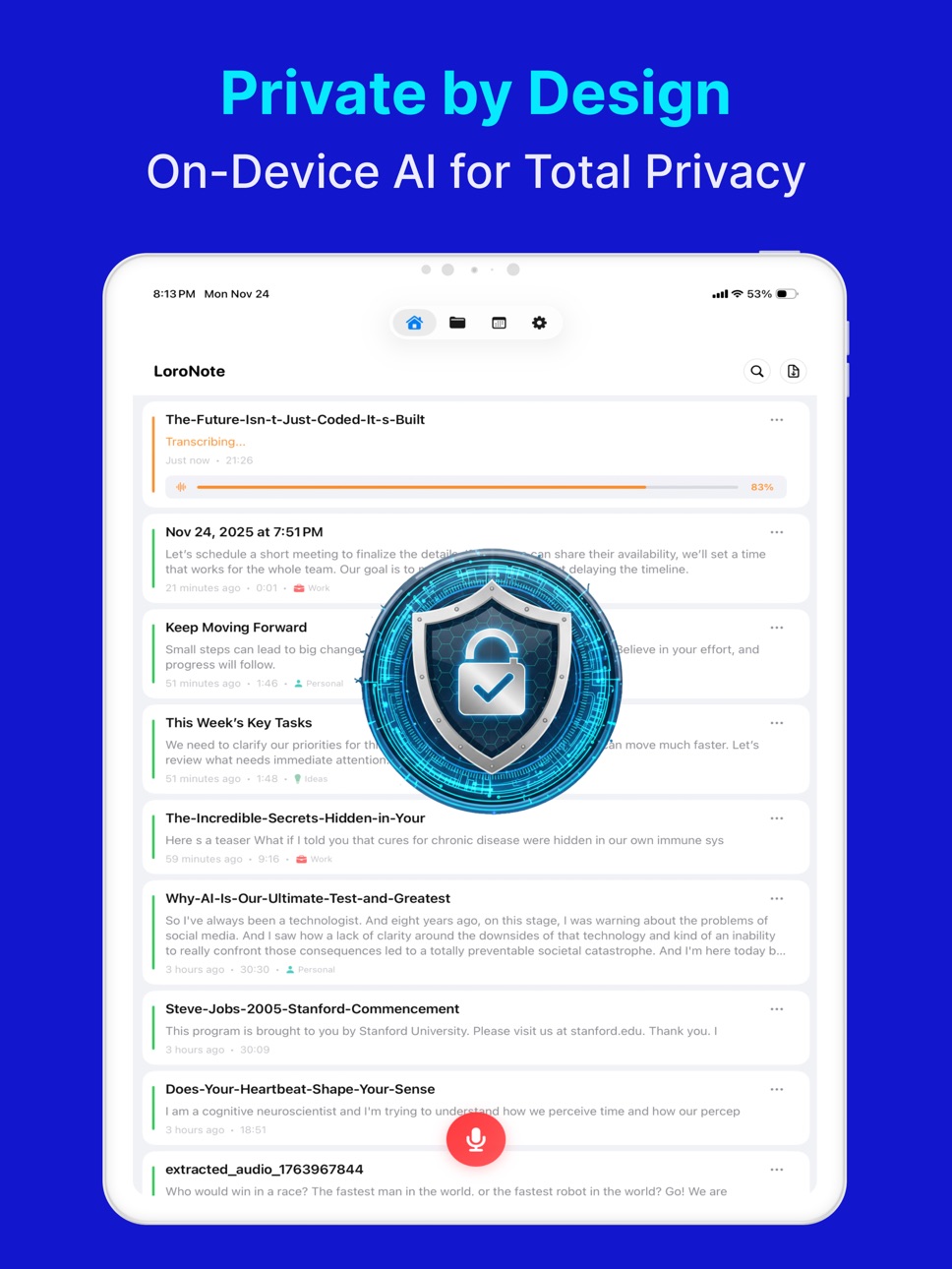
Experience studio-grade accuracy with OpenAI’s Whisper Large V3 Turbo engine, processed 100% on-device for unmatched privacy and security.
■ Why LoroNote?
• Fast & Accurate: High-speed transcription with professional-grade accuracy.
• 100% Private: All audio and text are processed locally on your iPhone. No data ever leaves your device.
• Offline Ready: Works perfectly in Airplane Mode or without internet.
■ Powerful AI Features
▶ On-Device Whisper Large V3 Turbo
We’ve optimized the state-of-the-art Whisper Large V3 Turbo model to run directly on your iPhone. Get the highest possible accuracy and speed available on a mobile device, without the privacy risks or delays of cloud servers.
▶ Apple Intelligence Integration
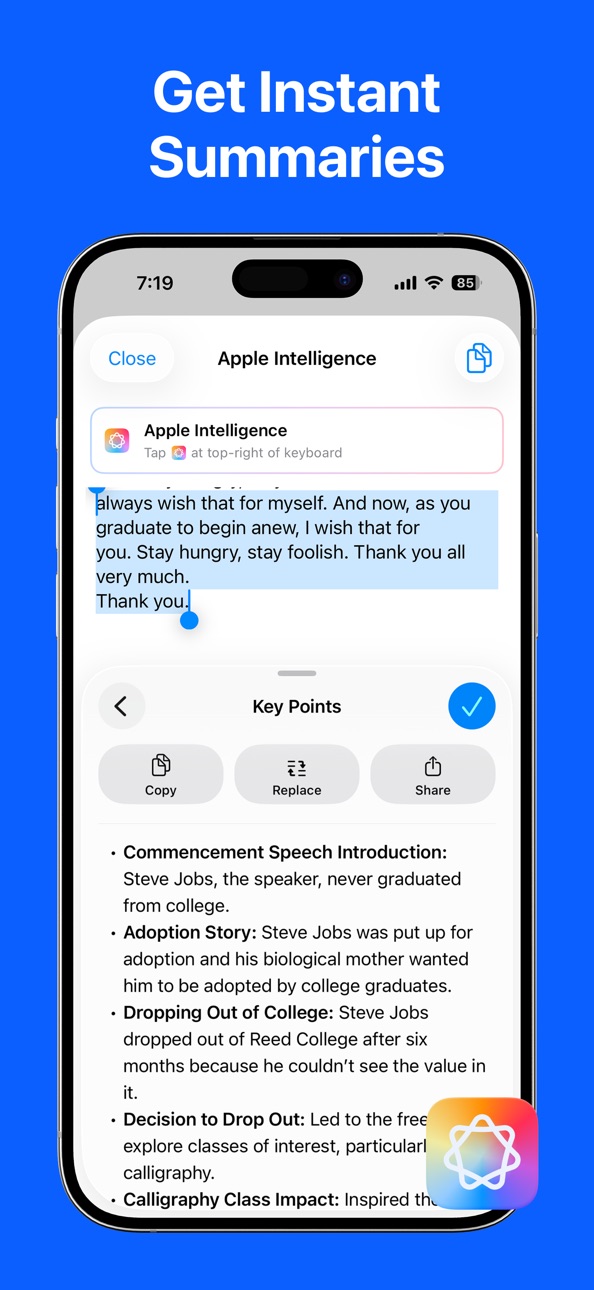
Supercharge your productivity with Apple Intelligence. Instantly summarize hour-long meetings, extract key action items, and refine your notes using the latest on-device AI capabilities.
▶ Speaker Identification
See who's speaking, rename speakers, and share transcripts with speaker labels.
▶ Apple Watch App & Complications
Record ideas, memos, or conversations directly from your wrist. Add complications to your watch face for instant access. Your recordings automatically sync to your iPhone for transcription when connected.
▶ iPad Support
Experience LoroNote on the big screen. Fully optimized for iPad, making it perfect for reviewing transcripts, editing notes, and multitasking with Split View and Slide Over.
▶ Home & Lock Screen Widgets
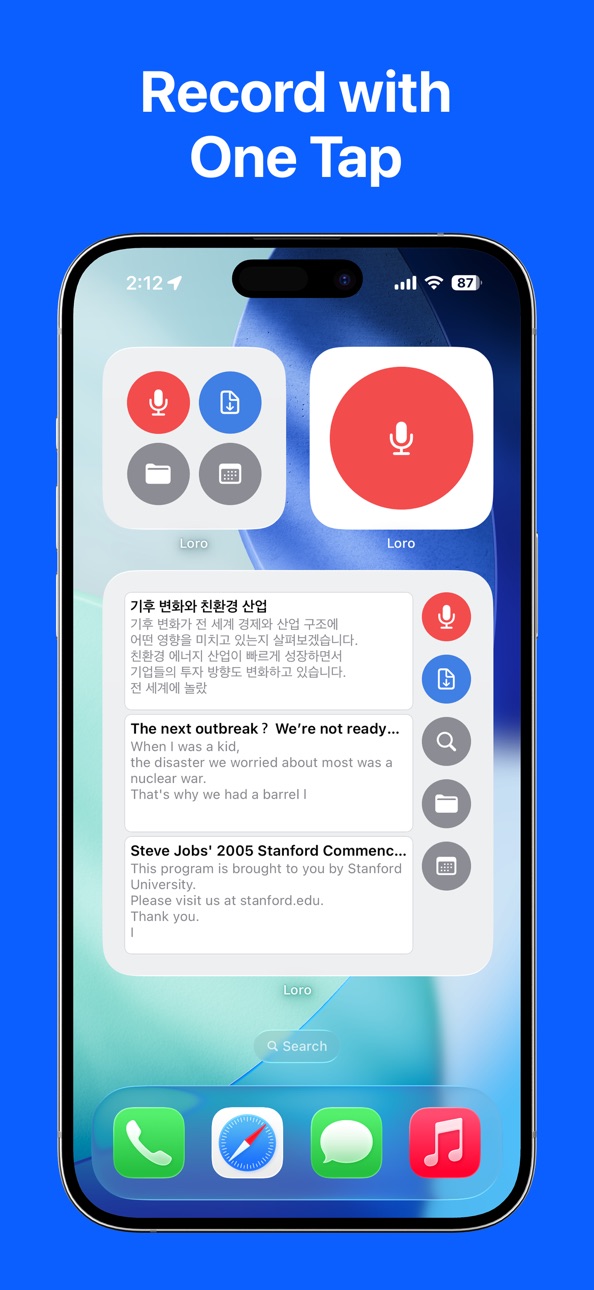
Start recording or access your recent notes instantly with customizable widgets. Capture the moment before it passes.
■ Pro-Grade Tools
▶ Import & Export
• Import Audio/Video: Transcribe mp3, wav, m4a, mp4, mov, and more.
• Export Anywhere: Save as Text (TXT) or Subtitles (SRT). Share to Notes, Files, or any other app.
▶ Smart Organization
• Folders & Calendar: Organize notes by topic or date.
• Search & Replace: Instantly find keywords or batch-replace terms across transcripts.
• Custom Dictionary: Add names, technical jargon, or acronyms for perfect recognition.
▶ Advanced Playback
• Listen while you read with synced text highlighting.
• Edit text easily while listening to the original audio.
■ Supported Languages
Auto-detects and transcribes over 100 languages including English, Spanish, French, German, Japanese, Korean, Chinese, and many more.
■ Recommended For
• Meetings: Securely record sensitive business discussions.
• Students: Transcribe entire lectures for easy review and searching.
• Creators: Generate subtitles (SRT) for your videos in minutes.
• Journalists: Record interviews and get immediate, searchable text.
■ Usage Note
• Supported Devices:
- iPhone 13 or later (2021~)
- iPhone SE 3rd generation (2022~)
- iPad mini 6th generation or later (2021~)
- iPad 11th generation or later (2025~)
- iPad Air M1 or later (2022~)
- iPad Pro M1 or later (2021~)
• LoroNote utilizes your device's powerful GPU for fast, accurate transcription. For the best performance on long recordings, please keep the app open during processing.
■ Customer Support
• Email: support@loronote.com
• Privacy Policy: https://loronote.com/privacy
• Terms of Use: https://www.apple.com/legal/internet-services/itunes/dev/stdeula/
In-App Purchases US pricing
Loro Pro Subscription
Yearly Subscription · Yearly$29.99
Monthly Subscription · Monthly$4.99
One-Time Purchases
Pro Lifetime$39.99
Capabilities
In-App Purchases
Accessibility
ipadiphonemacrealityDevicetvoswatch
Version history 25 versions
Build 887834048v3.62026-07-04 21:36:38
• Identify Speakers — Automatically detects who's speaking and labels conversations by speaker.
• Speaker names & sharing — Rename speakers and share transcripts with speaker labels included.
Build 887571385v3.52026-06-29 15:20:46
• More reliable recording — Recordings auto-save every 3 minutes and whenever you pause, so you never lose a recording.
• Drafts — Saved recordings collect in Settings > Support > Drafts, where you can keep them untranscribed and play, transcribe, or export them anytime.
Build 885652902v3.4.52026-06-05 14:10:21
Improved UI/UX for a cleaner layout, smoother interactions, and a better overall experience.
Build 882610018v3.4.02026-04-28 13:54:58
• App Icon Selection: Switch to a previous version's app logo. Choose your favorite icon in Settings.
• UI/UX Improvements: Refined the interface for a more intuitive and seamless experience.
• Bug Fixes: Resolved minor bugs to improve overall app stability.
Build 882255876v3.3.02026-02-17 21:54:02
• App Icon Selection: Switch to a previous version's app logo. Choose your favorite icon in Settings.
• UI/UX Improvements: Refined the interface for a more intuitive and seamless experience.
• Bug Fixes: Resolved minor bugs to improve overall app stability.
Build 882137978v3.2.52026-02-07 11:50:25
• Apple Watch Complication: Start recording directly from your watch face.
• Widget Improvements: Start recording faster than ever with our redesigned Home & Lock Screen widgets.
• UI/UX Enhancements: We've polished the interface for a smoother, more intuitive experience.
• Performance Boost: Optimized transcription engine for better speed and stability.
Build 882098936v3.1.22026-02-03 10:34:21
• Apple Watch Complication: Start recording directly from your watch face.
• Widget Improvements: Start recording faster than ever with our redesigned Home & Lock Screen widgets.
• UI/UX Enhancements: We've polished the interface for a smoother, more intuitive experience.
• Performance Boost: Optimized transcription engine for better speed and stability.
Build 882032812v3.0.22026-01-31 10:43:30
• You can now restore your purchases automatically, even after reinstalling the app.
• Added Home Screen and Lock Screen widgets for quicker access at a glance.
• Improved overall UI/UX and performance for a smoother experience.
Build 882034276v3.0.42026-01-31 12:10:30
• You can now restore your purchases automatically, even after reinstalling the app.
• Added Home Screen and Lock Screen widgets for quicker access at a glance.
• Improved overall UI/UX and performance for a smoother experience.
Build 881901191v2.1.72026-01-28 03:22:29
Added Apple Watch Complication.
Fixed minor bugs, improved UI/UX, and added a dark mode logo.
Build 881911642v2.1.82026-01-28 04:48:46
Added Apple Watch Complication.
Fixed minor bugs, improved UI/UX, and added a dark mode logo.
Build 881915995v2.2.02026-01-28 08:21:12
Added Apple Watch Complication.
Fixed minor bugs, improved UI/UX, and added a dark mode logo.
Build 881793374v2.12026-01-24 10:50:19
- Try it free first: 2 minutes of transcription per note
- Apple Watch complications now supported
- Improved Calendar UI/UX
Build 881735042v2.02026-01-22 09:12:00
- Improved transcription speed
- UI/UX improvements
Build 881684025v1.9.52026-01-21 22:42:35
• Added Resume Transcription.
• Minor bug fixes and UI/UX improvements.
Build 881177060v1.92026-01-04 01:31:57
• Added Resume Transcription.
• Minor bug fixes and UI/UX improvements.
Build 880758359v1.8.12025-12-17 20:42:30
• Boosted accuracy with the new Custom Word Dictionary — save names, acronyms, and terms so they’re recognized correctly.
• New Search & Replace — fix repeated words or phrases across your transcripts in seconds.
• Save storage with “Delete Audio Only” — keep the transcript text while removing the audio file.
Build 880504491v1.7.52025-12-12 20:48:12
- Improved overall UI/UX for a smoother experience
- Added protection to prevent accidental deletion of all data in Settings
Build 880470389v1.72025-12-10 02:18:05
• Added support for Apple Intelligence.
• Minor bug fixes and UI/UX improvements.
Build 880330295v1.6.32025-12-05 17:05:22
■ A Fresh New LoroNote Icon
We’ve redesigned the LoroNote app icon with a cleaner, more polished look.
Check out the new logo on your Home Screen!
■ Other Improvements
• Overall stability enhancements
• Small UI refinements for a smoother experience
Build 880189957v1.62025-12-02 13:27:19
- Added full Apple Watch support.
- Fixed an issue where recordings could stop after the app stayed in the background for an extended time while paused.
Build 880094286v1.52025-11-28 09:22:35
Enjoy a smoother, more stable experience with this update’s bug fixes and performance enhancements.
Build 879391968v1.42025-11-25 22:03:32
LoroNote is even more powerful and convenient with the v1.4 update!
Reflecting your valuable feedback, we've added full iPad support and features for video creators.
■ Full iPad Support
Enjoy recording on a larger screen. Work seamlessly between iPhone and iPad via iCloud sync.
■ Video Transcription & SRT Export
You can now import video files (mp4, mov, etc.) for text conversion. Export the results directly as subtitle files (.srt), making it perfect for video creation.
■ Instant Recording on Launch
Never miss a moment. Enable this feature in settings to start recording immediately as soon as the app opens.
■ Remove Punctuation Option
Need text without commas or question marks? You can now choose to automatically remove punctuation in the transcription settings.
■ Improved Stability
Overall app optimization provides a faster and more stable experience.
Build 879163294v1.3.12025-10-28 08:27:03
iOS 26 Liquid Glass is here! Plus, we found and patched a number of hard-to-spot bugs.
Build 878910503v1.32025-10-16 07:48:04
Improved performance and stability
Price history by region
Currency
Show
Columns
Search
Availability 1 of 1 storefronts
| Region | Language | Price | Ratings | Avg | Version |
|---|---|---|---|---|---|
| US | en-US | Free | 42 | 4.8 | 3.6 |
Change log 29 changes · US
✎
releaseNotes updated
• Identify Speakers — Automatically detects who's speaking and labels conversations by speaker.
• Speaker names & sharing — Rename speakers and share transcript
✎
description updated
LoroNote is the ultimate AI transcription voice recorder.
Experience studio-grade accuracy with OpenAI’s Whisper Large V3 Turbo engine, processed 100% on-device
✎
subtitle updated
Transcribe audio to text, STT
✎
name updated
LoroNote - Speech to Text
◆
Version 3.6 released
• Identify Speakers — Automatically detects who's speaking and labels conversations by speaker.
• Speaker names & sharing — Rename speakers and share transcripts with speaker labels included.
◆
Version 3.5 released
• More reliable recording — Recordings auto-save every 3 minutes and whenever you pause, so you never lose a recording.
• Drafts — Saved recordings collect in Settings > Support > Drafts, where you can keep them untranscribed and play, tran
◆
Version 3.4.5 released
Improved UI/UX for a cleaner layout, smoother interactions, and a better overall experience.
◆
Version 3.4.0 released
• App Icon Selection: Switch to a previous version's app logo. Choose your favorite icon in Settings.
• UI/UX Improvements: Refined the interface for a more intuitive and seamless experience.
• Bug Fixes: Resolved minor bugs to improve over
◆
Version 3.3.0 released
• App Icon Selection: Switch to a previous version's app logo. Choose your favorite icon in Settings.
• UI/UX Improvements: Refined the interface for a more intuitive and seamless experience.
• Bug Fixes: Resolved minor bugs to improve over
◆
Version 3.2.5 released
• Apple Watch Complication: Start recording directly from your watch face.
• Widget Improvements: Start recording faster than ever with our redesigned Home & Lock Screen widgets.
• UI/UX Enhancements: We've polished the interface for a smoo
◆
Version 3.1.2 released
• Apple Watch Complication: Start recording directly from your watch face.
• Widget Improvements: Start recording faster than ever with our redesigned Home & Lock Screen widgets.
• UI/UX Enhancements: We've polished the interface for a smoo
◆
Version 3.0.4 released
• You can now restore your purchases automatically, even after reinstalling the app.
• Added Home Screen and Lock Screen widgets for quicker access at a glance.
• Improved overall UI/UX and performance for a smoother experience.
◆
Version 3.0.2 released
• You can now restore your purchases automatically, even after reinstalling the app.
• Added Home Screen and Lock Screen widgets for quicker access at a glance.
• Improved overall UI/UX and performance for a smoother experience.
◆
Version 2.2.0 released
Added Apple Watch Complication.
Fixed minor bugs, improved UI/UX, and added a dark mode logo.
◆
Version 2.1.8 released
Added Apple Watch Complication.
Fixed minor bugs, improved UI/UX, and added a dark mode logo.
◆
Version 2.1.7 released
Added Apple Watch Complication.
Fixed minor bugs, improved UI/UX, and added a dark mode logo.
◆
Version 2.1 released
- Try it free first: 2 minutes of transcription per note
- Apple Watch complications now supported
- Improved Calendar UI/UX
◆
Version 2.0 released
- Improved transcription speed
- UI/UX improvements
◆
Version 1.9.5 released
• Added Resume Transcription.
• Minor bug fixes and UI/UX improvements.
◆
Version 1.9 released
• Added Resume Transcription.
• Minor bug fixes and UI/UX improvements.
◆
Version 1.8.1 released
• Boosted accuracy with the new Custom Word Dictionary — save names, acronyms, and terms so they’re recognized correctly.
• New Search & Replace — fix repeated words or phrases across your transcripts in seconds.
• Save storage with “Delete
◆
Version 1.7.5 released
- Improved overall UI/UX for a smoother experience
- Added protection to prevent accidental deletion of all data in Settings
◆
Version 1.7 released
• Added support for Apple Intelligence.
• Minor bug fixes and UI/UX improvements.
◆
Version 1.6.3 released
■ A Fresh New LoroNote Icon
We’ve redesigned the LoroNote app icon with a cleaner, more polished look.
Check out the new logo on your Home Screen!
■ Other Improvements
• Overall stability enhancements
• Small UI refinements for a smoother
◆
Version 1.6 released
- Added full Apple Watch support.
- Fixed an issue where recordings could stop after the app stayed in the background for an extended time while paused.
◆
Version 1.5 released
Enjoy a smoother, more stable experience with this update’s bug fixes and performance enhancements.
◆
Version 1.4 released
LoroNote is even more powerful and convenient with the v1.4 update!
Reflecting your valuable feedback, we've added full iPad support and features for video creators.
■ Full iPad Support
Enjoy recording on a larger screen. Work seamlessly b
◆
Version 1.3.1 released
iOS 26 Liquid Glass is here! Plus, we found and patched a number of hard-to-spot bugs.
◆
Version 1.3 released
Improved performance and stability