Home › Business

Timora - Automated Payroll App
Automated Payroll System in Ph
 US
US
1 of 1 storefronts
Content in en-US
Content in en-US
Information
Preview 2 platforms
iPhone 10 images





iPad 3 images


What’s New Version 1.11.0
What’s New?
NPGH Feature-Gated Customizations:
Added company-code and permission-gated workflows for STAGING, NPGH, and PAGUIATEST.
Meal Stub Management:
Added employee, scanner, and admin meal stub flows with QR preview/redeem, assignment, voiding, filtering, and pagination.
On-Call Attendance:
Added employee on-call records and admin approval/rejection workflow for unscheduled attendance.
Overtime Offset:
Added admin overtime offset preview, apply, reverse, history, and attendance refresh flows.
Late/Undertime Templates:
Added admin management and simulation support for late and undertime deduction templates.
NPGH Payroll and Payslip Policy Display:
Added backend-owned half-day, credited work, overtime offset, and on-call impact display in attendance, payroll, payslip, and PDF outputs.
Description
Timora App - Payroll System
All Employee Features:
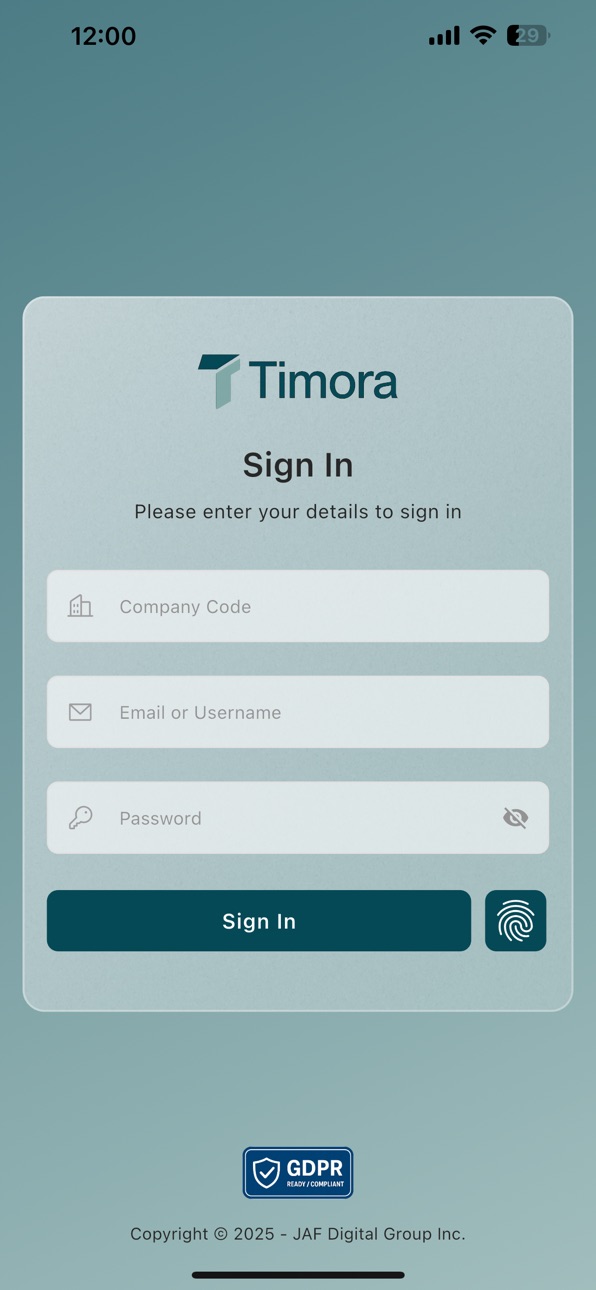
- Multi-Tenant Login
- Biometrics Login
- Face Recognition
- Fingerprint
- Remember Me Functionality
- Employee 201 File Management
- Update Profile Picture
- Update Employee Information
- Employee Attendance Request
- Employee Leave Request
- Employee Official Business Request
- Employee Overtime Request
- Timekeeping Features
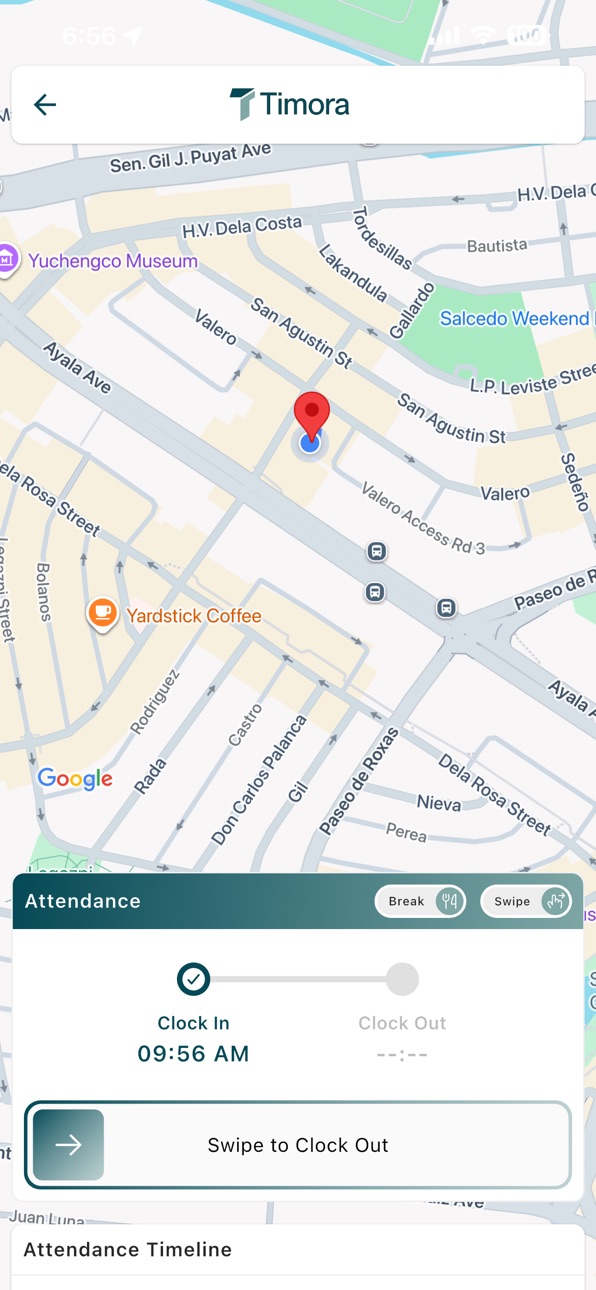
- Clock In/Out
- Clock In/Out with Photo
- Clock In/Out with Late Status Box
- Biometric Auto Clock-In/Out
- Google Maps Integration
- Attendance Timeline
- Advanced Calendar Feature
- Leave Overview
- Attendance Filtering
- Role-Based Authentication
- Quick Login with Password-only
- Privacy Policy
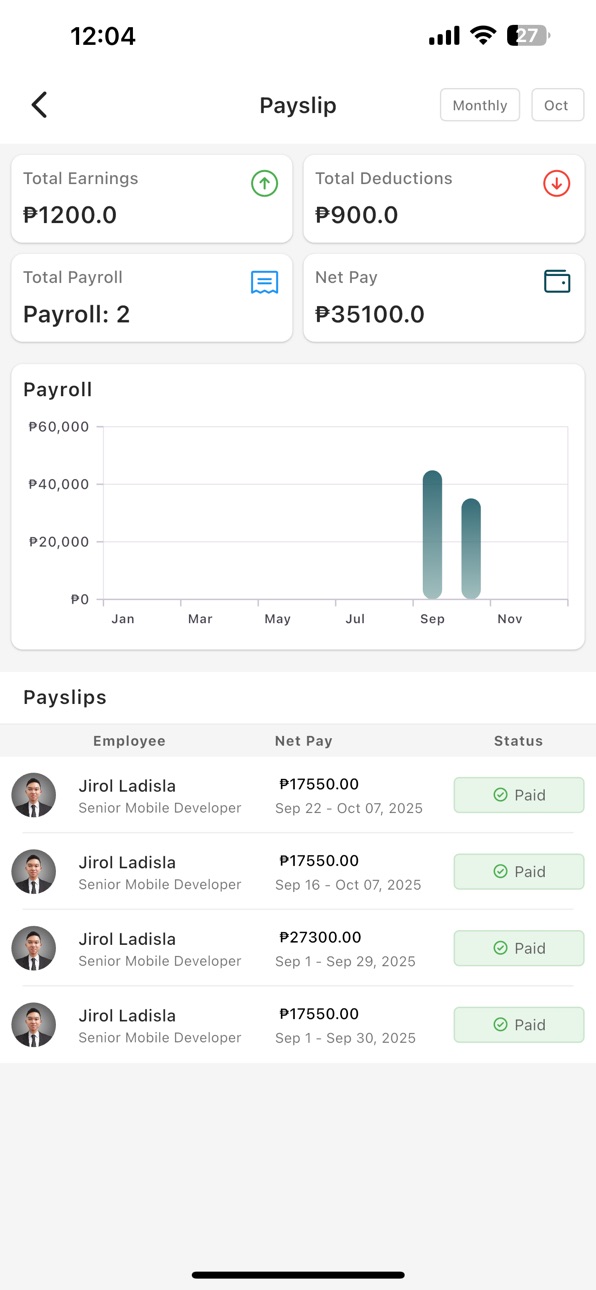
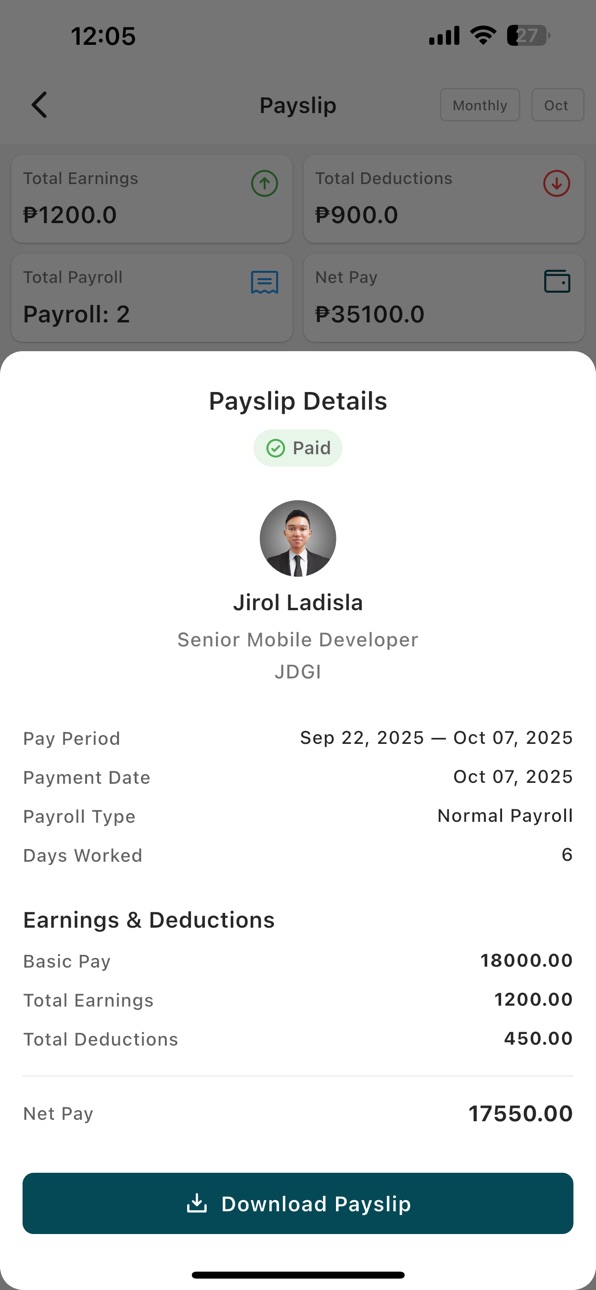
- Payslip Management
- Generate PDF File of Payslip
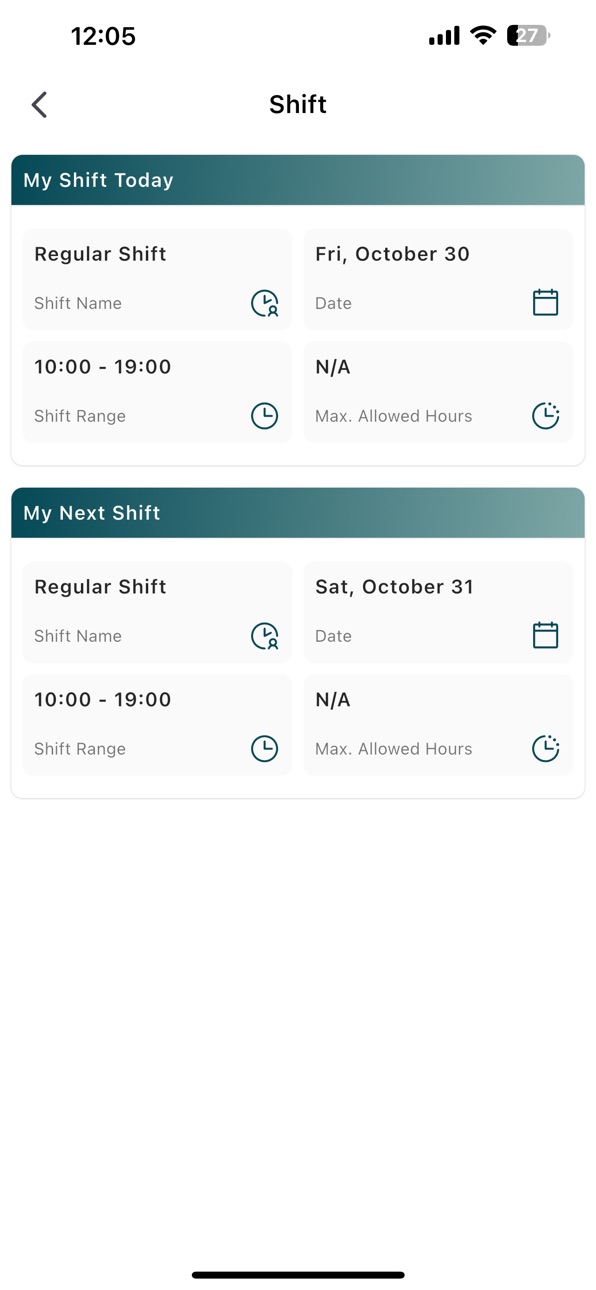
- Shift and Schedule - Employee
- Holiday Feature
- AI Chatbot
- App Notifications
- Resignation Request
- Violation Viewing
All Admin Features:
- Admin Dashboard
- Attendance Overview
- Payroll Overview
- Overtime Overview
- Birthday Reminders
- Employee Clock In/Out Monitor
- Employee Management
- Add Employee
- Edit Employee
- View Employee Details
- Employee List
- HRM - All Employee Requests
- Attendance Request Management
- Leave Request Management
- Official Business Request Management
- Overtime Request Management
- Attendance Management
- Admin Attendance Request Approval
- Attendance Settings
- Geofence Management
- Add/Edit Geofence
- Assign Geofence to Employees
- Approval Settings
- Leave Management
- Admin Leave Request Approval
- Leave Type Settings
- Official Business Management
- Admin Official Business Request Approval
- Overtime Management
- Admin Overtime Request Approval
- Payroll Management
- Process Payroll
- 13th Month Pay Processing
- Generate Payslip
- Edit Processed Payroll
- Payroll Items
- SSS Contributions
- PhilHealth Contributions
- Withholding Tax
- Overtime Table
- De Minimis
- Earnings
- Allowances
- Deductions
- Earnings Management
- Add/Edit Earnings
- Assign Earnings to Employees
- Deductions Management
- Add/Edit Deductions
- Assign Deductions to Employees
- Allowances Management
- Add/Edit Allowances
- De Minimis Management
- Assign De Minimis to Employees
- Bank Management
- Payroll Batch Settings
- Payroll Batch Users
- Payroll Reports
- Generate Payroll Reports
- Alphalist Reports
- Generate Alphalist Reports
- SSS Reports
- Generate SSS Reports
- Shift and Schedule Management
- Add/Edit Shift
- Shift List
- Assign Shift to Employees
- Holiday Management
- Add/Edit Holiday
- Holiday Exception Management
- Assign Holiday Exception to Users
- Biometric Device Management
- Add/Edit Biometric Device
- Biometric Device List
- Asset Management
- Add/Edit Asset
- Admin Asset List
- Employee Asset Assignment
- Asset History
- Branch Management
- Add Branch
- View Branch Details
- Department Management
- Designation Management
- Roles Management
- Violation Management
- View Violations
- Violation Details
- Company Policies Management
- Add/Edit Policy
- Policy Document Upload
- Announcement Management
- Custom Fields Management
- Add/Edit Custom Field
- Billing Management
- Admin Settings
- Attendance Settings
- Geofence Management
- Approval Workflow Settings
Accessibility
ipadiphonemacrealityDevicetvoswatch
Version history 25 versions
Build 886824121v1.11.02026-06-11 19:26:15
What’s New?
NPGH Feature-Gated Customizations:
Added company-code and permission-gated workflows for STAGING, NPGH, and PAGUIATEST.
Meal Stub Management:
Added employee, scanner, and admin meal stub flows with QR preview/redeem, assignment, voiding, filtering, and pagination.
On-Call Attendance:
Added employee on-call records and admin approval/rejection workflow for unscheduled attendance.
Overtime Offset:
Added admin overtime offset preview, apply, reverse, history, and attendance refresh flows.
Late/Undertime Templates:
Added admin management and simulation support for late and undertime deduction templates.
NPGH Payroll and Payslip Policy Display:
Added backend-owned half-day, credited work, overtime offset, and on-call impact display in attendance, payroll, payslip, and PDF outputs.
Build 886665932v1.10.12026-06-08 18:09:43
What's new:
- Improved Attendance Location Handling: Clock-in and clock-out now handle optional location coordinates based on attendance settings
- More Reliable Organization Filters: Admin filters for branches, departments, designations, and employees are more stable across different API response formats
- Enhanced Payslip PDF Generation: Payslip PDFs now better support dynamic earnings, allowances, deductions, and loan deduction items
Build 885423319v1.10.02026-05-08 21:07:53
App Version Check:
1. Better Release Notes Display – View what's new in a clearer, easier-to-read format
2. Improved Update Notifications – Enhanced app update messages with better information and design
Build 885324313v1.9.0+952026-05-06 16:33:28
Added
User Management:
You can now edit data access levels to customize what each user or role can view or edit.
You can manage user permissions to assign, modify, or revoke specific actions for individual users.
You can create and delete custom roles to align with your team structure and remove unused ones.
Leave Settings:
You can now assign leave types to users.
You can now edit and delete the assigned leave types to certain users.
You can now change or configure your leave types settings.
Free Meal Management:
Meal Stub – View and manage your company meal stubs with QR code for easy redemption
Meal Stub Scanner – Scan and redeem employee meal stubs using QR code
Admin Meal Stub Management – Full list and detail view for admins with sidebar shortcuts
Permission-Based Access – Meal stub features are shown only to specific clients
Fixes
Admin Attendance – Enhanced User Data Display: Improved display of user information using embedded attendance data
Build 884881344v1.8.2+942026-04-24 20:09:00
- Fixed an issue where some payslips wouldn’t load properly. You can now view your payslips smoothly without errors.
Build 884755631v1.8.1+932026-04-21 20:37:00
What’s New
- We've added "Date Filed" fields to all your requests (leave, attendance, overtime, breaks, and official business) so you can easily track when you submitted them.
- We've improved error handling across all request types by removing technical jargon and providing clearer, user-friendly feedback.
Build 884539478v1.8.0+922026-04-15 18:58:06
- Forgot password feature allows user to reset their password thru the app by sending OTP to their email and verify it on app.
Build 884188563v1.7.3+912026-04-08 07:46:07
Added
- Added LoginErrorHandler to provide user-friendly error messages during login.
- Added AttendanceErrorHandler for clearer error handling in attendance-related actions.
- Implemented “still waiting” notifications for long-running operations.
- Standardized empty state handling across multiple screens using EmptyStateWidget.
Fixed
- Fixed attendance clock in/out logic. Users with a backdated clock-in and no clock-out can now clock in for the current day on Fixed Shift.
Improved
- Refactored update forms for better readability and maintainability.
- Enhanced validation logic and error handling during form submission.
- Increased API timeout durations to better support slow network conditions.
Build 883700422v1.7.1+892026-03-24 21:38:40
- Attendance clock in/out logic adjusted. Users who have a backdated clock in without a clock out can now clock in today.
Build 883459211v1.7.0+882026-03-17 17:16:37
Added
- Introduced Offline Clock-In, allowing users to clock in even without an internet connection. The data will sync automatically once the device reconnects.
Fixed
- Resolved an issue with automatic refresh in the Shift Screen, ensuring shifts update properly without needing manual refresh.
- Adjusted the mobile interface to match the web version, providing a more consistent and familiar user experience across platforms.
Build 883202957v1.6.3+852026-03-10 19:46:53
- Fixed an issue where some Earnings and Deduction items were missing in the generated payslip.
- Improved attendance loading error handling so Clock In and Clock Out buttons remain visible even if attendance data fails to load.
Build 883081362v1.6.2+832026-03-06 17:30:14
Added
• Searchable dropdowns across multiple modules (Organization Filter, Holiday Exception, Payroll Processing, Deminimis, Payroll Batch Users, Designation, and Batch Assignment)
• Branch search for Payroll Reports
• Dynamic default filters for Leave Requests (Employee and Admin)
• Employee 201 File tabs: Assets, Attachments, Policy, and Leaves
• Empty state indicators for new tab sections
• Overtime Request now requires photo capture for clock in and clock out
• White background for searchable dropdown UI
• Company Screen now replaces All Employee Requests when admin access is unavailable
Fixed
• Salary and bank details display issues
• Payroll Batch Settings create and update dialog errors
• Leave Type creation error replaced with proper field validation
• “Currently working here” checkbox now hides the end date field correctly
• Geofence expiration date issue
• Empty state flickering in tab sections
• Admin Dashboard user permission issue
• Attendance loading error removed so clock in/out buttons remain visible
Build 882726512v1.6.1+812026-02-24 23:15:06
- Fixed branch address layout issue in Payslip screen.
Build 882701303v1.6.0+792026-02-23 21:13:55
- Introduced an enhanced Admin Dashboard with improved data visibility, pull-to-refresh, and automatic data updates.
- Added full Branch Management, allowing administrators to create, update, delete, and manage branches with real-time refresh support.
- Added Employee Management with complete control over employee records, including creation, updates, activation, deactivation, and deletion.
- Enhanced Employee Profile management, enabling updates to personal details, emergency contacts, family information, education history, work experience and viewing of their data like assets, attachments, leave credits, and policies.
- Implemented Salary Record management, allowing administrators to create, update, delete, and refresh employee salary information.
- Added Department and Designation management with full create, update, and delete functionality.
- Added Policy Management, including support for target types and streamlined policy creation, updates, and deletion.
- Added Holiday and Holiday Exception management, enabling easier scheduling, activation, deactivation, and administration of exceptions.
- Added Leave, Official Business, Overtime, and Attendance Request handling, allowing administrators to review, approve, reject, update, and delete requests efficiently.
- Added Asset Settings management, enabling administrators to view assets history and create, update, and delete company assets.
- Added Employee Asset management, allowing administrators to assign and track company-issued assets.
- Added Payroll Processing capabilities, supporting normal payroll and 13th-month payroll generation, individual and bulk processing, and payroll deletion.
- Added Generated Payslip management, allowing viewing, reverting, and bulk deletion of normal and 13th-month payslips.
- Added Payroll Items management, including SSS, PhilHealth, Withholding Tax, overtime, de minimis, earnings, deductions, and allowances where you can create, update, and delete said benefits.
- Expanded Earnings, Deductions, Allowances, and De Minimis management, including employee assignment, deletion, updates and automated data refresh.
- Added Payroll Batch Settings and Payroll Batch User management to better control payroll grouping and processing.
- Added Bank and Custom Field Settings to support more flexible payroll and employee configurations.
- Added Biometrics, Leave Type, Approval and Attendance Settings.
- Added Geofencing Management and user assignment to better support location-based attendance tracking.
- Added Payroll, Alphalist, and SSS report generation with improved refresh and usability.
- Added Shift Management and Shift List administration for better workforce scheduling.
Build 882563494v1.5.8+762026-02-18 22:30:26
Fixed an issue that sometimes prevented users from submitting a leave request.
Build 882403520v1.5.7+752026-02-13 22:35:05
Added support for incomplete previous-day clock-ins. Users can now clock out missed sessions or proceed with today’s clock-in without conflicts.
Build 882328866v1.5.6+742026-02-10 23:32:37
- Added null safety in payslip information
Build 882292687v1.5.5+732026-02-09 22:28:45
Added automatic rest day detection & rest day clock-in support
Build 882223811v1.5.4+722026-02-06 14:03:38
• Added dynamic branch logo display in payslips
• Improved pay period formatting with a more reliable date conversion
• Introduced attendance analytics for better tracking and insights
Build 882104743v1.5.3+712026-02-03 18:08:31
Integrated new user-shifts endpoint for reliable shift detection
Build 882003701v1.5.2+702026-01-30 19:05:43
What’s New in v1.5.2
Leave and OB Request Improvements
• Improved system stability to prevent duplicate submissions and app crashes
• Fixed an issue where repeatedly tapping Add or Request created duplicate Leave and OB entries
• Resolved critical bug W-34 that caused crashes when multiple leave requests were submitted rapidly
Profile Information Validation Enhancements
Basic Information
• Added character limits to all editable fields to prevent overly long inputs
• Improved contact number validation with proper type selection
Personal Information
• Converted Nationality, Religion, and Civil Status from free text to dropdown selections
• Applied character limits to all text fields for better data consistency
Emergency Contact
• Added name validation to block numbers, invalid symbols, and excessive length
• Converted Relationship field to standardized dropdown options
• Implemented phone number format validation
Family Information
• Added name validation to prevent invalid characters and excessive length
• Converted Relationship field to standardized dropdown options
• Implemented phone number format validation
Education Details
• Added character limits to Institution Name and Course fields
• Fixed End Date validation to prevent future dates and support ongoing education
Company Information
• Added character limits to Company Name and Designation fields
• Fixed End Date validation to prevent future date selection
User Interface Improvements
• Improved Holiday List readability by shortening month names, for example December to Dec
Build 881844790v1.5.1+692026-01-26 17:30:00
Version 1.5.1 - What's New
NEW SECURITY FEATURES
- Developer Options Detection - Comprehensive security feature to detect and prevent fake GPS usage by detecting when Android Developer Options are enabled
- Triple-layer detection system using Android native settings checks for maximum reliability
- Non-dismissible security dialog with step-by-step instructions to disable Developer Options
- Automatic detection on app launch and when app resumes from background
SECURITY IMPROVEMENTS
- Enhanced session expiry detection to handle HTTP 302 and 301 redirect responses
- Automatic forced logout when session expires with user-friendly notification
- Prevention of multiple simultaneous logout attempts for cleaner user experience
BUG FIXES
- Fixed dynamic base URL configuration to use tenant-specific URLs instead of hardcoded demo URL
- Fixed password change validation to correctly detect numbers in passwords
- Fixed Cupertino date picker UI overflow on smaller screens by increasing picker height
- Fixed missing display of maximum allowed hours in shift details
- Added support for grace period display in shift information
USER INTERFACE IMPROVEMENTS
- Improved change password dialog with real-time validation indicators
- Independent visibility toggles for each password field
- Automatic space removal from password input
- Submit button disabled until all password requirements are met
- Scrollable dialog support for small screens
- Better date picker layout with proper spacing and no overflow
API AND NETWORKING
- Disabled auto-follow redirects to properly intercept session expiry responses
- Enhanced API base URL validation
- Improved error handling and user feedback throughout the app
Build 881478752v1.4.2+662026-01-14 15:39:42
Fixed
• Critical login issue when server doesn't return tenant information
• Improved error handling for incomplete API responses
• Better stability when logging in across different server environments
Enhanced
• More resilient login system with fallback mechanisms
• Backward compatible with all server configurations
Build 880173739v1.2.1+602025-11-29 01:43:41
What's New in Version 1.2.1
1. Added Get Started Text Button in Login
Build 879972325v1.2.0+592025-11-22 19:40:06
What's New in Version 1.2.0
1. Admin Experience Enhanced
New Admin Shortcuts: Quickly switch between Employee and Admin views with one tap
Smart Admin Sidebar: Menu items now show/hide based on your permissions
Admin Portal Access: New button in settings for users with admin privileges
Profile Indicator: Admin users now have a colored border on their profile picture
2. Attendance Management
No Clock-In Tracking: Admins can now see which employees haven't clocked in yet
Real Profile Pictures: Employee avatars now show actual photos instead of generic icons
Better Time Display: All times now show in 12-hour format (AM/PM) for easier reading
3. Improved Interface
Simplified Birthday Widget: Cleaner design showing today's birthdays first
Unified Request Screens: Consistent look across all attendance, leave, and overtime screens
Smoother Performance: Reduced server calls by 96% for faster loading
4. Bug Fixes
Fixed rate limiting errors for admin users
Resolved permission loading issues when switching modes
Fixed UI overflow issues in company settings
Improved error handling throughout the app
5. Performance improvements and enhanced user experience across all features.
No pricing data captured yet — comparisons appear once the app has paid storefronts or in-app purchases.
Availability 1 of 1 storefronts
| Region | Language | Price | Ratings | Avg | Version |
|---|---|---|---|---|---|
| US | en-US | Free | 0 | — | 1.11.0 |
Change log 29 changes · US
✎
releaseNotes updated
What’s New?
NPGH Feature-Gated Customizations:
Added company-code and permission-gated workflows for STAGING, NPGH, and PAGUIATEST.
Meal Stub Management:
Add
✎
description updated
Timora App - Payroll System
All Employee Features:
- Multi-Tenant Login
- Biometrics Login
- Face Recognition
- Fingerprint
- Remember Me Functionality
- E
✎
subtitle updated
Automated Payroll System in Ph
✎
name updated
Timora - Automated Payroll App
◆
Version 1.11.0 released
What’s New?
NPGH Feature-Gated Customizations:
Added company-code and permission-gated workflows for STAGING, NPGH, and PAGUIATEST.
Meal Stub Management:
Added employee, scanner, and admin meal stub flows with QR preview/redeem, assignme
◆
Version 1.10.1 released
What's new:
- Improved Attendance Location Handling: Clock-in and clock-out now handle optional location coordinates based on attendance settings
- More Reliable Organization Filters: Admin filters for branches, departments, designations, a
◆
Version 1.10.0 released
App Version Check:
1. Better Release Notes Display – View what's new in a clearer, easier-to-read format
2. Improved Update Notifications – Enhanced app update messages with better information and design
◆
Version 1.9.0+95 released
Added
User Management:
You can now edit data access levels to customize what each user or role can view or edit.
You can manage user permissions to assign, modify, or revoke specific actions for individual users.
You can create and dele
◆
Version 1.8.2+94 released
- Fixed an issue where some payslips wouldn’t load properly. You can now view your payslips smoothly without errors.
◆
Version 1.8.1+93 released
What’s New
- We've added "Date Filed" fields to all your requests (leave, attendance, overtime, breaks, and official business) so you can easily track when you submitted them.
- We've improved error handling across all request types by
◆
Version 1.8.0+92 released
- Forgot password feature allows user to reset their password thru the app by sending OTP to their email and verify it on app.
◆
Version 1.7.3+91 released
Added
- Added LoginErrorHandler to provide user-friendly error messages during login.
- Added AttendanceErrorHandler for clearer error handling in attendance-related actions.
- Implemented “still waiting” notifications for long-running
◆
Version 1.7.1+89 released
- Attendance clock in/out logic adjusted. Users who have a backdated clock in without a clock out can now clock in today.
◆
Version 1.7.0+88 released
Added
- Introduced Offline Clock-In, allowing users to clock in even without an internet connection. The data will sync automatically once the device reconnects.
Fixed
- Resolved an issue with automatic refresh in the Shift Screen, ensu
◆
Version 1.6.3+85 released
- Fixed an issue where some Earnings and Deduction items were missing in the generated payslip.
- Improved attendance loading error handling so Clock In and Clock Out buttons remain visible even if attendance data fails to load.
◆
Version 1.6.2+83 released
Added
• Searchable dropdowns across multiple modules (Organization Filter, Holiday Exception, Payroll Processing, Deminimis, Payroll Batch Users, Designation, and Batch Assignment)
• Branch search for Payroll Reports
• Dynamic default fi
◆
Version 1.6.1+81 released
- Fixed branch address layout issue in Payslip screen.
◆
Version 1.6.0+79 released
- Introduced an enhanced Admin Dashboard with improved data visibility, pull-to-refresh, and automatic data updates.
- Added full Branch Management, allowing administrators to create, update, delete, and manage branches with real-time ref
◆
Version 1.5.8+76 released
Fixed an issue that sometimes prevented users from submitting a leave request.
◆
Version 1.5.7+75 released
Added support for incomplete previous-day clock-ins. Users can now clock out missed sessions or proceed with today’s clock-in without conflicts.
◆
Version 1.5.6+74 released
- Added null safety in payslip information
◆
Version 1.5.5+73 released
Added automatic rest day detection & rest day clock-in support
◆
Version 1.5.4+72 released
• Added dynamic branch logo display in payslips
• Improved pay period formatting with a more reliable date conversion
• Introduced attendance analytics for better tracking and insights
◆
Version 1.5.3+71 released
Integrated new user-shifts endpoint for reliable shift detection
◆
Version 1.5.2+70 released
What’s New in v1.5.2
Leave and OB Request Improvements
• Improved system stability to prevent duplicate submissions and app crashes
• Fixed an issue where repeatedly tapping Add or Request created duplicate Leave and OB entries
• Resolv
◆
Version 1.5.1+69 released
Version 1.5.1 - What's New
NEW SECURITY FEATURES
- Developer Options Detection - Comprehensive security feature to detect and prevent fake GPS usage by detecting when Android Developer Options are enabled
- Triple-layer detection system u
◆
Version 1.4.2+66 released
Fixed
• Critical login issue when server doesn't return tenant information
• Improved error handling for incomplete API responses
• Better stability when logging in across different server environments
Enhanced
• More resilient login syste
◆
Version 1.2.1+60 released
What's New in Version 1.2.1
1. Added Get Started Text Button in Login
◆
Version 1.2.0+59 released
What's New in Version 1.2.0
1. Admin Experience Enhanced
New Admin Shortcuts: Quickly switch between Employee and Admin views with one tap
Smart Admin Sidebar: Menu items now show/hide based on your permissions
Admin Portal Access: New but