Home › Music

 US
US
1 of 1 storefronts
Content in en-US
Content in en-US
Information
Apple ID6748915689
Bundle IDcom.arcadebuilds.tuneo
SellerSeller
Min iOS26.0
Min macOS26.0
Device familiesiphone, ipad
Released2025-08-07
Copyright© Aashish Koshti & arcade.build
Privacy policyLink ↗
Preview 2 platforms
iPhone 8 images
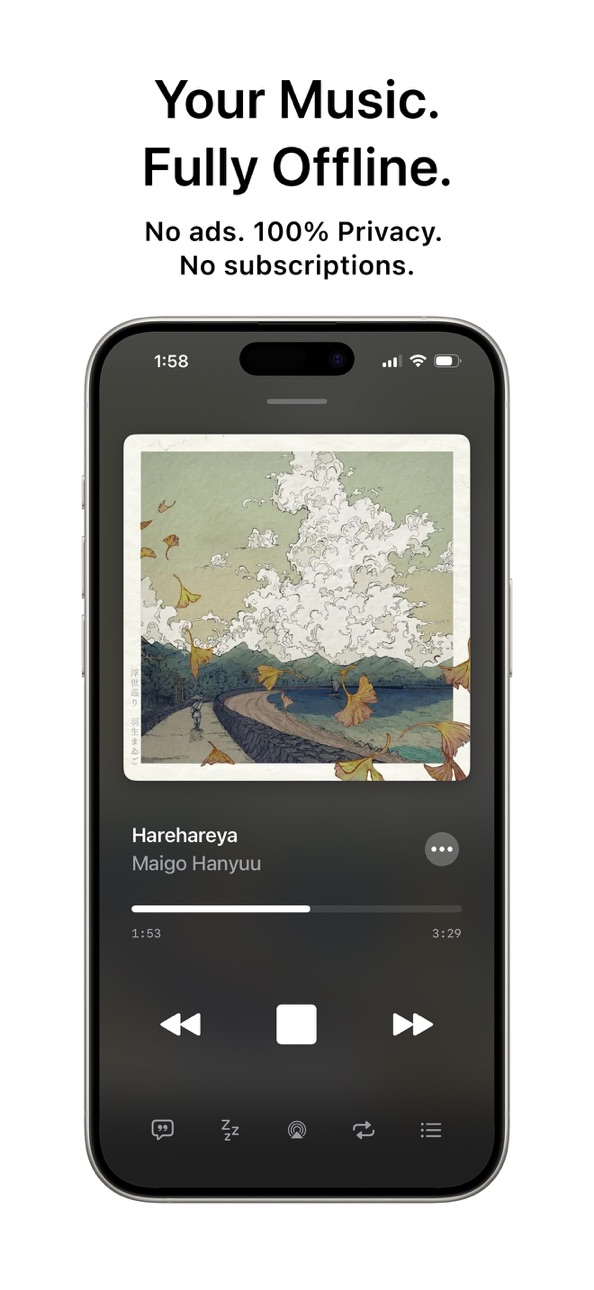


iPad 8 images


What’s New Version 5.5.0
• Audio Equalizer (Pro) — Create and manage your own EQ presets.
• Custom EQ per Library — Apply EQ settings to playlists, albums, and artists.
• Playlist Artwork — Add custom cover images to your playlists.
• Improved Audio Performance — Better playback quality and stability.
• Bug Fixes & Improvements
Description
100% offline, private & ad-free. Play your music your way with powerful controls, LRC lyrics, advanced equalizer, and a beautifully designed player — no account, no tracking.
Tuneo is a modern offline music player built for people who care about their music. No ads, no subscriptions, no data collection — just your library, fully in your control.
Enjoy your entire music collection in one place with a clean, intuitive interface and powerful features designed for both casual listeners and audiophiles.
100% OFFLINE & PRIVATE:
• No ads — zero interruptions, ever
• No tracking — your listening stays on your device
• No account required — just install and play
• Works completely offline — no internet needed
SUPPORTED FORMATS:
• MP3 — universal compatibility
• FLAC — lossless, high-quality audio
• WAV — uncompressed audio
• AAC / M4A — Apple standard formats
POWERFUL PLAYER:
• Smooth, high-quality audio playback
• Advanced audio equalizer (Pro) — create and manage your own EQ presets
• Apply EQ to playlists, albums, and artists
• Synced LRC lyrics — view and edit lyrics directly in the player
• Full playback controls — shuffle, repeat, seek
• Queue management — control what plays next
• Sleep timer — stop playback automatically
• Background playback — listen while using other apps
• Lock screen & Control Center support
• Beautiful mini player experience
ORGANIZE YOUR MUSIC:
• Import music directly from the Files app
• Smart folder-based organization (Artists, Albums, Playlists)
• Create and manage unlimited playlists
• Edit track metadata — title, artist, album, and more
• Add custom artwork to tracks, playlists, albums, and artists
• Fast search across tracks, artists, albums, and playlists
• Pins & favorites for quick access
DESIGNED FOR YOU:
• Clean, modern interface inspired by native iOS design
• Smooth animations and refined interactions
• Optimized for iPhone and iPad
• Lightweight and storage-efficient
• Multi-language support
GO PRO & UNLOCK MORE:
• Advanced equalizer controls
• Synced lyrics editing (LRC)
• Queue management enhancements
• Sleep timer
• Album management
• Listening stats — top tracks, artists, and activity insights
• Last.fm & ListenBrainz scrobbling
WHY TUNEO?
Unlike streaming apps, Tuneo gives you complete ownership of your music. No subscriptions, no ads, no compromises.
Perfect for:
• Users with large local music libraries
• Privacy-focused listeners
• Audiophiles who want full control
• Travelers and offline users
• Anyone tired of ads and subscriptions
Download Tuneo and experience your music — your way.
Privacy Policy: tuneo.arcade.build/privacy
Terms of Use: tuneo.arcade.build/terms
In-App Purchases US pricing
One-Time Purchases
Tuneo Pro - Lifetime Special$5.99
Tuneo Pro - Lifetime Discount$5.99
Tuneo Pro - Lifetime Unlock$9.99
Capabilities
In-App Purchases
Accessibility
ipadiphonemacrealityDevicetvoswatch
Version history 16 versions
Build 884539625v5.5.02026-04-15 20:17:29
• Audio Equalizer (Pro) — Create and manage your own EQ presets.
• Custom EQ per Library — Apply EQ settings to playlists, albums, and artists.
• Playlist Artwork — Add custom cover images to your playlists.
• Improved Audio Performance — Better playback quality and stability.
• Bug Fixes & Improvements
Build 884099193v5.4.02026-04-03 18:04:32
• LRC Lyrics — View synced lyrics directly on the player.
• Edit Lyrics — Add or modify lyrics for any track.
• Refined Player UI — Updated track player, queue, and mini player with a more modern, polished feel.
• Improved Experience — Smoother interactions and a more premium overall design.
Build 883309389v5.3.02026-03-12 23:49:33
This update introduces new folder-based import features to better organize your music library.
• Import playlists using playlist folders (Pro feature)
• Import albums by placing album folders inside artist folders using the “Import Artist Folders” method
• Various improvements and bug fixes
Build 883026364v5.2.02026-03-04 21:32:38
Bug fixes:
1. Sort order persisting on Tracks screen
2. Add to playlist option on Track player screen
3. Prefer metadata for track title while importing
Build 882582348v5.1.02026-02-19 07:44:25
• ListenBrainz scrobbling support
• Album management for Pro users
• Performance improvements and bug fixes
• iOS 26 Liquid Glass UI enhancements
Build 881040027v5.0.02026-01-12 18:20:24
Features:
1. Last.fm Scrobbling (Pro) — Automatically track your listens and sync them with your Last.fm profile.
2. Music Listening Stats (Pro) — Discover your top artists, top tracks, and listening patterns across time.
UI/UX Improvements:
1. Improved Sleep Timer UI — Cleaner, faster, and easier to set.
2. Enhanced Queue Management — Better control over what plays next.
3. UI refinements & performance improvements.
Build 880767576v4.1.02025-12-17 21:26:54
Introducing Folder-Based Artist Management
Organize your music by creating artist folders inside the Tuneo app directory and import them directly for effortless library management.
Build 880274350v4.0.02025-12-05 19:08:07
We've brought a massive upgrade for our beloved users.
This version brings our biggest improvements yet:
- 100× faster performance across the app
- App size 90% reduced, from 40MB → just 4MB
- New iOS 26-inspired UI/UX redesign
- Artist Management — manage your artists seamlessly
- Queue Management for Pro users
- Pin your favorite artists, playlists & tracks to the Explore page
Enjoy the smoothest and fastest experience ever!
Build 879549006v3.0.12025-11-07 11:37:39
We're continuously making improvements to Tuneo - your support keeps us going!
Please consider leaving a rating and review to help us reach more music lovers.
• New dedicated search tab with recently played tracks for faster access
• Automatic backup system for your playlists and music data
• Bug fixes and performance improvements
Thank you for being with us!
Build 878666936v3.0.02025-10-23 08:45:57
We’ve given the app a fresh new look inspired by iOS 26’s Liquid Glass design language.
- Sleek, fluid visuals that feel right at home on the latest iOS.
- Subtle depth, translucency, and motion for a more immersive experience.
- Improved consistency and smoother animations across the app.
Everything feels more polished, modern, and delightfully fluid.
Build 878299205v2.1.32025-09-22 21:58:15
This update brings improved stability, updated libraries, and enhanced compatibility with the latest iOS version for a smoother experience.
Build 877950772v2.1.22025-09-10 22:37:31
Feature:
- New language support, now app supports Russian language.
Bug Fixes & Improvements:
- Fixed lock screen & control panel artwork image display
- Sleep timer fully stops playback, even in repeat mode
Build 877897804v2.1.12025-09-08 18:08:14
- Fixed an issue where album artwork wasn’t appearing after importing from Dropbox.
- Improved performance when opening playlists with many tracks.
- Optimized image handling for smoother cover art loading.
- General stability improvements and refinements.
Build 877844938v2.1.02025-09-05 06:53:20
1. Automatic Cover Art Extraction:
- Your music tracks now get beautiful cover art automatically from file metadata
2. Faster App Startup & Track Loading:
- Enjoy a smoother, quicker experience when launching the app and browsing your library.
3. Bug Fixes & Performance Improvements:
- Various optimizations for large libraries, memory usage, and overall stability.
4. Change Log & Updates:
- Developer logs & updates information section in settings.
Update now to enjoy the latest features and improvements!
Build 877665216v2.0.02025-09-02 13:18:06
Free Features Updates:
1. Smoother navigation & polished UI
2. Global Language Support
- Now in 8 languages (English, Spanish, French, German, Korean, Japanese, Arabic, Filipino)
- Instant switching with more accurate translations
3. Improved performance & memory usage
4. App optimizations
Pro Features (Upgrade to Unlock)
1. Sleep Timer
2. Premium Light & Dark Themes
3. Cloud Integration
- Import & back up your music library with Dropbox
Build 876579274v1.02025-08-07 23:21:55
Price history by region
Currency
Show
Columns
Search
Availability 1 of 1 storefronts
| Region | Language | Price | Ratings | Avg | Version |
|---|---|---|---|---|---|
| US | en-US | Free | 46 | 4.2 | 5.5.0 |
Change log 20 changes · US
✎
releaseNotes updated
• Audio Equalizer (Pro) — Create and manage your own EQ presets.
• Custom EQ per Library — Apply EQ settings to playlists, albums, and artists.
• Playlist Artwo
✎
description updated
100% offline, private & ad-free. Play your music your way with powerful controls, LRC lyrics, advanced equalizer, and a beautifully designed player — no account
✎
subtitle updated
Offline. Ad-Free. Your Music.
✎
name updated
Tuneo: Offline Music Player
◆
Version 5.5.0 released
• Audio Equalizer (Pro) — Create and manage your own EQ presets.
• Custom EQ per Library — Apply EQ settings to playlists, albums, and artists.
• Playlist Artwork — Add custom cover images to your playlists.
• Improved Audio Performance — B
◆
Version 5.4.0 released
• LRC Lyrics — View synced lyrics directly on the player.
• Edit Lyrics — Add or modify lyrics for any track.
• Refined Player UI — Updated track player, queue, and mini player with a more modern, polished feel.
• Improved Experience — Smoo
◆
Version 5.3.0 released
This update introduces new folder-based import features to better organize your music library.
• Import playlists using playlist folders (Pro feature)
• Import albums by placing album folders inside artist folders using the “Import Artist F
◆
Version 5.2.0 released
Bug fixes:
1. Sort order persisting on Tracks screen
2. Add to playlist option on Track player screen
3. Prefer metadata for track title while importing
◆
Version 5.1.0 released
• ListenBrainz scrobbling support
• Album management for Pro users
• Performance improvements and bug fixes
• iOS 26 Liquid Glass UI enhancements
◆
Version 5.0.0 released
Features:
1. Last.fm Scrobbling (Pro) — Automatically track your listens and sync them with your Last.fm profile.
2. Music Listening Stats (Pro) — Discover your top artists, top tracks, and listening patterns across time.
UI/UX Improvement
◆
Version 4.1.0 released
Introducing Folder-Based Artist Management
Organize your music by creating artist folders inside the Tuneo app directory and import them directly for effortless library management.
◆
Version 4.0.0 released
We've brought a massive upgrade for our beloved users.
This version brings our biggest improvements yet:
- 100× faster performance across the app
- App size 90% reduced, from 40MB → just 4MB
- New iOS 26-inspired UI/UX redesign
- Artist
◆
Version 3.0.1 released
We're continuously making improvements to Tuneo - your support keeps us going!
Please consider leaving a rating and review to help us reach more music lovers.
• New dedicated search tab with recently played tracks for faster access
• Autom
◆
Version 3.0.0 released
We’ve given the app a fresh new look inspired by iOS 26’s Liquid Glass design language.
- Sleek, fluid visuals that feel right at home on the latest iOS.
- Subtle depth, translucency, and motion for a more immersive experience.
- Improved
◆
Version 2.1.3 released
This update brings improved stability, updated libraries, and enhanced compatibility with the latest iOS version for a smoother experience.
◆
Version 2.1.2 released
Feature:
- New language support, now app supports Russian language.
Bug Fixes & Improvements:
- Fixed lock screen & control panel artwork image display
- Sleep timer fully stops playback, even in repeat mode
◆
Version 2.1.1 released
- Fixed an issue where album artwork wasn’t appearing after importing from Dropbox.
- Improved performance when opening playlists with many tracks.
- Optimized image handling for smoother cover art loading.
- General stability improvements
◆
Version 2.1.0 released
1. Automatic Cover Art Extraction:
- Your music tracks now get beautiful cover art automatically from file metadata
2. Faster App Startup & Track Loading:
- Enjoy a smoother, quicker experience when launching the app and browsing your libr
◆
Version 2.0.0 released
Free Features Updates:
1. Smoother navigation & polished UI
2. Global Language Support
- Now in 8 languages (English, Spanish, French, German, Korean, Japanese, Arabic, Filipino)
- Instant switching with more accurate translations
3. Impro
◆
Version 1.0 released