Home › Utilities

 US
US
1 of 1 storefronts
Content in en-US
Content in en-US
Information
Preview 2 platforms
iPhone 7 images


iPad 7 images




What’s New Version 1.2.11
For a better experience with Apple Music, you can now set it to Always-Allowed on admin.livingroomapp.com. Also, LivingRoom app cold-start time is now faster.
Description
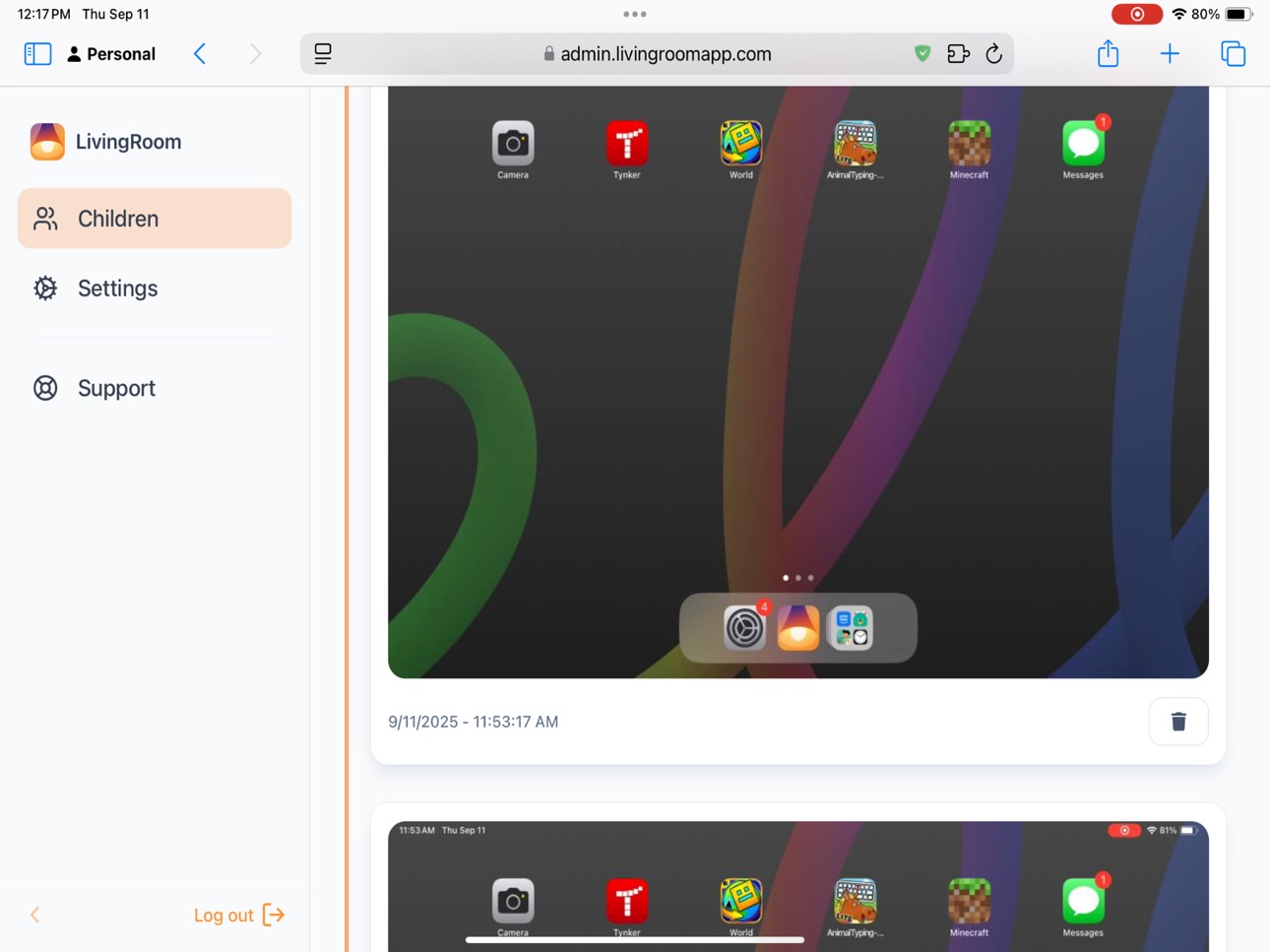
Screens are visible in your LivingRoom! Gain true insight with screenshots from every app, helping you teach digital responsibility through transparency, not just restriction.
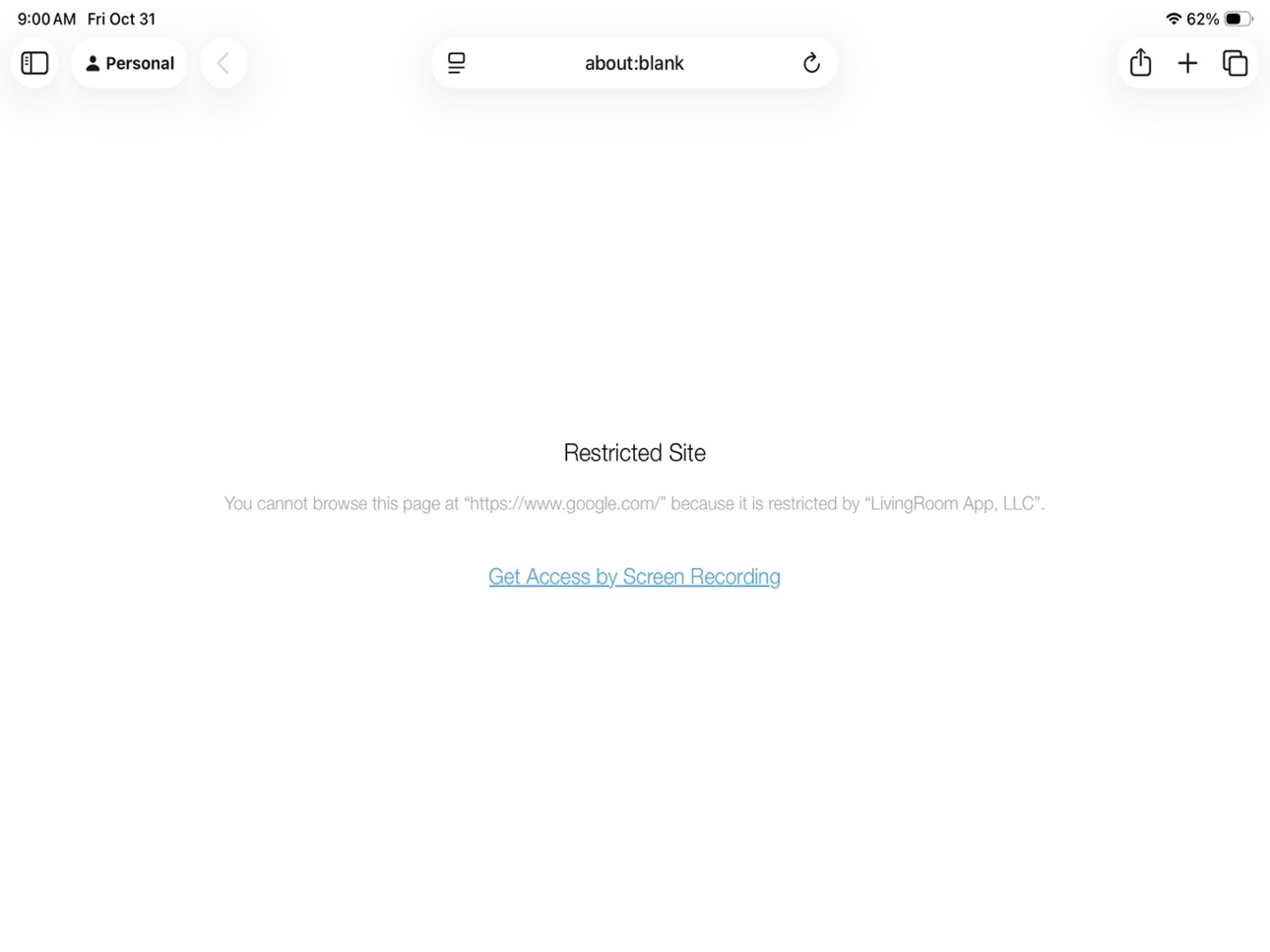
LivingRoom can be used to monitor anything! Monitor Messages, web browsers, YouTube, Roblox, Instagram, Snapchat, and more! The app enables internet on your child's device only when screen recording is active. About once per minute, screenshots are saved to your secure dashboard, giving you peace of mind and creating opportunities to get to know your child's online world, talk about online safety, or to set restrictions if something becomes an issue. Encourage accountability and build digital trust instead of fighting over screen time.
Instructions:
1. Setup Apple Family Sharing using your iPhone/iPad/Mac.
2. Install this app on your child's iPhone/iPad and follow the instructions on screen.
3. Check screenshots on admin.livingroomapp.com
Pro tip: You can make it so highly-trusted apps don't require screen recording. Add these apps in Settings->Family->Child Name->Screen Time->Always Allowed and on admin.livingroomapp.com.
Notes: The Phone app is always allowed. Copyright-protected video-streaming apps such as Disney+ and Netflix may be used but cannot be monitored.
Accessibility
ipadiphonemacrealityDevicetvoswatch
Version history 18 versions
Build 887002746v1.2.112026-06-16 12:42:54
For a better experience with Apple Music, you can now set it to Always-Allowed on admin.livingroomapp.com. Also, LivingRoom app cold-start time is now faster.
Build 886494892v1.2.92026-06-04 14:50:31
On-device detection is 2x faster. Notifications are less annoying and more helpful!
Build 885971251v1.2.82026-05-22 13:22:15
- Fixed a bug which would (in rare cases) cause screenshot upload failure,
- Better onboarding experience
- Highlighted always-allowed apps feature on the shield page
- Added explanation that always-allowed apps may need recording in the rare case they use an embedded web browser
Build 885683788v1.2.62026-05-14 22:55:01
Added in critical protections for Safari. Rarely, this causes certain always-allowed apps to behave strangely. To fix, turn on the LivingRoom screen recorder.
Build 884993159v1.2.52026-04-28 13:15:56
In setup process, clarified that CloudFlare One must be Always Allowed for Tech Lockdown users.
Build 884247523v1.2.42026-04-17 17:54:30
Spotify images/video only load when recording unless Spotify is set to Always-Allowed on admin.livingroomapp.com. Also enhanced image security and updated the build toolchain.
Build 883314401v1.2.32026-03-20 18:16:04
Improved setup process now shares about Always Allowed apps feature.
Build 882614980v1.2.22026-03-07 02:50:15
- New smart protections on Spotify! Music keeps playing, images/video only load when screen recording.
- Onboarding experience is even better.
Build 882453052v1.2.02026-02-17 19:57:41
Privacy-preserving sensitive image analysis stops creation and viewing of inappropriate material.
Build 881752966v1.1.82026-02-11 00:45:46
We added an exception for a web domain mis-categorized by Apple's "Limit Adult Websites" setting.
Build 881222568v1.1.72026-01-07 12:03:16
Smarter screenshot timing, improved installation advice and better running icon.
Build 880783698v1.1.62025-12-22 18:11:58
Link to new setup method
Build 880047374v1.1.52025-11-25 10:06:27
Optimized app launch time.
Build 879978326v1.1.42025-11-23 13:39:39
Better onboarding experience for users who have other parental-control apps on the device.
Build 879374492v1.1.32025-11-20 14:14:32
- A new block screen and notification make it easy to start screen recording.
- LivingRoom 1.1.0 uses two layers of control, increasing safety and everyday convenience.
- Did you know you can make it so trusted apps don't need screen recording? https://livingroomapp.com/always-allowed-apps
- You may now use Screen Time time-extensions. The recording requirement will be enforced by blocking the app's internet access until screen recording is on.
- Apple Music may now be safely added to Screen Time's Always Allowed list.
- Enhanced protections for built-in iPhone features such as Spotlight and iMessage GIFs. In these cases, images are blocked until screen recording is turned on.
Build 879124511v1.0.112025-10-22 14:06:18
Fixed a bug where recording would stop in portrait mode due to "HDCP or a prolonged visual pause"
Build 878292445v1.0.102025-09-23 18:39:03
We've enhanced the user experience when leaving an app review.
Build 876487802v1.0.72025-09-18 22:23:04
No pricing data captured yet — comparisons appear once the app has paid storefronts or in-app purchases.
Availability 1 of 1 storefronts
| Region | Language | Price | Ratings | Avg | Version |
|---|---|---|---|---|---|
| US | en-US | Free | 38 | 4.6 | 1.2.11 |
Change log 22 changes · US
✎
releaseNotes updated
For a better experience with Apple Music, you can now set it to Always-Allowed on admin.livingroomapp.com. Also, LivingRoom app cold-start time is now faster.
✎
description updated
Screens are visible in your LivingRoom! Gain true insight with screenshots from every app, helping you teach digital responsibility through transparency, not ju
✎
subtitle updated
Connecting parents & children
✎
name updated
LivingRoom for Families
◆
Version 1.2.11 released
For a better experience with Apple Music, you can now set it to Always-Allowed on admin.livingroomapp.com. Also, LivingRoom app cold-start time is now faster.
◆
Version 1.2.9 released
On-device detection is 2x faster. Notifications are less annoying and more helpful!
◆
Version 1.2.8 released
- Fixed a bug which would (in rare cases) cause screenshot upload failure,
- Better onboarding experience
- Highlighted always-allowed apps feature on the shield page
- Added explanation that always-allowed apps may need recording in the r
◆
Version 1.2.6 released
Added in critical protections for Safari. Rarely, this causes certain always-allowed apps to behave strangely. To fix, turn on the LivingRoom screen recorder.
◆
Version 1.2.5 released
In setup process, clarified that CloudFlare One must be Always Allowed for Tech Lockdown users.
◆
Version 1.2.4 released
Spotify images/video only load when recording unless Spotify is set to Always-Allowed on admin.livingroomapp.com. Also enhanced image security and updated the build toolchain.
◆
Version 1.2.3 released
Improved setup process now shares about Always Allowed apps feature.
◆
Version 1.2.2 released
- New smart protections on Spotify! Music keeps playing, images/video only load when screen recording.
- Onboarding experience is even better.
◆
Version 1.2.0 released
Privacy-preserving sensitive image analysis stops creation and viewing of inappropriate material.
◆
Version 1.1.8 released
We added an exception for a web domain mis-categorized by Apple's "Limit Adult Websites" setting.
◆
Version 1.1.7 released
Smarter screenshot timing, improved installation advice and better running icon.
◆
Version 1.1.6 released
Link to new setup method
◆
Version 1.1.5 released
Optimized app launch time.
◆
Version 1.1.4 released
Better onboarding experience for users who have other parental-control apps on the device.
◆
Version 1.1.3 released
- A new block screen and notification make it easy to start screen recording.
- LivingRoom 1.1.0 uses two layers of control, increasing safety and everyday convenience.
- Did you know you can make it so trusted apps don't need screen record
◆
Version 1.0.11 released
Fixed a bug where recording would stop in portrait mode due to "HDCP or a prolonged visual pause"
◆
Version 1.0.10 released
We've enhanced the user experience when leaving an app review.
◆
Version 1.0.7 released