Home › Productivity

 US
US
1 of 1 storefronts
Content in en-US
Content in en-US
Information
Apple ID6748703191
Bundle IDde.krabyte.MyWorkingHours
SellerSeller
Min iOS18.0
Device familiesmac, iphone, ipad
Released2025-07-23
Copyright© 2026 Arnold Kretschmer
Privacy policyLink ↗
Preview 3 platforms
iPhone 5 images

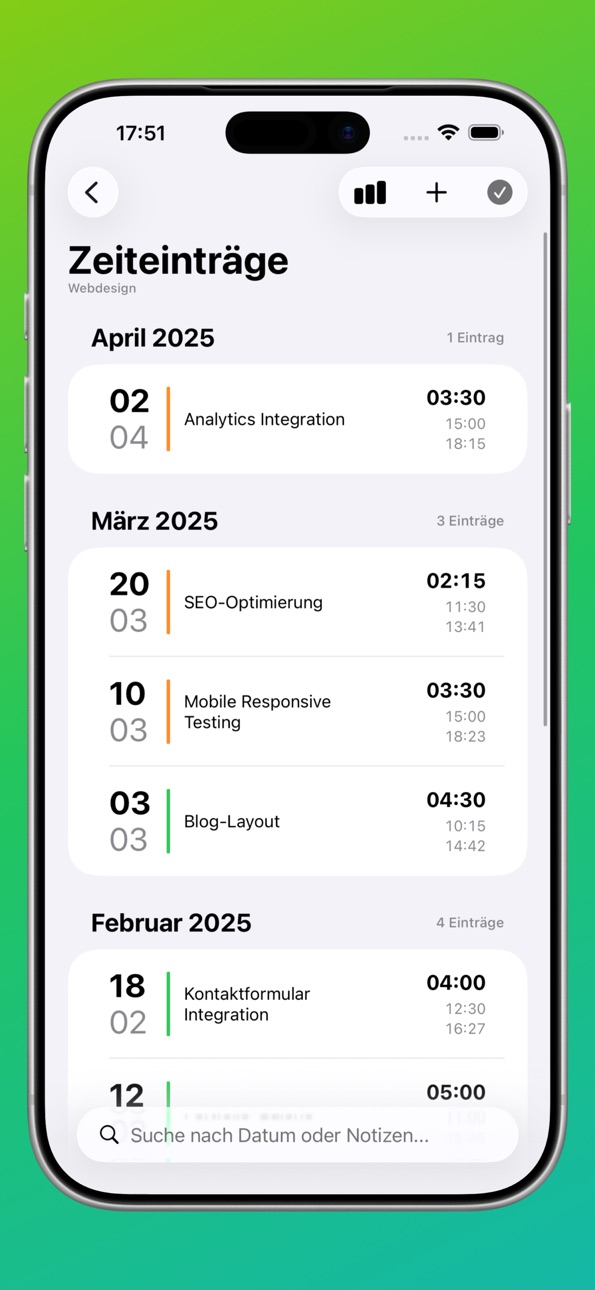


iPad 3 images


Mac 4 images


What’s New Version 26.0
WHAT'S NEW IN VERSION 26.0
Operating system updates:
- Interface fully adapted to iOS/iPadOS 26 and macOS 26
- Entry forms revised
- Search function now native in iOS/iPadOS
- Database update optimized
- Dark mode further optimized
- Missing translations added
iPadOS improvements:
- New float button for quick project/time entry creation
Project list revised:
- Sorting via toolbar icon
- New grouping modes: Projects or Companies
- Favorites always at top
- Statistics selectable as amount or hours
- Footer toolbar removed (more space)
Time entries list revised:
- Statistics sheet via toolbar
- Client name removed from list (more space for notes)
Details display simplified.
Description
KEY FEATURES:
• Timer-based time tracking with live recording
• Project and client management
• Flexible time rounding (5, 10, 15, 30 min)
• iCloud synchronization across all devices
• Multi-selection for bulk operations
• Face ID/Touch ID security
Universal app for iPhone, iPad and Mac.
EXPORT & REPORTS:
• HTML reports for clients
• CSV import/export
• JSON backup function
Accessibility
ipadiphonemacrealityDevicetvoswatch
Version history 4 versions
Build 886615401v26.02026-06-07 14:20:17
WHAT'S NEW IN VERSION 26.0
Operating system updates:
- Interface fully adapted to iOS/iPadOS 26 and macOS 26
- Entry forms revised
- Search function now native in iOS/iPadOS
- Database update optimized
- Dark mode further optimized
- Missing translations added
iPadOS improvements:
- New float button for quick project/time entry creation
Project list revised:
- Sorting via toolbar icon
- New grouping modes: Projects or Companies
- Favorites always at top
- Statistics selectable as amount or hours
- Footer toolbar removed (more space)
Time entries list revised:
- Statistics sheet via toolbar
- Client name removed from list (more space for notes)
Details display simplified.
Build 877628102v25.22025-08-30 08:48:10
- Improved ScrollView for time entries column (iOS 18+, macOS 15+)
- Internal code optimization for list display.
- Statistics field adjustments:
- White, gray, green
- Can be hidden completely.
- Added missing translations.
Build 877028535v25.1.1 (0804)2025-08-06 15:55:56
- iOS JSON export no longer triggers a switch to the first project
- Creating/editing a “time entry” allows project selection
- Statistics field (above the time entries) expanded to include the total number of time entries
- iCloud Sync - when active - is triggered with a delay during CRUD operations.
- iCloud Sync icon (shows the total number of records and the current sync) can be disabled in the settings
- Minor UI bug fixes
Build 876453864v25.1 (0726)2025-07-28 20:32:02
No pricing data captured yet — comparisons appear once the app has paid storefronts or in-app purchases.
Availability 1 of 1 storefronts
| Region | Language | Price | Ratings | Avg | Version |
|---|---|---|---|---|---|
| US | en-US | Free | 0 | — | 26.0 |
Change log 7 changes · US
✎
releaseNotes updated
WHAT'S NEW IN VERSION 26.0
Operating system updates:
- Interface fully adapted to iOS/iPadOS 26 and macOS 26
- Entry forms revised
- Search function now native
✎
description updated
KEY FEATURES:
• Timer-based time tracking with live recording
• Project and client management
• Flexible time rounding (5, 10, 15, 30 min)
• iCloud sync
✎
name updated
My Working Hours
◆
Version 26.0 released
WHAT'S NEW IN VERSION 26.0
Operating system updates:
- Interface fully adapted to iOS/iPadOS 26 and macOS 26
- Entry forms revised
- Search function now native in iOS/iPadOS
- Database update optimized
- Dark mode further optimized
- Missi
◆
Version 25.2 released
- Improved ScrollView for time entries column (iOS 18+, macOS 15+)
- Internal code optimization for list display.
- Statistics field adjustments:
- White, gray, green
- Can be hidden completely.
- Added missing translations.
◆
Version 25.1.1 (0804) released
- iOS JSON export no longer triggers a switch to the first project
- Creating/editing a “time entry” allows project selection
- Statistics field (above the time entries) expanded to include the total number of time entries
- iCloud Sync - w
◆
Version 25.1 (0726) released