Home › Photo & Video
![TripCam: [Camera] icon](/img/assets/6748248829/generic/icon-0-b9036a2f461df673.jpg)
 US
US
1 of 1 storefronts
Content in en-US
Content in en-US
Information
Apple ID6748248829
Bundle IDhomelab.TripCam
SellerSeller
Min iOS18.4
Min macOS15.4
Device familiesiphone, ipad
Released2025-07-17
Copyright© 2025 David Mitchell
Privacy policyLink ↗
Preview 2 platforms
iPhone 5 images




iPad 4 images


What’s New Version 1.3
You can now add a widget to your control centre, or lock screen for quick and easy access. If you are missing some feature of the native camera app, you can still swipe left from the lock screen to access it - best of both worlds!
Description
TripCam: [Camera] solves the biggest pain point of travel photography: the overwhelming task of organizing hundreds of photos after your trip. No more sorting through thousands of images or struggling to remember where each photo was taken. Create an album once, capture memories as you go, and instantly have a beautifully organized collection of your journey with precise location data.
Key Features
Effortless Organization:
- Create albums once and automatically organize every new memory
- No more post-trip photo sorting - everything is organized as you capture
- Smart album suggestions based on your location
- Seamless camera-to-album workflow
- QR code scanning
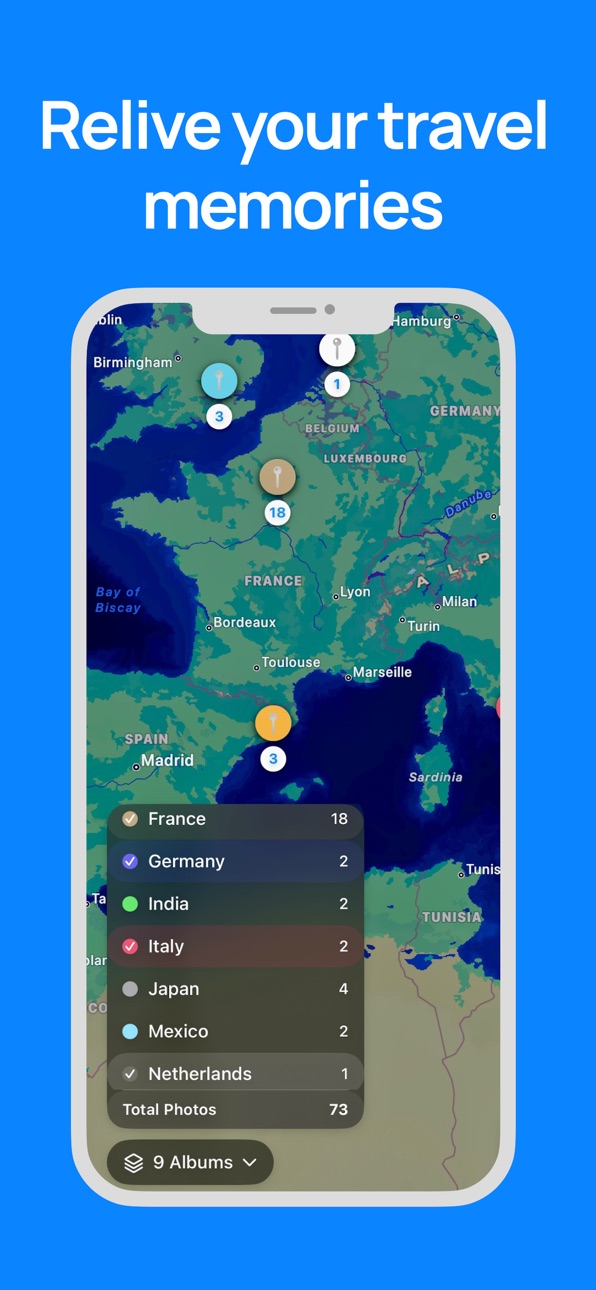
Interactive Travel Map:
- View all your memories on a beautiful interactive map
- See where each photo was taken
- Combine multiple albums to relive entire journeys
- Pin locations with color-coded regions
Smart Duplicate Detection:
- Automatically identify and manage duplicate photos
- Save storage space by removing redundant images
- Keep only the best version of each shot
- Maintain photo quality while reducing clutter
More features to come.
If you'd like to request features or provide feedback, email us at feedback@thatbrightidea.com.
Terms of Use: https://www.apple.com/legal/internet-services/itunes/dev/stdeula/
Privacy Policy: https://thatbrightidea.com/privacy/
Capabilities
In-App Purchases
Accessibility
ipadiphonemacrealityDevicetvoswatch
Version history 4 versions
Build 877520362v1.32025-08-25 07:52:12
You can now add a widget to your control centre, or lock screen for quick and easy access. If you are missing some feature of the native camera app, you can still swipe left from the lock screen to access it - best of both worlds!
Build 876547955v1.22025-08-04 11:46:06
Introducing QR code recognition – just point the camera at a QR code to scan it!
Have feedback or ideas? Email at feedback@thatbrightidea.com.
Thanks for the support!
Build 876525293v1.12025-07-19 23:02:56
- Bug fixes and improvements
Build 876150958v1.02025-07-17 21:34:28
No pricing data captured yet — comparisons appear once the app has paid storefronts or in-app purchases.
Availability 1 of 1 storefronts
| Region | Language | Price | Ratings | Avg | Version |
|---|---|---|---|---|---|
| US | en-US | Free | 0 | — | 1.3 |
Change log 8 changes · US
✎
releaseNotes updated
You can now add a widget to your control centre, or lock screen for quick and easy access. If you are missing some feature of the native camera app, you can sti
✎
description updated
TripCam: [Camera] solves the biggest pain point of travel photography: the overwhelming task of organizing hundreds of photos after your trip. No more sorting t
✎
subtitle updated
Save to a default photo album
✎
name updated
TripCam: [Camera]
◆
Version 1.3 released
You can now add a widget to your control centre, or lock screen for quick and easy access. If you are missing some feature of the native camera app, you can still swipe left from the lock screen to access it - best of both worlds!
◆
Version 1.2 released
Introducing QR code recognition – just point the camera at a QR code to scan it!
Have feedback or ideas? Email at feedback@thatbrightidea.com.
Thanks for the support!
◆
Version 1.1 released
- Bug fixes and improvements
◆
Version 1.0 released