Home › Utilities

 US
US
1 of 1 storefronts
Content in en-US
Content in en-US
Information
Apple ID6748235519
Bundle IDcom.ztyuu.com.watchbox
SellerSeller
Min iOS16.6
Min macOS13.5
Device familieswatch, iphone
Released2025-07-11
Copyright© Taiyu Zuo. All rights reserved.
Privacy policyLink ↗
Preview 2 platforms
iPhone 3 images

Apple Watch 3 images


What’s New Version 1.0.11
优化浏览器的体验
遇到问题或有建议?请前往「设置」→「联系我们」反馈
Description
Welcome to WatchBox, a lightweight browser app designed specifically for smartwatches.
Break through the limits of small screens and turn your watch into a convenient gateway to the world of information. WatchBox offers voice search and web browsing capabilities to meet your everyday needs—whether for work, study, or leisure.
【Voice Search · Quick Access】
Hands-free operation with built-in voice search. Easily find websites, translate words, or access useful information—all by speaking.
【Compact Browser · Seamless Experience】
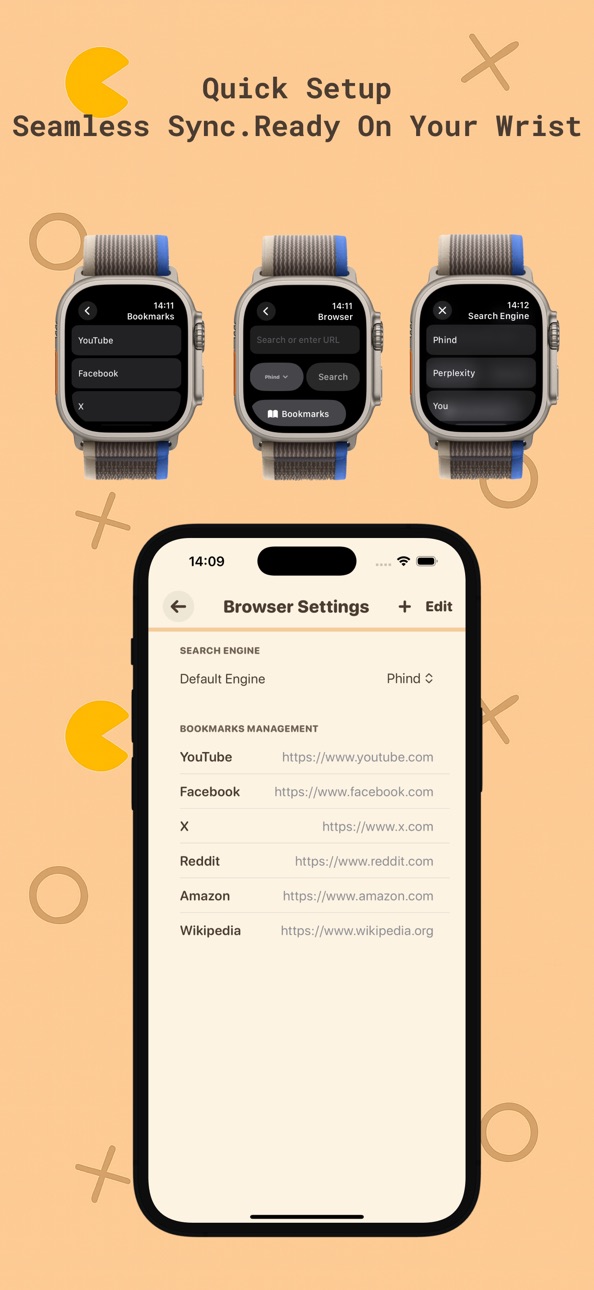
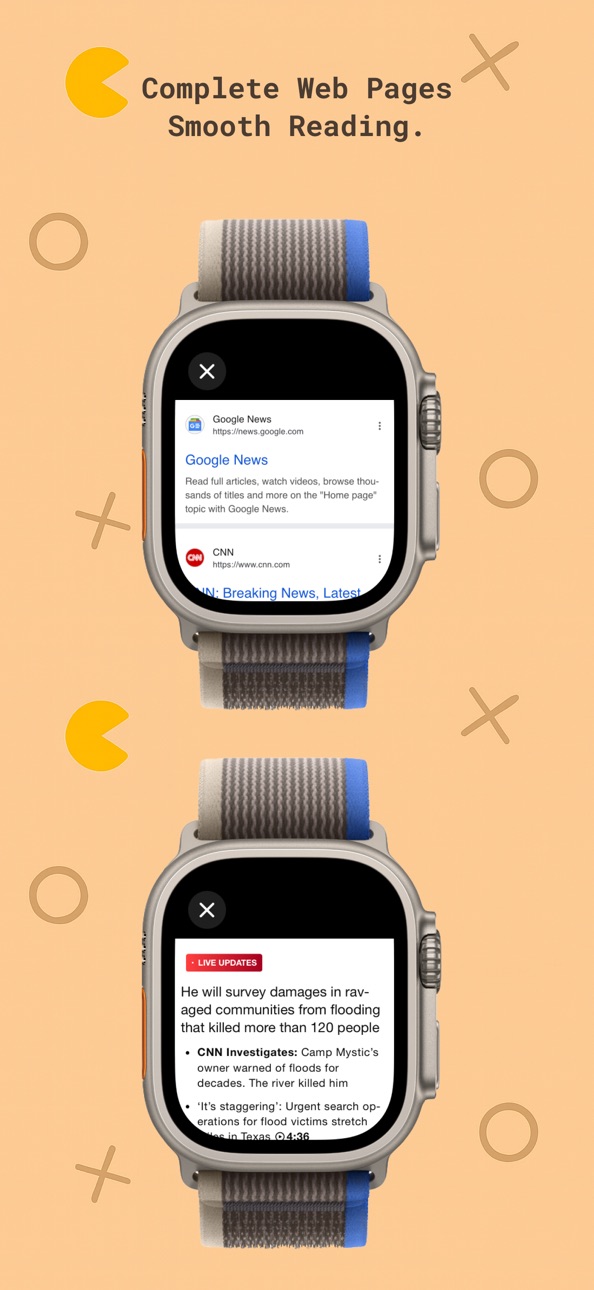
Smooth and clear web browsing optimized for small screens. Supports everyday browsing tasks with intuitive interaction and optimized layout for smartwatch use.
【Cross-Device Sync · Better Efficiency】
Bookmark pages and sync your preferences between your phone and watch. Enjoy a seamless experience across devices.
【Interface Designed for Small Screens】
Clean and simple interface, ultra-lightweight performance, fast response. No ads, no tracking—your privacy is our priority.
Whether you're in a meeting looking up quick info, checking the news on your commute, or just browsing casually, WatchBox is your go-to companion for web access on the go.
Download WatchBox now and enjoy an efficient, responsive browsing experience on your wrist!
---
Privacy Policy:https://sites.google.com/view/watchbox-privacy-policy
Terms of Use:https://sites.google.com/view/watchbox-terms-of-service
Capabilities
In-App Purchases
Accessibility
ipadiphonemacrealityDevicetvoswatch
Version history 12 versions
Build 887607348v1.0.112026-06-30 03:25:15
优化浏览器的体验
遇到问题或有建议?请前往「设置」→「联系我们」反馈
Build 887516165v1.0.102026-06-27 20:11:44
优化浏览器的体验
Build 887477762v1.0.92026-06-26 21:28:38
优化浏览器的体验
Build 883442016v1.0.82026-03-17 17:18:04
Apple watch now supports Dark Mode. If you encounter any issues or have suggestions while using the app, please go to Settings → Feedback to let us know.
Build 882104641v1.0.72026-02-03 18:09:45
Added file transfer support. If you have any questions or suggestions while using it, please go to **Settings → Feedback** and let us know!
Build 881202260v1.0.62026-01-05 17:54:28
- optimized the product experience and fixed several issues. If you have any questions or suggestions, please go to Settings > Contact Us to let us know!
Build 881042131v1.0.52025-12-28 03:06:24
1. Add configuration for the Doubao AI search engine.
2. Add a shortcut entry on Apple Watch for quick access.
If you have any questions or suggestions, please go to Settings > Contact Us to let us know!
Build 879248301v1.0.42025-10-27 00:01:57
- optimized the product experience and fixed several issues. If you have any questions or suggestions, please go to Settings > Contact Us to let us know!
Build 878858867v1.0.32025-10-13 19:23:37
- optimized the product experience and fixed several issues. If you have any questions or suggestions, please go to Settings > Contact Us to let us know!
Build 876493578v1.0.22025-07-22 18:15:18
- optimized the product experience and fixed several issues. If you have any questions or suggestions, please go to Settings > Contact Us to let us know!
Build 876331509v1.0.12025-07-14 03:07:24
- optimized the product experience and fixed several issues. If you have any questions or suggestions, please go to Settings > Contact Us to let us know!
Build 876141558v1.02025-07-11 09:52:31
No pricing data captured yet — comparisons appear once the app has paid storefronts or in-app purchases.
Availability 1 of 1 storefronts
| Region | Language | Price | Ratings | Avg | Version |
|---|---|---|---|---|---|
| US | en-US | Free | 1 | 1.0 | 1.0.11 |
Change log 16 changes · US
✎
releaseNotes updated
优化浏览器的体验
遇到问题或有建议?请前往「设置」→「联系我们」反馈
✎
description updated
Welcome to WatchBox, a lightweight browser app designed specifically for smartwatches.
Break through the limits of small screens and turn your watch into a con
✎
subtitle updated
Mini Browser on your Watch
✎
name updated
WatchBox - Browser on Watch
◆
Version 1.0.11 released
优化浏览器的体验
遇到问题或有建议?请前往「设置」→「联系我们」反馈
◆
Version 1.0.10 released
优化浏览器的体验
◆
Version 1.0.9 released
优化浏览器的体验
◆
Version 1.0.8 released
Apple watch now supports Dark Mode. If you encounter any issues or have suggestions while using the app, please go to Settings → Feedback to let us know.
◆
Version 1.0.7 released
Added file transfer support. If you have any questions or suggestions while using it, please go to **Settings → Feedback** and let us know!
◆
Version 1.0.6 released
- optimized the product experience and fixed several issues. If you have any questions or suggestions, please go to Settings > Contact Us to let us know!
◆
Version 1.0.5 released
1. Add configuration for the Doubao AI search engine.
2. Add a shortcut entry on Apple Watch for quick access.
If you have any questions or suggestions, please go to Settings > Contact Us to let us know!
◆
Version 1.0.4 released
- optimized the product experience and fixed several issues. If you have any questions or suggestions, please go to Settings > Contact Us to let us know!
◆
Version 1.0.3 released
- optimized the product experience and fixed several issues. If you have any questions or suggestions, please go to Settings > Contact Us to let us know!
◆
Version 1.0.2 released
- optimized the product experience and fixed several issues. If you have any questions or suggestions, please go to Settings > Contact Us to let us know!
◆
Version 1.0.1 released
- optimized the product experience and fixed several issues. If you have any questions or suggestions, please go to Settings > Contact Us to let us know!
◆
Version 1.0 released