Home › Utilities

 US
US
1 of 1 storefronts
Content in en-US
Content in en-US
Information
Apple ID6748069957
Bundle IDcom.techtag.propterminal
SellerSeller
Min iOS15.1
Min macOS12.0
Device familiesiphone, ipod
Released2025-07-08
Copyright© 2026 Techtag GmbH
Privacy policyLink ↗
Preview 1 platform
iPhone 8 images




What’s New Version 1.2.0
Quick Trade Templates
Pre-configure your most-used trade setups and execute them with a single tap. Quick Trade becomes the default Trades tab when you have templates saved.
Template cards — each template shows the instrument, account/group, TP/SL, and live market price
Instant & Confirm modes — toggle between one-tap market order entry execution (with haptic feedback) and a confirmation-based modal with tick-based price adjustment for limit order entry.
Nx1 / Nx2 layouts — switch between compact list and grid views (choose the one you prefer)
Live multi-instrument pricing — all template instruments receive simultaneous real-time market data
Save as Template — save your current manual trade form as a new Quick Trade template
Template editor — create, edit, and manage templates from a dedicated form screen
Manual Trade
The full manual trade form is still accessible via the header icon on the Quick Trade screen, or shown by default when no templates exist.
Supporting Server Updates
Multi-instrument market data subscription support (required for Quick Trade)
Stability improvements for account limit monitoring
Rollout
NOTE: For PropTerminal Desktop, the server must be updated to version 2.1.0 before using the client app v1.2.0 (web, iOS and Android).
Description
- Accessible on desktop through the web app, and on mobile through the iOS and Android mobile apps
- Connect evals, funded, and personal accounts across multiple firms for Tradovate, Ninjatrader and Rithmic accounts
- One-tap execution across groups of up to 100+ accounts
- Every trade protected with built-in OCO brackets
- Advanced position management with TP/SL update & trailing
- Hosted locally on your machine (PropTerminal Desktop) or on your dedicated VPS infrastructure (PropTerminal PRO) with dedicated resources
The Ultimate Multi-Prop Trader Swiss-Knife
Every feature designed to give you the edge in fast-moving markets with multiple accounts across multiple firms.
1. Connect to Any Account, Across Any Firm
Manage every account type—evaluation, sim, funded, personal—on one platform.
2. Emergency Broker Controls
Instant reconnect, liquidation, or failover handling.
3. Transparent Connection Monitoring
Detailed broker connection view with full control and health monitoring.
4. Real-Time Account Portfolio Overview
Live P&L, net liquidation, and per-account performance.
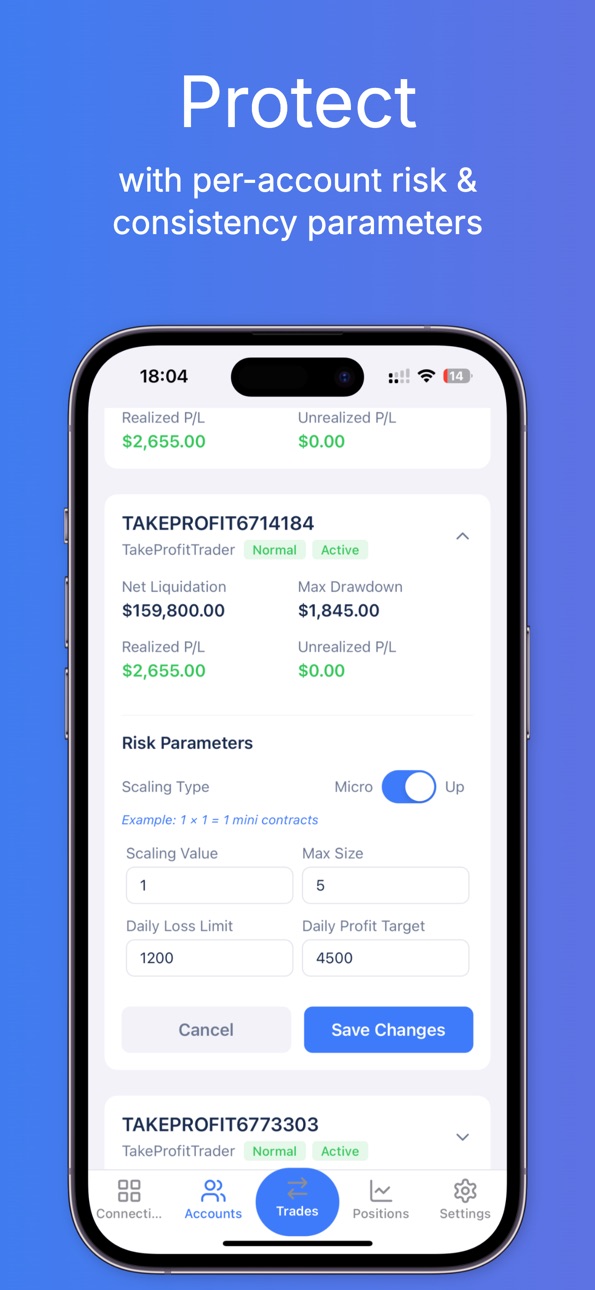
5. Per-Account Risk & Consistency Settings
Set DLL, profit targets, scaling type and contract caps for each account.
6. Custom Group Management
Create unlimited account groups based on your own criteria.
7. Smart Group Trade Entry with Sizing Multipliers using 1-tap quick trade templates or manual trade entry
Auto-calculate size per account using custom multipliers, sizing and scaling type (micro or mini).
8. Built-In OCO Bracket Orders + User-defined Expiry
Rogue tweet? Surprise war? Every trade protected with a SL+TP bracket.
9. Unified Position & Order Management
Aggregate view of all open positions and orders across groups.
10. Advanced Group Position Controls
The ultimate execution edge. Manage 100+ positions in seconds with a tap, no stress.
Accessibility
ipadiphonemacrealityDevicetvoswatch
Version history 3 versions
Build 882356267v1.2.02026-02-11 17:44:06
Quick Trade Templates
Pre-configure your most-used trade setups and execute them with a single tap. Quick Trade becomes the default Trades tab when you have templates saved.
Template cards — each template shows the instrument, account/group, TP/SL, and live market price
Instant & Confirm modes — toggle between one-tap market order entry execution (with haptic feedback) and a confirmation-based modal with tick-based price adjustment for limit order entry.
Nx1 / Nx2 layouts — switch between compact list and grid views (choose the one you prefer)
Live multi-instrument pricing — all template instruments receive simultaneous real-time market data
Save as Template — save your current manual trade form as a new Quick Trade template
Template editor — create, edit, and manage templates from a dedicated form screen
Manual Trade
The full manual trade form is still accessible via the header icon on the Quick Trade screen, or shown by default when no templates exist.
Supporting Server Updates
Multi-instrument market data subscription support (required for Quick Trade)
Stability improvements for account limit monitoring
Rollout
NOTE: For PropTerminal Desktop, the server must be updated to version 2.1.0 before using the client app v1.2.0 (web, iOS and Android).
Build 881039032v1.1.02025-12-27 23:37:20
- Support for Rithmic brokerage accounts
- Support for PropTerminal Desktop
- Support for PropTerminal DDNS Server
- Support for additional trading instruments and updated futures contracts
- Support for added visualization of Tradovate/Ninjatrader and Rithmic market data feeds individually
- Several bugfixes and stability improvements
Build 876069658v1.02025-07-08 10:17:09
No pricing data captured yet — comparisons appear once the app has paid storefronts or in-app purchases.
Availability 1 of 1 storefronts
| Region | Language | Price | Ratings | Avg | Version |
|---|---|---|---|---|---|
| US | en-US | Free | 1 | 1.0 | 1.2.0 |
Change log 7 changes · US
✎
releaseNotes updated
Quick Trade Templates
Pre-configure your most-used trade setups and execute them with a single tap. Quick Trade becomes the default Trades tab when you have te
✎
description updated
- Accessible on desktop through the web app, and on mobile through the iOS and Android mobile apps
- Connect evals, funded, and personal accounts across multipl
✎
subtitle updated
Multi-Prop Trading Swiss-Knife
✎
name updated
PropTerminal
◆
Version 1.2.0 released
Quick Trade Templates
Pre-configure your most-used trade setups and execute them with a single tap. Quick Trade becomes the default Trades tab when you have templates saved.
Template cards — each template shows the instrument, account/gro
◆
Version 1.1.0 released
- Support for Rithmic brokerage accounts
- Support for PropTerminal Desktop
- Support for PropTerminal DDNS Server
- Support for additional trading instruments and updated futures contracts
- Support for added visualization of Tradovate/Nin
◆
Version 1.0 released