Home › Photo & Video

 US
US
1 of 1 storefronts
Content in en-US
Content in en-US
Information
Apple ID6747997793
Bundle IDcom.weikly.TimeCamera
SellerSeller
Min iOS16.0
Min macOS13.0
Device familiesiphone
Released2025-07-14
Copyright© 2025 CHEN YANJIE
Privacy policyLink ↗
Preview 1 platform
iPhone 4 images

What’s New Version 4.1.3
The time display in watermark templates has been upgraded for greater flexibility
Description
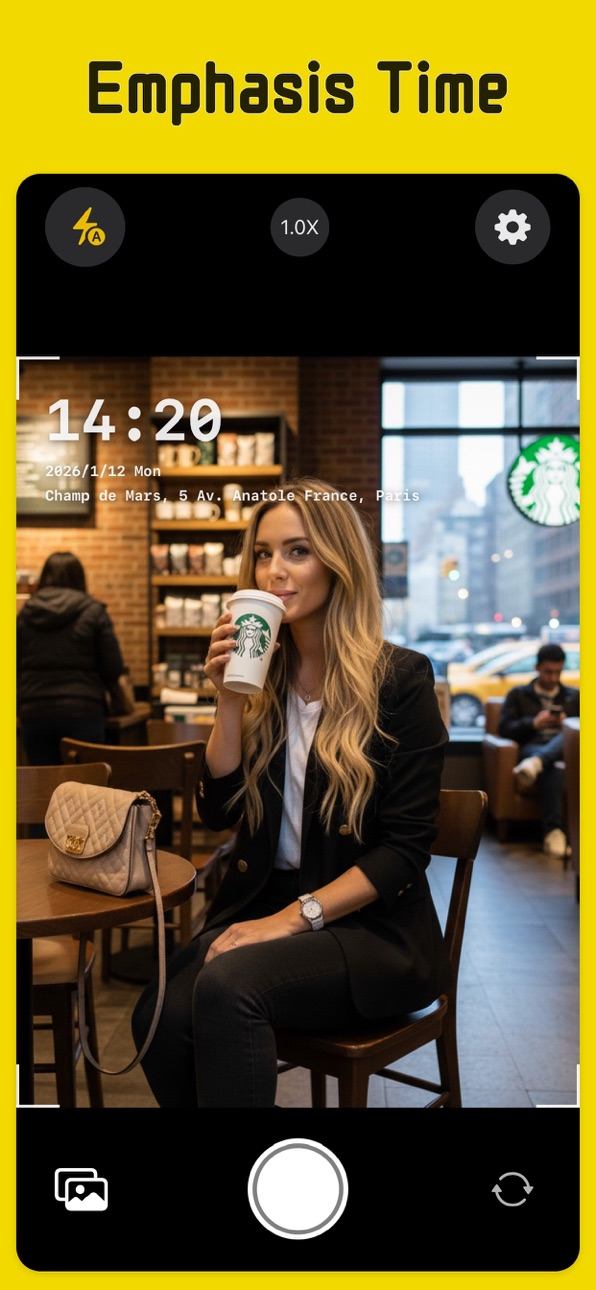
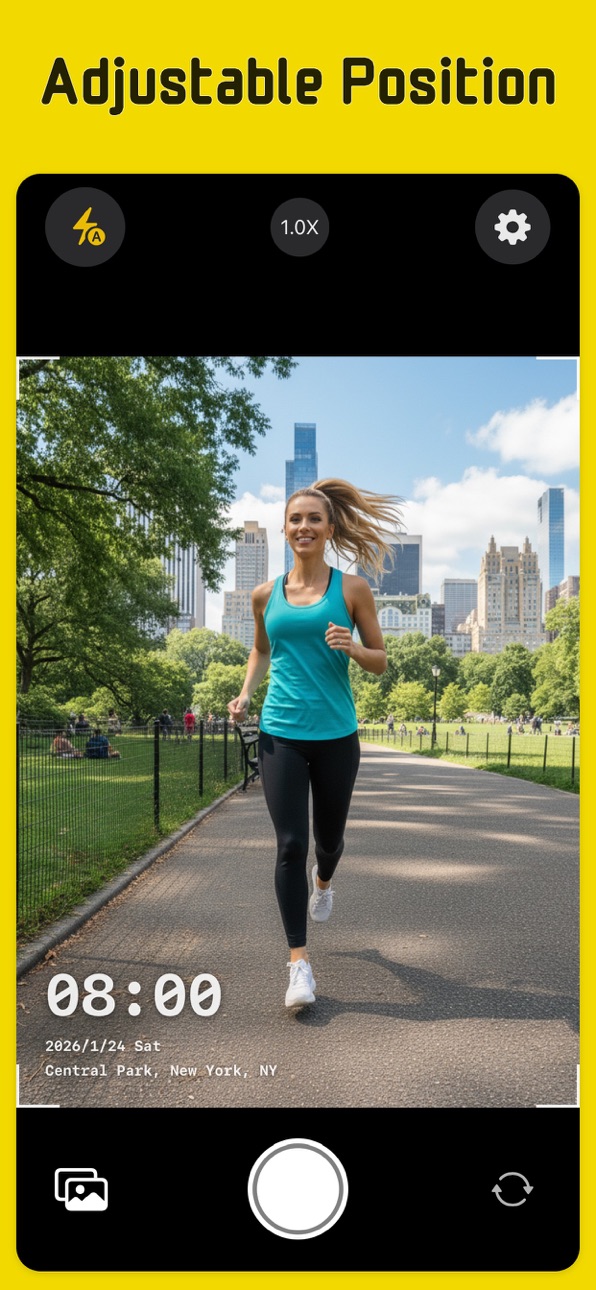
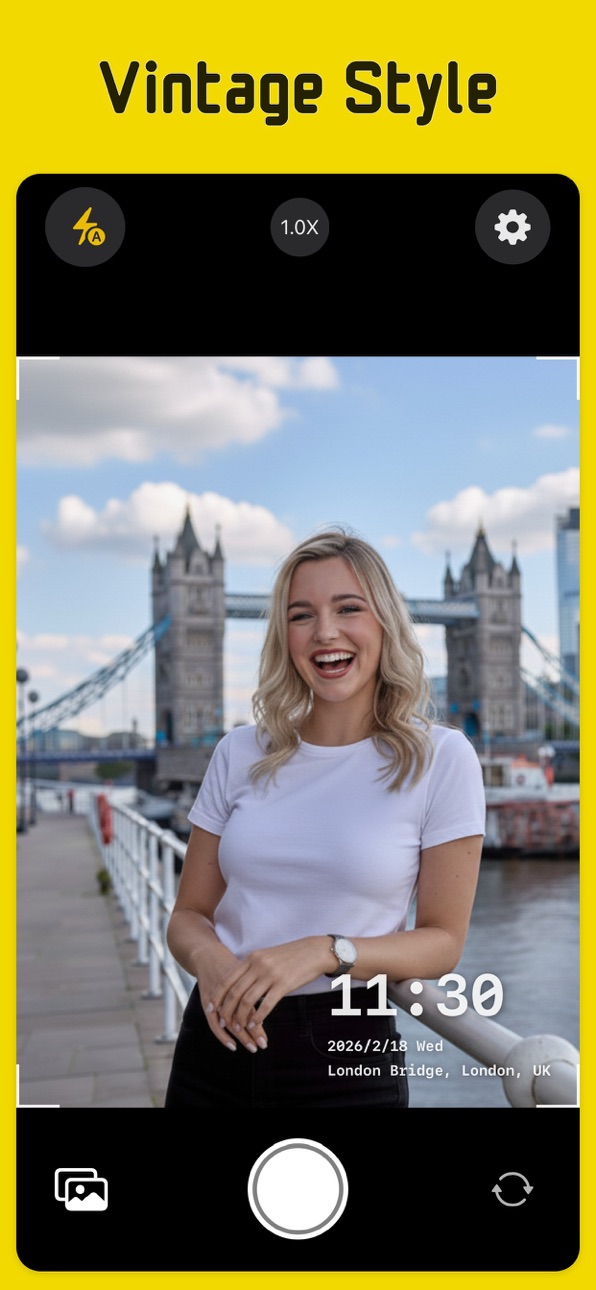
TimeCamera is a professional camera app designed for work records, travel logging, and field inspections. It automatically embeds precise time, detailed address, GPS coordinates, altitude, and compass heading directly into your photos as you capture them.
Key Features:
Precise Recording: Automatically captures current time and detailed location to ensure authenticity.
Professional Metadata: Supports GPS coordinates, real-time Altitude (Alt), and Compass Heading.
High Customization: Multiple style presets (Classic, Record, Minimal, Vintage, Cyber). Customize font design (Serif, Monospaced, Rounded), weight, color, opacity, and shadow.
Immersive Experience: Realistic mechanical shutter animation paired with precise haptic feedback for a tactile photography experience.
Flexible Control: Easily toggle visibility for GPS, altitude, heading, or seconds in settings to suit your needs.
Optimized Performance: Uses advanced rendering technology to ensure smooth operation and memory efficiency even with 48MP high-resolution photos.
Use Cases:
Work Logs: Field staff attendance, property inspections, and construction site verification.
Travel Adventures: Document your journeys with exact coordinates and altitude.
Daily Life: Add context to your most meaningful moments.
Subscription automatically renews unless canceled.
Terms of Use: https://www.apple.com/legal/internet-services/itunes/dev/stdeula/
Privacy Policy: https://appbay.netlify.app/timecamera/privacy
In-App Purchases US pricing
Pro Subscription
Monthly · Monthly$3.99
Quarterly · 3 months$7.99
Yearly · Yearly 7-day free trial$19.99
Capabilities
In-App Purchases
Accessibility
ipadiphonemacrealityDevicetvoswatch
Version history 23 versions
Build 887538950v4.1.32026-06-28 16:55:46
The time display in watermark templates has been upgraded for greater flexibility
Build 887469173v4.1.22026-06-26 17:55:34
1. Added a repeating diagonal watermark template.
2. Improved the customization options for QR code watermark templates.
Build 887182734v4.1.12026-06-20 16:43:22
1. Captured photos are now saved directly to the system Photos library.
Build 887097543v4.1.02026-06-17 21:13:38
• Introduced a new watermark template system, replacing Poster Mode.
• Added support for QR code watermark templates.
• Enhanced watermark style selection.
• Relocated the watermark style button to the bottom toolbar.
• You can now edit watermark information directly from the preview screen.
Build 886639093v4.0.72026-06-07 21:04:35
1. Added multi-select mode to the in-app photo gallery.
2. Fixed an issue with switching photos using swipe gestures.
Build 886348631v4.0.62026-05-31 18:12:32
1. Fixed an issue where watermark positioning was incorrect when taking landscape photos in overlay mode.
2. Fixed an issue where photos taken in landscape orientation were flipped in Poster mode.
3. Fixed an issue where double-tap did not work when viewing photos in the album.
4. Fixed occasional crashes during camera startup.
5. Improved performance and overall stability.
Build 886126890v4.0.42026-05-29 01:53:33
1. Added subscription options
2. Requires iOS 15 or later
3. Fixed an issue affecting photo zoom and movement
Build 886273415v4.0.52026-05-29 14:59:11
1. Added an onboarding guide for new users
2. Fixed inconsistencies after subscribing
3. Resolved issues with missing localized text
4. Improved overall experience
Build 886061592v4.0.32026-05-24 19:26:06
1. Added photo favorites
2. Fixed camera memory issue
Build 886003119v4.0.12026-05-22 14:24:37
1. Easily toggle location info while capturing
2. Easily switch watermark style while capturing
3. Added more poster templates
4. Simplified settings page
5. Fixed bugs and improved stability
Build 885651475v3.0.02026-05-14 16:33:29
1. Save captured photos directly in the app
2. Bug fixes and performance improvements
Build 884830779v2.8.22026-04-23 17:06:38
1. Improved the UI experience of Poster Mode.
Build 884136458v2.8.12026-04-04 17:22:32
1. Improved UI and overall user experience
2. Stability improvements
Build 883913555v2.8.02026-03-30 20:28:33
1. Added Poster model.
2. Enhance the user interface experience.
Build 883571971v2.7.02026-03-20 15:20:54
1. Improved user experience
2. Added multilingual support
Build 883285608v2.6.62026-03-16 10:33:44
1. 修复应用会偶尔崩溃的问题;
2. 提升了应用的健壮性。
Build 882432543v2.6.52026-02-17 09:45:45
1. 支持大字模式;
2. 增加了多种水印风格;
3. 支持自定义风格;
4. 可选显示GPS坐标,秒钟
5. 提升用户体验。
Build 882093838v2.6.12026-02-03 18:07:31
1. 修复水印位置有时不正确的问题;
2.改进了用户体验。
Build 882044569v2.4.02026-02-01 06:02:56
1. 增加了水印位置设置功能;
2. 修复了一些用户体验问题。
Build 881548346v2.3.02026-01-16 16:07:41
新曾功能:
1. 支持横屏拍摄;
2. 修复启动假死问题;
3. 修复水印对齐问题;
4. 更多的用户体验。
Build 876700285v2.2.02025-07-25 13:13:15
新曾功能:
1. 增加对超广角镜头的支持,可以快速切换;
2. 提升拍摄照片的分辨率。
Build 876621747v2.1.02025-07-23 02:06:59
新增加内容:
1. 增加取景框效果
2. 性能改善
Build 876019636v2.0.02025-07-14 09:07:23
Price history by region
Currency
Show
Columns
Search
Availability 1 of 1 storefronts
| Region | Language | Price | Ratings | Avg | Version |
|---|---|---|---|---|---|
| US | en-US | Free | 0 | — | 4.1.3 |
Change log 27 changes · US
✎
releaseNotes updated
The time display in watermark templates has been upgraded for greater flexibility
✎
description updated
TimeCamera is a professional camera app designed for work records, travel logging, and field inspections. It automatically embeds precise time, detailed address
✎
subtitle updated
True GPS Location & Timestamp
✎
name updated
Time Camera - GPS & Timestamp
◆
Version 4.1.3 released
The time display in watermark templates has been upgraded for greater flexibility
◆
Version 4.1.2 released
1. Added a repeating diagonal watermark template.
2. Improved the customization options for QR code watermark templates.
◆
Version 4.1.1 released
1. Captured photos are now saved directly to the system Photos library.
◆
Version 4.1.0 released
• Introduced a new watermark template system, replacing Poster Mode.
• Added support for QR code watermark templates.
• Enhanced watermark style selection.
• Relocated the watermark style button to the bottom toolbar.
• You can now edit wat
◆
Version 4.0.7 released
1. Added multi-select mode to the in-app photo gallery.
2. Fixed an issue with switching photos using swipe gestures.
◆
Version 4.0.6 released
1. Fixed an issue where watermark positioning was incorrect when taking landscape photos in overlay mode.
2. Fixed an issue where photos taken in landscape orientation were flipped in Poster mode.
3. Fixed an issue where double-tap did not
◆
Version 4.0.5 released
1. Added an onboarding guide for new users
2. Fixed inconsistencies after subscribing
3. Resolved issues with missing localized text
4. Improved overall experience
◆
Version 4.0.4 released
1. Added subscription options
2. Requires iOS 15 or later
3. Fixed an issue affecting photo zoom and movement
◆
Version 4.0.3 released
1. Added photo favorites
2. Fixed camera memory issue
◆
Version 4.0.1 released
1. Easily toggle location info while capturing
2. Easily switch watermark style while capturing
3. Added more poster templates
4. Simplified settings page
5. Fixed bugs and improved stability
◆
Version 3.0.0 released
1. Save captured photos directly in the app
2. Bug fixes and performance improvements
◆
Version 2.8.2 released
1. Improved the UI experience of Poster Mode.
◆
Version 2.8.1 released
1. Improved UI and overall user experience
2. Stability improvements
◆
Version 2.8.0 released
1. Added Poster model.
2. Enhance the user interface experience.
◆
Version 2.7.0 released
1. Improved user experience
2. Added multilingual support
◆
Version 2.6.6 released
1. 修复应用会偶尔崩溃的问题;
2. 提升了应用的健壮性。
◆
Version 2.6.5 released
1. 支持大字模式;
2. 增加了多种水印风格;
3. 支持自定义风格;
4. 可选显示GPS坐标,秒钟
5. 提升用户体验。
◆
Version 2.6.1 released
1. 修复水印位置有时不正确的问题;
2.改进了用户体验。
◆
Version 2.4.0 released
1. 增加了水印位置设置功能;
2. 修复了一些用户体验问题。
◆
Version 2.3.0 released
新曾功能:
1. 支持横屏拍摄;
2. 修复启动假死问题;
3. 修复水印对齐问题;
4. 更多的用户体验。
◆
Version 2.2.0 released
新曾功能:
1. 增加对超广角镜头的支持,可以快速切换;
2. 提升拍摄照片的分辨率。
◆
Version 2.1.0 released
新增加内容:
1. 增加取景框效果
2. 性能改善
◆
Version 2.0.0 released