Home › Productivity

 US
US
1 of 1 storefronts
Content in en-US
Content in en-US
Information
Preview 2 platforms
iPhone 8 images




iPad 8 images


What’s New Version 1.9
We've optimized the engine under the hood:
• Upgraded core scanning libraries for faster detection
• Improved memory usage during long batch sessions
• Reduced app launch time
• General stability and performance improvements
ScanBatch keeps getting faster with every update.
Description
Need to scan multiple QR codes and barcodes fast? ScanBatch is the batch QR scanner that lets you scan dozens of codes in a row — no interruptions, no limits. Export to CSV, organize your history, and generate QR codes all in one app.
Whether you're managing inventory, checking in event tickets, auditing equipment, or tracking shipments, ScanBatch is the fastest QR code scanner and barcode reader for your iPhone.
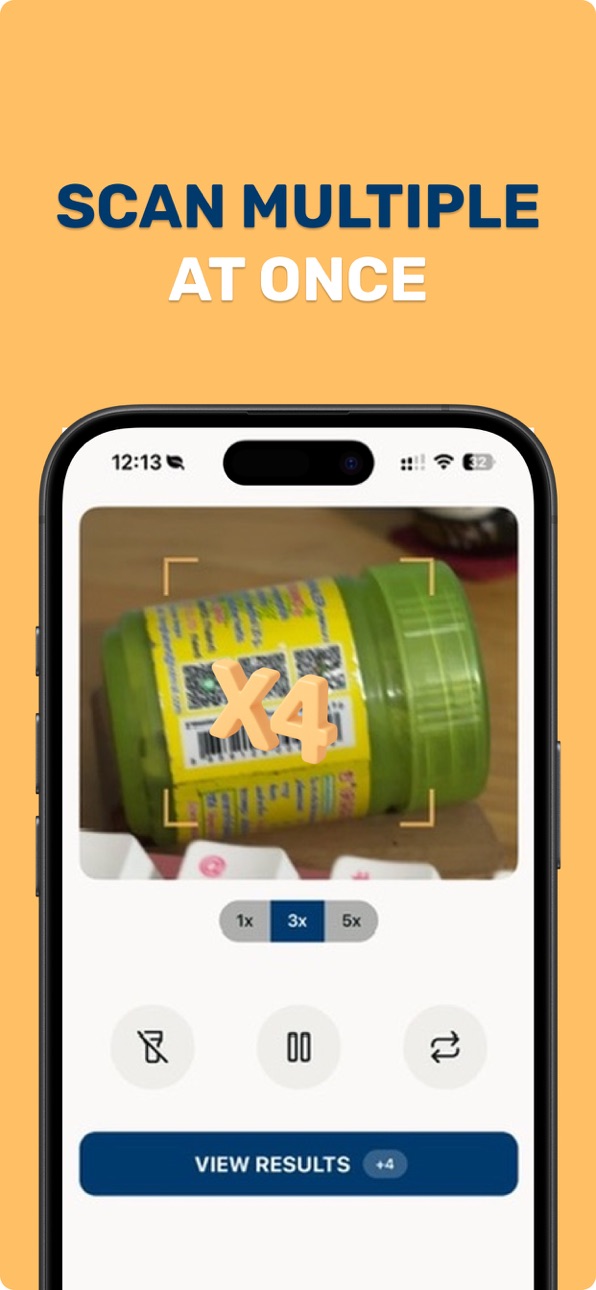
BATCH SCAN — SCAN MULTIPLE QR CODES
Forget tapping "back" after every scan. ScanBatch's continuous scan mode keeps scanning until you stop. Point, capture, repeat. Haptic and visual feedback confirms every scan.
• Unlimited consecutive scans — no session limits
• Works with QR, UPC, EAN-13, EAN-8, Code 128, Code 39
• Flash and front camera support
• Real-time detection with vibration confirmation
EXPORT SCAN LIST TO CSV
Turn your batch scan results into a CSV file you can open in Numbers, Excel, or Google Sheets. One tap exports your full scan history or individual collections.
• Full history CSV export
• Export individual collections
• Share via AirDrop, email, or files
• Includes timestamp, format, and content
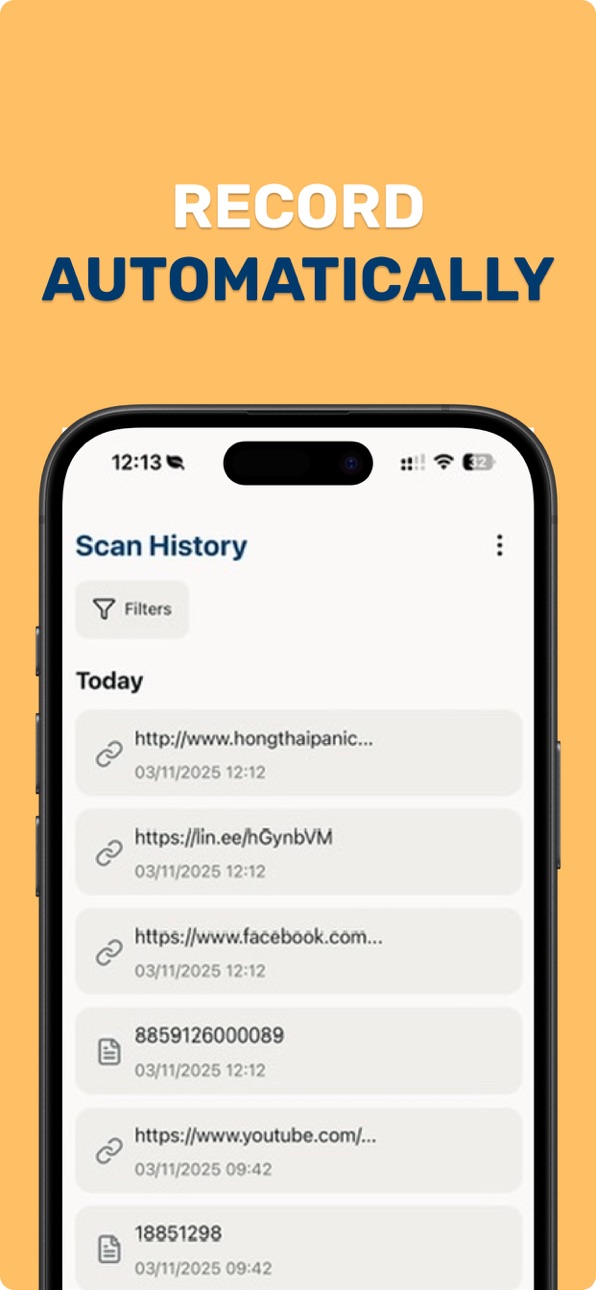
SMART COLLECTIONS & SCAN HISTORY
Organize every QR code and barcode you scan. Group scans by project, location, or date. Search, filter, and star your most-used codes.
• Create named collections
• Add notes to individual scans
• Search across your full scan list
• Save locations with each scan
QR CODE & BARCODE GENERATOR
Generate QR codes for URLs, WiFi networks, contact cards, text, and more. Customize colors, add logos, and save to collections. Use offline — works without internet.
HOME SCREEN WIDGET
Launch the scanner in one tap from your Home Screen with an iOS widget. No need to open the app first.
WHY SCANBATCH?
• Works offline — all scan data stays on your device
• Universal format reader: QR, UPC, EAN, Code 39, Code 128, Data Matrix
• Lightweight — optimized for iOS 17+
• Clean, professional design
WHO USES SCANBATCH
• Warehouse staff scanning inventory barcodes
• Event organizers checking in tickets
• Teachers collecting student work
• Auditors logging equipment
• Shopkeepers managing stock
Download ScanBatch free today. Upgrade to ScanBatch Pro for unlimited batch scanning, CSV export, and an ad-free experience.
Terms: https://www.apple.com/legal/internet-services/itunes/dev/stdeula/
Capabilities
In-App Purchases
Accessibility
ipadiphonemacrealityDevicetvoswatch
Version history 10 versions
Build 883451871v1.92026-06-12 04:14:44
We've optimized the engine under the hood:
• Upgraded core scanning libraries for faster detection
• Improved memory usage during long batch sessions
• Reduced app launch time
• General stability and performance improvements
ScanBatch keeps getting faster with every update.
Build 879927560v1.8.02025-11-20 21:18:46
Widgets are here!
We’ve updated UniQR to make your scanning experience even faster and smoother.
• New Home Screen Widget: See QR code instantly right from your Home Screen.
• Auto Theme Sync: The app now automatically switches between Light and Dark mode based on your system settings.
• Improved Haptics: Fixed an issue with vibration feedback during scanning.
• UI Polish: Fixed an issue where notifications were hidden behind modal screens.
Love the new widget? Please leave us a review!
Build 879443979v1.7.02025-11-03 21:24:38
What’s New
- Updated the app logo for a refreshed visual identity
- Unlocked free access to all features for all users
- Resolved an issue causing scanned results to clear prematurely
Build 879164924v1.6.02025-10-24 01:09:53
Added color picker for favorite cards
Improved scan flow for faster and more reliable results
Build 878752019v1.5.02025-10-10 08:02:30
What’s New in This Version:
• Added price label scanner to detect and extract prices
• Save history records directly to collections
• Added iPad interface support
• Improved app performance and stability
• Added option to change text size for better readability
Build 878466152v1.4.02025-09-29 07:51:07
What's New in UniQR:
- Rebranded from HandyQR to UniQR for a fresh new identity
- Completely revamped Settings tab UI for easier navigation
- Improved speed when opening record details for a smoother experience
- Added filter options on the Collection screen for better organization
- New feature: save and view scan location for each QR code record
- Enhanced delete record flow for quicker and safer removal
Update now to experience a smarter, faster, and more intuitive UniQR!
Build 878150042v1.3.02025-09-19 12:32:31
- Feedback Update – Share thoughts more easily with our improved feedback feature.
- Japanese Language Support – HandyQR is now available in Japanese!
- Revamped Home Screen – Cleaner, modern design for faster access.
- Improved History UI – Find past scans with a more intuitive look.
Thanks for using HandyQR! We’re always working to improve — leave us feedback to help shape future updates.
Build 877303801v1.2.02025-08-20 05:15:43
- Introduced Flow Mode for continuous scanning
- Added barcode scanning and generation for UPC-A, UPC-E, EAN-13, and EAN-8
- Added data management: clear, import, and export data
- Added Korean language support
Build 876789193v1.1.02025-08-01 18:37:53
• Revamped user interface for smoother experience
• Scanner now supports flash and front camera
• Submit feedback directly in-app
• Added lock history and QR detail features
• New language support: Spanish, Chinese (Simplified)
Build 875869912v1.0.02025-07-14 22:53:42
No pricing data captured yet — comparisons appear once the app has paid storefronts or in-app purchases.
Availability 1 of 1 storefronts
| Region | Language | Price | Ratings | Avg | Version |
|---|---|---|---|---|---|
| US | en-US | Free | 0 | — | 1.9 |
Change log 14 changes · US
✎
releaseNotes updated
We've optimized the engine under the hood:
• Upgraded core scanning libraries for faster detection
• Improved memory usage during long batch sessions
• Reduced
✎
description updated
Need to scan multiple QR codes and barcodes fast? ScanBatch is the batch QR scanner that lets you scan dozens of codes in a row — no interruptions, no limits. E
✎
subtitle updated
Scanner, Generator, CSV Export
✎
name updated
ScanBatch: Batch QR & Barcode
◆
Version 1.9 released
We've optimized the engine under the hood:
• Upgraded core scanning libraries for faster detection
• Improved memory usage during long batch sessions
• Reduced app launch time
• General stability and performance improvements
ScanBatch kee
◆
Version 1.8.0 released
Widgets are here!
We’ve updated UniQR to make your scanning experience even faster and smoother.
• New Home Screen Widget: See QR code instantly right from your Home Screen.
• Auto Theme Sync: The app now automatically switches between L
◆
Version 1.7.0 released
What’s New
- Updated the app logo for a refreshed visual identity
- Unlocked free access to all features for all users
- Resolved an issue causing scanned results to clear prematurely
◆
Version 1.6.0 released
Added color picker for favorite cards
Improved scan flow for faster and more reliable results
◆
Version 1.5.0 released
What’s New in This Version:
• Added price label scanner to detect and extract prices
• Save history records directly to collections
• Added iPad interface support
• Improved app performance and stability
• Added option to change text size f
◆
Version 1.4.0 released
What's New in UniQR:
- Rebranded from HandyQR to UniQR for a fresh new identity
- Completely revamped Settings tab UI for easier navigation
- Improved speed when opening record details for a smoother experience
- Added filter options on the
◆
Version 1.3.0 released
- Feedback Update – Share thoughts more easily with our improved feedback feature.
- Japanese Language Support – HandyQR is now available in Japanese!
- Revamped Home Screen – Cleaner, modern design for faster access.
- Improved History UI
◆
Version 1.2.0 released
- Introduced Flow Mode for continuous scanning
- Added barcode scanning and generation for UPC-A, UPC-E, EAN-13, and EAN-8
- Added data management: clear, import, and export data
- Added Korean language support
◆
Version 1.1.0 released
• Revamped user interface for smoother experience
• Scanner now supports flash and front camera
• Submit feedback directly in-app
• Added lock history and QR detail features
• New language support: Spanish, Chinese (Simplified)
◆
Version 1.0.0 released