Home › Productivity

 US
US
USen-US CAen-CA
 AEen-GB
 AFen-GB
 ALen-GB
 AMen-GB
 ATde-DE
 AUen-AU
 AZen-GB
 BAen-GB
 BEen-GB
 BGen-GB
 BHen-GB
 BMen-GB
 BNen-GB
 BTen-GB
 BYen-GB
 CHde-CH
 CNzh-Hans-CN
 CYen-GB
 CZen-GB
 DEde-DE
 DKen-GB
 EEen-GB
 EGen-GB
 ESes-ES
 FIen-GB
 FJen-GB
 FMen-GB
 FRfr-FR
 GBen-GB
 GEen-GB
 GRen-GB
 HKzh-Hant-HK
 HRen-GB
 HUen-GB
 IDen-GB
 IEen-GB
 ILen-GB
 INen-GB
 IQen-GB
 ISen-GB
 ITit
ITit JOen-GB
 JPja
JPja KGen-GB
 KHen-GB
 KRko
KRko KWen-GB
 KZen-GB
 LAen-GB
 LBen-GB
 LKen-GB
 LTen-GB
 LUen-GB
 LVen-GB
 MDen-GB
 MEen-GB
 MKen-GB
 MMen-GB
 MNen-GB
 MOzh-Hant-HK
 MRen-GB
 MTen-GB
 MVen-GB
 MYen-GB
 NLnl
NLnl NOen-GB
 NPen-GB
 NRen-GB
 NZen-AU
 OMen-GB
 PGen-GB
 PHen-GB
 PKen-GB
 PLen-GB
 PTpt-PT
 PWen-GB
 QAen-GB
 ROen-GB
 RSen-GB
 RUru
RUru SAen-GB
 SBen-GB
 SEsv
SEsv SGen-GB
 SIen-GB
 SKen-GB
 THen-GB
 TJen-GB
 TMen-GB
 TOen-GB
 TRen-GB
 TWzh-Hant-TW
 UAen-GB
 UZen-GB
 VNen-GB
 VUen-GB
 XKen-GB
 YEen-GB
 ZAen-GB
101 of 101 storefronts
Content in en-US
Content in en-US
Information
Preview 1 platform
iPhone 5 images



What’s New Version 2026.03.02
All new improved UI!
Description
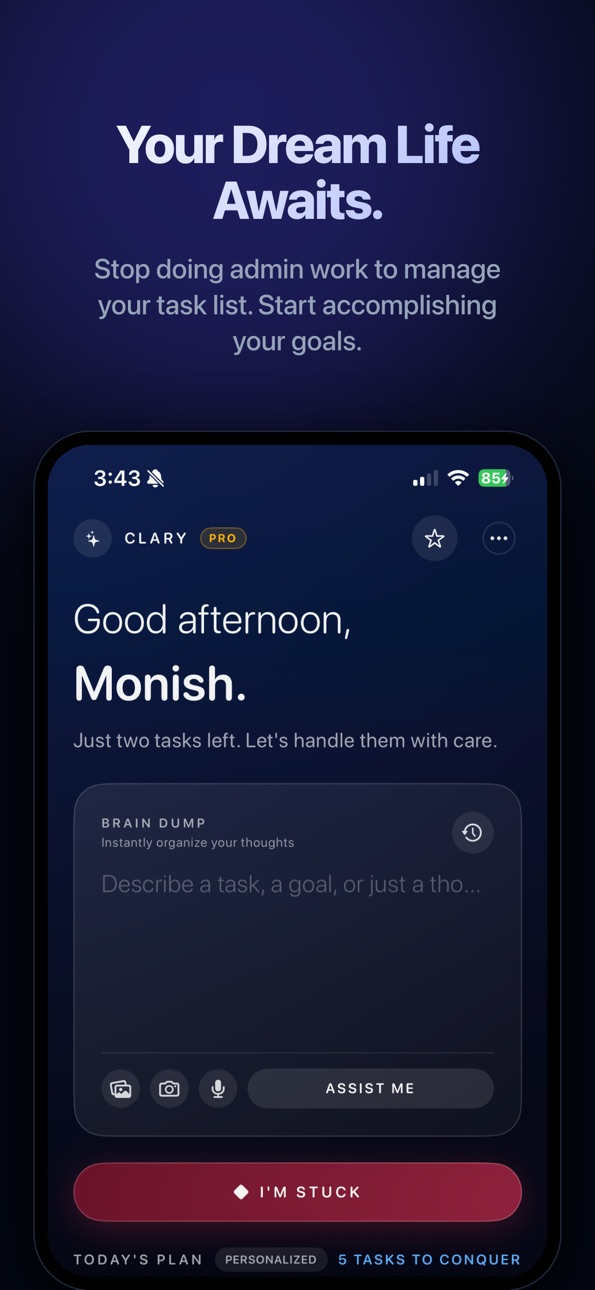
We didn’t just update Clary; we completely reimagined it. We realized that for a productivity app to actually work, it needs to disappear. It shouldn't feel like "using an app"—it should feel like an extension of your brain.
So we rebuilt everything—from the UI to the AI—to create the first frictionless planner.
Clary is designed for "zero-thinking" capture. You don't fill out forms. You don't manually set dates. You simple speak, type, or snap, and Clary's completely overhauled AI engine understands exactly what you mean, where it goes, and when you should do it. It just works.
Clary is different. We believe organizing your life shouldn't feel like a chore. It should feel like a conversation with a brilliant executive assistant who just gets it. Clary is the first task manager designed to be your AI co-pilot, handling the administrative drag so you can focus on what you do best: achieving your goals.
WHY CLARY? Most to-do apps feel like data entry. Clary feels like magic. We use advanced AI to handle the tedious parts of planning—sorting, tagging, scheduling, and breaking down tasks—so you can focus on doing the work that matters.
CAPTURE ANYTHING, ANYHOW
Speak Your Mind: Just say, "Remind me to email the proposal tomorrow morning and follow up next week." Clary understands the context, sets the due date, and prioritizes it for you.
Snap Your Notes: Have a messy whiteboard or a handwritten sticky note? Snap a photo. Clary's AI reads it and converts it into a digital checklist instantly.
Brain Dump Freely: Overwhelmed? Type a messy paragraph of everything on your mind. Clary will deconstruct it into clear, manageable subtasks and organize them into your projects.
MASTER YOUR WORKFLOW
Smart Scheduling: Clary doesn't just list tasks; it helps you plan them. Our AI respects your wake-up times and working hours to suggest the best times to get things done.
Visual Clarity: Switch between a powerful Kanban board for projects or a standard list for daily agendas.
Focus Tools: Built-in Pomodoro timer to help you work in sprints, plus an Eisenhower Matrix to ensure you’re always working on what’s actually important, not just what’s urgent.
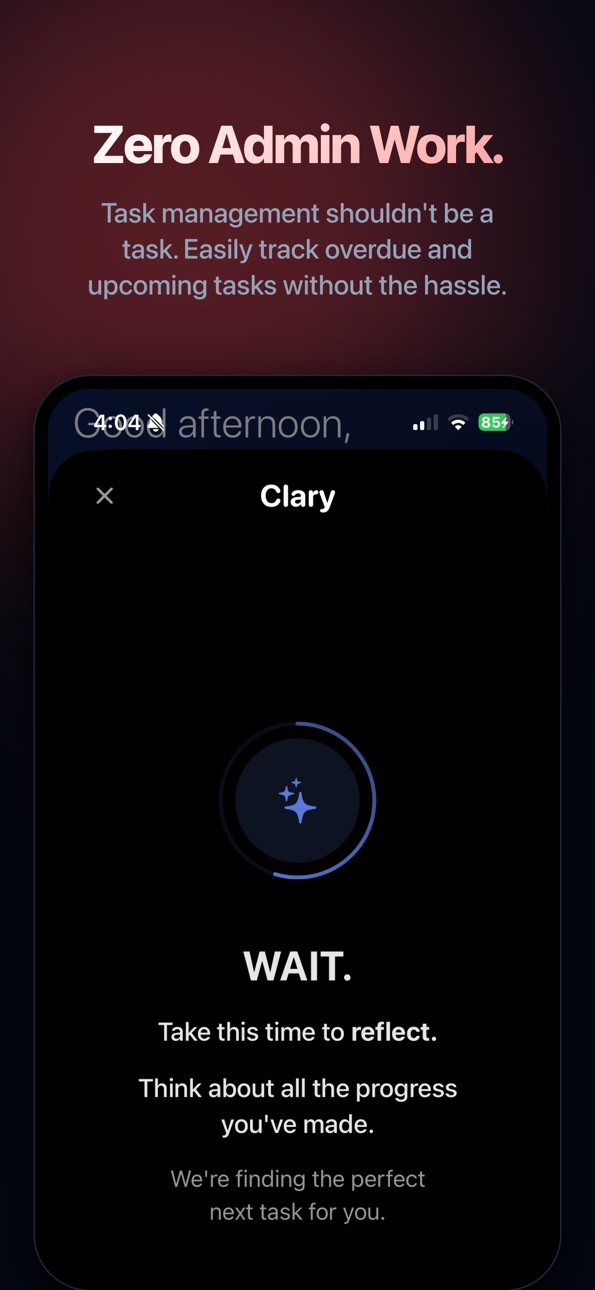
Gamified Consistency: Build a productivity streak with our "Reflect" system. Track your progress daily and stay motivated.
SEAMLESS INTEGRATION
Google Calendar Sync: See your events alongside your tasks. Never double-book yourself again.
Home Screen Widgets: distinct and beautiful widgets keep your goals front and center.
Siri & Shortcuts: Capture tasks completely hands-free while driving or walking.
CLARY FREE The perfect starting point for getting organized.
Unlimited tasks and notes
Standard reminders
Up to 2 projects
Basic AI capture
CLARY PRO Unlock your ultimate productivity potential.
Unlimited AI Intelligence: Unlimited voice-to-task, photo-to-task, and brain dump breakdown.
Calendar Sync: Real-time 2-way sync with Google Calendar.
Unlimited Projects: Organize every aspect of work, home, and side hustles.
Advanced Analytics: Deep insights into your productivity trends and streaks.
Stop fighting with your planner. Start getting things done.
Terms of Use: https://www.apple.com/legal/internet-services/itunes/dev/stdeula/ Privacy Policy: https://www.tryclary.com/privacy.html
Capabilities
In-App Purchases
Accessibility
ipadiphonemacrealityDevicetvoswatch
Version history 21 versions
Build 883558713v2026.03.022026-03-20 15:18:49
All new improved UI!
Build 883382282v2026.03.012026-03-15 20:15:33
Added a login screen with an option to bypass onboarding for users who already have an account, streamlining access for returning users.
Introduced chat history functionality, allowing users to view previous messages and maintain context across sessions.
Build 881509708v2026.01.012026-02-24 03:26:09
Clary 2.0: Rebuilt, Reimagined, and Frictionless.
We have rebuilt Clary from the ground up. This isn't just an update; it’s a brand-new experience.
Every pixel of the UI, every line of code, and every logic pathway in our AI has been reconstructed with one goal: Zero Friction.
A WHOLE NEW FOUNDATION
The "It Just Works" Engine: We’ve rewritten the core architecture to be faster, smoother, and deeply intuitive. No more fighting the interface. The app now flows as fast as you think.
Hyper-Personalized AI: The AI doesn't just "read" text anymore; it understands context. It knows your work hours, respects your sleep schedule, and learns how you speak. You don't have to be precise; you just have to be you.
INTELLIGENT INTEGRATIONS
Google Calendar Sync: A highly requested feature, built seamlessly into the new flow. Your tasks and events now live in perfect harmony.
Smarter Onboarding: We’ve scrapped the old setup. The new onboarding is designed to learn your preferences instantly so the app feels like yours from Second 1.
VISUAL & BRAIN UPGRADES
Redesigned UI: A stunning new look that feels premium and calm, designed to reduce cognitive load.
Better "Reflect": The reflection and streak systems have been overhauled to actually help you build habits, not just track stats.
We stripped away everything that felt like "work" and left only what feels like "magic." Welcome to the new Clary.
Build 878022700v2025.09.012025-09-11 20:18:40
Lowered the minimum iOS version required!
Build 877514829v2025.08.022025-08-28 07:40:34
Much better siri integration! And also the streaks are toggleable.
Build 877283028v2025.08.012025-08-16 17:10:07
Smarter Auto-Tagging: We've made our AI even better at understanding your tasks. It now generates more concise and useful tags, making it easier than ever to find and organize your to-do list.
Build 877125880v2025.07.112025-08-10 20:13:59
Improvements & Fixes
Clearer Navigation: When you're viewing a filtered list (like "Due Today" or a specific project), a new banner now provides a one-tap way to return to your full task list, so you never feel lost.
Improved Interface: The action buttons in the Overdue Management view now include clear text labels, making them more intuitive and accessible
Build 877048994v2025.07.102025-08-07 20:17:18
We've been listening! This update is all about making Tudu an even more seamless extension of your brain.
INSTANT CAPTURE, ANYWHERE: Introducing the new floating "Inbox" button! Now, your executive assistant is just a single tap away from any screen. Capture a fleeting thought the moment it strikes, without breaking your flow.
SMOOTHER SCHEDULING: Rescheduling overdue tasks just got a whole lot faster. We've streamlined the process, cutting down on taps so you can spend less time managing and more time doing.
POLISH & PERFORMANCE: We've squashed some bugs and polished the UI to make your experience even more frictionless.
Thank you for your incredible feedback. Keep it coming!
Build 876860218v2025.07.092025-08-04 12:46:45
We heard you loud and clear! This update is all about tackling that dreaded list of overdue tasks and making our powerful AI even easier to access.
Introducing the Overdue Task Manager!
Feeling overwhelmed by tasks that have slipped past their due date? Now, a smart banner appears when you have overdue items. Tap 'Review' to enter a focused management screen where you can:
Bulk Select: Use the "Select All" button to manage all overdue tasks at once.
Quick Reschedule: Effortlessly move tasks to Today, Tomorrow, or Next Week with a single tap.
AI-Powered Suggestions: Let "Tudu Suggestions" intelligently propose new, realistic dates to get you back on track.
Clean Up: Quickly clear due dates or delete multiple tasks to achieve a clean slate.
Your AI Assistant, Everywhere!
The powerful Tudu AI Assistant is no longer just on the Tasks screen. A new floating button lives in the corner of every main tab (Dashboard, Tasks, Completed, and Settings), so inspiration is never more than a tap away.
Thank you for your incredible feedback. It directly shapes the future of Tudu and helps us build an app that's truly frictionless. Keep it coming!
Build 876822343v2025.07.082025-07-30 11:19:05
This is the biggest update to tudu ever. We've evolved from a smart to-do list into a complete productivity system, designed to help you organize your life, build good habits, and focus on what truly matters.
Here's What's New:
Build Lasting Habits: Introducing a beautiful new Habit Tracker! Set daily or weekly goals, track your streaks, and build the routines that lead to success.
Visualize Your Workflow with Kanban: See the big picture! Organize your projects into custom Kanban boards. Drag and drop tasks from "To Do" to "In Progress" to "Done" for a clear, visual overview of your progress.
Prioritize Like a Pro with the Eisenhower Matrix: Stop wondering what to work on next. Our new Eisenhower Matrix automatically sorts your tasks into Urgent/Important quadrants, helping you make smart decisions and focus your energy effectively.
Smarter AI: The AI Assistant is now even more powerful, with improved accuracy and speed.
Thank you for being on this journey with us!
Build 876737162v2025.07.072025-07-28 01:28:47
Reworded descriptions!
Build 876675066v2025.07.062025-07-24 20:36:34
A Huge Upgrade: Your Personal AI Partner is Here!
We've completely supercharged tudu to help you achieve "Frictionless Focus." This version introduces powerful new AI features designed to save you time and mental energy.
Smoother Onboarding:
Break It Down: Overwhelmed by a big task? Select it from your list, and our new "Decompose" feature will instantly break it into smaller, manageable subtasks.
From Photo to Plan: Use the new image import feature in the AI Assistant to take a picture of a whiteboard or sticky note, and tudu will automatically transcribe it into tasks.
This update also includes a completely redesigned onboarding experience and countless performance improvements to make your entire workflow smoother and faster.
Build 876285155v2025.07.052025-07-14 21:18:03
NEW: Speak Your Mind
Tap the new microphone icon in the AI Assistant to speak your tasks, ideas, and commands. Tudu transcribes your voice on-device for a fast, private, and seamless experience. No more typing needed to capture a fleeting thought!
IMPROVED: Quick Access to Pro Tools
We've added a new menu to the Dashboard toolbar for instant access to the Pomodoro Timer and future productivity tools, making it easier than ever to get into a state of deep focus.
YOUR FEEDBACK MATTERS
We've added a one-time request for our Pro members to share their #1 reason for subscribing. Your insights are invaluable and directly shape the future of Tudu. Thank you for your support!
Also in this update:
The AI input screen is now more convenient with a new quick-clear button.
Squashed several bugs related to task syncing and recurrence for a more reliable experience.
General UI polish and performance improvements across the app.
Build 876146899v2025.07.042025-07-09 18:00:53
Tudu just got a major upgrade to both its brain and its focus! This update introduces powerful new ways to turn your thoughts—and your voice—into organized action, and a rebuilt tool to help you conquer those tasks.
• AUDIO-TO-ACTION: Your brain doesn't stop, and now, neither does Tudu. Share a voice memo or import an audio file of a meeting or lecture, and watch as our AI transcribes it and pulls out a list of actionable tasks. Never lose a brilliant idea again!
• A BRAND NEW FOCUS TIMER: We've completely rebuilt the Pomodoro timer to be your ultimate deep work companion. With a sleek new design, multiple session lengths, and enhanced controls, getting into the zone has never been easier.
• TEACH YOUR AI: You're the boss. In Settings, you can now give Tudu's AI persistent custom instructions. Tell it to "always tag tasks about 'Project X' as #urgent" or "any task for my boss gets high priority." The AI now works exactly how you want it to.
• RAPID-FIRE TASK ENTRY: Doing a brain dump? Enable the new "Bulk Add Mode" in Settings. The 'New Task' screen will stay open, letting you add task after task without interruption.
As always, we've squashed some bugs and improved performance to make your experience even smoother. Thank you for your support and feedback
Build 876116993v2025.07.032025-07-04 11:45:21
Get ready to focus and organize like never before! This update is packed with powerful new tools to help you conquer your to-do list and achieve your goals.
What's New:
BOOST YOUR FOCUS with the Pomodoro Timer!
Crush procrastination and work in focused sprints. Our new integrated timer helps you manage your energy and get more done, right inside the app.
ALL-NEW WIDGETS for Your Home Screen!
Get a snapshot of your day at a glance. Track your streak with the new Dashboard widget and view your upcoming tasks with the Task List widget.
LET AI PLAN YOUR DAY with Smart Schedule!
Feeling overwhelmed? Our AI Assistant can now analyze your tasks for the day and create a realistic, block-by-block plan for you—complete with breaks!
BREAK IT DOWN with AI Task Decomposition!
Is a task too big to handle? Let our AI assistant break it down into smaller, actionable subtasks for you. Turning big projects into easy wins has never been simpler.
TRACK YOUR PROGRESS with Fun Stats!
Curious how you're doing? The new collapsible Stats section in Settings shows you your total tasks completed, longest streak, and more. A fun way to see how far you've come!
NEW SOUNDS & CONTROLS!
Enjoy subtle sound effects for timers and notifications. Not a fan? You can now toggle all in-app sounds off in Settings for a quieter experience.
Plus, even more: This update also includes numerous bug fixes and performance enhancements to make your Tudu experience smoother than ever.
Thank you for using Tudu! If you're enjoying the new features, please consider leaving a review. It helps us a lot!
Build 876061865v2025.07.022025-07-02 11:58:55
What's New in This Version
This is our biggest update yet, packed with powerful new features and critical fixes based on your amazing feedback! Get ready to take your productivity to the next level.
INTRODUCING CALENDAR SYNC (PRO)
See your schedule and your tasks in one place! Tudu can now automatically add tasks with due times to your Apple Calendar, creating a unified view of your day.
SUPERCHARGED SUBTASKS
Multi-Level Nesting: Go beyond simple checklists. Create subtasks of subtasks for any level of detail your project requires.
Intelligent Parent Tasks: Parent tasks are now smarter! They automatically display the total estimated time and a consolidated list of all tags from their subtasks, giving you a complete overview at a glance.
Safe Deletion: We've added a confirmation alert when deleting a parent task to prevent accidental loss of your important subtasks.
AI ASSISTANT MAJOR UPGRADE
Full Nesting Control: The AI Assistant is now a master of hierarchy! Simply ask it to "make task A a subtask of task B" or "create a new parent task for these items," and it will handle the rest.
Consistent Tagging: AI-generated tags are now always stored alphabetically for a cleaner, more organized experience.
UI & UX POLISH
Dashboard Parity: The "Due Today" section on your Dashboard now correctly displays your task hierarchy with proper indentation, matching the main Tasks view.
Bug Squashing: We've fixed numerous bugs, including one that could hide deeply nested subtasks and another that allowed completed tasks to be assigned as parents. The app is now more stable and reliable than ever.
Build 876028003v2025.07.012025-07-01 17:35:56
Smarter, More Reliable AI Assistant
Intuitive Date Handling: When you add a task for a time that's already passed today (like logging something you just did), our AI now correctly assigns it to today for tracking, instead of defaulting to tomorrow.
Handles Complex Commands: The Assistant is now much better at understanding commands that affect multiple tasks at once. Go ahead, tell it to "reschedule my two reports and mark the 'send invoice' task as complete"!
Cleaner AI-Generated Tags: Tags created by the AI are now more consistent, using single-word formats (like timeblocking instead of time_blocking) for a cleaner look.
A Polished & Powerful User Experience
All-New Tag Editor: We've completely overhauled tag management! Tapping a task's tags now opens a dedicated, focused editor. It's multi-line (no more truncated text!) and even suggests your existing tags as you type to help you stay organized.
Full Dashboard Visibility: The "Due Today" section on your Dashboard now shows all of your tasks for the day. Nothing important ever gets hidden off-screen again.
Interactive Completed Tasks: Completed tasks are no longer static! You can now tap any completed item to view its full details, review notes, or easily un-complete it. Tags are also now visible on completed tasks for better context.
Consistent Tag Order: All tags are now automatically saved and displayed alphabetically, making your lists cleaner and more predictable.
Also added color schemes!!
Build 875962258v2025.06.032025-06-30 02:08:12
Increased auto close timer for AI Input view, introduced Siri Integration, and Auto Project Assign.
Build 875996117v2025.06.042025-06-30 19:01:45
Added imports from Apple Reminders App + Optional Sync with Reminders App
Build 875925251v2025.06.022025-06-27 13:59:05
Added cloud storage of beta feature toggle, added question to onboarding flow, fixed small background color error UI changes on managing projects sheet.
Build 875803994v1.02025-06-26 07:47:14
No pricing data captured yet — comparisons appear once the app has paid storefronts or in-app purchases.
Availability 101 of 101 storefronts
| Region | Language | Price | Ratings | Avg | Version |
|---|---|---|---|---|---|
| US | en-US | Free | 8 | 4.4 | 2026.03.02 |
| CA | en-CA | Free | 1 | 4.0 | 2026.03.02 |
| AE | en-GB | Free | 0 | — | 2026.03.02 |
| AF | en-GB | Free | 0 | — | 2026.03.02 |
| AL | en-GB | Free | 0 | — | 2026.03.02 |
| AM | en-GB | Free | 0 | — | 2026.03.02 |
| AT | de-DE | Free | 0 | — | 2026.03.02 |
| AU | en-AU | Free | 0 | — | 2026.03.02 |
| AZ | en-GB | Free | 0 | — | 2026.03.02 |
| BA | en-GB | Free | 0 | — | 2026.03.02 |
| BE | en-GB | Free | 0 | — | 2026.03.02 |
| BG | en-GB | Free | 0 | — | 2026.03.02 |
| BH | en-GB | Free | 0 | — | 2026.03.02 |
| BM | en-GB | Free | 0 | — | 2026.03.02 |
| BN | en-GB | Free | 0 | — | 2026.03.02 |
| BT | en-GB | Free | 0 | — | 2026.03.02 |
| BY | en-GB | Free | 0 | — | 2026.03.02 |
| CH | de-CH | Free | 0 | — | 2026.03.02 |
| CN | zh-Hans-CN | Free | 0 | — | 2026.03.02 |
| CY | en-GB | Free | 0 | — | 2026.03.02 |
| CZ | en-GB | Free | 0 | — | 2026.03.02 |
| DE | de-DE | Free | 0 | — | 2026.03.02 |
| DK | en-GB | Free | 0 | — | 2026.03.02 |
| EE | en-GB | Free | 0 | — | 2026.03.02 |
| EG | en-GB | Free | 0 | — | 2026.03.02 |
| ES | es-ES | Free | 0 | — | 2026.03.02 |
| FI | en-GB | Free | 0 | — | 2026.03.02 |
| FJ | en-GB | Free | 0 | — | 2026.03.02 |
| FM | en-GB | Free | 0 | — | 2026.03.02 |
| FR | fr-FR | Free | 0 | — | 2026.03.02 |
| GB | en-GB | Free | 0 | — | 2026.03.02 |
| GE | en-GB | Free | 0 | — | 2026.03.02 |
| GR | en-GB | Free | 0 | — | 2026.03.02 |
| HK | zh-Hant-HK | Free | 0 | — | 2026.03.02 |
| HR | en-GB | Free | 0 | — | 2026.03.02 |
| HU | en-GB | Free | 0 | — | 2026.03.02 |
| ID | en-GB | Free | 0 | — | 2026.03.02 |
| IE | en-GB | Free | 0 | — | 2026.03.02 |
| IL | en-GB | Free | 0 | — | 2026.03.02 |
| IN | en-GB | Free | 0 | — | 2026.03.02 |
| IQ | en-GB | Free | 0 | — | 2026.03.02 |
| IS | en-GB | Free | 0 | — | 2026.03.02 |
| IT | it | Free | 0 | — | 2026.03.02 |
| JO | en-GB | Free | 0 | — | 2026.03.02 |
| JP | ja | Free | 0 | — | 2026.03.02 |
| KG | en-GB | Free | 0 | — | 2026.03.02 |
| KH | en-GB | Free | 0 | — | 2026.03.02 |
| KR | ko | Free | 0 | — | 2026.03.02 |
| KW | en-GB | Free | 0 | — | 2026.03.02 |
| KZ | en-GB | Free | 0 | — | 2026.03.02 |
| LA | en-GB | Free | 0 | — | 2026.03.02 |
| LB | en-GB | Free | 0 | — | 2026.03.02 |
| LK | en-GB | Free | 0 | — | 2026.03.02 |
| LT | en-GB | Free | 0 | — | 2026.03.02 |
| LU | en-GB | Free | 0 | — | 2026.03.02 |
| LV | en-GB | Free | 0 | — | 2026.03.02 |
| MD | en-GB | Free | 0 | — | 2026.03.02 |
| ME | en-GB | Free | 0 | — | 2026.03.02 |
| MK | en-GB | Free | 0 | — | 2026.03.02 |
| MM | en-GB | Free | 0 | — | 2026.03.02 |
| MN | en-GB | Free | 0 | — | 2026.03.02 |
| MO | zh-Hant-HK | Free | 0 | — | 2026.03.02 |
| MR | en-GB | Free | 0 | — | 2026.03.02 |
| MT | en-GB | Free | 0 | — | 2026.03.02 |
| MV | en-GB | Free | 0 | — | 2026.03.02 |
| MY | en-GB | Free | 0 | — | 2026.03.02 |
| NL | nl | Free | 0 | — | 2026.03.02 |
| NO | en-GB | Free | 0 | — | 2026.03.02 |
| NP | en-GB | Free | 0 | — | 2026.03.02 |
| NR | en-GB | Free | 0 | — | 2026.03.02 |
| NZ | en-AU | Free | 0 | — | 2026.03.02 |
| OM | en-GB | Free | 0 | — | 2026.03.02 |
| PG | en-GB | Free | 0 | — | 2026.03.02 |
| PH | en-GB | Free | 0 | — | 2026.03.02 |
| PK | en-GB | Free | 0 | — | 2026.03.02 |
| PL | en-GB | Free | 0 | — | 2026.03.02 |
| PT | pt-PT | Free | 0 | — | 2026.03.02 |
| PW | en-GB | Free | 0 | — | 2026.03.02 |
| QA | en-GB | Free | 0 | — | 2026.03.02 |
| RO | en-GB | Free | 0 | — | 2026.03.02 |
| RS | en-GB | Free | 0 | — | 2026.03.02 |
| RU | ru | Free | 0 | — | 2026.03.02 |
| SA | en-GB | Free | 0 | — | 2026.03.02 |
| SB | en-GB | Free | 0 | — | 2026.03.02 |
| SE | sv | Free | 0 | — | 2026.03.02 |
| SG | en-GB | Free | 0 | — | 2026.03.02 |
| SI | en-GB | Free | 0 | — | 2026.03.02 |
| SK | en-GB | Free | 0 | — | 2026.03.02 |
| TH | en-GB | Free | 0 | — | 2026.03.02 |
| TJ | en-GB | Free | 0 | — | 2026.03.02 |
| TM | en-GB | Free | 0 | — | 2026.03.02 |
| TO | en-GB | Free | 0 | — | 2026.03.02 |
| TR | en-GB | Free | 0 | — | 2026.03.02 |
| TW | zh-Hant-TW | Free | 0 | — | 2026.03.02 |
| UA | en-GB | Free | 0 | — | 2026.03.02 |
| UZ | en-GB | Free | 0 | — | 2026.03.02 |
| VN | en-GB | Free | 0 | — | 2026.03.02 |
| VU | en-GB | Free | 0 | — | 2026.03.02 |
| XK | en-GB | Free | 0 | — | 2026.03.02 |
| YE | en-GB | Free | 0 | — | 2026.03.02 |
| ZA | en-GB | Free | 0 | — | 2026.03.02 |
Change log 25 changes · US
✎
releaseNotes updated
All new improved UI!
✎
description updated
We didn’t just update Clary; we completely reimagined it. We realized that for a productivity app to actually work, it needs to disappear. It shouldn't feel lik
✎
subtitle updated
Your AI Executive Assistant
✎
name updated
Clary: Your Second Brain
◆
Version 2026.03.02 released
All new improved UI!
◆
Version 2026.03.01 released
Added a login screen with an option to bypass onboarding for users who already have an account, streamlining access for returning users.
Introduced chat history functionality, allowing users to view previous messages and maintain context ac
◆
Version 2026.01.01 released
Clary 2.0: Rebuilt, Reimagined, and Frictionless.
We have rebuilt Clary from the ground up. This isn't just an update; it’s a brand-new experience.
Every pixel of the UI, every line of code, and every logic pathway in our AI has been reco
◆
Version 2025.09.01 released
Lowered the minimum iOS version required!
◆
Version 2025.08.02 released
Much better siri integration! And also the streaks are toggleable.
◆
Version 2025.08.01 released
Smarter Auto-Tagging: We've made our AI even better at understanding your tasks. It now generates more concise and useful tags, making it easier than ever to find and organize your to-do list.
◆
Version 2025.07.11 released
Improvements & Fixes
Clearer Navigation: When you're viewing a filtered list (like "Due Today" or a specific project), a new banner now provides a one-tap way to return to your full task list, so you never feel lost.
Improved Interface: The
◆
Version 2025.07.10 released
We've been listening! This update is all about making Tudu an even more seamless extension of your brain.
INSTANT CAPTURE, ANYWHERE: Introducing the new floating "Inbox" button! Now, your executive assistant is just a single tap away from a
◆
Version 2025.07.09 released
We heard you loud and clear! This update is all about tackling that dreaded list of overdue tasks and making our powerful AI even easier to access.
Introducing the Overdue Task Manager!
Feeling overwhelmed by tasks that have slipped past th
◆
Version 2025.07.08 released
This is the biggest update to tudu ever. We've evolved from a smart to-do list into a complete productivity system, designed to help you organize your life, build good habits, and focus on what truly matters.
Here's What's New:
Build Lasti
◆
Version 2025.07.07 released
Reworded descriptions!
◆
Version 2025.07.06 released
A Huge Upgrade: Your Personal AI Partner is Here!
We've completely supercharged tudu to help you achieve "Frictionless Focus." This version introduces powerful new AI features designed to save you time and mental energy.
Smoother Onboarding
◆
Version 2025.07.05 released
NEW: Speak Your Mind
Tap the new microphone icon in the AI Assistant to speak your tasks, ideas, and commands. Tudu transcribes your voice on-device for a fast, private, and seamless experience. No more typing needed to capture a fleeting
◆
Version 2025.07.04 released
Tudu just got a major upgrade to both its brain and its focus! This update introduces powerful new ways to turn your thoughts—and your voice—into organized action, and a rebuilt tool to help you conquer those tasks.
• AUDIO-TO-ACTION: Your
◆
Version 2025.07.03 released
Get ready to focus and organize like never before! This update is packed with powerful new tools to help you conquer your to-do list and achieve your goals.
What's New:
BOOST YOUR FOCUS with the Pomodoro Timer!
Crush procrastination and w
◆
Version 2025.07.02 released
What's New in This Version
This is our biggest update yet, packed with powerful new features and critical fixes based on your amazing feedback! Get ready to take your productivity to the next level.
INTRODUCING CALENDAR SYNC (PRO)
See your
◆
Version 2025.07.01 released
Smarter, More Reliable AI Assistant
Intuitive Date Handling: When you add a task for a time that's already passed today (like logging something you just did), our AI now correctly assigns it to today for tracking, instead of defaulting to
◆
Version 2025.06.04 released
Added imports from Apple Reminders App + Optional Sync with Reminders App
◆
Version 2025.06.03 released
Increased auto close timer for AI Input view, introduced Siri Integration, and Auto Project Assign.
◆
Version 2025.06.02 released
Added cloud storage of beta feature toggle, added question to onboarding flow, fixed small background color error UI changes on managing projects sheet.
◆
Version 1.0 released