Home › Lifestyle

 US
US
1 of 1 storefronts
Content in en-US
Content in en-US
Information
Apple ID6746971764
Bundle IDcom.beadpainter.app
SellerSeller
Min iOS17.1
Min macOS14.1
Device familiesiphone, ipad
Released2026-01-05
Copyright© 2025 BeadPainter
Privacy policyLink ↗
Preview 2 platforms
iPhone 10 images




iPad 6 images


What’s New Version 1.6.1
You can now import your own images for reference, tracing, and color matching.
• Add an image for tracing or reference
• Pin it to the canvas, adjust opacity, and choose whether it appears below or above your bead design
• Pinned images move with canvas gestures
• Unpinned images stay fixed in the background
• Use the Pipette to match image areas to the closest Delica bead colors
• View bead images in the palette not just rows, but also as a grid
If you enjoy BeadPainter, please consider leaving a review. Thank you!
— Alexandra
Description
BeadPainter is a creative studio for designing seed bead jewelry, whether you are making your first peyote ring or preparing professional patterns to share or sell.
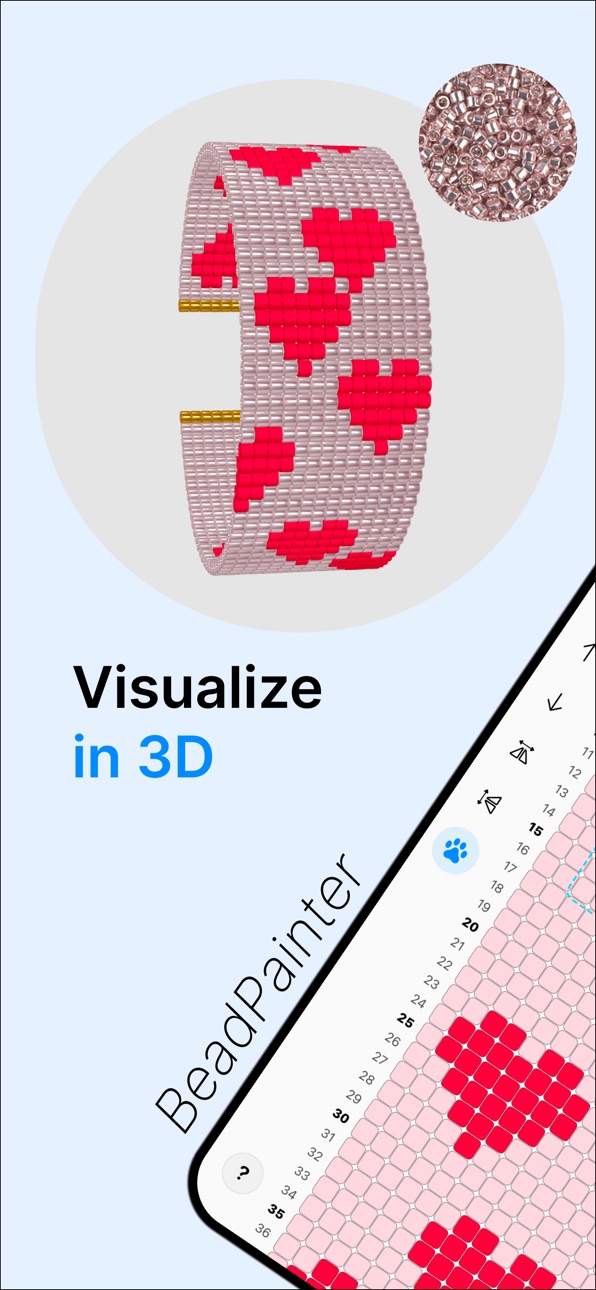
Design beadwork on an interactive canvas built for real making. Preview every bead in live 3D, work with real MIYUKI Delica images, track your progress, follow bead-by-bead weaving tutorials, and export branded PDFs.
FEATURES
Design beadwork
• Create rings, earrings, bracelets, pendants and custom patterns
• Work with peyote, brick, and loom stitch layouts
• Choose cylinder or rounded bead shapes
• Adjust bead proportions for seed beads, tube beads, or larger rounded beads
Draw and edit patterns
• Draw on an interactive bead grid
• Full Apple Pencil support
• Use pencil, eraser, bucket, and pipette tools
• Select areas to move, duplicate, repeat, or edit (NEW)
• Turn selected areas into reusable stamps (NEW)
• Freely move, zoom and rotate the grid by 90 degrees
• Use row numbers and symbols for clearer pattern reading
• Add, remove, or shift rows and columns
• Rename, duplicate, and version patterns
• Use Image tracing/reference with pin, layers and opacity controls (NEW)
Build color palettes
• Explore Miyuki Delica 8/0, 10/0, 11/0, and 15/0 catalogue
• Work with 1,200+ real bead images
• Search instantly by bead number or hue
• Find the closest Delica matches for custom colors
• Simulate glossy, matte, metallic and sparkle beads
Preview in live 3D
• See every edit update instantly in 3D
• Preview beadwork as flat or cylindrical designs
• Edit in 2D and preview in 3D side by side on iPad
• Change bead shapes, colors, sizes, and finishes in 3D
Follow guided weaving
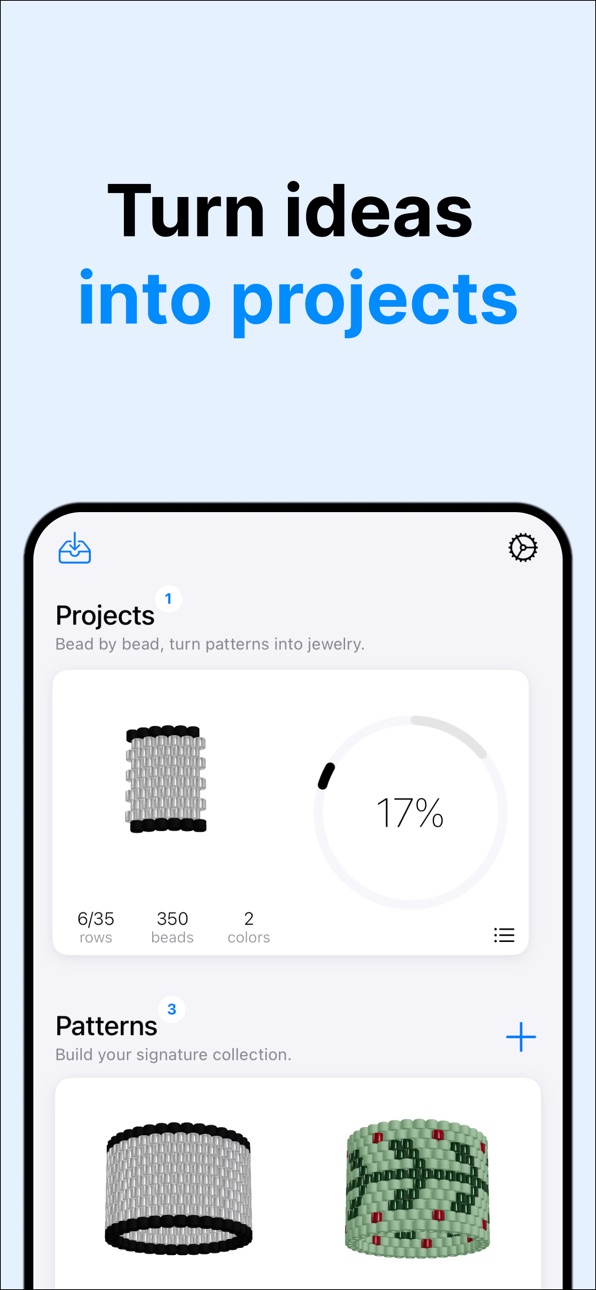
• Stay organized with material checklists
• Learn with step-by-step stitch tutorials
• Follow adaptive row-by-row guidance for your own patterns
• Mark the last bead if you paused
• Track your progress while you bead
Export and share
• Create professional PDF pattern documents
• PDF include charts, material lists, bead counts, and flow charts
• Branding kit: add your logo, author info, copyright, and license text
• Choose portrait or landscape PDF layouts
• Export editable BeadPainter files
• Save PNG files for sharing and reference
START FREE
Start creating with the essentials for free: ready-made jewelry layouts, live 3D preview, Apple Pencil support, and core drawing tools.
Design loom bracelets, fringe earrings, peyote rings, and your own custom bead patterns in full 3D from day one.
HOBBY PLAN
Upgrade to Hobby for guided making tools, including step-by-step tutorials, adaptive weaving guidance, progress tracking, and unlimited projects.
PRO PLAN
Go Pro for professional pattern design tools, including commercial use rights, PDF export, advanced pattern editing tools, bead material calculation, bead size controls, and additional bead finish styles such as matte, metallic, and sparkle.
Whether you are sketching a quick idea, planning a handmade gift, learning bead weaving, or preparing polished PDFs for your pattern collection, BeadPainter gives you a creative studio made for seed bead jewelry.
Download BeadPainter and turn your bead patterns into beautiful wearable jewelry.
Terms of Service: https://beadpainter.nl/terms
Privacy Policy: https://beadpainter.nl/privacy
EULA: https://www.apple.com/legal/internet-services/itunes/dev/stdeula/
In-App Purchases US pricing
Premium Plans Subscription
Pro · Yearly$59.99
Hobby · Monthly$9.99
Capabilities
In-App Purchases
Accessibility
ipadiphonemacrealityDevicetvoswatch
Version history 8 versions
Build 886824177v1.6.12026-06-14 09:12:54
You can now import your own images for reference, tracing, and color matching.
• Add an image for tracing or reference
• Pin it to the canvas, adjust opacity, and choose whether it appears below or above your bead design
• Pinned images move with canvas gestures
• Unpinned images stay fixed in the background
• Use the Pipette to match image areas to the closest Delica bead colors
• View bead images in the palette not just rows, but also as a grid
If you enjoy BeadPainter, please consider leaving a review. Thank you!
— Alexandra
Build 885972209v1.5.12026-05-25 18:00:31
• Added MIYUKI Delica bead catalogue with 1,200+ real images
• Switch between MIYUKI Delica 8/0, 10/0, 11/0, and 15/0
• Sort bead palettes by name or by color
• Match custom colors to the closest Delica beads in the catalogue
• Made copy, paste, and move actions more reliable across Brick, Peyote, and Loom patterns
• Added a ghost preview when moving selected areas, so you can see the new placement before dropping
• Added freehand area selection with Pencil ON, alongside rectangular selection
Thank you for using BeadPainter.
— Alexandra
Build 884390005v1.4.02026-04-17 08:04:20
• Area selection in the editor
• Copy, paste, move, and mirror selected pattern areas
• Turn any selection into a stamp
• Weaving tutorials for loom bracelets
• Polished two-column Bead flow charts in PDFs
Thank you for using BeadPainter and your amazing feedback.
— Alexandra
Build 883279816v1.3.22026-03-14 19:09:20
• New Origami tool: instantly switch designs between flat and circular forms
• Insert or remove rows and columns anywhere in the pattern
• New eraser tool for quick edits
• PDF preview
Thank you for using BeadPainter. If you enjoy this update, a review would really help!
— Alexandra
Build 882341753v1.2.02026-03-05 13:12:37
Major upgrades to canvas multitouch navigation, built for professional-grade control:
• Fluid, unrestricted positioning
• Natural two-finger rotation
• Precision 90° snap alignment
• Turn your photos into instant color palettes
• Extended support for up to 25 colors per design
• Added landscape layout option for PDF exports
Thank you for using BeadPainter!
— Alexandra
Build 881649446v1.1.02026-02-05 22:03:10
• Added fringe-only earrings support
• New icons for round & cylinder beads
• Easier color palette selection
• Progress circle now shows remaining bead colors (%)
• General UI improvements
Thanks for using BeadPainter!
Alexandra
Build 881382739v1.0.22026-01-18 14:00:44
This update improves pattern creation and precision tools to make designing and drawing even smoother.
• New pattern creation flow
• Added bucket tool for faster coloring
• Added pipette tool to quickly pick bead colors
• Precision seed bead editor now allows adjusting bead sizes and shapes not only in 3D, but also in 2D and DIY screens.
Thanks for using BeadPainter!
Alexandra
Build 875408254v0.92026-01-05 14:51:29
Price history by region
Currency
Show
Columns
Search
Availability 1 of 1 storefronts
| Region | Language | Price | Ratings | Avg | Version |
|---|---|---|---|---|---|
| US | en-US | Free | 0 | — | 1.6.1 |
Change log 12 changes · US
✎
releaseNotes updated
You can now import your own images for reference, tracing, and color matching.
• Add an image for tracing or reference
• Pin it to the canvas, adjust opacity,
✎
description updated
BeadPainter is a creative studio for designing seed bead jewelry, whether you are making your first peyote ring or preparing professional patterns to share or s
✎
subtitle updated
Design seed bead patterns
✎
name updated
BeadPainter: Beading Studio
◆
Version 1.6.1 released
You can now import your own images for reference, tracing, and color matching.
• Add an image for tracing or reference
• Pin it to the canvas, adjust opacity, and choose whether it appears below or above your bead design
• Pinned images mo
◆
Version 1.5.1 released
• Added MIYUKI Delica bead catalogue with 1,200+ real images
• Switch between MIYUKI Delica 8/0, 10/0, 11/0, and 15/0
• Sort bead palettes by name or by color
• Match custom colors to the closest Delica beads in the catalogue
• Made copy, p
◆
Version 1.4.0 released
• Area selection in the editor
• Copy, paste, move, and mirror selected pattern areas
• Turn any selection into a stamp
• Weaving tutorials for loom bracelets
• Polished two-column Bead flow charts in PDFs
Thank you for using BeadPainter a
◆
Version 1.3.2 released
• New Origami tool: instantly switch designs between flat and circular forms
• Insert or remove rows and columns anywhere in the pattern
• New eraser tool for quick edits
• PDF preview
Thank you for using BeadPainter. If you enjoy this upd
◆
Version 1.2.0 released
Major upgrades to canvas multitouch navigation, built for professional-grade control:
• Fluid, unrestricted positioning
• Natural two-finger rotation
• Precision 90° snap alignment
• Turn your photos into instant color palettes
• Extended
◆
Version 1.1.0 released
• Added fringe-only earrings support
• New icons for round & cylinder beads
• Easier color palette selection
• Progress circle now shows remaining bead colors (%)
• General UI improvements
Thanks for using BeadPainter!
Alexandra
◆
Version 1.0.2 released
This update improves pattern creation and precision tools to make designing and drawing even smoother.
• New pattern creation flow
• Added bucket tool for faster coloring
• Added pipette tool to quickly pick bead colors
• Precision seed be
◆
Version 0.9 released