Home › Health & Fitness

 US
US
1 of 1 storefronts
Content in en-US
Content in en-US
Information
Preview 2 platforms
iPhone 10 images




iPad 9 images


What’s New Version 2.4.3
- minor bug fixes
Description
Pokii • GLP-1 Tracker for Shots, Pills, Weight, Nutrition, Water, Photos, PDF Reports & More
Stay on top of your GLP-1 medication routine with Pokii — your dedicated tracker for injections and pills, injection reminders, and personal health journal built for people taking Ozempic, Mounjaro, Wegovy, Zepbound, Trulicity, Rybelsus, Retatrutide, and other GLP-1 medications.
Whether you're managing weight loss, type 2 diabetes, or tracking your tirzepatide or semaglutide doses, Pokii helps you personalize your care and never miss a dose.
Key Features
• Custom Medications:
Track any medication — not just the ones on our list. Add your own custom drugs, doses, and frequencies. Perfect for trial medications, compounded GLP-1s, or any off-label use.
• GLP-1 Tracker (Shots + Pills):
Log every GLP-1 dose with one tap — injections or oral meds. Supports all major medications and even those in trials, including Saxenda, Bydureon, CagriSema, Rybelsus, and Wegovy (pill).
• Shot Scheduler with Level Simulation:
Visually plan your next injection based on projected medication levels. Simulate future shots, adjust timing, and optionally update your dose frequency. It's the smartest way to schedule your next dose.
• Smart Shot Reminders:
Customize your injection schedule and get discreet, reliable alerts. Set a shot day timer to notify you when it's time to warm up your medication.
• Relative Check-Ins:
Track side effects, mood, appetite, and more — without needing to assign numbers. Just log how things feel relative to last time.
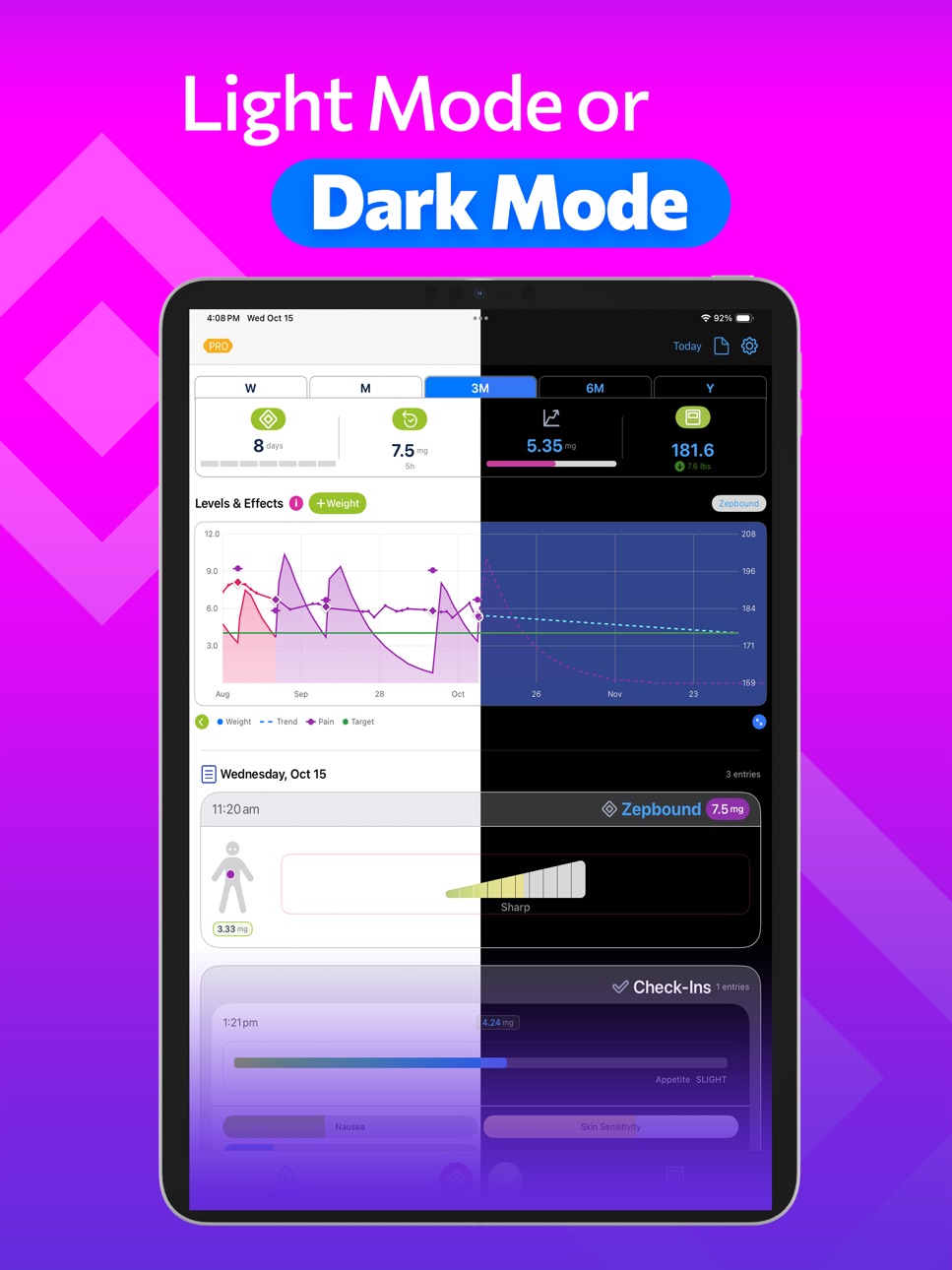
• Weight Trends & Dose Levels:
See your weight and projected GLP-1 levels side-by-side. Visual charts make it easy to understand your progress over time.
• Water & Nutrition Tracking:
Log daily water intake and nutrition alongside your GLP-1 routine. See how hydration and diet connect to your progress over time.
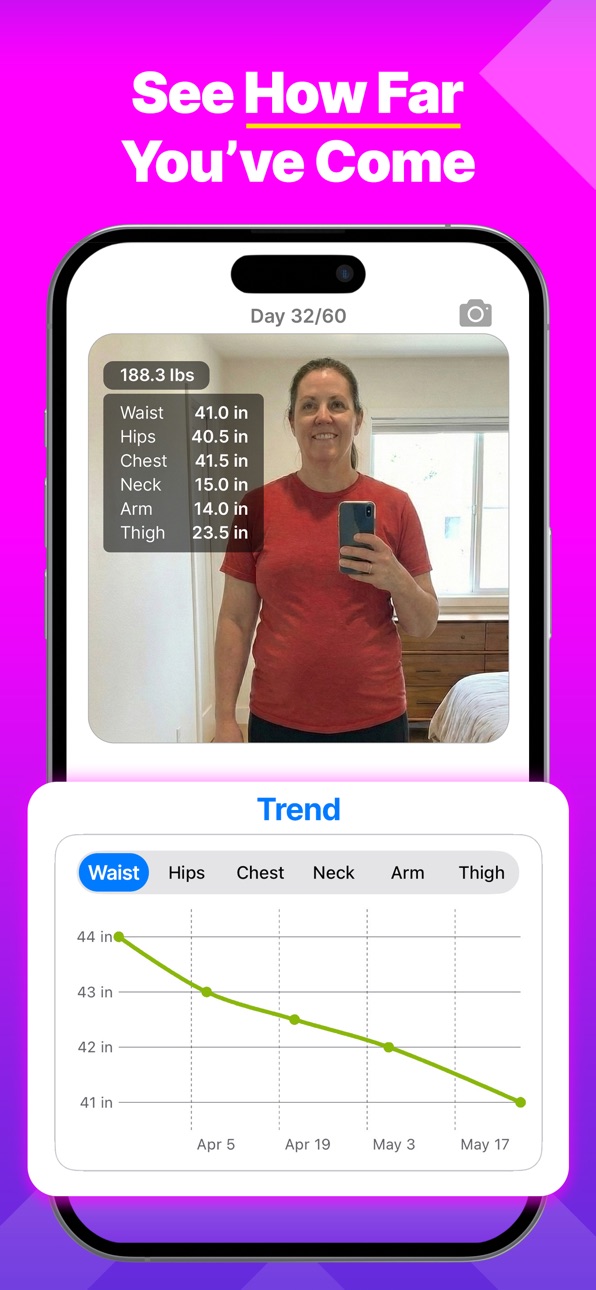
• Body Measurements & Progress Photos:
Record measurements and capture progress photos to document your transformation. See the full picture of your journey, not just the number on the scale.
• Color-Coded Charts:
See more at a glance with charts colorized by dosage or medication. Whether you're adjusting levels or switching between GLP-1s, the color coding makes trends and changes crystal clear.
• Highlighted Dose Day:
Never miss your next injection — a dotted highlight marks your upcoming shot on the calendar.
• Apple Health Sync:
Securely sync weight data with Apple Health. All your stats stay up to date, automatically, and are available in other health apps.
• Injection Site Picker:
Log where you injected using a visual body diagram — no dropdown menus or lists, just tap the spot.
• Highly Customizable:
From scheduling to check-ins, themes to chart styles — Pokii adapts to your routine, not the other way around.
• iCloud Backup & Device Sync:
Your data is backed up and kept in sync across iPhone and iPad. And yes, it works beautifully on iPad — not just a scaled-up iPhone view.
• PDF Reports:
Generate beautiful, comprehensive reports to save, print, or share with your doctor. Includes charts of your shots, weight, and projected levels, plus side effects, appetite, mood, injection site, and pain indicators. Fully customizable — you decide what to include.
Why Pokii?
Pokii was designed specifically for today's GLP-1 users — whether you're using semaglutide, tirzepatide, or exploring new medications. Unlike generic health apps, Pokii understands your routine and gives you the tools to stay consistent and informed.
This isn't just another weight loss tracker or diabetes journal. It's your modern companion for the GLP-1 journey — shots or pills.
Pokii is clean, modern, and thoughtfully designed to support your GLP-1 experience from day one.
Start your GLP-1 tracking today with Pokii.
Because consistency makes all the difference.
Terms of Use: https://www.apple.com/legal/internet-services/itunes/dev/stdeula/
In-App Purchases US pricing
Pokii Premium Subscription
Pokii Annual · Yearly$24.99
Pokii Monthly · Monthly$2.99
One-Time Purchases
Back Pokii$1.99
Contribute to Pokii$4.99
Sponsor Pokii$9.99
Capabilities
In-App Purchases
Accessibility
ipadiphonemacrealityDevicetvoswatch
Version history 25 versions
Build 887127912v2.4.32026-07-02 18:05:53
- minor bug fixes
Build 887066643v2.4.12026-06-18 06:04:28
- Lean Body Mass now available on the Levels & Effects chart
- requires a scale that supports Lean Body Mass
- LBM entries in the daily log
- New Dosage Stats page (tap the Level card on the dashboard)
- Replaced intrusive info dialogs with in-app guided tours and coach tips
- Shot scheduler opens directly without an extra schedule-picker step
- Shot day notifications show the medicine name under *shot day*
- Removed medicine flags from the chart quick menu
- New users can scroll the chart back to see all their weight history
- Chart: optional limit on how far back you can scroll, anchored to your starting weight date (Settings → Chart)
- Chart: optional hide for the "today" indicator in Settings
- Goal date and finish line on the chart are gold so they stand out from the target line
- Weight details page emphasizes total weight lost on the hero card instead of current weight
- Weight details page footer shows all-time and since-starting min/max
- Simplified injection site popup; removed injection site help dialog
- Schedule changes on the review sheet apply only when you tap Save
- Updated localization strings (let us know if we missed any!)
- Fixed dashboard weight card staying blank after restoring a backup
- Fixed chart Y-axis scaling in per-medication and per-compound modes
- Fixed schedule summary layout and change highlighting
- Added Terms of Use to Settings
Build 886867947v2.4.02026-06-17 00:43:05
- Lean Body Mass now available on the Levels & Effects chart
- requires a scale that supports Lean Body Mass
- LBM entries in the daily log
- New Dosage Stats page (tap the Level card on the dashboard)
- Replaced intrusive info dialogs with in-app guided tours and coach tips
- Shot scheduler opens directly without an extra schedule-picker step
- Shot day notifications show the medicine name under *shot day*
- Removed medicine flags from the chart quick menu
- New users can scroll the chart back to see all their weight history
- Chart: optional limit on how far back you can scroll, anchored to your starting weight date (Settings → Chart)
- Chart: optional hide for the "today" indicator in Settings
- Goal date and finish line on the chart are gold so they stand out from the target line
- Weight details page emphasizes total weight lost on the hero card instead of current weight
- Weight details page footer shows all-time and since-starting min/max
- Simplified injection site popup; removed injection site help dialog
- Schedule changes on the review sheet apply only when you tap Save
- Updated localization strings (let us know if we missed any!)
- Fixed dashboard weight card staying blank after restoring a backup
- Fixed chart Y-axis scaling in per-medication and per-compound modes
- Fixed schedule summary layout and change highlighting
Build 886132171v2.3.02026-05-30 03:44:11
- New Shot Schedules: each medicine gets its own dose, device, frequency, and reminder under Settings → Shot Data → Shot Schedules; replaces the single global medicine and frequency setting
- Schedule summary simplified to a single easier-to-read card
- Shot scheduler handles multiple schedules
- Shot scheduler updates to better handle weekday schedules
- Shot scheduler simulate controls & medication level moved to the calendar header
- Simulated shots minus removes shots only for the selected day
- Dashboard and widgets highlight the soonest due shot across all schedules
- Updated pharmacokinetic profiles for Tirzepatide (Zepbound/Mounjaro), Dulaglutide (Trulicity), and Liraglutide (Saxenda/Victoza) to better match FDA label data; adjusted Retatrutide estimates to match commonly cited clinical-trial summaries
- First Shot Date starting weight now uses any weigh-in on the same calendar day as your first injection
- Added Per Compound level curves chart option
- Tooltip can show Last Dose or Current Level per medicine
- Tap the chart legend to see what each item means
- Body measurements included in PDF progress reports
- Local backup when iCloud is unavailable, with a clear warning
- Bitix food-logging link skips the confirm dialog when Bitix is already installed
- Fixed My Journey still showing photos after you delete one
- Fixed overdue shots not showing when you track more than one medicine
- Fixed shot reminders not scheduling when today's reminder time had already passed
- Fixed weekday schedules being saved with no days selected
- Fixed widget shot progress for weekday-based schedules
- Fixed chart legend text truncating
- Fixed pill labels for contrast so text isn't white on yellow
- Fixed custom dose pill text color on dark backgrounds
- Deleting a custom medicine now deletes its shot schedule too
Build 885147683v2.2.02026-05-01 22:20:18
- Show a dot on the calendar for all log activity (weight, photos, body measurements)
(previously didn't show a dot for body measurements)
- Reseeded built-in doses when importing a backup to ensure all doses are present
- Added missing Goal ETA to the full screen chart tooltip
- Fixed backups not tracking custom dose colors
- Fixed chart labels from overlapping
- Fixed Levels & Weight chart not letting you scroll into the future when you were close to your goal weight
- Fixed chart snapping back to today on the right edge while you were swiping to future projection
- Added support for Zepbound KwikPen (multi-dose, 4 doses/pen)
- Added Ankle circumference to body measurements - some of you will know why ;)
- Added note field to body measurements to allow you to add a note to your measurements
- Added the ability to use different units for body measurements (cm or inches) in Settings → Units → Body Measurement Units
- My Journey: you can now long-press a progress photo to delete it
Build 884817226v2.1.02026-04-23 18:23:17
- The chart now shows your predicted Goal Day, including the expected date you'll reach your target weight, days remaining, and a marker on the chart at that point
- Added new Body Measurements page to track your body measurements over time
- Added new ruler icon on the My Journey page to show your body measurement history
- Added tooltip snap to the chart to show the exact value at a data point
- Smoothed weight trend so it now eases toward your latest weigh-in when it fits recent weigh-ins; obvious outliers ignored
This helps prevent the projection from starting above your last weigh-in when you weigh in at a new low.
- Fixed chart "Pinch to zoom…" hint being clipped by the header so the dismiss button is now tappable
- Fixed photo viewer auto-dismissing the first time you tapped a photo in the daily log
- Fixed tooltip in full screen mode and shot scheduler
- My Journey card now shows weight and body metrics for the date you're viewing (timeline/calendar), not only today
- Fixed My Journey photo overlays to snapshot body measurements nearest to each photo's capture date
- Fixed My Journey photos to use your weight as of that photo's day; fixed body measurement labels truncating on the card
- Updated Shotsy importer to support weight
Build 884262021v2.0.22026-04-09 21:57:00
IMPROVED:
- Tooltip now shows in the header so it doesn't cover the chart
- Tooltip now shows the last dose of the medication at that time
- Tooltip shows dosages and meds for all meds with >0 mg at that time
- Fixed Y axis to be perfectly accurate (previously it could have been off by a fraction of a pound)
- Fixed the gap that sometimes would appear between the last weight point and the projected weight line
Build 884208317v2.0.12026-04-07 15:14:49
IMPROVED:
- Weight trend (dashed line on Levels & Effects): projects in a straight line from your smoothed trend so you can read when you might hit your goal
- Trend line stops at your target weight if set
Build 883650900v2.0.02026-03-29 18:33:14
NEW – LEVELS & EFFECTS CHART REWRITE:
The chart has been completely rebuilt from the ground up with smooth swipe scrolling
- Swipeable chart with dynamic Y axis so levels and weight stay in view as you scroll
- Chart is taller and extends to the screen edges providing more space for your data
- New vertical pins from weight trend line to data points to show deviation
- Removed many of the chart restrictions (e.g. Chart Color mode can be set to By Dose or By Medicine for all Level curves modes)
- Removed Chart Mode, tooltip is now a single clean flag with haptic feedback accessed by long pressing on the chart
NEW – CUSTOM DOSE COLORS:
- Tap the color swatch next to any dose in the dosage picker to choose your own color
NEW – CUSTOMIZE YOUR DASHBOARD:
- Choose which sections appear on the home screen: Summary Cards, Chart, My Journey, Daily Log, and Water Tracker
- Toggle each section on or off and drag to reorder in Settings → Preferences → Dashboard
- When Water Tracker and Nutrition are both enabled, you can combine them into one dashboard section
NEW – WATER TRACKING:
- Track your water intake with a water tracker card on the dashboard
- Syncs with your water data from Apple Health
- Tap the cup to add water quickly; long-press the cup to enter an exact amount
NEW - NUTRITION TRACKING:
- Track your nutrition with a nutrition tracker card on the dashboard
- Syncs with your nutrition data from *any* app that supports Apple Health
- Shows your calorie intake, protein, carbs, fat, fiber, and sugar intake
- Use the + Food menu to open Bitix to log meals that flow into Pokii through Apple Health
NEW - WIDGETS
- Add a widget to your home screen to see your next shot and medication level
- Widgets update automatically, so your data is always up to date
- Tap on a widget to go directly to Pokii
NEW – BETTER CONFETTI & CONFIG:
- Celebrate with even better confetti, yup, you read that right, it got even better.
- Configure it? YES! You can now configure your confetti, why? Because why not. :)
Settings → Visual Effects: tune your confetti particles
IMPROVED:
- Trend lines use an improved smoothing algorithm that does forward-backward smoothing to prevent jumps at step changes
- Camera now starts in front-facing mode by default (you can still flip to back camera)
- My Journey card now properly updates when a photo is added or deleted
- Fixed the thin line showing on Daily Log cards
- Only report duplicate weights added by Pokii
- Fixed duplicate chevron (>) on the My Journey card
- Added swipe to delete on database backup list
- Fixed theme changes not updating all the colors properly - FINALLY - NO MORE APP RESTART REQUIRED! :)
Build 883522154v1.4.02026-03-19 18:49:39
FIXED:
- Target weight set to 0 (and showing 40lbs) during onboarding
Build 883408870v1.3.02026-03-17 17:31:32
IMPROVED:
- Weight dial: redesigned to be smoother and fixed bugs where it would jump to the end
FIXED:
- Quick menu now updates correctly when options change
- Add Weight no longer causes the app to hang
Build 883205071v1.2.02026-03-13 07:47:21
NEW - CUSTOM MEDICATIONS ARE HERE! (our most requested feature):
You're no longer limited to the built-in list — add any medication with optional drug profile parameters. Custom meds use the same level math as built-in drugs so your charts and projections stay accurate.
- Add your own medications with a custom name and specify if it's oral or not
- Set drug profile parameters (half-life, bioavailability, etc.) so they can be used to calculate projected levels
- Custom meds show a pink "Custom" pill so you can tell them apart from built-in meds
- Change, hide or delete custom meds from the Edit page by simply swiping left
- Favorite your custom meds and add them to the quick picker on Add Shot so you can add a shot or dose with one tap
IMPROVED:
- Quick menu: when Level curves is set to Per Medication, Chart Color is now set to By Medicine so the displayed option matches what the chart uses
FIXED
- Fixed issue where the quick menu Chart Color and Chart Mode options would automatically dismiss before selecting an option
- Height not showing correctly on reports if updated in Settings
- Fixed issue with Shotsy importer
Build 882800396v1.1.02026-03-02 19:17:49
NEW - MULTI-MEDICATION SUPPORT:
- Favorite meds and quick picker on Add Shot so you can add a shot with one tap
- Levels & Effects chart: show each medication on its own curve (By Medicine) or combined
- Chart display options in a quick menu above the chart (level curves, weight, trend, etc.)
NEW - BODY MEASUREMENTS:
- Track body measurements (waist, hips, chest, neck, arm, thigh) from the + menu
- Each entry appears in the daily log like shots, check-ins, and weight
- Measurements display as overlays on My Journey images (with weight when present)
NEW - LOCALIZATION:
- Added translations for Spanish, French, Portuguese (Brazil), German, and Swedish.
NEW - SUPPORT POKII:
- Want to support Pokii? Tap the star in the toolbar and chip in with a one-time contribution.
IMPROVED:
- Weight cards in the daily log now show the source (e.g. Pokii, Withings) and an icon you can tap that explains how deleting will affect the entry (Note: apps are only allowed to delete entries they added)
- Replaced the medication pill above the chart with a quick menu—change level curves, weight line, target weight, shot indicators, and other chart options without opening Settings
- Swipe to delete: no longer need to tap and hold for the delete menu
- Levels & Effects chart scales better so projected levels stay in bounds after adding a higher dose
- Simulated shots in the Shot Scheduler now update the chart scale so the projected line stays visible
- Chart legend wraps instead of expanding the page on smaller screens
- "Level curves" mode: vertical-line tooltip for reading levels when viewing by medicine
- Medication curves and data in tooltip no longer show when level is 0 mg
FIXED:
- New or higher-dose shots (and simulated shots) no longer push the projected level curve off the top of the chart
- Rare crash fixed if duplicate weight entries were found
Build 882543504v1.0.262026-02-18 00:21:56
NEW:
- Oral medication support: drug profiles and meds for oral formulations (e.g. Rybelsus, Wegovy Pill)
- Shot/Dose dialog updated to support oral medications (no injection site + pain slider)
IMPROVED:
- Chart math now factors in bioavailability so projected levels are more accurate for all medications
- Chart scale can go lower so oral medication levels display correctly
Build 882398109v1.0.252026-02-16 18:36:53
NEW:
- My Journey : A dedicated page for your journey allowing you to swipe through progress photos. Open from the My Journey card on the dashboard (below the chart).
IMPROVED:
- Toolbar "Today" is now a calendar icon so the selected date has more room to display
- Update date formatting in the toolbar so it fits in the toolbar more easily
FIXED:
- Simulated shots in the Shot Scheduler now clean up reliably when you leave the view or close the app.
Build 882183362v1.0.242026-02-05 10:49:37
NEW:
- Backups now include weight history
- Optional restore prompt to prevent HealthKit duplicates when restoring a backup
IMPROVED:
- Rolling backups: keeps the last 14 backups (from Backup Now or daily backup)
- Backups section now lists both rolling and safety backups in one place
- Duplicate detection for weight entries now matches cleanup behavior more reliably
- Backup/restore flow better handles weight data and avoids accidental duplicate merges
Build 882142221v1.0.232026-02-04 12:57:12
IMPROVED:
- Relative tracking bars (grey reference for appetite and side effects) now show on the first view of the Check-In page
- Side effects on check-in history cards now appear in the same order as on the Check-In page
FIXED:
- Deleting a check-in now properly removes all related data
- History list updates immediately when you delete a check-in
- Relative tracking now correctly uses your previous check-in's values after deleting one
Build 881995406v1.0.222026-01-30 10:05:31
IMPROVED:
- Though rare, we've made additional improvements to duplicate detection and handling
- Safety backups: list is now collapsible and you can export a backup if needed
- Backup overkill? Maybe, but we want to be sure you never lose data
FIXED:
- Weight loss on the dashboard is now correctly clamped at your start weight
Build 881958374v1.0.212026-01-29 14:09:20
NEW:
- Duplicate detection and handling: review duplicates by category and clean up; timestamped safety backup written to iCloud before cleanup
- Backup page: Data Maintenance shows duplicate summary and "Review and clean up"; Safety Backups lists pre-cleanup backups in iCloud
Build 881868734v1.0.202026-01-27 23:19:08
NEW:
- Added shot statistics to Next Shot page showing total shots, first shot date, last shot date, and average time between shots
IMPROVED:
- Changed weight loss calculation on the dashboard to show weight loss for the selected time period (last 7/30/90/180/365 days) instead of using the centered chart date range. For example, when "M" (month) is selected, it now shows weight loss for the last 30 days rather than only the last 15 days that are visible on the chart.
FIXED:
- Fixed an issue with data not syncing properly across devices
- Fixed duplicate weight entries being created after sync issue resolved
Build 881587593v1.0.192026-01-19 19:46:41
NEW:
- Added days since last shot to the shot row card in the daily log
FIXED:
- Fixed rare crash during weight migration/sync
- Fixed possible crash during weight sync
Build 881270846v1.0.182026-01-08 08:19:48
NEW:
- ** Weight Line Smoothing ** Added weight line smoothing option in Chart Settings to reduce noise and better visualize long-term weight trends
- this is now the default so you should see a smoother weight line
- Added starting weight vertical line to the weight used as Start Weight
- Allow navigation as far back as the first weight recorded (no longer hiding the green back navigation button)
- Added option to show/hide weight data point dots on the chart (Settings → Charts → Weight Data Points)
- Fixed Shotsy import issue
IMPROVED:
- Improved chart performance
FIXED:
- Fixed weight dots and line not appearing when navigating back in time on the chart to before the first shot
Build 880934224v1.0.172025-12-24 02:32:03
NEW:
- Weight tracking no longer requires Apple Health! You can now track your weight directly in the app, whether or not you use Apple Health.
- If you do use Apple Health, your data will still sync automatically.
- All your existing weight data has been preserved and will continue to work exactly as before
- Faster weight chart loading and smoother navigation
- Added ability to delete weight entries: tap and hold on any weight entry in your daily log to delete it. If the entry was added by another app, you'll be notified and the entry will be removed from Pokii, but we're not allowed to delete it from Apple Health. If the entry was added in Pokii, it will be deleted from both Apple Health and Pokii.
- Calendar view now shows a purple square indicator for days with photos, positioned next to the weight dot indicator instead of using the green check-in line
FIXED:
- Fixed a very rare issue where charts might temporarily appear blank
- Fixed daily log not showing weight entries on dashboard
Build 880510257v1.0.162025-12-10 18:18:24
NEW:
- Added photos! Snap a picture of your progress. Currently they show in your daily log but we have much more planned.
FIXED:
- Fixed weight chart Y-axis minimum calculation to keep axis floor within 10 lbs of target weight or actual weight, preventing trend projections from influencing the axis range
- Fixed possible crash when adding custom dosage values or custom side effects
- Fixed bug that incorrectly showed a premium access required screen to founding users who should have full access
Build 879949690v1.0.152025-11-21 19:03:22
- Added date picker to Add Weight dialog to select any date when adding weight entries
- Improved Onboarding flow: now offers ability skip optional steps
Price history by region
Currency
Show
Columns
Search
Availability 1 of 1 storefronts
| Region | Language | Price | Ratings | Avg | Version |
|---|---|---|---|---|---|
| US | en-US | Free | 708 | 4.8 | 2.4.3 |
Change log 29 changes · US
✎
releaseNotes updated
- minor bug fixes
✎
description updated
Pokii • GLP-1 Tracker for Shots, Pills, Weight, Nutrition, Water, Photos, PDF Reports & More
Stay on top of your GLP-1 medication routine with Pokii — your ded
✎
subtitle updated
GLP1 Zepbound Wegovy Ozempic
✎
name updated
GLP-1 Tracker • Pokii
◆
Version 2.4.3 released
- minor bug fixes
◆
Version 2.4.1 released
- Lean Body Mass now available on the Levels & Effects chart
- requires a scale that supports Lean Body Mass
- LBM entries in the daily log
- New Dosage Stats page (tap the Level card on the dashboard)
- Replaced intrusive info dialogs
◆
Version 2.4.0 released
- Lean Body Mass now available on the Levels & Effects chart
- requires a scale that supports Lean Body Mass
- LBM entries in the daily log
- New Dosage Stats page (tap the Level card on the dashboard)
- Replaced intrusive info dialogs
◆
Version 2.3.0 released
- New Shot Schedules: each medicine gets its own dose, device, frequency, and reminder under Settings → Shot Data → Shot Schedules; replaces the single global medicine and frequency setting
- Schedule summary simplified to a single easier-t
◆
Version 2.2.0 released
- Show a dot on the calendar for all log activity (weight, photos, body measurements)
(previously didn't show a dot for body measurements)
- Reseeded built-in doses when importing a backup to ensure all doses are present
- Added missing G
◆
Version 2.1.0 released
- The chart now shows your predicted Goal Day, including the expected date you'll reach your target weight, days remaining, and a marker on the chart at that point
- Added new Body Measurements page to track your body measurements over time
◆
Version 2.0.2 released
IMPROVED:
- Tooltip now shows in the header so it doesn't cover the chart
- Tooltip now shows the last dose of the medication at that time
- Tooltip shows dosages and meds for all meds with >0 mg at that time
- Fixed Y axis to be perfectly
◆
Version 2.0.1 released
IMPROVED:
- Weight trend (dashed line on Levels & Effects): projects in a straight line from your smoothed trend so you can read when you might hit your goal
- Trend line stops at your target weight if set
◆
Version 2.0.0 released
NEW – LEVELS & EFFECTS CHART REWRITE:
The chart has been completely rebuilt from the ground up with smooth swipe scrolling
- Swipeable chart with dynamic Y axis so levels and weight stay in view as you scroll
- Chart is taller and extends t
◆
Version 1.4.0 released
FIXED:
- Target weight set to 0 (and showing 40lbs) during onboarding
◆
Version 1.3.0 released
IMPROVED:
- Weight dial: redesigned to be smoother and fixed bugs where it would jump to the end
FIXED:
- Quick menu now updates correctly when options change
- Add Weight no longer causes the app to hang
◆
Version 1.2.0 released
NEW - CUSTOM MEDICATIONS ARE HERE! (our most requested feature):
You're no longer limited to the built-in list — add any medication with optional drug profile parameters. Custom meds use the same level math as built-in drugs so your charts
◆
Version 1.1.0 released
NEW - MULTI-MEDICATION SUPPORT:
- Favorite meds and quick picker on Add Shot so you can add a shot with one tap
- Levels & Effects chart: show each medication on its own curve (By Medicine) or combined
- Chart display options in a quick men
◆
Version 1.0.26 released
NEW:
- Oral medication support: drug profiles and meds for oral formulations (e.g. Rybelsus, Wegovy Pill)
- Shot/Dose dialog updated to support oral medications (no injection site + pain slider)
IMPROVED:
- Chart math now factors in bioava
◆
Version 1.0.25 released
NEW:
- My Journey : A dedicated page for your journey allowing you to swipe through progress photos. Open from the My Journey card on the dashboard (below the chart).
IMPROVED:
- Toolbar "Today" is now a calendar icon so the selected date
◆
Version 1.0.24 released
NEW:
- Backups now include weight history
- Optional restore prompt to prevent HealthKit duplicates when restoring a backup
IMPROVED:
- Rolling backups: keeps the last 14 backups (from Backup Now or daily backup)
- Backups section now list
◆
Version 1.0.23 released
IMPROVED:
- Relative tracking bars (grey reference for appetite and side effects) now show on the first view of the Check-In page
- Side effects on check-in history cards now appear in the same order as on the Check-In page
FIXED:
- Deleti
◆
Version 1.0.22 released
IMPROVED:
- Though rare, we've made additional improvements to duplicate detection and handling
- Safety backups: list is now collapsible and you can export a backup if needed
- Backup overkill? Maybe, but we want to be sure you never lose
◆
Version 1.0.21 released
NEW:
- Duplicate detection and handling: review duplicates by category and clean up; timestamped safety backup written to iCloud before cleanup
- Backup page: Data Maintenance shows duplicate summary and "Review and clean up"; Safety Backup
◆
Version 1.0.20 released
NEW:
- Added shot statistics to Next Shot page showing total shots, first shot date, last shot date, and average time between shots
IMPROVED:
- Changed weight loss calculation on the dashboard to show weight loss for the selected time peri
◆
Version 1.0.19 released
NEW:
- Added days since last shot to the shot row card in the daily log
FIXED:
- Fixed rare crash during weight migration/sync
- Fixed possible crash during weight sync
◆
Version 1.0.18 released
NEW:
- ** Weight Line Smoothing ** Added weight line smoothing option in Chart Settings to reduce noise and better visualize long-term weight trends
- this is now the default so you should see a smoother weight line
- Added starting weig
◆
Version 1.0.17 released
NEW:
- Weight tracking no longer requires Apple Health! You can now track your weight directly in the app, whether or not you use Apple Health.
- If you do use Apple Health, your data will still sync automatically.
- All your existing weigh
◆
Version 1.0.16 released
NEW:
- Added photos! Snap a picture of your progress. Currently they show in your daily log but we have much more planned.
FIXED:
- Fixed weight chart Y-axis minimum calculation to keep axis floor within 10 lbs of target weight or actual we
◆
Version 1.0.15 released
- Added date picker to Add Weight dialog to select any date when adding weight entries
- Improved Onboarding flow: now offers ability skip optional steps