Home › Productivity

 US
US
1 of 1 storefronts
Content in en-US
Content in en-US
Information
Preview 1 platform
iPhone 6 images




What’s New Version 26.1.5
・Enhancements to usability
・Minor bug fixes
・Performance improvement
Description
【Essential Features, Refined to Perfection】
・Ultra-smooth event creation, editing, and deletion
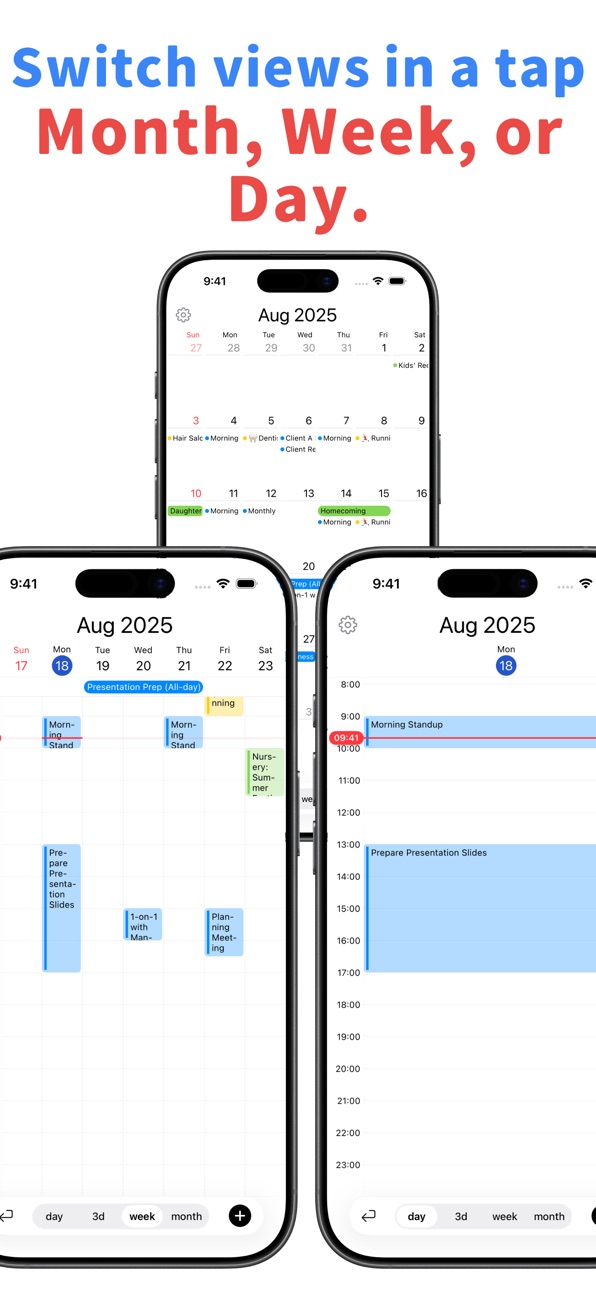
・Switch instantly between monthly, weekly, 3-day, and daily views
・Full integration with Google Calendar and iCloud
・Quickly move or duplicate events with intuitive drag-and-drop.
・Automatic color display by calendar (based on Apple/Google settings)
・Customize the app’s overall color theme
・Open Apple Maps or Google Maps directly from events
・Set the display order of multiple calendars freely
・Widget support (Monthly Calendar — Color/Simple, Upcoming Event)
→ One calendar for work, personal, and everything in between.
→ No unnecessary features. Just an elegant, focused experience.
■ Smart Event Management
・Tap any event to open a sheet view for instant detail and editing
・Easily manage even the busiest days
・Set custom priority order for calendars (e.g. work > personal > shared)
・Instantly toggle between monthly, weekly, 3-day, and daily views
■ Cloud Integration
・Works seamlessly with iCloud, Exchange, and Google accounts via iOS Calendar
・All settings are saved in iCloud—no need to reconfigure after device changes
■ Move & Duplicate Events with Drag & Drop
・You can long-press an event to move
■ Make It Your Own
・Calendar color display
・By default, adopts calendar colors from Apple/Google Calendar
・Premium users can apply pale, vivid, and other color styles for a personalized look
・Customize the app’s color theme freely
・Dark mode support for comfort
■ Widget Support
・Monthly Calendar (Color): Shows color dots on each day so you can gauge busyness at a glance
・Monthly Calendar (Simple): A clean month view with only the essentials
・Upcoming Event: Displays the next event starting soon
■ Built for Global Users
・Fully supports Japanese and English UI
・Choose from holiday calendars for various countries
・Week start day adjusts automatically based on iOS regional settings
■ Go Premium for Even More
・Customize event colors with pale, vivid, and other styles
・Unlock 2-day, 4-day, 5-day, and 6-day views
・Change the entire app’s color theme
・Enjoy an ad-free experience
□ Privacy Policy
https://calenn.hibit-studio.com/app-privacy/
□ Terms of Use (EURA)
https://www.apple.com/legal/internet-services/itunes/dev/stdeula/
In-App Purchases US pricing
Premium Plan Subscription
Annual Plan · Yearly$39.99
Monthly Plan · Monthly$3.99
Capabilities
In-App Purchases
Accessibility
ipadiphonemacrealityDevicetvoswatch
Version history 21 versions
Build 885849426v26.1.52026-05-19 16:14:47
・Enhancements to usability
・Minor bug fixes
・Performance improvement
Build 884709239v26.1.42026-04-20 20:04:06
・Enhancements to usability
・Minor bug fixes
Build 882657135v26.1.32026-02-21 21:01:16
・Enhancements to usability
・Minor bug fixes
Build 881771398v26.1.22026-01-24 00:10:13
・Enhancements to usability
Build 879720482v26.1.12025-11-13 07:29:25
・Minor bug fixes
Build 879571076v26.1.02025-11-08 04:59:28
・Added drag & drop move or duplicate for events
・You can long-press an event to move
・Enhancements to usability
・Minor bug fixes
Build 878751837v26.0.32025-10-09 06:41:48
・Enhancements to usability
・Minor bug fixes
Build 878667421v26.0.22025-10-07 20:02:28
・Enhancements to usability
・Minor bug fixes
Build 878287519v26.0.12025-09-21 03:24:53
Fixed an issue in iOS 26 where the popup displayed in the wrong position when long-pressing an event.
Build 878144660v26.0.02025-09-16 18:56:38
Added support for Liquid Glass on iOS 26
Build 877664233v1.1.62025-08-29 18:00:12
・Updated the app icon
・Enhancements to usability
Build 877475186v1.1.52025-08-22 18:28:02
Minor bug fixes
Build 876799032v1.1.42025-07-29 18:01:22
Enhancements to usability
Build 876624250v1.1.32025-07-23 15:39:44
Added a new widget that shows your upcoming events.
Instantly check today’s and tomorrow’s schedule — including all-day events — right from your Home Screen.
Build 876469468v1.1.22025-07-17 12:27:50
Minor bug fixes
Build 876089372v1.1.12025-07-03 06:25:49
Fixed widget issues and made minor design adjustments.
Build 876064072v1.1.02025-07-02 11:55:15
• You can now add a widget to your Home Screen. Starting with a compact monthly view.
• Ads are currently not displayed (this may change in future updates).
Build 875453385v1.0.42025-06-17 15:39:02
Enhancements to usability
Build 875309652v1.0.32025-06-04 20:03:15
Minor bug fixes and performance improvements.
Build 875269359v1.0.12025-06-03 16:53:28
Minor bug fixes and performance improvements.
Build 875092102v1.0.02025-06-02 21:25:05
Price history by region
Currency
Show
Columns
Search
Availability 1 of 1 storefronts
| Region | Language | Price | Ratings | Avg | Version |
|---|---|---|---|---|---|
| US | en-US | Free | 0 | — | 26.1.5 |
Change log 25 changes · US
✎
releaseNotes updated
・Enhancements to usability
・Minor bug fixes
・Performance improvement
✎
description updated
【Essential Features, Refined to Perfection】
・Ultra-smooth event creation, editing, and deletion
・Switch instantly between monthly, weekly, 3-day, and daily view
✎
subtitle updated
Clarity and calm in your day
✎
name updated
Calenn
◆
Version 26.1.5 released
・Enhancements to usability
・Minor bug fixes
・Performance improvement
◆
Version 26.1.4 released
・Enhancements to usability
・Minor bug fixes
◆
Version 26.1.3 released
・Enhancements to usability
・Minor bug fixes
◆
Version 26.1.2 released
・Enhancements to usability
◆
Version 26.1.1 released
・Minor bug fixes
◆
Version 26.1.0 released
・Added drag & drop move or duplicate for events
・You can long-press an event to move
・Enhancements to usability
・Minor bug fixes
◆
Version 26.0.3 released
・Enhancements to usability
・Minor bug fixes
◆
Version 26.0.2 released
・Enhancements to usability
・Minor bug fixes
◆
Version 26.0.1 released
Fixed an issue in iOS 26 where the popup displayed in the wrong position when long-pressing an event.
◆
Version 26.0.0 released
Added support for Liquid Glass on iOS 26
◆
Version 1.1.6 released
・Updated the app icon
・Enhancements to usability
◆
Version 1.1.5 released
Minor bug fixes
◆
Version 1.1.4 released
Enhancements to usability
◆
Version 1.1.3 released
Added a new widget that shows your upcoming events.
Instantly check today’s and tomorrow’s schedule — including all-day events — right from your Home Screen.
◆
Version 1.1.2 released
Minor bug fixes
◆
Version 1.1.1 released
Fixed widget issues and made minor design adjustments.
◆
Version 1.1.0 released
• You can now add a widget to your Home Screen. Starting with a compact monthly view.
• Ads are currently not displayed (this may change in future updates).
◆
Version 1.0.4 released
Enhancements to usability
◆
Version 1.0.3 released
Minor bug fixes and performance improvements.
◆
Version 1.0.1 released
Minor bug fixes and performance improvements.
◆
Version 1.0.0 released